
"/><stop offset="1" stop-color="rgb(118, 37, 250)"/></linearGradient></defs><g d="M 19.242 21.22 L 19.362 6.204 L 19.272 6.204 L 13.757 21.22 L 10.161 21.22 L 4.796 6.204 L 4.706 6.204 L 4.825 21.22 L 0 21.22 L 0 0 L 7.283 0 L 12.109 13.607 L 12.229 13.607 L 16.844 0 L 24.247 0 L 24.247 21.22 Z M 26.421 26.113 L 26.421 23.445 L 41.407 23.445 L 41.407 26.113 Z" fill="transparent" height="26.112508199679183px" id="DvfaAIHYn" width="41.40731898311435px"><path d="M 19.242 21.22 L 19.362 6.204 L 19.272 6.204 L 13.757 21.22 L 10.161 21.22 L 4.796 6.204 L 4.706 6.204 L 4.825 21.22 L 0 21.22 L 0 0 L 7.283 0 L 12.109 13.607 L 12.229 13.607 L 16.844 0 L 24.247 0 L 24.247 21.22 Z" fill="rgb(46, 46, 46)" height="21.220180016149442px" id="pLsxRCobd" width="24.247352589074694px"/><path d="M 0 2.668 L 0 0 L 14.986 0 L 14.986 2.668 Z" fill="url(%23yD9d4I5GR-3279285344-linear-gradient)" height="2.6675085048549647px" id="yD9d4I5GR" transform="translate(26.421 23.445)" width="14.986002836263765px"/></g></svg>)
" height="26.80529977783203px" id="tymKb8bqC" width="128.00300311279295px"/><path d="M 0 2.417 L 0 0 L 12.909 0 L 12.909 2.417 Z" fill="rgb(126, 78, 253)" height="2.417099999999998px" id="aYr4em6zK" transform="translate(128.341 22.325)" width="12.908999999999992px"/></svg>)





Join over 100,000 users
LinkedIn Scheduled Posts
Plan once. Post consistently. Grow on autopilot.
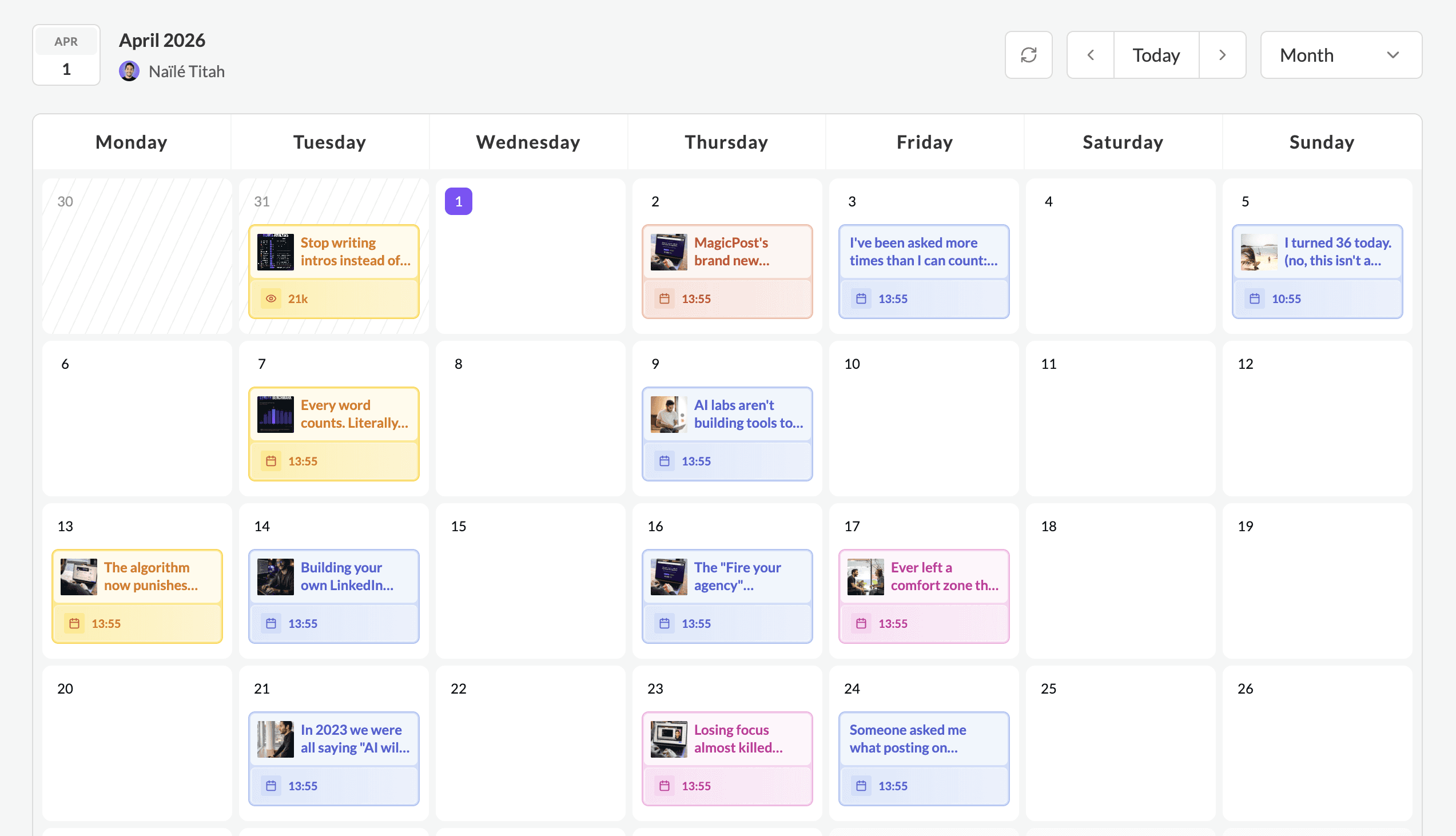
Stop scrambling for content every morning. Schedule your LinkedIn posts weeks in advance, set the perfect time, and let MagicPost publish automatically, so you can focus on everything else.
Free trial
• No credit card
• No commitment
MagicPost is a LinkedIn-verified partner

LinkedIn Scheduled Posts
Plan once. Post consistently. Grow on autopilot.
Stop scrambling for content every morning. Schedule your LinkedIn posts weeks in advance, set the perfect time, and let MagicPost publish automatically, so you can focus on everything else.
Free trial
• No credit card
• No commitment
MagicPost is a LinkedIn-verified partner
LinkedIn Scheduled Posts
Plan once. Post consistently. Grow on autopilot.
Stop scrambling for content every morning. Schedule your LinkedIn posts weeks in advance, set the perfect time, and let MagicPost publish automatically, so you can focus on everything else.
Free trial
• No credit card
• No commitment
MagicPost is a LinkedIn-verified partner
Effortless Scheduling for Maximum Engagement
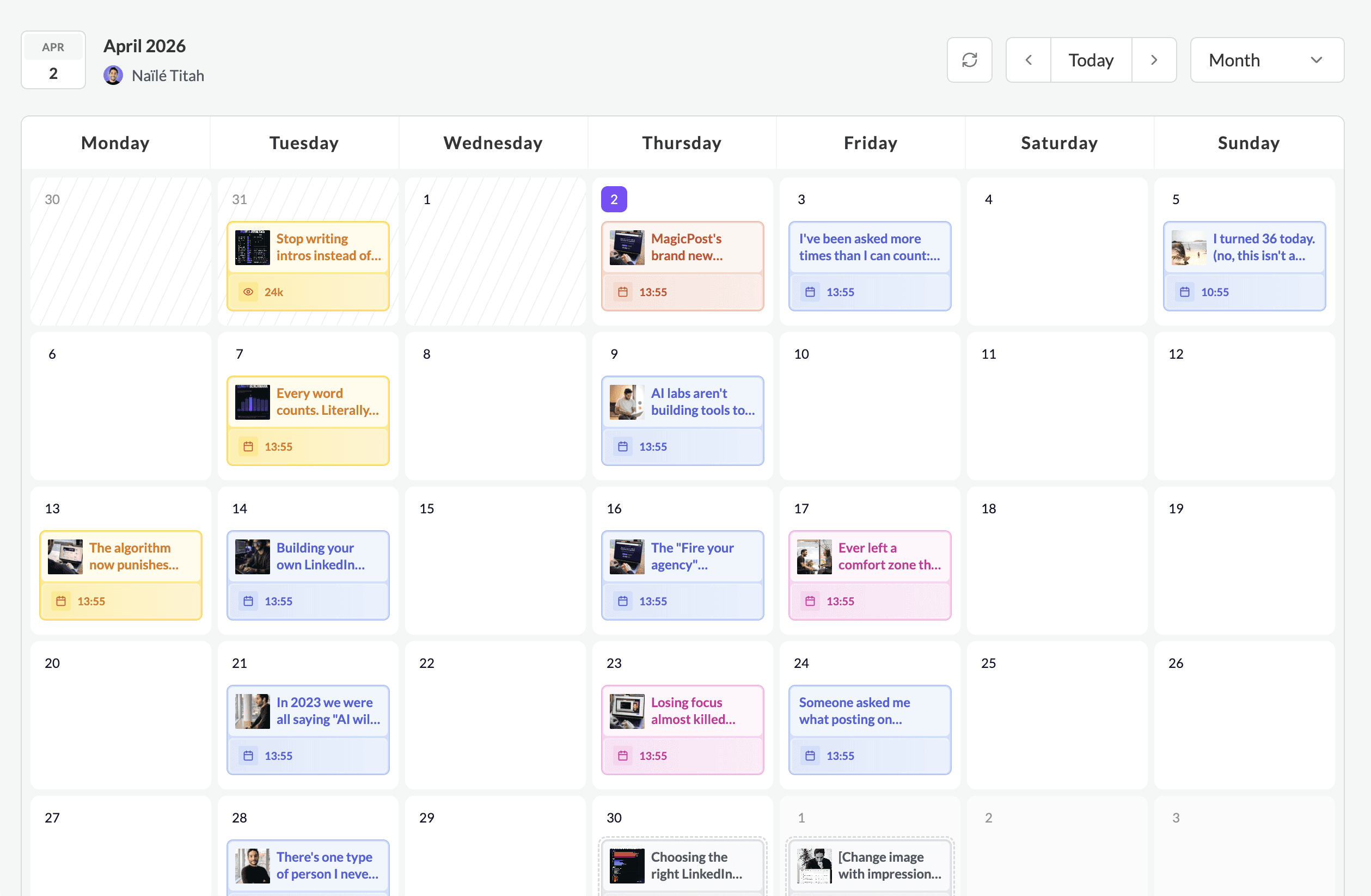
Plan your LinkedIn content weeks or even months ahead.
Set the date and time for each post, and the platform will handle the rest.

Lorem ipsum
Never miss a post with MagicPosts' scheduling feature
Quick analytics
Snapshot statistics of your past posts, impressions, likes and comments
Quick analytics
Snapshot statistics of your past posts, impressions, likes and comments
Drag and drop feature
Easily move posts or ideas by dragging and dropping them to your preferred date.
Drag and drop feature
Easily move posts or ideas by dragging and dropping them to your preferred date.
Schedule with ease
Never worry about missing a day to post again.
Schedule with ease
Never worry about missing a day to post again.
How it Works
Simple, intuitive, and fast. Staying consistent has never felt this easy.
Plan your content with the Calendar
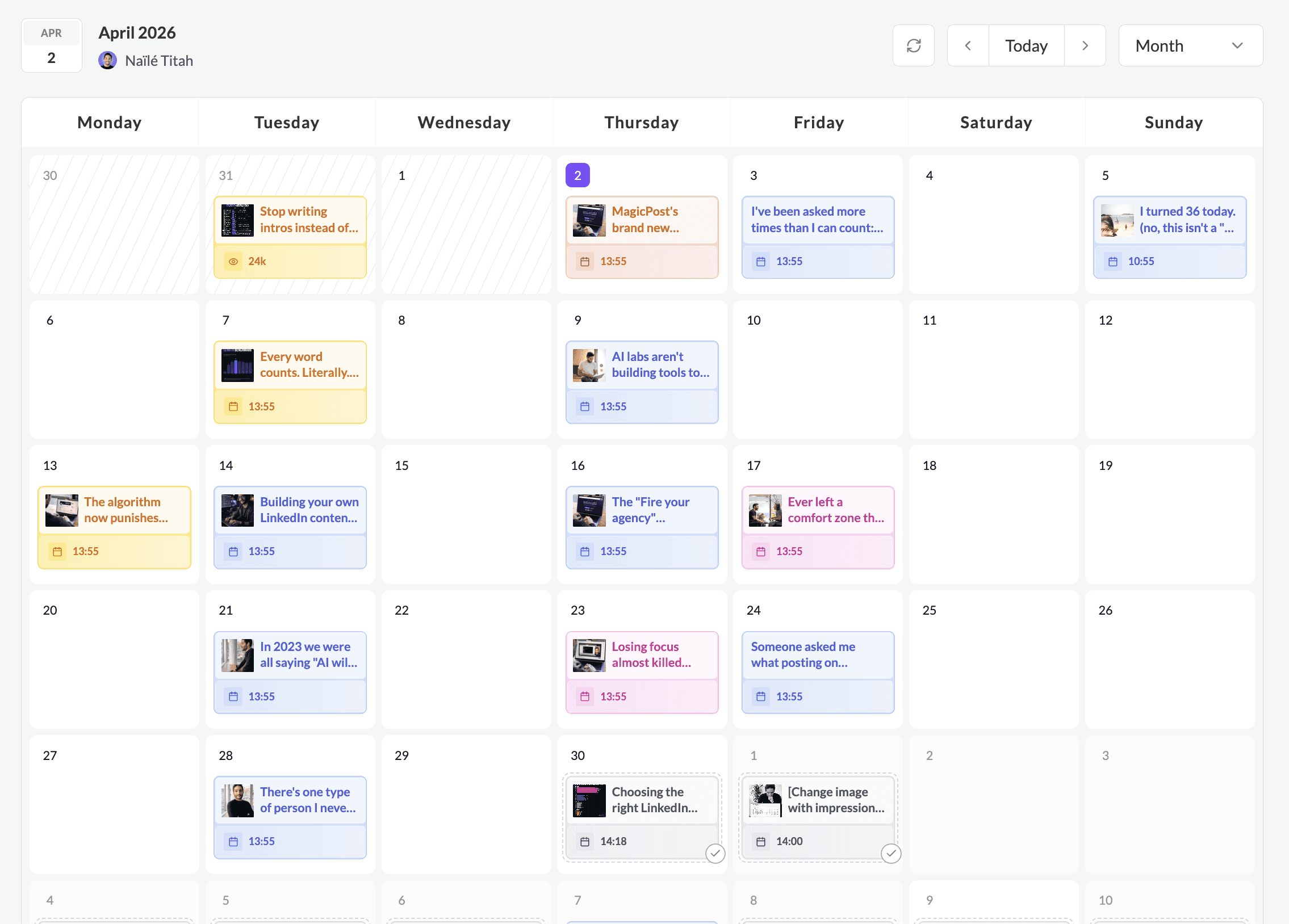
Plan and schedule your LinkedIn posts weeks in advance, all from one place, allowing you to stay consistent without the daily effort.
Easily reuse posts, drag and drop a post to another day… You’ll actually enjoy scheduling your content!

Plan your content with the Calendar
Plan and schedule your LinkedIn posts weeks in advance, all from one place, allowing you to stay consistent without the daily effort.
Easily reuse posts, drag and drop a post to another day… You’ll actually enjoy scheduling your content!
Plan your content with the Calendar
Plan and schedule your LinkedIn posts weeks in advance, all from one place, allowing you to stay consistent without the daily effort.
Easily reuse posts, drag and drop a post to another day… You’ll actually enjoy scheduling your content!
Easily add posts or ideas
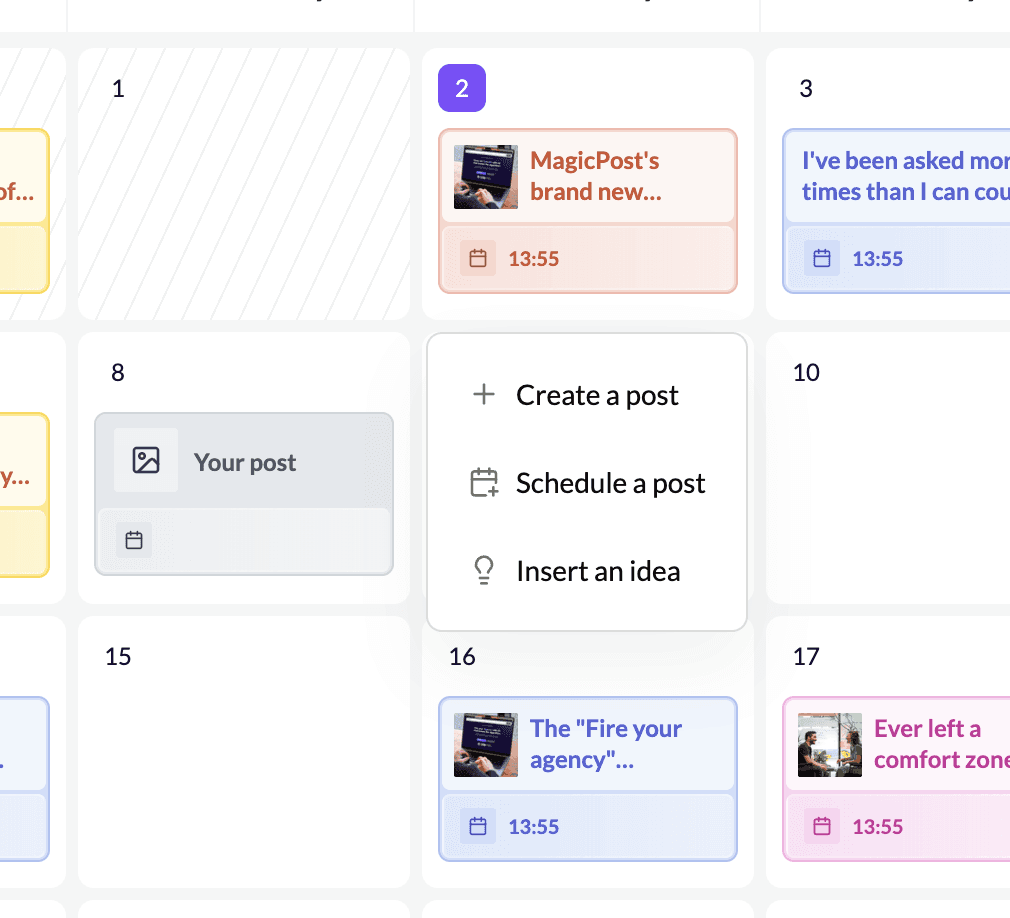
By clicking on a day in the calendar feature, you'll have different options to plan your content:
Create a post from the calendar
Schedule a post you've already generated or written
Add an idea to turn into a post later
Easily add posts or ideas
By clicking on a day in the calendar feature, you'll have different options to plan your content:
Create a post from the calendar
Schedule a post you've already generated or written
Add an idea to turn into a post later
Easily add posts or ideas
By clicking on a day in the calendar feature, you'll have different options to plan your content:
Create a post from the calendar
Schedule a post you've already generated or written
Add an idea to turn into a post later
Preview & Schedule safely
MagicPost operates through LinkedIn's official developer programme using authenticated API connections that LinkedIn explicitly approves.
This way, you can safely connect your LinkedIn account to publish your posts immediately or schedule them for later.
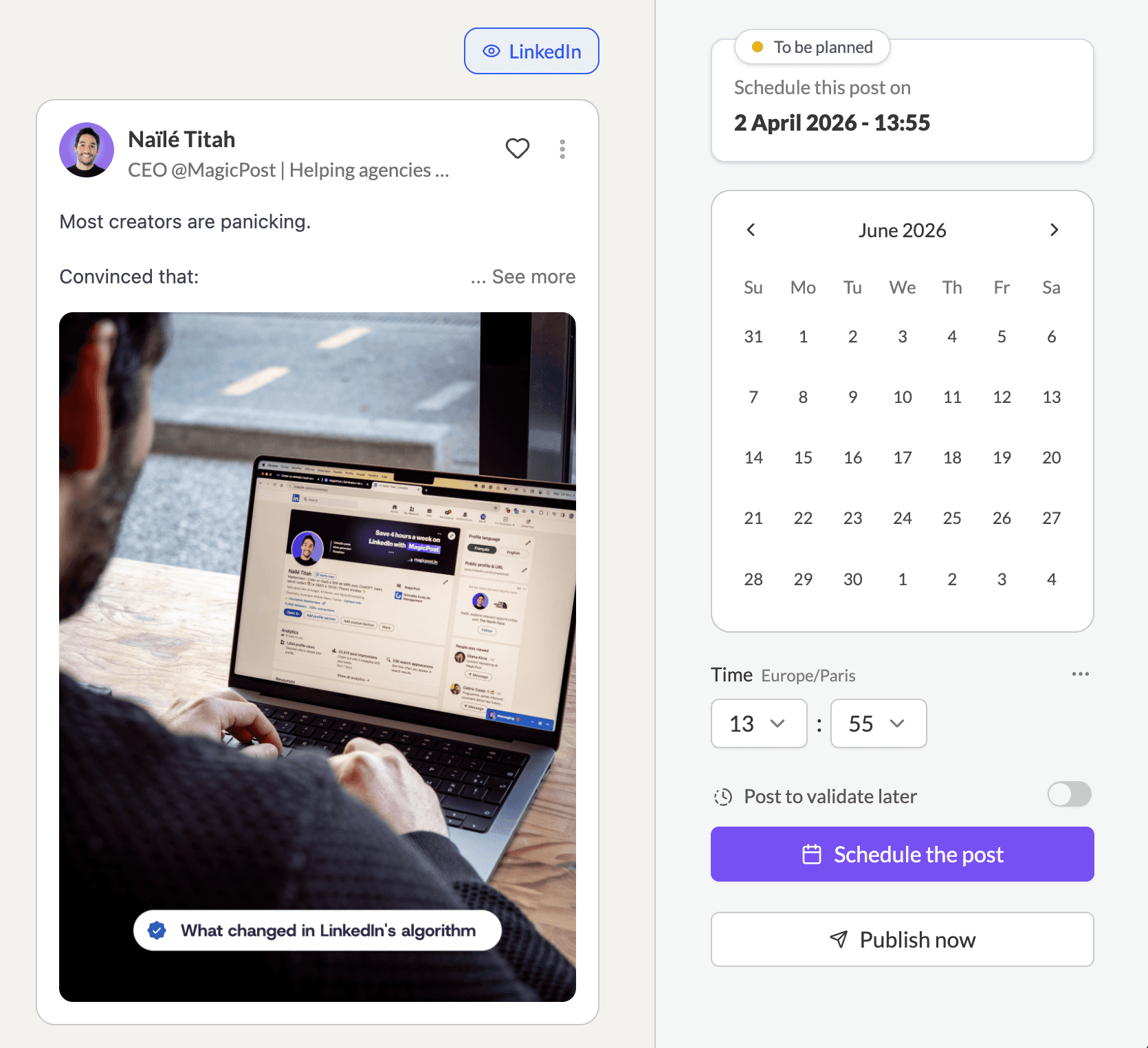
Preview & Schedule safely
MagicPost operates through LinkedIn's official developer programme using authenticated API connections that LinkedIn explicitly approves.
This way, you can safely connect your LinkedIn account to publish your posts immediately or schedule them for later.
Preview & Schedule safely
MagicPost operates through LinkedIn's official developer programme using authenticated API connections that LinkedIn explicitly approves.
This way, you can safely connect your LinkedIn account to publish your posts immediately or schedule them for later.
Schedule your post comments
You can even schedule comments under your post to get the engagement rolling.
There's no limit. Schedule as many comments as you'd like and use GIFs to set yourself apart!
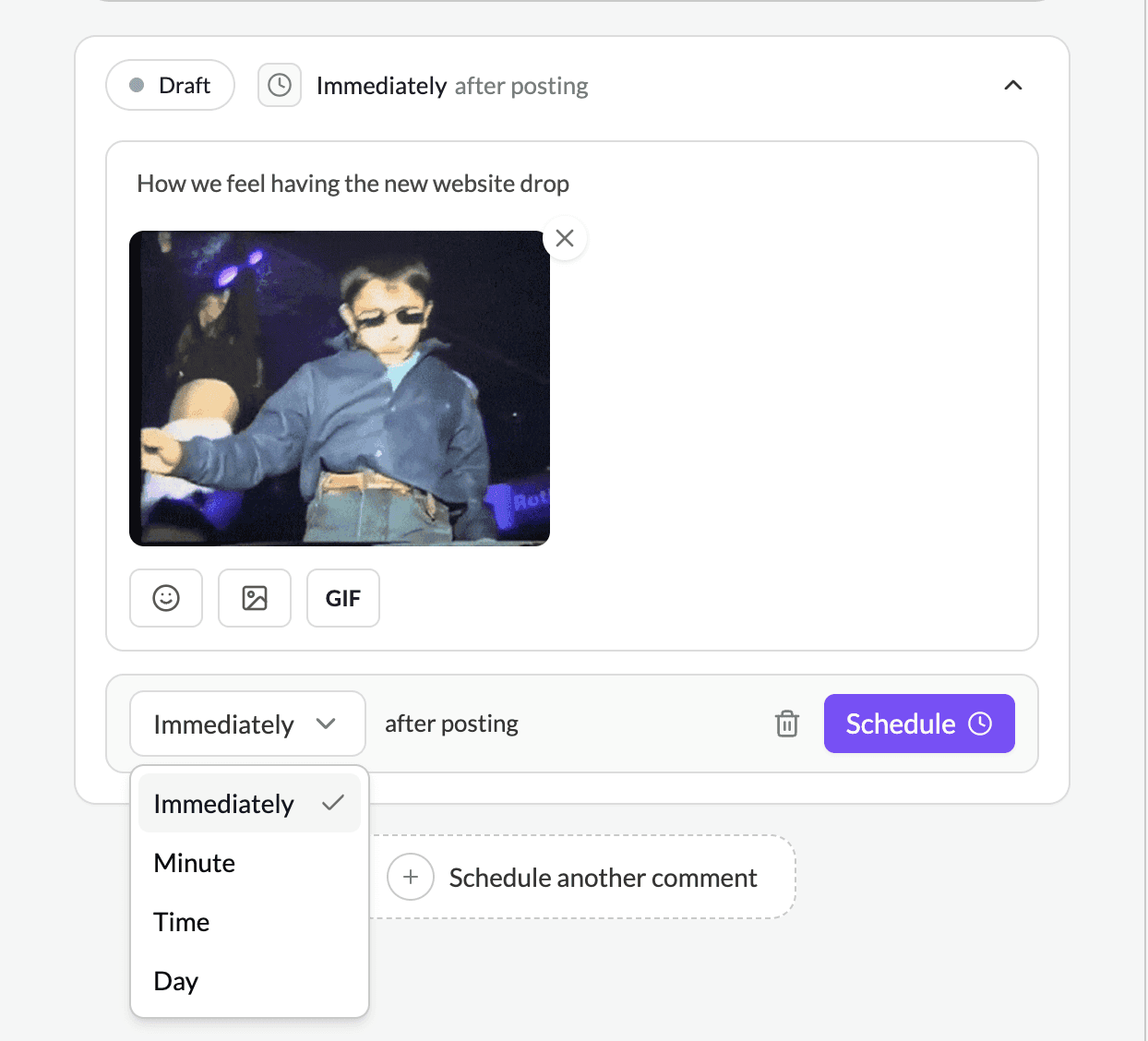
Schedule your post comments
You can even schedule comments under your post to get the engagement rolling.
There's no limit. Schedule as many comments as you'd like and use GIFs to set yourself apart!
Schedule your post comments
You can even schedule comments under your post to get the engagement rolling.
There's no limit. Schedule as many comments as you'd like and use GIFs to set yourself apart!
Check post performances
You can easily check posts that have gone live to track their performance, including impressions, likes, and comments.
You can also reuse, edit, and delete posts directly from MagicPost.
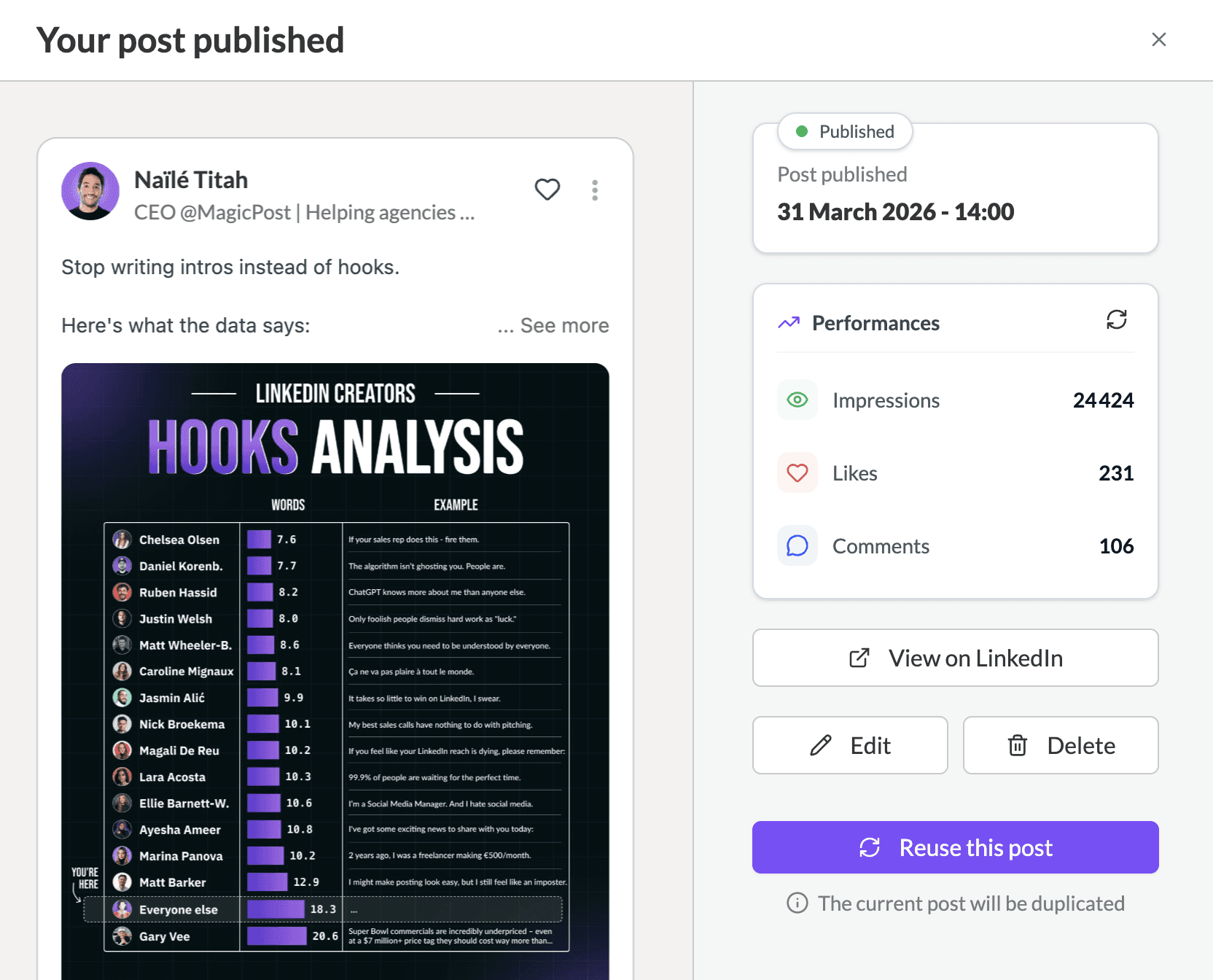
Check post performances
You can easily check posts that have gone live to track their performance, including impressions, likes, and comments.
You can also reuse, edit, and delete posts directly from MagicPost.
Check post performances
You can easily check posts that have gone live to track their performance, including impressions, likes, and comments.
You can also reuse, edit, and delete posts directly from MagicPost.
See the difference with MagicPost

Matt Barker
190K+ Followers
I think I’ve already scheduled 400+ posts with MagicPost. This has completely freed up my time. I can plan a month’s worth of content in just one afternoon!
Matt Barker
190K+ Followers
I think I’ve already scheduled 400+ posts with MagicPost. This has completely freed up my time. I can plan a month’s worth of content in just one afternoon!
Ready to save time?
Ready to save time?
Choose the offer that best suits your LinkedIn ambitions.
Monthly
40% off annually
Analytics
1 seat
₹1,500
₹2,600
/month
Schedule posts and master your LinkedIn metrics.
Features:
Advanced LinkedIn Metrics
Post scheduling & tag
Comment scheduling
Creator
1 seat
$39
$69
/month
Accelerate your LinkedIn content strategy from A to Z.
Most popular
Everything in Analytics, plus:
Post generator ✨
Idea generator ✨
Inspirations library
Engagement
Metrics of any creator
API/MCP Integration
Team or Agency
Let's chat
For businesses or agencies to enhance their content creation.
Everything in Creator, along with:
Multi-account management
Activity dashboard
Custom reports
Pay as you grow
Services:
30-minute onboarding call
Dedicated account manager
Priority chat support
Monthly
40% off annually
Analytics
1 seat
₹1,500
₹2,900
/month
Schedule posts and master your LinkedIn metrics.
Features:
Advanced LinkedIn Metrics
Post scheduling & tag
Comment scheduling
Analytics
Creator
Enterprise
MagicPost is a LinkedIn-verified partner
MagicPost is a LinkedIn-verified application

MagicPost is built entirely for LinkedIn. And it shows.
With MagicPost, you save up to 4 hours a week. Spend less time managing content and more time growing your business.
No credit card required. No commitment. Just real-time savings.
100% free trial.

Naïlé Titah
CEO at MagicPost
LinkedIn ने अपना एल्गोरिदम फिर से बदल दिया है। और इस बार, यह ध्यान देने योग्य है।
मैं जानने के लिए अच्छी स्थिति में हूँ:

Create your first LinkedIn post in under 5 minutes
With MagicPost, you save up to 4 hours a week, starting with your very first post. Spend less time writing and more time expanding your business.
No credit card. No commitment.
100% free trial.
MagicPost is built entirely for LinkedIn. And it shows.
With MagicPost, you save up to 4 hours a week. Spend less time managing content and more time growing your business.
No credit card required. No commitment. Just real-time savings.
100% free trial.
Naïlé Titah
CEO at MagicPost
LinkedIn ने अपना एल्गोरिदम फिर से बदल दिया है। और इस बार, यह ध्यान देने योग्य है।
मैं जानने के लिए अच्छी स्थिति में हूँ:
Trusted by over 100,000 creators
Find out what they think about our solution.
4.8
/
430
reviews
AP
Melissa Osmani
I wasn't convinced by AI until I discovered MagicPost.
The tool is very well made, very practical and ergonomic, and it's the perfect assistant for those who need a helping hand to create content.
AP
Josh Sanders
Use MagicPost and save time thinking about how you’re going to write the post.
↳ Enter a small prompt related to your niche
↳ Choose your post type (e.g., actionable)
↳ Select your category (e.g., best practices)
↳ Sit back and relax while it generates a new original post
↳ Tweak, improve and hit the post buttonAP
Louis Pille
It's probably the best tool I've used to improve my content creation on LinkedIn.
When I don't have any ideas, I find them in one click with MagicPost's functionality, and when I have ideas but have less time to write them, MagicPost does it for me. I recommend it with my eyes closed.
AP
Shadman Rahman
MagicPost, an AI-powered LinkedIn post generator has been a game-changer for my LinkedIn content strategy. Not only is it intuitive and user-friendly, but it also offers flexibility in crafting posts tailored to different objectives.
AP
Luke Matthews
ChatGPT is king. But MagicPost is easier. MagicPost creates elite AI posts very quickly.
1. I start by creating a custom template in MagicPost. This allows me to set the tone and structure of my AI posts.
2. I then feed the template into the AI engine and within seconds, I get a unique post based on my template.
3. I then edit the post with my own insights and expertise to make it truly unique.
AP
Melissa Osmani
I wasn't convinced by AI until I discovered MagicPost.
The tool is very well made, very practical and ergonomic, and it's the perfect assistant for those who need a helping hand to create content.
AP
Josh Sanders
Use MagicPost and save time thinking about how you’re going to write the post.
↳ Enter a small prompt related to your niche
↳ Choose your post type (e.g., actionable)
↳ Select your category (e.g., best practices)
↳ Sit back and relax while it generates a new original post
↳ Tweak, improve and hit the post buttonAP
Louis Pille
It's probably the best tool I've used to improve my content creation on LinkedIn.
When I don't have any ideas, I find them in one click with MagicPost's functionality, and when I have ideas but have less time to write them, MagicPost does it for me. I recommend it with my eyes closed.
AP
Shadman Rahman
MagicPost, an AI-powered LinkedIn post generator has been a game-changer for my LinkedIn content strategy. Not only is it intuitive and user-friendly, but it also offers flexibility in crafting posts tailored to different objectives.
AP
Luke Matthews
ChatGPT is king. But MagicPost is easier. MagicPost creates elite AI posts very quickly.
1. I start by creating a custom template in MagicPost. This allows me to set the tone and structure of my AI posts.
2. I then feed the template into the AI engine and within seconds, I get a unique post based on my template.
3. I then edit the post with my own insights and expertise to make it truly unique.
AP
Melissa Osmani
I wasn't convinced by AI until I discovered MagicPost.
The tool is very well made, very practical and ergonomic, and it's the perfect assistant for those who need a helping hand to create content.
AP
Josh Sanders
Use MagicPost and save time thinking about how you’re going to write the post.
↳ Enter a small prompt related to your niche
↳ Choose your post type (e.g., actionable)
↳ Select your category (e.g., best practices)
↳ Sit back and relax while it generates a new original post
↳ Tweak, improve and hit the post buttonAP
Louis Pille
It's probably the best tool I've used to improve my content creation on LinkedIn.
When I don't have any ideas, I find them in one click with MagicPost's functionality, and when I have ideas but have less time to write them, MagicPost does it for me. I recommend it with my eyes closed.
AP
Shadman Rahman
MagicPost, an AI-powered LinkedIn post generator has been a game-changer for my LinkedIn content strategy. Not only is it intuitive and user-friendly, but it also offers flexibility in crafting posts tailored to different objectives.
AP
Luke Matthews
ChatGPT is king. But MagicPost is easier. MagicPost creates elite AI posts very quickly.
1. I start by creating a custom template in MagicPost. This allows me to set the tone and structure of my AI posts.
2. I then feed the template into the AI engine and within seconds, I get a unique post based on my template.
3. I then edit the post with my own insights and expertise to make it truly unique.
Frequently asked questions
Can't find the answer you're looking for?
Frequently asked questions
Can't find the answer you're looking for?
How far in advance can I schedule LinkedIn posts using MagicPost?
You can schedule posts weeks or even months in advance. MagicPost gives you full control over your content calendar so you can plan campaigns without last-minute stress.
Can I edit or reschedule posts after they are scheduled?
Yes, MagicPost allows you to easily edit, reschedule, or delete posts even after they are scheduled, giving you complete control and flexibility over your content calendar.
Can MagicPost manage time zones automatically when I schedule posts?
Yes, MagicPost automatically adjusts for time zones, ensuring your posts go live at the right local time for your target audience, no matter where they are in the world.
Why should I use MagicPost instead of LinkedIn’s built-in scheduler?
MagicPost offers more flexibility, multi-platform scheduling, AI-generated content ideas, and analytics, making it easier to plan, optimize, and grow your LinkedIn presence efficiently.
How far in advance can I schedule LinkedIn posts using MagicPost?
You can schedule posts weeks or even months in advance. MagicPost gives you full control over your content calendar so you can plan campaigns without last-minute stress.
Can I edit or reschedule posts after they are scheduled?
Yes, MagicPost allows you to easily edit, reschedule, or delete posts even after they are scheduled, giving you complete control and flexibility over your content calendar.
Can MagicPost manage time zones automatically when I schedule posts?
Yes, MagicPost automatically adjusts for time zones, ensuring your posts go live at the right local time for your target audience, no matter where they are in the world.
Why should I use MagicPost instead of LinkedIn’s built-in scheduler?
MagicPost offers more flexibility, multi-platform scheduling, AI-generated content ideas, and analytics, making it easier to plan, optimize, and grow your LinkedIn presence efficiently.