" height="26.80529977783203px" id="tymKb8bqC" width="128.00300311279295px"/><path d="M 0 2.417 L 0 0 L 12.909 0 L 12.909 2.417 Z" fill="rgb(126, 78, 253)" height="2.417099999999998px" id="aYr4em6zK" transform="translate(128.341 22.325)" width="12.908999999999992px"/></svg>)

"/><stop offset="1" stop-color="rgb(118, 37, 250)"/></linearGradient></defs><g d="M 19.242 21.22 L 19.362 6.204 L 19.272 6.204 L 13.757 21.22 L 10.161 21.22 L 4.796 6.204 L 4.706 6.204 L 4.825 21.22 L 0 21.22 L 0 0 L 7.283 0 L 12.109 13.607 L 12.229 13.607 L 16.844 0 L 24.247 0 L 24.247 21.22 Z M 26.421 26.113 L 26.421 23.445 L 41.407 23.445 L 41.407 26.113 Z" fill="transparent" height="26.112508199679183px" id="DvfaAIHYn" width="41.40731898311435px"><path d="M 19.242 21.22 L 19.362 6.204 L 19.272 6.204 L 13.757 21.22 L 10.161 21.22 L 4.796 6.204 L 4.706 6.204 L 4.825 21.22 L 0 21.22 L 0 0 L 7.283 0 L 12.109 13.607 L 12.229 13.607 L 16.844 0 L 24.247 0 L 24.247 21.22 Z" fill="rgb(46, 46, 46)" height="21.220180016149442px" id="pLsxRCobd" width="24.247352589074694px"/><path d="M 0 2.668 L 0 0 L 14.986 0 L 14.986 2.668 Z" fill="url(%23yD9d4I5GR-3279285344-linear-gradient)" height="2.6675085048549647px" id="yD9d4I5GR" transform="translate(26.421 23.445)" width="14.986002836263765px"/></g></svg>)

Camelia Khadraoui
Your LinkedIn Skills section is a shortcut to making your profile shine. With 50 slots, the real question is: how many skills will truly set you apart on your Linkedin profile?
Let’s look at how many skills you should add and how to pick the ones that help you stand out.
In Short:
Your LinkedIn Skills section is crucial for getting noticed by recruiters and boosting your profile in searches.
Don’t list all 50 slots, aim for 20–30 targeted skills that reflect your expertise.
Start with your core hard skills, add supporting skills, and include relevant soft skills.
Pin the top three skills, update regularly, and collect endorsements.
Avoid clutter, outdated skills, or random filler.
क्यों आपके LinkedIn कौशल महत्वपूर्ण हैं
💡 संक्षेप में, आपके कौशल आपके LinkedIn प्रोफ़ाइल के लिए SEO कीवर्ड के रूप में कार्य करते हैं।
दिन-ब-दिन, आपके कौशल आपके शिक्षा, पिछले नियोक्ताओं, नौकरी के शीर्षकों और कार्य अनुभव के बराबर जरूरी हो गए हैं जब नई नौकरी पाने की बात आती है।
एक प्रतिभा पेशेवर के रूप में, आप जानते हैं कि अब नियोक्ता एआई संचालित उपकरणों का उपयोग करते हैं यह जांचने के लिए कि एक उम्मीदवार के कौशल एक खुली स्थिति की आवश्यकताओं से कितनी निकटता से मेल खाते हैं।
नियोक्ता उम्मीदवार के कार्य इतिहास, शिक्षा और गतिविधियों को उनके कौशल का पता लगाने के लिए देखते हैं। वे साक्षात्कार में लक्षित प्रश्न पूछते हैं और संदर्भों से बात करते हैं। LinkedIn पर लगभग आधे (48%) नियोक्ता अब कौशल डेटा का सीधे इस्तेमाल करते हैं भूमिकाएं भरने के लिए।
एक नियोक्ता का काम उम्मीदवार के अनुभव और शिक्षा की समीक्षा करना, उनका साक्षात्कार लेना, और संदर्भों से बात करना शामिल है।
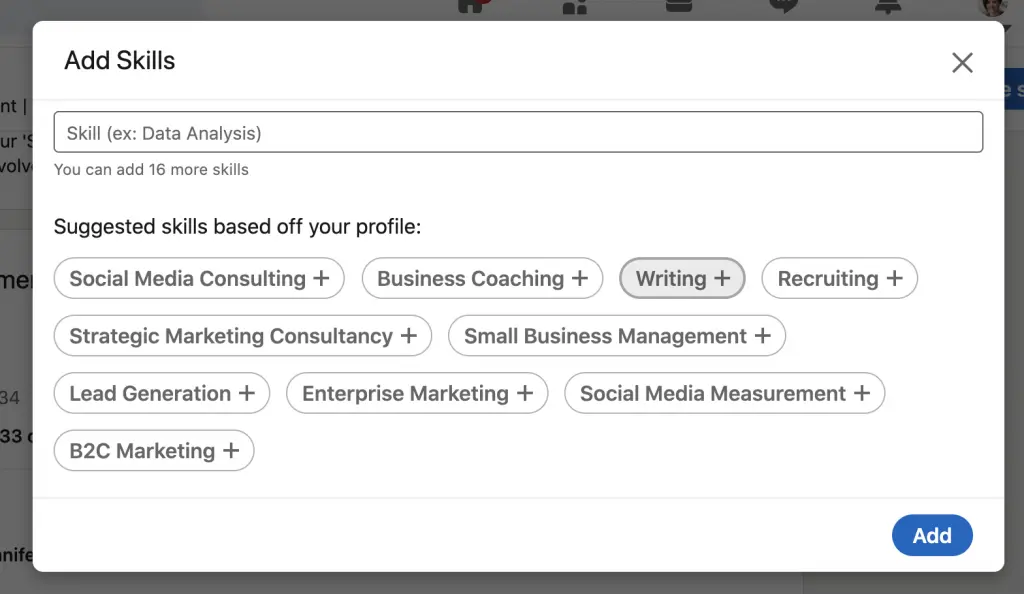
हालांकि, आज LinkedIn पर नियोक्ता स्पष्ट रूप से कौशल डेटा ऑटोमेशन का उपयोग करते हैं आवेदन को फ़िल्टर करने और भूमिकाएँ भरने के लिए।
LinkedIn आपके कौशल को समझने और आपको सही अवसरों से जोड़ने के लिए पढ़ता है। यह आपको खोज परिणामों में ऊँचा चढ़ने में मदद करता है, जो अंततः आपको मदद करेगा:
अपनी विश्वसनीयता दिखाएँ: समर्थित कौशल दूसरों को यह संकेत देते हैं कि आप अपने क्षेत्र में विश्वसनीय और सिद्ध हैं।
अपनी ताकत पर प्रकाश डालें: कौशल आपको अपनी शीर्ष प्रतिभाओं को प्रदर्शित करने और प्रतियोगिता को पीछे छोड़ने की अनुमति देते हैं।
अपने कौशल को सूचीबद्ध करके और उन्हें विचारपूर्वक रैंक करके, आप नियोक्ता का काम आसान बनाते हैं, लेकिन सबसे महत्वपूर्ण बात यह है कि आप ध्यान में आने के अपने अवसरों को बढ़ाते हैं।



What's The Ideal Number of Skills on LinkedIn
💡 LinkedIn allows up to 50 skills, but you don’t need to use all of them.
The ideal number to add is between 20 and 30 selected skills that you have mastered.
Your LinkedIn Skills section is more than just a checklist; it’s a shortcut to what you can actually do. It helps recruiters and collaborators quickly see your strengths and match you with the right opportunities.
Fewer than 10. Your profile may appear incomplete or unprofessional.
Around 20 to 30. Balanced, focused, and relevant. This is the ideal range for most professionals.
More than 40. Can make your profile look scattered and unfocused.
Remember, most recruiters value clarity and straightforward profiles. So, a smaller list of precise skills is always better than a long, random one.
How to Choose the Right Skills for Your LinkedIn Profile
When choosing which skills to add, be strategic. Go straight to the point and focus on the skills that truly showcase what you do best:
→ Start with your core expertise. Add the top 5–10 hard skills that are your strengths.
→ Include supporting skills. Add related abilities that complement your strengths.
→ Use industry keywords. Think about what recruiters or clients type when searching for professionals like you.
→ Highlight your top three. Pin your strongest, most relevant skills at the top of your profile.
→ Update regularly. Remove outdated or irrelevant skills as your career evolves.
1. List the hard skills that define you
Hard skills are the technical skills you develop through education and experience.
They are usually top of mind when discussing your strengths or when in a skills-based hiring. They often involve using a machine, software, or tool ranging from:
Technical skills : Microsoft ; Adobe Suites; data analysis ; SQL and digital marketing
Educational skills : Screenwriting; film editing; sales;
When filling your skills section, start with the hard skills that your ideal target role requires.
Also, increase your credibility by highlighting relevant training, education, and certifications that support your claims.
2. Include your soft skills
“Hard skills get you the interview but soft skills get you the job.”
Soft skills are the abilities that shape your personality and how you work, interact, and communicate with coworkers and teammates. They include talents like communication, collaboration, leadership, listening, and problem-solving, etc.
However, most workers struggle to identify their own soft skills because they are more difficult to measure than hard skills.
How to do it?
Take a personality test
Go through your previous work reviews.
Ask your family and friends about your best traits
What does your senior coworker compliment you on?
What do your teammates usually say about you?
You can also take an assessment
For example, platforms like Cappfinity and Harver offer gamified behavioral assessments to evaluate soft skills, social, and emotional characteristics.
If that isn’t possible, you could also try an online self-assessment like the Skills Health Check offered by the National Careers Service in the U.K.
Top Overall Skills on LinkedIn You Could Use
If you are selecting which skills to highlight on your profile or want to know what to work on next, pay attention to the skills that show up most frequently on LinkedIn.
These popular skills generally align with what employers are seeking, so using them as a guideline can assist you in aligning your profile with industry standards and make it simpler for employers to find you.
Communication
Teamwork
Problem-solving
Analytical skills
Leadership
Sales
Management
Data analysis
Team leadership
Organizational skills
Top Soft Skills on LinkedIn
When you emphasize your soft skills, select the qualities that are most valued on LinkedIn. These characteristics illustrate how effectively you work with others, communicate, and lead.
Communication
Teamwork
Problem-solving
Analytical skills
Leadership
Management
Team leadership
Organizational skills
Interpersonal skills
Negotiation
Top Hard Skills on LinkedIn
When you enumerate your hard skills, target the technical abilities and tools that often appear on LinkedIn. These skills emphasize your expertise and correspond with what employers are looking for.
Sales
Data analysis
Marketing
Customer relationship management (CRM)
Python (programming language)
Research skills
SQL
Business development
Training
Social media
Of course, the frequency with which these skills appear isn’t a perfect predictor of what recruiters and hiring managers are looking for. Neither is it an ideal guide to what learning leaders are trying to teach and develop.
Top 4 Common Mistakes to Avoid
Even experienced professionals sometimes make mistakes when updating their LinkedIn Skills. Steering clear of these common errors can help your profile look more polished, focused, and credible:
❌ Adding too many skills: Filling all 50 slots may look impressive at first, but a long list can overwhelm recruiters and make your main strengths less clear. Instead, highlight 20 to 30 skills that best show what you do well.
❌ Keeping outdated or irrelevant skills: Listing old software, beginner tools, or skills that no longer fit your current role can make your profile look outdated. Review your skills often and remove anything that does not support your professional image.
❌ Neglecting skill order: Your top skills should quickly show your strengths. If you do not reorder your skills, your most important abilities might end up at the bottom, where recruiters could miss them. Make sure to pin your three strongest and most relevant skills at the top.
❌ Ignoring endorsements: Endorsements show others that you really have the skills you list. Ask your colleagues, peers, and mentors to endorse your key skills. A skill section with plenty of endorsements helps you look more credible and trustworthy to recruiters and collaborators.
If you avoid these mistakes, your Skills section will better highlight your strengths, support your personal brand, and help you get noticed for the right opportunities.
To Wrap it Up
Your Skills section does more than just look good. It helps LinkedIn recognize your expertise and connect you with the right opportunities.
Focus on 20 to 30 relevant skills,
Include both hard and soft skills,
Highlight the three that are best suited for your next role.
So take a few minutes today to review your skills and remove any that are not useful, add keywords that match your target role, and ask colleagues to endorse your top skills.
Don't forget to check back each month. These small changes will increase your visibility, credibility, and attract better opportunities.

How to Find Your LinkedIn URL and Customize It
Learn how to find your LinkedIn URL and customize it to make it more professional and easier to share. Enhance your LinkedIn presence with these simple steps!

LinkedIn Profile Picture: Do’s and Don’ts (2026)
Your LinkedIn profile picture is essential for creating a strong first impression. Discover the dos and don'ts to ensure your profile picture stands out.
How to Create the Perfect LinkedIn Banner
Boost your LinkedIn profile with your banner! Understand its importance, create a banner that leaves a lasting impression, builds trust, and enhances your brand.

LinkedIn Sample Headlines: Examples and Tips
Learn how to create an engaging LinkedIn headline that highlights your skills, stands out in search results, and assists you in achieving your career aspirations.