" height="26.80529977783203px" id="tymKb8bqC" width="128.00300311279295px"/><path d="M 0 2.417 L 0 0 L 12.909 0 L 12.909 2.417 Z" fill="rgb(126, 78, 253)" height="2.417099999999998px" id="aYr4em6zK" transform="translate(128.341 22.325)" width="12.908999999999992px"/></svg>)

"/><stop offset="1" stop-color="rgb(118, 37, 250)"/></linearGradient></defs><g d="M 19.242 21.22 L 19.362 6.204 L 19.272 6.204 L 13.757 21.22 L 10.161 21.22 L 4.796 6.204 L 4.706 6.204 L 4.825 21.22 L 0 21.22 L 0 0 L 7.283 0 L 12.109 13.607 L 12.229 13.607 L 16.844 0 L 24.247 0 L 24.247 21.22 Z M 26.421 26.113 L 26.421 23.445 L 41.407 23.445 L 41.407 26.113 Z" fill="transparent" height="26.112508199679183px" id="DvfaAIHYn" width="41.40731898311435px"><path d="M 19.242 21.22 L 19.362 6.204 L 19.272 6.204 L 13.757 21.22 L 10.161 21.22 L 4.796 6.204 L 4.706 6.204 L 4.825 21.22 L 0 21.22 L 0 0 L 7.283 0 L 12.109 13.607 L 12.229 13.607 L 16.844 0 L 24.247 0 L 24.247 21.22 Z" fill="rgb(46, 46, 46)" height="21.220180016149442px" id="pLsxRCobd" width="24.247352589074694px"/><path d="M 0 2.668 L 0 0 L 14.986 0 L 14.986 2.668 Z" fill="url(%23yD9d4I5GR-3279285344-linear-gradient)" height="2.6675085048549647px" id="yD9d4I5GR" transform="translate(26.421 23.445)" width="14.986002836263765px"/></g></svg>)




Camelia Khadraoui
Once again, you’re struggling to find new content ideas.
No inspiration? No problem. Because you already have a goldmine of content sitting in your archives, ready for a second chance.
The right posting strategy helps you stay consistent and avoid writer's block.
By repurposing your LinkedIn articles, you stay visible and consistent without burning out or starting from scratch each week.
In Short:
Repurposing = turning one article into micro-posts, carousels, short videos, quotes, or infographics.
LinkedIn post types: text, images, carousels (PDF), videos, and polls.
Benefits: boosts visibility (algorithm favors consistency), saves time, reaches different audience preferences, builds authority.
5-step method: identify core message → break into micro-content → choose format → add CTA → cross-link to original article.
Key idea: repurposing is intentional distribution, not reposting.
Result: stay consistent, expand reach, avoid burnout.
What Are the Different Types of LinkedIn Posts?
For starters, it’s important to check out the main types of content LinkedIn offers:
Text posts | Perfect for storytelling, personal insights, and sharing opinions. |
|---|---|
Image posts | Great for portraits, graphics, quick charts, or quotes from your article. |
Document posts (PDF carousels) | Ideal for turning long articles into slides that people can scroll through. |
Video posts | Perfect for summarizing your main points in a more engaging, human way. |
Polls | To spark discussion or get audience feedback. |
Knowing the differences between each format helps you figure out what type to explore next and which ones work best for you.
What Does “Repurposing” Mean on LinkedIn?
Repurposing content means recycling your existing posts or articles into new formats without losing their essence.
For example, if you shared a strong input in a text post last week and it flopped, it might be time to turn it into a video.
Instead of letting your article sit unread, you can:
Extract insights and turn them into smaller posts.
Visualize data or lists as carousels.
Record short videos explaining one key takeaway.
Create infographics or quotes from strong lines in your piece.
Ultimately, the goal is to test and tweak, sharing your content from different angles to see if it resonates with people in a different format. ✔️
Why Repurpose Your LinkedIn Posts
Repurposing is more than just a way to save time. It’s a clever way to get noticed.
With competition for attention increasing in 2025, reusing and updating your content helps you grow on LinkedIn sustainably. Here are four reasons why it matters:
Increase your visibility:
LinkedIn’s algorithm favors people who post frequently. When you share valuable content regularly, you’re more likely to appear in your audience’s feed. Repurposing helps you stay active without constantly needing new ideas.
Save significant time and energy:
It requires time and effort to create quality content. Repurposing enables you to gain more value from what you’ve already created. For instance, one strong article can transform into several posts, saving you hours while maintaining high quality.
Reach different audience preferences:
People prefer to receive information in various formats. Some enjoy detailed text posts, while others appreciate quick carousels or brief videos. By conveying your message in different styles, you can reach a broader audience.
Strengthen your authority:
Sharing your primary ideas in different formats helps people remember you and trust your expertise. When your audience frequently sees your clear insights, they regard you as reliable and knowledgeable in your field.
Repurposing isn’t merely repeating yourself. It’s an intelligent way to share your ideas with a larger audience.
How to Repurpose LinkedIn Articles in 5 Steps
The aim isn’t to keep sharing the same content. Instead, you want to turn one strong idea into several posts that help you reach more people, boost engagement, and build authority. Here’s a straightforward 5-step process to help your article reach more readers.
1. Identify the Core Message
Every great article has one main insight, the “aha” moment that makes it valuable. Before you start repurposing, ask yourself:
What is the single most important takeaway?
What problem does this solve?
What idea would I want people to remember?
This core message is the base for all the smaller pieces of content you’ll make. If you skip this step, your repurposed posts might feel random instead of focused.
2. Break It Into Micro-Content
After you find the main idea, break the article into three to five separate insights. Each mini-piece should work independently as:
A clear opinion
A practical tip
A lesson learned
A myth you’re debunking
A question you’re answering
If someone never reads the full article, each short post should still offer value by itself. This way, one long article can become a week’s worth of content.
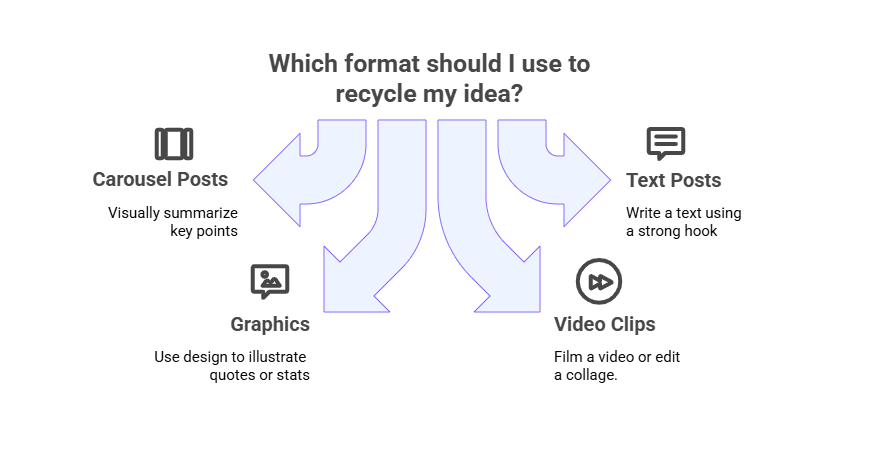
3. Choose the Right Format
Next, choose how you want to share each idea. Different formats can lead to different types of engagement.
A strong opinion might perform well as a short text post.
A step-by-step framework could become a carousel.
A personal story might feel more powerful as a short video.
A controversial insight could turn into a poll.
Pick the format that fits each message best, rather than using the same style every time. This keeps your content fresh and helps you see what your audience likes most.
4. Add a Call to Action (CTA)
Every great post starts a conversation. That’s when your CTA comes in.
Think about inviting your audience to engage whether that’s by answering a question or sharing their own experience.
You don’t need to overcomplicate it. A simple, authentic question at the end can do wonders for engagement. Try lines like:
“Would you handle it differently?”
“Tag someone who needs to read this.”
“Agree or disagree?”
The goal is to spark genuine conversation, not to force interaction.
5. Cross-Link Strategically
When you turn an article into a post or carousel, don’t forget to link back to the original one.
Some people will want the short version, others will want to dig deeper, so keep that option available.
It’s an easy way to bring traffic back to your original piece while showing that your insights come from a larger, well-thought-out work.
Best Examples of Content Repurposing
Example 1: “Top 5 Lessons from Freelancing”
You can develop every lesson from your article and turn it into a :
Carousel post: break down each lesson into its own slide with clean visuals for easy swiping.
Infographics: summarize all five lessons in one visual with quick stats or icons.
A short video/Reel: share each lesson in a few seconds with text overlays for a personal touch.
Example 2: “6 Rules to Negotiating Multi-Million Dollar Deals”
Pick the rules you want to elaborate, and turn them into a:
LinkedIn poll: ask your audience which negotiation strategy they rely on most, and comment on the results.
Carousel post: each slide breaks down a key negotiation tactic. Add a real example or statistic for more impact.
Short video/Reel: a 30-second clip of you explaining one critical tactic, with a caption highlighting a step by step.
A clever content writer should not only be talented and consistent, but also be resourceful.
Repurposing your older ‘failed’ posts helps you stay on top of your game without spending hours creating new content.
So next time you write a great article, don’t let it gather dust. Slice it, remix it, and bring it back to life!
Repurpose Your Content Into LinkedIn Posts With MagicPost!
MagicPost turns a single article into a cohesive plan in minutes. Paste the piece, pick formats, and it spins out tight micro-posts, slide outlines, and short-video talking points that keep the original insight intact. You refine tone in a few clicks, then line up the week.
How does it work in action?
Import your source: New Project → paste your article text or add a URL → generate a first draft post.
Create variants fast: use writing parameters (tone/length, templates) to spin 3–5 alternates from the same idea.
Tighten the copy: edit hooks, pull a quote, add a natural question at the end (no special button required).
Prep a carousel: have MagicPost produce the slide-by-slide text outline, then build the PDF in Canva/Figma before uploading to LinkedIn.
Schedule and track: open the Calendar/Scheduled Posts view, set dates/times, and review upcoming posts in one place.
Wrapping Up
Repurposing is not just reposting. It means sharing your content in a thoughtful, planned way.
Start with a strong article and break it into focused ideas. Try out different formats like text, carousels, videos, or polls, and always link back to your original piece. Doing this every week helps you stay consistent, reach more people, and build authority without feeling overwhelmed.
For your next step, paste your article into MagicPost. You can quickly create 10 ready-to-publish versions in different formats, make a few quick edits, and schedule your posts for the next two weeks all at once.
Keep your content visible and publish faster. Try MagicPost for free!