" height="26.80529977783203px" id="tymKb8bqC" width="128.00300311279295px"/><path d="M 0 2.417 L 0 0 L 12.909 0 L 12.909 2.417 Z" fill="rgb(126, 78, 253)" height="2.417099999999998px" id="aYr4em6zK" transform="translate(128.341 22.325)" width="12.908999999999992px"/></svg>)

"/><stop offset="1" stop-color="rgb(118, 37, 250)"/></linearGradient></defs><g d="M 19.242 21.22 L 19.362 6.204 L 19.272 6.204 L 13.757 21.22 L 10.161 21.22 L 4.796 6.204 L 4.706 6.204 L 4.825 21.22 L 0 21.22 L 0 0 L 7.283 0 L 12.109 13.607 L 12.229 13.607 L 16.844 0 L 24.247 0 L 24.247 21.22 Z M 26.421 26.113 L 26.421 23.445 L 41.407 23.445 L 41.407 26.113 Z" fill="transparent" height="26.112508199679183px" id="DvfaAIHYn" width="41.40731898311435px"><path d="M 19.242 21.22 L 19.362 6.204 L 19.272 6.204 L 13.757 21.22 L 10.161 21.22 L 4.796 6.204 L 4.706 6.204 L 4.825 21.22 L 0 21.22 L 0 0 L 7.283 0 L 12.109 13.607 L 12.229 13.607 L 16.844 0 L 24.247 0 L 24.247 21.22 Z" fill="rgb(46, 46, 46)" height="21.220180016149442px" id="pLsxRCobd" width="24.247352589074694px"/><path d="M 0 2.668 L 0 0 L 14.986 0 L 14.986 2.668 Z" fill="url(%23yD9d4I5GR-3279285344-linear-gradient)" height="2.6675085048549647px" id="yD9d4I5GR" transform="translate(26.421 23.445)" width="14.986002836263765px"/></g></svg>)

The MagicPost team
AI has, quite literally, transformed sales forever. So why do so many reps rely only on ChatGPT?
There are thousands of other AI tools specifically designed for sales teams. And in 2026, trying to close deals without them could leave you behind.
We’ve done the hard work for you by gathering up the best of the best. In this article, we’ve handpicked AI solutions that integrate directly into your daily sales workflow so you can grow your pipeline and sell more deals, faster.
There are three types of AI tools for sales: generative, automation, and machine learning. Each tool has a different place depending on your business needs.
What are the Best AI Tools for Sales in 2026?
If you’re ready to crush your quota in 2026, read on.
We’ll start with one of the highest-rated AI tools on Trustpilot:



1. MagicPost - Best AI social selling tool
Pros | Cons |
Generate ideas, hooks, and complete LinkedIn posts in seconds | Focused exclusively on LinkedIn (no cross-platform scheduling) |
500K+ viral LinkedIn posts for inspiration | Can’t capture prospects or push data to CRM |
Integrated scheduling and analytics dashboard |
What is MagicPost?
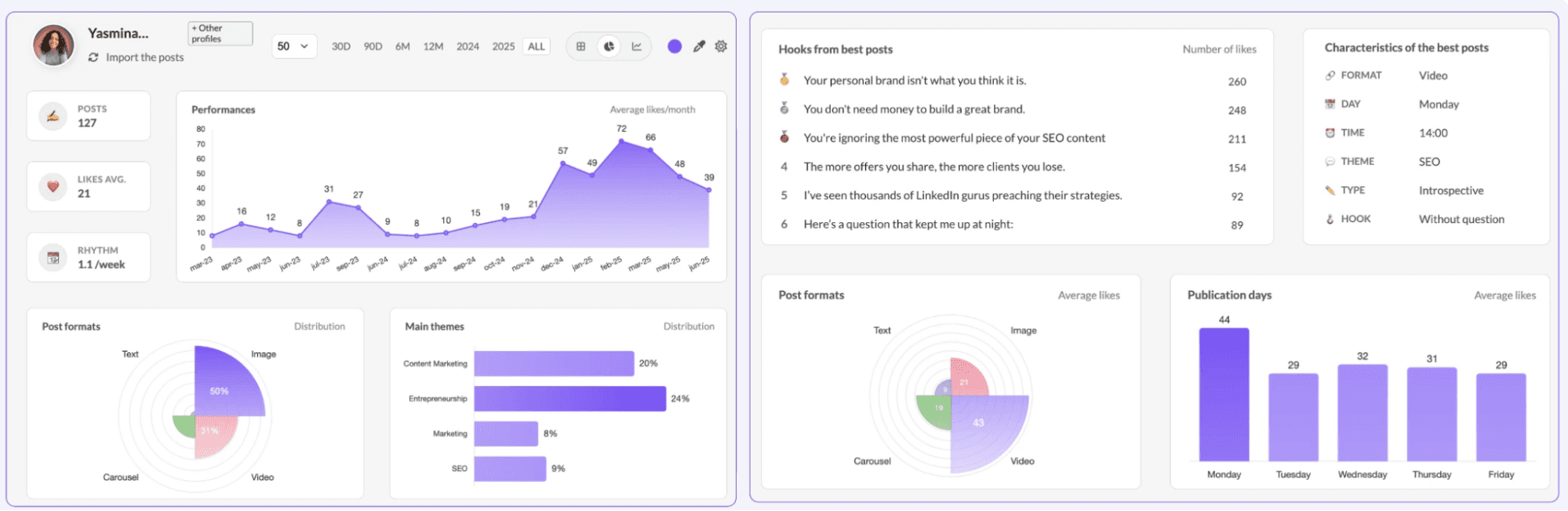
MagicPost is an AI-powered content creation tool that can generate LinkedIn posts in your voice in under 30 seconds. It offers thousands of templates for viral posts to help spark inspiration, along with tools that help you track metrics, engagement, and other results so you have a better idea of your reach and impact.
As a solopreneur, you can use MagicPost to save up to four hours per week. As an agency brand, you could double your client capacity in 30 days. Even enterprise teams reap the benefits of MagicPost: it’s possible to 3x your company's visibility in under a month.
Of course, MagicPost is focused exclusively on LinkedIn — so if you need to post on other social media, you may need to pair MagicPost with another platform. Plus, MagicPost can’t yet capture prospects or push your data to a CRM. But this is something you could easily manage using a platform like Attio (which we’ll cover later on).
How does MagicPost benefit sales teams?
You can use MagicPost to engage with prospects using the voice and tone you already use. Not only does this help create a consistent online presence, but it can save 4+ hours of your time every week for more complex, critical tasks (like taking sales calls, for example).
“It WORKS! My posts are getting great genuine engagement, it sounds like me, the posts don't sound like they've been written with AI, they help turn a thought that I've got into something actionable and helpful for people to read, in a matter of seconds. Game changer.” — Trustpilot
You can also use MagicPost to take the temperature of your engagement: how people are responding and interacting with your posts. Studies show MagicPost can increase your LinkedIn engagement by +38% or higher, which can 3x your company's visibility in just 30 days.
Last but not least, MagicPost is constantly innovating with new features — many of which will greatly benefit sales teams. Custom reports, for example, are already on the horizon. And features like engagement feeds can help you connect and reply to your audience in real time.
MagicPost pricing
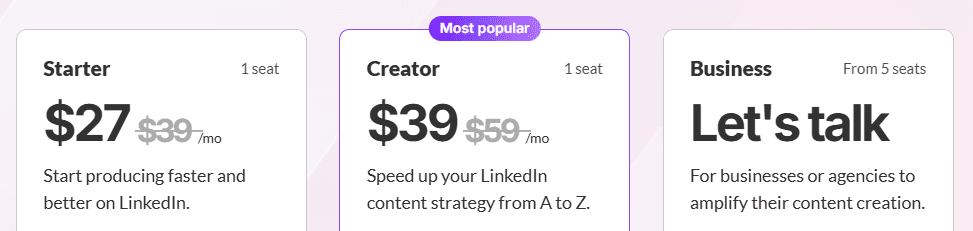
There are three MagicPost pricing plans to choose from.
Here’s a quick pricing breakdown if you’re paying annually:
Starter: $27/month for 30 posts per month, ideas and hooks generators, and scheduling and tags management
Starter: $39/month for unlimited posts per month, Metrics LinkedIn™, and Metrics for any creator
Business: Custom pricing for multi-account management, dedicated onboarding, and custom reports
2. Gong - Best AI Coaching Tool
Pros | Cons |
Onboarding, coaching, and skills development tools | No pricing information available on the website |
Simple, fast sales forecasting | Users report Gong AI agents can be “finicky” |
Mix and match applications for specific business needs |
What is Gong?
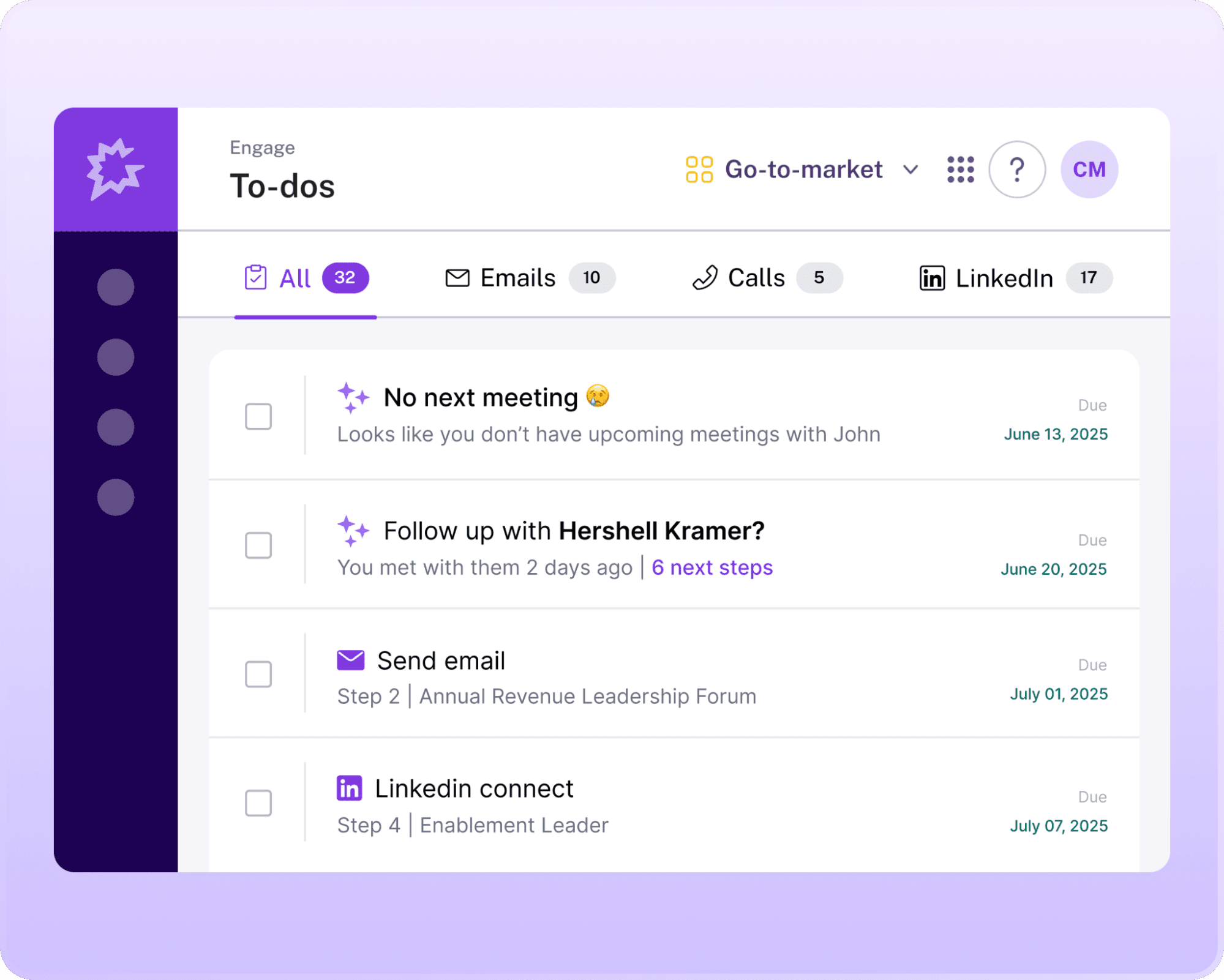
Gong is one of the most popular conversation AI platforms for sales teams — and for good reason. This AI-powered platform helps teams record, transcribe, and analyze sales calls so they can better understand what is working (and what is not) in closing conversations.
You can think of Gong as an assistant for everyday ride-along and coaching needs. First, it listens in on sales interactions across phone, video, and email interactions. Then, it helps you collect feedback to share with your team, such as objection handling, conversation speed, and script accuracy.
Keep in mind Gong does not publish pricing on its website, which makes budgeting tricky for smaller teams. And while Gong’s AI agents can be powerful in certain circumstances, some users report that it occasionally misses cues.
How does Gong benefit sales teams?
Gong’s biggest advantage for sales teams is automatically highlighting calls based on their context. For example, managers can identify patterns and behaviors that help reps win deals. But it can also catch red flags in their calls — think poor talk ratios or missed follow-ups — so your team can take feedback and improve their workflows.
“Gong helps me as a leader give direct "live" feedback on calls to improve sales skills that I otherwise would only have insight on if I was on the call. I love the scorecards and AI functions and that they continue to improve from when I first started using Gong to now. The user usability is easy enough for call searching and easy to train on. I also love the transcript function and ability to search the overall outline and key points of the call.” — G2
Another benefit of Gong: forecasting revenue. This can give you better insights on whether or not you will hit your quota. The system uses deal signals and rep activity data to help predict which opportunities are most likely to convert.
If you are a sales leader, you can use Gong to write, store, and manage sales-related content all in a single place. This makes it easier to onboard or upskill your reps. All you need to do is onboard your team, then let them explore the content on their own.
“As a new employee (Account Manager), Gong has been critical in my onboarding efforts. It's not only given me an entire library of call recordings separated by account and rep to prep for my sign off of mock demos, but it's also given me extremely detailed notes on each of the accounts that are in my name. I like this best about Gong as it's given me confidence to show up in my role knowing the inner workings of how my clients utilize our product (particularly given there are many ways to use it). I use it every day to uncover notes and watch my colleagues' recordings to come up with ideas that make sense in my own workflows.” — G2
Gong pricing
Unfortunately, Gong does not list any pricing online. You will have to contact sales for a custom quote.
But some online sources claim that prices hover around $5,000 for platform access, plus ~$1,200/user/year depending on your team and needs.
3. Allo - Best AI Phone System
Pros | Cons |
Support for calling and texting in the US and Canada | Doesn’t support legacy equipment like desk phones and pagers |
AI voice agent on every plan | Built for small sales teams, not enterprises |
1,000+ integrations with upgrade |
What is Allo?
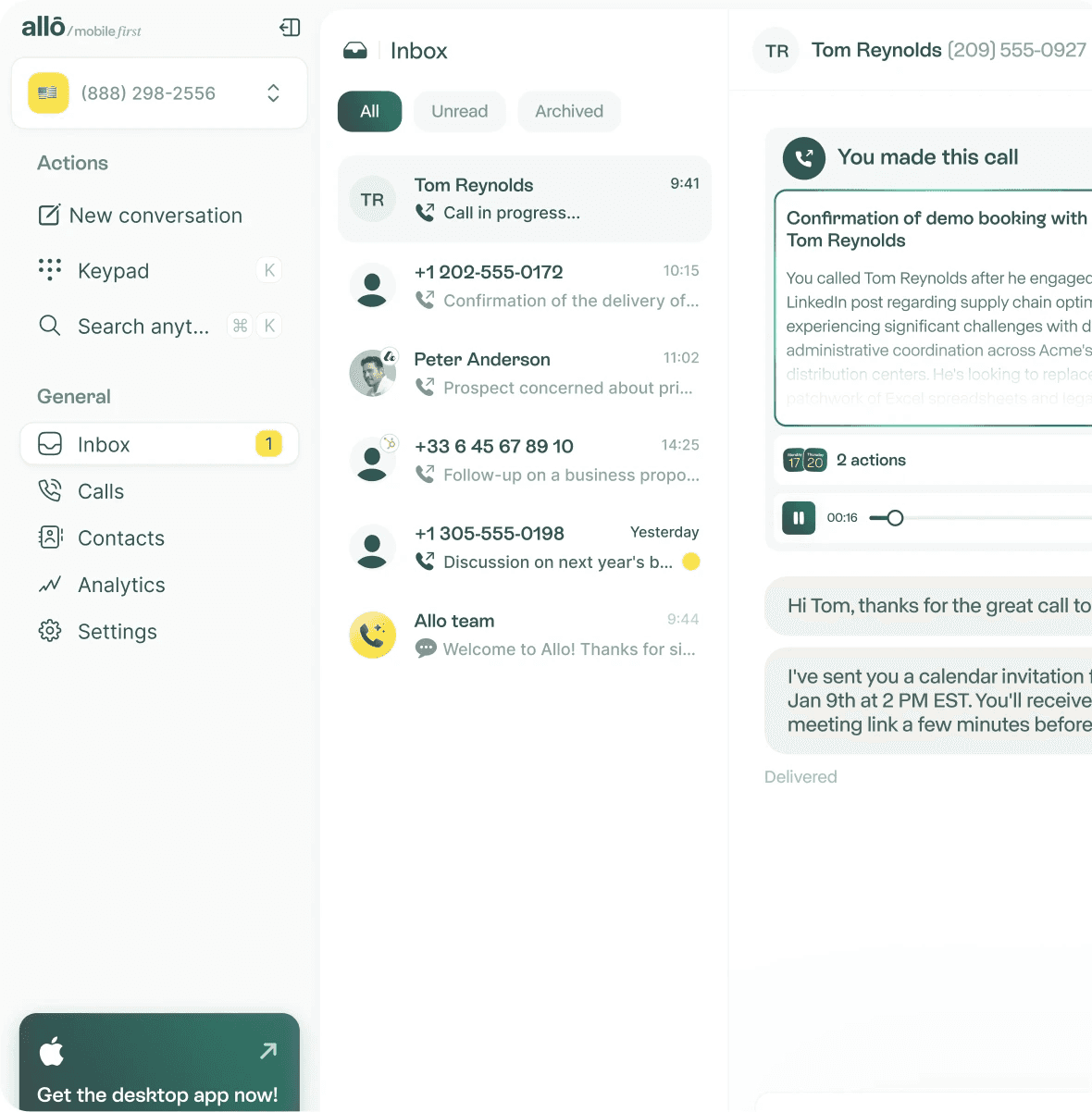
Allo is an AI-first business phone system that helps small sales teams communicate with prospects like enterprise brands. It integrates calling, texting, and automation tools, plus AI assistants for voicemail, record searches, and more.
If you upgrade to the Business plan, you can connect Allo to more than 1,000 other tools. For instance, CRMs like HubSpot, Attio, and Salesforce. This allows you to sync conversations, track interactions, and manage contacts in other AI-powered tools without needing to switch tabs.
FYI: Allo wasn’t designed for large or complex enterprises, so it might seem limited if you’re already a massive brand. It also isn’t compatible with legacy phone equipment (i.e., desk phones and handsets). Fortunately, this VoIP platform is automatically compatible with the phones you already own.
How does Allo benefit sales teams?
With Allo, you can make unlimited calls in the US and Canada, manage inbound and outbound SMS, and even set up a smart IVR system that answers the phone and routes calls on your behalf. It’s basically a virtual sales assistant that never sleeps. This way, you can have repetitive call tasks on autopilot, allowing your team to focus on building relationships and closing deals.
“Initially, I used Allo for managing and prioritizing my calls. With the product's developments, we now use it for all our calls. The quality of the integration into our CRM is remarkable. The time savings are fantastic. Thanks to interactions with their highly responsive and attentive support, we could configure it perfectly according to our needs, and their advice and experiences helped us achieve more than we imagined.” — G2
Not available to answer the phone? Your phone system is — 24/7, 365. Allo can help you respond to missed texts with auto-replies. Plus, you can use their AI receptionist to answer FAQs, book appointments, and route calls based on intent. This simplifies the process of triaging leads even while your team is busy or out for the day.
“Thanks to this app, my clients always get a response (even when I'm unavailable). The call summaries with AI are remarkable, and it's a huge time saver! The app is intuitive, and the possibilities are endless. You quickly become addicted to this solution!” — G2
When you introduce AI workflows and automations to the mix, you can see how Allo can reclaim hundreds of hours annually for your team. Let’s say a representative needs to follow up with a prospect who called overnight. Allo provides real-time call transcriptions, conversation summaries, and post-call insights, enabling them to follow up faster (and with even greater accuracy).
Allo pricing
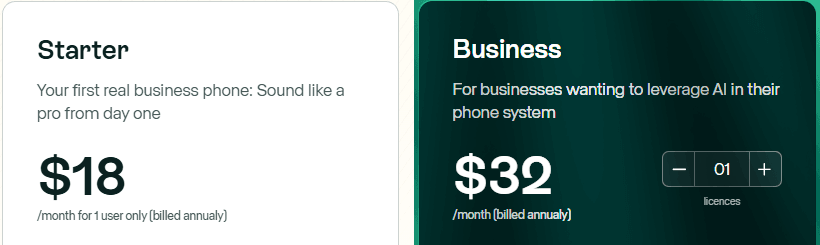
Allo offers two simple plans that scale with your team. Here’s what they cost when billed annually:
Starter: $18/month for unlimited calling in the US and Canada, one local business number, inbound SMS, call recording, business hours, call summaries, smart call routing, an AI receptionist, and more
Business: $32/user/month for multi-device sync, toll-free numbers, SMS, MMS, and outbound texting support, 1,000+ integrations, call insights, international calling, web and desktop apps, and unlimited calls with Allo’s AI receptionist
4. Apollo - Best AI sales prospecting tool
Pros | Cons |
AI Assistant on every plan | Inbound lead scoring requires add-on |
Prospecting extensions for Chrome, Gmail, and more | Free plan lacks CRM integrations and AI Lead Scoring |
Free forever plan |
What is Apollo?
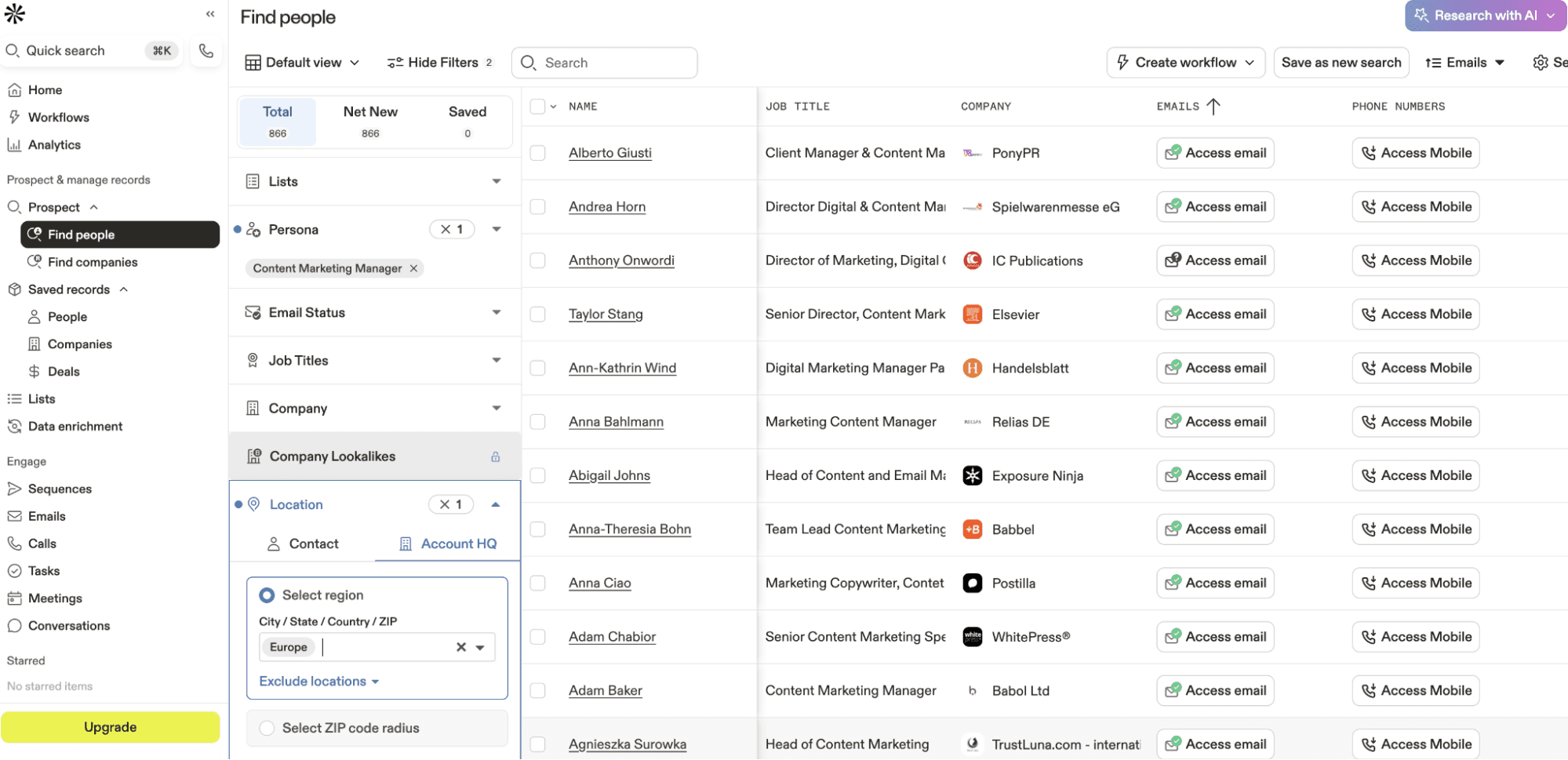
Apollo is an AI-powered sales intelligence platform, which means it combines sales prospecting and automations into a single tool. Its biggest claim to fame is a database of 210+ million contacts. This massive reach, among many other features, allows you to build workflow automations, set up automated nurture sequences, and qualify new leads and decision-makers within seconds.
Every Apollo plan comes with an AI Assistant so you can instantly identify high-intent leads, send messages based on persona, or generate outreach sequences. It also integrates directly into your workflow with Chrome, Gmail, and LinkedIn extensions. That way, it’s a little easier to source leads and send outreach messages from your browser.
But while Apollo’s free plan does offer an AI Assistant, it doesn’t include AI Lead Scoring or native CRM integrations unless you upgrade. Plus, inbound lead scoring in particular requires a separate upgrade. This can be a drawback for smaller teams with more limited resources.
How does Apollo benefit sales teams?
Sales teams can use Apollo to automatically sort best-fit leads based on company data, job titles, or engagement signals. That way, your team can prioritize prospects matching your ideal customer profile. Combined with AI Lead Scoring, which helps qualify prospects, you can easily identify which opportunities are most likely to convert.
Apollo also offers AI-powered recommendations so representatives can generate high-quality email outreach templates or sales sequences in seconds. The AI Assistant also provides real-time suggestions to improve message tone, timing, and personalization for higher conversion rates. Then, sales representatives can track messages to identify what works versus what doesn’t.
“I find Apollo.io to be incredibly useful for generating leads for business purposes. It helps me create lists for campaigns, schedule calls, and manage deals more efficiently than traditional methods. I am impressed with how well I can keep track of emails, including whether they've been opened or marked as spam. This tracking feature is very valuable to me and is something I really love about the service. The platform’s features such as targeting options by country and technology, as well as defining buyer personas, are necessary and valuable for me. The initial setup was easy because Apollo.io is self-explanatory, and the demos with the team were very helpful, allowing us to become proficient within a week.” — G2
Small teams can also benefit from Apollo’s analytics suite — think representative analytics, reports, and dashboards, analytics alerts, sequence reports, and more. This allows you to instantly access your sales numbers in real time and check whether or not you’re on track to reach your quota.
Apollo pricing

Apollo’s pricing, features, and custom add-ons largely depend on what your business needs. This includes four broad categories: outbound sales, inbound sales, data enrichment, and deal execution.
Assuming you’re in outbound sales, here’s what you’ll pay with annual billing:
Free: $0/user/month for 1,200 credits, AI Assistant and Research, two sequences, basic filters, and more
Basic: $49/user/month for AI Lead Scoring, unlimited sequences, CRM integrations, waterfall enrichment, six Meetings events, and the ability to purchase domains and mailboxes
Professional: $79/user/month for automated workflows, analytics and pre-built reports, and Projects (coming soon)
Organization: $99/user/month for customizable reports and dashboards, advanced security configurations, and access to single sign-on (SSO)
5. Lavender - Best AI Email Assistant
Pros | Cons |
Free forever plan | Limited to five emails per month on Basic plan |
Real-time scores and feedback on email personalization and style | No AI email writer without upgrading |
Automate emails completely with the AI email writer |
What is Lavender?
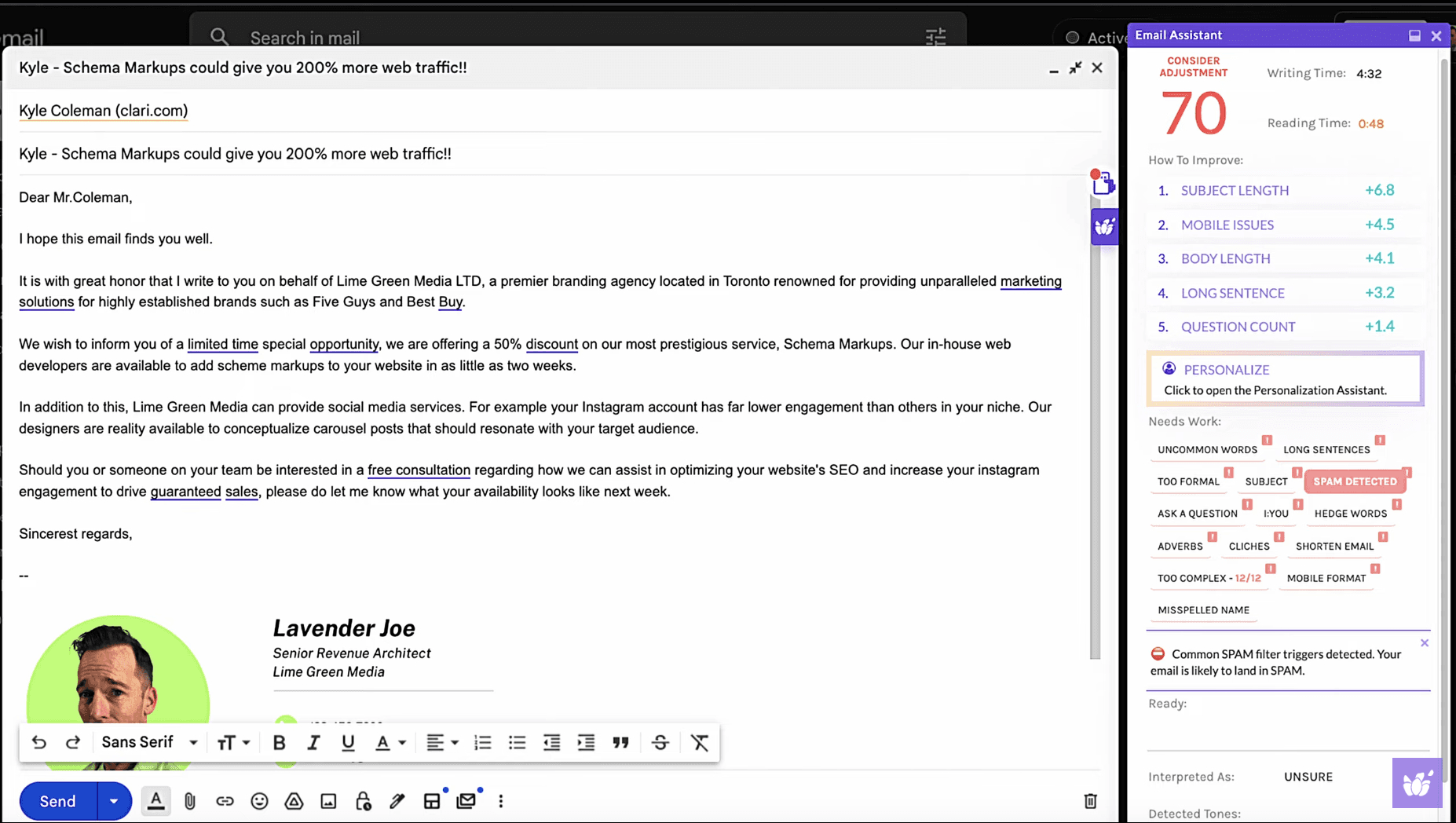
Lavender is an AI-powered writer and coach that analyzes and scores sales emails in real time. First, it gives you a score for personalization, tone, and readability. Then, it helps you make improvements to increase your reply rate before you hit “send.”
You can think of Lavender as your personal email coach and co-pilot: it sits inside your inbox (or a Chrome extension) so you can make adjustments to drafts on the go. If you ever get stuck, you can ask the AI to start the email for you. This makes it easier to conquer brain fog in a pinch.
But while Lavender does offer a free forever plan, you’re limited to a scant five emails per month. You’ll need to upgrade to a paid tier to access unlimited feedback. This also unlocks the AI email writer, which can automate and generate entire drafts for you.
How does Lavender benefit sales teams?
You can use Lavender to help score your emails based on four parameters: quick fixes, what to work on, long-term trends, and custom best practices. Beyond just correcting grammar, it analyzes message structure, depth of personalization, and tone. This is invaluable for sales teams wanting to ensure every message feels genuine.
But when combined with its bespoke AI email writer, Lavender can automate outbound outreach completely. You can generate context-aware drafts that match your brand voice and your prospect’s profile. Plus, it scours your inbox for personalization elements on your behalf.
“Lavender has completely changed my email writing workflow. The email coach is great as it clearly highlights the score of the email along with detailed ways to improve it. The GIF feature and mobile viewer have also immensely helped me in crafting more visually appealing emails, ensuring my follow-ups are read more.” — G2
Lavender also provides analytics and performance tracking so you can identify which email strategies get the best results. Reps can track response rates and learn from top-performing messages. That way, it’s practically effortless to continuously refine your approach.
Lavender pricing
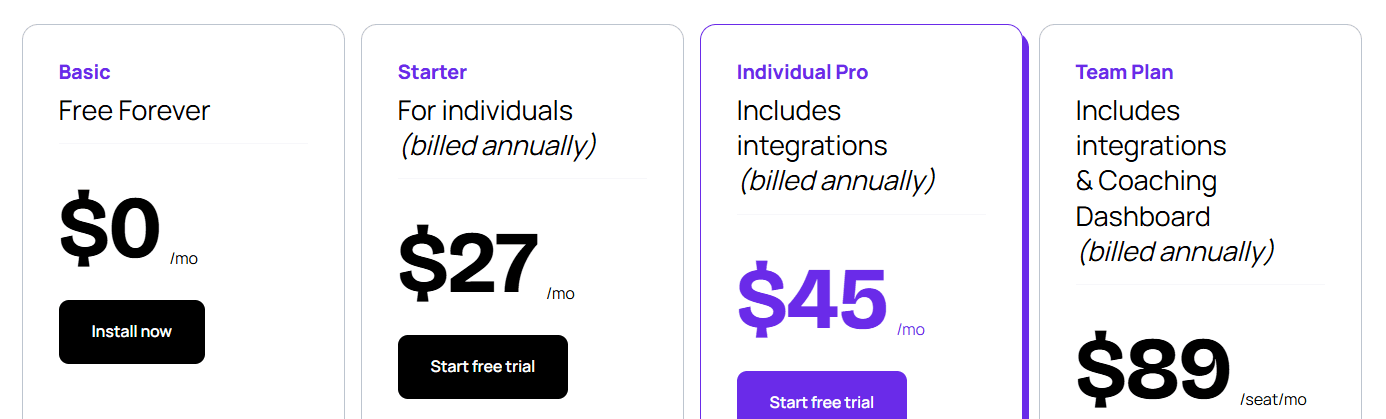
You can choose from one of four Lavender pricing plans:
Basic: $0/month for all basic features, five email analyses and personalization/month, and integrations with Gmail and Microsoft 365
Starter: $27/month for unlimited email analysis, personalization, and recommendations, plus multi-inbox support, AI Email Writer, and mobile optimization tools
Individual Pro: $45/month for unlimited everything, plus additional third-party integrations and priority support
Team Plan: $89/seat/month for everything in Individual Pro plus aggregated email analytics, accelerated dynamic scoring, proactive customer success, human-led coaching programs, and content-studio access
6. Attio - Best AI CRM
Pros | Cons |
Free plan available | Free plan limited to 3 users max |
Unlimited workflows and automations | Call intelligence only available with upgrade |
Deploy AI for automated prospecting |
What is Attio?
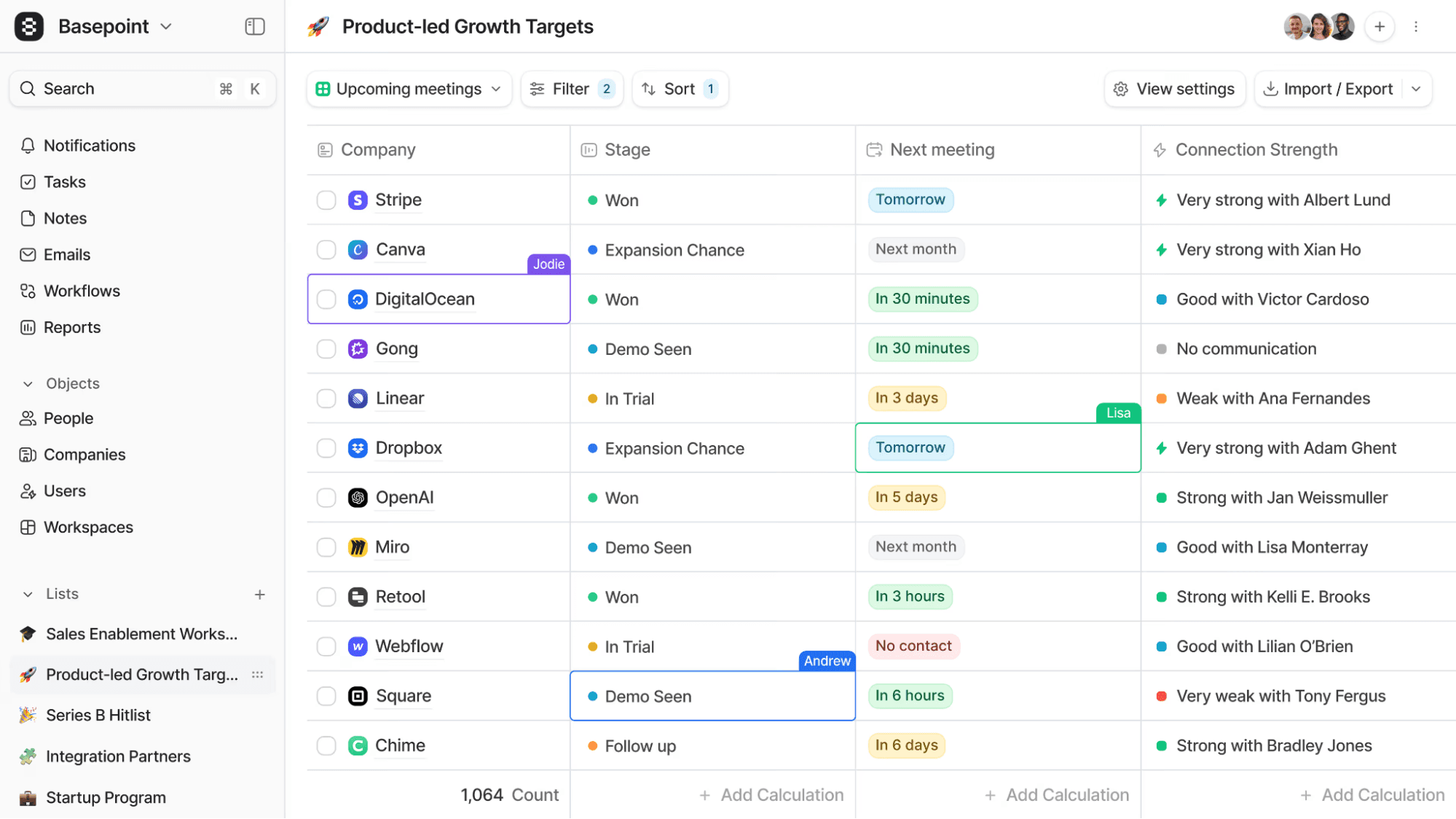
You can think of Attio as Hubspot for AI natives — it allows you to automate everyday (read: mundane) tasks with data workflows, automations, and relationship intelligence. The best part is, you can get started for $0. Attio enables you to set up unlimited AI workflows even on the Free plan.
With Attio, you can easily consolidate nearly any data source to create custom “objects,” such as Companies, People, and Deals. Then, you can automatically trigger workflows based on the attributes or behaviors of those prospects.
For example:
Enroll invitees in event sequences
Collect high-value, high-priority leads
Notify the team when the deal stage changes
However, you should know that Attio isn’t fully featured without multiple upgrades. For instance, call intelligence requires upgrading to the Pro plan, which prevents you from connecting to another business phone system. Additionally, you’re limited to 250 automation credits on the free plan. There’s no way to acquire more unless you upgrade to a paid plan.
How does Attio benefit sales teams?
Attio’s biggest advantage is helping you set up workflows based on object attributes. This way, your team can spend more time engaging in conversations with leads instead of manually categorizing or routing them in your system.
“Attio is the most flexible and modern CRM I’ve used. The object-based structure provides us total freedom to model our data precisely the way we need. The automation features are powerful and intuitive, allowing us to streamline key workflows without the need for engineering resources.” — G2
Attio can also generate comprehensive summaries even with unstructured data. For instance, you can quickly sync and enrich existing data, enabling you to sort, filter, and establish connections between records that can aid in closing future deals. Then, you can store calls and leave context for other representatives, keeping everyone on your team aligned.
Finally, you can leverage Attio’s research agent (also known as Deploy AI) to automate tasks that typically require human effort. It almost instantly accomplishes work related to prospecting, lead qualification, and churn estimations, allowing you to make more informed sales decisions.
“Gmail integration is best-in-class. The user experience is 10x easier than Hubspot/Salesforce yet it's just as powerful. Robust data architecture, and data dashboards are simple to set up. Excellent Zapier integration.” — G2
Attio pricing

With Attio, you will have four plans to choose from. Here’s what they cost when billed annually:
Free: $0/user/month for real-time contact syncing, automatic data enrichment, and a maximum of three team members
Pro: $29/user/month for private lists, enhanced email sending, and unlimited team members
Plus: $69/user/month for call intelligence, advanced data enrichment, priority support
Enterprise: Custom pricing for unlimited objects, SAML and SSO, and flexible invoicing
7. Highspot - Best AI Sales Enablement Tool
Pros | Cons |
Agentic-based AI | No transparent pricing |
Hundreds of integrations available | Better suited to enterprises than small and growing sales teams |
Built-in content management tools |
What is Highspot?
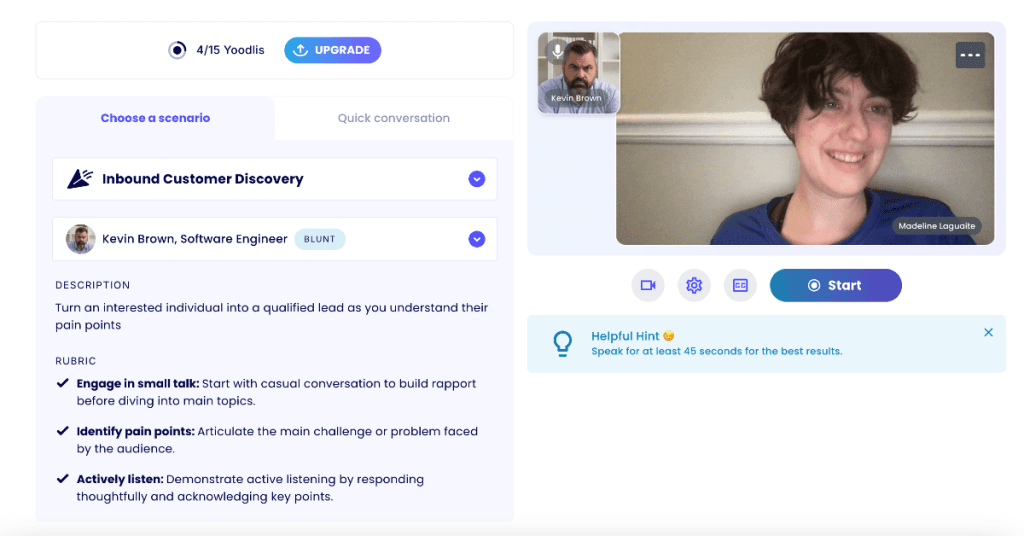
Highspot is an agentic sales platform, which means it offers AI agents that can support sales representatives in real time. It’s specifically designed for go-to-market (GTM) sales teams looking for live context, training, and coaching while in the midst of a call.
You can use Highspot to create a central repository of all sales content so representatives can search for quick answers to challenging questions in real time (think common objections, brand differentiators, and more). Additionally, you can connect to hundreds of integrations. This makes it easier to connect with the tools you already use.
Just keep in mind that Highspot doesn’t publicly disclose its pricing, although the annual cost is said to be quite high. This inherently directs it towards larger businesses — smaller sales teams with tighter budgets may find it challenging to afford.
How does Highspot benefit sales teams?
With Highspot, you can train an “AI teammate” using your company’s scripts and uploaded sales calls. This helps you identify what works (and what doesn’t) in seconds, then create specific trainings to roll out company-wide.
There are built-in content management tools to help organize these trainings, which can assist representatives in getting started with best practices, key phrases to look for, and customized development pathways. The AI even highlights opportunities during calls to aid your representatives in saying and doing the right things, in real time, on every call.
“Highspot is extremely helpful for anyone responsible for managing content at the organizational or team level. It has user-friendly tools to show when content is becoming outdated and who is responsible for updating it. I do wish the analytics were a bit more flexible and that the pricing wasn't so module-based.” — Trustpilot
Once human representatives have completed your AI-powered sales training, they can practice their new skills with built-in AI roleplaying. Plus, you can view their results in a dedicated dashboard. This makes it easier to track progress and skill development over time.
“This platform not only serves as a one-stop shop for housing content and training, but also acts as a differentiator for sales presentations, RFP submissions, and merely showcasing your company.” — G2
Highspot pricing
Highspot doesn’t publish its pricing online. But some online sources suggest a range of $20,000 or more per year.
Additionally, its “request pricing” form is currently inaccessible. This means the only way to obtain a custom quote is to directly contact the sales team.
Frequently Asked Questions About AI in Sales
What is the best AI tool for sales?
The “best” AI tool for sales depends on what your business needs to grow. This could mean:
MagicPost for AI social selling
Gong for AI coaching
Allo for an AI-powered phone system
Apollo for sales prospecting
Lavender for email
Attio for customer relationship management
Highspot for AI sales enablement
How is AI used in sales?
You can use AI in sales to help automate routine tasks, like drafting posts, taking messages, managing calls, or logging contacts in your CRM. That way, you have more time to spend on complex tasks like hosting discovery calls and closing deals.
How can AI be used in sales?
You can use AI in sales to generate content such as posts, emails, and text messages. You can also use AI to provide feedback for teams via coaching and sales enablement. Or, you can let AI perform routine tasks that don’t need human input, such as prospecting leads or adding contacts to your CRM.
Can I use ChatGPT for business?
ChatGPT does offer plans for businesses, but keep in mind they’re not designed with sales teams in mind. It can provide you with generic generative AI — like images, text, and charts/tables — but it can’t be hyperspecific to your sales teams’ needs (like offering specific feedback after sales calls). Plus, it can’t help you do things that aren’t generative in nature, like putting AI voice agents on your phone system.
Can AI replace salesmen?
No, AI can’t replace salesmen. But it can help them close deals more quickly and easily. Since AI handles routine tasks in the background, reps have more time to engage with prospects, book calls, and schedule follow-ups. They won’t get bogged down in repetitive tasks like after-call work, writing social media posts, or updating contacts in your CRM.