" height="26.80529977783203px" id="tymKb8bqC" width="128.00300311279295px"/><path d="M 0 2.417 L 0 0 L 12.909 0 L 12.909 2.417 Z" fill="rgb(126, 78, 253)" height="2.417099999999998px" id="aYr4em6zK" transform="translate(128.341 22.325)" width="12.908999999999992px"/></svg>)

"/><stop offset="1" stop-color="rgb(118, 37, 250)"/></linearGradient></defs><g d="M 19.242 21.22 L 19.362 6.204 L 19.272 6.204 L 13.757 21.22 L 10.161 21.22 L 4.796 6.204 L 4.706 6.204 L 4.825 21.22 L 0 21.22 L 0 0 L 7.283 0 L 12.109 13.607 L 12.229 13.607 L 16.844 0 L 24.247 0 L 24.247 21.22 Z M 26.421 26.113 L 26.421 23.445 L 41.407 23.445 L 41.407 26.113 Z" fill="transparent" height="26.112508199679183px" id="DvfaAIHYn" width="41.40731898311435px"><path d="M 19.242 21.22 L 19.362 6.204 L 19.272 6.204 L 13.757 21.22 L 10.161 21.22 L 4.796 6.204 L 4.706 6.204 L 4.825 21.22 L 0 21.22 L 0 0 L 7.283 0 L 12.109 13.607 L 12.229 13.607 L 16.844 0 L 24.247 0 L 24.247 21.22 Z" fill="rgb(46, 46, 46)" height="21.220180016149442px" id="pLsxRCobd" width="24.247352589074694px"/><path d="M 0 2.668 L 0 0 L 14.986 0 L 14.986 2.668 Z" fill="url(%23yD9d4I5GR-3279285344-linear-gradient)" height="2.6675085048549647px" id="yD9d4I5GR" transform="translate(26.421 23.445)" width="14.986002836263765px"/></g></svg>)
Conceptos básicos de LinkedIn

Camelia Khadraoui
LinkedIn es una herramienta esencial para los vendedores que buscan encontrar nuevos clientes.
Además de compartir tu nueva promoción en el trabajo, también podrías aprovechar los 1.000 millones de usuarios a tu alcance y convertirlos en clientes.
Pero dado que LinkedIn es una plataforma de networking, enviar mensajes en estilo de correo electrónico frío generalmente no obtiene respuestas. Estos mensajes pueden parecer demasiado insistentes y no ayudarán a que tu negocio crezca.
Si deseas hacer acercamientos en LinkedIn de manera efectiva sin parecer spam, este artículo te guiará sobre cómo hacer crecer tus ventas utilizando LinkedIn.
¿Qué es el Outreach en LinkedIn?
El outreach en LinkedIn significa enviar mensajes personalizados y hacer un seguimiento en el momento adecuado para construir relaciones comerciales y, con suerte, convertir a las personas en clientes.
A diferencia del marketing entrante, donde esperas que las personas vengan a ti, el outreach significa dar el primer paso y contactarlos.
Este método implica conectar con profesionales en LinkedIn para hacer networking, contratación o ventas. También significa que debes enviar mensajes personales en lugar de idénticos a todos los destinatarios.
El outreach en LinkedIn generalmente implica:
Identificar prospectos a través de LinkedIn Sales Navigator.
Enviar solicitudes de conexión personalizadas.
Interaccionar con el contenido de los prospectos (me gusta y comentarios reflexivos).
Desarrollar secuencias de mensajes de múltiples toques para llevar al lead hacia un objetivo específico (por ejemplo, una reunión o una demostración).
Por qué el Outreach en LinkedIn sigue funcionando en 2026
A pesar de las nuevas plataformas, grupos privados y herramientas avanzadas de IA, LinkedIn sigue siendo el lugar principal para los negocios globales.
Es donde los profesionales construyen su reputación, muestran su credibilidad y comienzan conversaciones importantes. Pero, ¿por qué es valioso el outreach en LinkedIn?
1. Construyes confianza
Con bots escribiendo correos, deepfakes pretendiendo ser ejecutivos y spam por todas partes, las personas son mucho más cuidadosas sobre con quién hablan.
Un perfil sólido de LinkedIn ayuda a probar tu identidad.
Antes de responder, los prospectos pueden verificar instantáneamente quién eres al revisar tu historial laboral, recomendaciones, contenido compartido, respaldos y conexiones mutuas.
Esta transparencia hace que las personas sean menos escépticas y ayuda a que las conversaciones se sientan más seguras y reales.
2. Puedes llegar a los tomadores de decisiones directamente
Con más de 1.2 mil millones de profesionales, incluidos más de 10 millones de ejecutivos de nivel C, LinkedIn es el único lugar donde puedes contactar a fundadores, CEO o jefes de departamento sin pasar por asistentes o formularios de contacto genéricos.
Tu mensaje llega a la misma bandeja de entrada ya sea que estés contactando a un marketeer junior o a un ejecutivo de Fortune 500. Este nivel de acceso es único en B2B.
3. Es más probable que recibas respuestas
El outreach en LinkedIn suele funcionar mejor que los correos fríos tradicionales porque ocurre en un ambiente más social y casual.
En lugar de aterrizar como propuestas anónimas en una bandeja de entrada abarrotada, tus mensajes llegan con un nombre, una cara y conexiones compartidas que construyen familiaridad instantánea.
Este toque personal cambia cómo las personas ven tus mensajes. Incluso si es un outreach frío, se siente más cálido, más relevante y menos intrusivo.
En resumen, el outreach en LinkedIn sigue funcionando en 2026 porque reúne identidad, acceso y contexto como ningún otro canal. Mientras la confianza y la relevancia importen en los negocios, LinkedIn liderará la generación de leads en B2B.
5 Pasos para una Estrategia Práctica de Alcance en LinkedIn
Antes de enviar cualquier mensaje, asegúrate de que tu perfil esté listo para los espectadores. Aquí hay cinco pasos que te ayudarán a construir un flujo de trabajo que obtenga resultados:
Paso 1: Optimiza tu perfil de LinkedIn
Tu perfil es lo primero que ven los potenciales compradores. Un perfil sólido mejora tu marca personal y te hace parecer más accesible y confiable.
Para lucir lo mejor posible en línea, consulta esta lista de elementos que necesitas corregir:
Agrega una foto de perfil profesional
Usa una foto profesional de alta calidad que se vea amigable. Agrega una bonita imagen de banner que puedas personalizar usando plataformas de diseño como Canva. Considera agregar logotipos de tus clientes anteriores como respaldo. Lee nuestro artículo sobre Lo que se debe y no se debe hacer en las fotos de perfil de LinkedIn.
Escribe un titular atractivo
Mientras que tu foto de perfil ayuda a generar confianza, el titular sirve como una declaración de “portada de revista” que atrae a otros a saber más sobre ti.
Crea un titular que sea más que solo tu cargo. Menciona tu especialidad, el valor que ofreces y a quién ayudas. Puedes usar esta guía para crear un titular que llame la atención de los prospectos.
Agrega un resumen atractivo
Escribe un resumen que comparta tu historia. Explica qué haces, cómo ayudas a los potenciales compradores y qué te hace diferente. Mantén un tono amigable y un lenguaje directo.
Consejo: Agrega palabras clave que coincidan con tu industria y rol para ayudar a las personas a encontrarte en las búsquedas.
Agrega experiencia y habilidades importantes
Enumera tus experiencias laborales relevantes y describe tus roles, responsabilidades y logros.
Agrega habilidades que se adapten a tu rol de ventas, como Desarrollo de Negocios, Generación de Leads, Software CRM y Negociación.
Pide a colegas, clientes y gerentes que te respalden. Los respaldos aumentan tu credibilidad y muestran que tienes habilidades en las áreas que enumeraste.
Personaliza tu URL
Personaliza la URL de tu perfil de LinkedIn para que sea más limpia y profesional, especialmente si planeas agregarla a tarjetas de presentación o firmas de correo electrónico.
Siguiendo estos consejos, podrás crear un perfil de LinkedIn que muestre tus habilidades profesionales y llame la atención de posibles leads.
Paso 2: Personaliza las invitaciones para conectar
Después de hacer un contacto inicial, puedes hacer un seguimiento con mensajes directos si la persona ha aceptado tu solicitud de conexión.
Puedes usar este canal para proporcionar valor compartiendo insights de la industria y otro contenido relevante que aborde los puntos de dolor del prospecto.
Los mensajes genéricos como “Veo que ambos estamos en el sector [Industria]” ya no funcionan. En 2026, las personas esperan mensajes altamente personalizados. Para los profesionales de ventas, causar una fuerte primera impresión es clave.
La regla es mencionar algo que un simple bot no sabría. Por ejemplo, habla sobre un podcast en el que estuvieron, un comentario único que hicieron o una historia personal de su sección Acerca de.
El objetivo es mostrar que te tomaste el tiempo para aprender sobre ellos personalmente.
Cuando envíes una solicitud de conexión, menciona algo específico sobre el lead, como una conexión compartida, un evento relevante o algo interesante en su perfil.
Esto muestra un interés real y hace que sea más probable que acepten tu solicitud, llevándolos a tu proceso de ventas.
Paso 3: Envía InMail dirigido a personas fuera de tu red
LinkedIn InMail es una función premium que permite a los usuarios enviar mensajes directamente a otros miembros de LinkedIn, incluso si no están conectados.
Sigue siendo una de las herramientas de alcance más confiables, especialmente cuando se combina con la investigación de LinkedIn. Comienza revisando el perfil de tu objetivo para entender su rol, intereses y actividad reciente. Una forma de encontrar direcciones de correo electrónico es exportando tus contactos de LinkedIn.

Si bien no todos comparten su correo electrónico, para quienes lo hacen, puedes guardar su información en un lugar seguro fuera de LinkedIn.
El siguiente paso es enviar tu mensaje, para hacerlo:
1. Ve al perfil del usuario al que te gustaría enviar un mensaje InMail. También puedes buscar a un miembro y enviar un nuevo mensaje InMail desde la página de mensajería o ventanas de conversación.
2. Haz clic en el botón Más en su sección de introducción.
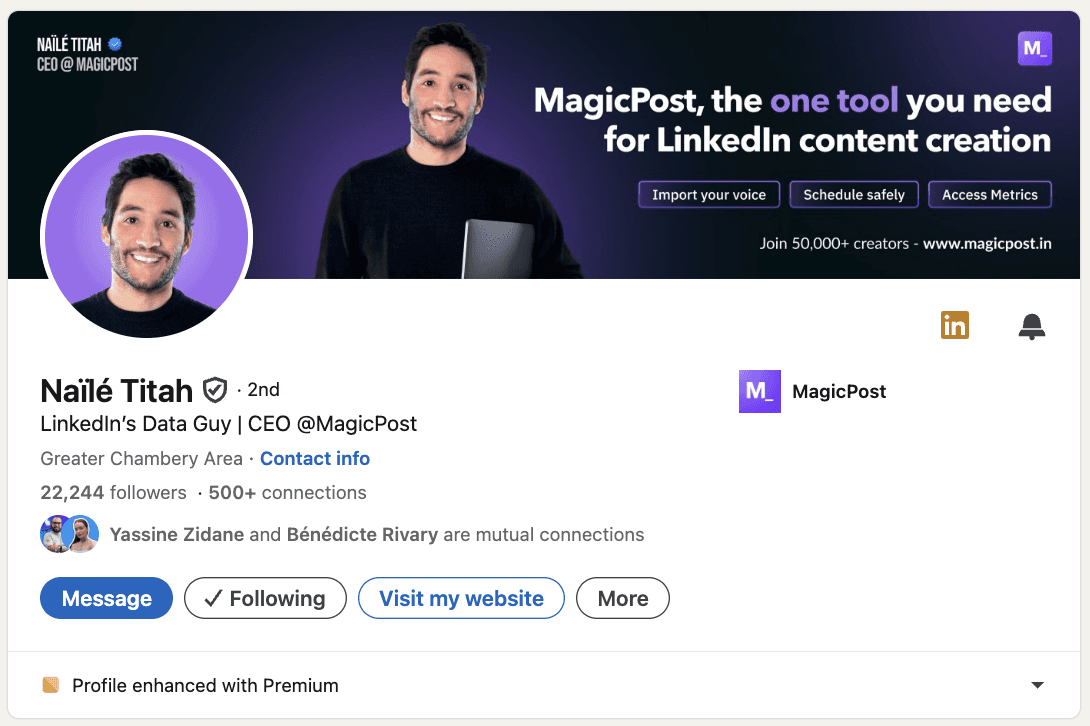
3. Selecciona Mensaje [Nombre del miembro] del menú desplegable.
4. Escribe el campo Asunto (opcional) en la ventana emergente de nuevo mensaje.
5. Escribe el mensaje en el cuadro de texto:
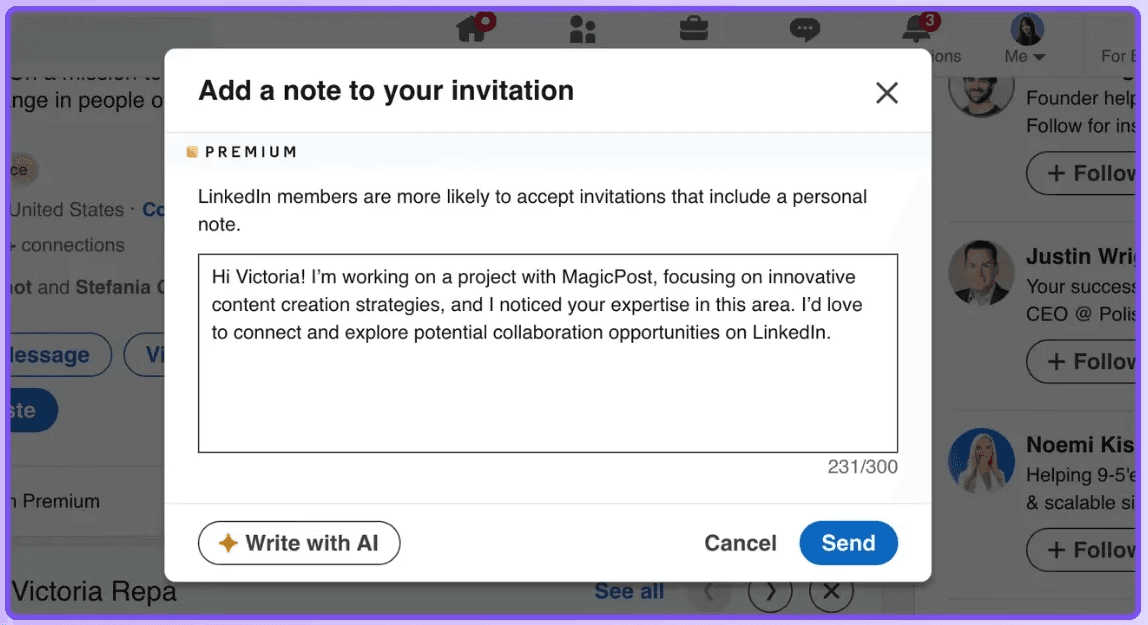
P.D. Si tienes una cuenta Básica (gratuita), debes actualizar a una cuenta Premium para usar InMail. No puedes enviar un mensaje a un miembro si ha elegido no recibir InMail en su configuración de preferencias de mensajes.
Si un miembro tiene habilitada la función de Perfil Abierto Premium, puedes enviarle un mensaje gratis.
Paso 4: Haz Seguimientos (Pero no SPAM)
La mayoría de las personas abandonan después del primer mensaje. Sin embargo, los datos sugieren que el segundo o tercer seguimiento a menudo obtiene la tasa de respuesta más alta.
Tiempo: Espera de 3 a 5 días entre cada mensaje.
Valor Agregado: No envíes un mensaje de “solo verificando”. En su lugar, comparte algo útil, como un estudio de caso, un informe de la industria o una herramienta útil.
Paso 5: Escribe un mensaje de LinkedIn que obtenga respuestas
Comienza dejando atrás el enfoque “centrado en mí”.
Los mensajes de alcance más exitosos en LinkedIn siguen un marco psicológico específico: Baja Fricción, Alta Relevancia.
Alta Fricción: “¿Podemos tener una llamada el martes a las 2 PM?”
Baja Fricción: “He preparado un PDF de 2 páginas sobre cómo [Competidor] resolvió esto, ¿te gustaría que te lo enviara?”
Si tu mensaje se siente como una “tarea” que el destinatario debe resolver, te ignorarán. Sin embargo, si se siente como un cumplido amigable y genuino o información valiosa, responderán.
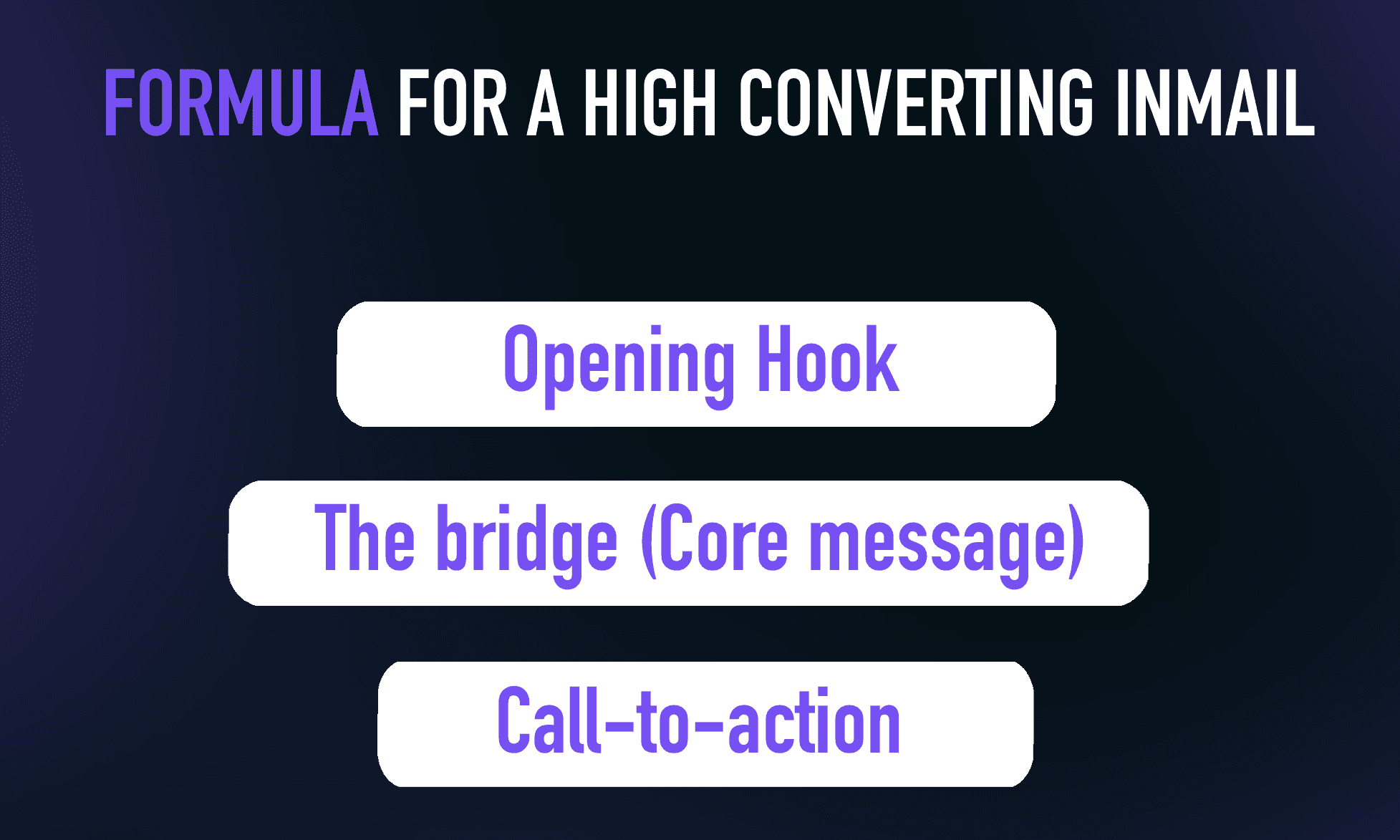
Aquí está la fórmula para un mensaje que convierte altamente:
1. El Gancho Inicial:
Comienza con una observación de “micro-nicho”. En lugar de “Hola [Nombre],” intenta “Me encantó tu opinión sobre [Tema Específico] en la publicación de ayer.”
2. El Puente:
Conecta tu experiencia con su situación actual. Usa un “Evento Desencadenante”, como un nuevo ascenso laboral, una ronda de financiamiento de la empresa o una entrevista reciente.
3. El Llamado a la Acción:
Nunca pidas una llamada de 30 minutos en el primer mensaje. Esa es una solicitud de “alta fricción”. En su lugar, haz una pregunta de “respuesta cerrada” u ofrece un recurso.
Consejo Profesional: Mantén tus mensajes por debajo de 75 palabras. En dispositivos móviles, los mensajes largos suelen ser ignorados porque se ven como trabajo. Párrafos cortos y contundentes son más fáciles de digerir mientras se desplazan.
Consejos adicionales para un gran mensaje de alcance en LinkedIn:
Personaliza tu mensaje
Evita la plantilla genérica y añade algo único para cada lead. Por ejemplo, menciona una conexión, intereses compartidos o una publicación reciente con la que interactuaron.
Usa un tono amigable
Comienza tu comunicación con un tono amistoso, destacando hitos de los leads o elogiando su éxito.
Referencia su contenido
Menciona una publicación o artículo específico que hayan compartido y explica cómo te impactó o por qué es relevante para tu alcance.
Sea claro
Asegúrate de que tu mensaje muestre por qué estás contactando, ya sea que estés ofreciendo ideas, sugiriendo una asociación o presentando tu producto o servicio.
Hazlo humano
Recuerda, hay una persona real detrás de cada perfil de LinkedIn. Mantén tu alcance genuino y relevante. No suenes demasiado rígido o robótico; después de todo, es una plataforma de networking.
El Mayor Error que Cometen las Personas con el Alcance en LinkedIn
Además de "Pitch-Slapping", que significa enviar una propuesta de venta justo después de que alguien acepte tu solicitud de conexión, hay algunos otros errores comunes:
Error 1: Enviar mensajes genéricos y no personalizados
Nada te bloquea más rápido que un mensaje genérico y robótico.
Para destacarte, adapta cada mensaje de LinkedIn a los intereses, necesidades y objetivos únicos de tu prospecto.
Pasa unos minutos explorando su perfil y publicaciones recientes. Luego, redacta un mensaje que muestre cómo puedes ayudarlos a tener éxito o agregar un valor real.
Error 2: Enviar demasiados mensajes
Nadie quiere leer tu propuesta una y otra vez. Si quieres que te bloqueen, ¡simplemente sigue spameando a tus prospectos!
Demasiados mensajes se sienten como acoso; muy pocos, y te olvidarán. Encuentra el punto dulce para estar en su radar sin sobrepasar los límites.
Consigue el equilibrio adecuado: envía un mensaje inicial, luego dos o tres seguimientos, cada uno con al menos 48 horas de diferencia. Evita los fines de semana y días festivos para obtener los mejores resultados.
Error 3: Sin un siguiente paso claro
Un tercer error común que puedes cometer al enviar mensajes fríos en LinkedIn es enviar mensajes sin un objetivo claro o un llamado a la acción.
Los mensajes sin un propósito claro dejan a los prospectos confundidos y sin saber qué hacer a continuación.
Para corregir este error, necesitas tener un objetivo claro y un llamado a la acción para cada mensaje. Tu objetivo debe estar alineado con tu objetivo general; por ejemplo, obtener una respuesta a tu pregunta que ayude a construir una relación o reservar una reunión a través de un enlace de Lemcal.
El alcance se trata de abrir puertas, no de cerrar tratos. Comienza ofreciendo valor o haciendo una pregunta simple.
Construye la relación primero, las ventas seguirán.
Los 15 mejores modelos de mensajes de divulgación en LinkedIn
Cada mensaje de divulgación en LinkedIn debe estar adaptado a la situación y a tu razón para contactar. Este enfoque obtiene los mejores resultados.
Aquí hay 9 modelos de mensajes de divulgación en LinkedIn que puedes adaptar dependiendo de a quién estás contactando.
1. Ofrecer ayudar a su negocio/marca
Por qué enviar este mensaje:
Si quieres iniciar una conversación ofreciendo valor primero, posiciónate como un experto útil en lugar de vender de inmediato.
Mensaje:
Hola {{First Name}},
Encontré tu trabajo en {{company}} y realmente me gustó cómo estás abordando {{specific project/initiative}}.Trabajo con {{type of business/brand}} en {{specific outcome}}, y mientras miraba lo que estás construyendo, surgieron algunas ideas que podrían ayudarte a {{improve result or solve problem}}.
Si estás abierto a ello, estaría encantado de compartirlas en una breve charla y ver si te resulta útil.
2. Presentación del producto con un CTA
Por qué enviar este mensaje:
Si has identificado un dolor claro que tu producto soluciona y quieres presentarlo sin sonar insistente, mientras guías al prospecto hacia un siguiente paso.
Mensaje:
Hola {{First Name}},
Noté que {{company}} actualmente está lidiando con {{specific challenge or goal}}, que es algo que vemos mucho en {{their industry}}.Creamos {{product name}} para ayudar a equipos como el tuyo a {{clear benefit/result}} sin {{common friction or downside}}.
¿Estarías abierto a una rápida llamada de 15 minutos esta semana para mostrarte cómo funciona y ver si es relevante para ti?
3. Presenta tu Canal/Página
Por qué enviar este mensaje:
Si deseas conectar al compartir contenido valioso primero, posicionarte como un recurso útil y comenzar una conversación sin vender.
Mensaje:
Hola {{First Name}},
Encontré tu perfil mientras leía sobre {{topic/industry}} y pensé que esto podría serte útil.Dirijo una página de contenido donde comparto ideas prácticas sobre {{main topics}}, basadas en experiencia del mundo real y estudios de caso.
Si estás interesado, estaría encantado de compartirlo contigo y intercambiar ideas.
4. Presenta tu producto
Por qué enviar este mensaje:
Si deseas presentar tu producto de manera clara y profesional, sin presionar por una venta inmediata, y abrir la puerta para una conversación de seguimiento.
Mensaje:
Hola {{First Name}},
Encontré {{company}} mientras investigaba sobre {{industry/topic}} y pensé que tu trabajo relacionado con {{specific detail}} era interesante.Quería presentarte rapidamente {{product name}} — una solución diseñada para ayudar a {{type of company}} a {{main benefit or result}} de manera más eficiente.
Si esto es algo que estás explorando actualmente, estaría encantado de compartir más detalles o guiarte a través de cómo funciona.
5. Solicitud de conexión a un posible socio
Por qué enviar este mensaje:
Si quieres conectar con alguien para una posible asociación y establecer el tono correcto desde la primera interacción.
Mensaje:
Hola {{First Name}},
Encontré tu trabajo en {{company}} y sentí que podría haber una fuerte sinergia entre lo que haces y lo que estamos construyendo en torno a {{shared focus}}.Me encantaría conectar y explorar posibles formas en que podríamos colaborar si tiene sentido.
6. Haz una oferta basada en el interés de un lead
Por qué enviar este mensaje:
Si el lead ya ha mostrado interés (le dio me gusta a una publicación, comentó, visitó tu sitio o mencionó una necesidad) y quieres convertir esa señal en una oferta relevante.
Mensaje:
Hola {{First Name}},
Noté tu interés en {{specific topic/action they took}}, lo que generalmente significa que los equipos están buscando mejorar {{related goal or pain point}}.Con base en eso, creo que {{product/service}} podría ayudarte a {{specific outcome}} sin {{common obstacle}}.
¿Te gustaría que te compartiera un ejemplo rápido o te explicara cómo podría funcionar para tu situación?
7. Ofrece una auditoría o revisión gratuita
Por qué enviar este mensaje:
Si el lead tiene un negocio o perfil que podría beneficiarse claramente de mejoras y quieres ofrecer valor desde el principio.
Mensaje:
Hola {{First Name}},
Noté tu configuración actual sobre {{topic}} y pensé que podrías estar abierto a una rápida auditoría.Puedo revisar {{website/profile/strategy}} y compartir 3–5 mejoras prácticas que podrían ayudarte a {{result}}.
¿Te interesaría una revisión corta?
8. Invita a un seminario web o evento en vivo
Por qué enviar este mensaje:
Si estás organizando un evento relevante para sus intereses y deseas invitarlos de una manera no insistente.
Mensaje:
Hola {{First Name}},
Vi que te interesa {{topic}}, y estoy organizando una sesión en vivo sobre {{topic}} la próxima semana.Es un breve seminario web donde cubriremos {{key points}} y compartiremos ejemplos reales.
¿Te gustaría que te enviara el enlace?
9. Comparte un estudio de caso
Por qué enviar este mensaje:
Si tu lead está en la misma industria que un cliente exitoso y deseas construir credibilidad.
Mensaje:
Hola {{First Name}},
Noté que estás trabajando en {{industry}}, y recientemente ayudamos a una empresa similar a lograr {{result}}.Puedo compartir el estudio de caso si estás interesado.
¿Te gustaría que te lo envíe?
10. Felicitaciones por un logro reciente
Por qué enviar este mensaje:
Si el lead compartió recientemente un logro, nuevo rol o hito y deseas comenzar una relación basada en la autenticidad.
Mensaje:
Hola {{First Name}},
¡Felicitaciones por {{achievement/new role}} — es una gran victoria!Estoy realmente impresionado por lo que estás construyendo en {{industry}}.
Me encantaría conectar y aprender más sobre tu trayectoria.
11. Pide retroalimentación u opinión
Por qué enviar este mensaje:
Si deseas iniciar una conversación pidiendo su opinión profesional, lo que les hace sentir valorados.
Mensaje:
Hola {{First Name}},
Vi tu experiencia en {{topic}}, y me encantaría saber tu opinión sobre algo.¿Te importaría compartir tus pensamientos sobre {{question}}?
Apreciaría mucho tu perspectiva.
12. Ofrecer una colaboración de contenido
Por qué enviar este mensaje:
Si deseas colaborar en un blog, pódcast o entrevista con alguien de tu nicho.
Mensaje:
Hola {{First Name}},
Me encanta tu contenido sobre {{topic}} y creo que nuestras audiencias se beneficiarían de una colaboración.¿Estarías dispuesto a hacer una breve entrevista o co-crear una publicación juntos?
Si es así, puedo compartir algunas ideas.
13. Ofrecer un descuento o una oferta especial
Por qué enviar este mensaje:
Si deseas hacer una oferta por tiempo limitado para incentivar la acción sin ser insistente.
Mensaje:
Hola {{First Name}},
Noté que estás explorando {{topic}}, y actualmente estamos ofreciendo un descuento especial para {{product/service}}.Si deseas, puedo compartir los detalles y ver si se ajusta a tus necesidades.
¿Te gustaría saber más?
14. Invita a unirse a un grupo o comunidad privada
Por qué enviar este mensaje:
Si tienes una comunidad que proporciona valor y deseas invitarles a unirse.
Mensaje:
Hola {{First Name}},
Estoy construyendo una pequeña comunidad de profesionales enfocados en {{topic}}.Compartimos recursos, estudios de caso y oportunidades de networking.
¿Te gustaría una invitación?
15. Ofrecer una demostración rápida o prueba
Por qué enviar este mensaje:
Si deseas que experimenten tu producto antes de comprometerse.
Mensaje:
Hola {{First Name}},
Me encantaría mostrarte cómo funciona {{product}} y cómo puede ayudarte a {{benefit}}¿Estarías abierto a una rápida demostración o una prueba gratuita?
Puedo configurarla en menos de 10 minutos.
Cómo Hacer Seguimiento y Mantener la Conversación en Marcha
Es difícil iniciar una conversación en LinkedIn, pero mantenerla es aún más complicado. Muchas personas envían solo un mensaje y luego esperan, con la esperanza de una respuesta.
Pero los verdaderos resultados provienen de hacer seguimiento de manera consistente y reflexiva, manteniendo a tu contacto interesado sin hacerle sentir presionado.
Además de no hacer spam, aquí hay algunos consejos más para mantener a tu contacto interesado y la conversación en marcha:
1. No Esperes Demasiado: El tiempo importa. Si esperas demasiado, tu mensaje se vuelve irrelevante o se olvida.
2. Menciona Su Actividad: Si han publicado algo recientemente, comentado o actualizado su perfil, utilízalo. Esto demuestra que estás prestando atención y no solo enviando mensajes genéricos.
3. Manténlo Breve y Natural: A nadie le gusta leer mensajes largos y prolijos. LinkedIn no es el lugar para correos electrónicos de ventas. Haz que tus mensajes sean breves, amigables y fáciles de leer.
4. Sé Respetuoso y Sabe Cuándo Dejarlo: Si has hecho seguimiento tres veces sin respuesta, está bien detenerte. Aún puedes mantener las cosas positivas diciendo: “Si ahora no es el momento adecuado, me pondré en contacto más tarde.” Esto mantiene la relación profesional.
5. Usa “Pruebas” para Construir Confianza: No dejes a tu contacto adivinando. Comparte tus credenciales o pruebas desde el principio, como resultados rápidos, un cliente satisfecho o un testimonio. La prueba hace que tu mensaje sea más creíble y más fácil de responder.
6. Siempre Termina con un Siguiente Paso Claro: Cada mensaje debe terminar con un CTA claro, pero no insistente. Esto facilita la respuesta del contacto. Por ejemplo:
“¿Quieres ver una demostración rápida?”
“¿Puedo enviarte un breve ejemplo?”
“¿Estarías abierto a una llamada de 10 minutos?”
7. Haz Preguntas Abiertas: En lugar de preguntas de sí/no, pregunta algo que invite a la conversación. Las preguntas abiertas facilitan que el contacto responda. Por ejemplo:
“¿Cuál es tu mayor desafío con X en este momento?”
“¿Cómo estás manejando Y actualmente?”
“¿Cuál sería tu resultado ideal para Z?”
8. Usa la Técnica del “Micro Compromiso”: En lugar de pedir una reunión de inmediato, pide primero una pequeña acción. Los micro compromisos son más fáciles de aceptar y ayudan a construir confianza. Por ejemplo:
“¿Te gustaría un ejemplo rápido?”
“¿Puedo enviarte un estudio de caso?”
“¿Está bien si comparto una breve demostración?”
Cerrando el Tema
Cuando te enfocas en enviar mensajes personalizados y ofrecer valor primero, tu alcance puede ayudarte a construir relaciones reales en lugar de solo conseguir una venta.
Encuentra tus prospectos y elige la mejor forma de contactarlos, como mensajes directos o InMails.
¡Mantén tus mensajes cortos, relevantes y amigables!
Usa los desencadenantes psicológicos con cuidado, haz un seguimiento reflexivo y guía la conversación hacia adelante sin hacer que nadie se sienta presionado.
Cuando se hace bien, el alcance en LinkedIn te ayuda a iniciar conversaciones reales, construir confianza y convertir conexiones en oportunidades duraderas.
¡Feliz acercamiento ✨