Bent u moe van het creëren van generieke LinkedIn-inhoud die de aandacht van uw publiek niet trekt? Wilt u het magische recept ontdekken dat ervoor zorgt dat uw publiek halverwege het scrollen pauzeert en aandacht besteedt aan uw bericht?
Klaar om los te breken van flauwe, saaie berichten en te beginnen met het creëren van inhoud die betrokkenheid en zichtbaarheid zal genereren? Dan zou u dit artikel moeten lezen. We hebben vijf sjablonen onderzocht en samengesteld die u kunt gebruiken om een unieke stem op het platform te creëren.
Waarom moet je een LinkedIn Post-sjabloon gebruiken?
Het gebruik van een LinkedIn post-sjabloon kan je op vele manieren helpen, afhankelijk van je behoeften:
Zorg ervoor dat je boodschap duidelijk, professioneel en effectief communiceert wat je wilt zeggen aan je professionele netwerk.
Dien als een gids, door een efficiënte structuur te bieden die je kunt aanpassen aan je specifieke content terwijl je een gepolijste presentatie behoudt.
Ze kunnen ook kostbare tijd besparen door een framework te bieden dat je snel kunt aanpassen voor verschillende soorten posts, of je nu updates, artikelen of aankondigingen deelt.
Over het geheel genomen kunnen sjablonen het proces vereenvoudigen van het maken van boeiende en impactvolle content op LinkedIn, vooral wanneer je weinig tijd hebt. Handig, toch?
5 LinkedIn Post Sjablonen om te Gebruiken
Nu, het moment waar je op hebt gewacht.
Laten we de 5 beste sjablonen bekijken die ELKE KEER werken.
Narratieve Benadering
Verhalen hebben deze magische kracht om ons te grijpen en nooit meer los te laten! Ze raken onze emotie, waardoor berichten niet alleen informatief, maar ronduit boeiend zijn. Daarom is het verweven van verhalen in je LinkedIn posts als het toevoegen van raketbrandstof aan je engagement-niveaus.
Van het delen van je eigen hilarische blunders tot het vieren van grote overwinningen en zelfs het presenteren van lovende recensies van klanten, de verhalenvertel mogelijkheden zijn eindeloos.
En raad eens? Sommige van de populairste LinkedIn posts daarbuiten? Ja, je raadde het al— ze gaan allemaal over die sappige, niet-neer-te-leggen verhalen.
De narratieve benadering sjabloon stap-voor-stap:
De hook: Begin met een persoonlijk anekdote om de aandacht van je lezer te pakken.
Verbind: Deel je emoties om diep te verbinden.
Het keerpunt: Markeer het keerpunt dat alles veranderde.
Het resultaat: Beschrijf het resultaat om de impact te tonen.
Reflectie: Reflecteer op geleerde lessen voor extra diepte.
Aanmoediging: Bied praktisch advies of aanmoediging.
Engagement: Rond af met een boeiende vraag om een gesprek aan te wakkeren.
Listicle Sjabloon
Het listicle sjabloon is één van de beste soorten content die je op LinkedIn kunt maken: kort, krachtig, en boordevol wijsheid!
Het beste deel? LinkedIn-gebruikers zijn er dol op! Ze zijn hongerig naar snelle tips, hacks, en baanbrekende strategieën. Geef je inzichten in een nette, lijstvormige verpakking, en zie je engagement omhoog schieten!
Dus, of het nu een aftelling van de top tien hacks is, een stapsgewijze gids, of een schat aan bronnen, kies je listicle smaak en maak je klaar om je publiek te betoveren!
Het listicle sjabloon stap-voor-stap:
Pak aandacht met een pakkende titel.
Begin met een boeiende introductie om je lezers te hooken.
Duik in je lijst met krachtige opsommingstekens.
Rond af met een sterke conclusie en benadruk de belangrijkste inzichten.
Vergeet een oproep tot actie niet om je publiek te engage en discussie aan te moedigen.
Hoewel gewone tekst prima werkt, overweeg je listicles op te laten vallen met carrousels voor nog meer zichtbaarheid en performance—want carrousels krijgen 5x meer klikken!
Met de kracht van listicles word je de bron voor branche-inzichten, terwijl je een loyale gemeenschap van toegewijde lezers opbouwt.
Persoonlijke Reflectie
Wist je dat je LinkedIn-pagina je persoonlijke reflectie kan laten zien als een mini-blog hub?
Vergeet lange artikelen; compacte blogs van minder dan 500 woorden kunnen je stem zijn over elk onderwerp. Bang voor woordlimieten? Breek het op in hapklare posts of maak een serie voor verwachting!
Je persoonlijke reflectie recept:
Deel je perspectief.
Adres tegenovergestelde meningen.
Kruid het op met verhalen.
Geef 3-5 tips.
Sluit af met een oproep tot actie.
Eerder het onderwerp behandeld? Verwijs ze naar je post en wek een gesprek! Leid verkeer en bouw vertrouwen op met je publiek.
Het Rant Sjabloon
Klaar om dingen op te schudden en mensen aan het praten te krijgen? Omarm het rant sjabloon!
Het doorbreekt normen, daagt perspectieven uit, en stimuleert reflectie, terwijl het grenzen verlegt. Maar ben voorzichtig! Benader met gevoeligheid en respecteer diverse meningen om constructieve dialoog te bevorderen.
Klaar om boeiende, controversiële content op LinkedIn te maken die levendige discussies aanwakkert? Laten we erin duiken en wat golven maken!
Het rant sjabloon stap-voor-stap:
Begin met het heersende idee: Laten we duiken in wat iedereen zegt.
Schud zaken op met je frisse blik: Klaar om de boot te laten schommelen met je gedurfde perspectief?
Onderbouw het met redenen: Laten we de 'waarom' achter je standpunt afbreken met solide bewijs.
Bied een alternatief aan: Hoe zit het met het herschikken van het script en verkennen van een ander pad?
Betrek iedereen erbij: Laten we horen wat jullie allemaal te zeggen hebben! Jullie ideeën zijn belangrijk.
Tijd om deel te nemen aan het gesprek: Deel je inzichten en laten we wat levendige discussies aanwakkeren!
Analyse Sjabloon
Op zoek om nummer liefhebbers te boeien?
Gebruik een op analytics gebaseerde sjabloon om top-notch engagement op LinkedIn te stimuleren. Getallen zijn niet alleen aandachtstrekkers; ze ontlokken ook prikkelende discussies.
Nauwkeurigheid is echter van groot belang om eventuele gevolgen van het verkeerd voorstellen van gegevens te vermijden. Als dit lijkt op een sjabloon dat je zou aanspreken, raden we aan om grote cijfers te contrasteren met kleinere voor een schokkend effect.
Hier ziet een Analyse sjabloon er stap voor stap uit met een voorbeeld:
Open met een korte inleiding die de geest van het publiek voorbereidt.
"Wist je dat de wereldwijde e-commerce markt naar verwachting 6,5 biljoen dollar zal bereiken tegen 2023?"
Voeg je grote datanummer in, mogelijk een die een belangrijke trend markeert.
"Volgens Statista kende de e-commerce markt alleen al in 2020 een groei van 27,6%, aangewakkerd door de verschuiving naar online winkelen tijdens de pandemie."
Contrast het grote cijfer met een klein en specifiek datapunt.
"Echter, slechts 22% van de kleine bedrijven heeft een volledig geïntegreerde e-commerce strategie, zoals gerapporteerd door Digital Commerce 360."
Presenteer je analyse en inzichten op basis van de gepresenteerde gegevens. Leg uit wat ze onthullen en hun implicaties.
"Deze cijfers benadrukken het immense potentieel van e-commerce, maar ook de uitdagingen die kleine bedrijven tegenkomen bij het benutten van deze kans.
Bedrijven moeten zich aanpassen en investeren in robuuste e-commerce strategieën om te gedijen in de digitale markt."
Sluit af met een oproep tot actie die lezers aanmoedigt om te reageren op de gegevens door hun standpunten te delen.
"Wat zijn je gedachten over de toekomst van e-commerce en de impact ervan op kleine bedrijven?
Deel je inzichten in de reacties hieronder, en laten we strategieën voor succes in het digitale tijdperk bespreken."
Hoe je je eigen LinkedIn Post-sjablonen maakt?
Volg deze drie stappen om een sjabloon te maken dat bij je stijl past:
1. Vind Je Stijl
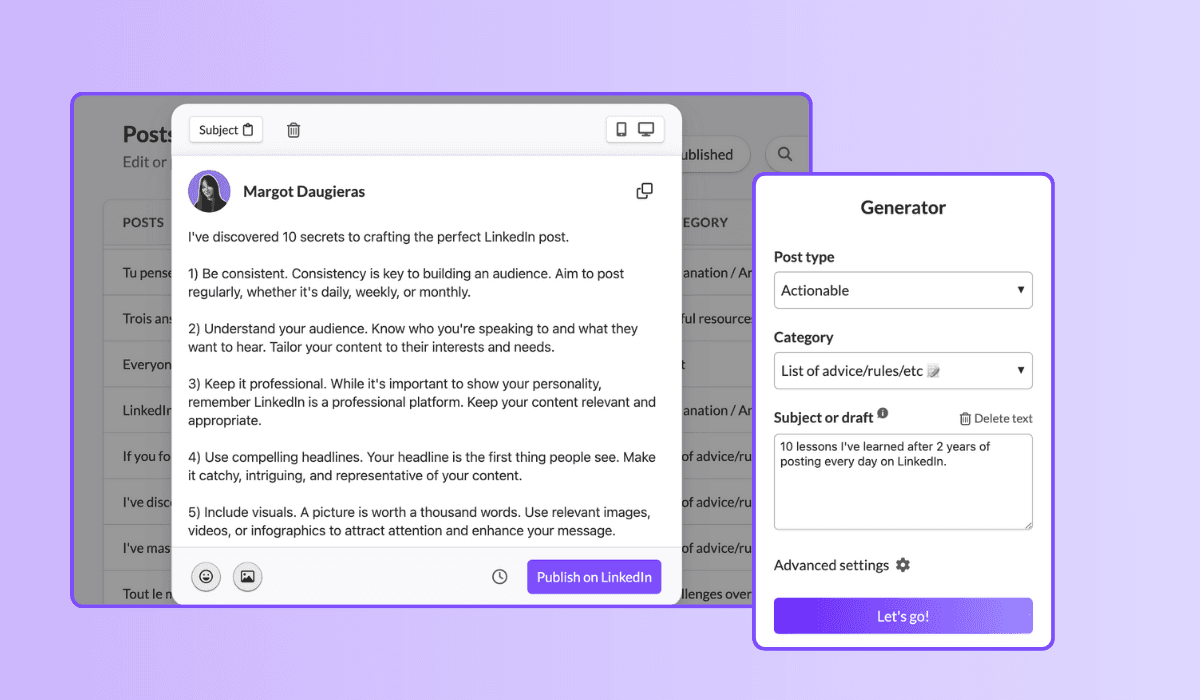
Begin met het creëren van LinkedIn posts op een manier die natuurlijk voor je aanvoelt. Experimenteer zoveel mogelijk. Gebruik tools zoals MagicPost om verschillende posts te genereren en ontdek welke stijlen bij je passen. Hergebruik de stijlen die je effectief en plezierig vond.
2. Beoordeel Je Resultaten
Let goed op de performance van je posts. Analyseer welke posts de meeste engagement genereren en probeer patronen te ontdekken in wat het beste werkt voor je publiek. Dit zal je helpen je eigen "magische formule" voor succesvolle posts te ontwikkelen.
3. Itereer en Verbeter Constant
Telkens wanneer een post goed presteert, sla deze op in de “Template” feature van MagicPost. Dit stelt je in staat om succesvolle posts eenvoudig te repliceren met dezelfde stijl en winnende formule. Blijf je aanpak verfijnen op basis van feedback en performance gegevens om je sjablonen te blijven verbeteren.
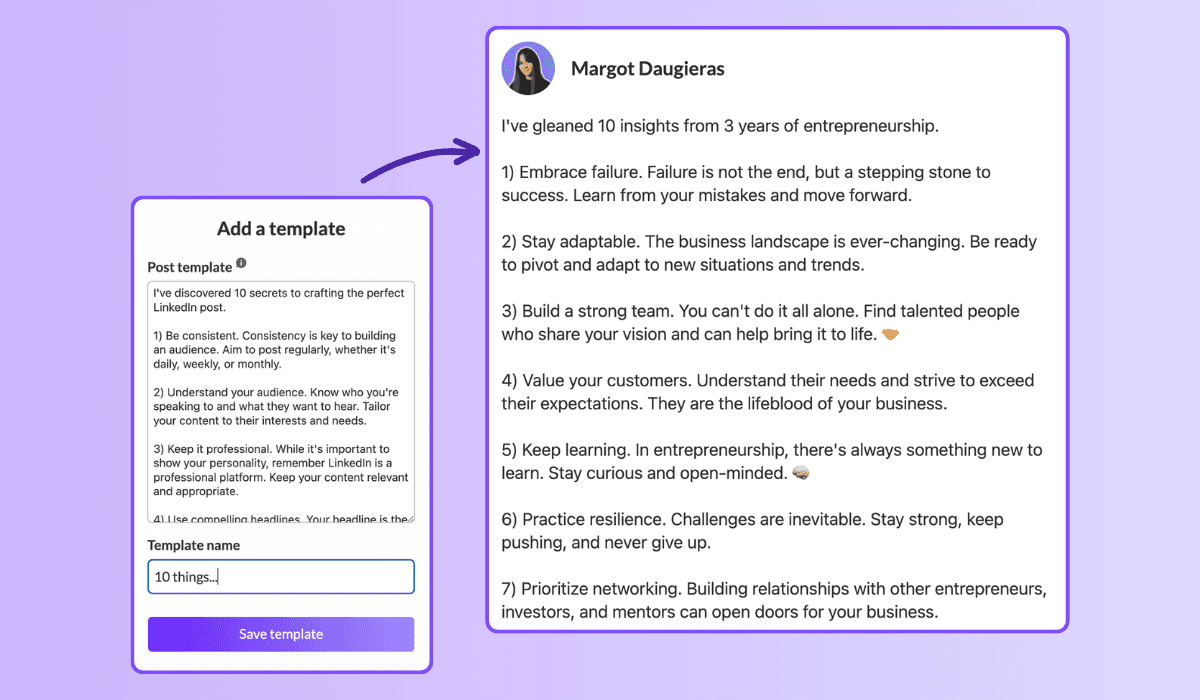
Door deze stappen te volgen, kun je LinkedIn post-sjablonen maken die niet alleen je unieke stijl weerspiegelen, maar ook aanzienlijke engagement genereren. Door gebruik te maken van verschillende tools en methoden om je strategie te stroomlijnen, kun je tijd besparen en tegelijkertijd de impact van je posts maximaliseren.
Dus duik erin en begin met het maken van posts die je publiek boeien!
Geef Je LinkedIn Spel Een Opfrisbeurt Met Nieuwe Sjablonen!
Blijf niet hangen in dezelfde oude routine—deze sjablonen kunnen je contentstrategie transformeren. Niet alleen bieden ze een reeks opties, maar ze garanderen ook dat je nooit zonder ideeën komt te zitten!
Dus, waarom wachten? Duik in deze sjablonen en combineer ze door gebruik te maken van MagicPost om de volledige kracht van je LinkedIn presence te ontketenen.
Verhef je professionele reis en bereik nieuwe hoogten!
2. The challenge overcome
Family: Challenges overcome. 1.03% median ER, 51 median likes, on 16,823 posts. The second-best family, and the engine of most great LinkedIn stories.
[Open inside the problem, present tense: "[Number] months ago, [the thing that was broken]."]
[Raise the stakes: what it would have cost to fail.]
[The turn: the decision, insight, or person that changed it.]
[What you did, concretely. The steps, not the vibes.]
[Where it landed, with one number.]
[The transferable lesson, one line, for the reader facing the same wall.]
When to use it: whenever a result came from struggle and the struggle is the interesting part. This is the backbone of the personal story post, the format that does the most for you on the platform.
3. The hard moment
Family: Hard moment. 0.80% median ER, 47 median likes, on 3,234 posts. Less used than the others (only 3,234 posts), which is part of why it still earns. Honesty is uncrowded.
[Name the hard thing, without a bow on it: "[What happened]. It still stings."]
[Resist resolving it too fast. Stay in the moment one beat longer than is comfortable.]
[What you are learning from it, tentatively, not as a TED talk.]
[An open question to the room, inviting people who have been there.]
When to use it: a layoff, a failed launch, a loss, a setback you are still inside. Use it honestly or not at all; the family rewards real vulnerability, not performed vulnerability. For the job-loss version specifically, the open-to-work explainer covers how to frame it.
4. The lessons learned
Family: Lessons learned. 0.70% median ER, 32 median likes, on 24,803 posts. A heavily-used family (24,803 posts) that still clears the median: proof the format travels.
[The setup: "[Time period] doing [thing] taught me [number] things."]
[Lesson 1: the counterintuitive one first. Bold the takeaway, then one line of why.]
[Lesson 2.]
[Lesson 3. Keep each to two lines max; the list is the value.]
[Close on the one lesson you wish you had learned soonest.]
When to use it: end of a project, a year, a role, a chapter. Anything you can look back on. Full skeleton bank in the lessons learned post guide.
Fill these in your own voice, automatically. This is the exact job MagicPost's AI LinkedIn post generator was built for: you pick a template, drop in your raw situation, and it writes the post the way you would, with the right length and structure for the family, no blank-page stare. A skeleton gets you the shape; the generator handles the words.
5. The situation recap
Family: Situation recap. 0.68% median ER, 45 median likes, on 11,729 posts. A "here is where things stand" post: state of the project, the market, the journey.
[Frame the moment: "[Number] weeks into [thing], here is the honest status."]
[What is working, briefly. One or two wins.]
[What is not working, more honestly. This is the part people read for.]
[What you are changing because of it.]
[Where you expect to be by [date]. Invite people to check back.]
When to use it: building in public, a recurring update cadence, a midpoint reflection. The transparency is the engagement driver: people follow trajectories, not snapshots.
Tier 2: the teaching templates (your reliable middle)
These five sit around the median: dependable, useful, the everyday workhorses. They teach rather than confess, which caps their ceiling but makes them repeatable. Mix them into the giving tier so you are not always confessing.
6. The explainer
Family: Explainer / analysis. 0.40% median ER, 21 median likes, on 83,180 posts. The second-most-used family on LinkedIn and, not coincidentally, one of the lowest likes counts (21). Useful, crowded, hard to stand out in.
[The question, as your reader would phrase it: "Why does [thing] actually [happen]?"]
[The short answer, in one sentence, up top. Do not bury it.]
[The mechanism: walk through how it works in 3 to 4 steps.]
[The "so what": what the reader should do differently knowing this.]
When to use it: breaking down a concept, a trend, a how-it-works in your domain. Strong for authority, weak for raw engagement, so reserve it for when teaching is the point.
7. The tips list
Family: Tips / rules list. 0.49% median ER, 57 median likes, on 9,520 posts. Note the split: a middling ER but 57 median likes and the highest median comments of any family (23). This template trades efficiency for conversation. People argue with lists.
[The promise: "[Number] rules for [outcome], learned the hard way."]
[Rule 1, as an imperative. "Do X." Then one line of cost-of-ignoring-it.]
[Rules 2 through N, same shape, tight.]
[The bonus rule, slightly contrarian, to bait the comments.]
[Ask: "What would you add?" The list format earns its comments by inviting them.]
When to use it: when you have hard-won rules and want a discussion, not just applause. The comment count is the real prize here.
8. The quick tip
Family: Quick tip. 0.46% median ER, 29 median likes, on 3,684 posts. The smallest unit of value: one actionable thing, fast.
[The tip in the first line, no windup: "[Do this specific thing] to [get this result]."]
[Why it works, one sentence.]
[How to do it, two or three lines. Concrete enough to act on today.]
[Optional: the mistake it replaces.]
When to use it: between bigger posts, to stay present without a big lift. Cheap to produce, modest but reliable return.
9. The contrarian take
Family: Contrarian take. 0.49% median ER, 40 median likes, on 8,357 posts. Above-median engagement and the second-highest median comments outside the tips list (14): disagreement drives replies.
[The unpopular claim, stated flatly: "[Common belief] is wrong."]
[Acknowledge why people believe it. Be fair to the other side first.]
[Your evidence: the experience or data that changed your mind.]
[The reframe: what to believe instead, and what it changes.]
[Invite the pushback explicitly. The disagreement is the engine.]
When to use it: when you have a real, defensible counter-position, not a hot take for its own sake. Full playbook in the contrarian post guide. Use sparingly; an account that is contrarian about everything is just tiring.
10. The personal reflection
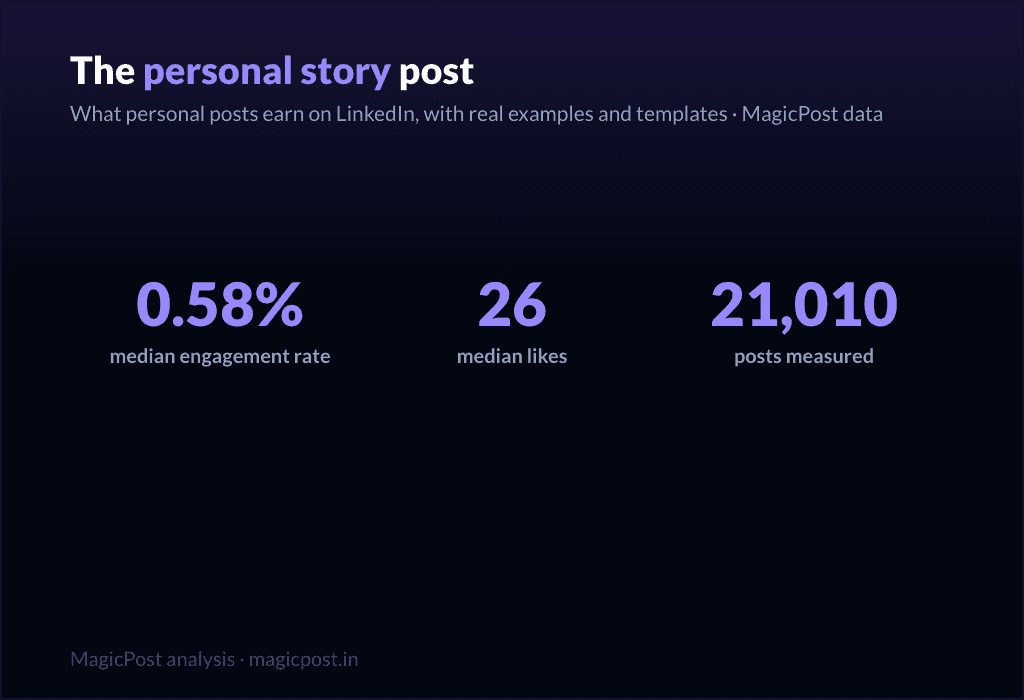
Family: Personal reflection. 0.58% median ER, 26 median likes, on 21,010 posts. Above the median on ER, lower on raw likes (26): it earns a high share of a smaller audience. Quiet, but it builds the relationship.
[A small, specific observation from your week: "[Tiny moment that made you think]."]
[Zoom out: what it made you realize about [work / people / yourself].]
[Hold the thought lightly. This is reflection, not a thesis.]
[An open-ended line that lets people sit with it too.]
When to use it: the in-between days, to stay human and not just useful, including the lighter seasonal beats covered in the holiday post guide. Pairs well with the giving tier as connective tissue.
Tier 3: the asking templates (use sparingly)
Here is the part most template pages hide. Every promotional family sits below the 0.39% median. These templates ask the reader for something (a click, a signup, a sale) and the feed charges you for it. They are necessary (you have to sell sometime) but they are a tax, not a treat. Earn the right with the tiers above, then spend it here, rarely.
11. The launch announcement
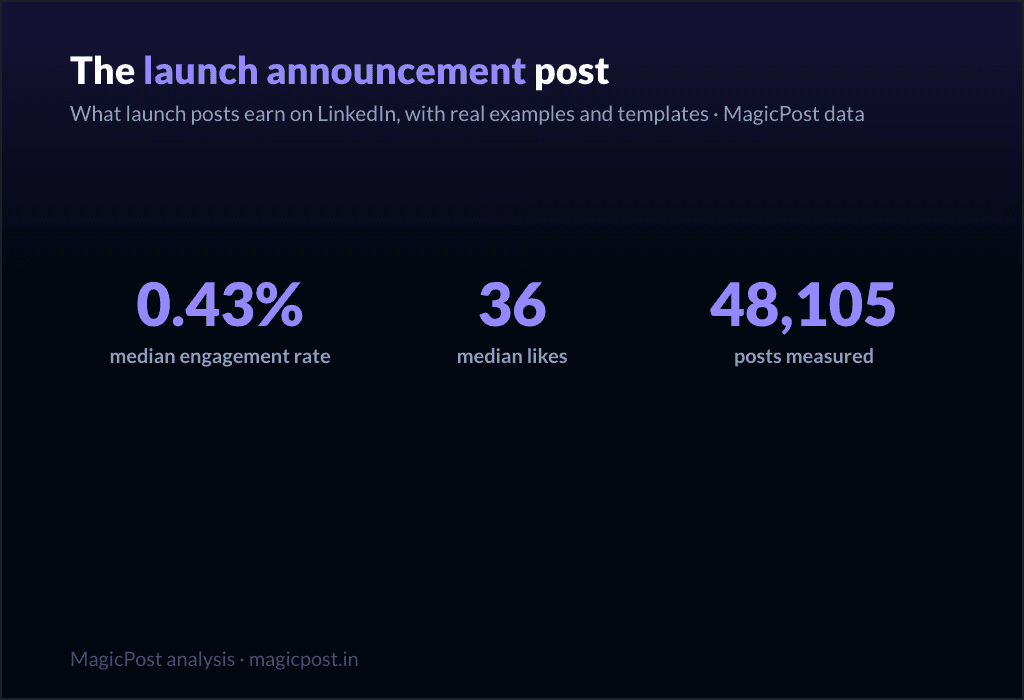
Family: Launch announcement. 0.43% median ER, 36 median likes, on 48,105 posts. The least-bad of the asking templates, slightly above median on ER but thin on comments (5). Still, do not lead your whole feed with launches.
[The news, but framed as a reader benefit, not a press release: "If you [reader problem], this is for you."]
[The problem it solves, in the reader's words.]
[What it is, in one clear line. Then one proof point.]
[The single next step. One CTA, not five.]
When to use it: an actual launch, used once or twice per launch, not as a daily drumbeat. Deep version in the product launch post guide.
12. The value-first sale
Family: Value-first selling. 0.33% median ER, 34 median likes, on 57,659 posts. Below the median (0.33%), which is the honest cost of selling, even when you wrap it in value.
[Lead with a free, genuinely useful insight. Give before you ask.]
[Make the insight complete on its own. It must stand without the pitch.]
[The soft bridge: "This is also exactly what [your offer] does for you."]
[A low-pressure invitation, not a hard close.]
When to use it: when you need to sell but want to protect the relationship. It is the gentlest asking template, and still below median, which tells you something. More patterns in the sales post examples and the wider promotion post examples.
13. The comment-gated lead magnet
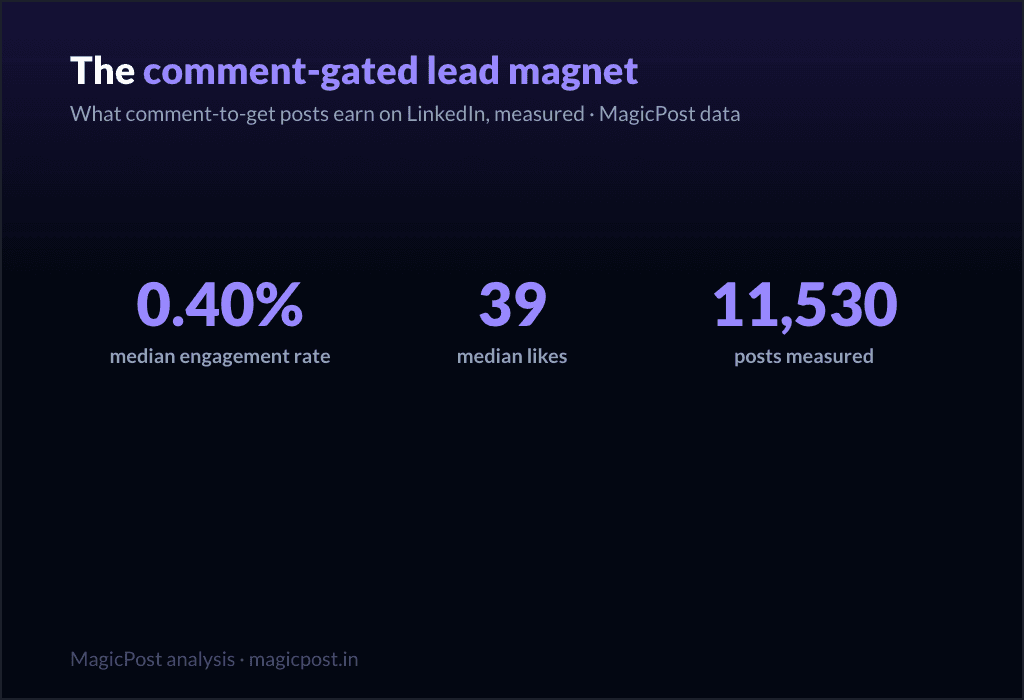
Family: Comment-gated lead magnet. 0.40% median ER, 39 median likes, on 11,530 posts. Right at the median on ER, but look at the comments: 17 median comments, second only to the tips list. The "comment X and I will send it" mechanic manufactures comments by design.
[The valuable thing you are giving away: "[Resource] that [specific outcome]."]
[Proof it is worth wanting: one line on what is inside.]
[The gate: "Comment '[word]' and I will send it to you." Keep the word short.]
[A reason to act now, lightly.]
When to use it: when you have a real asset and want both distribution and a comment spike. Be aware the comments are partly mechanical, not pure enthusiasm. Full mechanics in the lead magnet post guide.
14. The webinar invite
Family: Webinar signup push. 0.31% median ER, 32 median likes, on 51,864 posts. One of the two lowest families in the whole table (0.31%). Event posts ask for a calendar commitment, and the feed knows it.
[The outcome of attending, first: "Leave knowing how to [specific result]."]
[Who it is for, in one line. Disqualify the wrong people on purpose.]
[The logistics, compressed: date, time, format. One line.]
[The single registration link. Make the action trivial.]
When to use it: a real event, posted no more than two or three times in the run-up, spaced out. Lead with the giving tier in between. Full template set in the webinar post guide.
15. The podcast / video share
Family: Podcast / video share. 0.29% median ER, 36 median likes, on 32,031 posts. The lowest-performing family in the entire dataset (0.29%). Sharing content you made elsewhere asks people to leave the feed, and they mostly do not.
[The single best idea from the episode, stated as its own standalone insight.]
[One more: a surprising quote or moment, paraphrased.]
[Make the post valuable even if nobody clicks. That is the whole trick.]
[Then, almost as an afterthought: "Full conversation in the comments / link."]
When to use it: when you genuinely want to drive listens or views, knowing it is the weakest template on this list. The fix is the same every time: make the post worth reading on its own, and treat the click as a bonus.
The pattern, in one line: give four times for every time you ask. The data is unambiguous, and so is the playbook. MagicPost handles the drafting, the calendar, and the post-performance numbers together, so you build your week from the giving tier and spend the asking tier only when you have earned it.
Where this data comes from
Everything on this page is MagicPost's own research. We classified 1,141,932 LinkedIn posts into the template family each one belongs to, then ranked the families by median engagement rate: likes plus comments divided by the author's follower count, expressed as a percentage. The overall median across the whole corpus is a 0.39% engagement rate, the line we use to separate "above median" from "below median" throughout. Each family also reports its median likes and its sample size (n), shown in the table and beside every template. We use medians, never averages, so viral outliers cannot move a row. Engagement-rate figures are aggregated and anonymized.
FAQ
Wat is het beste LinkedIn-posttemplate?
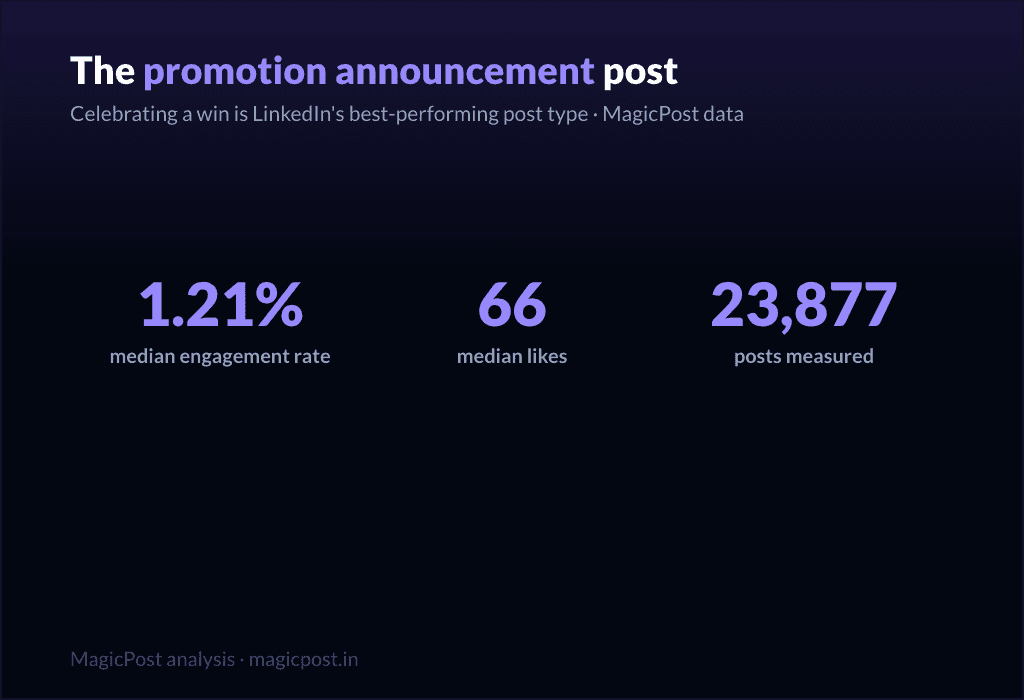
By measured engagement on 1,141,932 posts, the best template family is the win announcement (celebrating a win): a 1.21% median engagement rate and 66 median likes, the highest of any family. More broadly, the top tier is what we call the "giving templates," the ones that hand the reader something before asking for anything: celebrating a win (1.21%), challenges overcome (1.03%, 51 median likes), the hard moment (0.80%, 47 median likes), lessons learned (0.70%, 32 median likes) and the situation recap (0.68%, 45 median likes). All five clear the 0.39% overall median comfortably. The worst templates are the promotional ones, all of which sit below that median.
Hoeveel LinkedIn-posttemplates zijn er?
There are as many wordings as there are tools, but they collapse into a smaller number of real families. We measured 22 of them, from celebrating a win (1.21% median ER) down to podcast / video share (0.29%). The 15 fill-in skeletons on this page cover the families worth using, sorted into three performance tiers.
Werken templates voor promotieposts op LinkedIn?
They work, but they cost you. Every promotional family sits below the 0.39% overall median: launch announcement (0.43% ER, the least-bad), value-first selling (0.33%, 34 median likes), comment-gated lead magnet (0.40%), webinar signup push (0.31%) and podcast / video share (0.29%, the lowest of all 22 families). Use them when you must, sparingly, and earn the right with the giving templates first.
Welk LinkedIn-template krijgt de meeste reacties?
The tips / rules list, with 23 median comments, the highest of any family, despite a middling 0.49% engagement rate and 57 median likes. The comment-gated lead magnet is next at 17 median comments, though those are partly manufactured by the "comment to receive" mechanic. If conversation is your goal rather than likes, a rules list is the template to reach for.
Werken storytelling-templates echt beter dan how-to-templates?
Yes, clearly. Challenges overcome (1.03% ER), hard moment (0.80%) and lessons learned (0.70%) all beat the teaching families like explainer / analysis (0.40%, 21 median likes) and punchy advice (0.44%, 28 median likes), even though those teaching families are far more heavily used (explainer / analysis alone covers 83,180 posts). The crowd writes how-to; the data rewards story.
Waar kan ik echte voorbeelden van deze templates zien?
Beyond the skeletons here, LinkedIn post examples collects real posts for each family, and the family-specific guides linked throughout (the personal story post, lessons learned post, contrarian post and others) go deeper on each one with multiple worked examples.