Avaliações de Ferramentas

Camelia Khadraoui
Última atualização: 29 de jan. de 2026
If you’re still relying on long text posts to drive engagement on LinkedIn, you might be working harder than you need to. There’s a reason LinkedIn polls are everywhere on the platform now.
In addition to being relatively easy to go viral, polls are a great tool for lead generation.
Polls are quick to read, simple to join in, and naturally get people to share what they think. They catch attention and turn readers into participants.
But coming up with new and relevant poll ideas every 2 days can be tough.
This is where Poll Generator helps.
TL;DR
Poll Generator uses AI to come up with relevant and engaging LinkedIn poll ideas so that you can post regularly without the stress of brainstorming. Polls help you get noticed, start conversations, and learn what your audience really cares about. That makes them a powerful way to grow.
What Is Poll Generator?
A Poll generator is an AI powered tool that helps you quickly come up with engaging poll ideas for LinkedIn.
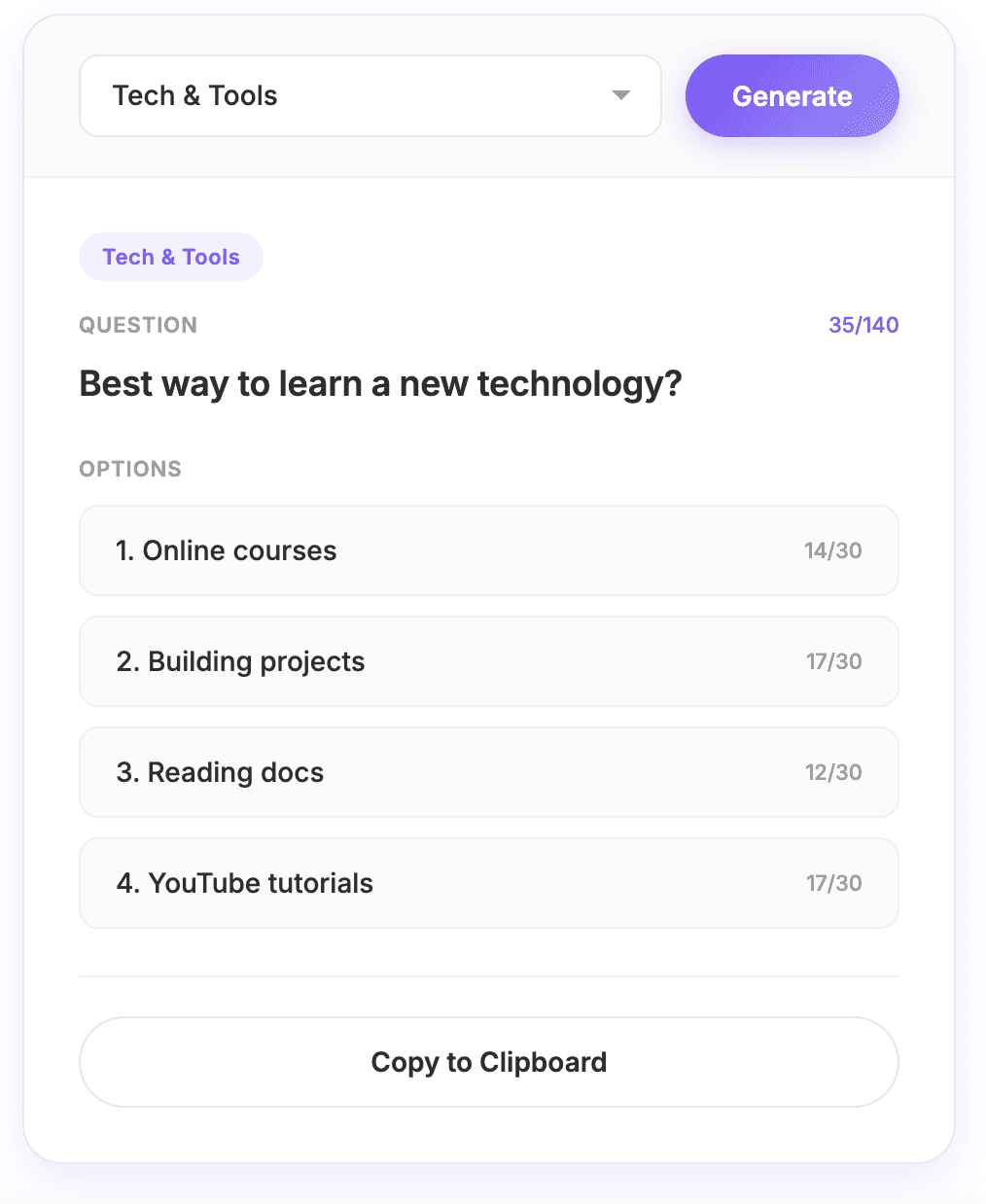
You simply select a category, click “Generate,” and it gives you ready-to-use polls.
Just enter your industry or topic, and Poll Generator will suggest timely, relevant poll ideas that fit your audience.
Whether you’re a creator, marketer, founder, or building your personal brand, Poll Generator helps you post great polls without having to come up with ideas on your own.
For example, you can type in “Tech & tools” and instantly get poll ideas that seem made just for your audience.
Why Polls Are One of the Best LinkedIn Growth Tools
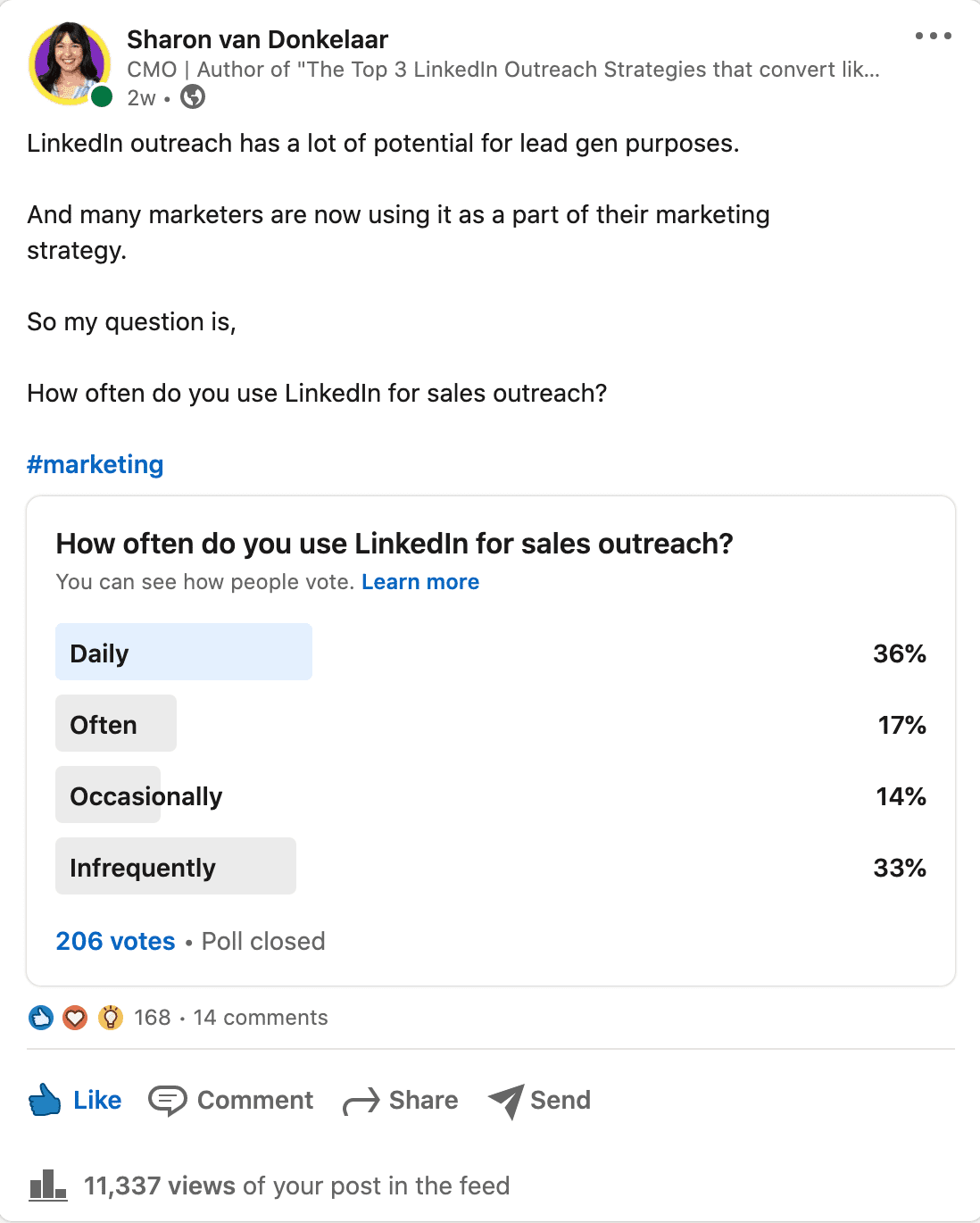
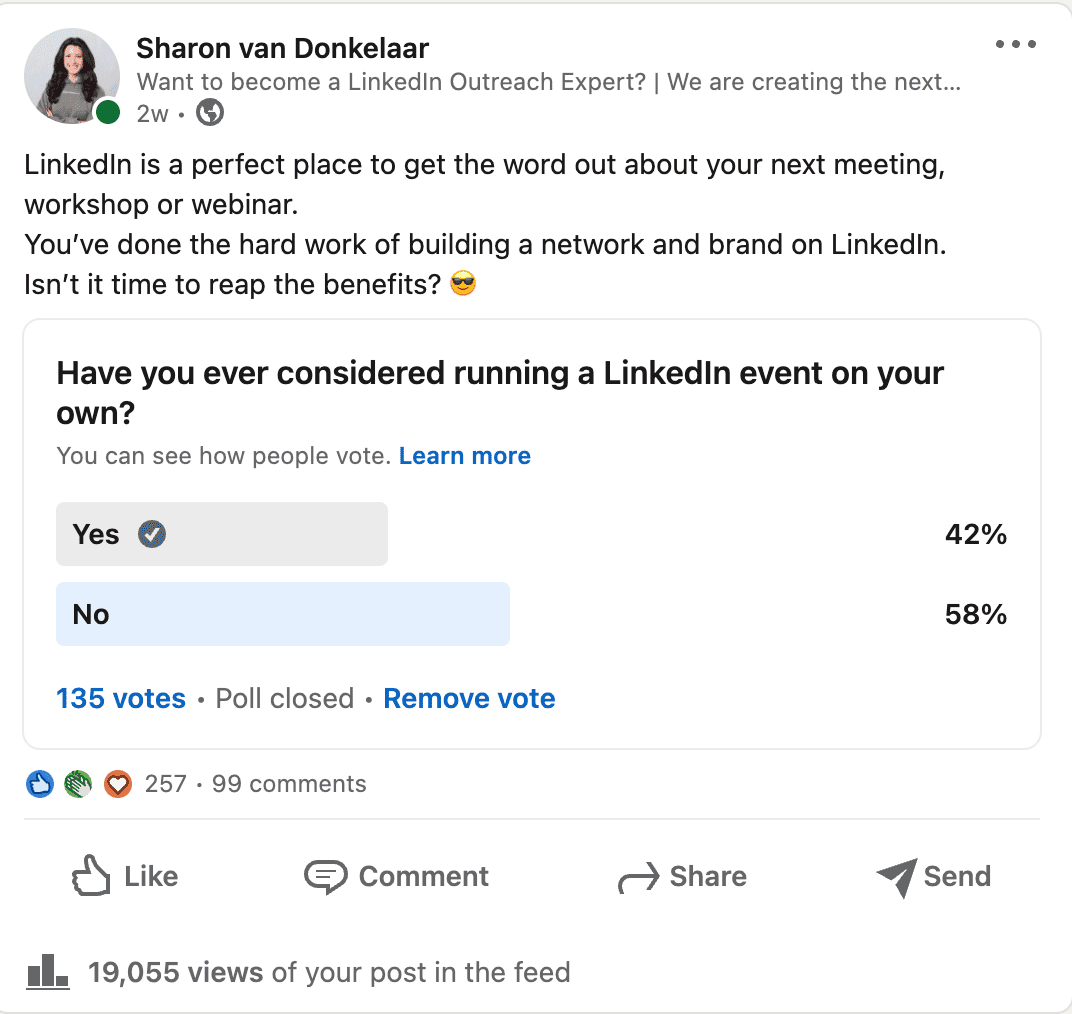
LinkedIn polls usually reach 3x-5x more people than posts without a poll. Why? Because answering a poll takes less effort than leaving a comment.
LinkedIn rewards engagement. The more people interact with your post, the more the algorithm shows it to others.
Polls work so well because they get people to take part and truly feel involved.
So, for almost every LinkedIn poll out there, you can expect it to have more people voting than leaving a comment. Polls turn scrolling into action, and taking action is what helps you build an audience.
The Benefits of LinkedIn Polls
1. They’re Highly Shareable and Algorithm-Friendly
LinkedIn polls tend to spread easily.
When a poll covers a topic people care about, especially if it’s relatable or a bit debatable, it encourages people to share their opinions.
When people vote, comment, or react, LinkedIn’s algorithm notices and shows the post to more people.
More interaction leads to more reach. That’s why polls often do better than regular text posts.
2. They drive more Engagement
Polls make it easier for people to join in.
Instead of asking people to read, think, and write a comment, you just ask them to click once. That quick action takes less than a second, so it feels easy to take part.
Curiosity also matters. People want to see how others voted, so they’re more likely to join in, even if they wouldn’t usually comment on a post.
3. They help you stay consistent
Staying consistent is one of the hardest parts of growing on LinkedIn, but polls make it much easier.
Polls are quick to post, easy to read, and don’t need long-form writing. This means you can show up often without burning out.
When you post polls regularly, your audience starts to recognize your content, engage more, and feel more connected to your profile. This helps your growth build up over time.
Best Practices for Using LinkedIn Polls to Generate More Leads
When used correctly, instead of just collecting votes, polls start discussions and qualified connections. But see real results, a few rules need to be in place.
Here are some tips to help you make the most of LinkedIn polls for finding new leads:
Ask questions that matter: Give clear context so people know why your question is important.
Make your poll relevant: Choose topics that your target audience will find interesting.
Add an “Other” option: This way, everyone can vote, even if their answer isn’t listed.
Keep your poll text short: You don’t need a long introduction—just ask your question clearly and make it easy to answer.
By applying these tips, your poll becomes less of a checkbox and more like a conversation starter that naturally draws your audience in.
However, posting the poll was only the first step.
How you promote it and engage afterward can dramatically increase your reach and results. The following strategies help you share your poll beyond your network, start discussions, and get more valuable interactions.
Use hashtags. LinkedIn hashtags help you reach people outside your network. You can try MagicPost’s free hashtag generator, which also suggests poll ideas if you need inspiration.
Stay active in the comments and keep the conversation going. The more you engage, the more others will join in.
Tag your connections. In the poll question or in the comments, mention people who might care about the topic to get their attention.
Share the poll link. Send it to your close connections to help your poll get early traction and more visibility.
Turn your poll results into a follow-up post. This is important because it keeps your poll visible and the conversation active.
Top 5 Tips on How to Create The Perfect Poll
Ask questions that matter
To get the most engagement, your audience needs to know why your poll matters. Instead of dumping a block of text, frame your question with a short story, anecdote, or scenario.
This works like a “cliffhanger,” encouraging people to click see more and invest in the poll.
Break up your text into small, digestible chunks; one sentence per paragraph works best. This keeps your post easy to scan and encourages readers to reach the poll itself. Adding a hint of curiosity or an intriguing twist can make your post even more compelling and increase participation.
Be Relevant to Your Audience
A poll about the weather won’t generate meaningful engagement if your goal is to connect with SEO content writers or content marketing professionals.
Focus on your ideal customer profile (ICP) and buyer personas to uncover the challenges, interests, and priorities of your potential leads. Tailoring your questions to your audience ensures your poll not only gets responses but also provides valuable insights for outreach.
Some examples of audience-focused poll questions for SEO content writers:
How often do you perform keyword research before writing a new article?
What’s your biggest challenge when optimizing content for search engines?
Which SEO tool do you rely on the most for content planning?
Do you prioritize readability or SEO when creating content, and why?
Open-ended questions like these reveal more about your audience than simple yes/no polls, giving you richer insights and more meaningful interactions.
Add an “Other” Option to Your Polls
Adding a final “Other” option is an easy way to boost engagement. This encourages people to comment with more specific answers and increases interaction on your post.
You can even add a line in your body text like: “Or is it something else? Let me know in the comments!” The more engagement your poll gets early on, the more likely it is to be seen by a wider audience.
Keep Your LinkedIn Polls Short
One of the biggest advantages of LinkedIn polls is their simplicity. While context and storytelling help, your poll question should be understandable on its own without requiring readers to read the entire post first.
Your poll should clearly convey your point and work independently, while the accompanying post adds context and encourages discussion.
Turn Poll Votes into Qualified Leads
With a well-designed poll, a follow-up works like automated lead qualification. Each vote shows you who is truly interested, so you can spend your time helping those who will benefit most from your solution.
If you run a poll about content creation challenges, you can reach out to people who chose “Struggle with SEO optimization” like this:
"Hi [Name], noticed your vote on my content creation poll. Would you be interested in seeing how MagicPost helps content writers optimize their posts for SEO effortlessly? I’d be happy to set up a quick demo."
It’s important to be persistent but also respectful. Give real value based on the interest they’ve shown by taking your poll, rather than trying to sell to them right away.
Here are a couple of other things you need to know about using LinkedIn polls:
How someone votes on your poll post is only visible to you as the author.
Polls are also possible to create in LinkedIn groups and only the poll author will be able to view those results.
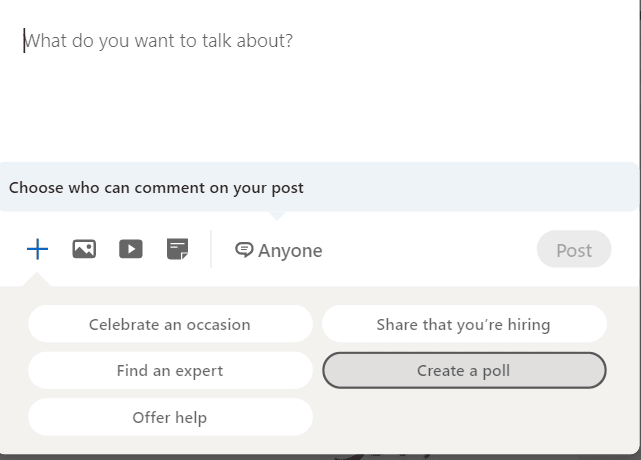
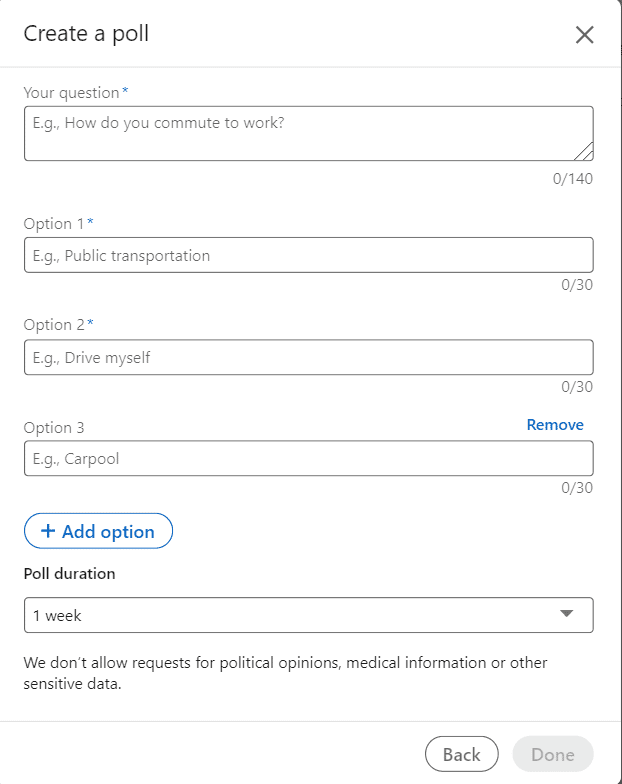
Your LinkedIn poll can have 4 options at most to choose from.
Poll questions are limited to a maximum of 140 characters and options are limited to a maximum of 30 characters.
You can’t edit LinkedIn polls once they’ve been posted.
You can also create a poll under a LinkedIn company page.
Use MagicPost’s Poll Generator
MagicPost’s Poll Generator helps you create LinkedIn polls quickly and easily.
Just enter your topic or audience, and the AI will suggest questions that fit your niche.
You can adjust the options, add an “Other” choice to encourage comments, and format your post so it’s easy to read.
The generator saves you time on brainstorming, helps you post regularly, and lets you create polls that encourage interaction, gather insights, and bring in leads all with just a few clicks.
Perguntas Frequentes
1. What is a LinkedIn Poll Idea Generator and how does it work?
It’s a tool that helps you quickly come up with engaging poll ideas for LinkedIn. You simply select a category (or leave it general) and click “Generate,” and it gives you ready-to-use poll ideas.
2. Do I need a LinkedIn account to use this tool?
No, you don’t need to be logged into LinkedIn to generate ideas. However, you will need a LinkedIn account to post the poll once you’ve created it.
3. Can I choose a specific category for my poll ideas?
Yes! You can select from different categories to generate poll ideas tailored to your industry, audience, or content theme.
4. How often can I generate new poll ideas?
You can generate as many poll ideas as you want—there are no limits. Each click produces a fresh, unique idea.
5. Can I customize the poll ideas suggested by the tool?
Absolutely! The ideas are meant to inspire you, so you can tweak the wording, options, or tone to fit your audience perfectly.
6. Is the tool free to use or does it require a subscription?
Most LinkedIn Poll Idea Generators are free to use, though some advanced features may require a subscription. Check the tool’s website for exact pricing details.