İçerik Üretimi

Saad Mouaouine
You can spot it immediately. The post starts with "In today's fast-paced digital landscape..." It’s perfectly structured, packed with rocket emojis, and says absolutely nothing of substance.
You know a robot wrote it. And more importantly, so does everyone else in the feed.
Generative AI solved the blank page problem on LinkedIn. But it created a new one: a flood of generic, soulless content that readers have learned to scroll past on instinct. The creators winning right now want the speed of AI without paying for it with their credibility.
Here’s exactly how to write AI LinkedIn posts without falling into that trap.
Why Do Most AI LinkedIn Posts Get Ignored?
Readers have developed a sharp immunity to AI-generated content. When every post in a feed is polished to within an inch of its life, authenticity disappears entirely, and so does trust.
People buy from people. They connect over shared frustrations, messy realities, and hard-won lessons. AI, by its nature, predicts the most statistically average next word. It writes how everyone writes, which means it writes like no one in particular.
When you publish raw AI output, you strip away the friction and specificity that makes your perspective worth reading. Your network is not looking for textbook definitions. They are looking for your point of view. If a post reeks of AI, readers scroll past it before they finish the first line.
How Common Are AI LinkedIn Posts in 2026?
If your feed feels different, you’re not imagining it.
→ According to research from Originality.ai, roughly 53.7% of long-form LinkedIn posts are now likely AI-generated. In some industries like design and wellness, nearly all high-reach posts show strong signs of AI assistance.
The algorithm is fighting back. LinkedIn’s Feed Relevance team has been explicit: the platform actively detects and downranks exact or near-duplicate content. Original thought is what gets rewarded.
The data makes the stakes clear. In trust-based fields like healthcare and government, human-written posts outperform AI posts by 40% to 44%. Generic AI efficiency only works until your audience stops trusting you.
What Does an AI LinkedIn Post Look Like?
Before you can fix an AI-sounding post, you need to diagnose one. The best creators know how to spot the algorithmic fingerprints in their own drafts before hitting publish.
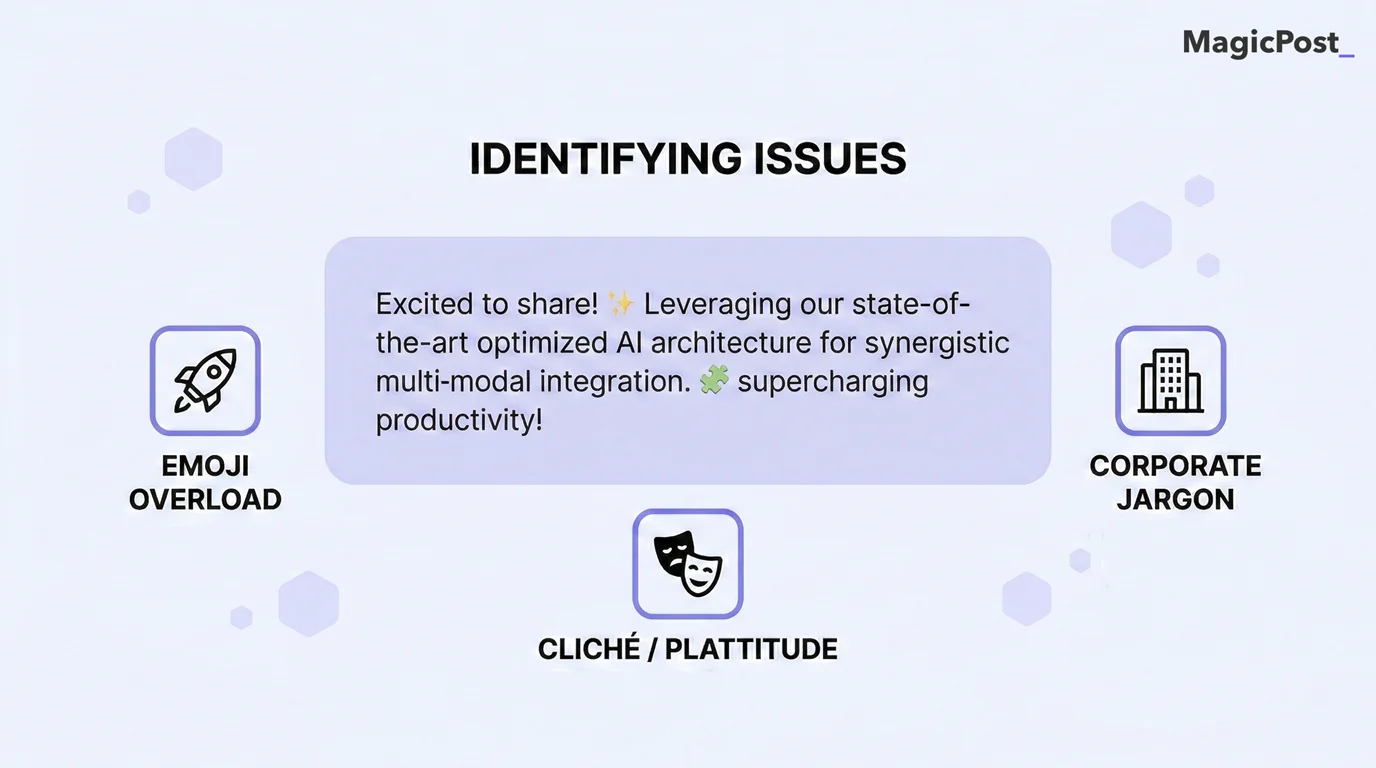
If your post includes any of these, it needs a rewrite:
The cliché opener. Starting with broad, sweeping statements like “In today’s ever-evolving world…” or “As a professional in the space…”
The corporate vocabulary. Overusing words like “delve,” “synergy,” “pivotal,” “tapestry,” “testament,” or “landscape.” If you wouldn’t say it out loud to a colleague, cut it.
The em-dash overuse. AI strings clauses together using em-dashes to sound conversational. It has the opposite effect.
The emoji overload. Formatting every bullet point with a 🚀, 💡, or 🔥 emoji shows that you’re using AI.
Zero specificity. The post advises you to “optimize your workflow” but never names a specific tool, a specific dollar amount, or a specific failure. Vague advice is AI’s default, but specific advice is yours.
What Is the Right Way to Use AI for LinkedIn Posts?
The most common mistake is treating AI like a ghostwriter. You type “Write a LinkedIn post about leadership,” accept whatever comes out, and post it. That’s the wrong relationship entirely.
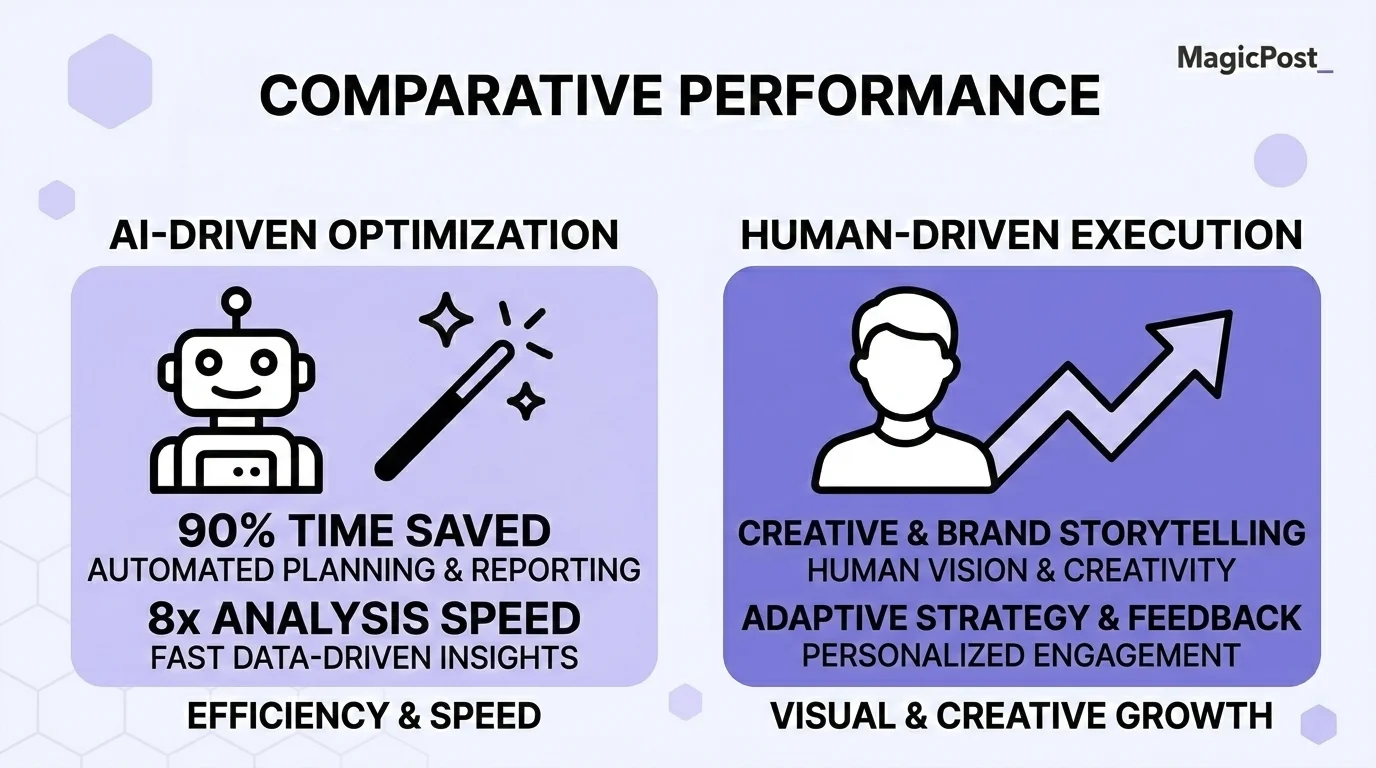
AI should be your accelerator, whereas your perspective is the engine.
→ Use AI for the systems. Use you for the soul. The best creators use AI to outline, unblock, and format. But the main insight comes from lived experience that no model has access to.
→ AI can get you 80% of the way there, but 80% isn't good enough. You need to share an idea that only you could have written. That remaining 20% is where your personal brand either lives or dies.
How Do You Write AI LinkedIn Posts That Sound Like You?
You need a repeatable system. Not a blank prompt box, but a workflow that starts with your voice and uses AI to amplify it.
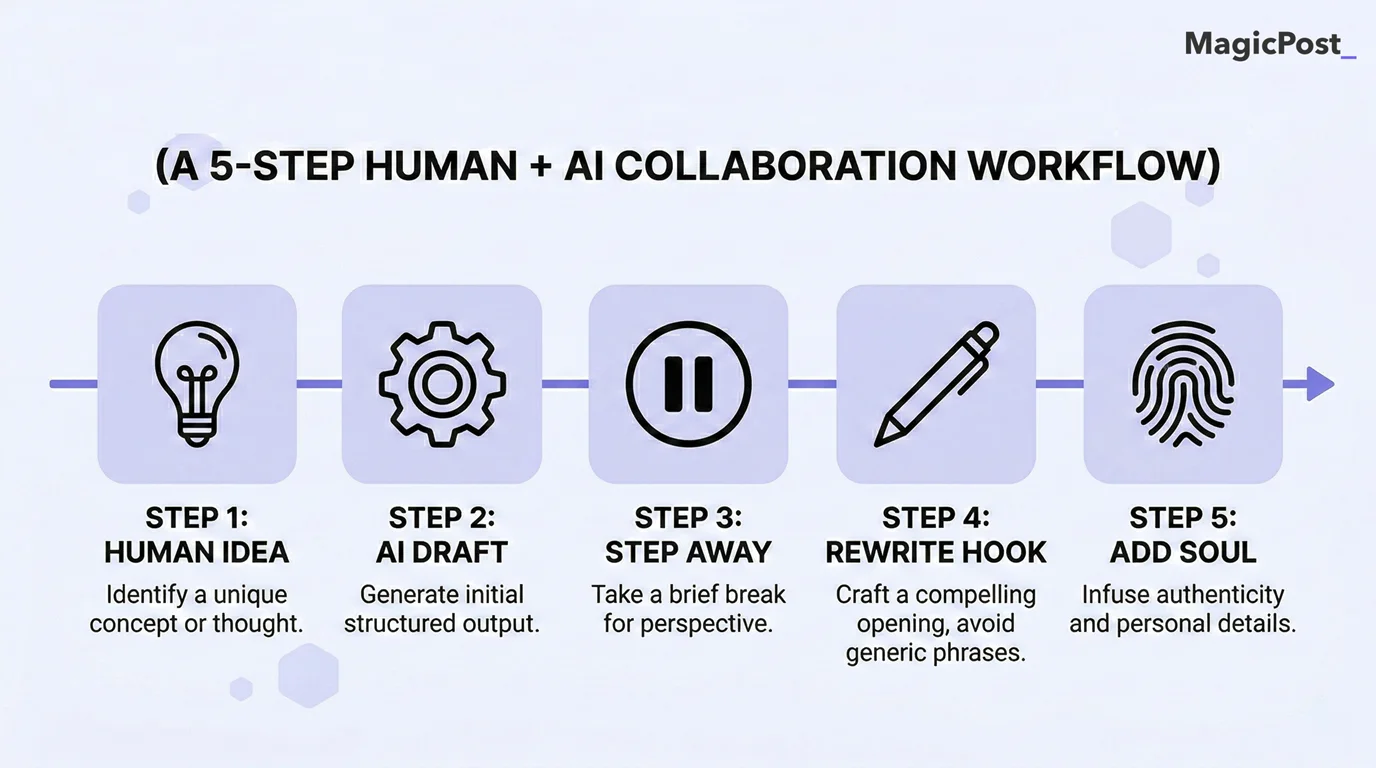
Here’s one.
Step 1: Start With Your Idea, Not a Prompt
The blank page belongs to you. Before you open any tool, know exactly what specific, contrarian, or useful point you want to make. If you don’t have a clear angle, AI will default to generic advice.
→ Your job is to arrive with the insight. AI's job is to help you deliver it.
Step 2: Give AI Your Messy Thoughts, Not a Clean Brief
Do a genuine brain dump. Feed the AI a voice note transcript, three bullet points about a mistake you made this week, or a rambling paragraph about something you noticed. Then tell it, "Turn these raw thoughts into a structured LinkedIn post."
→ This grounds the output in your actual reality instead of the average of everyone else's.
Step 3: Let AI Draft, Then Step Away From the Output
Read the draft once to absorb the structure and logic. Then close it. You’re now the editor, not the prompt engineer.
→ The AI gave you a skeleton. Your job is to make it breathe.
Step 4: Delete the Opener and Rewrite It in Your Own Voice
AI almost always writes a weak, overly formal opening line. Delete the first two sentences and replace them with something you’d actually say out loud to a contact at an event.
Check out our full guide on LinkedIn hooks to understand what actually stops the scroll. Or use MagicPost's Hook Generator to test stronger opening lines before you commit.
Step 5: Add the One Thing AI Can Never Have
AI can’t share a photo of your messy whiteboard. It can’t name the specific client who rejected your proposal last Tuesday. It can’t cite the exact metric you missed in Q3.
→ Go through the draft and inject those details. This is the soul of your post. It’s also the part that makes your post impossible to replicate.
What Should You Tell AI to Get Better LinkedIn Posts?
The quality of your output depends entirely on the constraints you give the model. A generic prompt produces generic slop. The technique that changes everything is called “style-priming.”

Here’s the difference:
Weak Prompt | Strong Prompt |
|---|---|
Write a LinkedIn post about marketing consistency. | Act as a B2B SaaS founder. Write a LinkedIn post about why consistency beats going viral. Use short, punchy sentences. Avoid words like “delve,” “landscape,” or “synergy.” Tone: conversational and slightly contrarian. Match the style of these posts I wrote: [paste 3 to 5 of your past posts here]. |
By feeding AI your past posts, you’re training it on your specific sentence length, vocabulary, and cadence. This is also a highly effective way to repurpose a LinkedIn post that already performed well.
Once your humanized draft is ready, run it through MagicPost’s LinkedIn Text Formatter to add clean structure and scannable formatting before you publish.
AI LinkedIn Post Examples: Before and After
Reading about AI tells is one thing. Seeing them side by side is another. Here are three common LinkedIn post types: the kind of post someone edited but didn’t fully humanize and the version that actually lands.
Example 1: Lesson Post
⚠️ Before
Getting passed over for a promotion I deserved was one of the most pivotal moments of my career. It taught me that technical skills alone aren't enough. You also need visibility, communication, and the ability to articulate your value. Here's what I'd tell anyone in the same position: — Speak up in rooms where decisions are made — Build relationships before you need them — Document your wins consistently The professionals who grow fastest aren't always the most talented. They're the most intentional. What's a career lesson that changed how you show up? I'd love to hear it.
✅ After
I got passed over for a promotion I was certain I'd earned. My manager told me I was technically strong but nobody knew what I stood for. That stung. But it changed how I showed up on LinkedIn, in meetings, and with clients. I stopped waiting to have something "important" to say and started saying the smaller, specific things I actually believed. Six months later I had a new job offer from someone who had been reading my posts for three weeks. The lesson wasn't "invest in yourself." It was: say the specific thing. The vague version helps no one, including you.
Example 2: Industry Insight Post
⚠️ Before
Something interesting is happening in B2B marketing right now. Everyone is talking about creating more content. But very few teams are stopping to ask whether the content they're already creating is actually working. The brands winning in 2025 aren't producing more. They're producing smarter — with clearer feedback loops, tighter distribution, and a real understanding of what their audience actually wants. Volume is not a strategy. Intentionality is. Are you measuring what's working, or just hitting publish and hoping for the best?
✅ After
Every B2B brand I've spoken to this quarter is saying the same thing: "We need more content." Almost none of them can tell me what their best-performing post from last month actually said. That's the real problem. Not volume. Not AI. Not the algorithm. It's publishing without a feedback loop. You can't produce your way out of a strategy problem.
Example 3: Personal Story Post
⚠️ Before
Early in my career, I made a mistake that I still think about today. I sent the wrong document to a prospect — one that hadn't been properly updated for their context. It was embarrassing, and I was convinced the deal was dead. But instead of avoiding the situation, I reached out immediately, owned the mistake, and focused on moving forward. They respected the transparency. We closed the deal shortly after. The lesson: how you respond to your mistakes often matters more than the mistake itself. Accountability builds trust faster than perfection ever will.
✅ After
I sent the wrong pricing deck to a prospect. Not a slightly outdated one. One with a competitor's name still in the header from a copy-paste I forgot to fix. They replied two minutes later: "Interesting. Do you want to try that again?" I wanted to close my laptop and move to another country. Instead I called them, laughed about it first, and landed the contract three days later. The lesson I actually learned: how you handle the embarrassing moment matters more than the embarrassing moment.
The pattern is the same every time. The "Before" posts are decent. Readable, even. But they stay at the level of the idea and never climb down into the specific moment.
The "After" posts live inside one real scene and let the reader draw the conclusion themselves. That specificity is what no prompt can manufacture on its own.
Let MagicPost Help You Create AI LinkedIn Posts That Sound Like You
Trying to wrangle a general-purpose AI into sounding like a specific human takes almost as much time as writing the post yourself. MagicPost was built to solve this exact problem.
It’s not a generic text generator. It’s a complete LinkedIn creation system designed to work with your voice, not instead of it.
Use the Idea Generator to find niche-specific topics that are relevant to your audience. Let the AI build a structured draft based on your preferred tone and post type. Then use the native editor to inject your personal stories, specific numbers, and real opinions. When the post is ready, schedule it directly within MagicPost at the optimal time for your audience.
MagicPost gives you the 80% framework in seconds. That leaves you with all the time you need to add the 20% that actually makes people stop scrolling.
Try MagicPost for free; no credit card is required. Start your free trial and build a LinkedIn presence that sounds unmistakably like you.
SSS
Is it okay to use AI to write LinkedIn posts?
Yes. Millions of creators and thought leaders use AI to outline content, overcome writer's block, and format their ideas. The problem isn’t using AI. The problem is publishing raw, unedited output that lacks your personal perspective and original thought.
How do I make AI LinkedIn posts sound more human?
The answer is specificity. Delete the corporate jargon, rewrite the opening hook in your natural speaking voice, and inject highly specific personal details: real numbers, real names, real failures. An AI can write "I learned an important lesson." Only you can write "I lost a $40,000 client because I sent the wrong proposal on a Friday afternoon."
Can LinkedIn detect AI-generated posts?
LinkedIn hasn’t confirmed shadowbanning purely AI-written content. However, their Feed Relevance algorithm actively downranks exact or near-duplicate content. Because generic AI posts inherently lack original thought, they naturally earn less reach than unique, specific posts. The algorithm doesn’t need to detect AI. It just rewards originality.
What is the best AI tool for LinkedIn posts?
General tools like ChatGPT can help, but dedicated platforms like MagicPost are better suited for LinkedIn specifically. MagicPost includes a Hook Generator, built-in text formatting, viral post inspiration, and native scheduling, all calibrated for LinkedIn's algorithm and content format.
How do I train AI to write in my voice?
Use style-priming. Paste 3 to 5 of your best-performing, human-written posts into the prompt and instruct the AI to analyze your sentence length, vocabulary, and tone. Tell it explicitly to match that style. The more specific you are, the closer the output will be to your actual voice.
Should I disclose that I used AI on LinkedIn?
There’s no platform rule requiring disclosure for standard text posts. For everyday drafting and outlining, disclosure is generally not expected, provided the final perspective is genuinely yours.
If you’re publishing heavily researched technical content or the core idea itself came from AI, transparency tends to build rather than erode trust.
LinkedIn Gönderi Başlığı: Örnekler, En İyi Uygulamalar
Kaydırmayı durduran güçlü bir Linkedin Gönderi Başlığı yazmanın yolları, örneklerle ve her gönderiye uygulayabileceğiniz basit çerçevelerle!
LinkedIn Gönderisini Nasıl Yeniden Kullanırsınız?
Bir LinkedIn gönderisini metne, karusel gönderilerine ve kısa videolara nasıl dönüştürebilirsiniz—adım adım—tutarlılığı korumak, erişimi artırmak ve zaman kazanmak için.
LinkedIn'de Kaç Gösterim İyi Sayılır?
LinkedIn'de kaç görüntüleme iyi? İşte cevabı.
LinkedIn'de Ne Sıklıkla Paylaşım Yapmalıyım?
LinkedIn'de ne sıklıkta paylaşım yapmak en iyisidir? Bilmeniz gereken her şey!
LinkedIn'e Kaç Fotoğraf Yayınlayabilirsiniz?
LinkedIn'e kaç fotoğraf yükleyebilirsiniz? İşte basit cevap!