" height="26.80529977783203px" id="tymKb8bqC" width="128.00300311279295px"/><path d="M 0 2.417 L 0 0 L 12.909 0 L 12.909 2.417 Z" fill="rgb(126, 78, 253)" height="2.417099999999998px" id="aYr4em6zK" transform="translate(128.341 22.325)" width="12.908999999999992px"/></svg>)

"/><stop offset="1" stop-color="rgb(118, 37, 250)"/></linearGradient></defs><g d="M 19.242 21.22 L 19.362 6.204 L 19.272 6.204 L 13.757 21.22 L 10.161 21.22 L 4.796 6.204 L 4.706 6.204 L 4.825 21.22 L 0 21.22 L 0 0 L 7.283 0 L 12.109 13.607 L 12.229 13.607 L 16.844 0 L 24.247 0 L 24.247 21.22 Z M 26.421 26.113 L 26.421 23.445 L 41.407 23.445 L 41.407 26.113 Z" fill="transparent" height="26.112508199679183px" id="DvfaAIHYn" width="41.40731898311435px"><path d="M 19.242 21.22 L 19.362 6.204 L 19.272 6.204 L 13.757 21.22 L 10.161 21.22 L 4.796 6.204 L 4.706 6.204 L 4.825 21.22 L 0 21.22 L 0 0 L 7.283 0 L 12.109 13.607 L 12.229 13.607 L 16.844 0 L 24.247 0 L 24.247 21.22 Z" fill="rgb(46, 46, 46)" height="21.220180016149442px" id="pLsxRCobd" width="24.247352589074694px"/><path d="M 0 2.668 L 0 0 L 14.986 0 L 14.986 2.668 Z" fill="url(%23yD9d4I5GR-3279285344-linear-gradient)" height="2.6675085048549647px" id="yD9d4I5GR" transform="translate(26.421 23.445)" width="14.986002836263765px"/></g></svg>)

Camelia Khadraoui
Do you open LinkedIn thinking, “What should I post today?”
Yeah… same. At least until I started using a content calendar.
A LinkedIn content calendar isn’t just a planning tool, but also your antidote to creative burnout. It keeps your ideas organized, helps you stay consistent, and ensures every post actually supports your goals.
And the best part? You’ll never stare at a blank screen wondering what to write again.
This guide provides both a strategy for creating your own content calendar and a three-day LinkedIn content calendar to help you get started.
TL;DR:
A LinkedIn content calendar helps you stay consistent, organized, and strategic. To build one, you simply:
Define your content goals.
Choose your content types.
Decide your posting frequency.
Brainstorm topics in advance.
Organize everything in a visual calendar.
Schedule and automate your posts.
Analyze results and adjust.
MagicPost makes this process easy by letting you plan visually in a calendar view, edit posts, choose dates and times, and schedule everything in advance.
Why You Need a LinkedIn Content Calendar
A content calendar is like a mind map with a schedule. It gives you a clear overview of your plan and helps you stay organized.
A great content calendar lets you plan your posts in advance, maintain a balanced mix, and avoid last-minute stress.
When you plan your topics, ideas, and posting schedule, your content will match your goals, connect with your audience, and help build your personal brand.
After having done all that, it becomes easier to see what works, improve your future posts, and keep your network engaged.
Plan ahead: When you know what you’ll post in advance, you can avoid last-minute stress. Planning ahead also helps you create better, more thoughtful posts.
Maintain consistency: Posting regularly keeps your audience interested and helps build your professional brand. LinkedIn’s algorithm also rewards consistent content, so you can reach more people.
Align with goals: A calendar lets you connect each post to your goals, such as getting more leads, demonstrating your expertise, or building a community.
Track performance: A calendar helps you see which content works best. You can look at engagement, spot trends, and adjust your strategy for better results.



How to Create your LinkedIn Content Calendar
Creating a LinkedIn content calendar doesn’t have to be complicated. Once you understand the structure behind consistent posting, planning your content becomes much easier and far less stressful.
Before jumping into the step-by-step process, it’s important to understand how a content calendar actually helps you stay focused, organized, and aligned with your goals.
Here’s how to build one that truly works for you. First, define Your Content Goals
Clear goals give your LinkedIn content a purpose. Ask yourself:
What do I want to achieve? Is it brand awareness, more leads, or becoming a thought leader?
Who is my target audience, and what kind of content will interest them?
How does each post help me reach my professional or business goals?
Setting goals also makes it easier to measure your success.
For example, if you want more engagement, track likes, comments, and shares. If you want more leads, track clicks and conversions.
Choose Your Content Types
After setting clear goals, you need to pick your type of content.
You can diversify your strategy and touch a bit of everything, but it helps to set one branded strategy that sets you apart.
On LinkedIn, here is what works best:
Text posts: Simple text posts are great for sharing insights, opinions, or advice. They’re easy to make and often spark good conversations.
Articles: LinkedIn articles allow you to share longer content and showcase your expertise. Use them to explore topics in depth, share case studies, or provide step-by-step guides.
Images or infographics: Visual posts stand out in busy feeds. Infographics can make complex ideas easier to understand and more shareable.
Videos: Videos are very engaging and LinkedIn’s algorithm prefers them. Short clips, tutorials, interviews, or behind-the-scenes videos all work well.
Polls and questions: Interactive posts get people involved. Polls, questions, or challenges help you learn about your audience and boost engagement.
💡 Read about the Top 10 Best LinkedIn Post Types to Get Noticed
Choose Your Posting Frequency
If you’re in a highly competitive industry (marketing or technology), you should post daily to stay top of mind with your audience.
In less competitive industries (non-profit, construction, or agriculture), posting 2 or 3 times a week might be enough to keep a constant presence.
Your content calendar should match what you can handle while keeping your posts high-quality. Here are some guidelines:
3–5 posts per week is good for individuals building a personal brand. This keeps you active without making your schedule too busy.
5–7 posts per week works for companies or brands running several campaigns. This keeps your brand visible and top of mind for your audience.
Also, keep in mind that consistency is more important than posting a lot. A few high-quality posts each week are better than posting every day with less value.
💡 Read our article answering the question what’s the Best Frequency to Post on LinkedIn?
Brainstorm Your Topics in Advance
Coming up with ideas for LinkedIn posts is the most challenging part of creating a content calendar.
However, there are a few ways you can maintain a steady flow of new content. You can either:
Follow trends: Find out what’s trending on LinkedIn and capitalize on it by creating viral content.
Check your competition: Improve your LinkedIn presence by learning from the best. Check out content from industry leaders and analyze their topics, formats, tones, etc.
Repurpose content: Turn blog posts, YouTube videos, customer reviews, or whitepapers into visually appealing LinkedIn posts. You can create eye-catching posts with Magicposts LinkedIn carousel generator.
Best 5 Content Formats Examples:
Coming up with and sorting topics helps keep your content fresh and relevant. Here are a few content formats that work great:
Industry news and trends: Share updates or your thoughts on changes in your field to demonstrate your expertise.
Tips and how-tos: Sharing helpful advice makes you a valuable resource. Short, practical tips usually perform well.
Personal stories and experiences: Telling your own stories makes your profile feel more human and helps you connect with your audience.
Product or service highlights: Showcase what you offer by sharing benefits, solutions, or success stories naturally.
Engaging questions or polls: Start conversations and learn more about your audience’s opinions and preferences.
You can use a spreadsheet or digital tool to plan your topics each week or month. This helps keep your content varied and balanced.
Create a Visual Content Calendar
A visual calendar makes it easy to organize your content. Be sure to include:
Date of posting: Plan your posts for times when your audience is most active to maximize visibility.
Content type: Note if it’s a text post, video, image, or article to keep your content varied.
Topic or caption: Draft initial ideas or full captions to save time later.
Relevant hashtags: Find and use hashtags that help more people find your posts.
Status: Track whether a post is drafted, scheduled, or published so you know where everything stands.
Tools like Google Sheets, Trello, Asana, and Notion make planning easier and let you collaborate with others. You can also color-code your content types or campaigns for a clearer overview.
Schedule and Automate Your Posts
Automation saves you time and helps you stay consistent. LinkedIn scheduling tools let you:
Schedule posts weeks ahead: This helps you avoid last-minute rush and keeps your engagement steady.
Maintain posting consistency: Posting regularly helps you show up more in LinkedIn’s algorithm.
Track engagement: Most tools give you analytics so you can see how your posts are doing and improve your content.
You can use Magicpost’s scheduler. These tools let you spend more time creating content instead of posting by hand.
💡 For more information on scheduling, check out the article on How to Schedule a Post on LinkedIn?
Analyze Your Results And Adjust
A content calendar isn’t set in stone; it should evolve as you see what works. Check your results to:
Identify high-performing content types and replicate their success.
Adjust posting times to align with audience engagement patterns.
Refine content topics according to feedback and engagement trends.
By regularly reviewing and updating your calendar, it becomes a strong tool to help you get better results and reach your goals.
Create A Content Calendar Using MagicPost
With MagicPost’s calendar view, scheduling is easy and quick to see at a glance. After you’ve set your strategy and prepared your posts, you can start automating your plan. Here’s exactly how to do it:
1. Go to the Calendar section
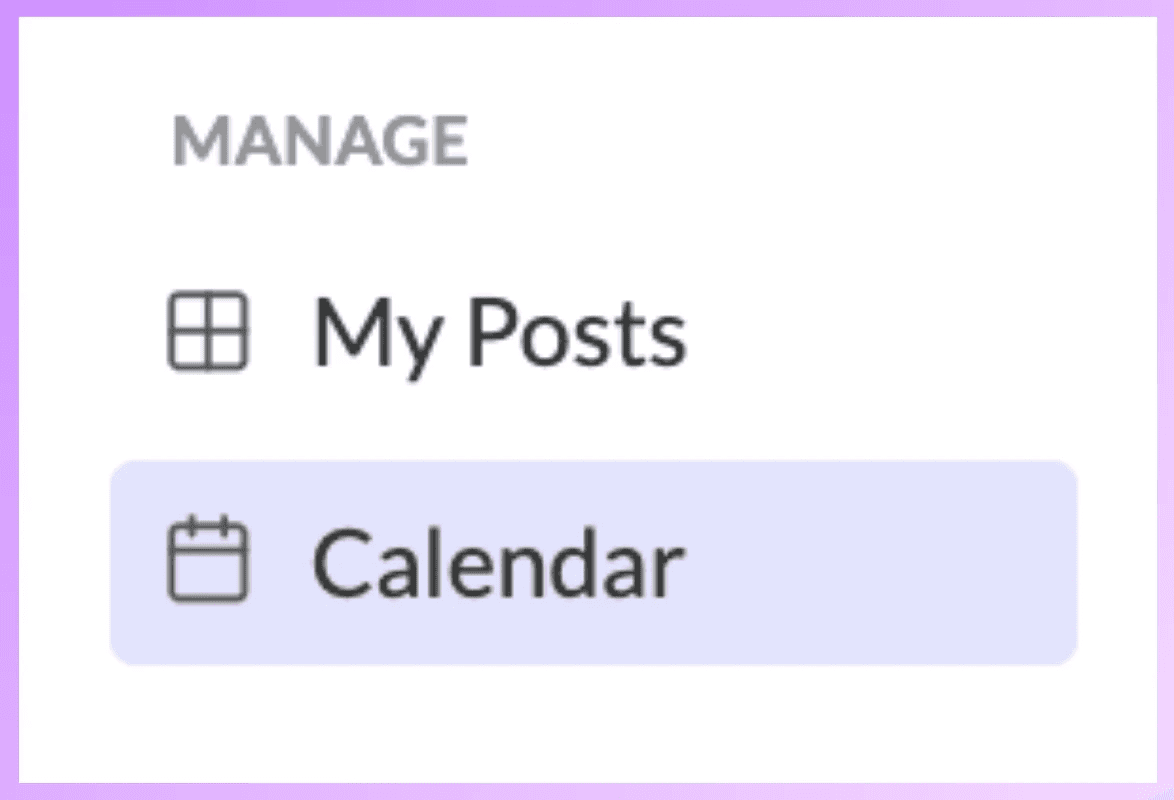
From the left-side menu, click on Manage → Calendar.
You’ll now see a monthly view that shows both your scheduled and open days.
2. Click on the day you want to schedule
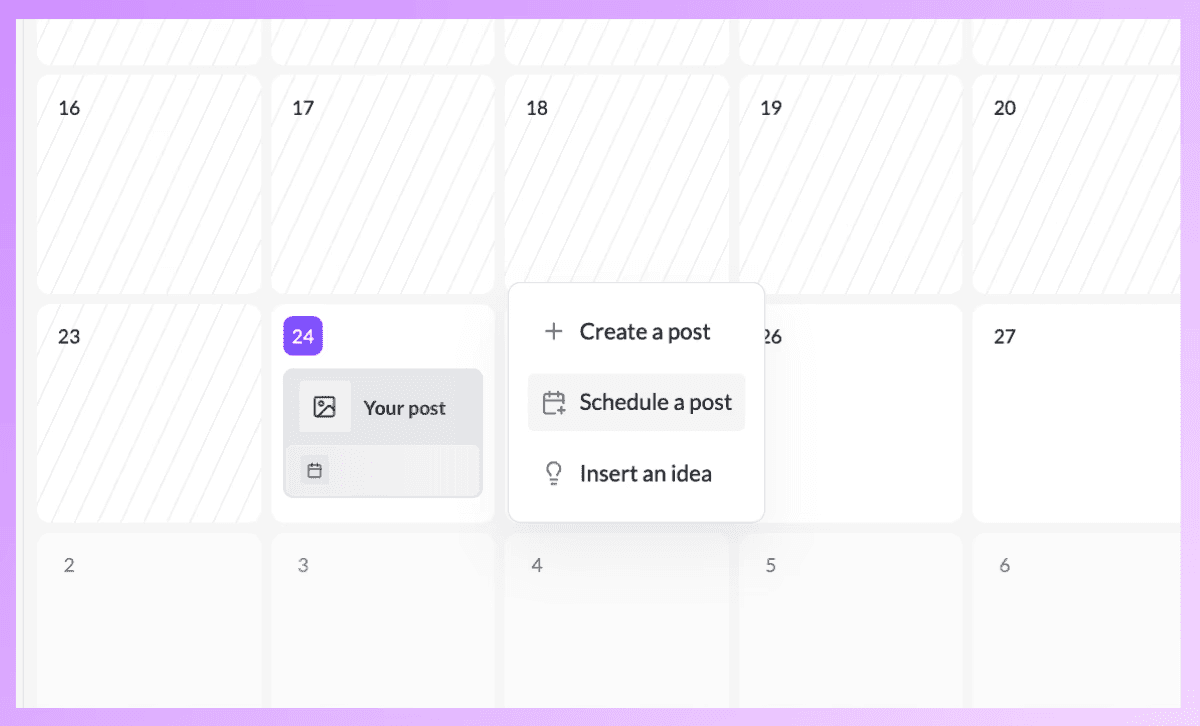
Pick the date when you want your content to go live. An action menu will pop up.
Choose “Schedule a post.”
3. Pick your post or topic
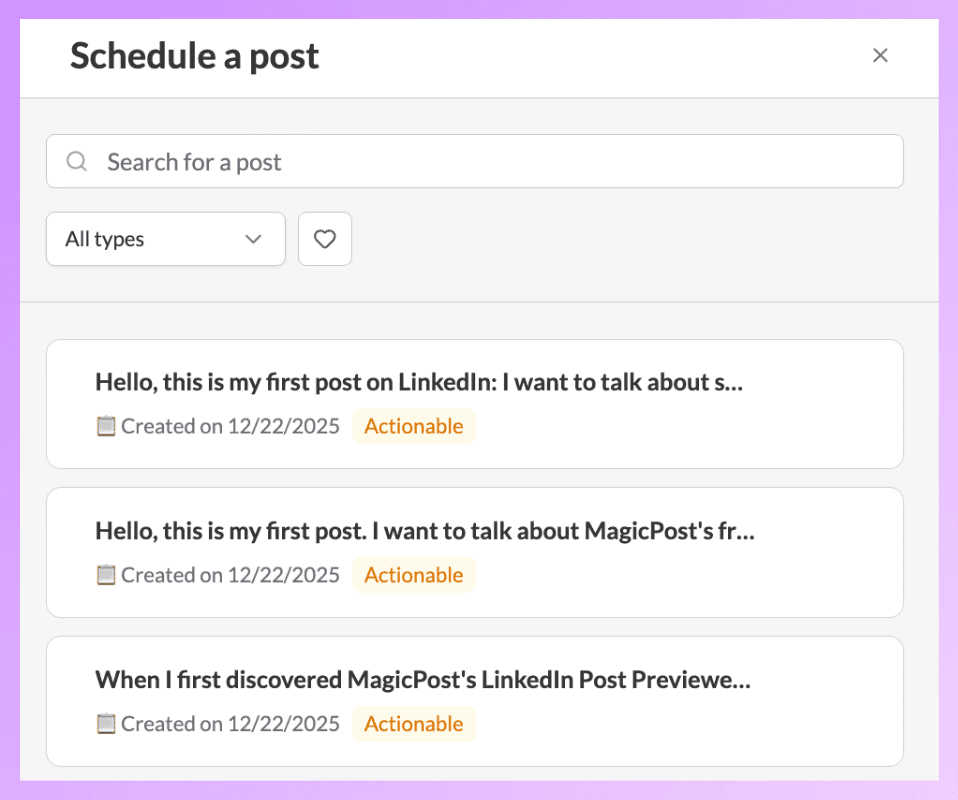
You’ll see your existing drafts and posts.
If you need to, use the search bar or filters to find your post, then choose the one you want to schedule.
4. Edit and refine
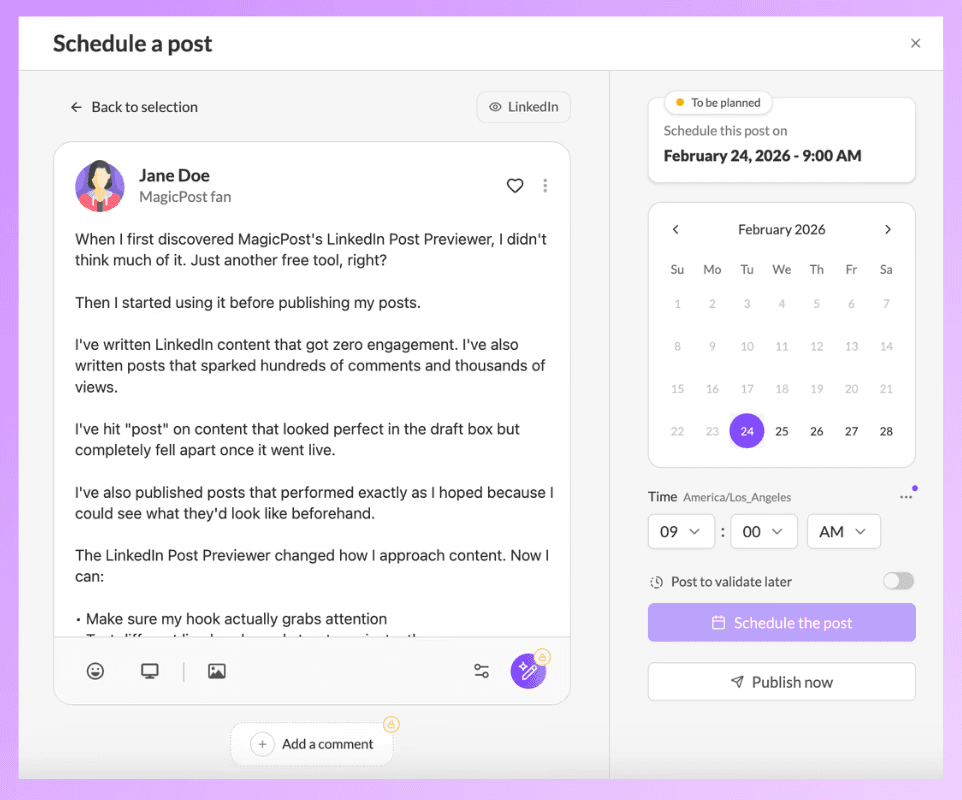
Before you confirm, you can do the following:
Edit the caption
Add or adjust media
Preview the post (including mobile view)
Make final improvements to your hook or formatting
This way, you can make sure everything looks just right before your post goes live.
Pick the exact date and time you want your post to be published.
Once selected, click “Schedule the post.”
Your post will now show up as Planned in your calendar.
5. Repeat the process
You can schedule as many posts as you want, whether it’s for a week, two weeks, or even a whole month ahead.
Wrapping Up
That’s all there is to it.
Your content is now organized, your posts are lined up and ready to go, and you don’t have to worry about staying consistent anymore.
Now you can relax, focus on creating, and stop stressing about posting every day.
How to Schedule a Post on LinkedIn (2026)
Learn how to schedule a post on LinkedIn in just 3 simple steps and explore proven best practices to enhance engagement and maintain consistency.

How Often Should You Post on LinkedIn? (2026)
Wondering how often you should post on LinkedIn? Discover how to determine the ideal posting frequency for your brand to enhance engagement and achieve success.
How to Write Great LinkedIn Posts with AI (2026)
Learn how to create excellent LinkedIn posts with AI by developing your writing style, using MagicPost, and trying out methods to enhance engagement.
What Is the Best Day to Post on LinkedIn? (2026)
Discover the best days and times to post on LinkedIn to maximize your visibility and engagement. Get tips on how to write quicker LinkedIn posts with MagicPost.