

LinkedIn is an essential tool for salespeople looking to find new clients.
In addition to sharing your new promotion at work, you could also take advantage of the 1 billion users at your finger tips and turn them into clients.
But since LinkedIn is a networking platform, sending cold-email style messages usually doesn’t get replies. These messages can seem too pushy and won’t help your business grow.
If you want to do LinkedIn outreach effectively without coming across as spammy, this article will guide you on how to grow your sales using LinkedIn.
What Is LinkedIn Outreach?
LinkedIn outreach means sending personalized messages and following up at the right time to build business relationships and hopefully turn people into clients.
Unlike inbound marketing, where you wait for people to come to you, outreach means taking the first step and reaching out to them.
This method involves connecting with professionals on LinkedIn for networking, hiring, or sales. It also means you should send personal messages instead of identical ones to all recipients.
LinkedIn outreach typically involves:
Identifying prospects through LinkedIn Sales Navigator.
Sending personalized connection requests.
Engaging with prospect content (likes and thoughtful comments).
Developing multi-touch message sequences to move the lead toward a specific goal (e.g., a meeting or a demo).
Why LinkedIn Outreach Still Works in 2026
Even with new platforms, private groups, and advanced AI tools, LinkedIn remains the main place for global business.
It’s where professionals build their reputation, show their credibility, and start important conversations. But why is LinkedIn outreach valuable?
1. You build trust
With bots writing emails, deepfakes pretending to be executives, and spam everywhere, people are much more careful about who they talk to.
A strong LinkedIn profile helps prove your identity.
Before replying, prospects can instantly verify who you are by checking your work history, recommendations, shared content, endorsements, and mutual connections.
This transparency makes people less skeptical and helps conversations feel safer and more real.
2. You can reach decision-makers directly
With over 1.2 billion professionals, including more than 10 million C-level executives, LinkedIn is the only place where you can reach founders, CEOs, or department heads without going through assistants or generic contact forms.
Your message lands in the same inbox whether you’re reaching a junior marketer or a Fortune 500 executive. This level of access is unique in B2B.
3. You’re more likely to get replies
LinkedIn outreach often works better than traditional cold emails because it happens in a more social and casual environment.
Instead of landing as faceless pitches in a crowded inbox, your messages arrive with a name, a face, and shared connections that build instant familiarity.
This personal touch changes how people view your messages. Even if it’s a cold outreach, it feels warmer, more relevant, and less intrusive.
In short, LinkedIn outreach still works in 2026 because it brings together identity, access, and context like no other channel. As long as trust and relevance matter in business, LinkedIn will lead B2B lead generation.
5 Steps for a Practical LinkedIn Outreach Strategy
Before you send any messages, make sure your profile is ready for viewers. Here are five steps to help you build a workflow that gets results:
Step 1: Optimize your LinkedIn profile
Your profile is the first thing potential buyers see. A strong profile boosts your personal brand and makes you seem more approachable and trustworthy.
To look your best online, check this list of elements you need to fix:
Add a professional profile photo
Use a high-quality, professional headshot that looks friendly. Add a nice banner picture that you can customize using design platforms such as canva. Think of adding logos of your previous clients for endorsement. Read our article on Do’s and Don’ts of LinkedIn profile pictures.
Write a compelling headline
While your profile photo helps build trust, the headline serves as a “magazine cover” statement that compels others to learn more about you.
Create a headline that’s more than just your job title. Mention your specialty, the value you offer, and who you help. You can use this guide to create a headline that grabs leads’ attention.
Add a compelling summary
Write a summary that shares your story. Explain what you do, how you help potential buyers, and what makes you different. Keep your tone friendly and your language direct.
Tip: Add keywords that match your industry and role to help people find you in searches.
Add important experience and skills
List your relevant job experiences and describe your roles, responsibilities, and achievements.
Add skills that fit your sales role, like Business Development, Lead Generation, CRM Software, and Negotiation.
Ask colleagues, clients, and managers to endorse you. Endorsements boost your credibility and show you’re skilled in the areas you listed.
Customize your URL
Customize your LinkedIn profile URL to make it cleaner and more professional, especially if you plan to add it to business cards or email signatures.
By following these tips, you can create a LinkedIn profile that shows your professional skills and catches the eye of potential leads.
Step 2: Personalize invitations to connect
After making an initial contact, you can follow up with direct messages if the person has accepted your connection request.
You can use this channel to provide value by sharing industry insights and other relevant content that address the prospect’s pain points.
Generic messages like “I see we are both in the [Industry] sector” don’t work anymore. In 2026, people expect highly personalized messages. For sales professionals, making a strong first impression is key.
The rule is to mention something a simple bot wouldn’t know. For example, talk about a podcast they were on, a unique comment they made, or a personal story from their About section.
The goal is to show you took the time to learn about them personally.
When you send a connection request, mention something specific about the lead, such as a shared connection, a relevant event, or something interesting on their profile.
This shows real interest and makes it more likely they’ll accept your request, moving them into your sales process.
Step 3: Send targeted InMail to people outside of your network
LinkedIn InMail is a premium feature that lets users send messages directly to other LinkedIn members, even if they are not connected.
It remains one of the most reliable outreach tools, especially when paired with LinkedIn research. Start by reviewing your target’s profile to understand their role, interests, and recent activity. One way to find email addresses is by exporting your LinkedIn contacts.
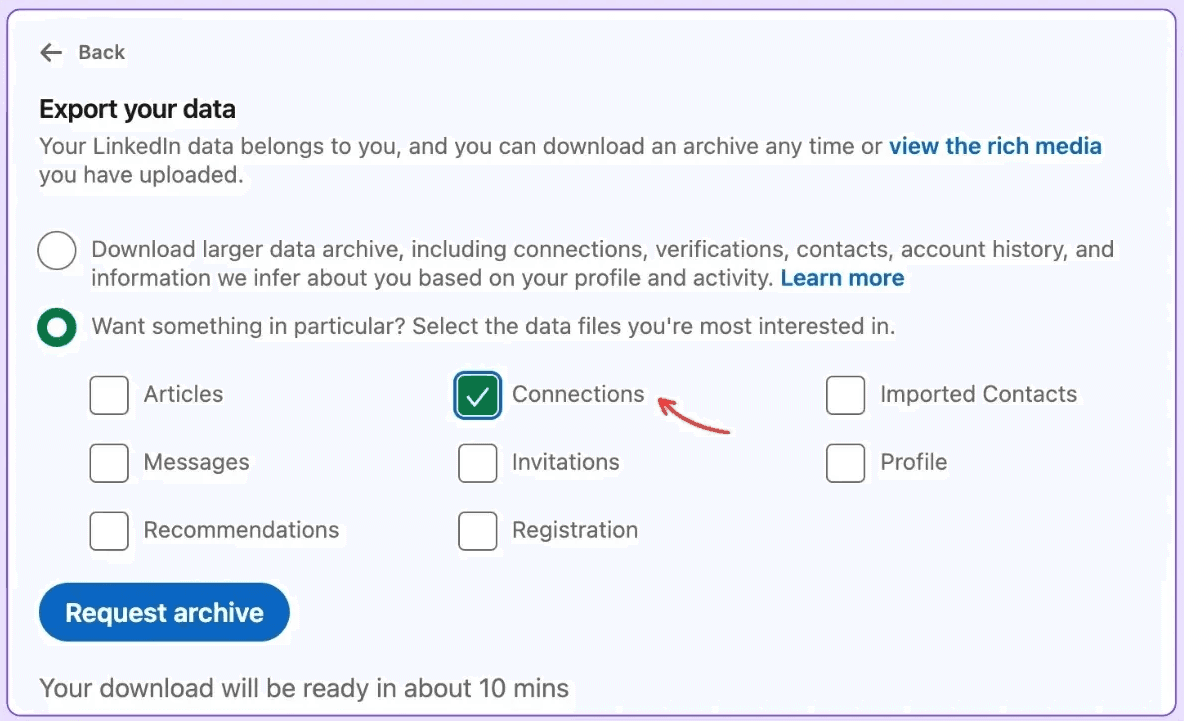
While not everyone shares their email, for those who do, you can save their information in a secure location outside LinkedIn.
The next step is to send your message, to do so:
1. Go to the profile of the user you’d like to send an InMail message to. You can also search for a member and send a new InMail message from the messaging page or conversation windows.
2. Click the More button on their introduction section.
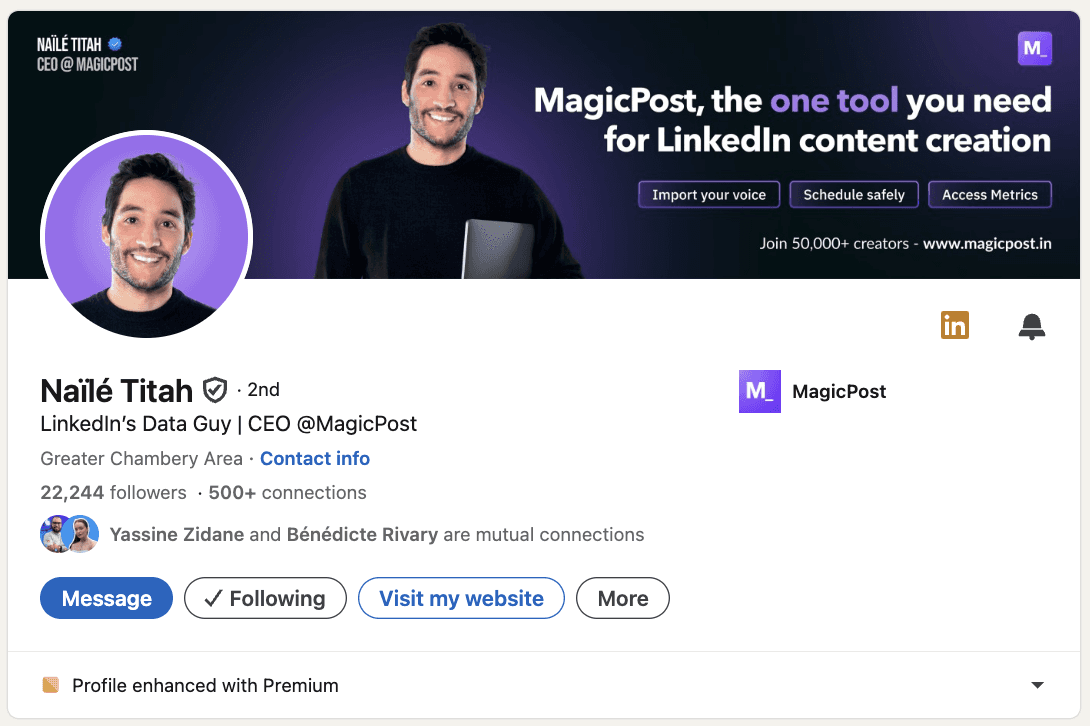
3. Select Message [Name of the member] from the dropdown.
4. Type the Subject field (optional) in the New message pop-up window.
5. Type the message in the text box:
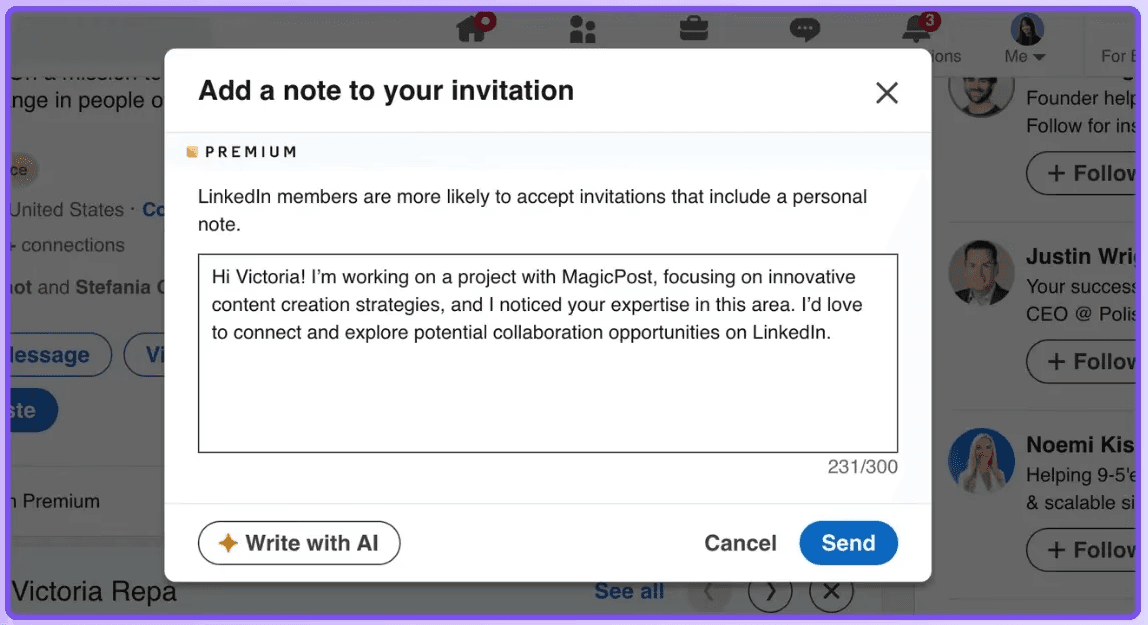
P.S. If you have a Basic (free) account, you must upgrade to a Premium account to use InMail. You can’t message a member if they’ve chosen not to receive InMail in their message preferences settings.
If a member has the Open Profile Premium feature enabled, you can message them for free.
Step 4: Do Follow-Ups (But do not spam)
Most people quit after the first message. However, data suggest that the second or third follow-up often yields the highest response rate.
Timing: Wait 3 to 5 days between each message.
Value-Add: Don’t send a “just checking in” message. Instead, share something useful, like a case study, industry report, or a helpful tool.
Step 5: Write a LinkedIn message that gets replies
Start by leaving behind the “me-centric” approach.
The most successful LinkedIn outreach messages follow a specific psychological framework: Low Friction, High Relevance.
High Friction: “Can we hop on a call Tuesday at 2 PM?”
Low Friction: “I put together a 2-page PDF on how [Competitor] solved this, would you like me to send it over?”
If your message feels like a “task” for the recipient to solve, they will ghost you. However, if it feels like a friendly and genuine compliment or valuable information, they will reply.
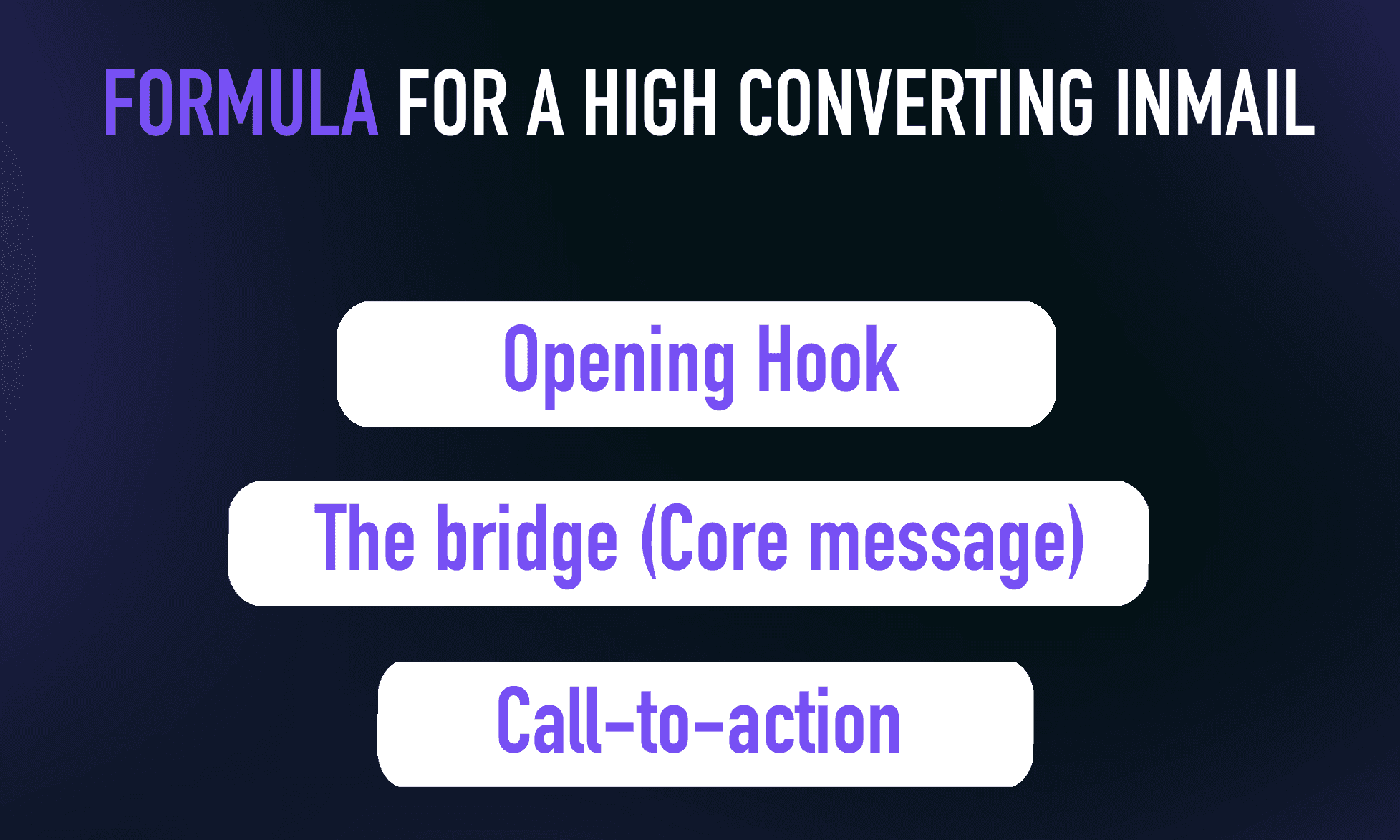
Here is the formula for a high-converting message:
1. The Opening Hook:
Start with a “micro-niche” observation. Instead of “Hi [Name],” try “Loved your take on [Specific Topic] in yesterday’s post.”
2. The Bridge:
Connect your expertise to their current situation. Use a “Trigger Event,” such as a new job promotion, a company funding round, or a recent interview.
3. The Call-to-action:
Never ask for a 30-minute call in the first message. That is a “high-friction” ask. Instead, ask a “closed-ended” question or offer a resource.
Pro Tip: Keep your messages under 75 words. On mobile devices, long messages are often ignored because they look like work. Short, punchy paragraphs are easier to digest while scrolling.
Additional tips for a great LinkedIn Outreach message:
Personalize your message
Skip the generic template and add something unique for each lead. For example, mention a connection, shared interests, or a recent post they engaged with.
Use a friendly tone
Start off your communication with a friendly tone, highlighting any leads’ milestones or complimenting their success.
Reference their content
Mention a specific post or article they’ve shared, and explain how it impacted you or why it’s relevant to your outreach.
Be clear
Make sure your message shows why you’re reaching out, whether you’re offering insights, suggesting a partnership, or introducing your product or service.
Make it human
Remember, there’s a real person behind every LinkedIn profile. Keep your outreach genuine and relatable. Don’t sound too stiff or robotic; it’s a networking platform, after all.
The Biggest Mistake People Make With LinkedIn Outreach
Besides “Pitch-Slapping,” which means sending a sales pitch right after someone accepts your connection request, there are a few other common mistakes:
Mistake 1: Sending generic, non-personalized messages
Nothing gets you blocked faster than a generic, robotic message.
To stand out, tailor every LinkedIn message to your prospect’s unique interests, needs, and goals.
Spend a few minutes exploring their profile and recent posts. Then, craft a message that shows how you can help them succeed or add real value.
Mistake 2: Sending too many messages
No one wants to read your pitch over and over. If you want to get blocked, just keep spamming your prospects!
Too many messages feel like harassment; too few, and you’ll be forgotten. Find the sweet spot to stay on their radar without crossing the line.
Strike the right balance: send one initial message, then two or three follow-ups, each at least 48 hours apart. Avoid weekends and holidays for the best results.
Mistake 3: No clear next step
A third common mistake you can make when cold messaging on LinkedIn is sending messages without a clear goal or call to action.
Messages without a clear purpose leave prospects confused and unsure of what to do next.
To fix this mistake, you need to have a clear goal and a call to action for each message. Your goal should be aligned with your overall objective – for example, getting a reply to your question that helps build a relationship or booking a meeting through a Lemcal link.
Outreach is about opening doors, not closing deals. Start by offering value or asking a simple question.
Build the relationship first, the sales will follow.
Top 15 LinkedIn Outreach Message Templates
Every LinkedIn outreach message should be tailored to the situation and your reason for reaching out. This approach gets the best results.
Here are 9 LinkedIn outreach message templates you can adapt depending on who you’re contacting.
1. Offer to help their business/brand
Why send this message:
If you want to start a conversation by offering value first, position yourself as a helpful expert rather than selling immediately.
Message:
Hi {{First Name}},
I came across your work at {{company}} and really liked how you’re approaching {{specific project/initiative}}.I work with {{type of business/brand}} on {{specific outcome}}, and while looking at what you’re building, a few ideas came to mind that could help you {{improve result or solve problem}}.
If you’re open to it, I’d be happy to share them in a quick chat and see if it’s useful for you.
2. Product pitch with a CTA
Why send this message:
If you’ve identified a clear pain point your product solves and want to introduce it without sounding pushy, while guiding the prospect toward a next step.
Message:
Hi {{First Name}},
I noticed that {{company}} is currently dealing with {{specific challenge or goal}}, which is something we see a lot in {{their industry}}.We built {{product name}} to help teams like yours {{clear benefit/result}} without {{common friction or downside}}.
Would you be open to a quick 15-minute call this week so I can show you how it works and see if it’s relevant for you?
3. Introduce Your Channel/ Page
Why send this message:
If you want to connect by sharing valuable content first, position yourself as a useful resource, and start a conversation without selling.
Message:
Hi {{First Name}},
I came across your profile while reading about {{topic/industry}} and thought you might find this useful.I run a content page where I share practical insights on {{main topics}}, based on real-world experience and case studies.
If you’re interested, I’d be happy to share it with you and exchange thoughts.
4. Introduce your product
Why send this message:
If you want to introduce your product clearly and professionally, without pushing for an immediate sale, and open the door for a follow-up conversation.
Message:
Hi {{First Name}},
I came across {{company}} while looking into {{industry/topic}} and thought your work around {{specific detail}} was interesting.I wanted to quickly introduce {{product name}} — a solution designed to help {{type of company}} {{main benefit or result}} more efficiently.
If this is something you’re currently exploring, I’d be happy to share more details or walk you through how it works.
5. Connection Request to a Potential Partner
Why send this message:
If you want to connect with someone for a potential partnership and set the right tone from the first interaction.
Message:
Hi {{First Name}},
I came across your work at {{company}} and felt there could be strong synergy between what you do and what we’re building around {{shared focus}}.I’d love to connect and explore potential ways we could collaborate if it makes sense.
6. Make an offer based on a lead’s interest
Why send this message:
If the lead has already shown interest (liked a post, commented, visited your site, or mentioned a need) and you want to turn that signal into a relevant offer.
Message:
Hi {{First Name}},
I noticed your interest in {{specific topic/action they took}}, which usually means teams are looking to improve {{related goal or pain point}}.Based on that, I think {{product/service}} could help you {{specific outcome}} without {{common obstacle}}.
Would you like me to share a quick example or walk you through how it could work for your situation?
7. Offer a Free Audit or Review
Why send this message:
If the lead has a business or profile that could clearly benefit from improvement and you want to offer value upfront.
Message:
Hi {{First Name}},
I noticed your current setup around {{topic}} and thought you might be open to a quick audit.I can review {{website/profile/strategy}} and share 3–5 practical improvements that could help you {{result}}.
Would you be interested in a short review?
8. Invite to a Webinar or Live Event
Why send this message:
If you’re hosting an event relevant to their interests and want to invite them in a non-salesy way.
Message:
Hi {{First Name}},
I saw you’re interested in {{topic}}, and I’m hosting a live session on {{topic}} next week.It’s a short webinar where we’ll cover {{key points}} and share real examples.
Would you like me to send you the link?
9. Share a Case Study
Why send this message:
If your lead is in the same industry as a successful client and you want to build credibility.
Message:
Hi {{First Name}},
I noticed you’re working in {{industry}}, and we recently helped a similar company achieve {{result}}.I can share the case study if you’re interested.
Would you like me to send it over?
10. Congratulate on a Recent Achievement
Why send this message:
If the lead recently shared a win, new role, or milestone and you want to start a relationship based on authenticity.
Message:
Hi {{First Name}},
Congrats on {{achievement/new role}} — that’s a big win!I’m really impressed by what you’re building in {{industry}}.
Would love to connect and learn more about your journey.
11. Ask for Feedback or Opinion
Why send this message:
If you want to start a conversation by asking for their professional opinion, which makes them feel valued.
Message:
Hi {{First Name}},
I saw your expertise in {{topic}}, and I’d love to get your opinion on something.Would you mind sharing your thoughts on {{question}}?
I’d really appreciate your insight.
12. Offer a Content Collaboration
Why send this message:
If you want to collaborate on a blog, podcast, or interview with someone in your niche.
Message:
Hi {{First Name}},
I love your content on {{topic}} and think our audiences would benefit from a collaboration.Would you be open to doing a short interview or co-creating a post together?
If yes, I can share a few ideas.
13. Offer a Discount or Special Offer
Why send this message:
If you want to make a time-limited offer to encourage action without being pushy.
Message:
Hi {{First Name}},
I noticed you’re exploring {{topic}}, and we’re currently offering a special discount for {{product/service}}.If you’d like, I can share the details and see if it fits your needs.
Would you like to learn more?
14. Invite to Join a Private Group or Community
Why send this message:
If you have a community that provides value and you want to invite them to join.
Message:
Hi {{First Name}},
I’m building a small community of professionals focused on {{topic}}.We share resources, case studies, and networking opportunities.
Would you like an invite?
15. Offer a Quick Demo or Trial
Why send this message:
If you want to let them experience your product before committing.
Message:
Hi {{First Name}},
I’d love to show you how {{product}} works and how it can help you {{benefit}}Would you be open to a quick demo or a free trial?
I can set it up in under 10 minutes.
How to Follow Up and Keep the Conversation Going
It’s tough to start a conversation on LinkedIn, but keeping it going is even harder. Many people send just one message and then wait, hoping for a reply.
But real results come from consistently and thoughtfully following up, keeping your lead interested without making them feel pressured.
Besides not spamming, here are a few more tips to keep your lead interested and the conversation moving:
1. Don’t Wait Too Long: Timing matters. If you wait too long, your message becomes irrelevant or forgotten.
2. Mention Their Activity: If they posted something recently, commented, or updated their profile, use it. This shows you’re paying attention and not just sending generic messages.
3. Keep It Short and Natural: No one wants to read long, wordy messages. LinkedIn isn’t the place for sales emails. Make your messages brief, friendly, and easy to read.
4. Be Respectful and Know When to Leave: If you’ve followed up three times with no reply, it’s fine to stop. You can still keep things positive by saying, “If now isn’t the right time, I’ll reach out later.” This keeps the relationship professional.
5. Use “Proof” to Build Trust: Don’t leave your lead guessing. Share your credentials or proof early on, like quick results, a client win, or a testimonial. Proof makes your message more credible and easier to answer.
6. Always End with a Clear Next Step: Every message should end with a clear CTA, but not pushy. This makes it easy for the lead to respond. For example:
“Want to see a quick demo?”
“Can I send you a short example?”
“Would you be open to a 10-minute call?”
7. Ask Open-Ended Questions: Instead of yes/no questions, ask something that invites a conversation. Open-ended questions make it easy for the lead to reply. For example:
“What’s your biggest challenge with X right now?”
“How are you currently handling Y?”
“What would be your ideal outcome for Z?”
8. Use the “Micro-Commitment” Technique: Instead of asking for a meeting right away, ask for a small action first. Micro-commitments are easier to agree to and help build trust. For example:
“Would you like a quick example?”
“Can I send you a case study?”
“Is it okay if I share a short demo?”
Wrapping It Up
When you focus on sending personalized messages and offering value first, your outreach can help you build real relationships rather than just scoring a sale.
Find your leads and choose the best way to contact them, such as direct messages or InMails.
Keep your messages short, relevant, and friendly!
Use psychological triggers with care, follow up thoughtfully, and guide the conversation forward without making anyone feel pressured.
When done well, LinkedIn outreach helps you start real conversations, build trust, and turn connections into lasting opportunities.
Happy outreaching ✨