15 Best LinkedIn Outreach Message Templates (With Follow-Ups)

15 Best LinkedIn Outreach Message Templates (With Follow-Ups)

15 Best LinkedIn Outreach Message Templates (With Follow-Ups)

Content Creation

Camelia Khadraoui

|

Last updated: 16 Jan 2026

Forget the awkward handshakes and stiff business cards; networking has moved almost entirely to LinkedIn. With over 1 billion users, it’s a goldmine for leads.

Whether you’re looking for clients or a partner, LinkedIn is where the decision-makers actually hang out, but there’s a catch: everyone else knows it too.

If you’ve ever been hit with a "buy my services" message five seconds after connecting, you know exactly what not to do. You know that sending messages that actually get replies is a real challenge.

Let’s break down how to reach out the right way and use LinkedIn outreach message templates that actually start real business conversations.

TL;DR

This guide explains what outreach is, its main advantages, what InMails are, and how much they cost, along with the psychological principles behind effective outreach messages.

It also demonstrates how to write high-performing messages, includes 15 ready-to-use message templates, and provides follow-up examples to keep conversations ongoing.

What’s LinkedIn Outreach?

LinkedIn outreach is the strategic process of contacting other professionals on LinkedIn to build relationships, find leads, get jobs, or create partnerships.

It involves sending personalized messages, connection requests, and engaging with content to meet your goals.

It’s a targeted way to network online. The goal is to start real conversations and build connections by sending tailored invites and messages to the right people.

This process might require you to step out of your comfort zone, but there are many advantages to exposing yourself:

1. You achieve higher response rates than emails
LinkedIn direct messages often receive an average reply rate of 10%+, which is significantly higher than most cold email campaigns. This indicates that your outreach efforts are more likely to initiate real conversations.

2. You can target better profiles using filters
LinkedIn allows you to filter prospects by industry, job title, location, company size, and more... This enables you to send the right message to the right people from the outset.

3. You gain direct access to decision-makers
LinkedIn enables you to contact professionals at every level, from managers to top executives, without needing to go through gatekeepers.

Sending an InMail or connection request provides you with a direct line to potential leads, collaborators, or partners.

4. You can establish authority
Even if someone doesn’t respond immediately, just seeing your profile or engaging with your content can enhance your reputation. Over time, this increases your visibility, credibility, and attracts more interest.

👉 For more information on how to implement the perfect outreach strategy for your business, read the complete LinkedIn Outreach guide.


How to Send Outreach Messages With InMails

To avoid confusion, let’s differentiate between reaching out to current connections and contacting people you haven’t connected with yet.

Direct Messaging Your Existing Contacts

When someone accepts your connection request, they become a “1st-degree connection,” and you can message them for free.

Focus on building the relationship; share useful industry tips, comment on their posts, or ask about their current projects.

This helps you build rapport and stay memorable.

Sending InMails for Cold Outreach

On the other hand, InMail is a paid feature that lets you message anyone on LinkedIn, even if you’re not connected.

InMails stand out in the inbox with a “Premium” tag and usually get more replies since your message lands directly in a prospect’s primary inbox.
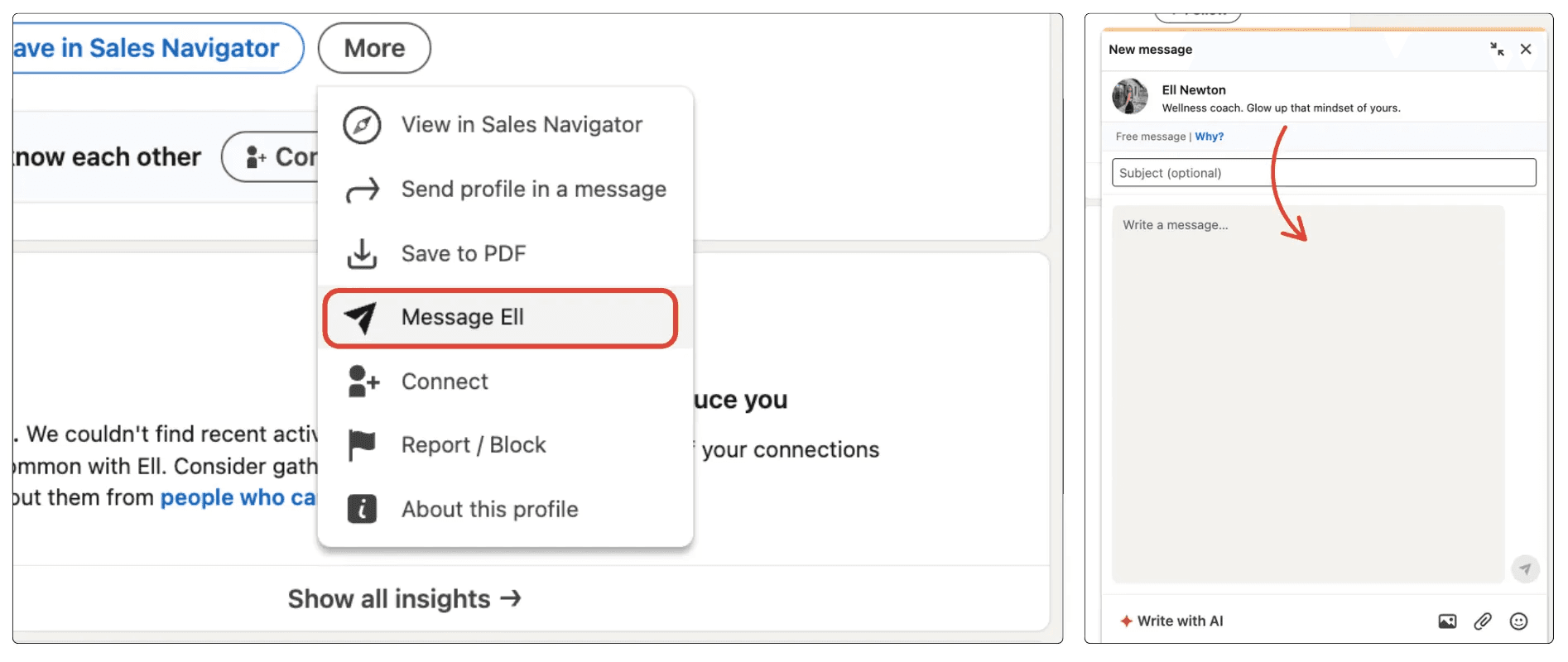
Choosing the Right InMail Type

There are 3 types of InMails you can use; free, paid, and sponsored. Choosing the wrong format can lead to wasted budget or missed opportunities. Here is a quick breakdown:

Type

Best For

Pros

Cons

Free InMails

Budget-conscious networking

Costs $0; works with “Open Profiles”

Only works if the recipient enables it

Paid InMails

Targeted sales & recruiting

Guaranteed reach; credit refunds

Limited monthly credits; can be pricey

Sponsored

Large-scale marketing

Massively scalable; automated

Labeled as “Sponsored”; less personal

1. Free InMails

Available when a Premium member has an Open Profile. You can message these users without spending a single credit. It’s the perfect “hidden” trick for cost-free outreach to high-profile professionals.
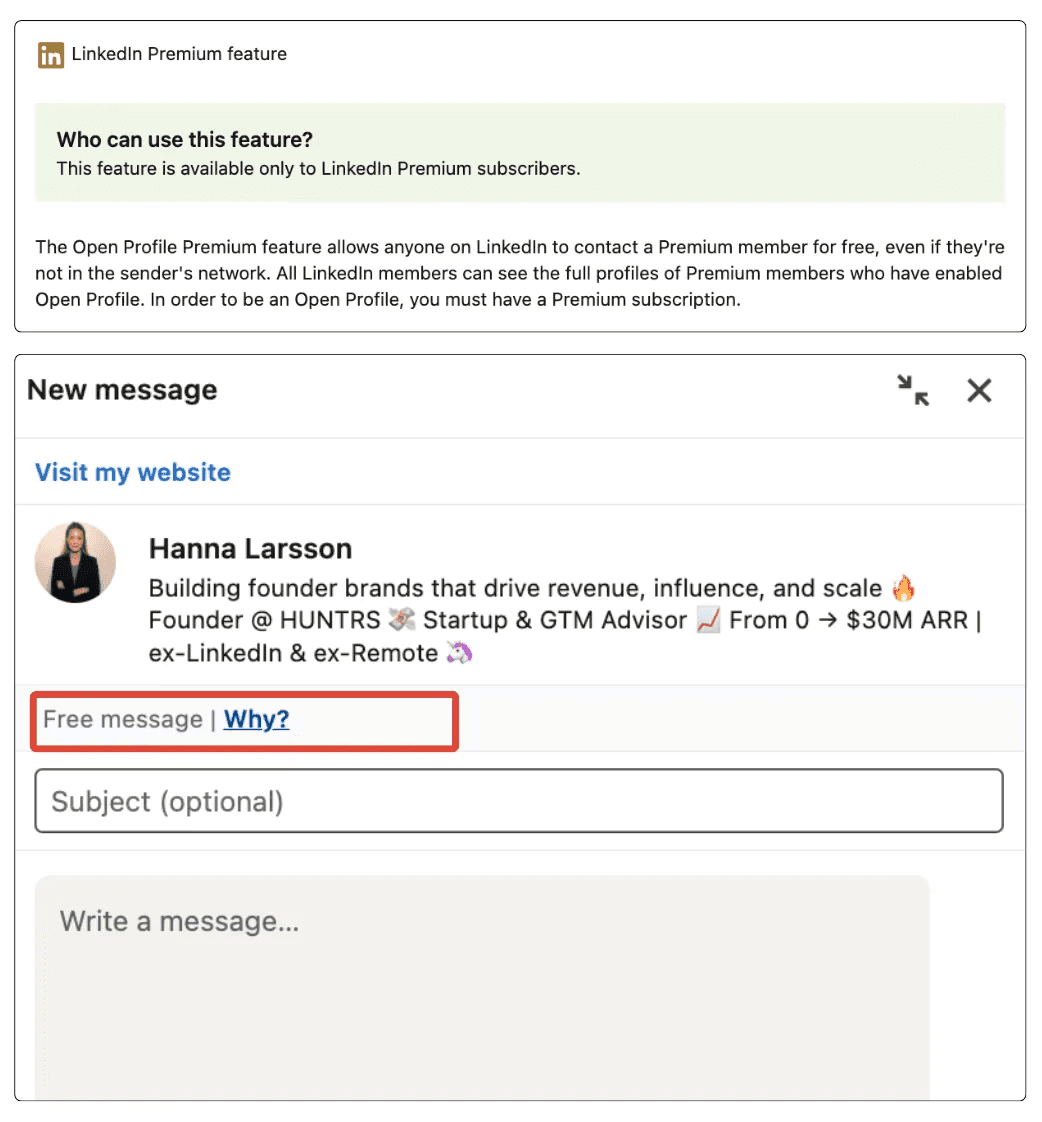
2. Paid InMails

The standard for Premium, Sales Navigator, and Recruiter users. These allow you to reach 2nd and 3rd-degree connections. Because credits are limited, this encourages high-quality, personalized messaging that yields better results.

3. Sponsored InMails (Message Ads)

These are part of the LinkedIn Ads ecosystem. Instead of manual outreach, you set a target audience and budget, and LinkedIn delivers your message to thousands of inboxes at once. While highly scalable, they carry a “Sponsored” tag, so they require a very strong hook to maintain high engagement.

For more details on message limits and practical advice, read our full guide on LinkedIn InMail features and tips.

How to Write the Perfect Outreach Message

To stand out from generic messages like “I’d love to add you to my network,” use psychological triggers that encourage people to respond.

Use The Law of Reciprocity

Give something before you ask for anything. Share a helpful resource, an interesting article, or a genuine compliment about their recent achievement. When you offer value first, people feel more inclined to reply.

Establish Social Proof

Mention a mutual connection or a shared professional group. Human beings are “tribal” by nature; we trust people who are connected to those we already know. Instantly referencing a shared contact lowers the recipient’s guard.

Keep it Short

Short messages work better. Messages under 400 characters (about 3-4 sentences) get a 22% higher response rate. Make your message easy to read and identify a pain point, offer a quick solution, and be direct.

Don't Forget The Easy Call-To-Action

End with a “soft” Call to Action (CTA) that is easy to answer. Instead of asking for a 30-minute meeting (which feels like a chore), ask a low-friction question like, “Are you currently focused on [Topic] this quarter?” or “Would you be open to seeing a quick case study on this?” This creates an “open loop” in the prospect’s mind that they want to close by providing a quick “yes” or “no.”

15 LinkedIn Outreach Message Templates

Every LinkedIn outreach message should be tailored to the situation and your reason for reaching out. This approach yields the best results.

Here are 9 LinkedIn outreach message templates you can adapt based on who you’re contacting.

1. Offer to help their business/brand

Why send this message:

If you want to initiate a conversation by offering value first, position yourself as a helpful expert rather than selling immediately.

Message:

Hi {{First Name}},
I came across your work at {{company}} and really liked how you’re approaching {{specific project/initiative}}.

I work with {{type of business/brand}} on {{specific outcome}}, and while looking at what you’re building, a few ideas came to mind that could help you {{improve result or solve problem}}.

If you’re open to it, I’d be happy to share them in a quick chat and see if they’d be useful for you.

2. Product pitch with a CTA

Why send this message:

If you’ve identified a clear pain point your product addresses and want to introduce it without sounding too forceful, while guiding the prospect toward a next step.

Message:

Hi {{First Name}},
I noticed that {{company}} is currently dealing with {{specific challenge or goal}}, which is a common issue in {{their industry}}.

We developed {{product name}} to assist teams like yours {{clear benefit/result}} without {{common friction or downside}}.

Would you be open to a quick 15-minute call this week so I can demonstrate how it works and see if it’s relevant for you?

3. Introduce Your Channel/ Page

Why send this message:

If you want to connect by sharing valuable content first, position yourself as a useful resource, and start a conversation without selling.

Message:

Hi {{First Name}},
I came across your profile while reading about {{topic/industry}} and thought you might find this valuable.

I run a content page where I share practical insights on {{main topics}}, based on real-world experiences and case studies.

If you’re interested, I’d be pleased to share it with you and exchange thoughts.

4. Introduce your product

Why send this message:

If you want to introduce your product clearly and professionally, without pushing for an immediate sale, and open the door for a follow-up conversation.

Message:

Hi {{First Name}},
I came across {{company}} while looking into {{industry/topic}} and found your work on {{specific detail}} interesting.

I wanted to briefly introduce {{product name}} — a solution designed to help {{type of company}} {{main benefit or result}} more effectively.

If this is something you’re currently exploring, I’d be happy to provide more details or guide you through how it works.

5. Connection Request to a Potential Partner

Why send this message:

If you want to connect with someone for a potential partnership and set the right tone from the initial interaction.

Message:

Hi {{First Name}},
I came across your work at {{company}} and felt there could be strong synergy between what you do and what we’re building around {{shared focus}}.

I’d love to connect and explore potential ways we could collaborate if it makes sense.

6. Make an offer based on a lead’s interest

Why send this message:

If the lead has already shown interest (liked a post, commented, visited your site, or indicated a need) and you want to turn that signal into a relevant offer.

Message:

Hi {{First Name}},
I noticed your interest in {{specific topic/action they took}}, which usually indicates teams are looking to improve {{related goal or pain point}}.

Based on that, I believe {{product/service}} could assist you {{specific outcome}} without {{common obstacle}}.

Would you like me to share a quick example or guide you through how it could work for your situation?

7. Offer a Free Audit or Review

Why send this message:

If the lead has a business or profile that could clearly benefit from improvement and you want to offer upfront value.

Message:

Hi {{First Name}},
I noticed your current setup related to {{topic}} and thought you may be open to a quick audit.

I can review {{website/profile/strategy}} and share 3–5 practical improvements that could assist you {{result}}.

Would you be interested in a brief review?

8. Invite to a Webinar or Live Event

Why send this message:

If you’re hosting an event relevant to their interests and want to invite them without sounding sales-oriented.

Message:

Hi {{First Name}},
I noticed you’re interested in {{topic}}, and I’m hosting a live session on {{topic}} next week.

It’s a brief webinar where we’ll cover {{key points}} and share real examples.

Would you like me to send you the link?

9. Share a Case Study

Why send this message:

If your lead is in the same industry as a successful client and you want to build credibility.

Message:

Hi {{First Name}},
I noticed you’re involved in {{industry}}, and we recently assisted a similar company achieve {{result}}.

I can share the case study if you’re interested.

Would you like me to send it over?

10. Congratulate on a Recent Achievement

Why send this message:

If the lead recently shared a success, new role, or milestone and you want to initiate a relationship based on authenticity.

Message:

Hi {{First Name}},
Congrats on {{achievement/new role}} — that’s a significant accomplishment!

I’m truly impressed by what you’re developing in {{industry}}.

I’d love to connect and learn more about your journey.

11. Ask for Feedback or Opinion

Why send this message:

If you want to start a conversation by asking for their professional opinion, which makes them feel valued.

Message:

Hi {{First Name}},
I noticed your expertise in {{topic}}, and I would love to get your opinion on something.

Would you mind sharing your thoughts on {{question}}?

I’d greatly appreciate your insight.

12. Offer a Content Collaboration

Why send this message:

If you want to collaborate on a blog, podcast, or interview with someone in your niche.

Message:

Hi {{First Name}},
I love your content on {{topic}} and believe our audiences would gain from a collaboration.

Would you be open to doing a brief interview or co-creating a post together?

If yes, I can share a few ideas.

13. Offer a Discount or Special Offer

Why send this message:

If you want to make a time-sensitive offer to encourage action without being overly assertive.

Message:

Hi {{First Name}},
I noticed you’re exploring {{topic}}, and we’re currently providing a special discount for {{product/service}}.

If you’d like, I can share the details and see if it fits your requirements.

Would you like to know more?

14. Invite to Join a Private Group or Community

Why send this message:

If you have a community that provides value and you want to invite them to join.

Message:

Hi {{First Name}},
I’m creating a small community of professionals focused on {{topic}}.

We share resources, case studies, and networking opportunities.

Would you like an invitation?

15. Offer a Quick Demo or Trial

Why send this message:

If you want to let them experience your product before committing.

Message:

Hi {{First Name}},
I’d love to show you how {{product}} works and how it can assist you {{benefit}}

Would you be open to a brief demo or a free trial?

I can set it up in under 10 minutes.

15 LinkedIn Outreach Message Templates

Every LinkedIn outreach message should be tailored to the situation and your reason for reaching out. This approach yields the best results.

Here are 9 LinkedIn outreach message templates you can adapt based on who you’re contacting.

1. Offer to help their business/brand

Why send this message:

If you want to initiate a conversation by offering value first, position yourself as a helpful expert rather than selling immediately.

Message:

Hi {{First Name}},
I came across your work at {{company}} and really liked how you’re approaching {{specific project/initiative}}.

I work with {{type of business/brand}} on {{specific outcome}}, and while looking at what you’re building, a few ideas came to mind that could help you {{improve result or solve problem}}.

If you’re open to it, I’d be happy to share them in a quick chat and see if they’d be useful for you.

2. Product pitch with a CTA

Why send this message:

If you’ve identified a clear pain point your product addresses and want to introduce it without sounding too forceful, while guiding the prospect toward a next step.

Message:

Hi {{First Name}},
I noticed that {{company}} is currently dealing with {{specific challenge or goal}}, which is a common issue in {{their industry}}.

We developed {{product name}} to assist teams like yours {{clear benefit/result}} without {{common friction or downside}}.

Would you be open to a quick 15-minute call this week so I can demonstrate how it works and see if it’s relevant for you?

3. Introduce Your Channel/ Page

Why send this message:

If you want to connect by sharing valuable content first, position yourself as a useful resource, and start a conversation without selling.

Message:

Hi {{First Name}},
I came across your profile while reading about {{topic/industry}} and thought you might find this valuable.

I run a content page where I share practical insights on {{main topics}}, based on real-world experiences and case studies.

If you’re interested, I’d be pleased to share it with you and exchange thoughts.

4. Introduce your product

Why send this message:

If you want to introduce your product clearly and professionally, without pushing for an immediate sale, and open the door for a follow-up conversation.

Message:

Hi {{First Name}},
I came across {{company}} while looking into {{industry/topic}} and found your work on {{specific detail}} interesting.

I wanted to briefly introduce {{product name}} — a solution designed to help {{type of company}} {{main benefit or result}} more effectively.

If this is something you’re currently exploring, I’d be happy to provide more details or guide you through how it works.

5. Connection Request to a Potential Partner

Why send this message:

If you want to connect with someone for a potential partnership and set the right tone from the initial interaction.

Message:

Hi {{First Name}},
I came across your work at {{company}} and felt there could be strong synergy between what you do and what we’re building around {{shared focus}}.

I’d love to connect and explore potential ways we could collaborate if it makes sense.

6. Make an offer based on a lead’s interest

Why send this message:

If the lead has already shown interest (liked a post, commented, visited your site, or indicated a need) and you want to turn that signal into a relevant offer.

Message:

Hi {{First Name}},
I noticed your interest in {{specific topic/action they took}}, which usually indicates teams are looking to improve {{related goal or pain point}}.

Based on that, I believe {{product/service}} could assist you {{specific outcome}} without {{common obstacle}}.

Would you like me to share a quick example or guide you through how it could work for your situation?

7. Offer a Free Audit or Review

Why send this message:

If the lead has a business or profile that could clearly benefit from improvement and you want to offer upfront value.

Message:

Hi {{First Name}},
I noticed your current setup related to {{topic}} and thought you may be open to a quick audit.

I can review {{website/profile/strategy}} and share 3–5 practical improvements that could assist you {{result}}.

Would you be interested in a brief review?

8. Invite to a Webinar or Live Event

Why send this message:

If you’re hosting an event relevant to their interests and want to invite them without sounding sales-oriented.

Message:

Hi {{First Name}},
I noticed you’re interested in {{topic}}, and I’m hosting a live session on {{topic}} next week.

It’s a brief webinar where we’ll cover {{key points}} and share real examples.

Would you like me to send you the link?

9. Share a Case Study

Why send this message:

If your lead is in the same industry as a successful client and you want to build credibility.

Message:

Hi {{First Name}},
I noticed you’re involved in {{industry}}, and we recently assisted a similar company achieve {{result}}.

I can share the case study if you’re interested.

Would you like me to send it over?

10. Congratulate on a Recent Achievement

Why send this message:

If the lead recently shared a success, new role, or milestone and you want to initiate a relationship based on authenticity.

Message:

Hi {{First Name}},
Congrats on {{achievement/new role}} — that’s a significant accomplishment!

I’m truly impressed by what you’re developing in {{industry}}.

I’d love to connect and learn more about your journey.

11. Ask for Feedback or Opinion

Why send this message:

If you want to start a conversation by asking for their professional opinion, which makes them feel valued.

Message:

Hi {{First Name}},
I noticed your expertise in {{topic}}, and I would love to get your opinion on something.

Would you mind sharing your thoughts on {{question}}?

I’d greatly appreciate your insight.

12. Offer a Content Collaboration

Why send this message:

If you want to collaborate on a blog, podcast, or interview with someone in your niche.

Message:

Hi {{First Name}},
I love your content on {{topic}} and believe our audiences would gain from a collaboration.

Would you be open to doing a brief interview or co-creating a post together?

If yes, I can share a few ideas.

13. Offer a Discount or Special Offer

Why send this message:

If you want to make a time-sensitive offer to encourage action without being overly assertive.

Message:

Hi {{First Name}},
I noticed you’re exploring {{topic}}, and we’re currently providing a special discount for {{product/service}}.

If you’d like, I can share the details and see if it fits your requirements.

Would you like to know more?

14. Invite to Join a Private Group or Community

Why send this message:

If you have a community that provides value and you want to invite them to join.

Message:

Hi {{First Name}},
I’m creating a small community of professionals focused on {{topic}}.

We share resources, case studies, and networking opportunities.

Would you like an invitation?

15. Offer a Quick Demo or Trial

Why send this message:

If you want to let them experience your product before committing.

Message:

Hi {{First Name}},
I’d love to show you how {{product}} works and how it can assist you {{benefit}}

Would you be open to a brief demo or a free trial?

I can set it up in under 10 minutes.

15 LinkedIn Outreach Message Templates

Every LinkedIn outreach message should be tailored to the situation and your reason for reaching out. This approach yields the best results.

Here are 9 LinkedIn outreach message templates you can adapt based on who you’re contacting.

1. Offer to help their business/brand

Why send this message:

If you want to initiate a conversation by offering value first, position yourself as a helpful expert rather than selling immediately.

Message:

Hi {{First Name}},
I came across your work at {{company}} and really liked how you’re approaching {{specific project/initiative}}.

I work with {{type of business/brand}} on {{specific outcome}}, and while looking at what you’re building, a few ideas came to mind that could help you {{improve result or solve problem}}.

If you’re open to it, I’d be happy to share them in a quick chat and see if they’d be useful for you.

2. Product pitch with a CTA

Why send this message:

If you’ve identified a clear pain point your product addresses and want to introduce it without sounding too forceful, while guiding the prospect toward a next step.

Message:

Hi {{First Name}},
I noticed that {{company}} is currently dealing with {{specific challenge or goal}}, which is a common issue in {{their industry}}.

We developed {{product name}} to assist teams like yours {{clear benefit/result}} without {{common friction or downside}}.

Would you be open to a quick 15-minute call this week so I can demonstrate how it works and see if it’s relevant for you?

3. Introduce Your Channel/ Page

Why send this message:

If you want to connect by sharing valuable content first, position yourself as a useful resource, and start a conversation without selling.

Message:

Hi {{First Name}},
I came across your profile while reading about {{topic/industry}} and thought you might find this valuable.

I run a content page where I share practical insights on {{main topics}}, based on real-world experiences and case studies.

If you’re interested, I’d be pleased to share it with you and exchange thoughts.

4. Introduce your product

Why send this message:

If you want to introduce your product clearly and professionally, without pushing for an immediate sale, and open the door for a follow-up conversation.

Message:

Hi {{First Name}},
I came across {{company}} while looking into {{industry/topic}} and found your work on {{specific detail}} interesting.

I wanted to briefly introduce {{product name}} — a solution designed to help {{type of company}} {{main benefit or result}} more effectively.

If this is something you’re currently exploring, I’d be happy to provide more details or guide you through how it works.

5. Connection Request to a Potential Partner

Why send this message:

If you want to connect with someone for a potential partnership and set the right tone from the initial interaction.

Message:

Hi {{First Name}},
I came across your work at {{company}} and felt there could be strong synergy between what you do and what we’re building around {{shared focus}}.

I’d love to connect and explore potential ways we could collaborate if it makes sense.

6. Make an offer based on a lead’s interest

Why send this message:

If the lead has already shown interest (liked a post, commented, visited your site, or indicated a need) and you want to turn that signal into a relevant offer.

Message:

Hi {{First Name}},
I noticed your interest in {{specific topic/action they took}}, which usually indicates teams are looking to improve {{related goal or pain point}}.

Based on that, I believe {{product/service}} could assist you {{specific outcome}} without {{common obstacle}}.

Would you like me to share a quick example or guide you through how it could work for your situation?

7. Offer a Free Audit or Review

Why send this message:

If the lead has a business or profile that could clearly benefit from improvement and you want to offer upfront value.

Message:

Hi {{First Name}},
I noticed your current setup related to {{topic}} and thought you may be open to a quick audit.

I can review {{website/profile/strategy}} and share 3–5 practical improvements that could assist you {{result}}.

Would you be interested in a brief review?

8. Invite to a Webinar or Live Event

Why send this message:

If you’re hosting an event relevant to their interests and want to invite them without sounding sales-oriented.

Message:

Hi {{First Name}},
I noticed you’re interested in {{topic}}, and I’m hosting a live session on {{topic}} next week.

It’s a brief webinar where we’ll cover {{key points}} and share real examples.

Would you like me to send you the link?

9. Share a Case Study

Why send this message:

If your lead is in the same industry as a successful client and you want to build credibility.

Message:

Hi {{First Name}},
I noticed you’re involved in {{industry}}, and we recently assisted a similar company achieve {{result}}.

I can share the case study if you’re interested.

Would you like me to send it over?

10. Congratulate on a Recent Achievement

Why send this message:

If the lead recently shared a success, new role, or milestone and you want to initiate a relationship based on authenticity.

Message:

Hi {{First Name}},
Congrats on {{achievement/new role}} — that’s a significant accomplishment!

I’m truly impressed by what you’re developing in {{industry}}.

I’d love to connect and learn more about your journey.

11. Ask for Feedback or Opinion

Why send this message:

If you want to start a conversation by asking for their professional opinion, which makes them feel valued.

Message:

Hi {{First Name}},
I noticed your expertise in {{topic}}, and I would love to get your opinion on something.

Would you mind sharing your thoughts on {{question}}?

I’d greatly appreciate your insight.

12. Offer a Content Collaboration

Why send this message:

If you want to collaborate on a blog, podcast, or interview with someone in your niche.

Message:

Hi {{First Name}},
I love your content on {{topic}} and believe our audiences would gain from a collaboration.

Would you be open to doing a brief interview or co-creating a post together?

If yes, I can share a few ideas.

13. Offer a Discount or Special Offer

Why send this message:

If you want to make a time-sensitive offer to encourage action without being overly assertive.

Message:

Hi {{First Name}},
I noticed you’re exploring {{topic}}, and we’re currently providing a special discount for {{product/service}}.

If you’d like, I can share the details and see if it fits your requirements.

Would you like to know more?

14. Invite to Join a Private Group or Community

Why send this message:

If you have a community that provides value and you want to invite them to join.

Message:

Hi {{First Name}},
I’m creating a small community of professionals focused on {{topic}}.

We share resources, case studies, and networking opportunities.

Would you like an invitation?

15. Offer a Quick Demo or Trial

Why send this message:

If you want to let them experience your product before committing.

Message:

Hi {{First Name}},
I’d love to show you how {{product}} works and how it can assist you {{benefit}}

Would you be open to a brief demo or a free trial?

I can set it up in under 10 minutes.

15 LinkedIn Outreach Message Templates

Every LinkedIn outreach message should be tailored to the situation and your reason for reaching out. This approach yields the best results.

Here are 9 LinkedIn outreach message templates you can adapt based on who you’re contacting.

1. Offer to help their business/brand

Why send this message:

If you want to initiate a conversation by offering value first, position yourself as a helpful expert rather than selling immediately.

Message:

Hi {{First Name}},
I came across your work at {{company}} and really liked how you’re approaching {{specific project/initiative}}.

I work with {{type of business/brand}} on {{specific outcome}}, and while looking at what you’re building, a few ideas came to mind that could help you {{improve result or solve problem}}.

If you’re open to it, I’d be happy to share them in a quick chat and see if they’d be useful for you.

2. Product pitch with a CTA

Why send this message:

If you’ve identified a clear pain point your product addresses and want to introduce it without sounding too forceful, while guiding the prospect toward a next step.

Message:

Hi {{First Name}},
I noticed that {{company}} is currently dealing with {{specific challenge or goal}}, which is a common issue in {{their industry}}.

We developed {{product name}} to assist teams like yours {{clear benefit/result}} without {{common friction or downside}}.

Would you be open to a quick 15-minute call this week so I can demonstrate how it works and see if it’s relevant for you?

3. Introduce Your Channel/ Page

Why send this message:

If you want to connect by sharing valuable content first, position yourself as a useful resource, and start a conversation without selling.

Message:

Hi {{First Name}},
I came across your profile while reading about {{topic/industry}} and thought you might find this valuable.

I run a content page where I share practical insights on {{main topics}}, based on real-world experiences and case studies.

If you’re interested, I’d be pleased to share it with you and exchange thoughts.

4. Introduce your product

Why send this message:

If you want to introduce your product clearly and professionally, without pushing for an immediate sale, and open the door for a follow-up conversation.

Message:

Hi {{First Name}},
I came across {{company}} while looking into {{industry/topic}} and found your work on {{specific detail}} interesting.

I wanted to briefly introduce {{product name}} — a solution designed to help {{type of company}} {{main benefit or result}} more effectively.

If this is something you’re currently exploring, I’d be happy to provide more details or guide you through how it works.

5. Connection Request to a Potential Partner

Why send this message:

If you want to connect with someone for a potential partnership and set the right tone from the initial interaction.

Message:

Hi {{First Name}},
I came across your work at {{company}} and felt there could be strong synergy between what you do and what we’re building around {{shared focus}}.

I’d love to connect and explore potential ways we could collaborate if it makes sense.

6. Make an offer based on a lead’s interest

Why send this message:

If the lead has already shown interest (liked a post, commented, visited your site, or indicated a need) and you want to turn that signal into a relevant offer.

Message:

Hi {{First Name}},
I noticed your interest in {{specific topic/action they took}}, which usually indicates teams are looking to improve {{related goal or pain point}}.

Based on that, I believe {{product/service}} could assist you {{specific outcome}} without {{common obstacle}}.

Would you like me to share a quick example or guide you through how it could work for your situation?

7. Offer a Free Audit or Review

Why send this message:

If the lead has a business or profile that could clearly benefit from improvement and you want to offer upfront value.

Message:

Hi {{First Name}},
I noticed your current setup related to {{topic}} and thought you may be open to a quick audit.

I can review {{website/profile/strategy}} and share 3–5 practical improvements that could assist you {{result}}.

Would you be interested in a brief review?

8. Invite to a Webinar or Live Event

Why send this message:

If you’re hosting an event relevant to their interests and want to invite them without sounding sales-oriented.

Message:

Hi {{First Name}},
I noticed you’re interested in {{topic}}, and I’m hosting a live session on {{topic}} next week.

It’s a brief webinar where we’ll cover {{key points}} and share real examples.

Would you like me to send you the link?

9. Share a Case Study

Why send this message:

If your lead is in the same industry as a successful client and you want to build credibility.

Message:

Hi {{First Name}},
I noticed you’re involved in {{industry}}, and we recently assisted a similar company achieve {{result}}.

I can share the case study if you’re interested.

Would you like me to send it over?

10. Congratulate on a Recent Achievement

Why send this message:

If the lead recently shared a success, new role, or milestone and you want to initiate a relationship based on authenticity.

Message:

Hi {{First Name}},
Congrats on {{achievement/new role}} — that’s a significant accomplishment!

I’m truly impressed by what you’re developing in {{industry}}.

I’d love to connect and learn more about your journey.

11. Ask for Feedback or Opinion

Why send this message:

If you want to start a conversation by asking for their professional opinion, which makes them feel valued.

Message:

Hi {{First Name}},
I noticed your expertise in {{topic}}, and I would love to get your opinion on something.

Would you mind sharing your thoughts on {{question}}?

I’d greatly appreciate your insight.

12. Offer a Content Collaboration

Why send this message:

If you want to collaborate on a blog, podcast, or interview with someone in your niche.

Message:

Hi {{First Name}},
I love your content on {{topic}} and believe our audiences would gain from a collaboration.

Would you be open to doing a brief interview or co-creating a post together?

If yes, I can share a few ideas.

13. Offer a Discount or Special Offer

Why send this message:

If you want to make a time-sensitive offer to encourage action without being overly assertive.

Message:

Hi {{First Name}},
I noticed you’re exploring {{topic}}, and we’re currently providing a special discount for {{product/service}}.

If you’d like, I can share the details and see if it fits your requirements.

Would you like to know more?

14. Invite to Join a Private Group or Community

Why send this message:

If you have a community that provides value and you want to invite them to join.

Message:

Hi {{First Name}},
I’m creating a small community of professionals focused on {{topic}}.

We share resources, case studies, and networking opportunities.

Would you like an invitation?

15. Offer a Quick Demo or Trial

Why send this message:

If you want to let them experience your product before committing.

Message:

Hi {{First Name}},
I’d love to show you how {{product}} works and how it can assist you {{benefit}}

Would you be open to a brief demo or a free trial?

I can set it up in under 10 minutes.

How to Follow Up and Keep the Conversation Going

Starting a conversation on LinkedIn is tough, but maintaining it is even more challenging. Many individuals send just one message and then wait, hoping for a response.

However, real results come from consistently and thoughtfully following up, keeping your lead engaged without making them feel pressured.

Besides avoiding spam, here are a few additional tips to keep your lead interested and the conversation progressing:

1. Don’t Wait Too Long: Timing is crucial. If you wait too long, your message may become irrelevant or forgotten.

2. Mention Their Activity: If they recently posted something, commented, or updated their profile, bring it up. This indicates that you are attentive and not just sending generic messages.

3. Keep It Short and Natural: No one desires to read long, verbose messages. LinkedIn isn’t the platform for sales emails. Make your messages concise, friendly, and easy to read.

4. Be Respectful and Know When to Leave: If you’ve followed up three times with no response, it’s acceptable to stop. You can still maintain a positive tone by saying, “If now isn’t the right time, I’ll reach out later.” This keeps the relationship professional.

5. Use “Proof” to Build Trust: Don’t leave your lead guessing. Share your credentials or proof early, such as quick results, a client victory, or a testimonial. Proof enhances your message's credibility and makes it easier to respond.

6. Always End with a Clear Next Step: Every message should conclude with a clear CTA that isn’t pushy. This facilitates an easier response from the lead. For instance:

  • “Would you like to see a quick demo?”

  • “Can I send you a brief example?”

  • “Would you be open to a 10-minute call?”

7. Ask Open-Ended Questions: Rather than yes/no questions, pose something that encourages conversation. Open-ended questions simplify the reply process for the lead. For example:

  • “What’s your biggest challenge with X at the moment?”

  • “How are you currently dealing with Y?”

  • “What would your ideal outcome for Z look like?”

8. Use the “Micro-Commitment” Technique: Instead of requesting a meeting right away, ask for a small action first. Micro-commitments are easier to agree to and aid in building trust. For example:

  • “Would you like a quick example?”

  • “Can I send you a case study?”

  • “Is it acceptable if I share a brief demo?”

Wrapping it Up

A successful outreach campaign is about treating people like people, not just as data points on a spreadsheet.

By using the right mix of InMails and personal messages, you will reach decision-makers directly. Keep your messages short, offer value upfront, and use LinkedIn outreach templates that feel like a real conversation, not a sales pitch.

When you focus on building real relationships, you’ll see your response rates and your business grow.
Tired of spending hours writing your next LinkedIn post?

MagicPost is not only your favorite AI LinkedIn Post Generator. It is the all-in-one platform for effortlessly creating engaging content on LinkedIn.

No credit card needed

Enjoy your free trial.

Tired of spending hours writing your next LinkedIn post?

MagicPost is not only your favorite AI LinkedIn Post Generator. It is the all-in-one platform for effortlessly creating engaging content on LinkedIn.

No credit card needed

Enjoy your free trial.

English (India)

Company

Resources

Alternatives

Free tools

English (India)

Made with love in 🇫🇷 - ©Copyright 2025 MagicPost