" height="26.80529977783203px" id="tymKb8bqC" width="128.00300311279295px"/><path d="M 0 2.417 L 0 0 L 12.909 0 L 12.909 2.417 Z" fill="rgb(126, 78, 253)" height="2.417099999999998px" id="aYr4em6zK" transform="translate(128.341 22.325)" width="12.908999999999992px"/></svg>)

"/><stop offset="1" stop-color="rgb(118, 37, 250)"/></linearGradient></defs><g d="M 19.242 21.22 L 19.362 6.204 L 19.272 6.204 L 13.757 21.22 L 10.161 21.22 L 4.796 6.204 L 4.706 6.204 L 4.825 21.22 L 0 21.22 L 0 0 L 7.283 0 L 12.109 13.607 L 12.229 13.607 L 16.844 0 L 24.247 0 L 24.247 21.22 Z M 26.421 26.113 L 26.421 23.445 L 41.407 23.445 L 41.407 26.113 Z" fill="transparent" height="26.112508199679183px" id="DvfaAIHYn" width="41.40731898311435px"><path d="M 19.242 21.22 L 19.362 6.204 L 19.272 6.204 L 13.757 21.22 L 10.161 21.22 L 4.796 6.204 L 4.706 6.204 L 4.825 21.22 L 0 21.22 L 0 0 L 7.283 0 L 12.109 13.607 L 12.229 13.607 L 16.844 0 L 24.247 0 L 24.247 21.22 Z" fill="rgb(46, 46, 46)" height="21.220180016149442px" id="pLsxRCobd" width="24.247352589074694px"/><path d="M 0 2.668 L 0 0 L 14.986 0 L 14.986 2.668 Z" fill="url(%23yD9d4I5GR-3279285344-linear-gradient)" height="2.6675085048549647px" id="yD9d4I5GR" transform="translate(26.421 23.445)" width="14.986002836263765px"/></g></svg>)




Bénédicte Rivory
Cold outreach shouts; buyers scroll past. Social selling earns attention where decisions start: public feeds, peer comments, and credible signals. The representative who demonstrates expertise consistently becomes the safe choice before any pitch lands.
In 2026, B2B buying relies on visible proof. Executives check who engages, which insights resonate, and whether a representative understands timing and context. Teams that treat social selling as a revenue discipline (content, conversations, and follow-ups tied to the pipeline) see warmer starts and shorter cycles.
The challenge isn’t posting more… It’s building a system: precise audience mapping, repeatable insight formats, signal tracking that flags intent, rapid one-to-one outreach, and clean CRM workflows that transform reactions into meetings. Done right, social feeds become a steady source of qualified conversations.
What is Social Selling?
Social selling is a sales process that builds trust in public and converts it in private. Representatives share useful insights where buyers are already paying attention, observe intent signals, and move qualified stakeholders into focused 1:1 conversations. The sequence remains simple: relevance first, ask second, meeting third.
The core strategies combine consistent expertise posts, comment-level engagement with Ideal Customer Profiles (ICPs), targeted connection invitations, and quick follow-ups that reference the exact signal observed. Teams route every interaction through the CRM to maintain context, coordinate multi-threading, and attribute revenue. When done effectively, the outcome is warmer replies, higher meeting rates, and shorter cycles, as buyers recognize the name long before the pitch.
Main B2B Social Selling Platforms in 2026
LinkedIn leads B2B social selling because decision-makers are present there and intent signals align seamlessly with pipeline work. Job titles, company information, and engagement metrics (comments, reposts, DMs, profile views) ensure precise targeting and make follow-ups easy. Other platforms provide reach or proof, but LinkedIn efficiently converts attention into meetings with minimal friction.
👉 LinkedIn. Best for mid-to-high ACV, multi-threaded deals. Strong filters for job titles and companies, rich public signals, native DM context, and credibility from insightful posts and comments. Sales Navigator enhances targeting and list management.
👉 X (Twitter). Effective for founders, VCs, development tools, and quick news cycles. Open replies create public proof and build rapport quickly. Limited firmographic filtering; rely on lists, bios, and topic follower graphs. Use to warm an account before transitioning to LinkedIn or email.
👉 Instagram. Useful for design, e-commerce, and agencies selling creative services. Visual formats highlight proof, and social validation builds fast. Targeting for B2B roles is limited; consider it as brand warming and a doorway for DMs, rather than the primary pipeline tool.
👉 YouTube. Long-form proof and searchable expertise. Ideal for complex products, demonstrations, and case walkthroughs. Comments and subscribers indicate interest; conversions generally occur after a LinkedIn touch or site visit.
👉 Reddit. High-intent discussions within niche communities. Authority increases through helpful answers and clear case details. Outreach needs to maintain community safety; move to 1:1 only when invited.
👉 Facebook. Still useful for community groups and local B2B interactions. Company pages often underperform in reach; closed groups and events drive the most significant discussions.
Quick platform comparison
Platform | Where it excels | Targeting quality | Signal richness | Best use |
|---|---|---|---|---|
All B2B businesses, from freelancers to large companies | Precise titles and companies | High: comments, views, reactions | Primary engine for meetings + Quick and free visibility | |
X (Twitter) | Tech, founders, VC | Medium via lists/bios | Medium: replies, quotes | Warmth and relationship initiation |
Creative, brand-led deals | Low for roles | Medium: saves, shares, replies | Visual proof and brand warming | |
YouTube | Complex products, demos | N/A (search-driven) | Medium: watch time, comments | Authority and long-form proof |
Niche buyer communities | Topic-specific subreddits | High: threads, upvotes | Credibility and authentic demand | |
Local B2B, communities | Low for roles | Medium: group threads | Events and group-led rapport |
LinkedIn is crucial for B2B companies. It’s the best platform to gain visibility for free while connecting easily with other profiles. Consider using another complementary platform, especially YouTube if you have a SaaS.
Best LinkedIn Social Selling Strategies in 2026!
Improve Your LinkedIn Profile
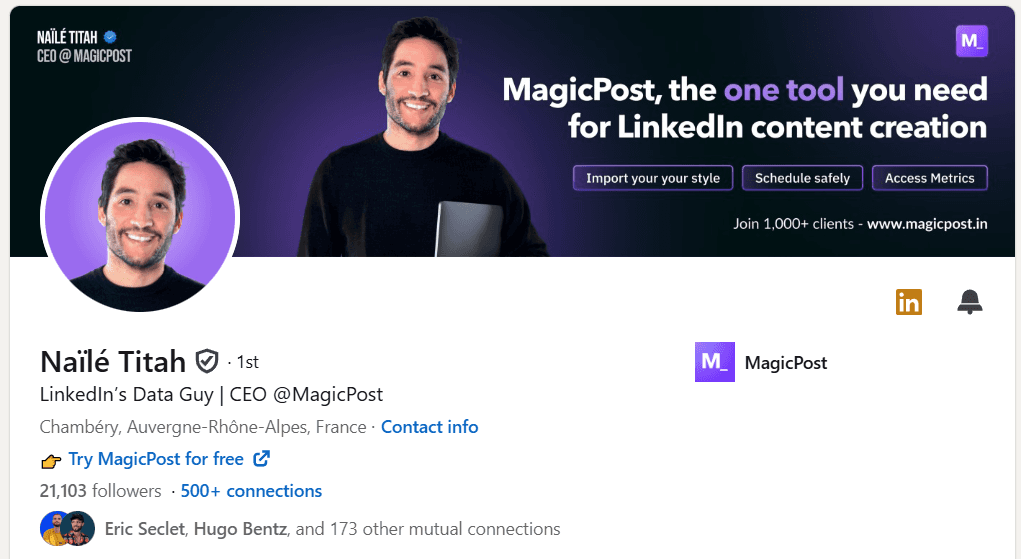
Your profile is a shop window for deals. A stranger should understand who you help, what result you create, and how to contact you in ten seconds. Keep the promise clear, show one proof, and give a simple next step that any buyer can follow without thinking.
Your goal is clarity over style. Use plain words. Name the ideal customer, the problem you solve, and one outcome that matters. Put proof in the Featured section so visitors see it before they leave. Set a visible button to your calendar so the path to a meeting feels natural.
MagicPost tip: Make your profile as human as possible. Avoid AI profile pictures and inspire trust naturally.
Your LinkedIn profile Strategy for 2026
Part | Do this | Why it works |
|---|---|---|
Banner | One line that states the result for a specific audience with one proof cue | The eye lands on the banner first so a clear promise stops the scroll |
Headline | Write who you help and the result you bring with your method or tool | Buyers decide fit in one glance |
About section | Four to six short lines that cover who you help, pain solved, method, simple result, and how to book | Tells a complete story without fluff |
Featured | Pin a client result, post a short demo video, and a booking link | Shows proof then gives a next step |
Custom button | Set to Book a call and link to your calendar | Removes friction for busy buyers |
Contact | Show work email and time zone | Makes replies easy and fast |
Define a Good Content Type Strategy
Consistency is more important than volume. Plan one week at a time around a single buyer problem.
Each post presents one idea, one proof, and one next step. Keep it concise, straightforward, and easy to read on mobile. When someone reacts or comments, send a same-day direct message that references the post and asks one simple question related to their role.
One week of posting template:
Day 1 Image plus caption that identifies the problem and one action for today
Day 2 Text post that explains one specific fix with a simple example
Day 3 Carousel that illustrates a short before and after and concludes with a gentle invitation
Day 4 Video that demonstrates the step in ninety seconds or less
Day 5 Comment roundup that highlights insightful takes from the week and one takeaway
Automate Your LinkedIn DMs
DM automation sends a short message when a warm signal appears such as a comment, reaction, or profile view. It saves time and keeps tone consistent across representatives. It also captures the brief window when interest is at its peak. Expect more replies and cleaner CRM handoffs.
Pick trusted triggers and connect an automation tool to your inbox.
Write simple templates that reference the exact moment and propose one next step, using safe merge fields like first name, role, and post title.
Throttle sends and sync every thread to the CRM.
Tools to consider include Lemlist, Waalaxy, LaGrowthMachine, Expandi, and Dripify.
Use Sales Navigator for Deeper Research
Sales Navigator pinpoints real buying moments inside named accounts so outreach feels timely and relevant.
Use it to focus reps on the right people, catch triggers fast, and turn public signals into booked meetings. Objectives are higher reply rates from ICP roles, more meetings per week, and shorter cycles on active opportunities.
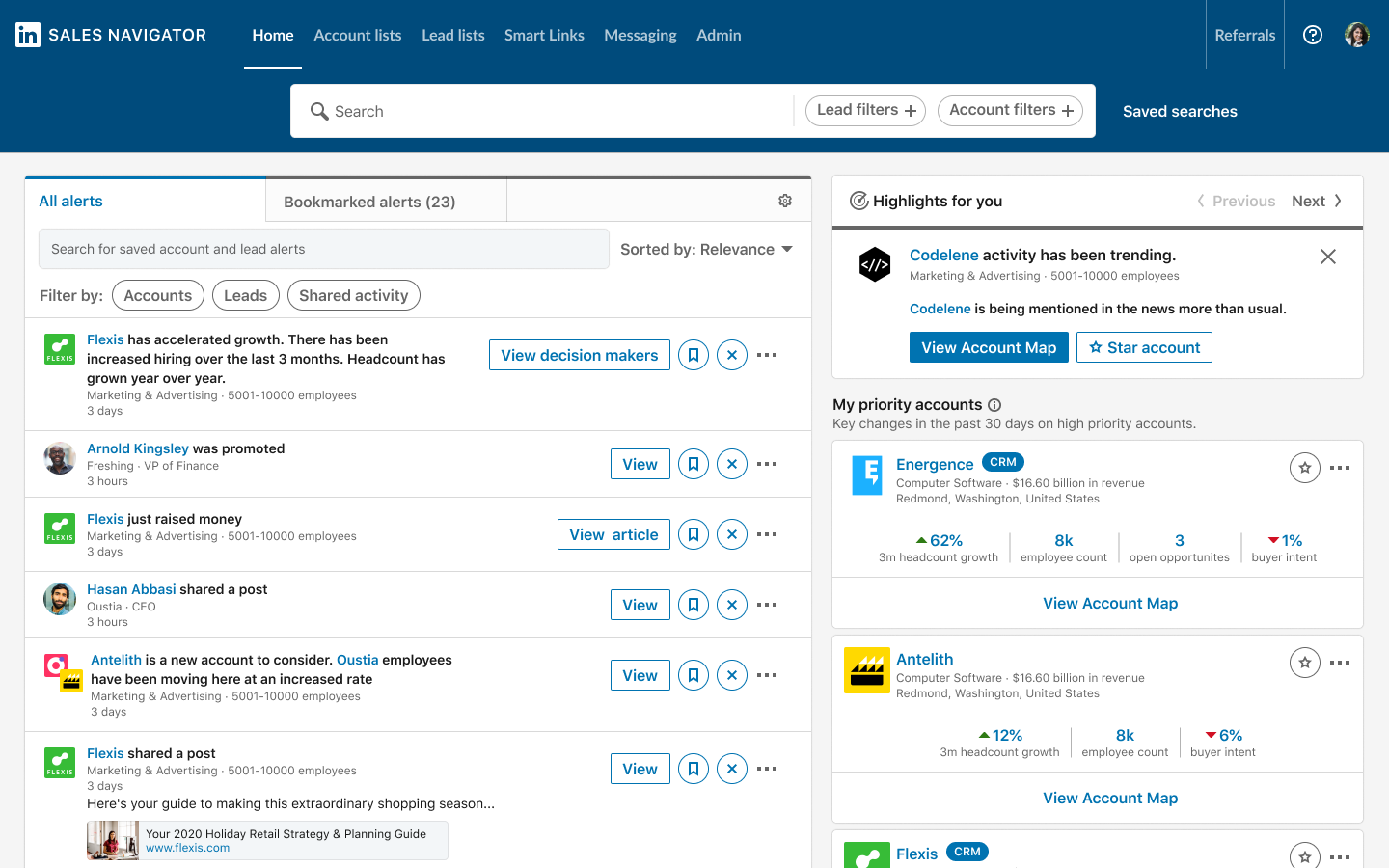
How to use Sales Navigator?
Build named account lists that match your ICP and assign owners.
Open Lead Filters and set title, seniority, function, geography, industry, and company size.
Add activity filters like posted content in 30 days and job change in 90 days.
Add company filters like headcount growth and recent funding or hiring.
Save the search and turn alerts on email and mobile for real-time pings.
When an alert fires, open the post or profile and send one short DM that cites the trigger and proposes a next step.
Export and enrich with three tools only Evaboot for clean exports Clay for enrichment Apollo for verified emails push to your CRM.
Review weekly which triggers booked meetings and tighten filters and copy.
Send LinkedIn Connections Properly
Connection requests open a low-pressure door with the right roles. Use them to turn public relevance into a private thread without a pitch. Aim for high acceptance and faster first replies. Each note should reference a post or topic they engaged with and state one clear reason to connect.
Keep invites short and human. Avoid links or calendar asks inside the request. Space actions across the day so activity looks natural. Track acceptance and route new connections to your CRM so follow-ups stay coherent.
Some safety guardrails:
✔️ New accounts 10 to 20 invites per day then ramp slowly
✔️ Established accounts 20 to 40 invites per day if acceptance stays healthy
✔️ Withdraw pending requests after 7 to 14 days to avoid pile-ups
✔️ Keep acceptance above 30 to 40 percent or reduce volume
✔️ Do not chain view visit invite DM in seconds
Turn signals into pipeline
The last but not least 🔥
Treat content as a steady source of replies. Pick one buyer problem per month, post three to four times per week, and jump on engagement within hours. The aim is public credibility first, then fast 1 to 1 threads that book calls. Keep every post tied to one problem and one outcome!
Use an automation platform to plan the calendar, queue best posting times, and flag saves plus comments from ICP roles. Let it surface who to DM and push threads into the CRM so handoffs stay clean. MagicPost handles scheduling and analytics, highlights high-signal posts, and helps reps act while interest is hot. Add a clear button for a ten minute demo.
What to track?
✔️ Posts per week and save rate
✔️ Comments from ICP roles and time to reply
✔️ Meetings sourced from post engagement
7 Best Social Selling Tools in 2026
Tool | Best for | Best social selling features | Starting price |
|---|---|---|---|
Startups, founders, all LinkedIn users | AI post + hook generator, comment/DM assistants, scheduling, idea prompts | ₹39/mo | |
Teams managing multi-channel social | Post scheduling, unified inbox, streams monitoring, analytics | ₹99/mo | |
Creators and teams focused on LinkedIn | AI writing, carousel maker, relationship builder, analytics | ₹39/mo | |
Medium to large sales teams | folkX Chrome capture, AI fields & follow-ups, Gmail/Outlook/WhatsApp timeline, sequences | ₹20/user/mo | |
Solopreneurs polishing social copy | AI rewrites, tone/length adjust, comment assistant, hashtag ideas | ₹10/mo | |
Signal-based list building & personalization | 100+ data sources, live enrichment, AI personalization | ₹149/mo | |
Automation across social platforms | LinkedIn scraping, auto-actions, multi-step workflows | ₹59/mo |
Conclusion
Social selling means building trust in public, then moving qualified interest into 1:1 conversations that turn engagement into pipeline. You show up with useful insights, watch for intent signals, follow up quickly, and track it all cleanly in your CRM.
LinkedIn is the best B2B platform for social selling. The audience is professional, discovery is targeted, and signals are visible and attributable: views, comments, profile visits, follows, and DMs. That clarity shortens cycles and raises meeting quality because you’re responding to real-time intent, not cold lists.
In 2026, MagicPost is the top social selling tool to execute this end to end. It helps you draft posts and hooks with AI, repurpose into carousels or threads, schedule consistently, and engage faster with comment and DM assistants—plus idea prompts and clear analytics. Publish smarter, repurpose efficiently, engage in minutes, and convert engagement into meetings.