
Help Centre
Create posts
How to use specific instructions?
How to generate ideas?
How to generate a post?
How to use templates?
How to use writing parameters?
How to find a post hook?
What types and styles of posts can I create?
Which AI model is being used?
How can I create a LinkedIn post from a topic?
How can I create a LinkedIn post from a URL?
How do you use template mode?
How can I customize and edit my generated post?
How can I add my services and persona to customize MagicPost AI?
How can I create authentic LinkedIn posts with MagicPost? [Beginner's guide]
How can I import a writing style?
What languages does MagicPost support for creating content?
What is the difference between MagicPost and ChatGPT?
Will my posts sound generic using MagicPost AI?
Manage posts
Where can I find my favorite posts, ideas, and hooks?
How do metrics work?
Can I add media to my post? (image, carousel, video...)
Where can I find my generated posts?
How can I manage my posts?
How can I schedule a LinkedIn post?
Is it safe to publish from MagicPost?
How do I tag someone in a MagicPost LinkedIn post?
How do I add a title to media uploaded (image, carousel, video) using MagicPost?
How to schedule a post?
Subscription
What are the MagicPost pricing plans and features?
How do I modify or cancel my subscription?
What payment methods are accepted?
Everything you need to know about billing and invoices.
How can I update my payment information on MagicPost?
How can I find and download my MagicPost invoices?
Is MagicPost free, can I try it, and how much does it cost?
Can I get a refund for my MagicPost subscription?
Can I downgrade from an annual to a monthly subscription on MagicPost?
How can I upgrade my MagicPost plan?
Settings
Help Centre
Create posts
How to use specific instructions?
How to generate ideas?
How to generate a post?
How to use templates?
How to use writing parameters?
How to find a post hook?
What types and styles of posts can I create?
Which AI model is being used?
How can I create a LinkedIn post from a topic?
How can I create a LinkedIn post from a URL?
How do you use template mode?
How can I customize and edit my generated post?
How can I add my services and persona to customize MagicPost AI?
How can I create authentic LinkedIn posts with MagicPost? [Beginner's guide]
How can I import a writing style?
What languages does MagicPost support for creating content?
What is the difference between MagicPost and ChatGPT?
Will my posts sound generic using MagicPost AI?
Manage posts
Where can I find my favorite posts, ideas, and hooks?
How do metrics work?
Can I add media to my post? (image, carousel, video...)
Where can I find my generated posts?
How can I manage my posts?
How can I schedule a LinkedIn post?
Is it safe to publish from MagicPost?
How do I tag someone in a MagicPost LinkedIn post?
How do I add a title to media uploaded (image, carousel, video) using MagicPost?
How to schedule a post?
Subscription
What are the MagicPost pricing plans and features?
How do I modify or cancel my subscription?
What payment methods are accepted?
Everything you need to know about billing and invoices.
How can I update my payment information on MagicPost?
How can I find and download my MagicPost invoices?
Is MagicPost free, can I try it, and how much does it cost?
Can I get a refund for my MagicPost subscription?
Can I downgrade from an annual to a monthly subscription on MagicPost?
How can I upgrade my MagicPost plan?
Settings

Hailey Felt
Social Media and Marketing Specialist
How do I change my timezone?
When you sign up, MagicPost automatically detects your time zone. But don’t worry - you can change it anytime!
💡 Important: The time zone you select will apply to all members of your MagicPost team. If you’re scheduling posts, double-check that you’re in the right zone to avoid any surprises!
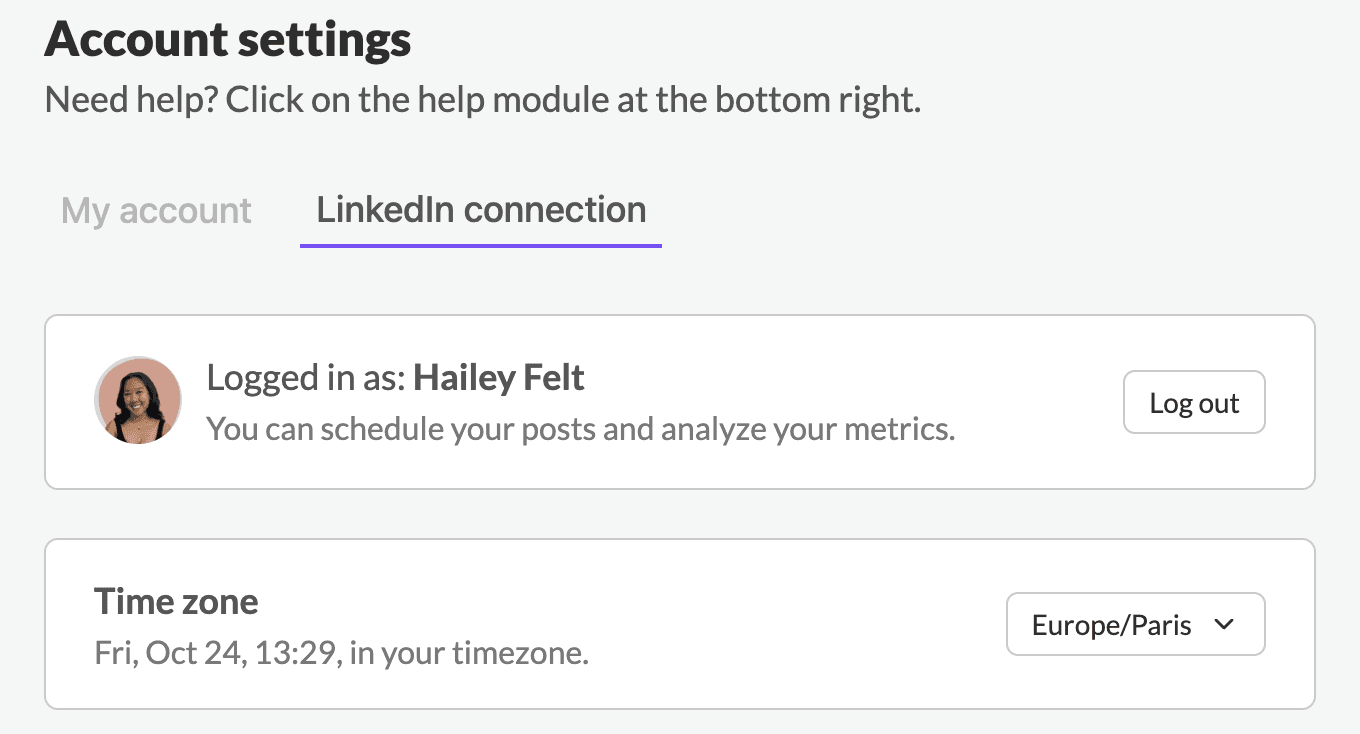
How to update your timezone:
Go to "Account settings" in your dashboard.
Select LinkedIn Connection
Find the Time Zone section.
Select your preferred time zone from the list and you're all set!
Need help? Our support team is here to assist you.
Last updated on:
24 October 2025