" height="26.80529977783203px" id="tymKb8bqC" width="128.00300311279295px"/><path d="M 0 2.417 L 0 0 L 12.909 0 L 12.909 2.417 Z" fill="rgb(126, 78, 253)" height="2.417099999999998px" id="aYr4em6zK" transform="translate(128.341 22.325)" width="12.908999999999992px"/></svg>)

"/><stop offset="1" stop-color="rgb(118, 37, 250)"/></linearGradient></defs><g d="M 19.242 21.22 L 19.362 6.204 L 19.272 6.204 L 13.757 21.22 L 10.161 21.22 L 4.796 6.204 L 4.706 6.204 L 4.825 21.22 L 0 21.22 L 0 0 L 7.283 0 L 12.109 13.607 L 12.229 13.607 L 16.844 0 L 24.247 0 L 24.247 21.22 Z M 26.421 26.113 L 26.421 23.445 L 41.407 23.445 L 41.407 26.113 Z" fill="transparent" height="26.112508199679183px" id="DvfaAIHYn" width="41.40731898311435px"><path d="M 19.242 21.22 L 19.362 6.204 L 19.272 6.204 L 13.757 21.22 L 10.161 21.22 L 4.796 6.204 L 4.706 6.204 L 4.825 21.22 L 0 21.22 L 0 0 L 7.283 0 L 12.109 13.607 L 12.229 13.607 L 16.844 0 L 24.247 0 L 24.247 21.22 Z" fill="rgb(46, 46, 46)" height="21.220180016149442px" id="pLsxRCobd" width="24.247352589074694px"/><path d="M 0 2.668 L 0 0 L 14.986 0 L 14.986 2.668 Z" fill="url(%23yD9d4I5GR-3279285344-linear-gradient)" height="2.6675085048549647px" id="yD9d4I5GR" transform="translate(26.421 23.445)" width="14.986002836263765px"/></g></svg>)

Camelia Khadraoui
In the past, posting on LinkedIn was optional. Now, it’s one of the easiest and most cost-effective ways to find leads, make sales, and grow your influence.
The challenge isn’t whether LinkedIn is effective.
The real issue is staying consistent while sounding credible, relatable, and up-to-date.
CoPost claims it can save you hours of manual work and help you boost engagement and consistency.
Whether you’re managing several accounts on your own or building a brand with a bigger social strategy, this review covers what CoPost does, how well it works, and if it’s worth your money.
CoPost क्या है?
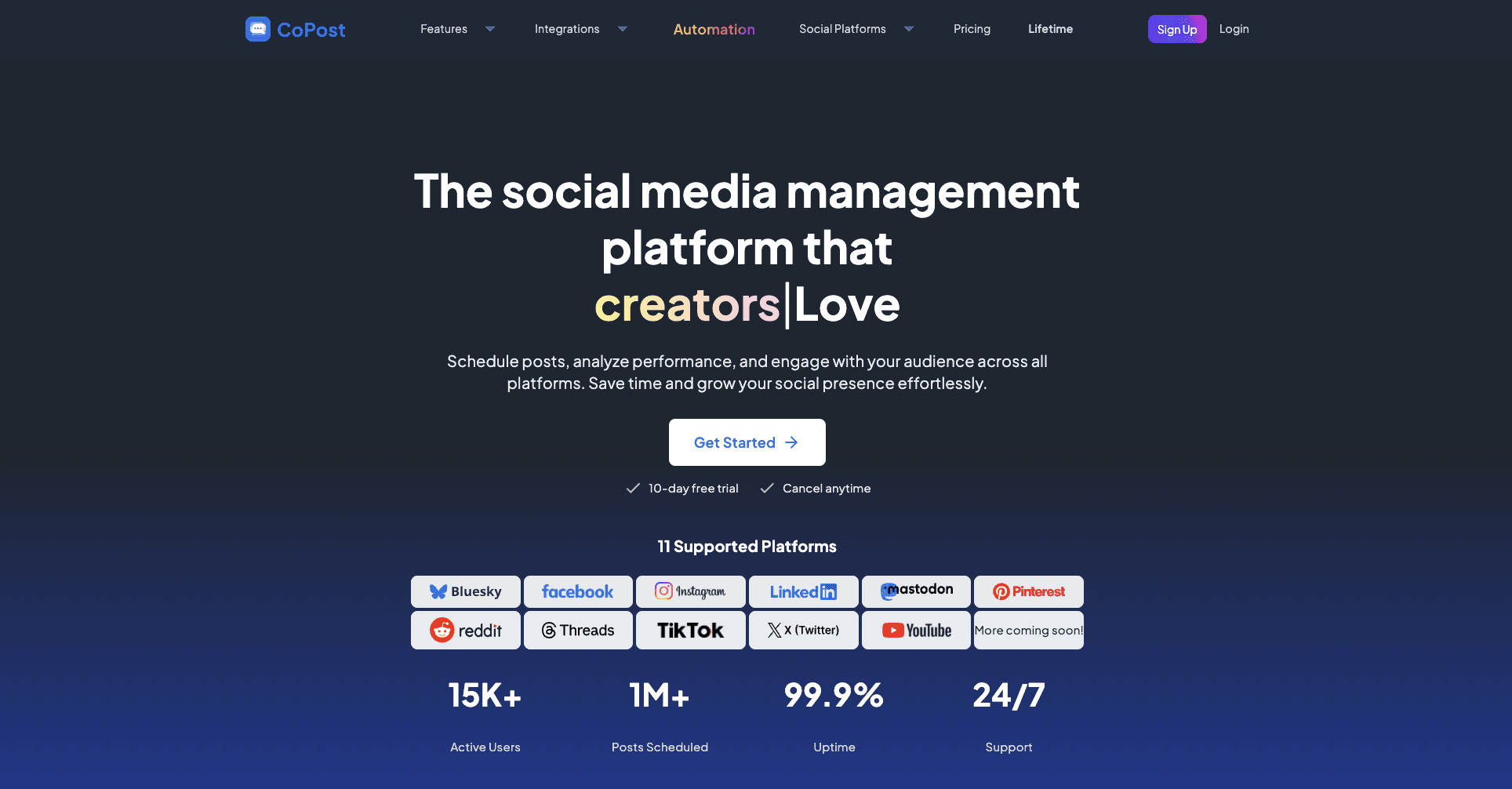
CoPost एक एआई-शक्तिशाली सोशल मीडिया प्रबंधन उपकरण है। यह आपको एक ही स्थान से कई प्लेटफार्मों पर सामग्री बनाने, समयबद्ध करने और प्रकाशित करने की अनुमति देता है।
यह दोहराने वाले सोशल मीडिया कार्यों को स्वचालित करने में मदद करता है, जिससे आपका समय और प्रयास बचता है।
यह प्लेटफार्म प्रमुख सोशल नेटवर्क के साथ एकीकृत होता है, जिससे यह उन सृजक, विपणक, और एजेंसियों के लिए मददगार होता है जो कई खातों का प्रबंधन करते हैं।
CoPost आपकी ब्रांड की शैली और लक्ष्यों के साथ समझौता करने वाले कैप्शन, हुक, और पोस्ट विचार उत्पन्न करने के लिए AI का उपयोग करता है।
यह सोशल मीडिया काम को अधिक सुचारु बनाने के लिए समयबद्धता, सामग्री संगठन और सहयोग उपकरण भी प्रदान करता है।



CoPost Advantages and Disadvantages
✅ CoPost Advantages
Easy to use and well-organized
Saves time by centralizing social media tasks
Scales effectively from individual creators to large teams
Good value compared to using multiple tools
Flexible pricing with a free basic plan
❌ CoPost Disadvantages
The free plan is quite limited.
Higher tiers can become costly.
Some users may find it a bit overwhelming at first.
Best value is locked behind paid plans.
Not suitable for users with very basic requirements.
CoPost योजनाएँ और विशेषताएँ तुलना
CoPost लचीली कीमतें प्रदान करता है जो आपकी आवश्यकताओं के अनुसार बढ़ती हैं, चाहे आप इसे सिर्फ आज़मा रहे हों या विभिन्न ब्रांडों के बीच कई खातों का प्रबंधन कर रहे हों।
एक मुफ्त प्रारंभिक योजना है, साथ ही अधिक उन्नत विकल्प भी हैं टीमें और संगठनों के लिए। प्रत्येक योजना विभिन्न स्तरों के वॉल्यूम, टीमवर्क और स्वचालन के लिए डिज़ाइन की गई है।
योजना | कीमत (वार्षिक) | श्रेष्टतम उपयोगकर्ता |
मुक्त | $0 / महीने | उपयोगकर्ता जो CoPost की मुख्य विशेषताओं और बुनियादी AI क्षमताओं का परीक्षण करना चाहते हैं |
क्रिएटर | $21 / महीने | एकल क्रिएटर, फ्रीलांसर, और व्यक्तिगत ब्रांड जो कई चैनलों का प्रबंधन कर रहे हैं |
टीम | $56 / महीने | छोटे ब्रांड, स्टार्टअप, और बढ़ती टीमें जो सामग्री पर सहयोग कर रही हैं |
टीम+ | $108 / महीने | व्यवसाय, एजेंसियाँ, और संगठनों के लिए जो बड़े पैमाने पर कई ब्रांडों का प्रबंधन कर रहे हैं |
यह सेटअप आपको छोटे स्तर पर शुरू करने और जैसे-जैसे आपकी सोशल मीडिया की जरूरतें बढ़ती हैं, अपग्रेड करने की अनुमति देता है।
एकल क्रिएटर बड़ी प्रतिबद्धता के बिना मजबूत AI उपकरणों का उपयोग कर सकते हैं, और बड़े टीमें अधिक सुविधाएं, अधिक ब्रांड स्थान, और अधिक स्वचालन प्राप्त करती हैं.
CoPost Feature Availability by Plan
Pricing gives you a general idea of who each plan suits, but the real differences show up when you compare the features directly.
The table below shows which tools, limits, and features come with each CoPost plan.
Feature | Free | Creator | Teams | Teams+ |
Social Channels | ✅ | ✅ | ✅ | ✅ |
Auto Feeds | ✅ | ✅ | ✅ | ✅ |
Collections | ✅ | ✅ | ✅ | ✅ |
Posts Scheduling | ✅ | ✅ | ✅ | ✅ |
AI Actions | ✅ | ✅ | ✅ | ✅ |
AI-Powered Social Inbox | ✅ | ✅ | ✅ | ✅ |
Analytics & Insights | ✅ | ✅ | ✅ | ✅ |
Adobe Express Integration | ✅ | ✅ | ✅ | ✅ |
Fast Support | ❌ | ✅ | ✅ | ❌ |
Multiple Brand Spaces | ❌ | ❌ | ✅ | ✅ |
Team Members per Brand | ❌ | ❌ | ✅ | ✅ |
Unlimited Collections | ❌ | ❌ | ❌ | ✅ |
Unlimited Posts in Queue | ❌ | ❌ | ❌ | ✅ |
Advanced AI Limits | ❌ | ❌ | ❌ | ✅ |
Sentiment & Intent Detection | ❌ | ❌ | ❌ | ✅ |
AI-Suggested Replies | ❌ | ❌ | ❌ | ✅ |
Advanced Analytics | ❌ | ❌ | ❌ | ✅ |
Priority Support | ❌ | ❌ | ❌ | ✅ |
As shown above, most key features—such as analytics, the AI social inbox, and Adobe Express integration—are included in every plan.
The main differences are in scale. As you move up the plans, you get more social channels, team members, automation, and support.
This makes CoPost a good fit for teams and agencies that want structure, speed, and the ability to handle a lot of work without using multiple tools.
Top 6 Important CoPost Features
CoPost puts all your social media tasks in one place, combining content creation, scheduling, inbox management, and analytics.
It uses AI to help you write faster, organize conversations, and automate posting. You also get flexible planning views and support for many social platforms. The tool works for both solo users and teams, making daily social media management quicker and more organized.
1. Unified Social Inbox
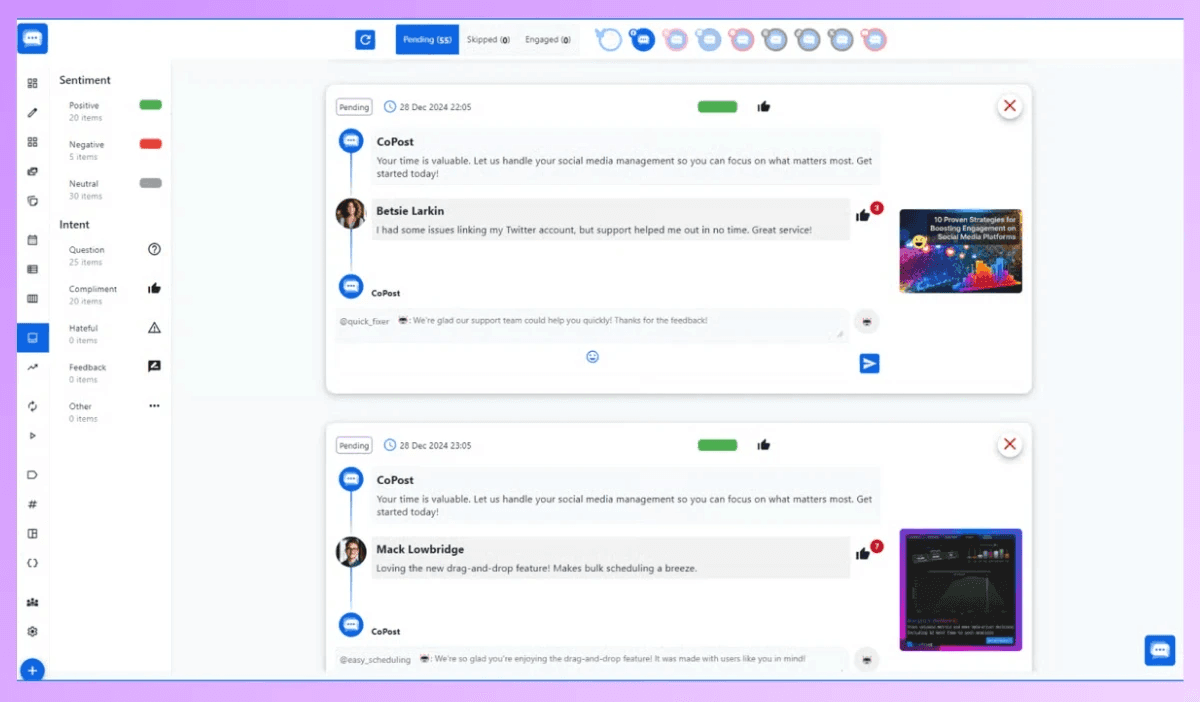
You get one inbox for all your connected social platforms. It’s organized by intent and sentiment with AI and offers smart reply suggestions.
2. Centralized Dashboard
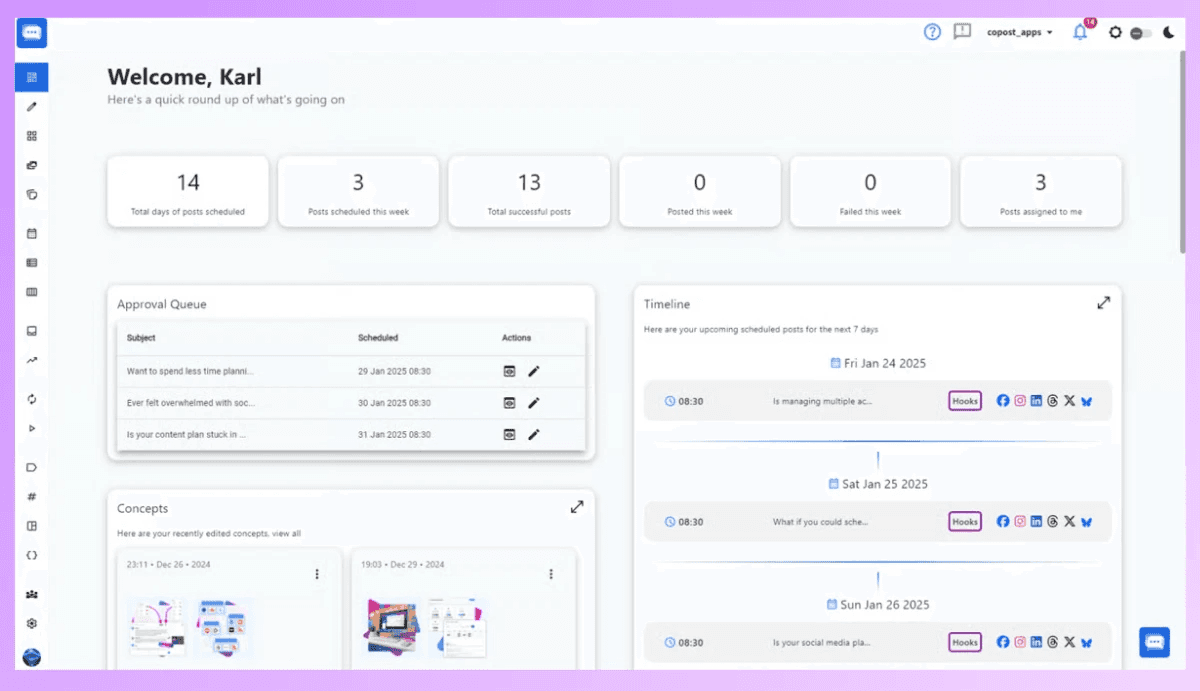
You see all your key stats, assigned posts, approval queues, and content ideas in one place.
3. Automated Content Feed
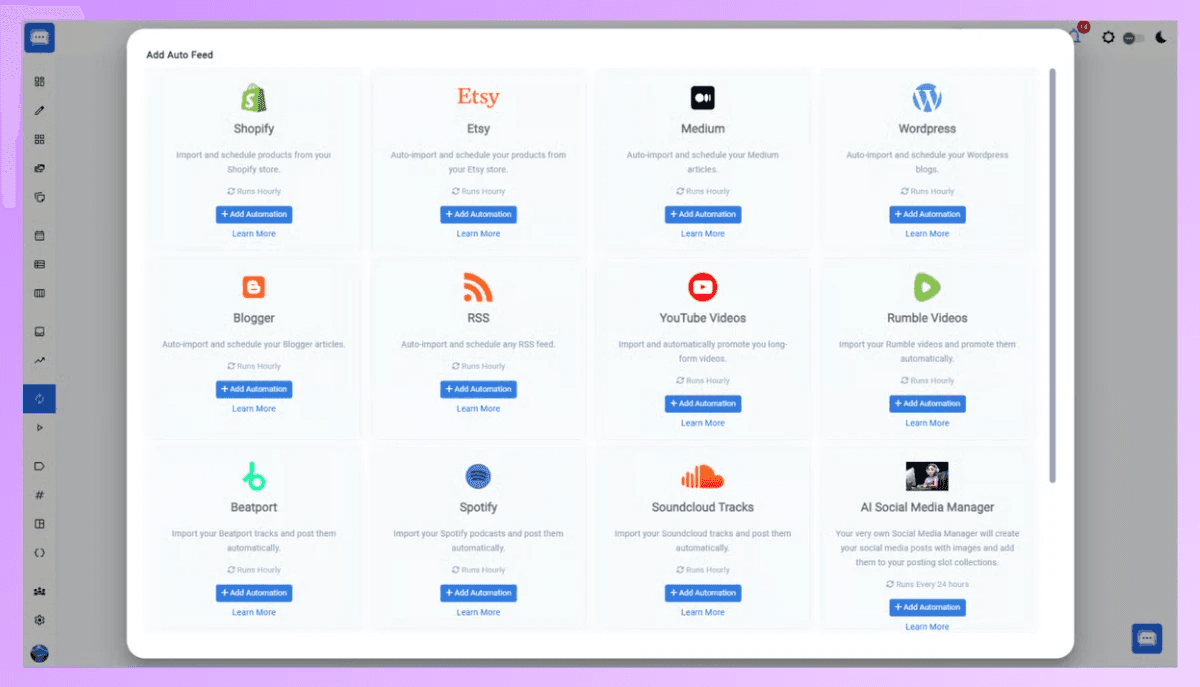
You can set up a custom posting plan and connect your e-commerce store, blog, podcast, SoundCloud, and more. New items are added to your queue automatically, and you can use AI-generated captions if you want.
4. Advanced Content
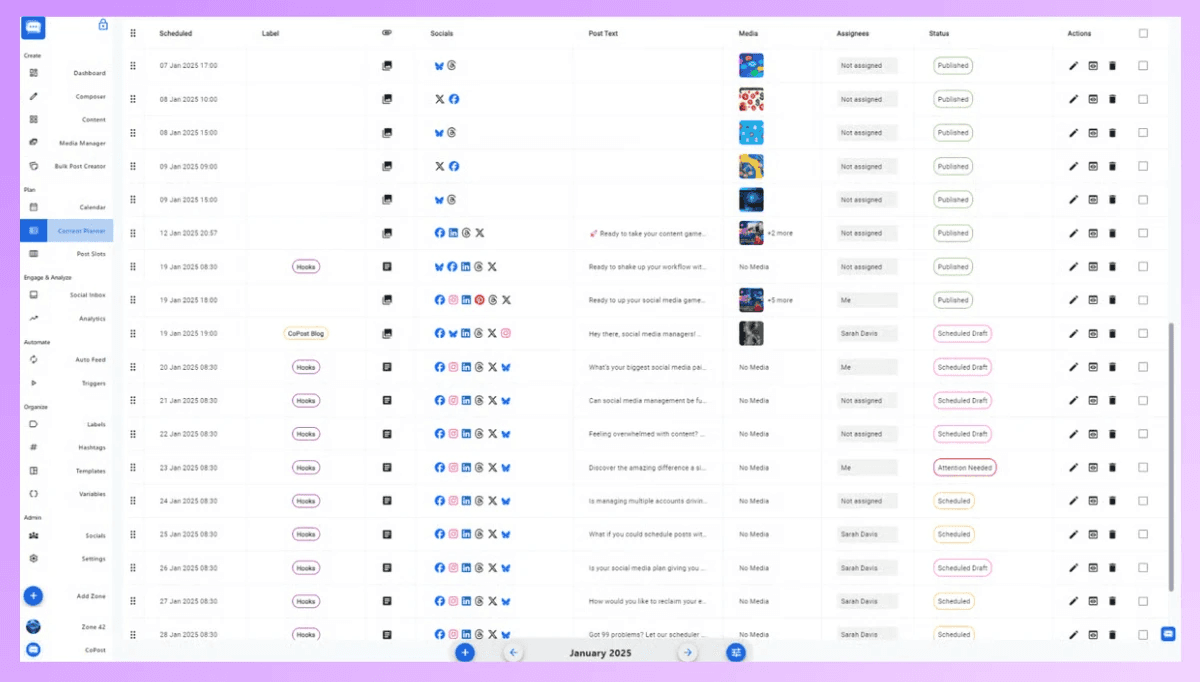
Manage your content with daily, monthly, or yearly calendars. There’s also a table-style monthly planner where you can drag and drop to reschedule easily.
5. Multi-Platform Integrations
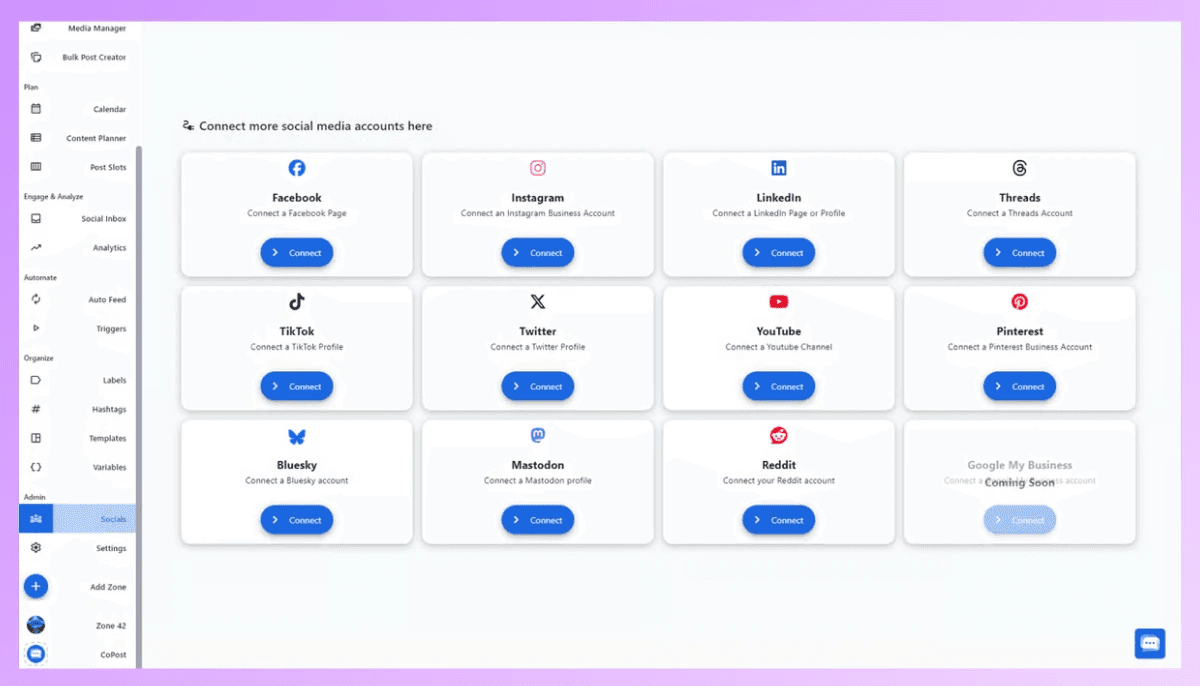
You can publish and manage content on a growing list of social media platforms, all from one tool.
6. In-Depth Analytics & Insights
Get detailed analytics and insights for each post to track your performance, engagement, and social media growth.

CoPostly Limitations
Even with its strong features, CoPost has a few limitations users should consider before signing up:
Limited Free Plan: The free tier offers basic access but doesn’t include many advanced tools, making it hard to fully test the platform without upgrading.
Cost at Scale: Higher-tier plans can be expensive for small teams or individual creators who don’t need enterprise-level features.
Learning Curve: Some AI and automation tools take time to learn and use well, especially for beginners.
Feature Gating: Some useful features, such as extensive analytics, high AI action limits, and advanced inbox tools, are only available in top-tier plans.
Overlap with Other Tools: If you already use analytics or scheduling tools, CoPost may replace them rather than augment them, which could make switching harder.
Why MagicPost Is a Better Fit for Most Creators
This is where MagicPost stands out as a better option.
MagicPost is made for creators who want to focus on content, not on complicated tools.
The pricing is much more affordable.
Instead of paying thousands each month, users get powerful LinkedIn content tools for a much lower price.
MagicPost covers the core needs that most creators actually have.
It includes a post generator, an idea generator, a content calendar, and scheduling features.
There is no heavy onboarding or strategic framework to configure.
You open the tool, generate content, and post.
For many users, this simplicity results in better content quality.
Less friction means more consistency, and consistency is what actually drives growth on LinkedIn.
Final Verdict: Why MagicPost Is the Better Alternative
CoPostly is a strong solution for companies and founders looking for a high-touch, agency-style LinkedIn system.
Its pricing and structure make sense for users who want sophistication, strategy, and sales-driven execution.
MagicPost, on the other hand, is built for creators who just want to create.
It offers the same essential features and more, including idea generation, post creation, cleaner UX, calendar planning, and scheduling.
The price is far more accessible.
This makes it ideal for solo founders, freelancers, consultants, and creators.
If you are not looking for complex systems or enterprise-level sophistication, MagicPost is the smarter choice.
For a lower price and a cleaner workflow, it delivers exactly what most LinkedIn creators actually need.
To Sum Up
CoPostly is a powerful LinkedIn content tool built on real agency experience.
It’s best for founders, consultants, and professionals who take LinkedIn seriously and want personalized, strategic content, not generic AI posts.
However, if you’re looking for a simpler, more flexible LinkedIn AI tool, MagicPost is your best alternative since it focuses on:
Faster post-generation
Idea generation
Cleaner UX
Fewer steps to publish
Less setup compared to Profile DNA systems
While CoPostly is ideal for users who want deep personalization and a structured ghostwriting workflow, MagicPost works better for creators who want speed, simplicity, and flexibility without onboarding friction.
If you want depth and structure, CoPostly delivers.
If you want speed and simplicity, MagicPost may be the better fit.
Stanley Review (2026): Is This ₹12,500/mo. LinkedIn Tool Worth It?
Stanley is a ₹12,500/mo. LinkedIn AI tool with no free trial. This Stanley review covers what it does, what it doesn’t do, and whether it’s worth it.
CoPost Review: Features, Prices, Pros and Cons
Discover CoPost, and learn why MagicPost is the best alternative for AI-powered LinkedIn content creation, featuring simpler pricing and unlimited post generation.
CoPostly Review: Features, Pricing, and Drawbacks
CoPostly review covering features, pricing, pros and cons, and plan comparison to help you decide if it’s the right LinkedIn content tool for you.

Heyoo Review: Features, Advantages & Disadvantages
Review of Heyoo: what it does well, where it falls short, how much it costs, and who it actually makes sense for on LinkedIn.

Top 11 Most Unfavorable LinkedIn Post Types
A witty and insightful analysis of the most prevalent LinkedIn post archetypes, ranging from oversharers to opportunists, and an exploration of why they continue to dominate your feed.
SayWhat Review: Advantages, Disadvantages, Features, and Pricing
Discover if SayWhat is the right LinkedIn AI tool for you: Top features, pros, cons, pricing, and how it compares to MagicPost.
Socialsonic Review: What’s Good (and Bad)
SocialSonic review discussing features, limitations, pricing, and real-world performance. Find out if SocialSonic is worth it or if there are better alternatives available.