" height="26.80529977783203px" id="tymKb8bqC" width="128.00300311279295px"/><path d="M 0 2.417 L 0 0 L 12.909 0 L 12.909 2.417 Z" fill="rgb(126, 78, 253)" height="2.417099999999998px" id="aYr4em6zK" transform="translate(128.341 22.325)" width="12.908999999999992px"/></svg>)

"/><stop offset="1" stop-color="rgb(118, 37, 250)"/></linearGradient></defs><g d="M 19.242 21.22 L 19.362 6.204 L 19.272 6.204 L 13.757 21.22 L 10.161 21.22 L 4.796 6.204 L 4.706 6.204 L 4.825 21.22 L 0 21.22 L 0 0 L 7.283 0 L 12.109 13.607 L 12.229 13.607 L 16.844 0 L 24.247 0 L 24.247 21.22 Z M 26.421 26.113 L 26.421 23.445 L 41.407 23.445 L 41.407 26.113 Z" fill="transparent" height="26.112508199679183px" id="DvfaAIHYn" width="41.40731898311435px"><path d="M 19.242 21.22 L 19.362 6.204 L 19.272 6.204 L 13.757 21.22 L 10.161 21.22 L 4.796 6.204 L 4.706 6.204 L 4.825 21.22 L 0 21.22 L 0 0 L 7.283 0 L 12.109 13.607 L 12.229 13.607 L 16.844 0 L 24.247 0 L 24.247 21.22 Z" fill="rgb(46, 46, 46)" height="21.220180016149442px" id="pLsxRCobd" width="24.247352589074694px"/><path d="M 0 2.668 L 0 0 L 14.986 0 L 14.986 2.668 Z" fill="url(%23yD9d4I5GR-3279285344-linear-gradient)" height="2.6675085048549647px" id="yD9d4I5GR" transform="translate(26.421 23.445)" width="14.986002836263765px"/></g></svg>)

Yasmina Akni Ebourki
A few months ago, the LinkedIn video feed completely reshaped LinkedIn content strategies.
But is it still as effective as it was?
Let’s break down how video performs on LinkedIn today and explore smart ways to integrate it into your content strategy to boost reach, visibility, and engagement.
TL;DR: The sweet spot is 1-5 minutes (45-48 median likes vs 26 under 30 seconds), and video is the only format still climbing (11.2% of posts in 2026).
How Does Video Work on LinkedIn in 2026?
Video took LinkedIn by storm at the beginning of the year 2025, becoming one of the platform’s top-performing content formats.
Although the initial hype may have subsided, video content continues to bring significant benefits to your LinkedIn strategy, especially when used wisely and consistently.
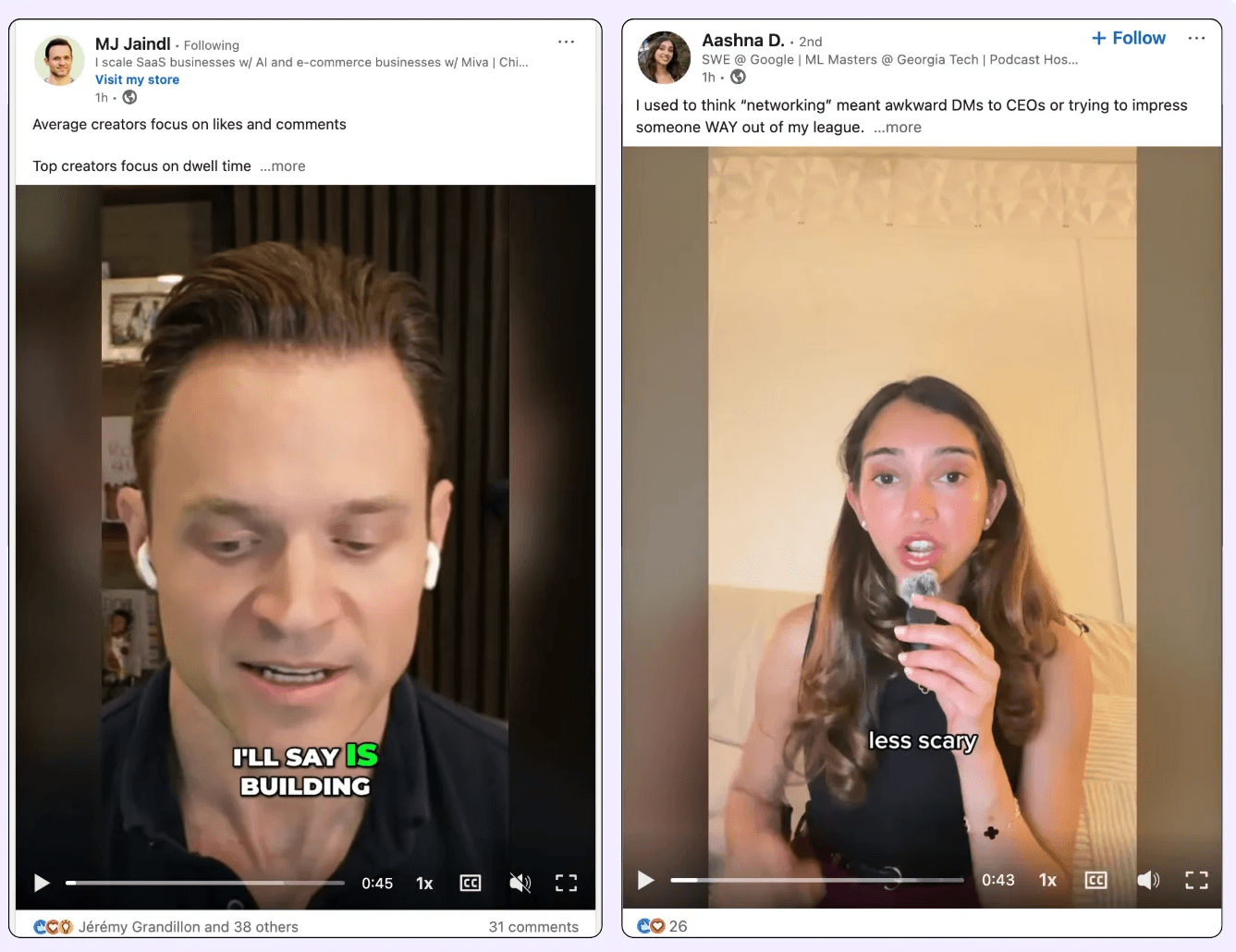
Why Use Video on LinkedIn?
✔️ Few people consistently post videos, which makes it easier for you to stand out in a sea of text and static images.
✔️ Video gives your audience a face and voice to connect with, making you far more memorable than just a profile picture or text post.
✔️ Video content typically generates higher reach and engagement because it's dynamic, visual, and more likely to stop someone from scrolling.
✔️ Trust & authority: Presence, tone, and expert takes feel human and credible.
60–90s demos compress 800+ words and pre-handle objections.
Think about it: how many posts do people read each day, and how many videos do they watch?
What we see catches us faster than what we read.



LinkedIn के लिए वीडियो कैसे बनाएं
आप सोच रहे होंगे: “वीडियो सामग्री बनाना समय लेने वाला और जटिल लगता है, मुझे तो यह पता ही नहीं कि कहाँ से शुरू करूँ।”
अच्छी खबर यह है: LinkedIn के लिए वीडियो बनाना उससे कहीं ज्यादा आसान है जितना यह दिखता है।
आपको एक पेशेवर वीडियो निर्माता होने की ज़रूरत नहीं है, और कोई भी चमकदार, सिनेमा गुणवत्ता की उम्मीद नहीं करता।
यह कहने पर, यहाँ 5 प्रमुख चरणों का विवरण है जो प्रक्रिया को आसान और अधिक जानबूझकर बनाने में मदद करेगा।
चरण 1: अपने वीडियो के साथ जाने के लिए सही कॉपी लिखना
हर बेहतरीन वीडियो एक स्पष्ट स्क्रिप्ट से शुरू होता है।
इसका मतलब यह नहीं है कि आपको कैमरे पर शब्द दर शब्द पढ़ना है, लेकिन यह मदद करता है कि आप ठीक-ठीक योजना बनाएं कि आप क्या कहना चाहते हैं, विशेषकर मुख्य संदेश या हुक।
एक अच्छी स्क्रिप्ट में किसी भी दृश्य संकेत भी शामिल होते हैं:
स्क्रीन पर पाठ, चित्र संकेत, संक्रमण, कोण, या दृश्य परिवर्तन।
जितना अधिक आप यह मैप करते हैं कि आप वीडियो को कैसा और कैसा दिखाना और महसूस करना चाहते हैं, उतना ही आसान होगा इसे बिना किसी संदेह के शूट करना।
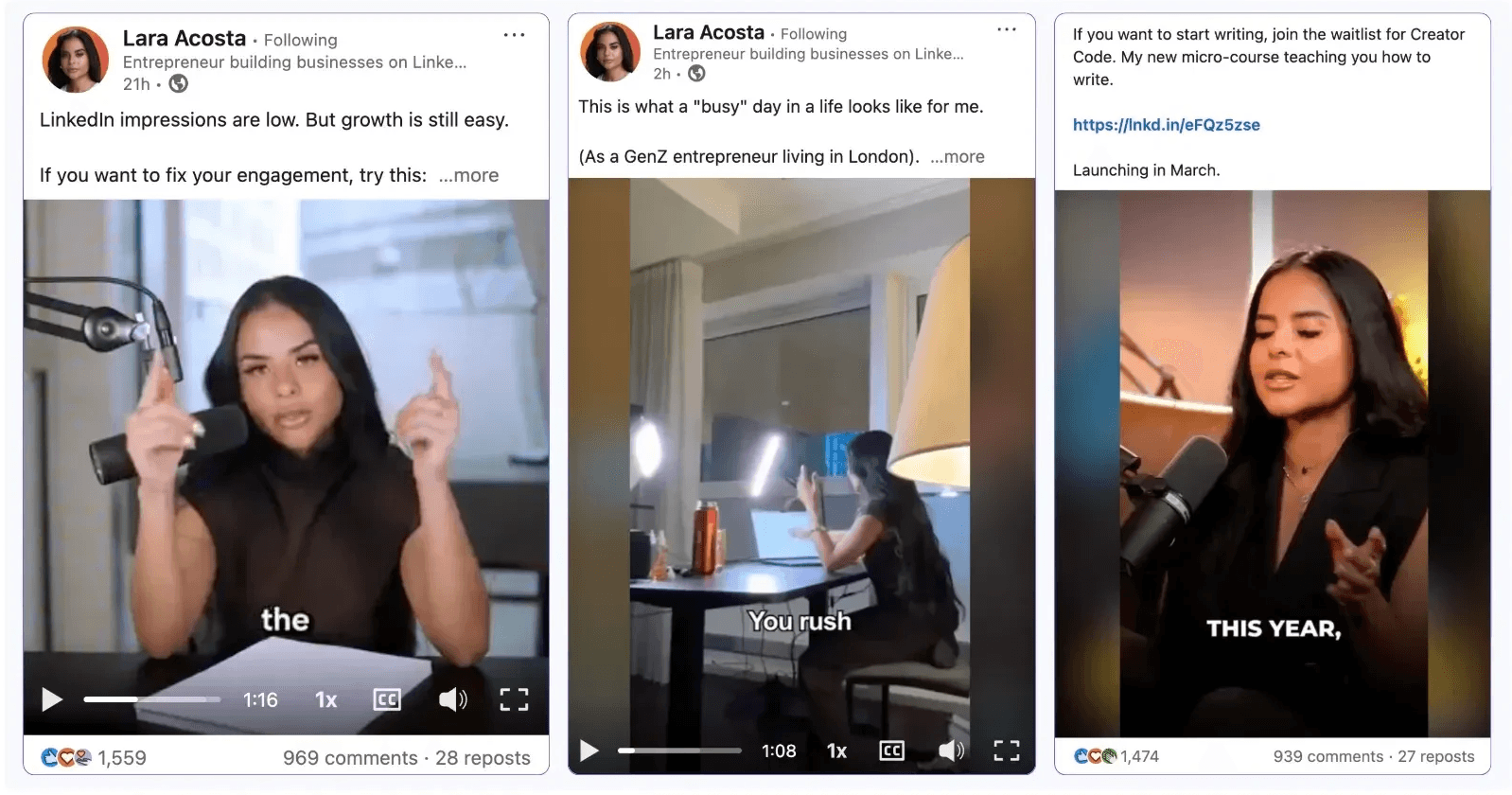
चरण 2: आपका वीडियो रिकॉर्ड करना
अब मजेदार हिस्सा आता है: रिकॉर्ड पर हिट करना।
पहले, यह समय लेने वाला या अजीब लग सकता है, लेकिन यह बिल्कुल सामान्य है। जितना अधिक आप अभ्यास करेंगे, उतना ही तेज़ और अधिक कुशल आप बनेंगे।
समय के साथ, आप बैच-रिकॉर्ड अपनी सामग्री कर सकेंगे, जिसका मतलब है कि आप एक घंटे में 5-10 वीडियो शूट कर सकते हैं और उन्हें दिनों या हफ्तों के अंतराल पर शेड्यूल कर सकते हैं।
प्रो टिप: आपका पहला वीडियो शायद बहुत अच्छा नहीं होगा, और यह ठीक है। पांचवे पर, आप पहले से ही आत्मविश्वास और गुणवत्ता में बड़ा अंतर देखेंगे।
चरण 3: अपने वीडियो का संपादन
यहां आप रचनात्मक हो सकते हैं।
संपादन उन अंतिम स्पर्शों को जोड़ता है जो एक मूल क्लिप को एक आकर्षक, स्क्रॉल-स्टॉपिंग पोस्ट में परिवर्तित कर सकते हैं।
दर्शकों की रुचि बनाए रखने के लिए संगीत, उपशीर्षक, संक्रमण, और दृश्य संकेत जैसे तत्वों का उपयोग करें।
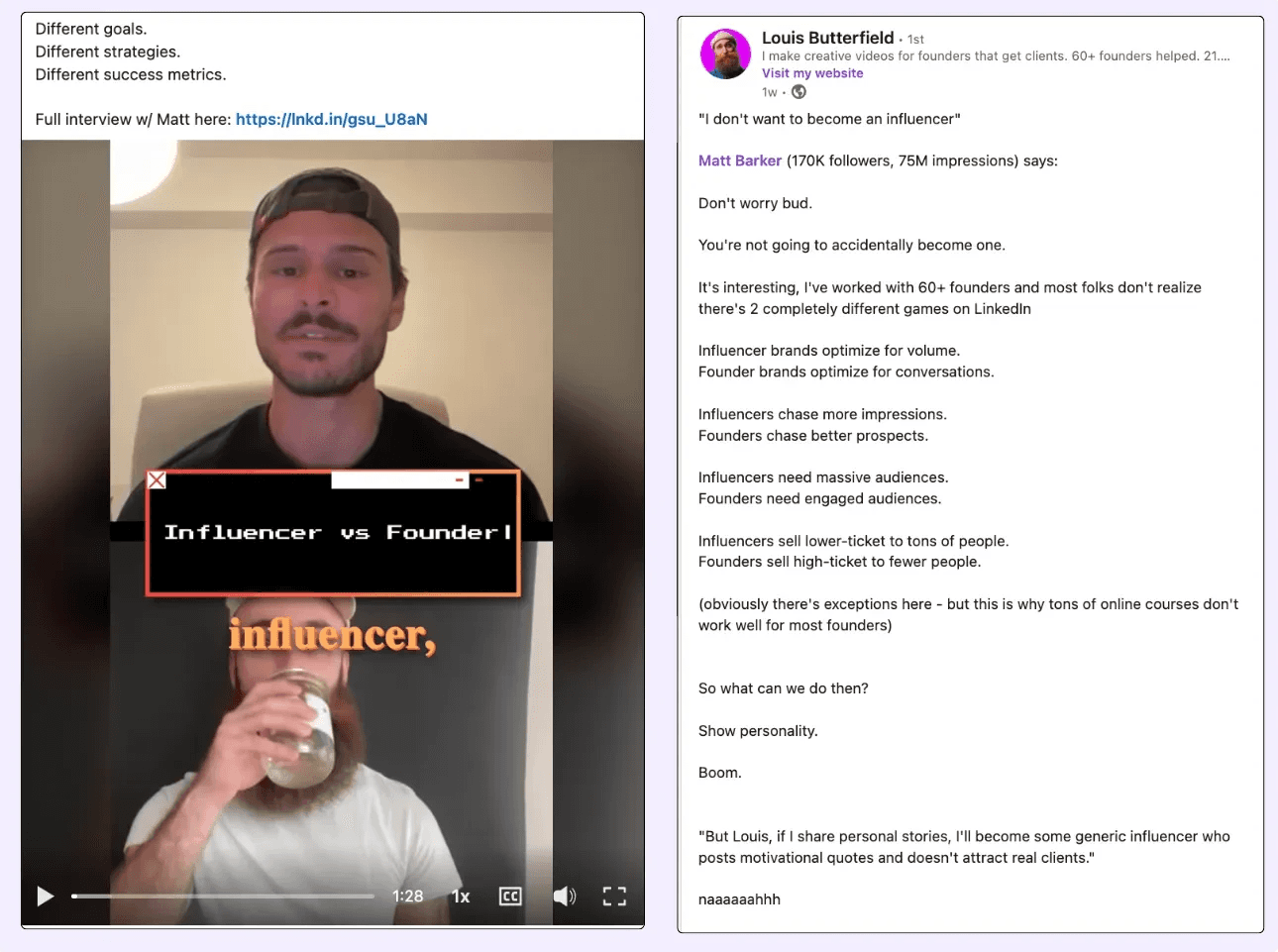
CapCut, Veed.io, या यहां तक कि एआई-संचालित संपादकों जैसे कई शुरुआती-अनुकूल उपकरण हैं जो प्रक्रिया को तेज करने में मदद करते हैं और पेशेवर पोलिश जोड़ते हैं, कोई उन्नत कौशल की आवश्यकता नहीं।
चरण 4: उपयुक्त पाठ के साथ वीडियो अपलोड करना
कठिन हिस्सा पूरा हो गया है, अब इसे पोस्ट करने का समय है।
जब आप अपने वीडियो को LinkedIn पर अपलोड करें, तो सुनिश्चित करें कि आप एक सम्मोहक कैप्शन जोड़ें। आप यह स्वयं लिख सकते हैं या विचार उत्पन्न करने के लिए MagicPost जैसे टूल का उपयोग कर सकते हैं।
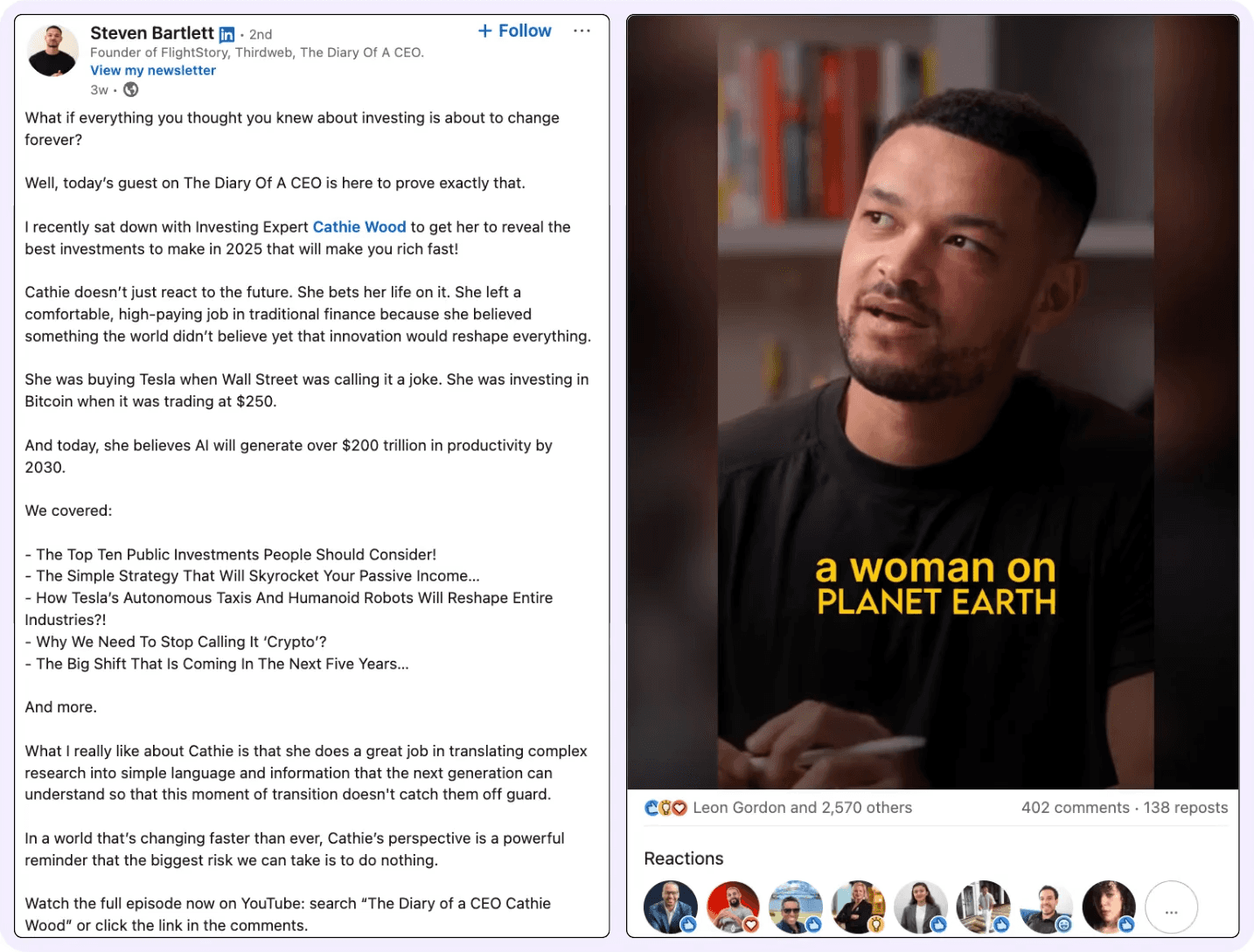
कुछ सुझाव:
आपके वीडियो में जो आप कहते हैं, उसे बस पुनः न दोहराएं। इसके बजाय, कैप्शन का उपयोग करें अतिरिक्त संदर्भ जोड़ने के लिए, विषय को पेश करने के लिए, या जिज्ञासा उत्पन्न करने के लिए।
हमेशा एक स्पष्ट कॉल टू एक्शन शामिल करें (जैसे, “आपकी इससे क्या राय है?” या “किसी को टैग करें जिसे इसे सुनने की जरूरत है।”)
अपने LinkedIn वीडियो अपलोड करते समय निम्नलिखित विवरण याद रखें:
फॉर्मेट: MP4 या MOV
अवधि: अधिकतम सगाई के लिए आदर्श रूप से 3 मिनट से कम
आसपास का अनुपात: 1:1 (स्क्वायर) या 4:5 (वर्टिकल) मोबाइल ऑप्टिमाइजेशन के लिए
फाइल साइज: 5GB से कम
चरण 5: अपने वीडियो प्रदर्शन का विश्लेषण करना
एक बार जब आपका वीडियो कम से कम 24 घंटों के लिए लाइव हो गया, तो समय आ गया है परिणामों की जांच करने का।
LinkedIn उपयोगी मेट्रिक्स प्रदान करता है जो आपको यह insight देते हैं कि आपकी सामग्री कैसे प्रदर्शन कर रही है। यहाँ देखने के लिए चीज़ें हैं:
मुख्य LinkedIn वीडियो KPI:
इम्प्रेशन: कितने लोगों ने आपकी पोस्ट देखी
व्यूज़: कितने लोगों ने आपका वीडियो कम से कम 3 सेकंड तक देखा
व्यू ड्यूरेशन: दर्शक कितनी देर तक जुड़े रहे
औसत वॉच टाइम: एक शक्तिशाली मेट्रिक जो वास्तविक रुचि को दर्शाता है
एंगेजमेंट (लाइक, कमेंट, शेयर): यह दर्शाता है कि आपका संदेश कितनी अच्छी तरह गूंजता है
अपने आप से पूछें:
क्या लोग बहुत जल्दी छोड़ रहे हैं?
क्या कुछ विषय अन्य विषयों की तुलना में बेहतर प्रदर्शन करते हैं?
क्या आपका हुक पहले 3 सेकंड में पर्याप्त मजबूत है?
इनका समय के साथ ट्रैक करना आपको भविष्य के वीडियो को ठीक ट्यून करने में मदद करेगा और अपने LinkedIn उपस्थिति को अधिक रणनीतिक रूप से बढ़ाएं।
10 Strategies That Work for LinkedIn Video in 2025
Creating videos on LinkedIn isn’t just about hitting “record”; it's about knowing what works on the platform right now.
So, instead of learning through trial and error, let me save you time.
Here are 10 battle-tested LinkedIn video strategies that can help you get reach, engagement, and real results.
1. Master the 3-Second Rule
Attention spans are shrinking fast, and LinkedIn is no exception.
That’s why the first 3 seconds of your video are crucial. If you don’t grab attention immediately, viewers will scroll right past, no matter how valuable the rest of your content is.
This is known as the 3-second rule: if you don’t hook them fast, you’ve lost them.
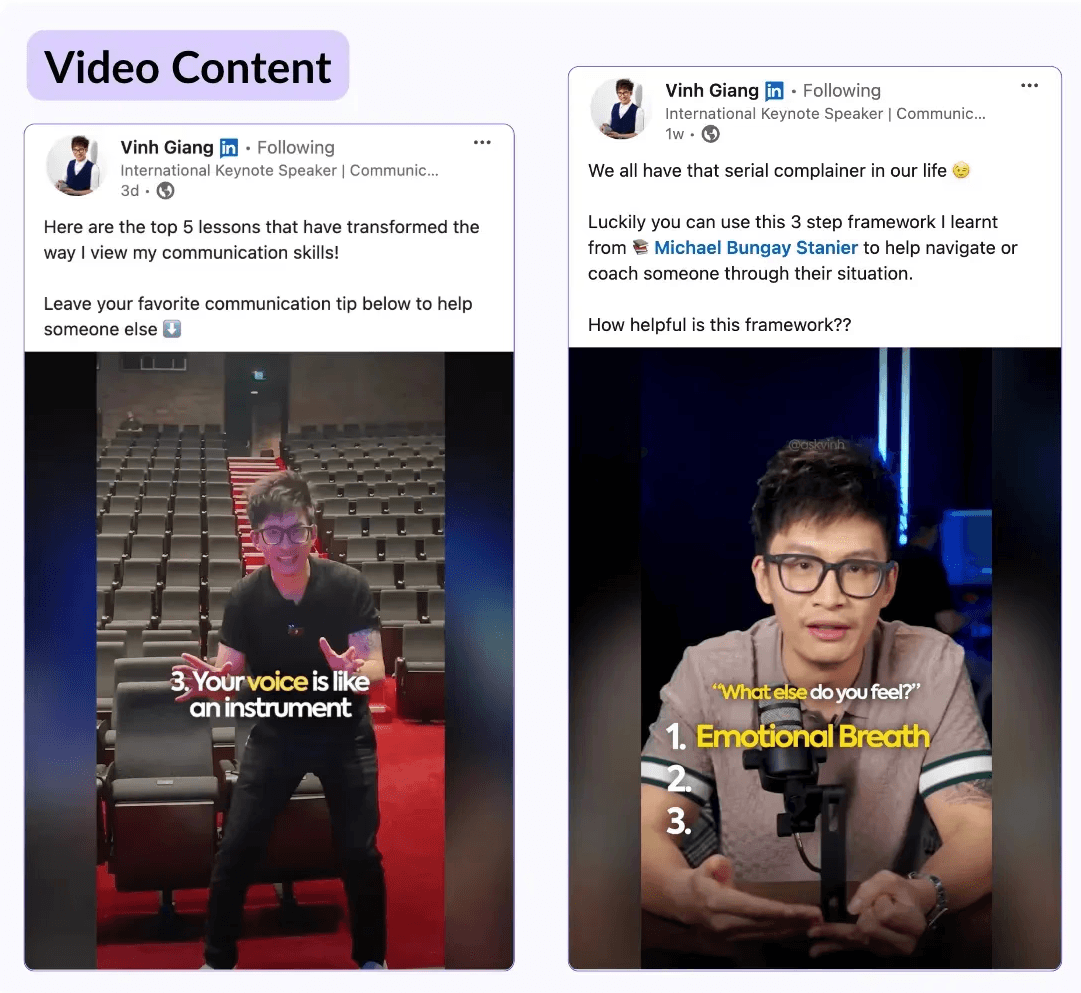
How to win the scroll:
Visual hooks: Use movement, bold text, or dramatic visuals right at the start.
Text hooks: Open with a strong question, a surprising fact, or a bold claim.
Movement: Quick gestures or camera zooms can add energy and instantly grab focus.
Examples of high-performing visual hooks:
Holding a sign or phone with bold text (e.g., “STOP scrolling if you’re in sales”)
A close-up with direct eye contact and an emotional facial expression
Fast cuts or zooms within the first second to add motion and rhythm
2. Optimize for Mobile-First Viewing
Most LinkedIn creators plan and review their content on desktop, but here’s the twist: the majority of LinkedIn users consume content on mobile.
In fact, according to LinkedIn, over 57% of their traffic comes from mobile devices.
So what does that mean for your videos? You have to think vertically.
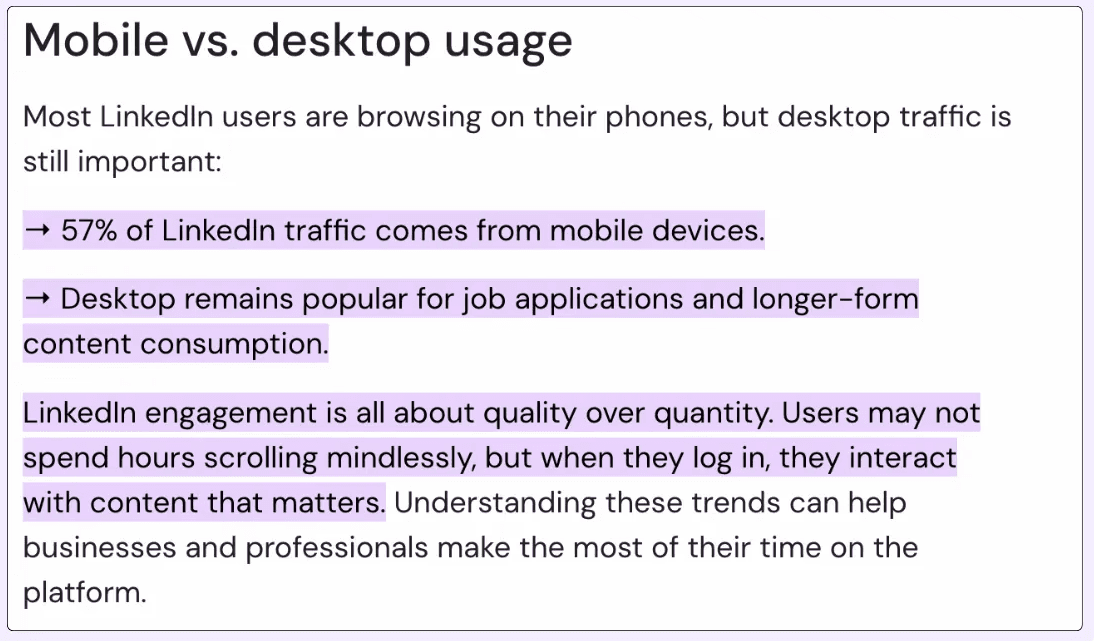
While longer videos (like tutorials or interviews) can still work in horizontal format, vertical videos:
Take up more real estate on the mobile feed
Look familiar, thanks to Instagram Reels and TikTok
Signal short-form, fast-value content to the viewer
Pro tip: Use a 9:16 aspect ratio and keep key visuals centered to avoid cropping in mobile previews.
3. Leverage the 15-30 Second Sweet Spot
What is the ideal length for high-engagement videos on LinkedIn? Between 15 and 30 seconds.
Here’s why:
Most users decide in the first 5 seconds whether to keep watching.
The platform’s average view duration hovers around 12–15 seconds, so packing value into that window is critical.
Shorter videos are easier to consume and more likely to be watched to the end.
Your goal is to hook viewers quickly, deliver value early, and use storytelling or cliffhangers to keep them watching until the final second.
4. Use Pattern Interrupts
How do you make people stop scrolling in the first 3 seconds? Pattern interrupts.
A pattern interrupt is a technique that adds something surprising or unusual. This helps break the viewer's routine and quickly grabs their attention.
Think of it as shaking up the scroll.
You can try to:
Whisper your CTA unexpectedly ("psst… want more leads?")
Start with an extreme close-up of your face or a surprising prop
Use a sudden cut or sound effect mid-sentence
Show a wrong or controversial statement on screen, then immediately explain
These small creative choices shock the algorithm and the brain, helping your content stand out in a sea of sameness.
5. Implement Story-Driven Content
Want people to watch until the end? Tell a story.
Storytelling isn’t just for novels; it’s one of the most powerful formats on LinkedIn Video.
Instead of simply talking to the camera, show your process.
Use B-rolls of your day-to-day, your screen, your tools, and narrate like you’re talking to a friend.
Great story-driven formats:
“A day in my freelance life” with voiceover insights
“Here’s how I failed my first launch (and what I learned)”
“Behind the scenes: how I create content in 60 minutes”
People relate to people, not pitches. If they feel something, they’ll remember you, and that’s what builds brand trust.
6. Create Series Content
Want more engagement and loyal viewers? Start a content series.
A video series keeps your audience coming back for more. When you turn your insights into episodes, you create continuity, and that builds familiarity and anticipation.
Think like this:
Instead of “How I built my business,” → do “Build My Business – Ep. 1: The First $1K”
End with a teaser: “In the next video, I’ll show you how I got my first client on LinkedIn.”
This taps into curiosity, keeps viewers invested, and positions you as someone worth following long-term.
7. Optimize for Silent Viewing
Most people scroll LinkedIn at work, with their sound off. So if your video needs audio to make sense, you're losing views.
That’s where subtitles come in and can make your content:
Increase retention
Help your message land clearly
Make your video accessible to everyone
But don’t overdo it. Use readable, well-timed captions that support—not clutter—your visuals.
Pro tip: Add emphasis by bolding key phrases or syncing captions with your visuals for max impact.
8. Engage in Real-Time
Let’s be real, when you’re at work, your phone and computer are probably on mute.
So, how do people watch videos on LinkedIn? With dynamic subtitles.
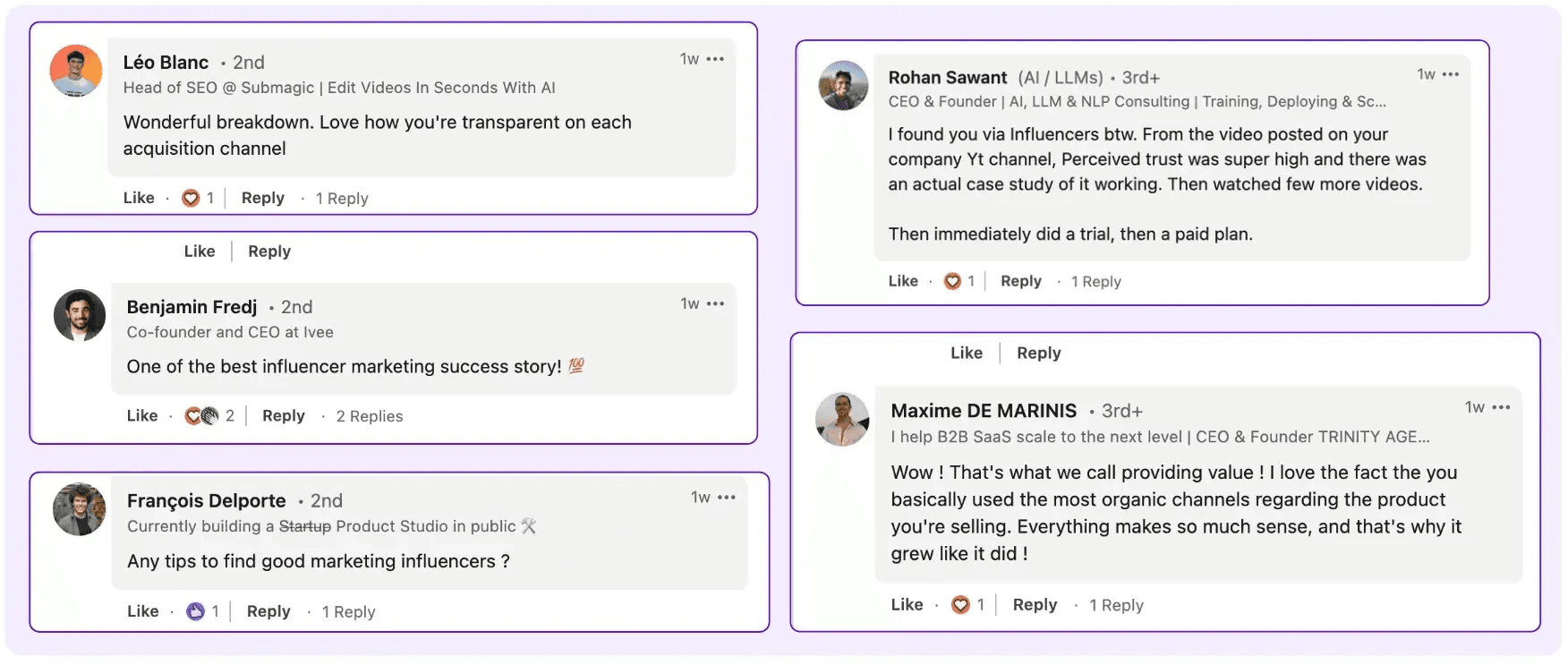
It makes it way easier to follow the story without needing to plug in headphones or turn the volume up. Super helpful for people scrolling during work hours or on the go.
Just one thing to keep in mind: make sure your subtitles are easy to read and not too distracting. If they’re too loud visually, people will focus more on the text than on your actual video.
9. Test and Iterate Constantly!
And maybe the most important tip of all: keep testing what works.
Which type of content gets the most reactions?
What kind of hook stops people from scrolling? What topics make people comment on or DM you?
The goal isn’t to reinvent the wheel every time; it’s to find out what works for you and do more of that.
LinkedIn gives you some basic analytics, but it’s on you to track your results and keep publishing consistently if you want real growth over time.
10. Use Data and Statistics
The content tends to perform best? The one that includes details and real data.
Drop in a recent stat, a surprising number, or even a quick case study — something that makes people pause and say, “Wait, really?”
People love numbers. It gives your video more weight, makes it feel legit, and shows you’ve done your homework. Plus, it instantly boosts credibility, especially in B2B or thought-leadership content.
Just one thing: always mention the source.
It doesn’t have to be super formal, just a quick, “According to XYZ study” or “Stats from [source]” works. That little touch makes your audience trust what you're saying even more.
How to Upload and Optimize LinkedIn Videos (Step-by-Step Guide)
Uploading a video on LinkedIn is way easier than most people think. It works just like creating a normal post, just with a few extra steps to make it stand out even more.
Follow this quick step-by-step, and don’t forget the bonus tip at the end
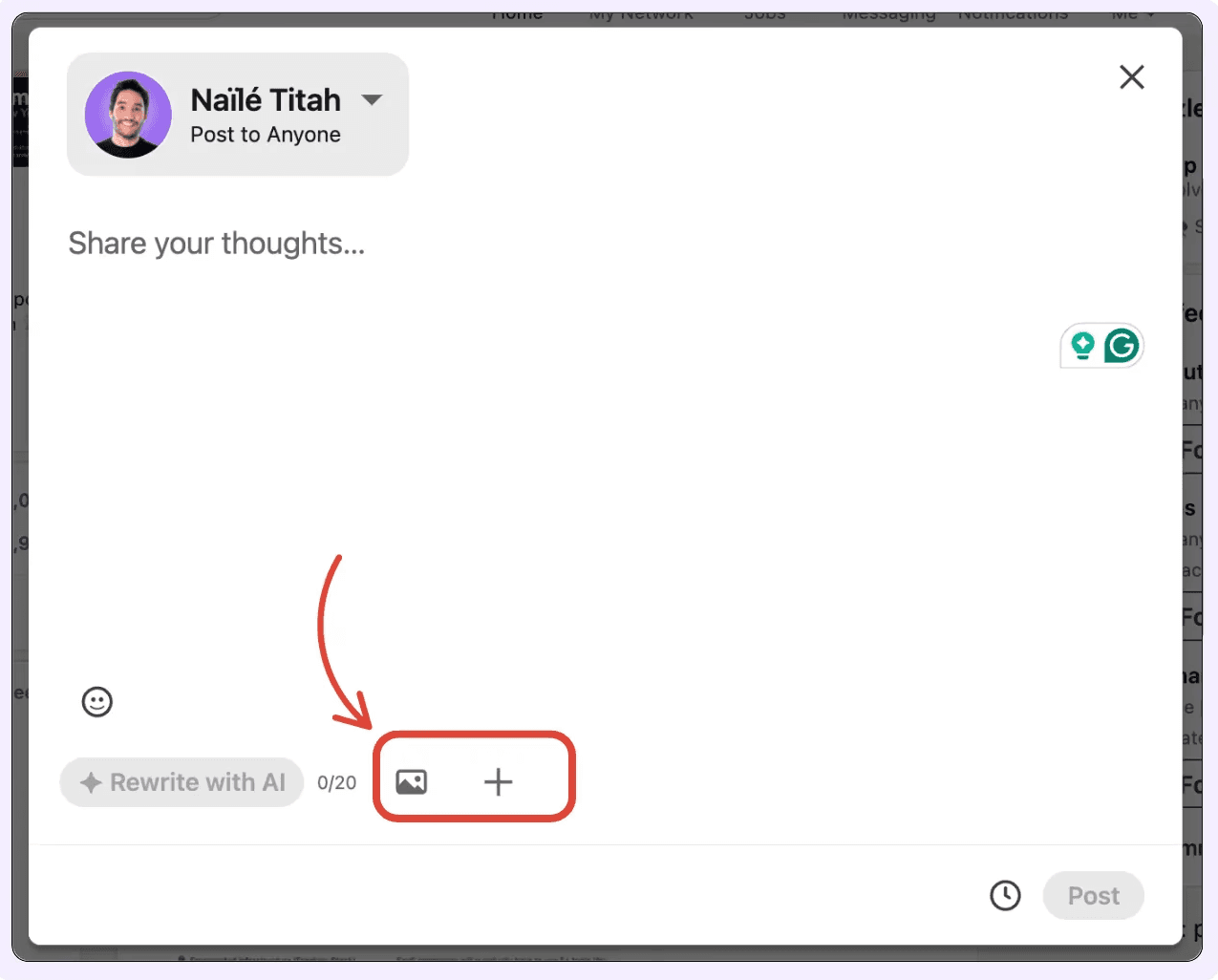
Step 1: Start a New Post
Go to your LinkedIn homepage and click on "Start a post" just like you normally would.
Step 2: Add Your Video
Click the “+” (More) icon and choose “Add a video” from the menu. Then upload the file directly from your computer or phone.
Make sure your video follows LinkedIn's recommended specs:
MP4 or MOV
Under 5GB
Ideally, 1:1 or vertical format (especially for mobile)
Step 3: Add a Title
After uploading, you’ll have the option to add a title to your video. This is optional, but highly recommended; it gives context and improves accessibility.
Step 4: Write Your Post Text
Now write the text that will appear above your video.
Avoid repeating what’s in the video. Instead, focus on a strong hook and a clear CTA (like “comment below” or “save this for later”).
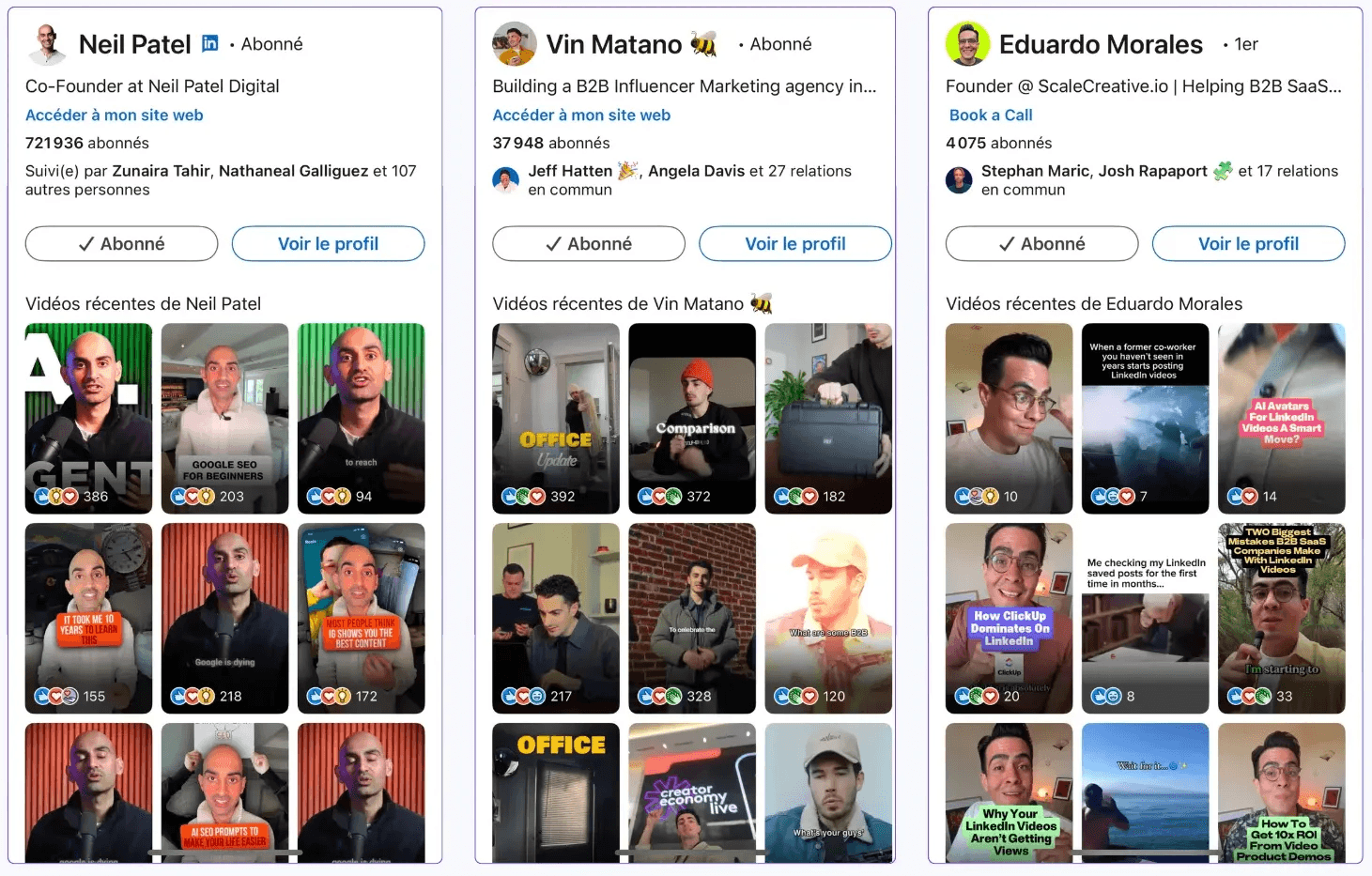
Step 5: Add a Thumbnail (Bonus Tip!)
This is the pro move most people forget: add a custom thumbnail to your video.
Why? It helps keep your visual branding consistent with your profile. It’s the first thing people see before they play.
Why Some Videos Work and Others Don't - Critical Mistakes to Avoid
Not all videos perform the same, and a lot of it comes down to who you're talking to and how you’re positioning your content.
LinkedIn is primarily a B2B platform, so if your videos feel too much like TikToks or personal vlogs, they might not land well with your audience.
The goal is to be engaging without losing credibility.
Think of it this way: your video should entertain, educate, and position you as the expert behind the content.
LinkedIn Videos for B2B Brands
When creating videos for a B2B audience, ask yourself:
Would someone at a company send this to their boss or colleague because it's actually useful?
That’s your standard.
The best-performing B2B videos are usually:
Mini case studies (real results, client success stories)
Client testimonials (authentic, short, and impactful)
Product/service demos (clear and benefit-focused)
Thought leadership from founders or senior execs
Educational content pulled from webinars, talks, or courses
If this sounds like the type of content you’re already posting as LinkedIn text posts, it’s because it is.
You can easily repurpose your top-performing posts and turn them into video format.
Don’t worry, they don’t have to be long or overly polished. What matters is the value they deliver and how easily they can be shared.
Mistakes to Avoid in LinkedIn Videos
Finally, here are some of the most common mistakes to watch out for:
Starting your video like it’s a YouTube vlog, remember, you don’t have the same time or patience on LinkedIn.
Using background music that’s too loud, making it hard to hear you speak.
Overloading your video with animations can make it look childish or unprofessional.
Leaving awkward pauses or dead air: every second counts, so keep the flow tight and focused.
Reading directly from a script and sounding like a boring lecture.
Not adding subtitles, which makes it hard for people to follow if they’re watching without sound.
Making videos that are way too long: shorter is usually better on LinkedIn.
Avoid these pitfalls to keep your audience engaged and coming back for more!
Native upload beats a link, every time
Upload the file straight to LinkedIn ("Start a post" then the video icon, then your MP4 or MOV). Do not post a YouTube or Vimeo link and expect the same result. A native video plays inline in the feed, autoplays as people scroll, and is treated as a first-class post. An external video link is just a link: it sends people off-platform and carries the same reach penalty every link post does. If the goal is engagement on LinkedIn, the video has to live on LinkedIn.
Specs that matter in 2026
Format: MP4 or MOV, file size under 5 GB.
Aspect ratio: vertical (4:5 or 9:16) for talking-head and short-form, because most of the feed is mobile and vertical fills more of the screen. Horizontal (16:9) is fine for interviews, demos and screen recordings where width carries information.
Length: LinkedIn allows 3 seconds to 10 minutes on a normal post, but the data says aim for the 1-to-5-minute band. Use the room; do not pad it.
Thumbnail: add a custom cover frame. It is the first thing people see before they hit play, and it keeps your visual branding consistent.
Caption for muted, mobile viewers
Most people watch LinkedIn video with the sound off, scrolling at work. Two consequences:
Burn in subtitles. If your video needs audio to make sense, you lose the silent majority. Readable, well-timed captions keep the message landing without headphones.
Write the post text to add, not repeat. The caption above the video should not transcribe what you say on camera. Use it to set up the topic, add context, and end on a clear call to action ("What is your take?" or "Save this for later"). The video delivers; the text frames and invites.
Win the first 3 seconds
Autoplay gives you about three seconds before a viewer scrolls on. Open on the strongest thing you have: a bold on-screen claim, a surprising number, a direct question, or movement (a gesture, a quick zoom, a prop). Do not open like a YouTube vlog with a slow "Hey everyone, so today I wanted to talk about..." On LinkedIn you have neither the time nor the patience budget for a runway. Hook first, context second.
Talking-head vs produced
You do not need a studio. A clear talking-head video shot on a phone, with good light and burned-in captions, outperforms an over-produced clip drowning in animations and loud music. The format rewards a face, a voice, and a point of view, that is what makes you more memorable than a static post. Save "produced" (B-roll, cuts, motion graphics) for when it genuinely serves the story: a demo, a case study, a process walkthrough. Polish should support the message, never bury it.
The mistakes that quietly kill videos
Starting slow, like a vlog intro, instead of hooking in 3 seconds.
Background music so loud it competes with your voice.
No captions, so the muted majority bounces.
Over-animating until it looks unserious for a B2B feed.
Dead air and awkward pauses; keep the flow tight.
Shooting under 30 seconds because "short wins," when the data says 1 to 5 minutes wins.
For repeatable content, batch-record. Once you are warmed up you can shoot five to ten short videos in an hour, then schedule them across the weeks. The first take is always the worst; by the fifth you will see the difference.
What to do with all this
Stop shooting 30-second clips by default. The median video (51 seconds) sits in an underperforming band. Aim for 1 to 5 minutes (45-48 median likes).
Upload native, never as a link. Inline autoplay is the whole advantage.
Caption for muted viewers and hook in 3 seconds. Most of your audience watches on mute, at work.
Bet on the format for the next few years. Video is the only one whose median keeps climbing (20 to 38 since 2022).
Do not expect free reach. Video reach (708 median impressions) is slightly below the feed; it wins on attention, not distribution.
Schedule it. A good video is too much work to waste on a dead time slot. (Carousels are the other format that rewards depth; here is how to build a LinkedIn carousel, and how the LinkedIn algorithm weighs all of this in 2026.)
Put video to work. With MagicPost you can write, schedule and analyze all your LinkedIn content in one place, so a format that takes real effort to produce actually gets posted at the right time, to the right audience, and measured properly afterward.
Where this data comes from
Everything measured on this page is MagicPost's own research. Duration and engagement figures: 100,758 native LinkedIn videos published over the last 12 months (reshares and deleted posts excluded), bucketed by length and compared on median likes. The median video runs 51 seconds and earns 36 median likes, 6 median comments. Reach figures come from posts with synced analytics: 43,078 videos (708 median impressions) versus 523,879 non-video posts (770 median impressions), aggregated and anonymized. History: the same corpus from 2022 to mid-2026, medians within each year, directional by construction since the corpus grows. Video masters: 5,000+ followers, people only, minimum video count in the window, ranked by median likes per video. Medians, never averages, so a handful of viral clips cannot distort anything. Figures dated June 2026, refreshed with the data.
Frequently Asked Questions
How long should a LinkedIn video be?
Yes, LinkedIn supports native video uploads for both personal profiles and company pages. You can upload videos directly through the platform or share links to external video content.
Is LinkedIn video still worth it in 2026?
LinkedIn has introduced enhanced video analytics, improved mobile optimization, and better integration with LinkedIn Live streaming capabilities in 2025.
Does LinkedIn give videos more reach?
LinkedIn videos continue to receive priority in the algorithm, but the platform has become more selective about quality content, requiring higher engagement rates for broad distribution.
Should I upload video natively or post a link?
LinkedIn videos can be between 3 seconds and 10 minutes for regular posts, while ads can be up to 30 minutes.
Do I really need captions on LinkedIn video?
A video view is counted when someone watches your video for at least 3 seconds. LinkedIn provides detailed analytics on view duration and completion rates.
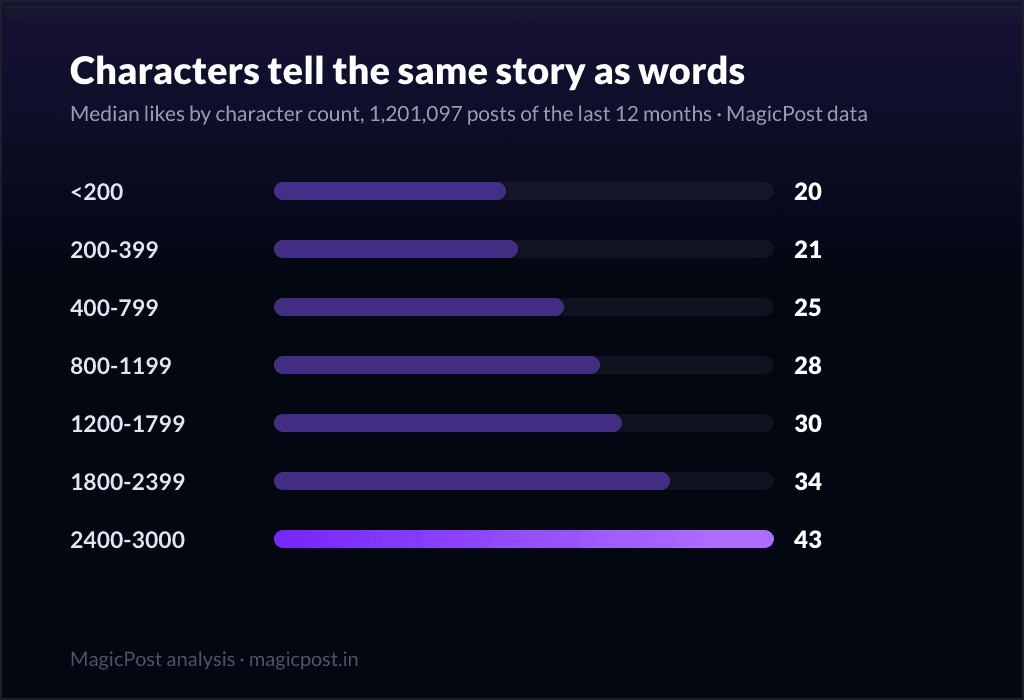
How Many Characters in a LinkedIn Post? (2026)
Discover what the maximum character limit for LinkedIn posts is and learn how to optimize your content with AI tools to enhance your visibility and engagement.
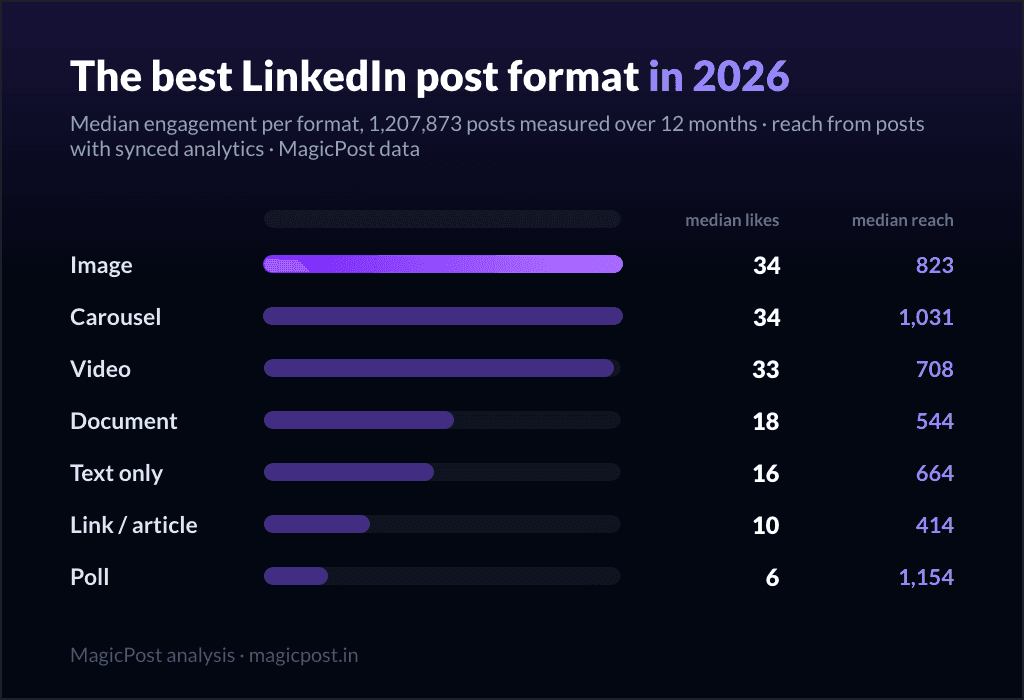
The Best LinkedIn Post Format in 2026 (We Measured 1.2 Million Posts)
The best LinkedIn post format in 2026, measured on 1.2M posts: image and carousel lead at 34 median likes, video is rising, polls are last. Full data.
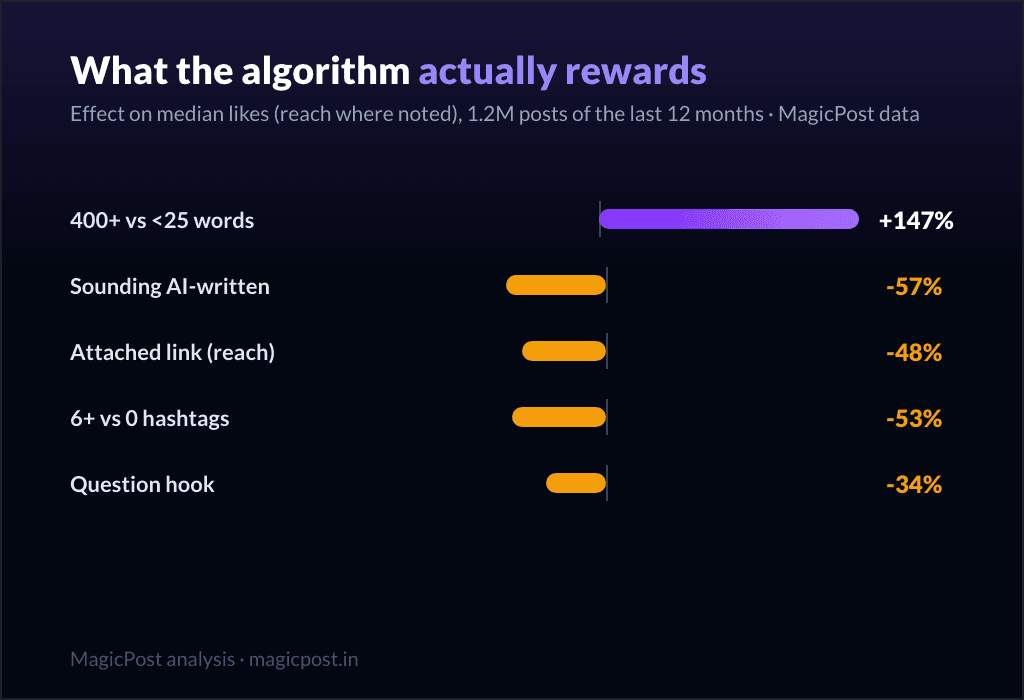
How the LinkedIn Algorithm Works in 2026: What 1.2M Posts Reveal
How the LinkedIn algorithm works in 2026, measured on 1.2M posts: the levers ranked, from post length (+147%) to AI-sounding text (-57%).
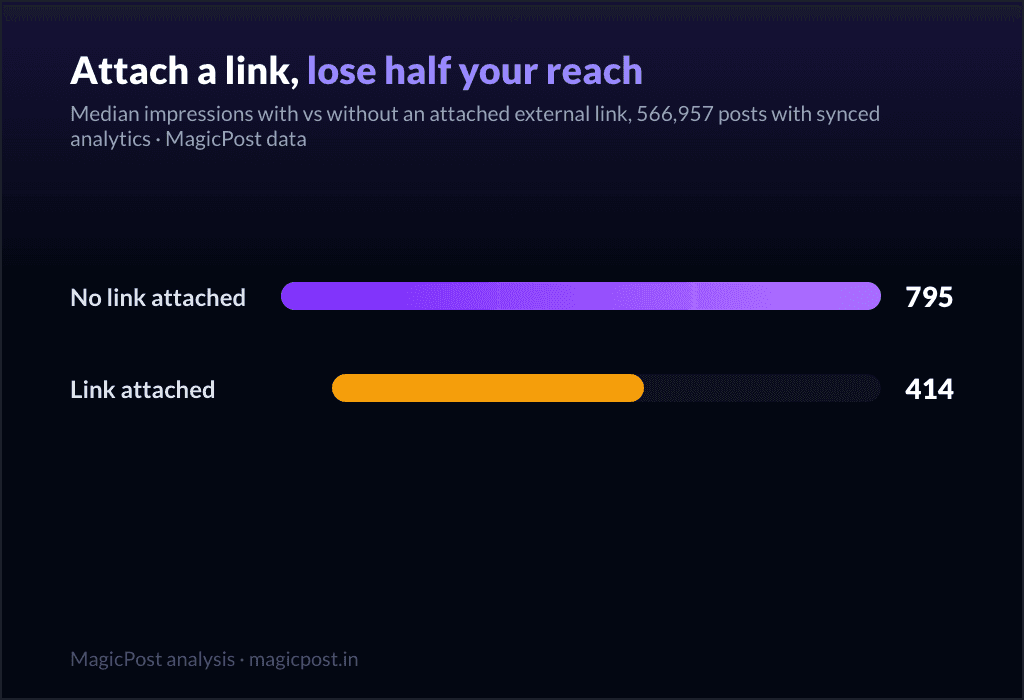
Do External Links Kill Your LinkedIn Reach? We Measured 566,957 Posts
Does linking out kill LinkedIn reach? 566,957 posts measured: attached link cards halve impressions (414 vs 795); in-body URLs cost nothing (858).
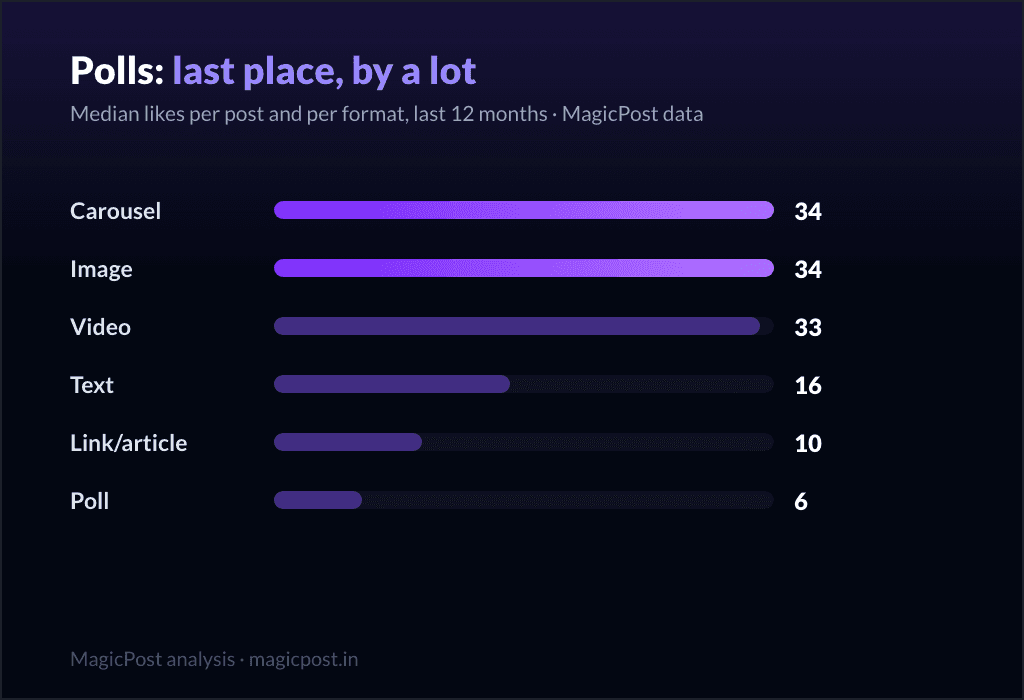
Do LinkedIn Polls Work? 11,000 Polls Say: Not the Way You Think
Do LinkedIn polls work? 11,123 polls measured: 6 median likes vs 34 for images, but 1,154 median impressions. When a poll helps, and when it hurts.
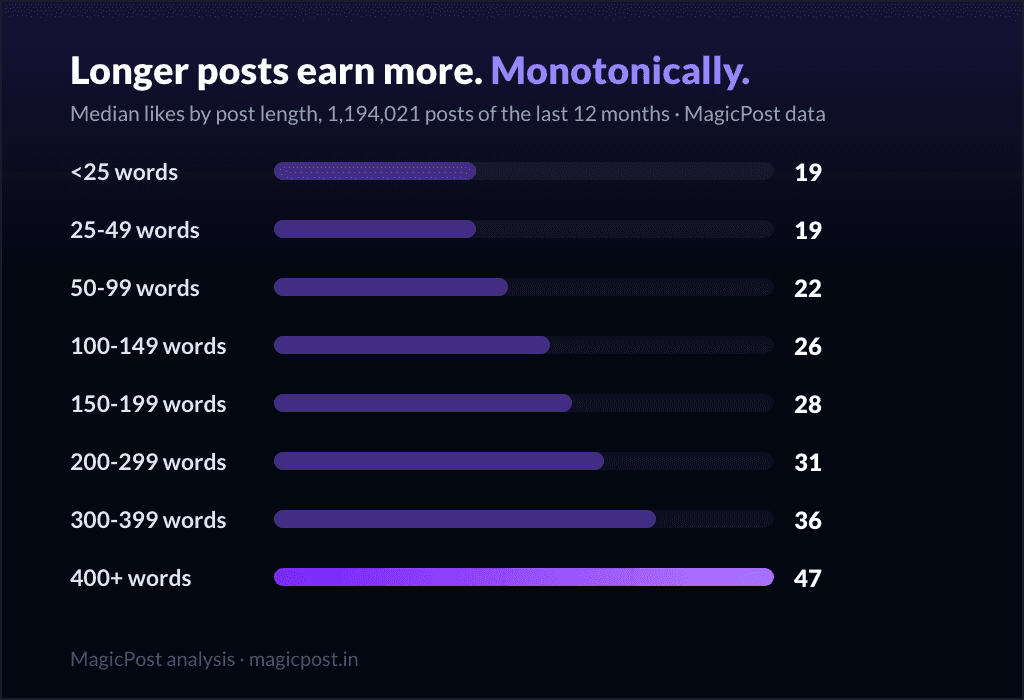
How Long Should a LinkedIn Post Be?
Learn what the ideal LinkedIn post length is to gain more visibility and impressions. Discover tips to optimize reach and enhance engagement.
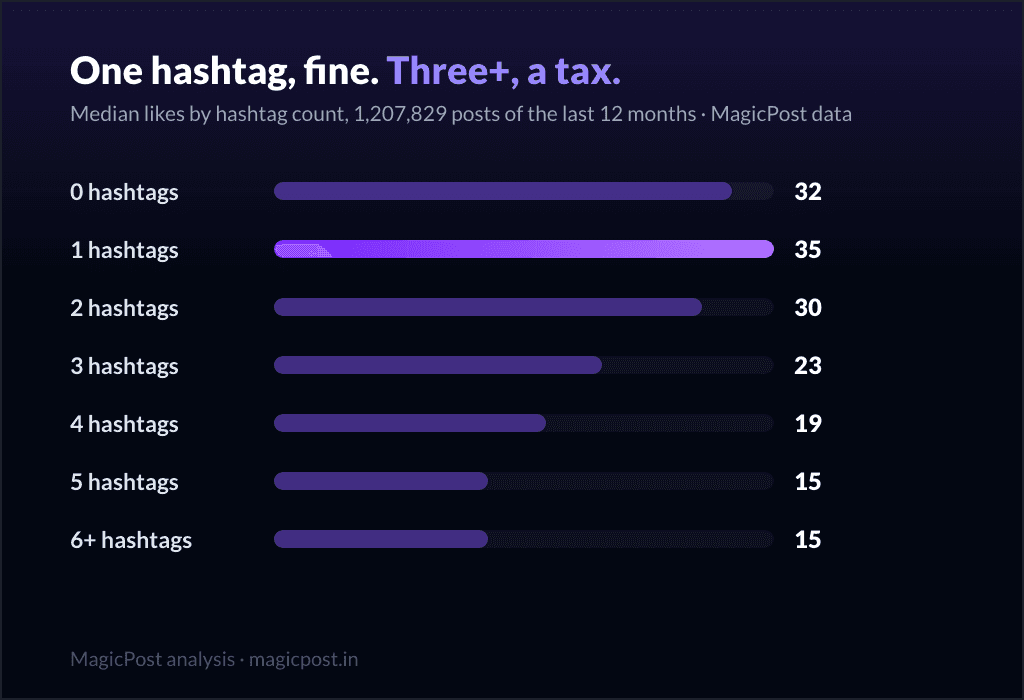
LinkedIn Hashtag Generator: Do Hashtags Still Work? (2026)
Are hashtags still relevant on LinkedIn? Find out how they influence your content strategy, their benefits and drawbacks, and if you should incorporate them into your posts.
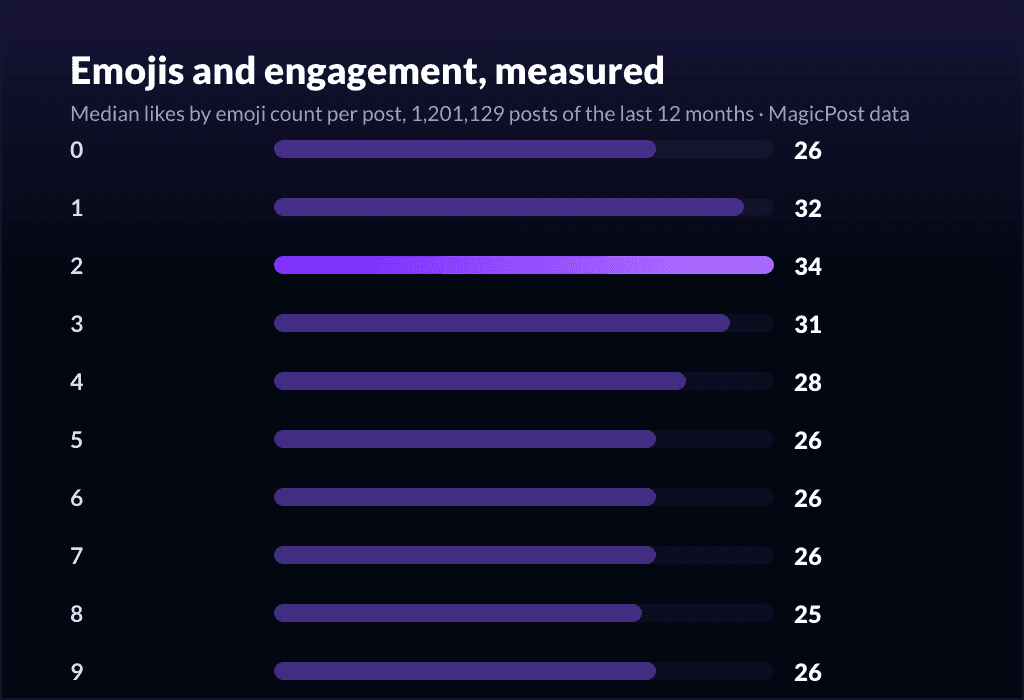
LinkedIn Emojis: How to Boost Engagement (+ Copy-Paste List)
Curious about using LinkedIn emojis to boost engagement on LinkedIn? Here are the ones that work, how many to use, and a complete copy-paste reference list.
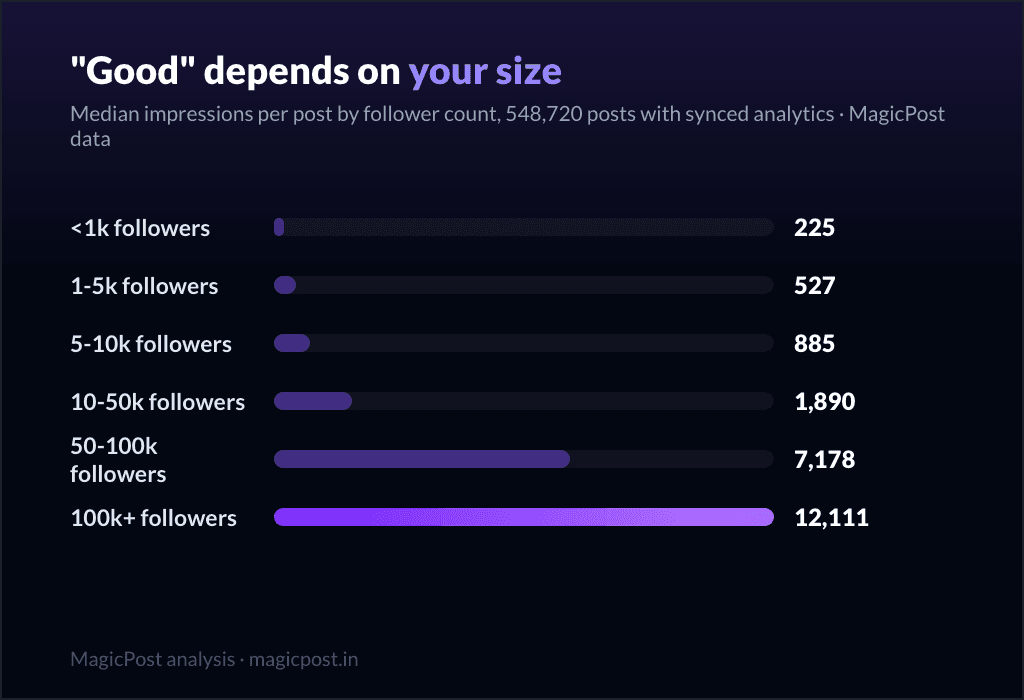
How Many Impressions are Good on LinkedIn?
How many impressions are considered good on LinkedIn? Here’s the answer.