" height="26.80529977783203px" id="tymKb8bqC" width="128.00300311279295px"/><path d="M 0 2.417 L 0 0 L 12.909 0 L 12.909 2.417 Z" fill="rgb(126, 78, 253)" height="2.417099999999998px" id="aYr4em6zK" transform="translate(128.341 22.325)" width="12.908999999999992px"/></svg>)

"/><stop offset="1" stop-color="rgb(118, 37, 250)"/></linearGradient></defs><g d="M 19.242 21.22 L 19.362 6.204 L 19.272 6.204 L 13.757 21.22 L 10.161 21.22 L 4.796 6.204 L 4.706 6.204 L 4.825 21.22 L 0 21.22 L 0 0 L 7.283 0 L 12.109 13.607 L 12.229 13.607 L 16.844 0 L 24.247 0 L 24.247 21.22 Z M 26.421 26.113 L 26.421 23.445 L 41.407 23.445 L 41.407 26.113 Z" fill="transparent" height="26.112508199679183px" id="DvfaAIHYn" width="41.40731898311435px"><path d="M 19.242 21.22 L 19.362 6.204 L 19.272 6.204 L 13.757 21.22 L 10.161 21.22 L 4.796 6.204 L 4.706 6.204 L 4.825 21.22 L 0 21.22 L 0 0 L 7.283 0 L 12.109 13.607 L 12.229 13.607 L 16.844 0 L 24.247 0 L 24.247 21.22 Z" fill="rgb(46, 46, 46)" height="21.220180016149442px" id="pLsxRCobd" width="24.247352589074694px"/><path d="M 0 2.668 L 0 0 L 14.986 0 L 14.986 2.668 Z" fill="url(%23yD9d4I5GR-3279285344-linear-gradient)" height="2.6675085048549647px" id="yD9d4I5GR" transform="translate(26.421 23.445)" width="14.986002836263765px"/></g></svg>)

Naïlé Titah
Welcome to MagicPost, your go-to tool for creating impactful LinkedIn posts that captivate your audience and enhance your professional image.
This comprehensive guide will walk you through using MagicPost efficiently to craft posts that not only engage but also position you as an expert in your field.
TL;DR:
Create a MagicPost account.
Select the type and category of post you prefer the most.
Click on "Generate Post."
Edit and customize your draft.
Copy the post or schedule it for LinkedIn.
Retrieve your generated posts under "My Posts".
Subscribe to the plan that best fits your needs.
Getting Started with MagicPost
1. Accessing MagicPost
Navigate to MagicPost's website to begin.
Complete the sign-up process or log in to reach the dashboard, where your content creation journey begins.
2. Selecting Your Post Type and Category
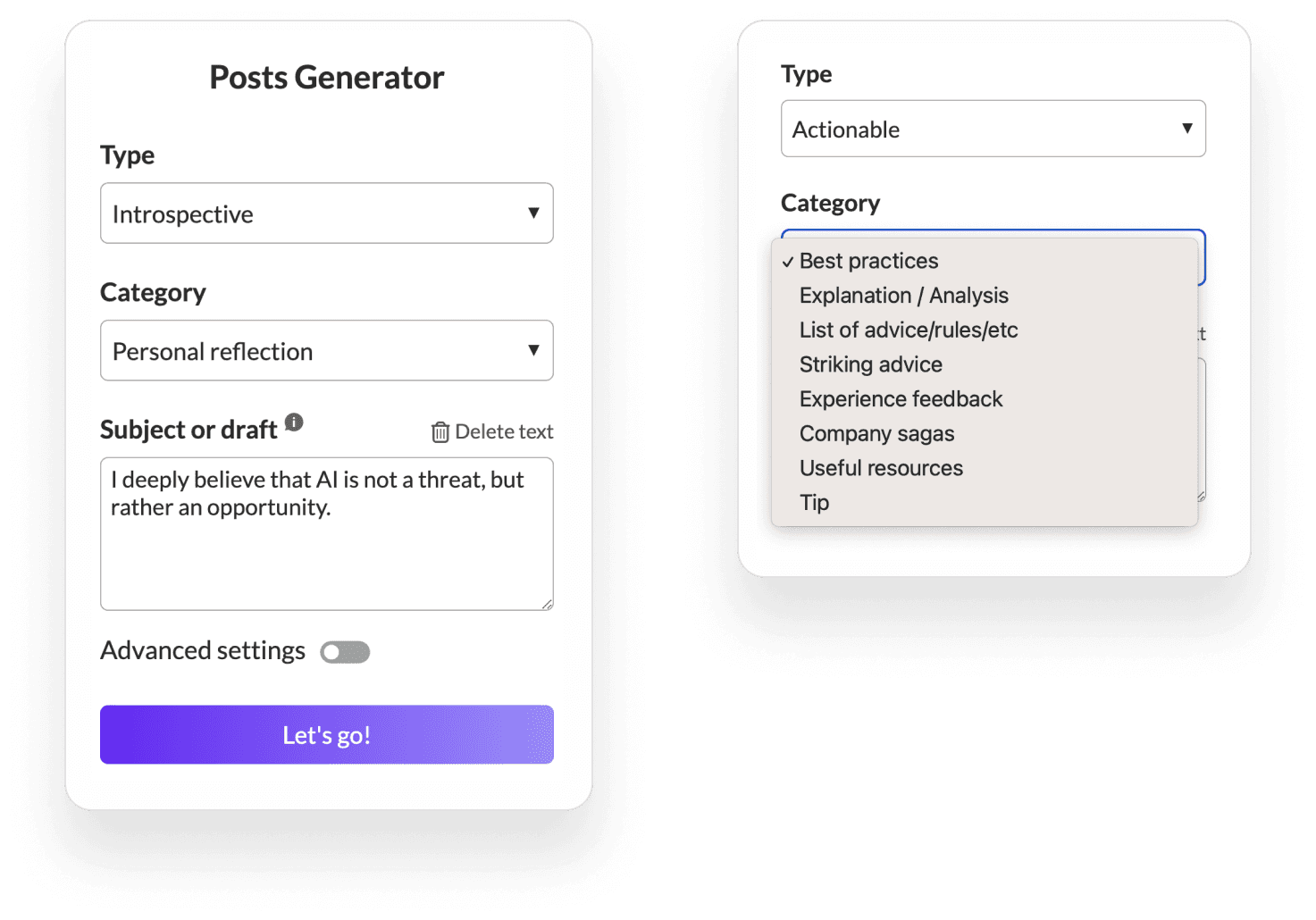
MagicPost offers a variety of post types and categories to match your content goals:
Actionable Posts: Focus on providing clear, practical advice or steps. For example, "The 5 UX rules you absolutely need to know before designing a website." Simply start with a topic sentence to generate content in this category.
Inspiring/Introspective Posts: Ideal for sharing personal insights or motivational content. Draft a brief version of your post with specific details you wish to highlight.
Promotional Posts: Best for showcasing products or content. Be concise but ensure to include essential details like dates, URLs, participants in events, or anecdotes.
3 Tips to Get More Out of MagicPost
Tip #1: Harnessing the “Actionable” Category
Leverage the Actionable category by starting with a clear topic sentence. This approach helps MagicPost generate specific, practical advice that your audience can immediately benefit from.
Example: "I've noticed 6 common traits among successful managers."
Tip #2: Mastering the “Inspiring”/“Introspective” Categories
When working with Inspiring or Introspective categories, provide a brief draft with the essential details you intend to convey. This helps MagicPost tailor the content more closely to your vision.
Example: "I struggled academically throughout my school years. Against all odds, I joined a top-ranked school. 10 years later, I lead a team of 50 people."
Tip #3: Nailing the “Promotional” Category
For Promotional content, clarity and conciseness are key. Ensure your draft includes all critical information such as event dates, URLs, and engaging details about the content or product being promoted.
Example: "This young American left everything at 18 to set up [...]. He is the guest of our episode of the week."
Bonus tip: This isn’t ChatGPT
Bear in mind that MagicPost isn't waiting for a prompt. It just needs a topic or a draft of your post, which it can then generate content from. Draw inspiration from examples on LinkedIn, then let MagicPost handle the rest.
अतिरिक्त विशेषताएँ
विविध उत्पादन मोड का उपयोग करना
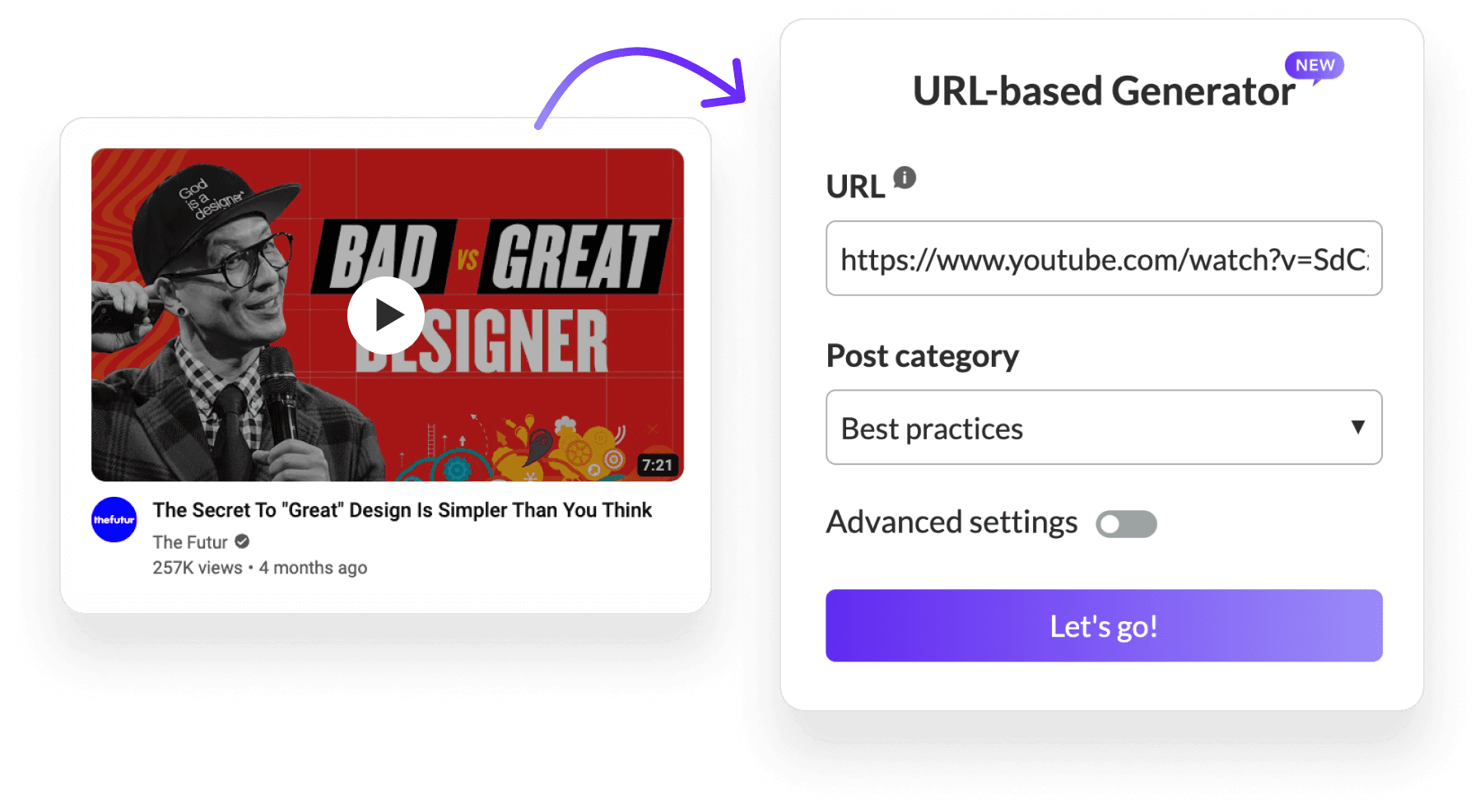
URL मोड: लेखों या YouTube वीडियो से सामग्री को आकर्षक पोस्टों में परिवर्तित करें।
मॉडल मोड: MagicPost की सामग्री उत्पादन को प्रेरित करने के लिए पसंदीदा पोस्ट टेम्पलेट का उपयोग करें।
परिवर्तन मोड: MagicPost के लिए ड्राफ्ट या अवधारणाएँ इनपुट करें ताकि इसे LinkedIn के लिए सही ढंग से स्वरूपित किया जा सके।
संपादन और अनुकूलन
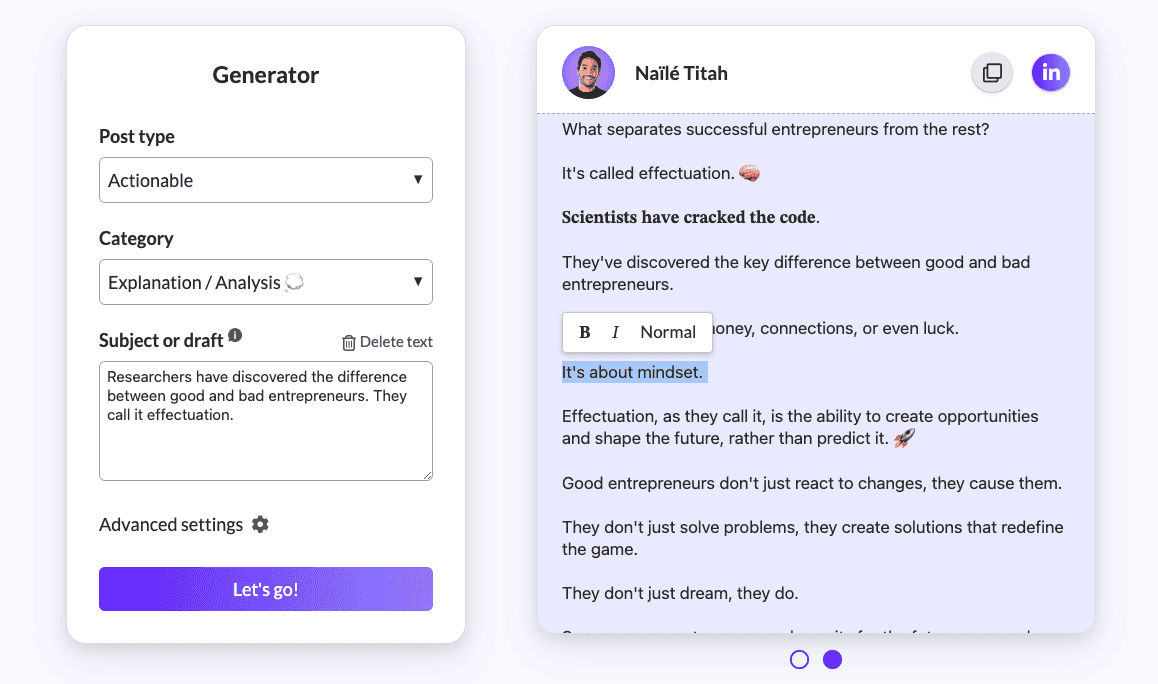
MagicPost आपके ड्राफ्ट का विस्तृत संपादन और अनुकूलन की अनुमति देता है, जिससे आप प्रकाशन से पहले अपने संदेश और प्रस्तुति को समायोजित कर सकते हैं।
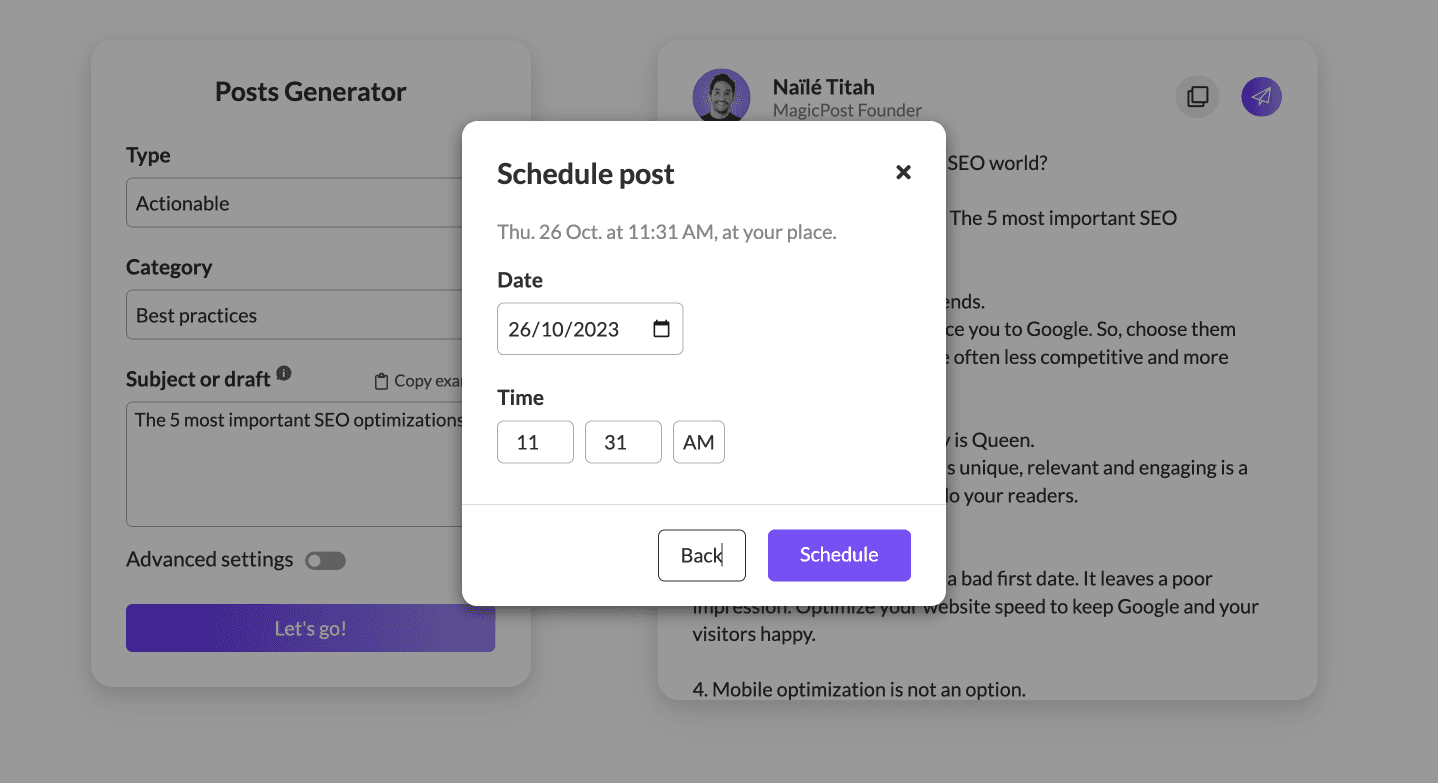
प्रत्यक्ष प्रकाशन और अनुसूची बनाना
प्रत्यक्ष प्रकाशन के लिए अपने LinkedIn खाते से MagicPost को कनेक्ट करें या अपने पोस्टों को इष्टतम संलग्न समय के लिए शेड्यूल करें, जिससे आपकी सामग्री रणनीति में सुधार होगा।
MagicPost योजनाएं और मूल्य निर्धारण
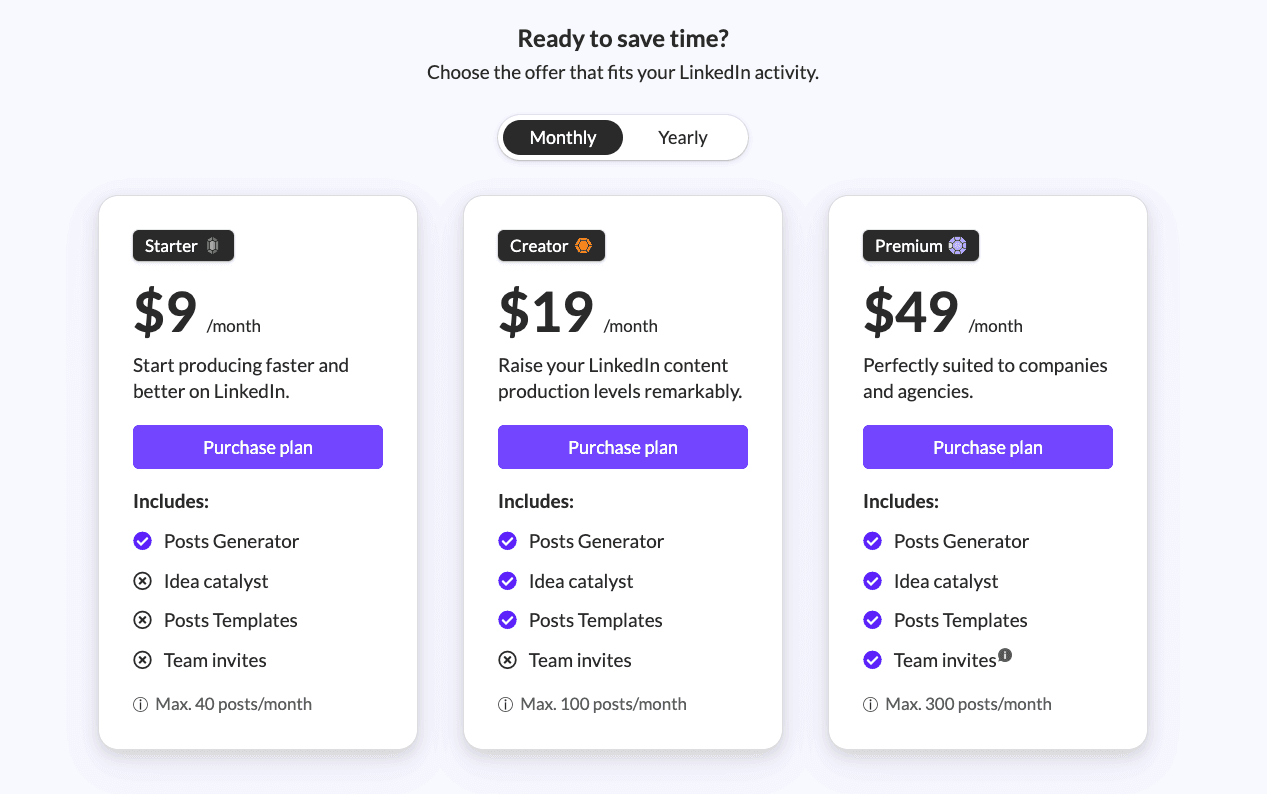
जब आप MagicPost चुनते हैं, तो आपके पास विभिन्न स्तरों की LinkedIn गतिविधियों के लिए तैयार की गई तीन विशिष्ट योजनाएं हैं। यहाँ प्रत्येक का विस्तृत अवलोकन है जो आपको एक सूचित निर्णय लेने में मदद करेगा:
स्टार्टर योजना - $9/महीना
किसके लिए: वे व्यक्ति जो LinkedIn पर सामग्री बनाना शुरू कर रहे हैं और अधिक कुशलता से काम करना चाहते हैं।
शामिल हैं:
पोस्ट जनरेटर: आसानी से सामग्री बनाएं।
विचार उत्प्रेरक: आपके पोस्ट को शुरू करने के लिए विचार उत्पन्न करें।
पोस्ट टेम्पलेट: अपनी लेखन प्रक्रिया को सरल बनाने के लिए विभिन्न टेम्पलेट्स तक पहुँचें।
टीम निमंत्रण: इस योजना में शामिल नहीं है।
पोस्ट की सीमा: प्रति माह 40 पोस्ट तक, नियमित सामग्री निर्माताओं के लिए उपयुक्त जो मध्यम पोस्टिंग आवृत्ति बनाए रखते हैं।
क्रिएटर योजना - $19/महीना
किसके लिए: उपयोगकर्ता जो अपनी LinkedIn सामग्री उत्पादन स्तर को महत्वपूर्ण रूप से बढ़ाना चाहते हैं।
शामिल हैं:
स्टार्टर योजना की सभी सुविधाएँ।
टीम निमंत्रण: इस योजना में शामिल नहीं है।
पोस्ट की सीमा: प्रति माह अधिकतम 100 पोस्ट, अधिक सक्रिय उपयोगकर्ताओं के लिए जो उच्च सामग्री उत्पादन की आवश्यकता होती है।
प्रीमियम योजना - $49/महीना
किसके लिए: कंपनियां और एजेंसियां जो व्यापक सामग्री उत्पादन क्षमताओं और सहयोगात्मक विकल्पों की आवश्यकता होती है।
शामिल हैं:
क्रिएटर योजना की सभी सुविधाएँ।
टीम निमंत्रण: अन्य MagicPost खातेधारकों को अपने प्रीमियम योजना की सुविधाओं का उपयोग करने के लिए आमंत्रित करें।
पोस्ट की सीमा: प्रति माह 300 पोस्ट तक की उदार आवंटन, जो उच्च मात्रा की सामग्री रणनीतियों और टीम सहयोग की अनुमति देती है।
अतिरिक्त योजना जानकारी
उचित उपयोग नीति: प्रत्येक योजना को उचित और लचीला बनाने के लिए डिज़ाइन किया गया है, जिससे आप हर महीने पर्याप्त संख्या में पोस्ट उत्पन्न कर सकें बिना किसी प्रतिबंधित महसूस किए।
सदस्यता प्रबंधन: आप किसी भी समय अपनी सदस्यता रद्द कर सकते हैं, सदस्यता पृष्ठ पर एक आसान उपयोग करने वाले रद्द करने के बटन के माध्यम से, जिससे आपकी योजना पर नियंत्रण सुनिश्चित होता है।
चालान और बिलिंग: खरीद पर, Stripe आपको एक विस्तृत चालान भेजेगा, और आप अपनी सभी चालानों को सदस्यता पृष्ठ पर आसानी से एक्सेस कर पाएंगे।
टीम निमंत्रण सुविधा (प्रीमियम योजना): अपने योजना में अन्य लोगों को उनके अपने MagicPost खातों के साथ आमंत्रित करें। प्रत्येक आमंत्रित सदस्य के पास अपनी सेटिंग्स और पोस्ट इतिहास के साथ एक स्वतंत्र स्थान होगा, जबकि प्रीमियम योजना के 300 पोस्ट प्रति माह के रिजर्व से लाभ उठाएगा। प्रीमियम खाता प्रशासक के पास इन आमंत्रित सदस्यों को प्रबंधित करने के लिए एक डैशबोर्ड है।
Conclusion
With MagicPost, you're equipped to create compelling, professional LinkedIn posts effortlessly. By incorporating these tips and utilizing MagicPost's robust features, you'll enhance your online presence, engage your audience more effectively, and position yourself as an industry thought leader.
Support and FAQ
MagicPost is dedicated to user success, offering direct support through LinkedIn, email, and a detailed FAQ section for any inquiries.
8 Best Employee Advocacy Examples to Follow in 2026
Employee advocacy examples to follow in 2026. See how top companies turn employees into growth channels and drive reach, trust, and pipeline.

LinkedIn Content Strategy Agency: What Do They Actually Do?
Looking for a LinkedIn content strategy agency? Before you hire one, understand what a strategy involves, what agencies do, and when to skip them.
LinkedIn Thought Leadership: How to Build Authority in 2026
LinkedIn thought leadership is about posting content that signals expertise. Here’s what builds authority on LinkedIn in 2026 and how to do it consistently.
How to Make Money on LinkedIn: 12 Tactics That Work in 2026
Discover how to earn money on LinkedIn! Learn 10 strategies to enhance your income and monetize your profile like a professional. Start transforming your LinkedIn today!
LinkedIn Emojis: How to Boost Engagement (+ Copy-Paste List)
Curious about using LinkedIn emojis to boost engagement on LinkedIn? Here are the ones that work, how many to use, and a complete copy-paste reference list.

What Is Employee Advocacy? (2026 Quick Guide)
Turn employees into a scalable growth channel. Increase reach, trust, and inbound leads with a structured employee advocacy strategy.
The 6 Best Employee Advocacy Software in 2026 (Full Review)
Looking for the best employee advocacy software in 2026? We compared MagicPost, Sociabble, DSMN8, and others so you can find the right fit for your team.