" height="26.80529977783203px" id="tymKb8bqC" width="128.00300311279295px"/><path d="M 0 2.417 L 0 0 L 12.909 0 L 12.909 2.417 Z" fill="rgb(126, 78, 253)" height="2.417099999999998px" id="aYr4em6zK" transform="translate(128.341 22.325)" width="12.908999999999992px"/></svg>)

"/><stop offset="1" stop-color="rgb(118, 37, 250)"/></linearGradient></defs><g d="M 19.242 21.22 L 19.362 6.204 L 19.272 6.204 L 13.757 21.22 L 10.161 21.22 L 4.796 6.204 L 4.706 6.204 L 4.825 21.22 L 0 21.22 L 0 0 L 7.283 0 L 12.109 13.607 L 12.229 13.607 L 16.844 0 L 24.247 0 L 24.247 21.22 Z M 26.421 26.113 L 26.421 23.445 L 41.407 23.445 L 41.407 26.113 Z" fill="transparent" height="26.112508199679183px" id="DvfaAIHYn" width="41.40731898311435px"><path d="M 19.242 21.22 L 19.362 6.204 L 19.272 6.204 L 13.757 21.22 L 10.161 21.22 L 4.796 6.204 L 4.706 6.204 L 4.825 21.22 L 0 21.22 L 0 0 L 7.283 0 L 12.109 13.607 L 12.229 13.607 L 16.844 0 L 24.247 0 L 24.247 21.22 Z" fill="rgb(46, 46, 46)" height="21.220180016149442px" id="pLsxRCobd" width="24.247352589074694px"/><path d="M 0 2.668 L 0 0 L 14.986 0 L 14.986 2.668 Z" fill="url(%23yD9d4I5GR-3279285344-linear-gradient)" height="2.6675085048549647px" id="yD9d4I5GR" transform="translate(26.421 23.445)" width="14.986002836263765px"/></g></svg>)

Camelia Khadraoui
Lupakan jabat tangan yang canggung dan kartu bisnis yang kaku; jaringan hampir sepenuhnya telah pindah ke LinkedIn. Dengan lebih dari 1 miliar pengguna, ini adalah sumber daya yang berharga untuk mendapatkan prospek.
Apakah Anda mencari klien atau mitra, LinkedIn adalah tempat di mana para pembuat keputusan benar-benar berkumpul, tetapi ada satu hal: semua orang juga mengetahuinya.
Jika Anda pernah menerima pesan "beli layanan saya" lima detik setelah terhubung, Anda tahu persis apa yang tidak boleh dilakukan. Anda tahu bahwa mengirim pesan yang benar-benar mendapatkan balasan adalah tantangan nyata.
Mari kita uraikan cara menjangkau dengan benar dan menggunakan template pesan jangkauan LinkedIn yang benar-benar memulai percakapan bisnis nyata.
TL;DR
Panduan ini menjelaskan apa itu outreach, keuntungan utamanya, apa itu InMail, dan berapa biayanya, serta prinsip psikologis di balik pesan outreach yang efektif.
Ini juga menunjukkan cara menulis pesan yang berkinerja tinggi, mencakup 15 template pesan siap pakai, dan membagikan contoh tindak lanjut untuk menjaga percakapan tetap berjalan.
Apa itu Outreach LinkedIn?
Outreach LinkedIn adalah proses strategis menghubungi profesional lain di LinkedIn untuk membangun hubungan, menemukan leads, mendapatkan pekerjaan, atau menciptakan kemitraan.
Ini melibatkan pengiriman pesan yang dipersonalisasi, permintaan koneksi, dan berinteraksi dengan konten untuk mencapai tujuan Anda.
Ini adalah cara yang terarah untuk menjalin jaringan secara online. Tujuannya adalah untuk memulai percakapan nyata dan membangun koneksi dengan mengirim undangan dan pesan yang disesuaikan kepada orang yang tepat.
Proses ini mungkin memerlukan Anda untuk keluar dari zona nyaman Anda, tetapi ada banyak keuntungan untuk menunjukkan diri Anda:
1. Anda mendapatkan tingkat respons yang lebih tinggi daripada email
Pesan langsung LinkedIn sering kali mendapatkan tingkat balasan rata-rata 10%+, yang jauh lebih tinggi daripada sebagian besar kampanye email dingin. Ini berarti upaya outreach Anda lebih mungkin memicu percakapan nyata.
2. Anda dapat menargetkan profil yang lebih baik menggunakan filter
LinkedIn memungkinkan Anda memfilter prospek berdasarkan industri, jabatan, lokasi, ukuran perusahaan, dan lebih banyak lagi... Ini membantu Anda mengirim pesan yang tepat kepada orang yang tepat dari awal.
3. Anda mendapatkan akses langsung ke pengambil keputusan
LinkedIn memungkinkan Anda menghubungi profesional di setiap tingkat, dari manajer hingga eksekutif teratas, tanpa harus melalui penjaga pintu.
Mengirim InMail atau permintaan koneksi memberi Anda jalur langsung ke potensi leads, kolaborator, atau mitra.
4. Anda dapat membangun otoritas
Even jika seseorang tidak membalas segera, hanya dengan melihat profil Anda atau berinteraksi dengan konten Anda dapat membantu reputasi Anda. Seiring waktu, ini membangun visibilitas, kredibilitas, dan menarik lebih banyak minat.
👉 Untuk informasi lebih lanjut tentang cara menerapkan strategi outreach yang sempurna untuk bisnis Anda, baca panduan lengkap Outreach LinkedIn.



Cara Mengirim Pesan Outreach Dengan InMails
Untuk menghindari kebingungan, mari kita bedakan antara menjangkau koneksi saat ini dan menghubungi orang yang belum Anda hubungkan.
Mengirim Pesan Langsung ke Kontak yang Ada
Ketika seseorang menerima permintaan koneksi Anda, mereka menjadi "koneksi derajat-1," dan Anda dapat mengirimkan pesan kepada mereka secara gratis.
Fokuslah pada membangun hubungan; bagikan tips industri yang berguna, beri komentar pada pos mereka, atau tanyakan tentang proyek-proyek mereka saat ini.
Ini membantu Anda membangun kedekatan dan tetap diingat.
Mengirim InMails untuk Outreach Dingin
Di sisi lain, InMail adalah fitur berbayar yang memungkinkan Anda mengirim pesan kepada siapa pun di LinkedIn, bahkan jika Anda tidak terhubung.
InMails menonjol di kotak masuk dengan tag "Premium" dan biasanya mendapatkan lebih banyak balasan karena pesan Anda langsung masuk ke kotak masuk utama prospek.
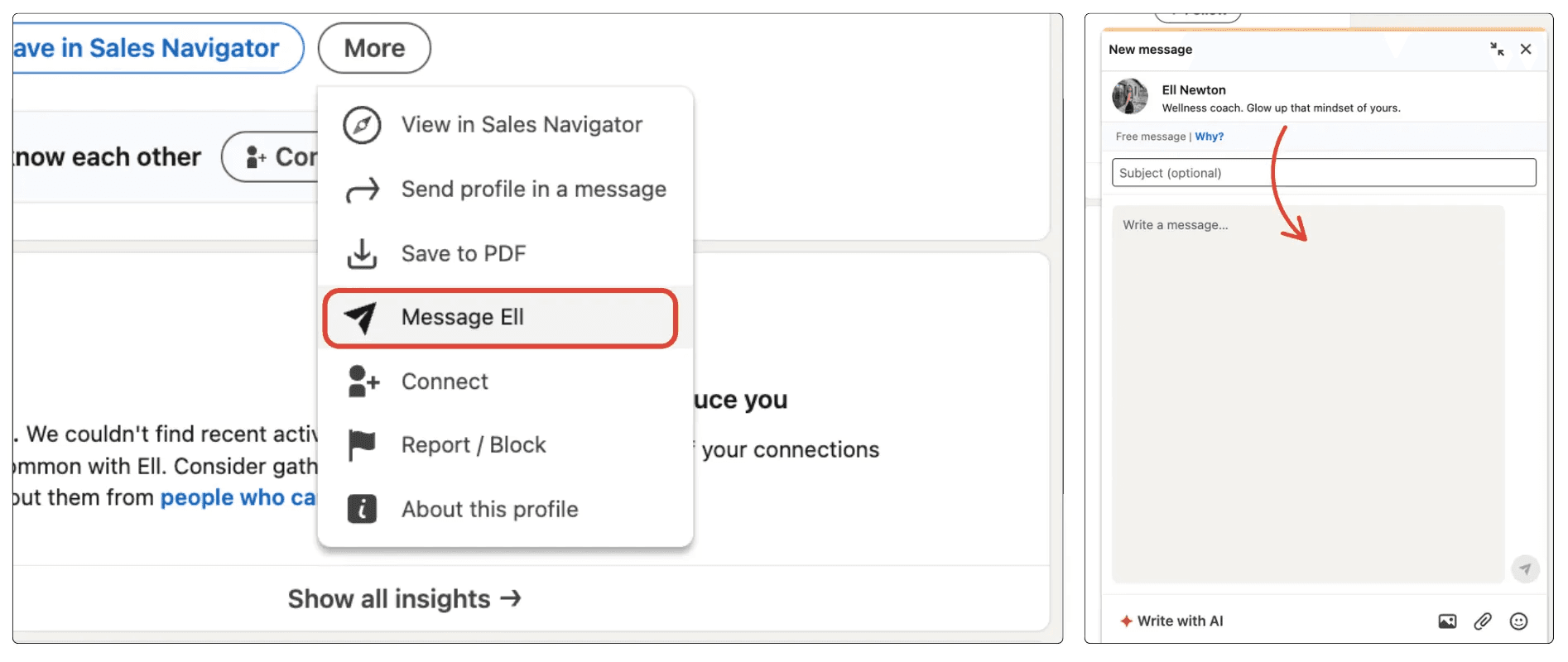
Pemilihan Jenis InMail yang Tepat
Ada 3 jenis InMails yang dapat Anda gunakan; gratis, berbayar, dan disponsori. Memilih format yang salah dapat mengakibatkan bujet terbuang atau peluang yang terlewat. Berikut adalah ringkasan singkat:
Jenis | Terbaik untuk | Keuntungan | Kerugian |
InMails Gratis | Jaringan yang sadar anggaran | Biaya $0; bekerja dengan "Profil Terbuka" | Hanya berfungsi jika penerima mengaktifkannya |
InMails Berbayar | Penjualan & perekrutan yang tertarget | Jangkauan terjamin; pengembalian kredit | Kredit bulanan terbatas; bisa mahal |
Disponsori | Pemasaran berskala besar | Mampu diskalakan secara besar-besaran; otomatis | Diberi label "Disponsori"; kurang personal |
1. InMails Gratis
Tersedia ketika anggota Premium memiliki Profil Terbuka. Anda dapat mengirim pesan kepada pengguna ini tanpa mengeluarkan satu kredit pun. Ini adalah trik “tersembunyi” yang sempurna untuk outreach tanpa biaya kepada profesional berprofil tinggi.
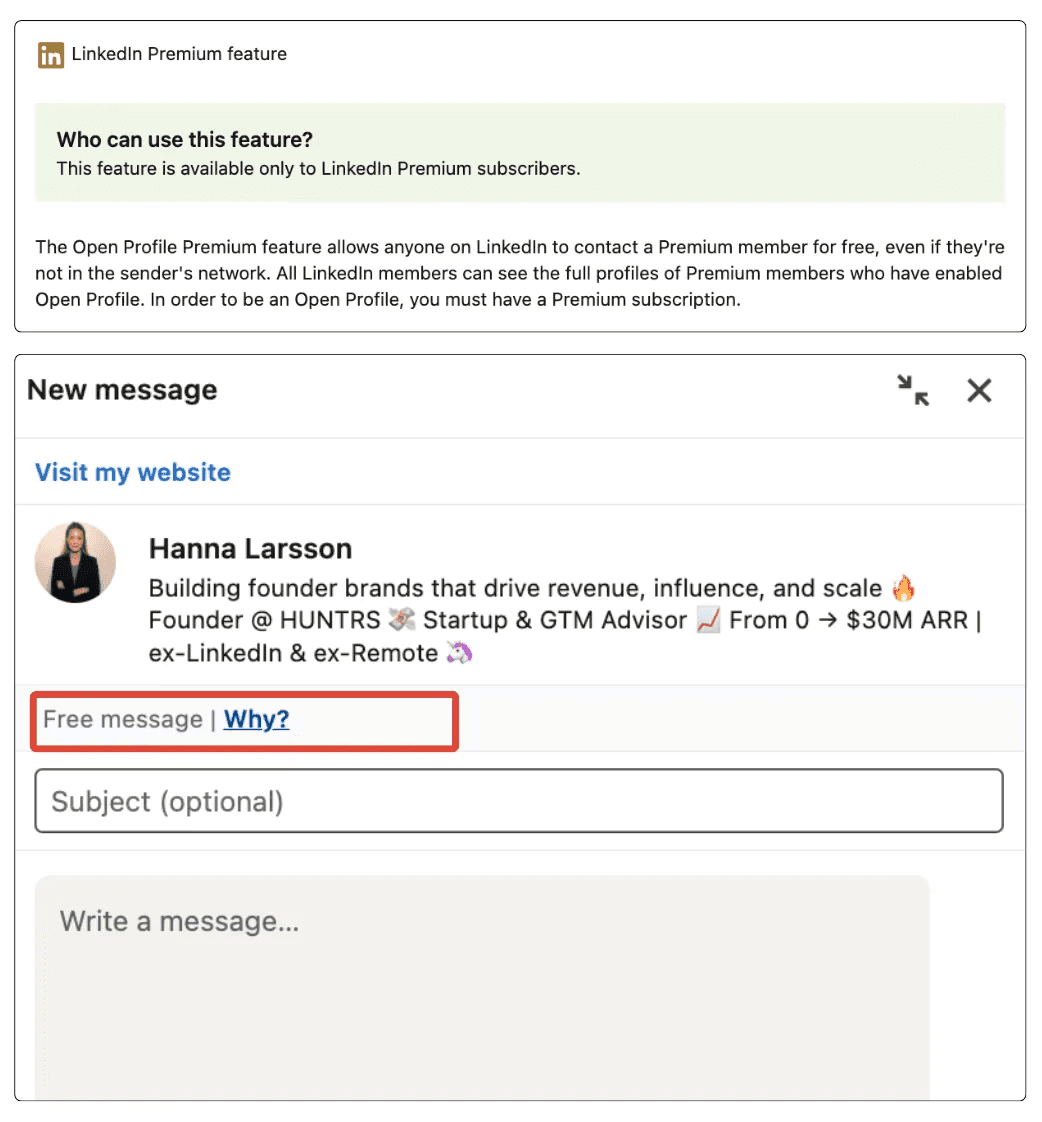
2. InMails Berbayar
Standar untuk pengguna Premium, Sales Navigator, dan Recruiter. Ini memungkinkan Anda menjangkau koneksi derajat-2 dan derajat-3. Karena kredit terbatas, ini mendorong pengiriman pesan yang berkualitas tinggi dan dipersonalisasi yang menghasilkan hasil yang lebih baik.
3. InMails Disponsori (Iklan Pesan)
Ini adalah bagian dari ekosistem Iklan LinkedIn. Alih-alih melakukan outreach secara manual, Anda menetapkan audiens target dan anggaran, dan LinkedIn mengirimkan pesan Anda ke ribuan kotak masuk sekaligus. Meskipun sangat dapat diskalakan, mereka membawa tag "Disponsori", sehingga memerlukan daya tarik yang sangat kuat untuk mempertahankan keterlibatan yang tinggi.
Untuk detail lebih lanjut tentang batasan pesan dan saran praktis, baca panduan lengkap kami tentang fitur dan tips InMail LinkedIn.
Bagaimana Menulis Pesan Outreach yang Sempurna
Untuk menonjol dari pesan-pesan umum seperti “Saya ingin menambahkan Anda ke jaringan saya,” gunakan pemicu psikologis yang mendorong orang untuk merespons.
Gunakan Hukum Timbal Balik
Berikan sesuatu sebelum Anda meminta sesuatu. Bagikan sumber daya yang berguna, artikel menarik, atau pujian tulus tentang pencapaian terbaru mereka. Ketika Anda menawarkan nilai terlebih dahulu, orang merasa lebih cenderung untuk membalas.
Bangun Bukti Sosial
Sebutkan koneksi bersama atau kelompok profesional yang sama. Manusia secara alami adalah “suku”; kita mempercayai orang yang terhubung dengan orang yang sudah kita kenal. Menyebutkan kontak yang sama secara langsung menurunkan kewaspadaan penerima.
Jaga Agar Singkat
Pesan singkat lebih baik. Pesan dengan panjang kurang dari 400 karakter (sekitar 3-4 kalimat) memiliki tingkat respons 22% lebih tinggi. Buat pesan Anda mudah dibaca, identifikasi titik sakit, tawarkan solusi cepat, dan bersikaplah langsung.
Jangan Lupakan Ajakan Bertindak yang Mudah
Akiri dengan Ajakan Bertindak (CTA) yang “halus” dan mudah dijawab. Alih-alih meminta pertemuan selama 30 menit (yang terasa seperti beban), ajukan pertanyaan dengan hambatan rendah seperti, “Apakah Anda saat ini fokus pada [Topik] kuartal ini?” atau “Apakah Anda open untuk melihat studi kasus singkat tentang ini?” Ini menciptakan “loop terbuka” di pikiran prospek yang ingin mereka tutup dengan memberikan “ya” atau “tidak” yang cepat.
15 Template Pesan Outreach LinkedIn
Setiap pesan outreach LinkedIn harus disesuaikan dengan situasi dan alasan Anda menghubungi. Pendekatan ini memberikan hasil terbaik.
Berikut adalah 9 template pesan outreach LinkedIn yang dapat Anda sesuaikan tergantung pada siapa yang Anda hubungi.
1. Tawarkan untuk membantu bisnis/merek mereka
Mengapa mengirim pesan ini:
Jika Anda ingin memulai percakapan dengan menawarkan nilai terlebih dahulu, posisikan diri Anda sebagai ahli yang membantu daripada langsung menjual.
Pesan:
Hai {{First Name}},
Saya menemukan pekerjaan Anda di {{company}} dan sangat menyukai cara Anda mendekati {{specific project/initiative}}.Saya bekerja dengan {{type of business/brand}} pada {{specific outcome}}, dan saat melihat apa yang Anda bangun, beberapa ide muncul yang dapat membantu Anda {{improve result or solve problem}}.
Jika Anda terbuka untuk itu, saya akan senang untuk membagikannya dalam percakapan singkat dan melihat apakah itu berguna bagi Anda.
2. Penawaran produk dengan CTA
Mengapa mengirim pesan ini:
Jika Anda telah mengidentifikasi titik sakit yang jelas yang dipecahkan produk Anda dan ingin memperkenalkannya tanpa terkesan memaksa, sambil membimbing prospek menuju langkah selanjutnya.
Pesan:
Hai {{First Name}},
Saya memperhatikan bahwa {{company}} saat ini menghadapi {{specific challenge or goal}}, yang merupakan sesuatu yang sering kami lihat di {{their industry}}.Kami membangun {{product name}} untuk membantu tim seperti milik Anda {{clear benefit/result}} tanpa {{common friction or downside}}.
Apakah Anda bersedia untuk melakukan panggilan singkat selama 15 menit minggu ini agar saya dapat menunjukkan cara kerjanya dan melihat apakah itu relevan bagi Anda?
3. Perkenalkan Saluran/Page Anda
Mengapa mengirim pesan ini:
Jika Anda ingin menghubungkan dengan berbagi konten berharga terlebih dahulu, posisikan diri Anda sebagai sumber yang berguna, dan mulai percakapan tanpa menjual.
Pesan:
Hai {{First Name}},
Saya menemukan profil Anda saat membaca tentang {{topic/industry}} dan berpikir Anda mungkin menemukannya bermanfaat.Saya menjalankan halaman konten di mana saya berbagi wawasan praktis tentang {{main topics}}, berdasarkan pengalaman dunia nyata dan studi kasus.
Jika Anda tertarik, saya akan senang untuk membagikannya dengan Anda dan bertukar pikiran.
4. Perkenalkan produk Anda
Mengapa mengirim pesan ini:
Jika Anda ingin memperkenalkan produk Anda secara jelas dan profesional, tanpa memaksa untuk penjualan segera, dan membuka pintu untuk percakapan lanjutan.
Pesan:
Hai {{First Name}},
Saya menemukan {{company}} saat mencari {{industry/topic}} dan berpikir pekerjaan Anda di sekitar {{specific detail}} sangat menarik.Saya ingin cepat memperkenalkan {{product name}} — solusi yang dirancang untuk membantu {{type of company}} {{main benefit or result}} dengan lebih efisien.
Jika ini adalah sesuatu yang sedang Anda eksplorasi, saya akan senang untuk berbagi lebih banyak detail atau memandu Anda melalui cara kerjanya.
5. Permintaan Koneksi untuk Potensi Mitra
Mengapa mengirim pesan ini:
Jika Anda ingin terhubung dengan seseorang untuk potensi kemitraan dan menetapkan nada yang tepat sejak interaksi pertama.
Pesan:
Hai {{First Name}},
Saya menemukan pekerjaan Anda di {{company}} dan merasa ada sinergi yang kuat antara apa yang Anda lakukan dan apa yang kami bangun di sekitar {{shared focus}}.Saya akan senang untuk terhubung dan menjelajahi cara-cara potensial di mana kami dapat berkolaborasi jika itu masuk akal.
6. Buat penawaran berdasarkan minat lead
Mengapa mengirim pesan ini:
Jika lead telah menunjukkan minat sebelumnya (menyukai postingan, mengomentari, mengunjungi situs Anda, atau menyebutkan kebutuhan) dan Anda ingin mengubah sinyal itu menjadi penawaran yang relevan.
Pesan:
Hai {{First Name}},
Saya memperhatikan minat Anda di {{specific topic/action they took}}, yang biasanya berarti tim mencari untuk meningkatkan {{related goal or pain point}}.Berdasarkan hal ini, saya pikir {{product/service}} dapat membantu Anda {{specific outcome}} tanpa {{common obstacle}}.
Apakah Anda ingin saya membagikan contoh cepat atau memandu Anda bagaimana itu bisa bekerja untuk situasi Anda?
7. Tawarkan Audit atau Tinjauan Gratis
Mengapa mengirim pesan ini:
Jika lead memiliki bisnis atau profil yang jelas bisa mendapat keuntungan dari perbaikan dan Anda ingin menawarkan nilai secara langsung.
Pesan:
Hai {{First Name}},
Saya memperhatikan pengaturan Anda saat ini di sekitar {{topic}} dan berpikir Anda mungkin terbuka untuk audit cepat.Saya dapat meninjau {{website/profile/strategy}} dan membagikan 3–5 perbaikan praktis yang dapat membantu Anda {{result}}.
Apakah Anda tertarik untuk melakukan tinjauan singkat?
8. Undang ke Webinar atau Acara Langsung
Mengapa mengirim pesan ini:
Jika Anda mengadakan acara yang relevan dengan minat mereka dan ingin mengundang mereka dengan cara yang tidak terkesan menjual.
Pesan:
Hai {{First Name}},
Saya melihat Anda tertarik pada {{topic}}, dan saya mengadakan sesi langsung tentang {{topic}} minggu depan.Ini adalah webinar singkat di mana kami akan membahas {{key points}} dan membagikan contoh nyata.
Apakah Anda ingin saya mengirimkan tautannya?
9. Bagikan Studi Kasus
Mengapa mengirim pesan ini:
Jika lead Anda berada di industri yang sama dengan klien yang sukses dan Anda ingin membangun kredibilitas.
Pesan:
Hai {{First Name}},
Saya memperhatikan Anda bekerja di {{industry}}, dan kami baru-baru ini membantu perusahaan serupa mencapai {{result}}.Saya dapat membagikan studi kasus jika Anda tertarik.
Apakah Anda ingin saya mengirimkannya?
10. Ucapkan Selamat atas Pencapaian Terbaru
Mengapa mengirim pesan ini:
Jika lead baru saja membagikan kemenangan, peran baru, atau tonggak sejarah dan Anda ingin memulai hubungan berdasarkan keaslian.
Pesan:
Hai {{First Name}},
Selamat atas {{achievement/new role}} — itu adalah kemenangan besar!Saya sangat terkesan dengan apa yang Anda bangun di {{industry}}.
Saya ingin terhubung dan belajar lebih banyak tentang perjalanan Anda.
11. Minta Umpan Balik atau Pendapat
Mengapa mengirim pesan ini:
Jika Anda ingin memulai percakapan dengan meminta pendapat profesional mereka, yang membuat mereka merasa dihargai.
Pesan:
Hai {{First Name}},
Saya melihat keahlian Anda di {{topic}}, dan saya ingin mendapatkan pendapat Anda tentang sesuatu.Apakah Anda berkenan untuk berbagi pikiran Anda tentang {{question}}?
Saya sangat menghargai wawasan Anda.
12. Tawarkan Kolaborasi Konten
Mengapa mengirim pesan ini:
Jika Anda ingin berkolaborasi dalam blog, podcast, atau wawancara dengan seseorang di niche Anda.
Pesan:
Hai {{First Name}},
Saya menyukai konten Anda di {{topic}} dan berpikir audiens kita akan mendapatkan manfaat dari kolaborasi.Apakah Anda terbuka untuk melakukan wawancara singkat atau menciptakan pos bersama?
Jika ya, saya bisa membagikan beberapa ide.
13. Tawarkan Diskon atau Penawaran Khusus
Mengapa mengirim pesan ini:
Jika Anda ingin membuat penawaran terbatas waktu untuk mendorong tindakan tanpa terkesan memaksa.
Pesan:
Hai {{First Name}},
Saya memperhatikan Anda sedang mengeksplorasi {{topic}}, dan kami saat ini menawarkan diskon khusus untuk {{product/service}}.Jika Anda mau, saya bisa membagikan rinciannya dan melihat apakah itu memenuhi kebutuhan Anda.
Apakah Anda ingin tahu lebih banyak?
14. Undang untuk Bergabung dengan Grup atau Komunitas Pribadi
Mengapa mengirim pesan ini:
Jika Anda memiliki komunitas yang memberikan nilai dan Anda ingin mengundang mereka untuk bergabung.
Pesan:
Hai {{First Name}},
Saya sedang membangun komunitas kecil profesional yang fokus pada {{topic}}.Kami berbagi sumber daya, studi kasus, dan peluang jaringan.
Apakah Anda ingin mendapatkan undangan?
15. Tawarkan Demo atau Uji Coba Cepat
Mengapa mengirim pesan ini:
Jika Anda ingin membiarkan mereka merasakan produk Anda sebelum berkomitmen.
Pesan:
Hai {{First Name}},
Saya ingin menunjukkan kepada Anda bagaimana {{product}} bekerja dan bagaimana hal itu dapat membantu Anda {{benefit}}Apakah Anda terbuka untuk demo cepat atau uji coba gratis?
Saya bisa mengaturnya dalam waktu kurang dari 10 menit.
Bagaimana Cara Menindaklanjuti dan Mempertahankan Percakapan
Sulit untuk memulai percakapan di LinkedIn, tetapi mempertahankannya lebih sulit lagi. Banyak orang hanya mengirimkan satu pesan dan kemudian menunggu, berharap mendapatkan balasan.
Tetapi hasil nyata datang dari menindaklanjuti secara konsisten dan thoughtful, menjaga minat prospek Anda tanpa membuat mereka merasa tertekan.
Selain tidak mengirim spam, berikut beberapa tips lagi untuk menjaga minat prospek Anda dan membuat percakapan terus bergerak:
1. Jangan Tunggu Terlalu Lama: Waktu itu penting. Jika Anda menunggu terlalu lama, pesan Anda menjadi tidak relevan atau terlupakan.
2. Sebutkan Aktivitas Mereka: Jika mereka baru-baru ini memposting sesuatu, mengomentari, atau memperbarui profil mereka, gunakanlah. Ini menunjukkan bahwa Anda memperhatikan dan tidak hanya mengirim pesan generik.
3. Jaga Agar Singkat dan Natural: Tidak ada yang ingin membaca pesan yang panjang dan berbunga-bunga. LinkedIn bukan tempat untuk email penjualan. Buatlah pesan Anda singkat, ramah, dan mudah dibaca.
4. Hormati dan Tahu Kapan Harus Pergi: Jika Anda telah menindaklanjuti tiga kali tanpa balasan, tidak apa-apa untuk berhenti. Anda masih bisa menjaga semuanya positif dengan mengatakan, “Jika sekarang bukan waktu yang tepat, saya akan menghubungi nanti.” Ini menjaga hubungan tetap profesional.
5. Gunakan “Bukti” untuk Membangun Kepercayaan: Jangan biarkan prospek Anda menebak-nebak. Bagikan kredensial atau bukti Anda di awal, seperti hasil cepat, kemenangan klien, atau testimonial. Bukti membuat pesan Anda lebih kredibel dan lebih mudah dijawab.
6. Selalu Akhiri dengan Langkah Selanjutnya yang Jelas: Setiap pesan harus diakhiri dengan CTA yang jelas, tetapi tidak memaksa. Ini memudahkan prospek untuk merespons. Sebagai contoh:
“Ingin melihat demo cepat?”
“Bolehkah saya mengirimkan contoh singkat?”
“Apakah Anda bersedia untuk panggilan selama 10 menit?”
7. Tanyakan Pertanyaan Terbuka: Alih-alih pertanyaan ya/tidak, tanyakan sesuatu yang mengundang percakapan. Pertanyaan terbuka memudahkan prospek untuk merespons. Sebagai contoh:
“Apa tantangan terbesar Anda dengan X saat ini?”
“Bagaimana Anda saat ini menangani Y?”
“Apa hasil ideal Anda untuk Z?”
8. Gunakan Teknik “Komitmen Mikro”: Alih-alih meminta pertemuan segera, mintalah aksi kecil terlebih dahulu. Komitmen mikro lebih mudah disetujui dan membantu membangun kepercayaan. Sebagai contoh:
“Apakah Anda ingin contoh cepat?”
“Bolehkah saya mengirimkan studi kasus?”
“Apakah tidak apa-apa jika saya membagikan demo singkat?”
Merangkum
Sebuah kampanye jangkauan yang sukses adalah tentang memperlakukan orang seperti orang, bukan hanya sebagai titik data dalam spreadsheet.
Dengan menggunakan campuran yang tepat dari InMail dan pesan pribadi, Anda akan langsung mencapai pengambil keputusan. Jaga pesan Anda singkat, tawarkan nilai di depan, dan gunakan templat jangkauan LinkedIn yang terasa seperti percakapan nyata, bukan penawaran penjualan.
Ketika Anda fokus pada membangun hubungan nyata, Anda akan melihat tingkat respons Anda dan bisnis Anda tumbuh.