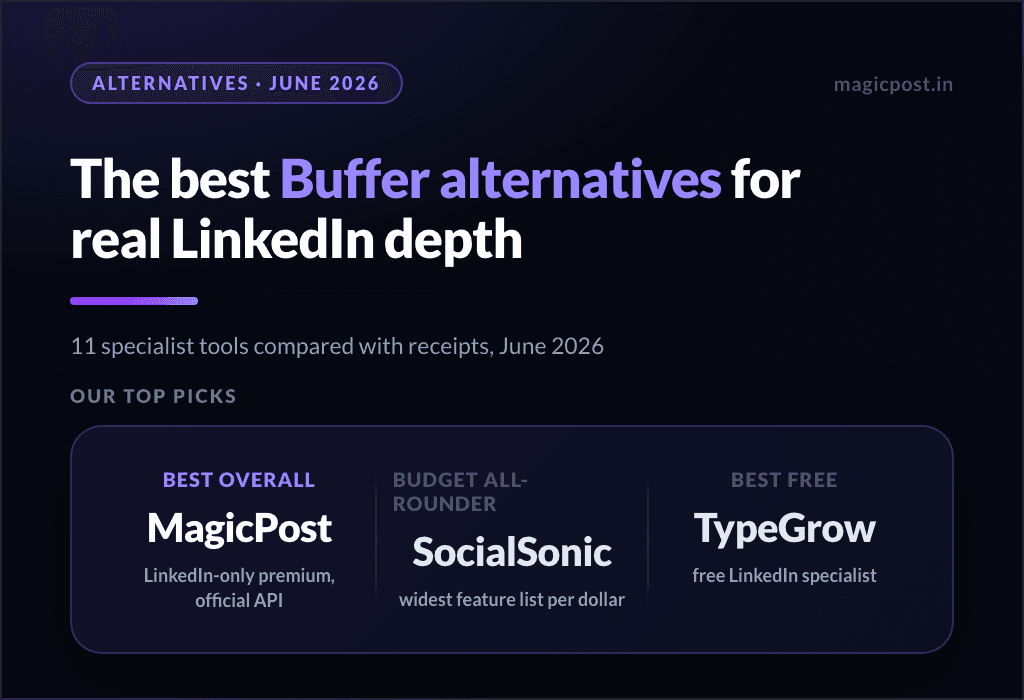
Every tool on this page can schedule a LinkedIn post. Four things separate the best LinkedIn scheduling tools:
Whether the published post matches the scheduled one, mentions included
How the tool connects to your account
What it can queue, and what that costs at $0
What the public record says about the vendor
We audited all fourteen on their own pages, help docs and public reviews, plus the four suites that Supergrow's own list adds; every section links the full audit. Two tests come first.
How to Schedule LinkedIn Posts in Advance With a Calendar
Test 1: which LinkedIn scheduling tools post working @mentions?
Schedule "Huge thanks to @Sarah Chen and the @Acme team", then look at what publishes:
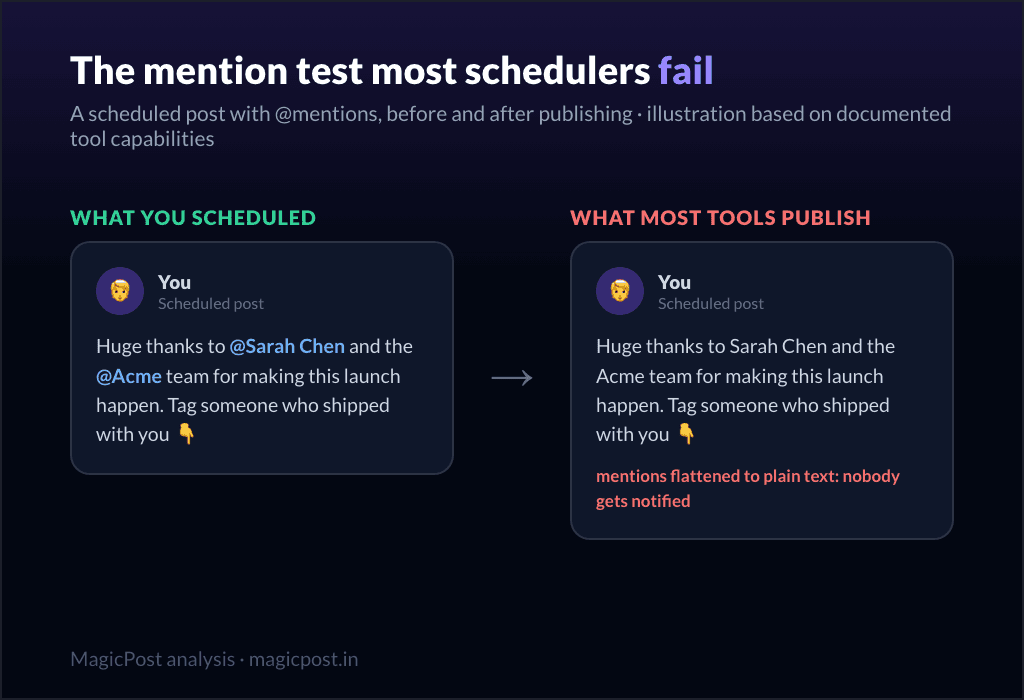
A tag that publishes as plain text notifies nobody, and the post loses the conversations it existed to start. This is where the schedulers diverge most, by their own documentation:
Hootsuite: Page followers, English-US profiles, an opt-in setting (2024 help article).
Agorapulse: personal profiles cannot mention another personal profile.
SocialPilot: only accounts that follow your organization's page.
Buffer: connections only, English-language profiles, opt-in settings.
Later: no tagging of people or companies on LinkedIn.
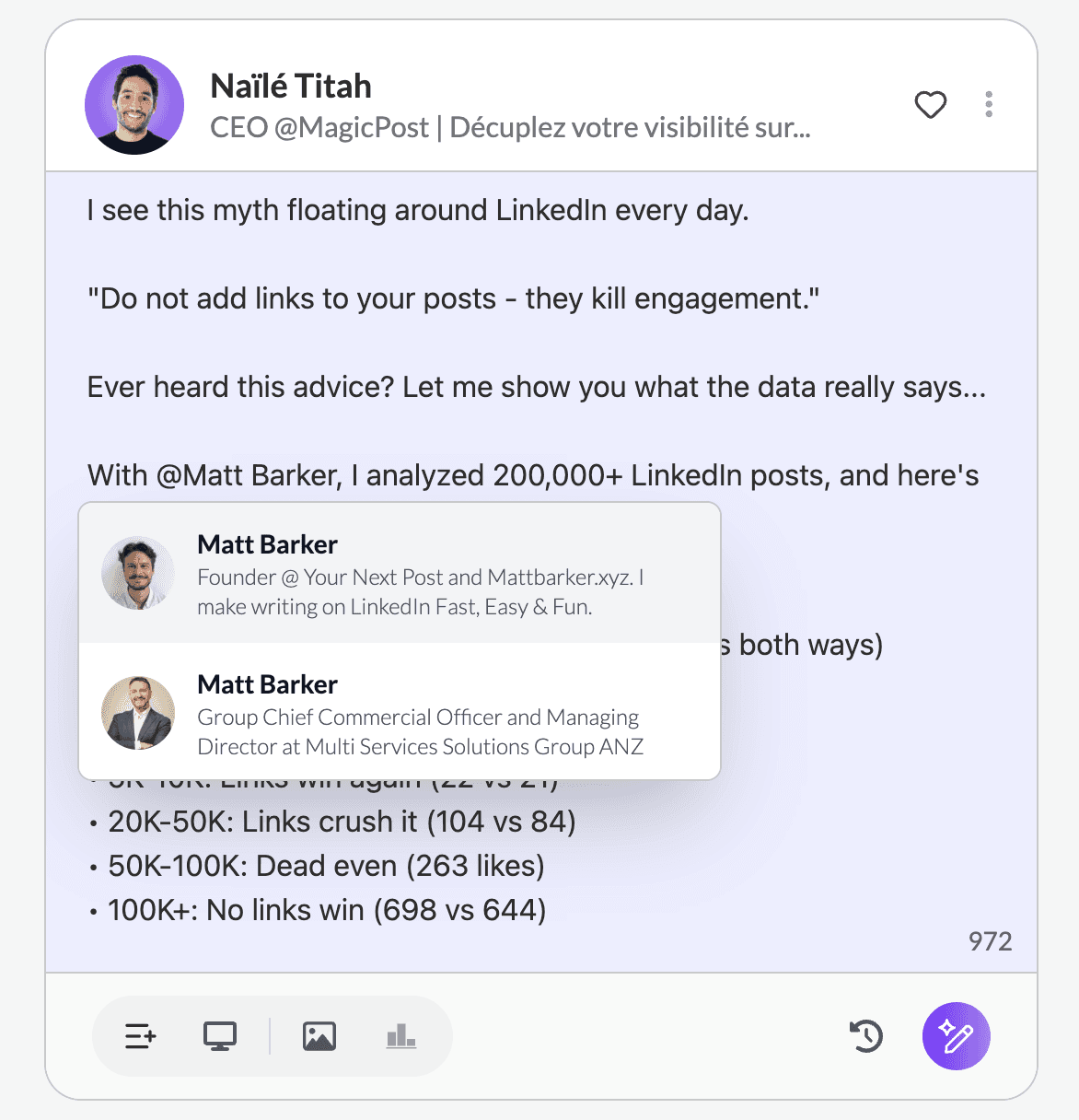
With MagicPost, the tag you schedule is the tag that publishes, people and companies alike; the proof is documented in how mentions work.
Is a third-party LinkedIn scheduler safe for your account?
Scheduling LinkedIn posts with a third-party tool is safe when the tool publishes through LinkedIn's official API, the access LinkedIn grants app by app, on application. The risk sits in browser extensions and session automation, which LinkedIn's policy treats as prohibited tools.
Both halves of that answer are in LinkedIn's own texts. Section 8.2 of the User Agreement bars members from using "bots or other unauthorized automated methods to access the Services, add or download contacts, send or redirect messages, create, comment on, like, share, or re-share posts".
LinkedIn's prohibited-software page extends the ban to "browser extensions that scrape, modify the appearance of, or automate activity".
API access works the other way round: an app applies for each API product, starts on a restricted development tier, and every member grants it permission through LinkedIn's own login screen (LinkedIn API access tiers).
MagicPost publishes through LinkedIn's Community Management API, the API product LinkedIn grants to an app only after it applies for access.
The connection test below sorts the eighteen schedulers we looked at.
Test 2: how each LinkedIn scheduler connects to your account
How a tool reaches LinkedIn decides whether your workflow, or your account, carries structural risk. LinkedIn's policy warns that prohibited tools may become non-operational without notice.
The recent record: Kleo's original extension was withdrawn in June 2025 at LinkedIn's request, Shield Analytics wound down, its founders stating that Google and LinkedIn made clear it could not keep operating as built, and Taplio's own support acknowledges its extension is treated as an automation tool against the ToS.
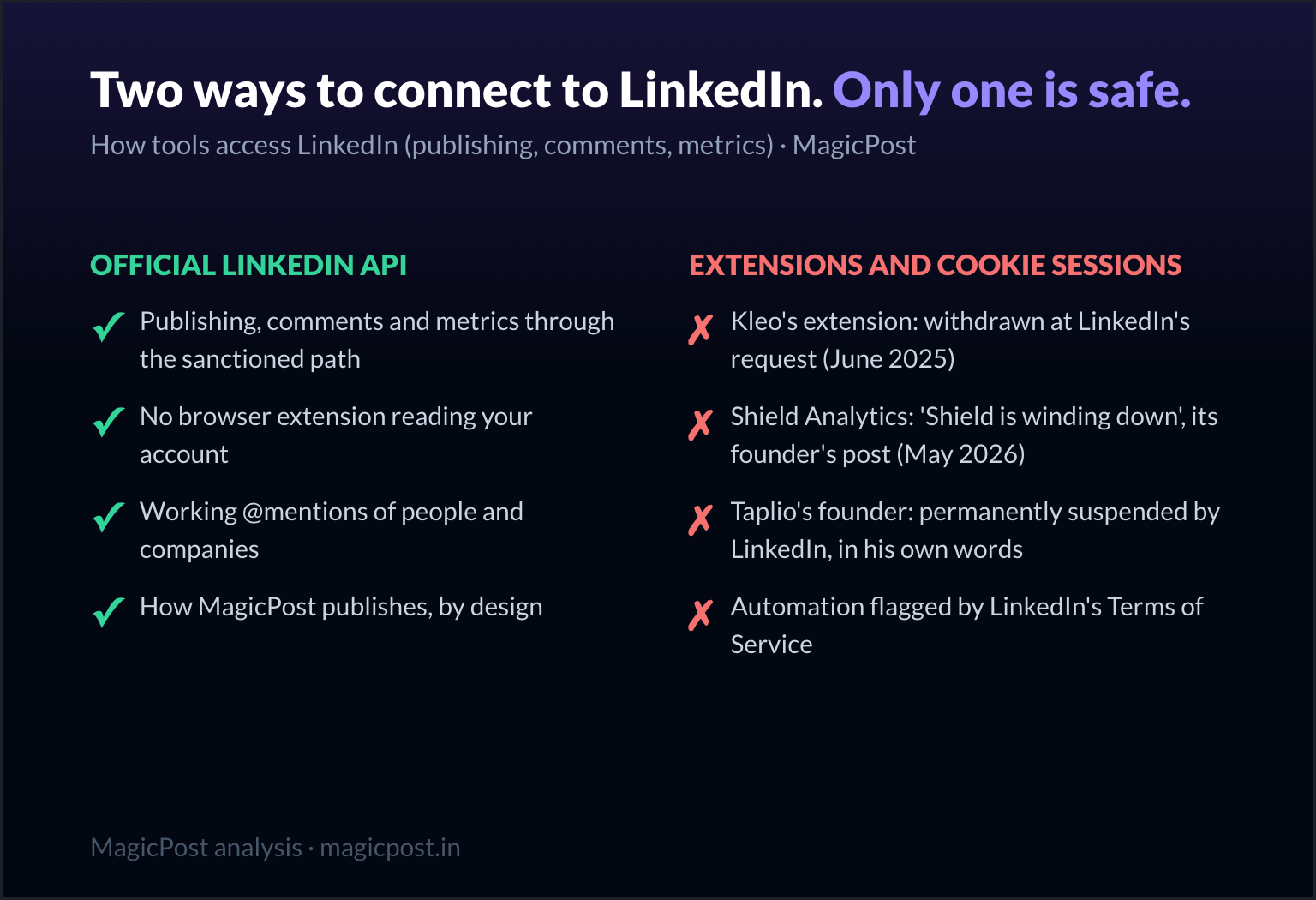
The multi-network suites (Buffer, Hootsuite, Agorapulse, Metricool, Swello, SocialPilot, Sendible, Sprout Social, CoSchedule, Later) are API partners: they carry no account risk, and their weak point is the generalist LinkedIn module. The natives split five ways:
Official API, Community Management API access: MagicPost.
States official API on its own site, API product not named: TypeGrow, Supergrow, Kleo V3.
Not documented: SocialSonic, Postdrips.
Extension, own session: AuthoredUp.
Stored session (per a third-party review), plus an extension flagged by its own support: Taplio.
Connection method, @mentions and price: the 18 LinkedIn scheduling tools compared
Tool | Connection method | @mentions | Price per month | Free plan or trial | Public record |
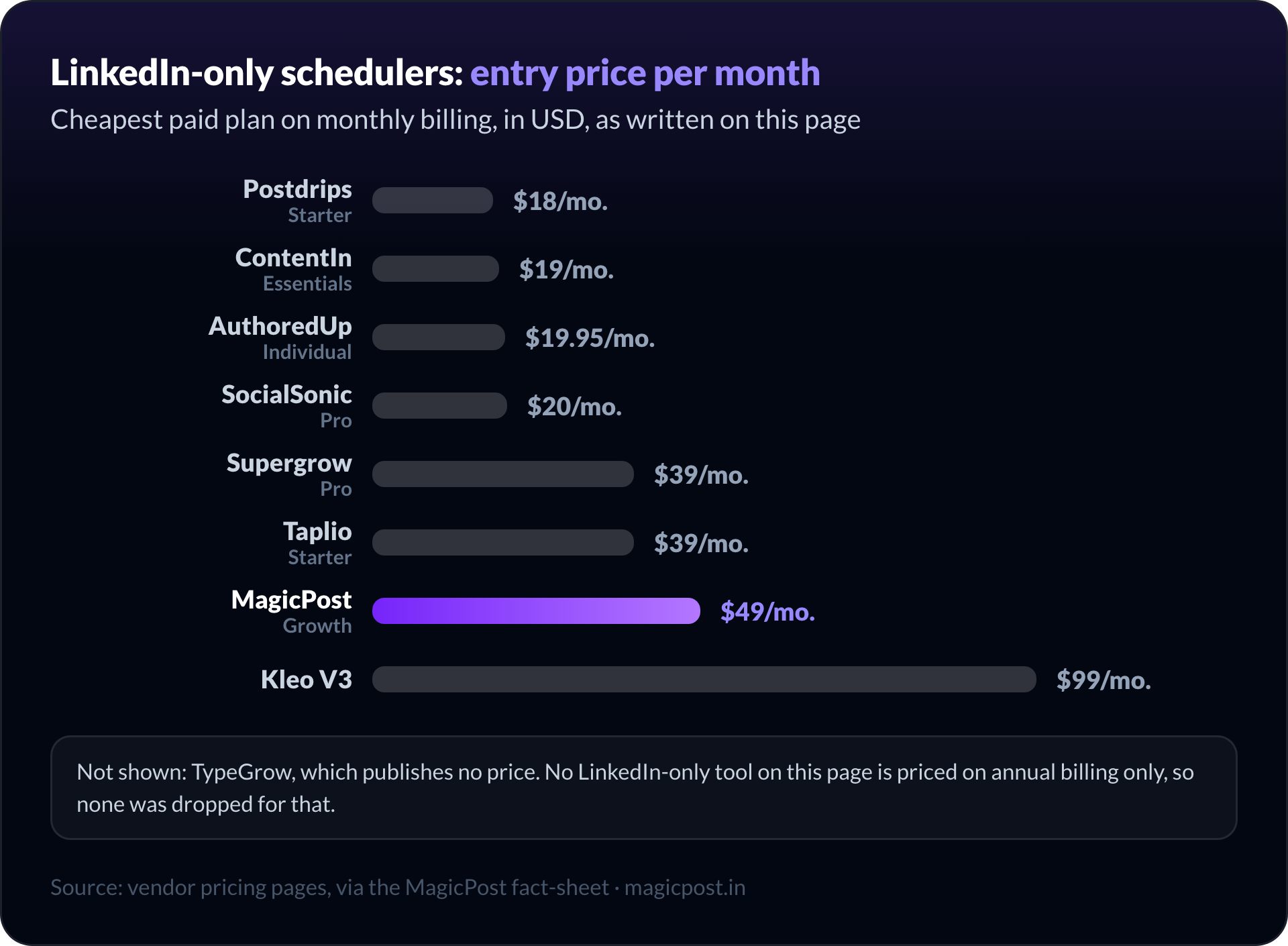
MagicPost | Official API, Community Management API access | People and companies | $49/mo. (Creator $69/mo.) | Free trial, no card | Trustpilot 4.7/5, 91 reviews |
TypeGrow | Official API (vendor statement), no extension | Not documented | Not published | Advertised free plan, limits not published | None found |
SocialSonic | Not documented | Not documented | $20/mo. | 7-day trial, no card | No Trustpilot profile of its own |
Supergrow | Official API (vendor statement) | Not documented | From $39/mo. | 7-day trial | No Trustpilot profile |
Taplio | Stored session (third-party report), plus a flagged extension | Through the extension | $39 to $199/mo. | 7-day trial | Trustpilot 3.5/5, 19 reviews |
Kleo V3 | Official API (vendor statement) | Not documented | $99/mo. | None (money-back window) | Trustpilot 3.3 to 3.5/5, very few reviews |
Postdrips | Not documented | No person tagging | $18 to $29/mo. | 7-day trial, auto-enrols Pro | None found |
AuthoredUp | Browser extension, your own session | Not documented | From $19.95/mo. | Free trial, no card | Trustpilot 3.5/5, 2 reviews |
Buffer | Official API, partner | Conditional | $6/mo. per channel | Free plan, 3 channels | Trustpilot 3.2/5, 105 reviews |
Agorapulse | Official API, partner | Page followers only | $99 to $199/mo. per user | 30-day trial, no card, then a free plan | Trustpilot 4.0/5, 57 reviews |
Metricool | Official API, partner | Not found in help docs | From €20/mo. | Free plan, LinkedIn excluded | Trustpilot 3.9/5, 603 reviews |
Swello | Official API, partner | Not found in help docs | From €24/mo. | Free plan; 7-day trial, no card | Trustpilot 4.9/5, 154 reviews |
Hootsuite | Official API, partner | Page followers only (2024 help article) | $99 to $399/mo. per user, billed annually | 14-day trial, no card | Trustpilot 1.3/5, 554 reviews |
SocialPilot | Official API, partner | Page followers only | $30 to $200/mo. | 14-day trial, no card | Trustpilot 2.2/5, 37 reviews |
Sendible | Official API, partner | Page followers only | From $35/mo. | 14-day trial, no card | Not checked |
Sprout Social | Official API, partner | Page followers only | From $99/mo. per seat | 30-day trial, no card | Not checked |
CoSchedule | Official API, partner | Page followers only | $39/mo. | Free plan, 15 posts at a time on 1 profile; 14-day trial | Not checked |
Later | Official API, partner | None | Monthly price not readable on its page; from $18.75/mo. billed yearly | Free plan; 14-day trial | Not checked |
Prices are monthly billing unless the cell says otherwise; EUR kept for Metricool and Swello, which publish in euros.
Two readings of that table. "Vendor statement" means the official-API connection is a sentence on the vendor's own site, credited as such, and none of those sentences names the LinkedIn API product behind it.
MagicPost's entry is an access status: it publishes through the Community Management API, which LinkedIn opens to an app only on application.
The connection column comes from each vendor's own pages: Supergrow's pricing FAQ, TypeGrow's site, Kleo's FAQ, AuthoredUp's pricing FAQ and Taplio's own support manual, linked in its section; Taplio's stored session is a third-party finding, credited there. SocialSonic and Postdrips do not state theirs.
Every @mention limit in the table is taken from the vendor's own help center.
What each LinkedIn scheduling tool can schedule
The publishing method decides whether the post arrives intact; this second matrix decides what you can put in the queue at all, tool by tool, from each vendor's own documentation. "Not documented" means the vendor's pages do not state it; the feature may still exist.
Tool | AI writing | Bulk / CSV import | PDF carousel | Poll | First comment | Team approvals |
MagicPost | Yes (Creator) | No | Yes | Yes | Yes (Creator) | Yes |
TypeGrow | Yes | Not documented | Yes | Not documented | Not documented | No |
SocialSonic | Yes | Not documented | Yes | Yes | Not documented | Yes |
Supergrow | Yes | Not documented | Yes | Not documented | Yes | Yes |
Taplio | Yes | Not documented | Yes | Not documented | Not documented | Not documented |
Kleo V3 | Yes | Not documented | Not documented | Not documented | Not documented | Not documented |
Postdrips | Yes | Not documented | No | Not documented | Not documented | Yes |
AuthoredUp | No | Not documented | Not documented | Not documented | Not documented | Not documented |
Buffer | Yes | Not documented | Not documented | Not documented | Yes | Yes |
Agorapulse | Not documented | Not documented | Not documented | Not documented | Not documented | Yes |
Metricool | Yes | Not documented | Not documented | Not documented | Not documented | Yes |
Swello | Yes | Not documented | Not documented | Not documented | Not documented | Not documented |
Hootsuite | Yes | Yes | Not documented | Not documented | Not documented | Yes |
SocialPilot | Yes | Yes | Yes | Not documented | Not documented | Yes |
Tier caveats: MagicPost's AI writing and timed first comment sit on Creator.
Supergrow's carousel maker sits on Pro, Hootsuite's bulk scheduling on Advanced, Metricool's approvals on Advanced, and SocialSonic's approvals on a Team tier its pricing page labels coming soon. Swello's AI is caption and hashtag help rather than post writing.
The 14 best LinkedIn scheduling tools, starting with the LinkedIn-native schedulers
The native order runs the page's four tests in turn: the mention test, the connection method, what the queue holds for the price, and the public record. Past MagicPost, only Taplio documents person tags, through its flagged extension, so places 2 to 4 come down to the other three.
None of those three documents @mentions, and we found no Trustpilot profile of its own for any of them. Two tests decide their order:
Test | 2. TypeGrow | 3. SocialSonic | 4. Supergrow |
Connection method | Official API (vendor statement), no extension | Not documented | Official API (vendor statement) |
Queue for the price | Carousels and hooks; no price published | Carousels, polls and AI images at $20/mo., trial without a card | Carousels and first comment at $39/mo., 7-day trial |
TypeGrow matches Supergrow on connection, and its site advertises a $0 entry where Supergrow offers only a 7-day trial; TypeGrow publishes no paid price. SocialSonic trails on connection but documents polls at about half Supergrow's price.
Supergrow still ranks above the next four: its stated API beats Taplio's flagged extension and AuthoredUp's in-session extension, and Supergrow's $39/mo. with a trial undercuts Kleo V3's $99/mo. without one.
1. MagicPost: Best for the complete LinkedIn scheduling workflow
MagicPost is the LinkedIn-only scheduler the rest of this page is measured against: it publishes through LinkedIn's Community Management API, posts working @mentions of people and companies, and keeps working after the post goes live.
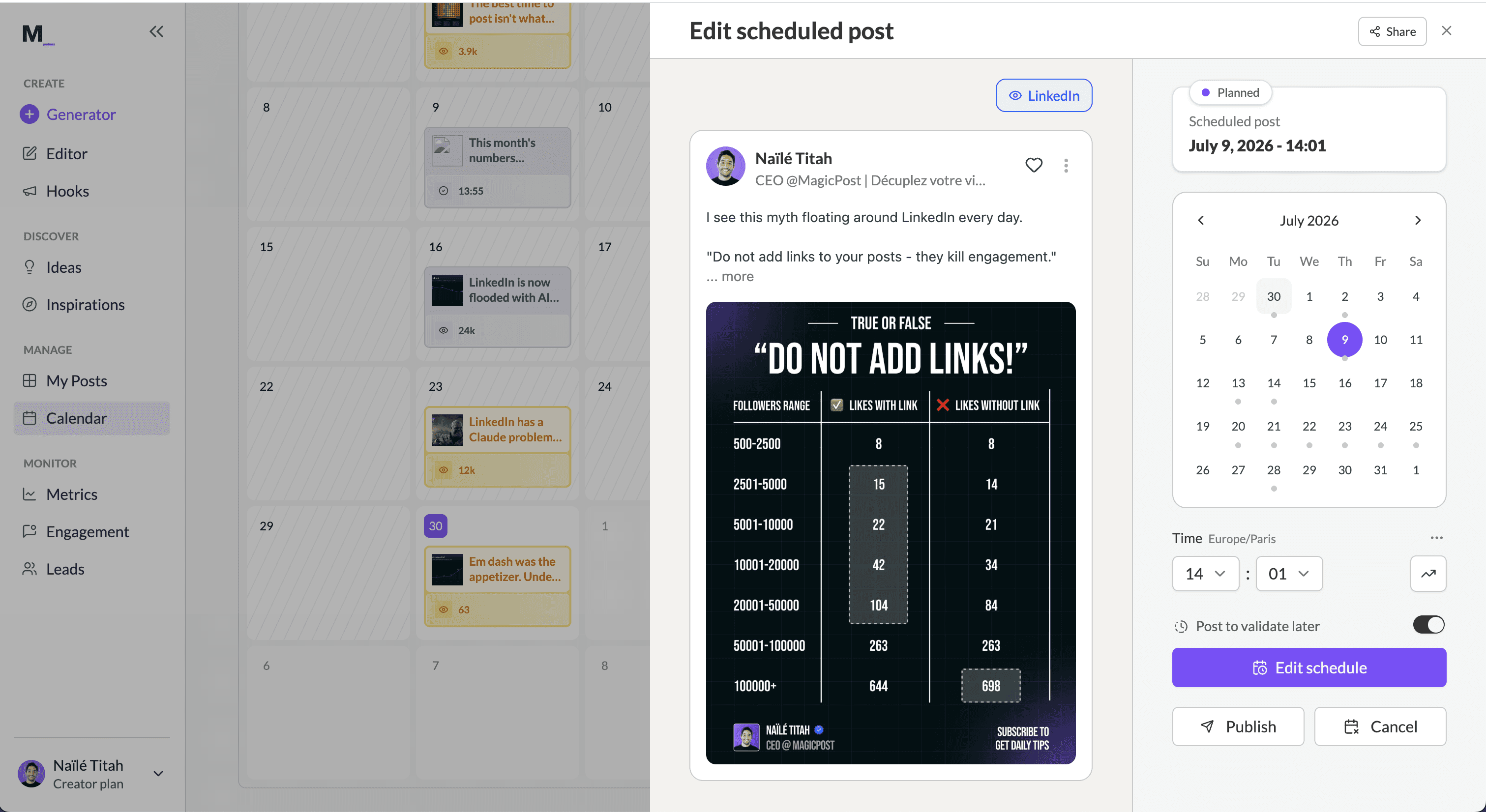
Connection method and mentions. OAuth, no extension, through the Community Management API, granted on application; MagicPost's pricing page describes it as a LinkedIn-verified application with access to premium APIs. Scheduled tags publish as working tags, in the post and in the first comment.
What it schedules. Text, image, video with the thumbnail you pick, PDF and carousel, poll, and, on Creator, a first comment timed right after the post or after a delay you set, all on a month or week calendar with recommended slots per country.
On Creator you can also schedule LinkedIn posts from Claude through its MCP server.
Around the queue sits the loop no pure scheduler has: market benchmarks, audience analysis and lead detection with CRM sync from Growth; on Creator, an AI trained on your own posts, a humanizer built on our published research and comment scheduling.
Price. Growth $49/mo. (scheduling, metrics, engagement, lead detection), Creator $69/mo. (adds AI writing and scheduled comments); free trial, no card. Teams $59/mo. per member, from 2 members; agencies $59/mo. per client, from 2 clients.
✅ Pros | ❌ Cons |
Working @mentions of people and companies, in the post and the first comment | LinkedIn only: no other network |
Community Management API access, no extension | AI writing and the timed first comment sit on Creator, the higher plan |
The after-publishing loop: benchmarks, engagement, leads |
2. TypeGrow: Best for a no-extension cloud scheduler
TypeGrow is a cloud-only LinkedIn scheduler with an AI assistant, hook generator, carousel maker, text formatter and a library of a million-plus viral posts.
Connection method and mentions. TypeGrow's pricing FAQ states an official-API connection for profiles and company pages, with no browser extension to install; the statement does not name the LinkedIn API product. Mentions are not documented.
Price. Not published. TypeGrow's pages show no price: the site advertises a free plan with no card, while its pricing FAQ says both that TypeGrow is free for now and that subscriptions are paid by card. Neither the paid price nor the free plan's limits are documented.
✅ Pros | ❌ Cons |
No extension, runs entirely in the cloud | No analytics documented |
Carousel maker and hook generator | No multi-account yet (labelled coming soon) |
Library of a million-plus viral posts |
Full audit: TypeGrow review and TypeGrow vs MagicPost.
3. SocialSonic: Best for the widest budget feature set
SocialSonic, a Writesonic product, packs AI writing trained on viral LinkedIn posts, smart scheduling, analytics with lead attribution, carousels, polls and gamification into one $20/mo. plan.
Connection method and mentions. Its pages do not document the publishing mechanism, and @mentions are not documented either. Engagement runs through a separate Chrome extension that suggests comments on LinkedIn, X, Reddit and Meta.
Price. Pro $20/mo., a locked early-adopter rate, 1 user; the Team and Agency tiers are labelled coming soon on the pricing page. 7-day trial, no card, plus a 7-day money-back window.
✅ Pros | ❌ Cons |
Broadest feature set of any tool at $20/mo. | Both team tiers and several engagement features are "coming soon" (pricing page) |
Carousels, polls and AI branding images included | No Trustpilot profile of its own; the parent's recent reviews centre on billing |
Lead and engagement attribution in analytics |
Full audit: SocialSonic review and SocialSonic alternatives · SocialSonic vs MagicPost.
4. Supergrow: Best for voice-first AI writing
Built around voice AI (Content DNA, AI interviews, voice-to-post), Supergrow is a LinkedIn-only writing tool with a scheduler attached: calendar, queue and Kanban views with auto first comment.
Connection method and mentions. Supergrow's pricing FAQ states an official-API connection without naming the LinkedIn API product. Its help pages do not document @mentions.
Price. Pro $39/mo. (carousels, MCP), Teams $199/mo. for 5 accounts; 7-day trial, after which the account pauses until you pick a plan.
✅ Pros | ❌ Cons |
Voice AI: Content DNA, AI interviews, voice-to-post | Analytics are the most repeated critique in its G2 reviews ("could be a bit more detailed") |
Repurposes YouTube videos, blog posts and PDFs into posts | One LinkedIn profile per account below Teams; approvals go to one person at a time (G2, May 2026) |
Public API and MCP on Pro |
Full audit: Supergrow review and Supergrow alternatives · Supergrow vs MagicPost.
5. Taplio: Best for all-in-one with outreach
Taplio is the best-known LinkedIn all-in-one: viral post library, Kanban scheduling, analytics, engagement and, on Pro, automated lead outreach.
Connection method and mentions. The evidence on the Taplio X Chrome extension, which its own support describes as treated by LinkedIn as an automation tool against the ToS, is laid out in is Taplio safe.
Basic posting without the extension runs through a stored session, according to a third-party review by Kondo; Taplio does not state its mechanism.
Price. Starter $39/mo. (no AI credits), Growth $69/mo., Pro $199/mo. with auto-DMs; 7-day trial with full Pro access, 30-day money-back.
✅ Pros | ❌ Cons |
Viral library of 50M+ posts and hook-driven AI | Extension flagged by its own support docs |
Outreach and engagement in the same tool | Trustpilot 3.5/5 on 19 reviews; the one-star reviews centre on renewals and cancellation |
Multi-account and advocacy sharing | Starter $39/mo. without AI credits |
Full audit: Taplio review, Taplio pricing and Taplio alternatives · Taplio vs MagicPost.
6. Kleo V3: Best for coaching alongside scheduling
Sold with weekly live group coaching and a private creator community by two of LinkedIn's best-known creators, Kleo V3 is a conversational writing app that schedules to LinkedIn.
Connection method and mentions. After its original in-feed extension was withdrawn in June 2025 at LinkedIn's request, Kleo rebuilt as a web app. Kleo's FAQ states an official-API connection "where appropriate", without naming the LinkedIn API product.
The surviving extension only clips inspiration from the web. Mentions are not documented.
Price. $99/mo., or $999/yr with a lifetime price lock, plus $49/mo. per extra profile. No trial: a 7-day money-back window monthly, 30 days on annual.
✅ Pros | ❌ Cons |
Live coaching and a creator community in the price | Generic AI output and slow support are the recurring complaints in 2026 reviews |
400+ templates, 200+ post examples, automatic memories | No trial, and the highest entry price among the LinkedIn-only tools |
20 one-click graphics a month included | $49/mo. per extra profile |
Full audit: Kleo review and Kleo alternatives · Kleo vs MagicPost.
7. Postdrips: Best for cheap multi-account queuing
Postdrips is a native auto-queue scheduler (video, GIFs, multi-image) with an AI that mimics the tone of any LinkedIn profile URL you paste, priced for people who run several accounts.
Connection method and mentions. The mechanism is not documented anywhere on the site. Its pricing FAQ says media uploads natively and that tagging people is tricky because of LinkedIn API limits, which points to API publishing without saying so. No person tagging, no carousels.
Price. Starter $18/mo. for one account; Pro $29/mo. for up to 5 LinkedIn accounts with approval workflows. The 7-day trial auto-enrols you in Pro unless you cancel first.
✅ Pros | ❌ Cons |
5 LinkedIn accounts for $29/mo. | No carousels, no person tagging (pricing FAQ) |
Approval workflows at that price | Post analytics still "coming soon" on Pro |
Tone of voice from any profile URL | The trial auto-enrols you in Pro |
Full audit: Postdrips vs MagicPost.
8. AuthoredUp: Best for scheduling without AI
AuthoredUp is a formatting, preview and scheduling layer with no AI writing by design: 300+ hooks, 100+ CTA templates, fold-accurate previews and a counting dashboard with CSV export.
Connection method and mentions. A Chrome extension that works inside your own LinkedIn session; scheduling runs through the extension, with no automation and no cookie collection, per its pricing FAQ. Mentions are not documented.
Price. Individual $19.95/mo.; Business $14.95 per profile per month with a 3-profile minimum; Growth on request from 10 profiles. Free trial, no card; company pages included on every plan.
✅ Pros | ❌ Cons |
Best-in-class formatting and fold preview | No AI writing at all, by design |
Deep counting: saves, sends, profile views, CSV export | Carousels are not a core feature |
Team analytics and draft collaboration on Business |
Full audit: AuthoredUp review and AuthoredUp alternatives · AuthoredUp vs MagicPost.
Want the scheduler that passes both tests? MagicPost's LinkedIn post scheduler puts text, PDF, video, polls and, on Creator, first comments on one calendar and publishes through LinkedIn's official API, working @mentions included. Free trial, no card.
Best multi-network LinkedIn scheduling tools
The suites below treat LinkedIn as one network among several. If you manage several networks, these six are the credible options, and many teams end up pairing a generalist for the broadcast networks with a LinkedIn specialist where the pipeline lives.
None of the six documents person tags without follower or language conditions, which is the structural reason the combo exists.
9. Buffer: Best for a light free multi-network start
Buffer is the simplest of the generalists: a queue per channel, an AI assistant, first-comment scheduling on paid plans, and a free plan that includes LinkedIn.
Connection method and mentions. An API partner across networks. Person mentions exist, with conditions from its own help center: connections only, English-language profiles, off-LinkedIn visibility and allow-mentions turned on, and Page followers when posting from a Page.
Price. Free for 3 channels and 10 queued posts per channel; Essentials $6/mo. per channel billed monthly ($5/mo. per channel billed annually) for unlimited posts; Team $10/mo. per channel with unlimited members. 14-day trial on paid plans.
✅ Pros | ❌ Cons |
A real free plan that includes LinkedIn | Mentions conditional on connections and English-language profiles |
Per-channel pricing: one LinkedIn profile costs $6/mo. | Trustpilot 3.2/5, 46% one-star, with post-failure reports among recent reviews |
Support answers its Trustpilot critics, typically within two weeks |
Full audit: Buffer alternatives for LinkedIn · Buffer vs MagicPost.
10. Agorapulse: Best for a well-reviewed big suite
With the best trial terms in the category, Agorapulse is a full social suite: unified inbox, listening, automated moderation and reporting with ROI analysis across 11 networks.
Connection method and mentions. An API partner like the rest of the suites. Its help center lists when LinkedIn mentions will not appear: personal profiles that do not follow your Page, posts scheduled to several profiles at once, and, in its own words, personal profiles cannot mention another personal profile.
Price. Standard $99/mo., Professional $149/mo., Advanced $199/mo., per user with 10 profiles each, billed monthly; annual billing brings them to $79/$119/$149. 30-day trial, no card; afterwards a free plan stays available, its scope not detailed on Agorapulse's pricing page.
✅ Pros | ❌ Cons |
Best-reviewed big suite: Trustpilot 4.0/5 on 57 reviews | Personal profiles cannot mention personal profiles (help center) |
Unified inbox and automated moderation for Pages | No replies to negative Trustpilot reviews |
Social listening and ROI reporting with a Google Analytics integration |
Full audit: Agorapulse alternatives for LinkedIn.
11. Metricool: Best for analytics-first generalists
Sold per brand rather than per seat, Metricool is the analytics-first generalist: cross-network reporting, competitor analysis, ad management and a link-in-bio.
Connection method and mentions. Metricool publishes through the networks' APIs as a partner; we found no help-center documentation of LinkedIn mentions.
Price. Free plan for one brand and 20 posts a month, with LinkedIn and Twitter excluded by name on the pricing page. Starter €20/mo. billed monthly (€16/mo. annually) for up to 5 brands; Advanced from €54/mo. billed monthly. No separate trial beyond the free plan.
✅ Pros | ❌ Cons |
Strongest analytics culture of the budget generalists | Free plan excludes LinkedIn by name |
Brand-based pricing: 5 brands for €20/mo. | Refund, subscription and cancellation lead its Trustpilot negatives |
Replies to 97% of negative Trustpilot reviews, within about a week |
Full audit: Metricool alternatives for LinkedIn.
12. Swello: Best for a top-rated multi-network record
Swello is the French generalist: seven networks (LinkedIn, Instagram, TikTok, Threads, Bluesky, Facebook and X), an editorial calendar, an image editor (Swello Pixel), an inbox, monitoring and mobile apps, with the best public record among the multi-network suites.
Connection method and mentions. Swello is a multi-network API partner too; we found no help-center documentation of LinkedIn mentions.
Price. Medium €24/mo. (1 user, 5 profiles), Large €72/mo. (5 users, 15 profiles), Business €120/mo. (5+ users, 15+ profiles); billed annually, €19, €59 and €99/mo.; a permanent free plan covers 1 profile per network, 1 user and 40 scheduled posts a month. 7-day trial, no card.
✅ Pros | ❌ Cons |
Trustpilot 4.9/5 on 154 uninvited reviews, not one negative | LinkedIn module is generalist-grade: caption-level AI, no documented mentions |
Flat EUR tiers with users and profiles bundled | Analytics are cross-network averages, no LinkedIn benchmarks |
Support praised by name in reviews |
Full audit: Swello review and Swello alternatives for LinkedIn.
13. Hootsuite: Best for enterprise procurement
Hootsuite is the procurement-grade suite: a drag-and-drop calendar across seven-plus networks, OwlyWriter AI, bulk scheduling, approval routing and, on Enterprise, employee advocacy and Talkwalker listening.
Connection method and mentions. A LinkedIn API partner whose help center, per the 2024 version of its help article, gates person mentions three ways: followers of the Page you post on, English-US profiles, and the off-LinkedIn visibility setting turned on.
Price. Standard $99/mo. per user (10 accounts), Professional $199/mo. per user (unlimited accounts), Advanced $399/mo. per user, all billed annually; monthly billing is not published. 14-day trial, no card.
✅ Pros | ❌ Cons |
Approval routing and mandatory reporting tags at scale | Trustpilot 1.3/5 on 554 reviews, on a claimed profile that invites them; billing and support lead |
Unified inbox across Pages and Showcase Pages | Person mentions limited to Page followers with English-US profiles |
Bulk scheduling in the hundreds | Monthly billing not published |
Full audit: Hootsuite review and Hootsuite alternatives.
14. SocialPilot: Best for managing many accounts
Up to 50 accounts and unlimited users on the top tier make SocialPilot the volume generalist, with bulk scheduling of 500-plus posts and LinkedIn Document (PDF) posts on every paid plan.
Connection method and mentions. Partner-class API publishing; its help article limits LinkedIn mentions to accounts that follow your organization's Page, with a note that LinkedIn API restrictions still apply.
Price. Essentials $30/mo. (7 accounts), Standard $50/mo. (15), Premium $100/mo. (25), Ultimate $200/mo. (50 accounts, unlimited users); annual billing takes 15% off. 14-day trial, no card.
✅ Pros | ❌ Cons |
Cheapest account slots per dollar on this page | Trustpilot 2.2/5, 75% one-star; replies take over a month |
PDF document posts on every paid plan | Billing at cancellation and breaking updates in recent reviews |
Unlimited users on Ultimate |
Full audit: SocialPilot review and SocialPilot alternatives · SocialPilot vs MagicPost.
Free LinkedIn scheduling tools: what is actually free
The free LinkedIn scheduling tools are LinkedIn's own native scheduler and the free plans of Buffer, Publer, Swello, CoSchedule, Later and Agorapulse, plus PerfectPost's free tier, which runs as a browser extension.
Apart from TypeGrow, whose advertised free plan has no published limits, every ranked LinkedIn-only tool is paid, with a trial at most.
A free plan is one you keep using at $0 after any trial ends; a free trial lends you the paid tool for a set period, then asks you to pay.
Option | Free forever? | LinkedIn on the free tier? | The limit |
LinkedIn native scheduler | Yes | Yes | One post at a time, 10 minutes to 3 months ahead; no first comment, no calendar |
Buffer Free | Yes | Yes | 3 channels, 10 queued posts per channel, 1 user |
Yes | Yes, X is the only network excluded | 3 social accounts, 10 scheduled posts at a time per account, 1 user | |
CoSchedule Free | Yes | Yes | 15 posts at a time on 1 profile |
Later Free | Yes | Text, image and video only | No PDF, no mentions, no polls, no first comment on LinkedIn |
Swello Free | Yes | Yes | 1 profile per network, 1 user, 40 scheduled posts a month |
Agorapulse free plan | Yes, after the 30-day trial | Not published | Scope not detailed on its pricing page |
Yes | Yes, through its browser extension | 1 scheduled post per week | |
Metricool Free | Yes | No, excluded by name | Other networks only |
TypeGrow | Advertised, not documented | Not published | No price or free-plan limits on its pages |
The other LinkedIn-only tools | No | Trial only | Postdrips $18/mo., AuthoredUp $19.95/mo., SocialSonic $20/mo., ContentIn $39/mo., Supergrow $39/mo., Taplio $39/mo. once the trial ends |
Kleo V3 | No | No trial | $99/mo., money-back window |
MagicPost | No | Trial, no card, full product | Growth $49/mo. or Creator $69/mo. once the trial ends |
LinkedIn's native scheduler is the clock icon in the post composer; the step-by-step lives in how to schedule a post on LinkedIn. For the full sort of free options, native versus free plan versus trial, read how to schedule LinkedIn posts free.
Which LinkedIn post types can you schedule?
MagicPost schedules every feed post format: text, image, video, PDF or carousel, poll, a first comment on the Creator plan, and @mentions of people and companies, because it publishes through LinkedIn's Community Management API.
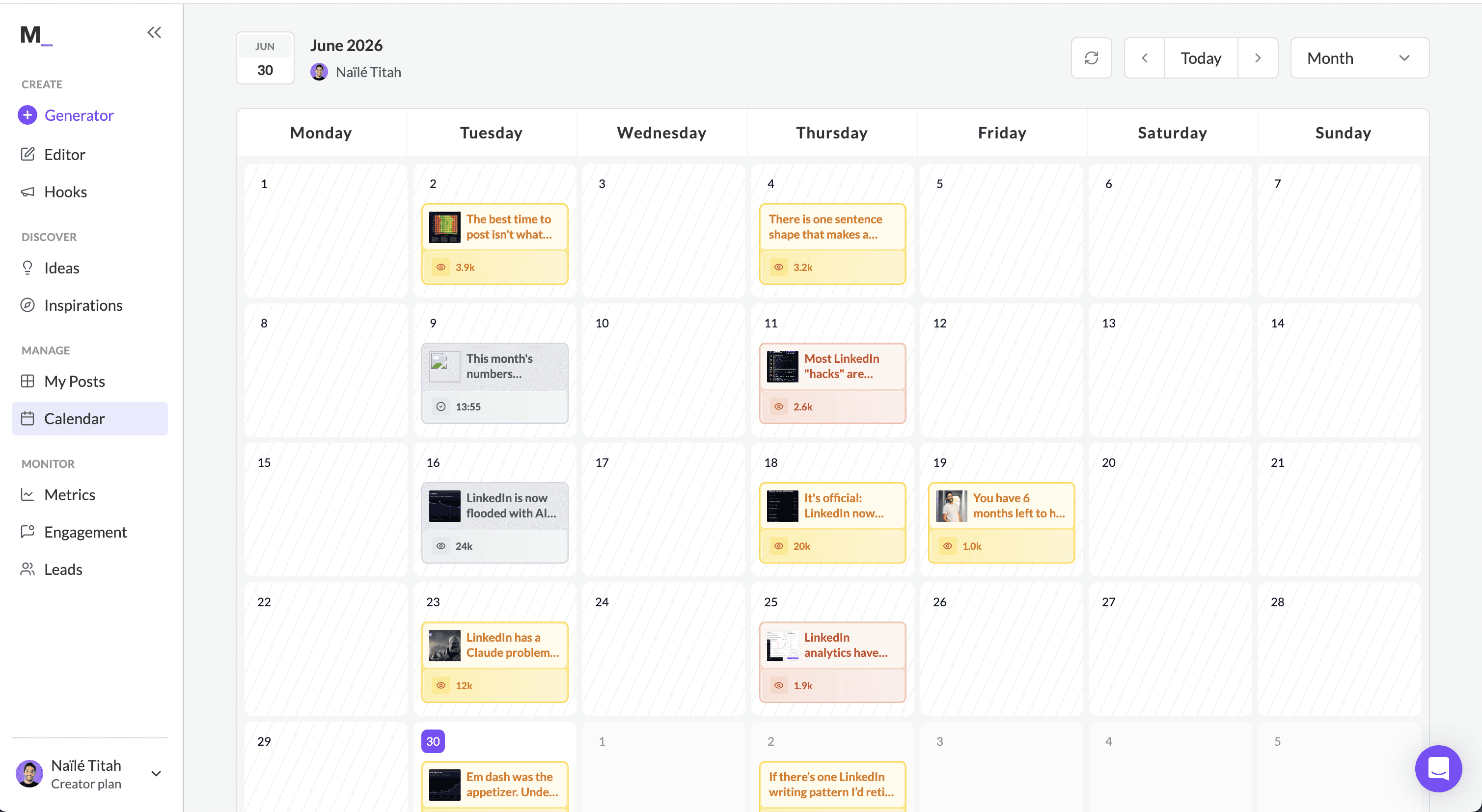
When a scheduler tells you a format or a tag is unavailable "due to API limitations", the limit sits in the vendor's integration: the same API carries a working person tag from MagicPost. The format-by-format detail of LinkedIn's native scheduler vs tools is on its own page.
Post type | LinkedIn native scheduler | MagicPost | Multi-network suites |
Text, single image, video | Yes | Yes, with the video thumbnail of your choice | Yes, everywhere |
PDF / carousel | Profile yes; not documented for Pages | Yes | Sendible, Sprout Social, SocialPilot, CoSchedule (5 MB cap) yes; Later no |
Poll | Profile yes; Page no | Yes: 140-character question, 2 to 4 options | Sprout Social and Later no; Sendible and CoSchedule not documented |
First comment, timed | Not documented | Yes on Creator, right after the post or after a delay | Buffer (paid), Sendible, CoSchedule yes; Later no |
@mentions of people | In the composer | Yes, in the post and in the comment | Page followers only (Hootsuite, Agorapulse, SocialPilot, Sendible, Sprout, CoSchedule); none on Later |
The first comment deserves its own line because that is where links live: on Creator, MagicPost prepares it with the post, image and mentions included, on the scheduled comments feature. The routine, delay included, is in how to schedule a LinkedIn first comment.
Four LinkedIn schedulers Supergrow lists that did not make the cut
Supergrow's own roundup of LinkedIn scheduling tools adds four multi-network suites. We audited them the same way; here is why none of the four earns a slot above.
Sendible as a LinkedIn scheduler
Sendible is an agency suite sized by workspaces and profiles, with unlimited users on every plan: Core $35/mo. (1 workspace, 6 profiles) up to Enterprise $750/mo., billed monthly, 14-day trial without a card. On LinkedIn it schedules profiles and Pages, PDFs up to 100 MB and a first comment.
The LinkedIn reading: its own tagging article says a person can only be tagged when posting from a Company Page, only if that person follows the Page, and the lookup returns US followers only; profile-to-profile tagging is not possible.
Polls are not documented and PDF posts are excluded from its analytics.
Sprout Social as a LinkedIn scheduler
Sprout Social is the enterprise suite priced per seat, billed monthly: Essentials $99, Standard $249, Professional $399 and Advanced $499 per seat a month; annual billing lowers each tier. 30-day trial without a card.
Personal profiles are supported, contrary to a common belief, but its help center allows @mentions only from a Company Page post and only for profiles that follow the Page; polls must be created inside LinkedIn, and PDFs are documented for Pages.
For a three-person team, the per-seat price weighs more than LinkedIn depth.
CoSchedule as a LinkedIn scheduler
CoSchedule is a marketing calendar with social scheduling attached: Starter $39/mo. and Professional $59/mo. billed monthly, a free plan capped at 15 posts at a time on 1 profile, 14-day trial (CoSchedule pricing).
Its LinkedIn help is the most explicit on this page about why mentions fail in schedulers: a person can be tagged only from a Company Page and only if six conditions hold, from following your Page to having an English primary language and third-party data sharing enabled.
Documents schedule with a 5 MB cap, where LinkedIn itself accepts 100 MB; polls are not documented.
Later as a LinkedIn scheduler
Later is an Instagram-first scheduler sold by Social Sets. Its monthly-billing prices are not readable on its pricing page; billed yearly, Starter is $18.75/mo. (1 set, 30 posts per profile a month), Growth $37.50/mo. and Scale $82.50/mo.; a free plan exists, and paid plans carry a 14-day trial.
Its LinkedIn help article is short: text, single-image, multi-image and single-video posts publish; PDF documents, polls, a first comment and tagging people, profiles or companies cannot be scheduled, and Best Time to Post is not available for LinkedIn. That is the weakest LinkedIn surface of the eighteen.
How to choose the best LinkedIn scheduling tool
The checklist follows this page's order, from the mention test to the public record.
Run the mention test. Schedule one post tagging one person, then check what publishes.
Check the connection method. API access or vendor API statement, undocumented, extension or stored session: the matrix maps all eighteen.
List the formats you actually post. PDF, poll, first comment, mentions: the post-types table shows which tools drop which.
Price your real shape. Per-channel, per-seat, per-brand, per-account, flat tiers or plans: the same roster costs wildly different amounts.
Read the records like an auditor. Invited vs uninvited, recent vs historic, replied vs ignored.
Which LinkedIn scheduling tool for agencies and teams?
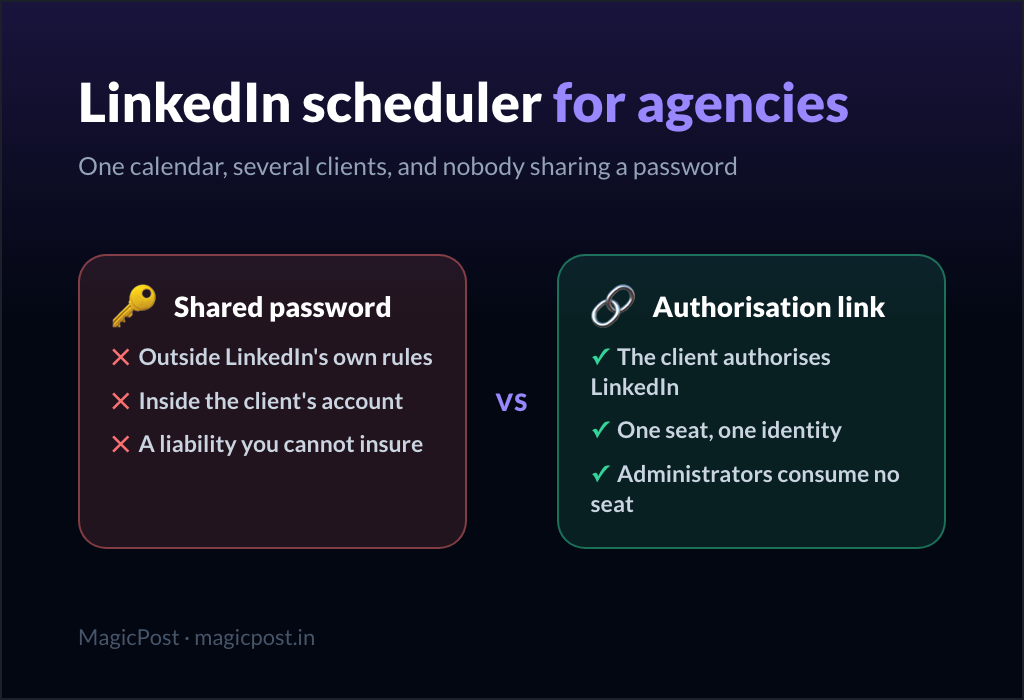
The scheduler question changes shape at roster scale: validation workflows, white-label reports and per-client voice matter more than queue features.
MagicPost's agency mode runs one workspace per client with validation (no post goes live until the client approves it) and white-label exportable reports, at $59 per client per month ($47 billed yearly), from 2 clients.
The calendar routine behind it, attaching a client, approvals and time zones, is in LinkedIn scheduling for agencies.
Team mode adds member spaces and adoption dashboards, with roles, consent and a shared calendar covered in LinkedIn scheduling for teams. The generalists' team tiers are compared in each LinkedIn-lens page above.
Is a LinkedIn scheduler the same as LinkedIn automation?
No: LinkedIn treats scheduling and automation very differently. Posting your own content at a chosen time through an official integration is the sanctioned path.
Auto-engagement, auto-DMs and cookie-session automation are what LinkedIn's policy targets, and the enforcement record (Kleo's original extension, Shield Analytics, Taplio's documented warnings) shows it acts. If a tool's pitch includes automating behaviour toward other people, read our guide to LinkedIn automation tools before connecting anything.
Which is the best LinkedIn scheduler overall?
MagicPost is the best LinkedIn scheduler overall in 2026. It publishes through LinkedIn's Community Management API and posts @mentions of people and companies without the follower and language conditions the suites document, and its loop continues after publishing with benchmarks, engagement and leads.
The runner-up depends on your setup. Among the LinkedIn-only tools: TypeGrow for an official-API statement and no extension, SocialSonic for the most features at $20/mo., Supergrow if voice AI matters most at $39/mo.
Otherwise: AuthoredUp if you want no AI at all; Swello or Agorapulse if LinkedIn is one network among several and the public record matters; Buffer if the budget is zero.
Want the complete LinkedIn loop around your schedule? Try MagicPost free: schedule with working mentions through the official API, and get the benchmarks, engagement and leads that come after, no card.
FAQ
What is the best LinkedIn scheduling tool?
MagicPost is the best LinkedIn scheduling tool in 2026 because it publishes through LinkedIn's Community Management API, which LinkedIn grants only on application, and posts working @mentions of people and companies, which most schedulers cannot.
It also passes the two tests this page runs, the mention test and the connection test, and its loop continues after publishing: benchmarks, audience analysis, engagement workflows and lead detection, on a trial without a card.
The right runner-up depends on how you work: TypeGrow for a no-extension cloud scheduler, Swello for multi-network, AuthoredUp for no AI.
What is the best free LinkedIn scheduler?
Buffer's free plan is the best free LinkedIn scheduler: it covers LinkedIn within 3 channels and 10 queued posts per channel, at $0 for as long as you want.
LinkedIn's own native scheduler is also free, one post at a time. Swello's free plan includes LinkedIn too, at 1 profile per network and 40 scheduled posts a month.
TypeGrow advertises a free plan but publishes neither its limits nor a paid price, and Metricool's free plan excludes LinkedIn by name. MagicPost offers a trial without a card rather than a permanent $0 plan.
Is it safe to schedule LinkedIn posts with third-party tools?
Scheduling LinkedIn posts with a third-party tool is safe when the tool publishes through LinkedIn's official API, the access LinkedIn grants app by app, on application.
The risk sits in cookie-session and automation-class tools; LinkedIn's policy warns prohibited tools may become non-operational without notice, and the record (Kleo's extension withdrawn in June 2025, Shield Analytics winding down on its founders' own statement, Taplio's own support citing the ToS) shows enforcement is real.
Check the connection column in the matrix above before connecting an account.
Do scheduled LinkedIn posts get less reach?
We have found no published data showing LinkedIn cutting a post's reach because it was scheduled, and MagicPost's research does not compare scheduled posts with posts published by hand.
What it measures is the cost of content: generic, interchangeable posts reach roughly 10 to 14% fewer people in MagicPost's 1.2M-post research.
In 2026, MagicPost's reach study across 287,120 posts found that four templated turns of phrase cost English posts roughly 3% to 7% of reach against the same author's normal, a cost that was statistically absent before 2026.
Those turns are a writing problem, which the humanizer rewrites, whatever tool publishes the post.
Can scheduling tools tag people in LinkedIn posts?
Most LinkedIn scheduling tools that document mentions attach conditions to person tags: Hootsuite, Agorapulse, SocialPilot, Sendible, Sprout Social and CoSchedule gate person-mentions behind Page-follower conditions, Buffer requires connections and English-language profiles, and Later cannot tag anyone on LinkedIn.
MagicPost publishes working @mentions of people and companies, in the post and in the first comment; the receipt is public.
What is the best LinkedIn scheduler for agencies?
MagicPost's agency mode is the best LinkedIn scheduler for agencies: one workspace per client, validation before publishing, white-label reports and per-client voice AI, at $59 per client per month ($47 billed yearly), from 2 clients.
Volume alternatives: SocialPilot (50 accounts at $200/mo., with the record caveats above) and Sendible's workspaces. The full agency comparison: best LinkedIn tools for agencies.
Should I use a multi-network scheduler or a LinkedIn specialist?
A multi-network scheduler fits when LinkedIn is one channel among many and the bar is "queued and posted"; Swello and Agorapulse have the records.
If LinkedIn is where your outcomes live, the generalist compromise shows up exactly there: conditional mentions, caption-level AI, averaged analytics. Many teams run both, a generalist for breadth and a specialist for LinkedIn.
The specialist picks beyond scheduling, from writing to leads, are in the best LinkedIn tools ranked by job.
How far ahead should I schedule LinkedIn posts?
LinkedIn's native scheduler accepts posts up to three months ahead, and no measured optimum exists beyond that limit: how far to queue is a workflow choice.
A one-to-two-week queue keeps posts current and leaves room to react to news; the data on the best time to post on LinkedIn then decides the time slot.
Reviewing what worked against benchmarks as well as impressions, then feeding it into the next batch, pays off over time, and that loop separates the tools on this page.
Can you schedule LinkedIn posts without a tool?
Yes, LinkedIn's native scheduler schedules a post from the clock icon in the composer: 10 minutes to 3 months ahead on a personal profile, and one hour to three months ahead on a Page.
It cannot schedule a first comment, a poll on a Page, or several accounts from one calendar, which is where a scheduling tool takes over.