The majority of LinkedIn users spend more time writing the body of their post than the first line. That’s backwards. LinkedIn cuts off posts after two to three with a “See more” button, and up to 70% of users decide whether to click it based solely on that opening line.
A strong LinkedIn post headline generates up to 13x more dwell time than ones that lose people in the first three seconds, and more dwell time means more distribution. Here’s how to perfect it.
What is a Linkedin Post Headline?
A LinkedIn post headline is the first line of your post. It’s the one visible before the “See more” button cuts the rest off.
On mobile, that’s sometimes just 120 characters. On desktop, it can be up to 210 characters. That’s your entire window to earn the next line.
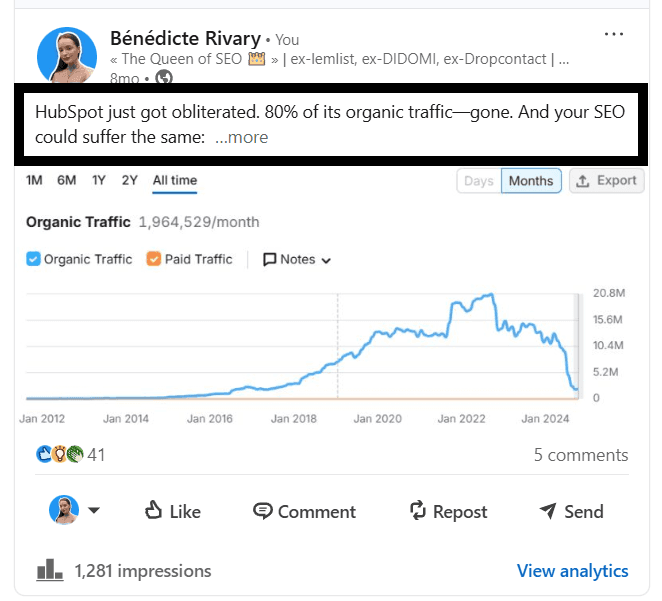
It’s essentially a small ad for the rest of the LinkedIn post. It doesn’t explain the context, introduce you, or warm up slowly. Instead, it makes a specific promise that makes clicking feel necessary.
A good headline does three things at once:
Signals who the post is for,
Creates a reason to keep reading, and
Matches what the algorithm is looking for (dwell time, not just likes).
Why Does the LinkedIn Post Headline Matter?
The LinkedIn algorithm in 2026 weighs dwell time heavily. Dwell time is how long someone actually spends on your post.
If your headline is strong, it pulls them past the cutoff, which starts the clock. A weak headline ends it before it begins.
Stat | What It Means |
|---|---|
Up to 70% of users decide to expand a post based on the opening line alone | The rest of your post only gets read if the headline works |
Posts with 61+ seconds dwell time hit 15.6% engagement vs 1.2% at 0-3 seconds | A headline that pulls people in drives algorithmic distribution, not just reads |
Hooks under 10 to 12 words outperform longer ones | Brevity creates intrigue, especially on mobile where the preview is even shorter |
Only 7.1% of LinkedIn members actively publish content | Most of your competition has already lost before the first line |
5 LinkedIn Post Headline Types That Work
Different posts call for different first lines. These five categories cover most situations and match different reader intents in the feed. For more examples, check out our 20 best LinkedIn hook examples guide.
1. Catchy Headlines
These grab attention with contrast, a bold claim, or a tension the reader didn’t see coming. They work well for LinkedIn thought leadership and hot takes.
Our brain is wired to notice things that break a pattern. Because such unexpected statements trigger a small gap, the reader needs to resolve it, so they click. The typical structure is the following:
[Strong opinion] + [context]
[Big result] without [common pain]
[Surprising statement] about [familiar topic]
For example:
→ “I stopped using hooks. My impressions went up 38%.”
→ “Cold outreach isn’t dead. Your targeting is.”
→ “Your ‘high-performing’ post isn’t why you got clients.”
2. Practical Headlines
These promise a clear, usable outcome and are best used for playbooks, step-by-step posts, frameworks, and case studies. The reader knows exactly what they’re getting.
Here’s what they look like:
How to [achieve result] with [simple method]
[X-step] process to [solve problem]
The playbook that [achieves result] without [common pain]
For example:
→ “3-step process I used to turn 47 comments into 9 qualified sales calls.”
→ “How I tested 25 headlines in 7 days (and the 3 that actually worked).”
→ “Steal this: the headline format behind my top 3 posts (187K+ total views).”
These work because people save posts they plan to use later. Saves are one of the strongest signals LinkedIn’s algorithm picks up in 2026, and a practical headline primes the reader to save before they’ve even finished reading.
3. Opinionated Headlines
These take a clear stand. They attract the right audience and filter out the wrong one, so use them for positioning, credibility, and thought leadership.
LinkedIn’s algorithm now identifies content by topic and distributes it to people interested in that space, not just your connections.
A sharp opinion signals what territory you occupy, which helps the algorithm route your post to the right feed. Here’s the structure you need to follow:
[Strong claim] about [common practice]
[What most teams get wrong] about [topic]
If you still do X, you are [wasting result/opportunity]
For example:
→ “Most ‘personalized’ outreach is just [First Name] + a compliment you didn’t mean.”
→ “Your ICP isn’t ‘too broad.’ You just don’t understand it.”
→ “Your 3% reply rate isn’t a channel problem. It’s your opener.”
4. Mysterious Headlines
These hint at a result, a turning point, or a mistake without revealing the full story. They create just enough curiosity and tension that the reader can’t help but click “See more” to resolve it.
This is the typical structure of such posts:
I was wrong about [topic] for [time period]
This one decision changed [metric or outcome]
I did [unusual action]. The result surprised me.
Here are some good examples:
→ “This one hiring decision cost us 6 months.”
→ “I copied a competitor’s strategy. It backfired fast.”
→ “We removed one step from our funnel. Pipeline went up.”
The secret is that the hidden piece must feel consequential, not cosmetic. It should be something actually worth knowing.
Each line withholds the mechanism but reveals the impact. You see a shift (pipeline up, strategy backfired, cost 6 months) but not the reason, so your brain has to close the gap.
5. Headlines for Students and Early-Career Professionals
Students and early-career professionals likely have minimal work experience. However, they can make it up with their first results, concrete actions, and specific learning moments to make progress feel tangible and repeatable for people at the same stage.
Here’s the structure most students and early-career professionals follow:
[X lessons] from [first experience]
[Result] with [simple, repeatable action]
[What I wish I knew] before [key milestone]
For example:
→ “How a 2-hour side project got me 4 interviews in 10 days”
→ “How I used 1 Notion page to land my first freelance client”
→ “I applied to 73 roles. These 2 changes got me interviews.”
These land better because they replace vague ambition with measurable progress (numbers, timelines, and outcomes) and low-bar actions (a side project, a Notion page, or cold emails), so the reader can immediately see themselves in the process, not just admire it.
How to Write a LinkedIn Post Headline That Actually Works
Here’s a step-by-step guide to write a LinkedIn post headline that’ll urge your readers to click “See more.”
Write the Headline Before the Post
Most people write the post first and add the headline last. Flip it. The headline sets the promise. If you write it first, the rest of the post is just keeping that promise. You’ll spend less time editing and end up with a sharper post.
Keep It Under 12 Words
Hooks under 10 to 12 words outperform longer ones mostly because mobile previews are tight. More words usually means more hedging, so cut everything that isn’t load-bearing.
Write Three Versions Before Picking One
Your first headline is almost never your best. Write a catchy version, a practical version, and an opinionated version of the same post. Pick the one that makes you most want to read it. Track which format performs best over time and lean into it.
Avoid the Slow Start
Headlines that begin with “I wanted to share…” or “Here are some thoughts on…” are warming up when they should already be in motion.
If you need to cut the first sentence to get to the actual opening, cut it.
Common Mistakes That Break Your LinkedIn Post Headlines
Absolutely avoid the mistakes below, as they’re a surefire way to get your readers to skip your LinkedIn posts.
Mistake | Example | Why It Fails |
|---|---|---|
Vague opener | “Some thoughts on content strategy…” | Tells the reader nothing. No reason to click. |
Starting with yourself | “I’m so excited to share that…” | Readers care about what’s in it for them, not your excitement. |
Clickbait with no payoff | “This will change everything.” | If the post doesn’t deliver, readers stop trusting future posts. |
Too long | “I’ve been thinking a lot lately about how our approach to B2B sales is fundamentally broken and here’s why” | Loses the reader before the cutoff. Shorter creates more tension. |
Final Thoughts
The headline is the highest-leverage line in any LinkedIn post. Everything else, from the story to the insight, only gets read if the first line earns it.
The five formats covered here (catchy, practical, opinionated, mysterious, and early-career) cover most situations.
Pick the one that matches the post, keep it under 10 words, and write a few versions before committing. Track what performs over time and you’ll build an instinct for it quickly.
If you want a faster starting point, MagicPost’s hook generator writes opening lines in your voice based on your topic. You can save the ones that land, tag them by type, and reuse the structures that work. Try MagicPost for free today.
FAQ
What is a LinkedIn post headline?
It’s the first line of your LinkedIn post, i.e., the text visible before the “See more” cutoff. It’s the most important line in the post because 65% of users decide whether to expand it based solely on that opener.
How long should a LinkedIn post headline be?
Under 10 words if you can manage it. Hooks under 10 words outperform longer ones by 40%, largely because mobile previews are short and brevity creates tension. Every word that isn’t doing something should go.
What makes a good LinkedIn post headline?
Specificity and a reason to keep reading. It should either make a clear promise, open a curiosity gap, or signal something worth knowing. It should never warm up slowly. For more on building posts that perform, see our guide to how to write a LinkedIn post.
What are the best LinkedIn post headline formats?
The five that consistently work are catchy, practical, opinionated, mysterious, and early-career-focused. Each matches a different reader intent. Mix them across your content rather than defaulting to one type every time.
See our guide to LinkedIn post types for how format choice affects performance beyond the headline.
Does the headline affect LinkedIn reach?
Yes, directly. The headline drives “See more” clicks, which signal dwell time to the algorithm. Posts with longer dwell times hit 15.6% engagement rates compared to 1.2% for posts that lose people immediately. That gap translates into distribution. For a deeper look at how the algorithm weighs this, see our guide to LinkedIn engagement.
Can I reuse headline structures?
Yes, and you should. If a particular structure drives strong profile visits or comments, that’s a signal worth repeating. The idea changes; the frame can stay.
MagicPost lets you save and tag your best-performing headlines so you’re not rebuilding from scratch every time. If you want to track what’s working, see our guide to how to measure content performance.