Content Creation

Saad Mouaouine
Zuletzt aktualisiert: 27.02.2026
You already know consistent posting on LinkedIn matters. The data backs it up: profiles that post 3–5 times per week consistently see 2–3× higher engagement and reach compared to sporadic posting.
The problem isn’t motivation; it’s time. Between writing, formatting, finding the right hook, and remembering to actually post at the right time, LinkedIn content creation quickly eats your week.
That’s where automating LinkedIn comes in. And no, it doesn’t mean handing your brand voice over to a robot.
Short Answer: Yes, you can automate your LinkedIn posting safely and still sound like yourself. The key is knowing which kind of automation you’re using and choosing a tool that’s actually built for LinkedIn. Here’s everything you need to know.
What Does It Mean to Automate LinkedIn Posts?
LinkedIn post automation means using software to handle part (or all) of the content process, from generating ideas and drafting posts to scheduling and publishing them automatically.
But not all automation is the same. There are two different types, and confusing them is where most people run into trouble:
Type | What It Does | Safe? |
|---|---|---|
Content Automation | AI writes, drafts, schedules, and publishes your posts | ✅ Yes (100%) |
Behavioral Automation | Bots simulate clicks, scrape data, and send fake engagement | ❌ No (high ban risk) |
Content automation (the kind MagicPost uses) means AI helps you think, write, and schedule. Behavioral automation is when a tool starts simulating human actions on your behalf (fake likes, connection spamming, and browser scripting). That’s what gets accounts flagged.
How to Automate LinkedIn Posts with MagicPost
MagicPost is an AI-powered LinkedIn content creation and scheduling platform designed for solopreneurs, founders, marketers, and agencies. The workflow is straightforward: generate, write, review, and schedule. Here’s how each step works:
Step 1: Generate Ideas Without Starting at Blank Screen
MagicPost’s Idea Generator lets you pick a theme and instantly get 6 different post ideas tailored to your niche. No more “What do I even write about today.” You can save ideas, add your own topics, and build a content bank for the week in minutes.
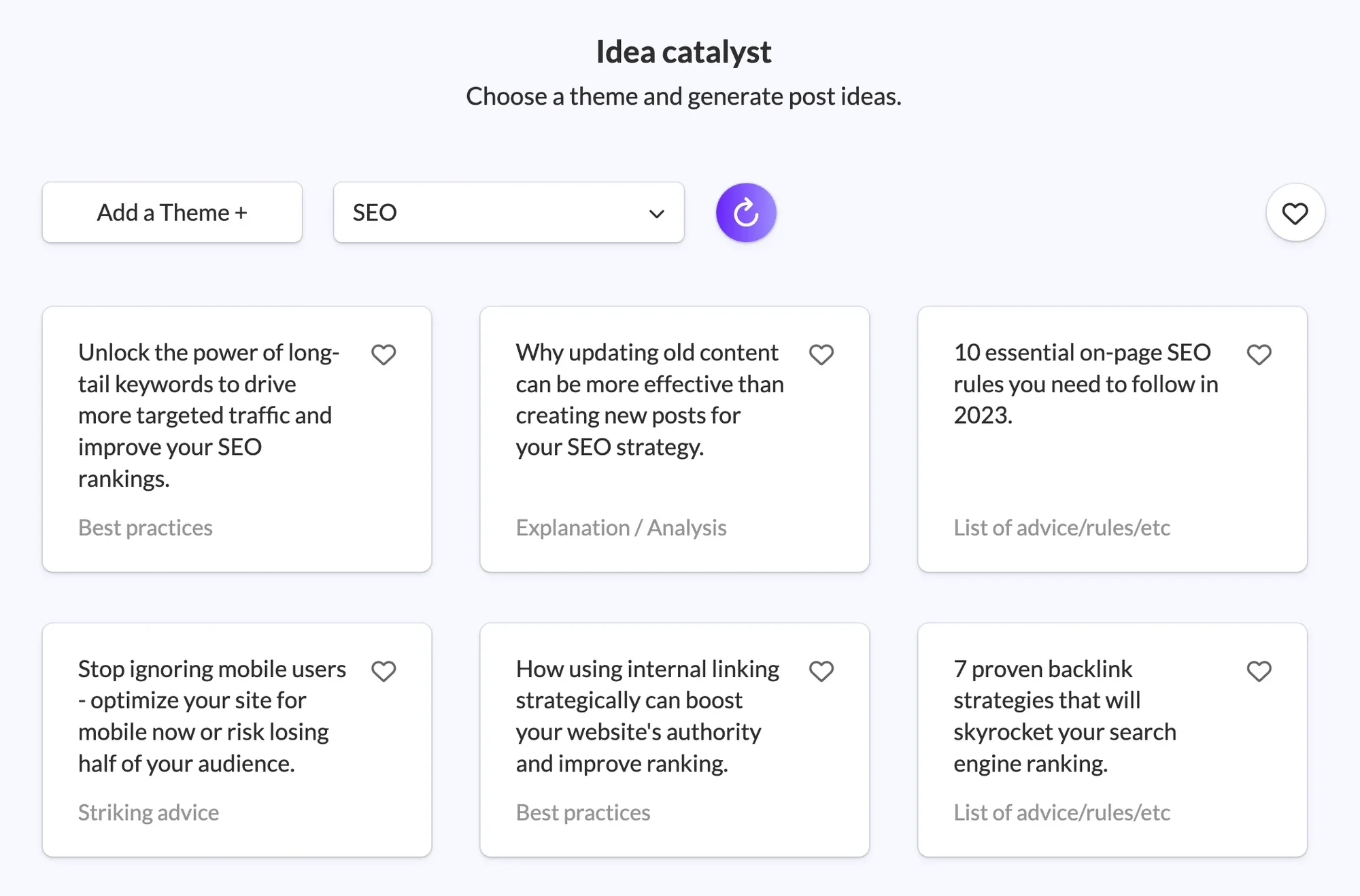
Pair it with the Hook Generator to craft your opening line: the one that makes people stop scrolling. Whether you want to create curiosity, spark a reaction, or get straight to the point, it generates strong opening lines built for LinkedIn’s feed.
Step 2: Write Posts That Actually Sound Like You
This is the part most automation tools get wrong. MagicPost’s AI Content Creator doesn’t just generate generic posts. You tell it your topic, select your tone, adjust the language, and it drafts something in your direction.
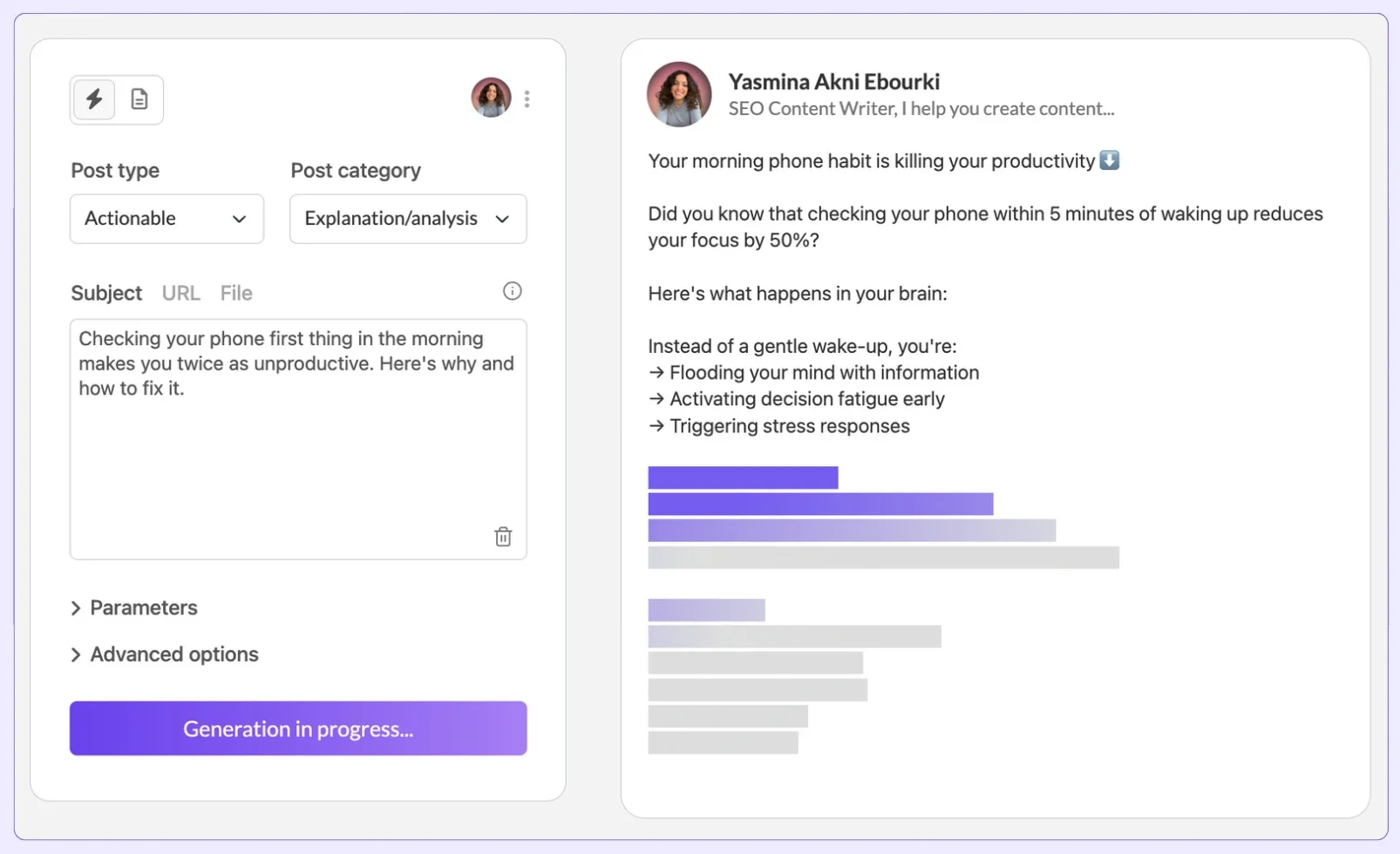
Better still, you can save your own best-performing posts as reusable templates; the AI then uses your real structure and voice as a reference for future posts. Over time, it gets closer to sounding like you, not like a chatbot that stumbled onto your LinkedIn profile.
You can also paste a URL (an article, blog post, or press release), and MagicPost will turn it into an engaging LinkedIn post with a summary, hook, and CTA, ready to edit and schedule.
Step 3: Find What's Is Already Working and Adapt It
MagicPost gives you access to 500,000+ viral posts, filterable by niche, format, number of likes, date, language, and word count. Find a post structure that’s performing well in your space, then ask MagicPost’s AI to adapt it to your style and topic.
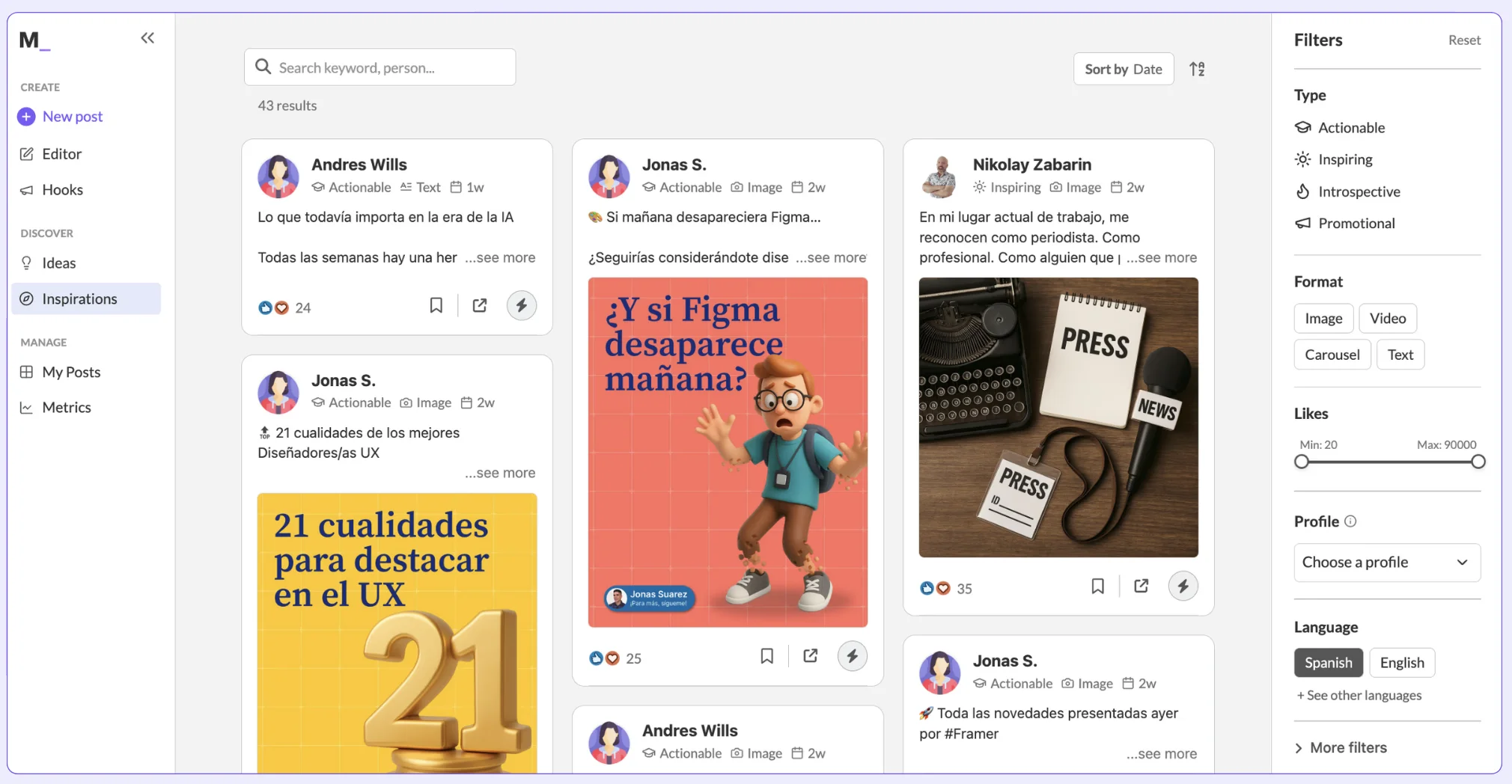
You’re not copying; you’re simply understanding what formats resonate with your audience and building on proven structures with your own original ideas.
Step 4: Automatically Schedule at the Right Time
Once your post is ready, schedule it directly under MagicPost. Pick a date and time, and the platform handles the rest. No copy-pasting to LinkedIn, no phone reminders, and no manual posting.
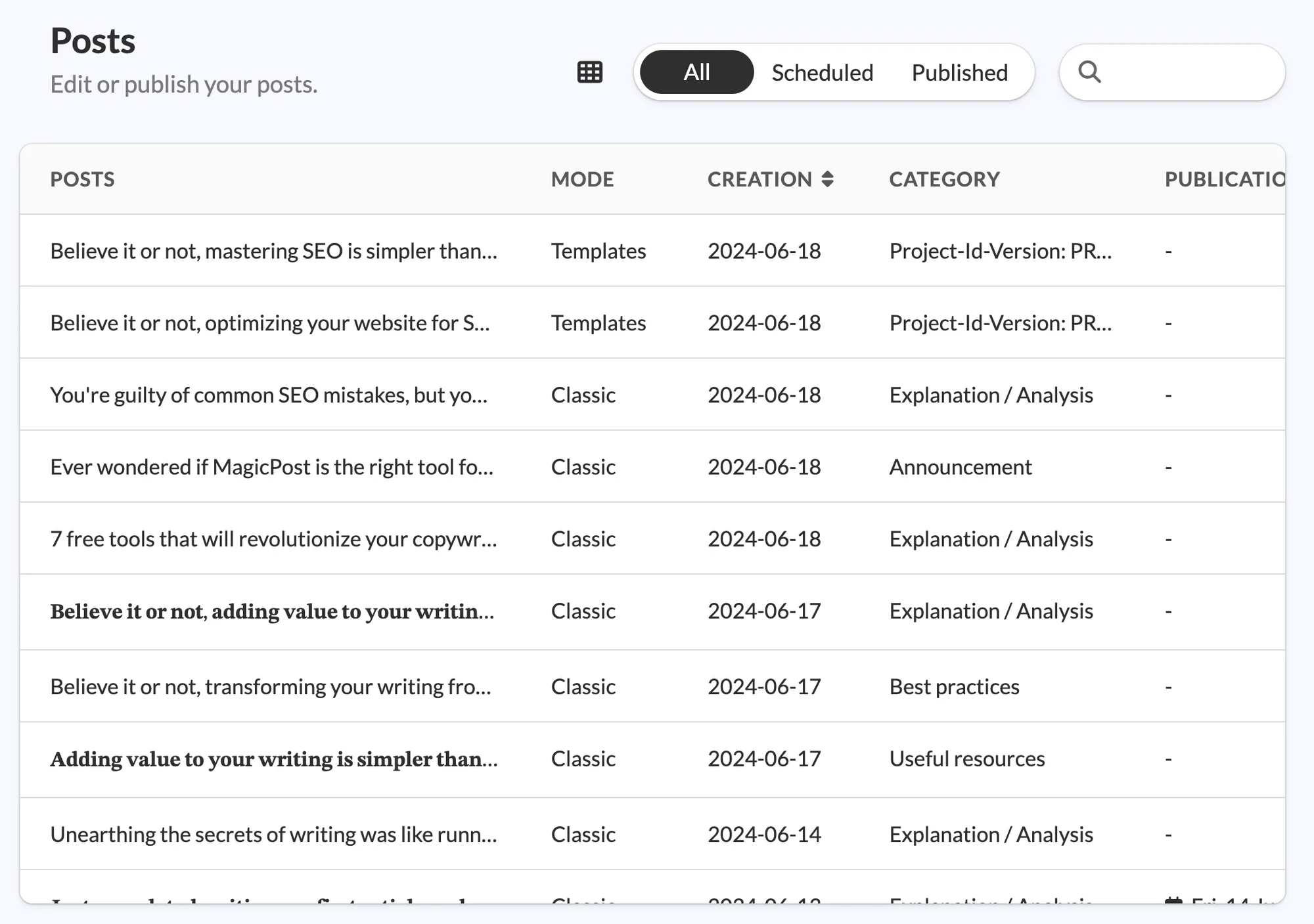
MagicPost’s content calendar gives you a full view of what’s planned, what’s published, and what’s still in draft, so you can manage your content pipeline without juggling tabs.
You can label posts as Draft, Modified, Favorite, Planned, or Published to stay organized at every stage.
Step 5: Track Performance and Focus on What Works
MagicPost’s LinkedIn analytics show you the metrics that actually matter: your best posting times, top-performing content types, average engagement rates, and posting rhythm.
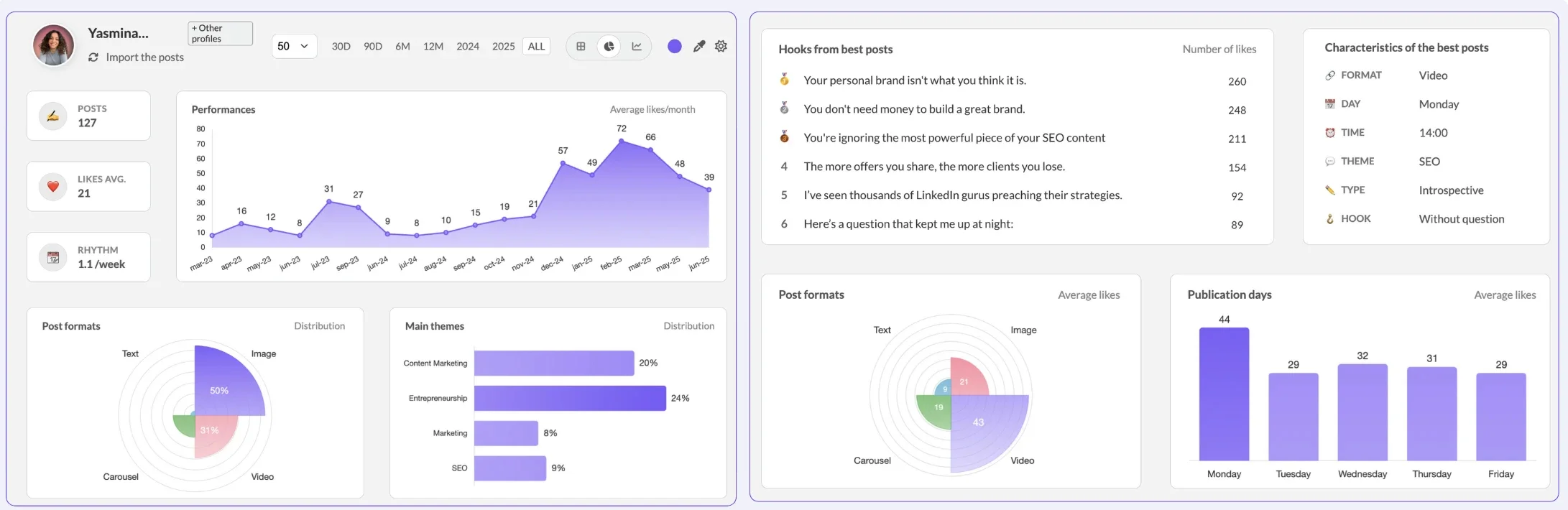
Put your gut feeling aside and use this data to refine your schedule and content focus.
For a deeper look at which metrics to track and why, see How to Increase Impressions on LinkedIn.
What Is the Best Time to Automate LinkedIn Posts?
Timing is a bigger lever than most people realize. The first 60–120 minutes are the highest-weight engagement window that strongly influences your post’s total reach, and posts that generate early conversation receive significantly higher distribution.
Here’s what you need to keep in mind when scheduling LinkedIn posts:
Weekday mornings: 7:30–9:00 AM (professionals checking in before the day starts)
Midday: 12:00–1:00 PM (lunch scrolling)
Late afternoon: 5:00–6:00 PM (end-of-workday)
Tuesday through Thursday tend to outperform Mondays and Fridays.
That said, your audience is your audience. The best time for you depends on your followers, not a generic benchmark. MagicPost’s analytics show your personal best posting windows based on actual performance data, so use that first.
See also: Best Time to Post on LinkedIn and How to Schedule a Post on LinkedIn.
Can You Automate LinkedIn Posts Without Sounding Robotic?
Yes, and this is the question that matters most.
The reason most AI-generated LinkedIn posts sound generic isn’t because AI is inherently bad at writing. It’s because people use it as a ghostwriter rather than a thinking partner. They type “write me a post about leadership” and publish whatever comes out.
The MagicPost workflow is different. You bring the idea, the angle, and your experience, and the AI structures it and helps you say it clearly. You review and edit before anything goes out. And because the tool learns from your own best-performing templates, it keeps your voice as the reference, not some average LinkedIn tone.
Over 70% of marketers say AI improves writing efficiency and consistency, while 50% save over 5 hours weekly. The tool isn’t replacing your voice; it’s only removing the issues that were preventing you from using it.
For more on writing posts that actually connect, check: How to Write LinkedIn Posts and LinkedIn Hooks: How to Stop the Scroll.
Is It Safe to Automate LinkedIn Posts?
Yes, as long as you’re using content automation, not behavioral bots. MagicPost is a LinkedIn Verified Partner, which means it’s fully compliant with LinkedIn’s Terms of Service and built to protect your account.
Here’s the clearest way to understand what gets people banned vs. what’s perfectly safe:
❌ What triggers bans: Session simulation, credential scraping, fake engagement bots, and aggressive auto-connection tools.
✅ What’s completely safe: AI-assisted writing, scheduled publishing, idea generation, hook creation, and content planning.
This distinction matters. Content automation automates thinking and creation, not account behavior. No one’s simulating your clicks or faking your engagement. You write (with AI help), you review, and you schedule. LinkedIn sees a human posting at a scheduled time, which is exactly how their native scheduler works too.
Why Should You Automate Your LinkedIn Posts?
You should automate your LinkedIn posts because motivation-based posting doesn’t scale. 64% of content creators quit posting consistently within 90 days not because they run out of ideas, but because manual creation eventually burns them out.
Here’s what the data says about consistency and automation:
Significantly more reach for profiles posting 3–5x per week vs. sporadic posting.
Your post’s reach is strongly influenced by timing, with the first 60–90 minutes after publishing being the most critical window for engagement.
AI-assisted content workflows reduce creation time by up to 70%.
Individuals using content automation save an average of 5 hours per week.
The goal isn’t to remove yourself from the process; it’s to remove the motivational constraint that stops you from showing up consistently.
MagicPost vs. Manual Posting: Is It Worth It?
Is MagicPost worth trying out? How does it compare to manual posting? We’ll let you decide for yourself:
Manual Posting | MagicPost Automation | |
|---|---|---|
Time Per Post | ❌ 45–90 min average | ✅ ~5 minutes with AI drafting |
Idea Generation | ❌ You, from scratch, every time | ✅ AI-generated in seconds |
Consistency | ❌ Depends on motivation | ✅ Scheduled and systematic |
Posting at Optimal Times | ⚠️ Requires you to be online | ✅ Automated and scheduled |
Voice Preservation | ✅ Full manual control | ✅ AI drafts, you review and edit |
Safe for LinkedIn | ✅ Yes | ✅ Yes (Verified Partner) |
Viral Post Inspiration | ⚠️ Manual browsing | ✅ 500,000+ filterable posts |
Analytics | ⚠️ LinkedIn native only | ✅ Built-in performance tracking |
Start Automating Your LinkedIn Posts Today
Consistency is the single biggest driver of LinkedIn growth and the hardest thing to maintain when you’re creating everything manually. MagicPost gives you the tools to post regularly, sound like yourself, and actually understand what’s working.
Try MagicPost for free—no credit card required. Start your free trial and go from a blank page to a scheduled post in minutes.
Häufige Fragen
Will LinkedIn ban me for automating my posts?
Not if you're using content automation. LinkedIn bans accounts that use behavioral bots (tools that simulate clicks, scrape data, or send mass connection requests).
Scheduling tools and AI writing assistants like MagicPost are completely safe. MagicPost is a LinkedIn Verified Partner and is fully compliant with LinkedIn's Terms of Service.
Can I automate LinkedIn posts for free?
LinkedIn's native scheduler lets you schedule posts for free directly on the platform. It's a solid starting point for basic scheduling.
However, it doesn't include AI writing, idea generation, hook creation, content inspiration, or performance analytics. MagicPost's Starter plan begins at $39/month and includes all core automation features with a free trial; no credit card required.
How many LinkedIn posts should I schedule per week?
Posting 3–5 times per week is the sweet spot for most creators. That's enough to stay consistent and build algorithmic momentum without burning out. For a deeper breakdown of frequency and strategy, see: Best Frequency to Post on LinkedIn.
Does automated content still perform well on LinkedIn?
Yes, when it's done right. LinkedIn's algorithm rewards content that generates real conversation, not the tool that was used to write it.
AI-assisted posts that are reviewed, edited, and scheduled thoughtfully perform just as well as fully manual ones. The key is keeping your ideas and perspective front and center and using AI to structure and deliver them more efficiently.
What's the difference between LinkedIn automation tools?
There are three main categories: AI writing tools (help you draft posts), scheduling tools (publish at set times), and engagement bots (automate likes, comments, and connections, which are risky).
MagicPost combines writing and scheduling in one platform, without touching behavioral automation. For a full comparison of the landscape, see: Best AI LinkedIn Post Generator and Best LinkedIn Scheduling Tools.
Is MagicPost good for agencies managing multiple LinkedIn accounts?
Yes. MagicPost offers an Agency plan with custom pricing designed for managing multiple accounts at scale. Agencies can handle content creation, scheduling, and performance tracking across clients from a single platform, without switching between accounts or tools.