" height="26.80529977783203px" id="tymKb8bqC" width="128.00300311279295px"/><path d="M 0 2.417 L 0 0 L 12.909 0 L 12.909 2.417 Z" fill="rgb(126, 78, 253)" height="2.417099999999998px" id="aYr4em6zK" transform="translate(128.341 22.325)" width="12.908999999999992px"/></svg>)

"/><stop offset="1" stop-color="rgb(118, 37, 250)"/></linearGradient></defs><g d="M 19.242 21.22 L 19.362 6.204 L 19.272 6.204 L 13.757 21.22 L 10.161 21.22 L 4.796 6.204 L 4.706 6.204 L 4.825 21.22 L 0 21.22 L 0 0 L 7.283 0 L 12.109 13.607 L 12.229 13.607 L 16.844 0 L 24.247 0 L 24.247 21.22 Z M 26.421 26.113 L 26.421 23.445 L 41.407 23.445 L 41.407 26.113 Z" fill="transparent" height="26.112508199679183px" id="DvfaAIHYn" width="41.40731898311435px"><path d="M 19.242 21.22 L 19.362 6.204 L 19.272 6.204 L 13.757 21.22 L 10.161 21.22 L 4.796 6.204 L 4.706 6.204 L 4.825 21.22 L 0 21.22 L 0 0 L 7.283 0 L 12.109 13.607 L 12.229 13.607 L 16.844 0 L 24.247 0 L 24.247 21.22 Z" fill="rgb(46, 46, 46)" height="21.220180016149442px" id="pLsxRCobd" width="24.247352589074694px"/><path d="M 0 2.668 L 0 0 L 14.986 0 L 14.986 2.668 Z" fill="url(%23yD9d4I5GR-3279285344-linear-gradient)" height="2.6675085048549647px" id="yD9d4I5GR" transform="translate(26.421 23.445)" width="14.986002836263765px"/></g></svg>)

Camelia Khadraoui
Still looking for a content creation tool? You’re not alone; many people now rely on AI to simplify their processes and boost productivity.
Today, we’re reviewing ContentDrips.
This one promises faster workflows, easier design, and smarter content ideas. In this ContentDrips review, we’ll explore how well it performs and whether it’s worth adding to your content workflow.
TL;DR: Contentdrips is an all-in-one AI tool for creating, designing, and scheduling social media posts quickly. It saves time but offers limited customization, weak integrations, and a learning curve for beginners.
What is Contentdrips?
As their landing page says, ContentDrips is an AI-powered platform that helps creators in making viral social media content “in minutes”.
In other words, the platform brings together writing tools, a carousel creator, image generation, and easy design features—all in one dashboard.
The main goal is to save you time on brainstorming, drafting, and formatting posts, so you can focus on your message instead of repetitive manual tasks.
While ContentDrips can be used for various projects, it’s especially popular among creators, freelancers, and small teams who want to streamline the production of high-quality content for LinkedIn, Instagram, and X.



Contentdrips Reviews
Producthunt: Rating⭐⭐⭐ 3.5/5 (2)
There isn’t a lot of public feedback on Contentdrips, and the few available reviews are mixed.
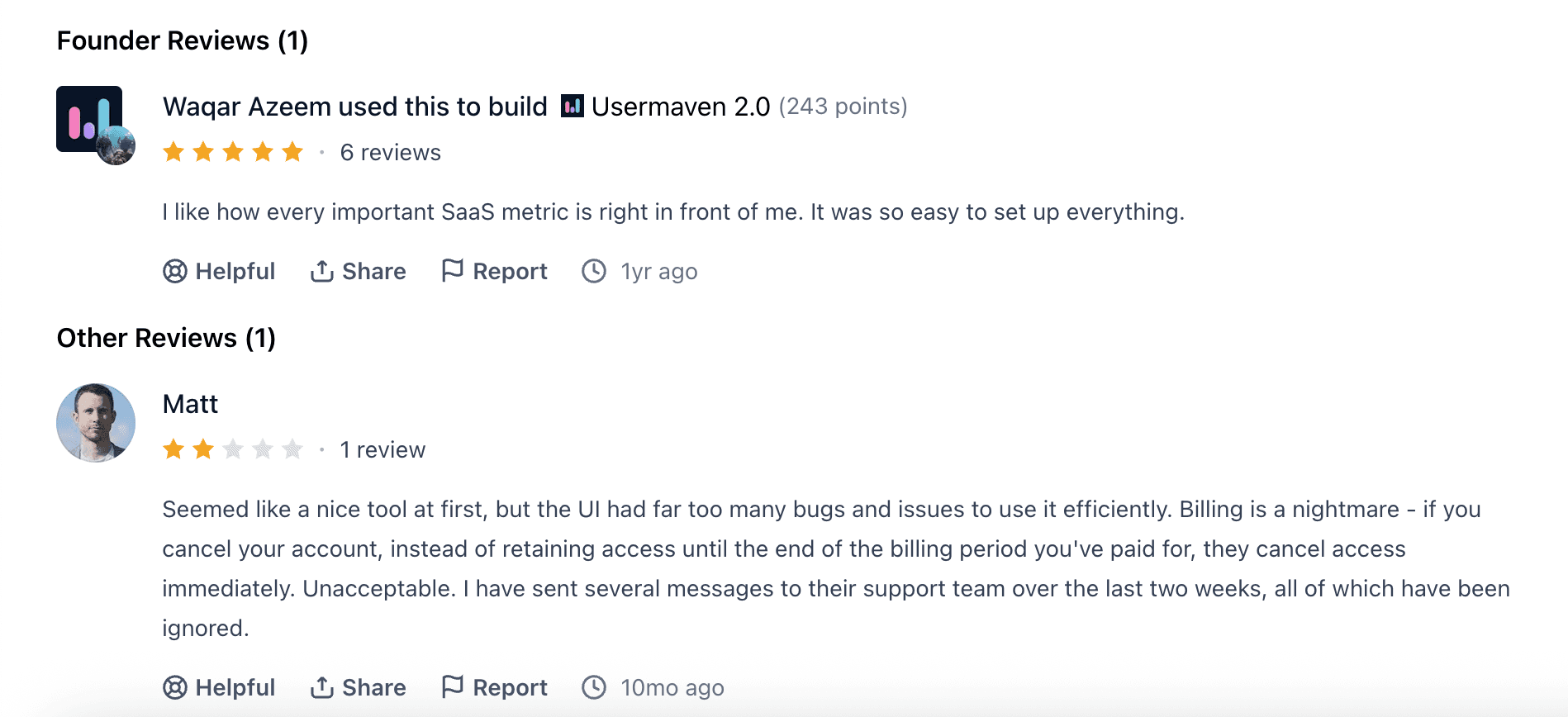
In the screenshot, one founder gives a positive rating and mentions that the tool makes key metrics and setup very simple. This suggests Contentdrips is good for basic and essential tasks.
Meanwhile, a user named Matt leaves a very negative review, mentioning UI bugs, billing problems, and unresponsive support.
Since there are so few reviews, it’s hard to draw a clear conclusion. The current feedback is split between users who appreciate its simplicity and those who are frustrated by technical and support issues.
With that in mind, let’s take a closer look at it ourselves.
Contentdrips Pros and Cons
✅ Pros
Very easy to use: beginners can create content quickly.
Affordable pricing: great value for individual creators and small teams.
Strong for LinkedIn content: optimized tools for posts and carousels.
Fast content production: AI speeds up writing, design, and repurposing.
Brand consistency: brand profiles and kits keep everything aligned.
❌ Cons
The free plan is very limited.
Not ideal for long-form writing.
Customization is more restricted than professional design tools.
Some AI outputs may feel basic.
Important features require paid plans.
Contentdrips Features
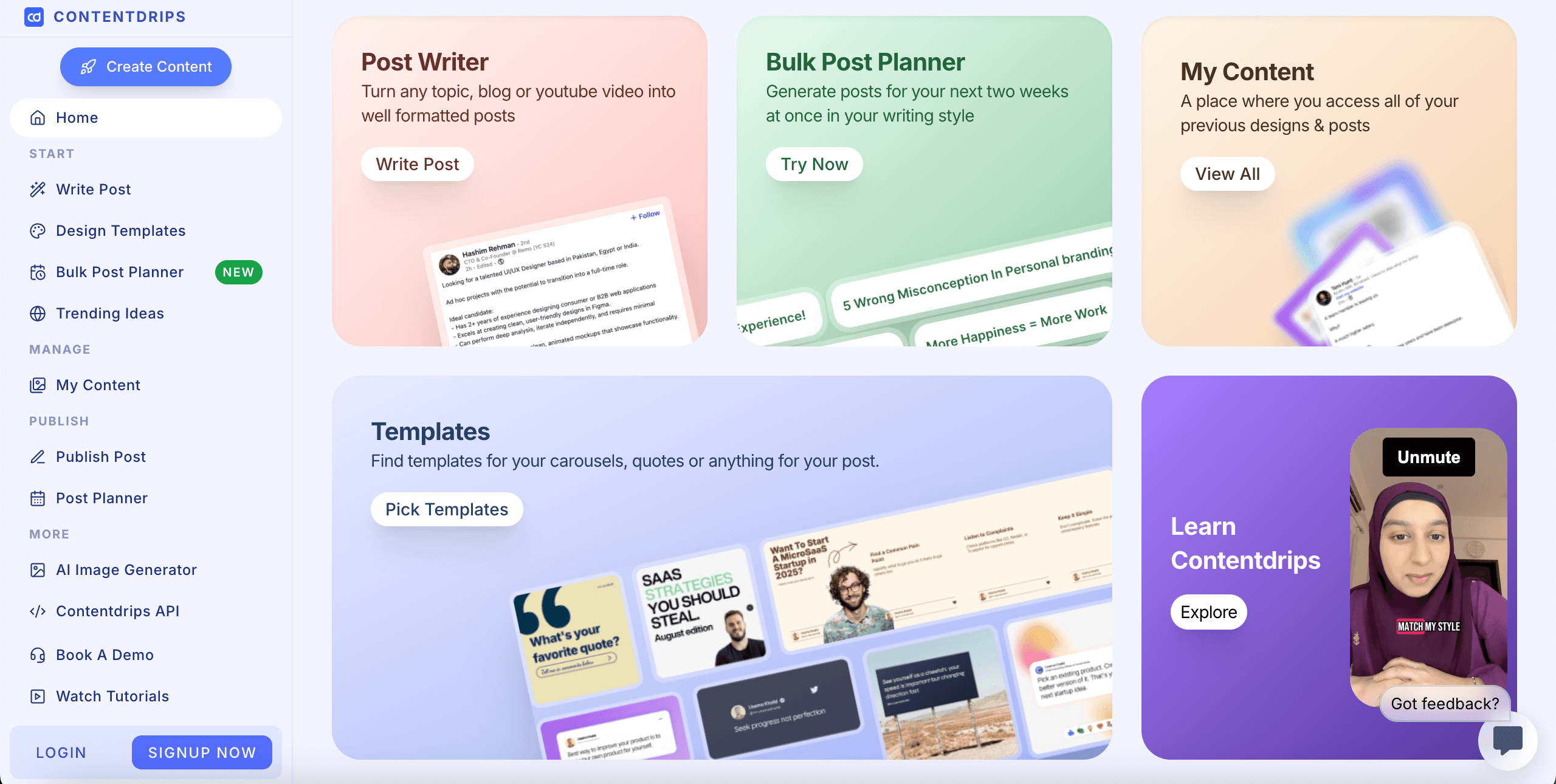
ContentDrips offers a suite of AI tools that accelerate content creation and help creators maintain consistency across platforms.
Each feature focuses on a different step in the content process, enabling you to research, write, design, and refine your posts more effortlessly.
1. Write LinkedIn Posts
The LinkedIn Post Writer assists you in crafting posts that align with the platform's style.
Simply select a template, add your topic, and allow the AI to write in your voice or employ your preferred copywriting style.
It’s particularly beneficial for sustaining a consistent posting schedule without running out of ideas.
2. Create Carousels With AI
This tool researches your topic, identifies key information, and organizes it into a clear, engaging carousel format.
You won’t have to spend hours brainstorming slides, designing layouts, or rewriting content. ContentDrips constructs the entire carousel for you, making it ready for editing and publishing.
It’s ideal if you seek quick, high-quality carousels for LinkedIn or Instagram.
And it can be accomplished with minimal effort.
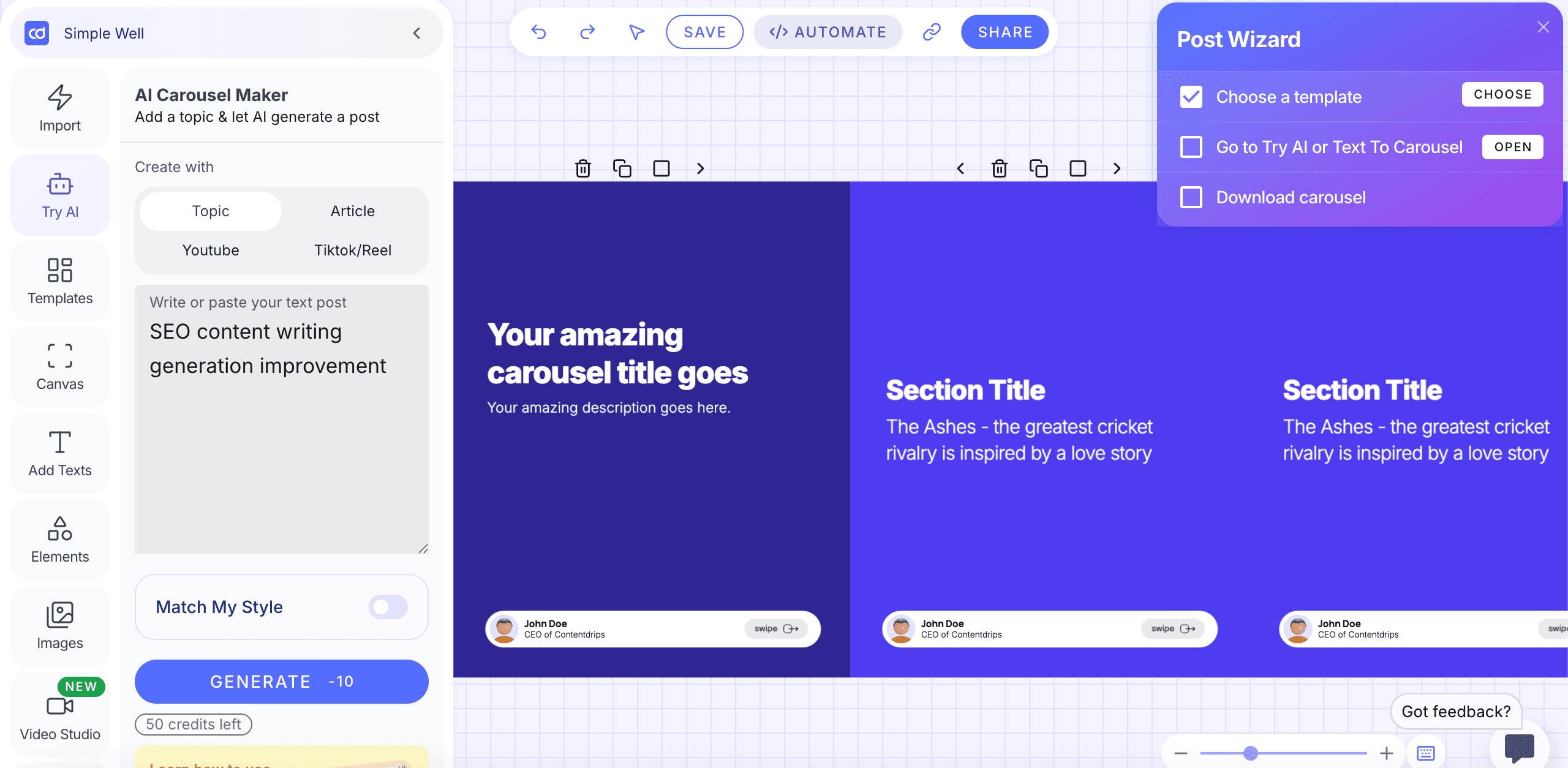
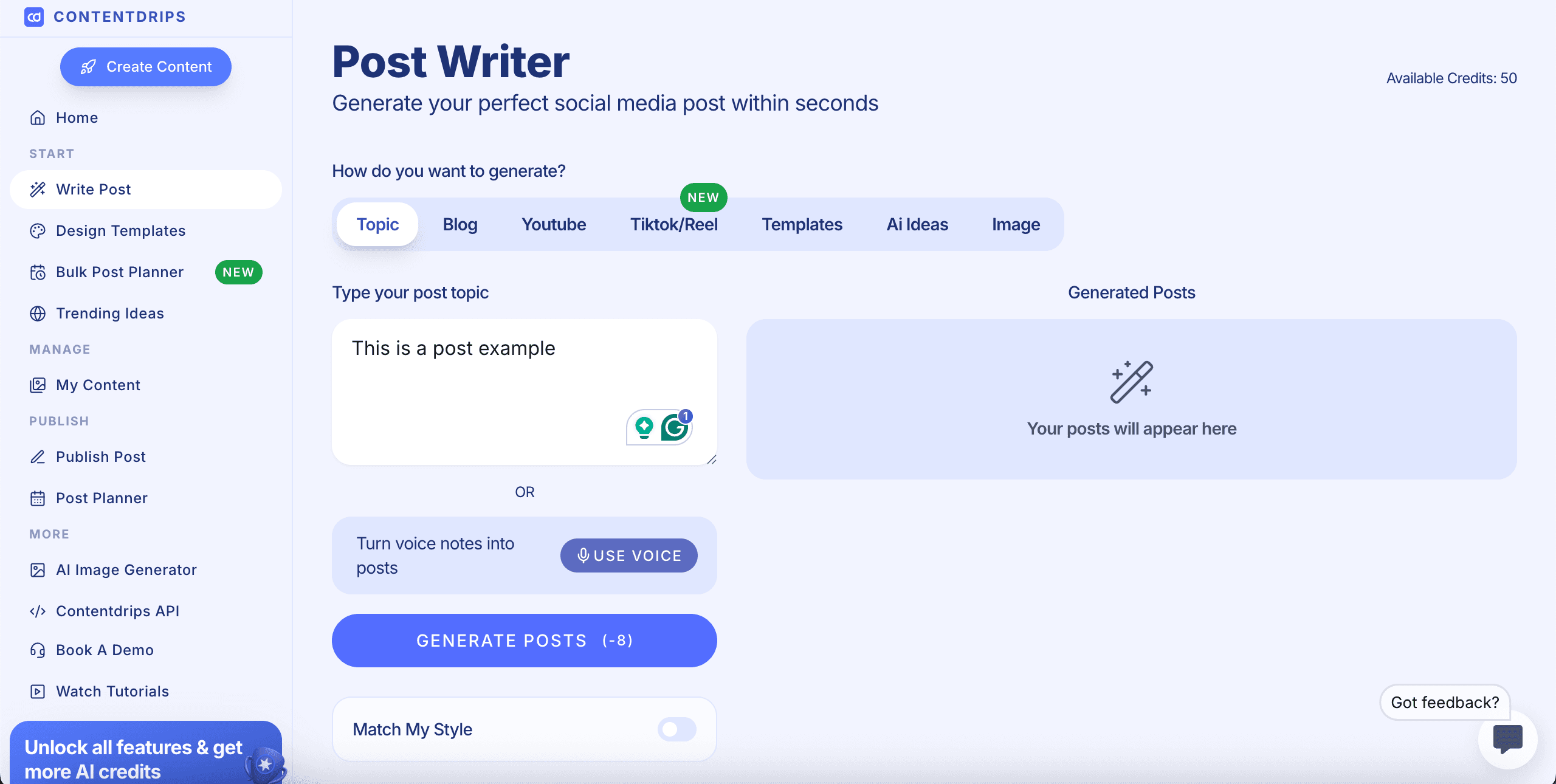
The dashboard is straightforward and user-friendly. You can begin by typing a topic, pasting an article, or importing content from YouTube or TikTok.
With a single click, the AI transforms your input into a complete carousel with titles, sections, key points, and swipe-friendly formatting.
You can browse templates, adjust layouts, edit text, modify colors, add images, and rearrange elements effortlessly using the built-in canvas editor.
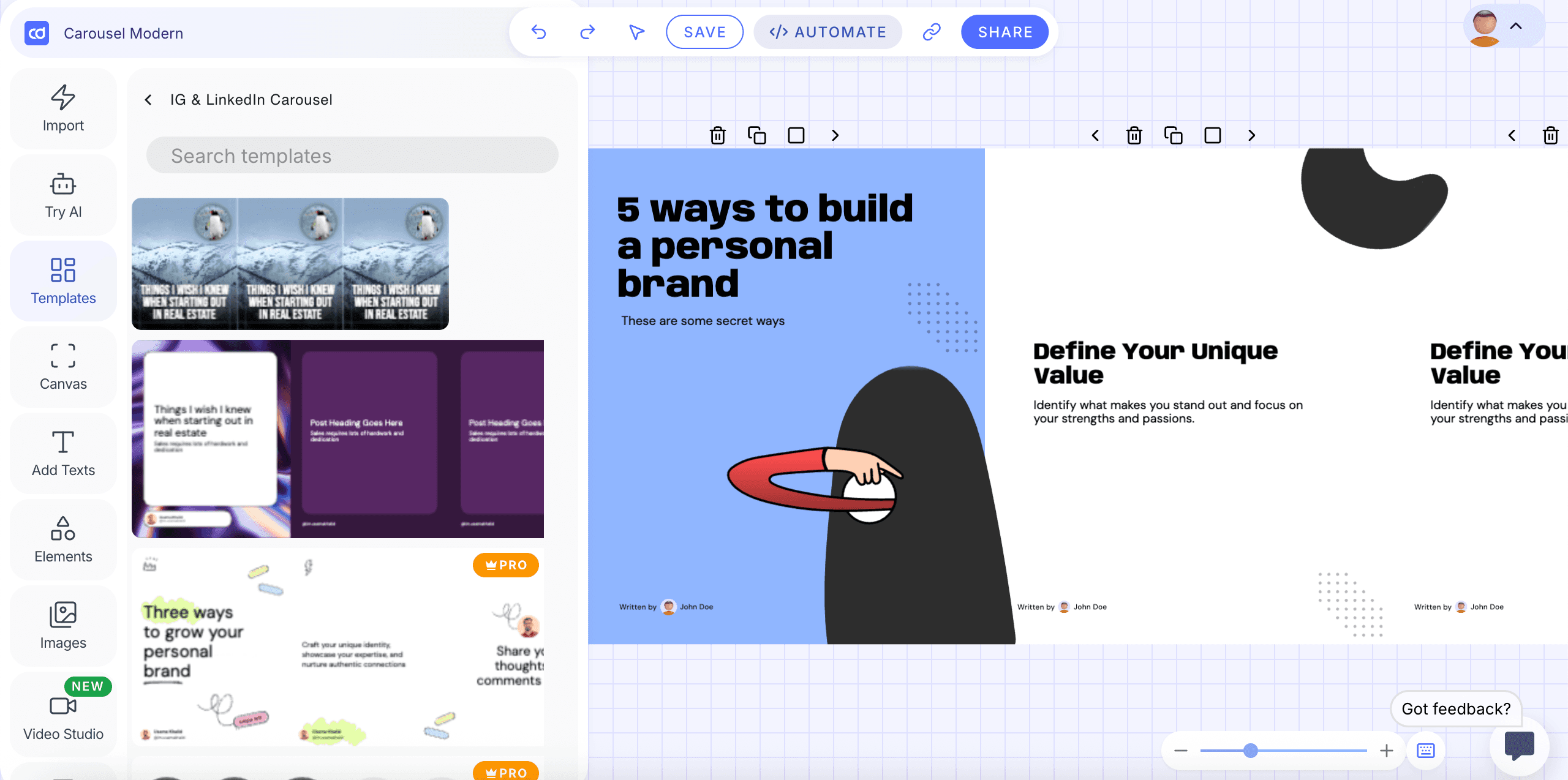
The “Match My Style” feature ensures your branding remains consistent. The Post Wizard aids you in selecting a template, creating AI content, and downloading your finished carousel.
Using this tool, you can convert your idea into a polished LinkedIn or Instagram carousel in just a few minutes, without requiring advanced design skills.
3. Check Content Trends
ContentDrips monitors niche topics and shows you which audiences are currently engaging with them.
Rather than guessing what to post, you receive real-time insights on trending topics. This allows you to create timely, relevant content that performs better.
It’s a smart strategy to stay ahead of the trends.
4. Generate Images Using AI
The AI Image Generator enables you to swiftly create visuals that correspond with your post’s message without needing design skills.
You can generate images in two ways: either by allowing the tool to interpret your written content (“Post Topic”) or by crafting a direct creative prompt.
Once your text is added, you can choose from various visual styles, such as Realistic, Design, 3D Render, Anime, or keep it on Auto for intelligent detection.
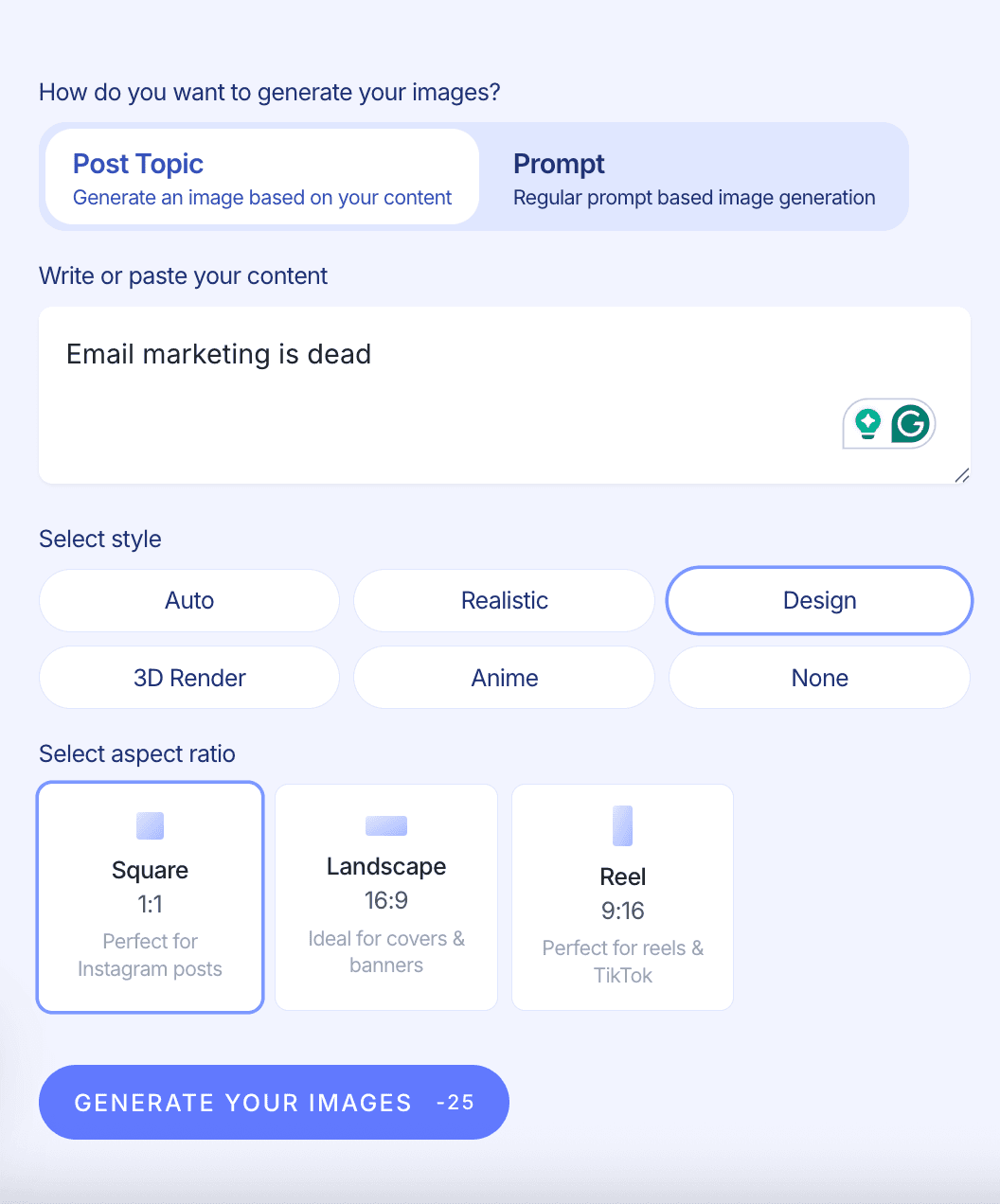
The tool also allows you to select the perfect aspect ratio for your platform: Square for Instagram, Landscape for banners and covers, or Reel format for TikTok and vertical videos.
With a single click, it generates ready-to-use images tailored to your content and style, making your posts more eye-catching in a matter of seconds.
However, the quality is not the best available. And since your credits are limited, you’ll want to utilize them wisely (especially if you're regularly producing visuals).

5. Post Planner
The post planner ensures you stay consistent by aggregating all your upcoming content in one location.
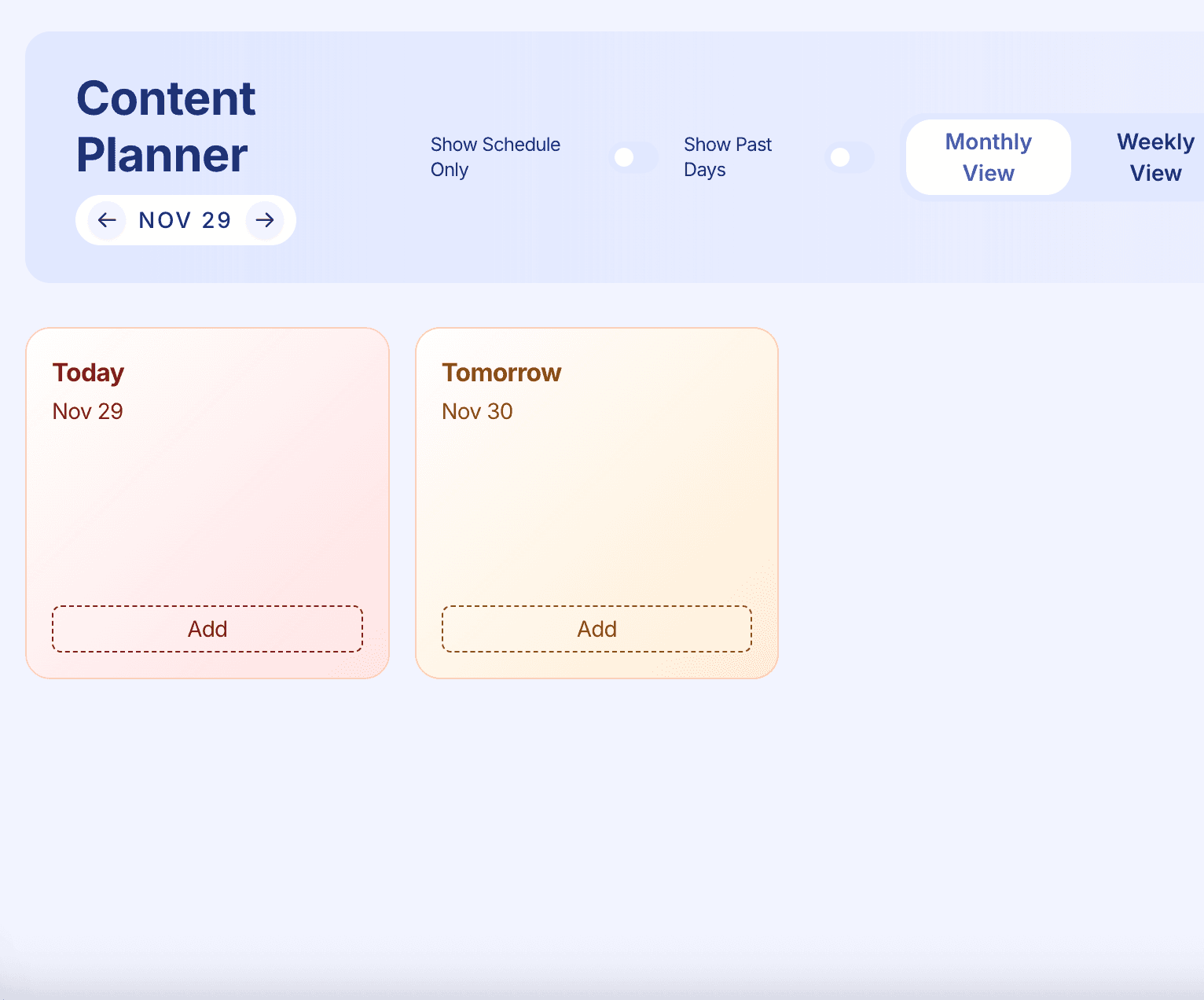
You can schedule posts, plan ideas for the week or month, and see which formats you still require, such as carousels, videos, text posts, or images.
It functions as a visual calendar, allowing you to drag and drop your planned content, adjust publishing dates, and view your entire content pipeline at once.
No matter how frequently you post, the planner assists you in staying on track and avoiding feelings of overwhelm.
Pricing and Plans Overview
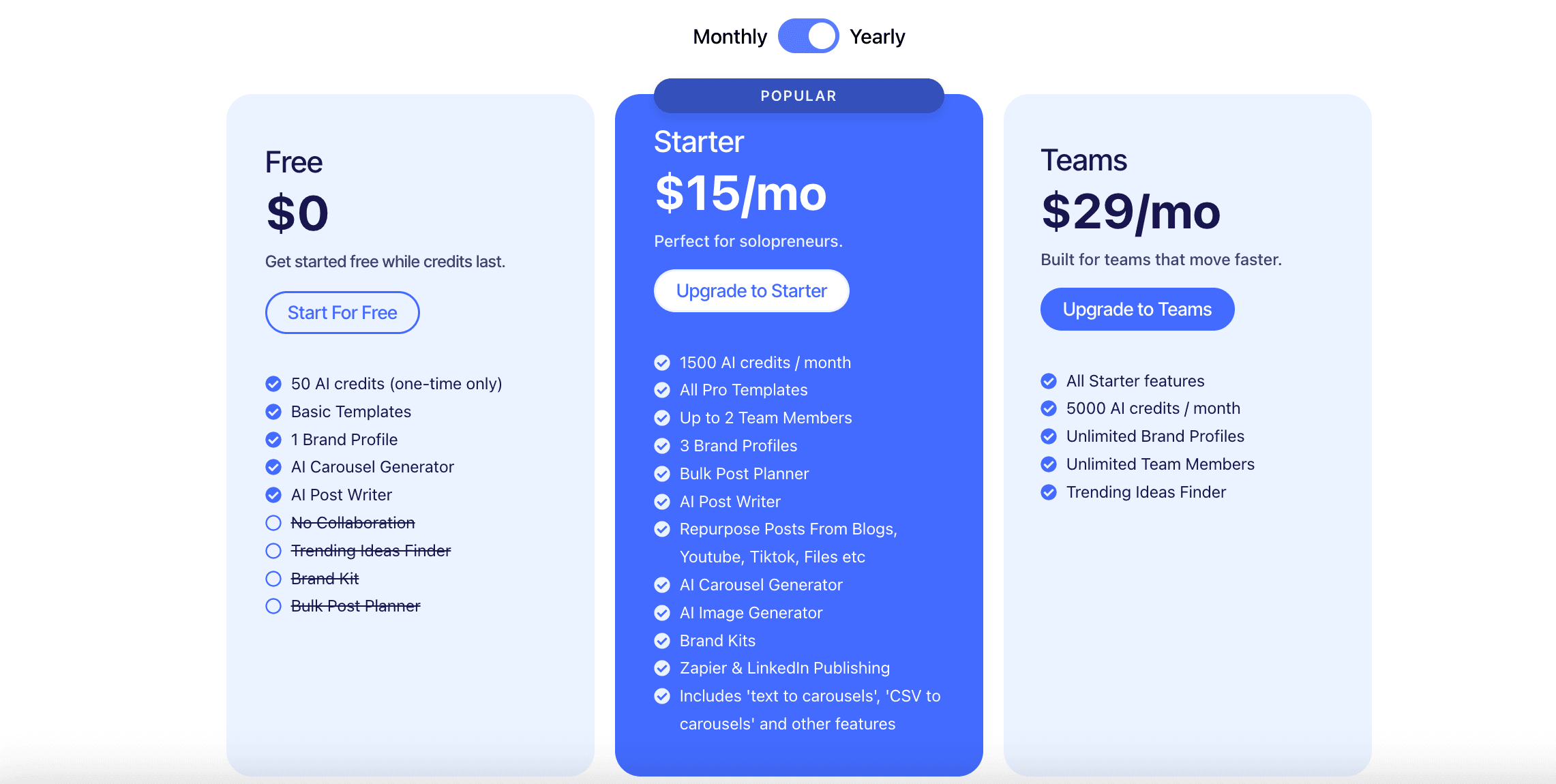
ContentDrips keeps its pricing simple and accessible. The platform starts with a free plan for beginners, while the paid tiers remain affordable for both solo creators and growing teams.
The Starter plan costs ₹1,250 per month, offering a low-cost entry point for serious content creators.
For teams that need more power and higher limits, the ₹2,400-per-month plan delivers strong value without breaking the budget.
Plan | Price | Key Features | Best For |
|---|---|---|---|
Free | ₹0 | - 50 AI credits (one-time) - Basic templates - 1 brand profile - AI Carousel Generator - AI Post Writer | Beginners testing the platform |
Starter | ₹1,250/mo | - 1500 AI credits/month - All Pro templates - Up to 2 team members - 3 brand profiles - Bulk Post Planner - AI Post Writer - Repurpose posts from blogs, YouTube, TikTok, files, etc. - AI Carousel Generator - AI Image Generator - Brand Kits - Zapier & LinkedIn publishing - Includes “text to carousels,” “CSV to carousels,” and other advanced tools | Solopreneurs and individual creators |
Teams | ₹2,400/mo | - All Starter features - 5000 AI credits/month - Unlimited brand profiles - Unlimited team members - Trending Ideas Finder | Teams and agencies that create content fast |
MagicPost: The Best Alternative to Contentdrips
Contentdrips has several interesting features, but MagicPost keeps things simple and affordable.
MagicPost focuses on what creators care about most: creating engaging social media content.
Features | MagicPost | Contentdrips |
Price | from $27 to $41 | from $15 to $29 |
Categories | Social Media Marketing | AI post generator |
Target users | Marketers, writers, agencies, and businesses are producing varied content, Content Creators, and Small businesses | Marketers, writers, agencies, and businesses are producing varied content |
Strengths | Saves time, consistent, affordable automation. | Affordable automation, Versatile, AI-driven. |
Weaknesses | No analytics, Lacks originality and deep creativity | Limited customization, AI needs editing, Basic scheduling, Limited analytics |
1. Made for Creators
MagicPost was built with marketers, freelancers, and social media managers in mind.
You can start writing, scheduling, and posting right away with MagicPost. There are no complicated setups or extra integrations needed.
If you want to grow on LinkedIn, Instagram, or TikTok, MagicPost gives you a faster and smoother workflow than most all-in-one AI platforms.
2. Consistency Made Simple
While many AI tools focus on long-form content, MagicPost is great at creating short, engaging social media posts.
Whether you need LinkedIn carousels or Instagram captions, MagicPost helps you make content that feels natural and matches your style.
You get unlimited prompts and built-in scheduling, so you can brainstorm, write, and publish everything in one place. That’s hard to find at this price.
3. Lightweight, Yet Effective
MagicPost doesn’t have advanced SEO or chatbot features like some other tools, but that’s actually a benefit.
Its simplicity and focus provide exactly what you need to create better content and grow your social media presence efficiently.
Stanley Review (2026): Is This ₹12,500/mo. LinkedIn Tool Worth It?
Stanley is a ₹12,500/mo. LinkedIn AI tool with no free trial. This Stanley review covers what it does, what it doesn’t do, and whether it’s worth it.
CoPost Review: Features, Prices, Pros and Cons
Discover CoPost, and learn why MagicPost is the best alternative for AI-powered LinkedIn content creation, featuring simpler pricing and unlimited post generation.
CoPostly Review: Features, Pricing, and Drawbacks
CoPostly review covering features, pricing, pros and cons, and plan comparison to help you decide if it’s the right LinkedIn content tool for you.

How to Write Great LinkedIn Posts with AI (2026)
Learn how to create excellent LinkedIn posts with AI by developing your writing style, using MagicPost, and trying out methods to enhance engagement.
Heyoo Review: Features, Advantages & Disadvantages
Review of Heyoo: what it does well, where it falls short, how much it costs, and who it actually makes sense for on LinkedIn.