

LinkedIn reach is down. According to Richard van der Blom’s Algorithm Insights Report, average visibility dropped around 47% in 2025, engagement fell 39%, and follower growth declined 42%. For 98% of users, impressions are lower than they were a year ago.
That’s the bad news. The good news is that the drop isn’t random; it’s the result of a more selective algorithm that now rewards specific behaviors and penalizes others. Once you know what those are, the path to more impressions becomes a lot clearer.
This guide covers how to increase impressions on LinkedIn in 2026 using data from real research.
What Are LinkedIn Impressions?
A LinkedIn impression is counted every time your content appears on someone’s screen, whether they stop to read it or scroll straight past. It’s a measure of reach, not engagement. A post can have thousands of impressions and almost no comments.
That said, impressions are still the foundation of everything: no impressions means no engagement, no followers, and no pipeline.
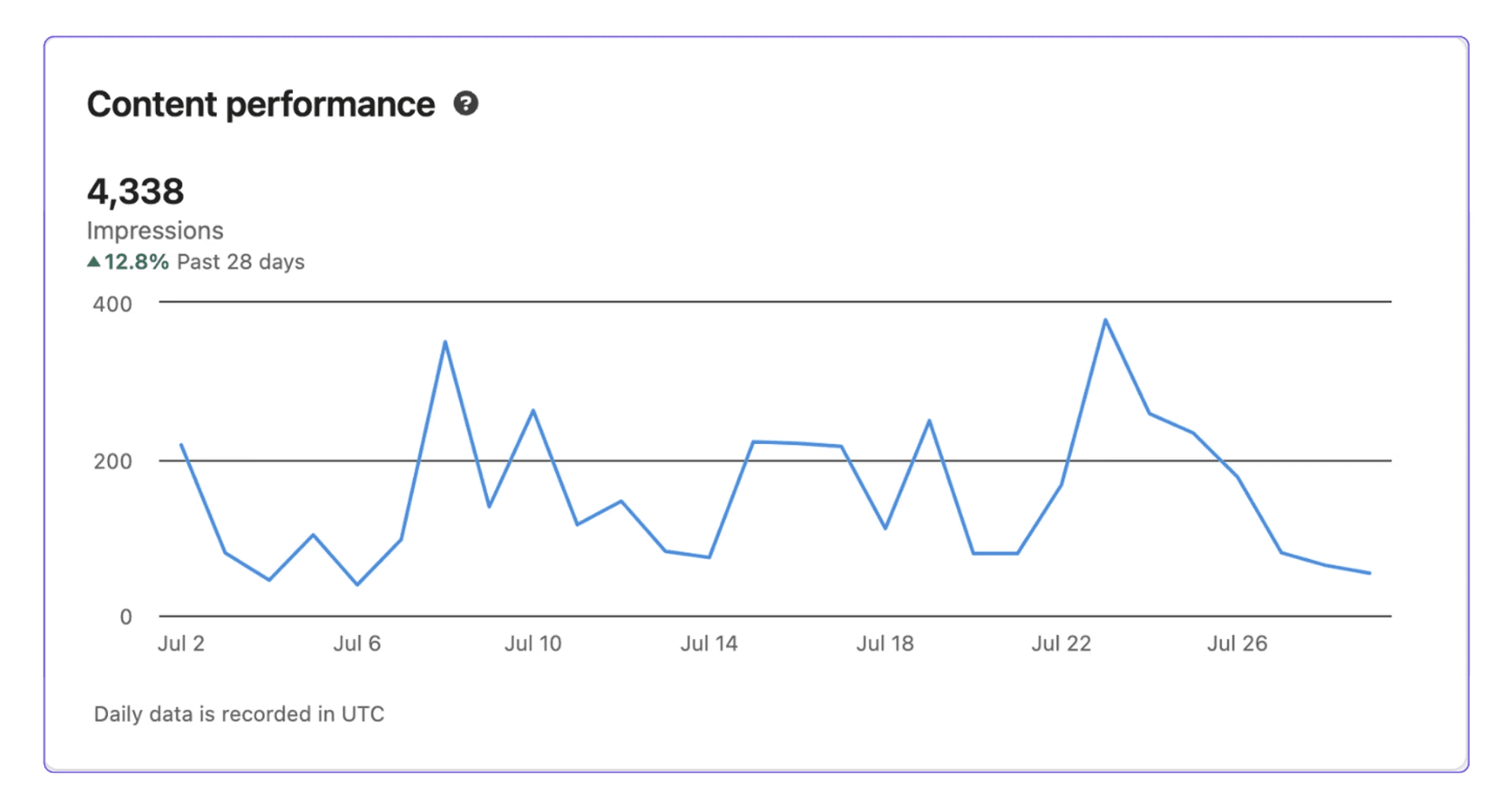
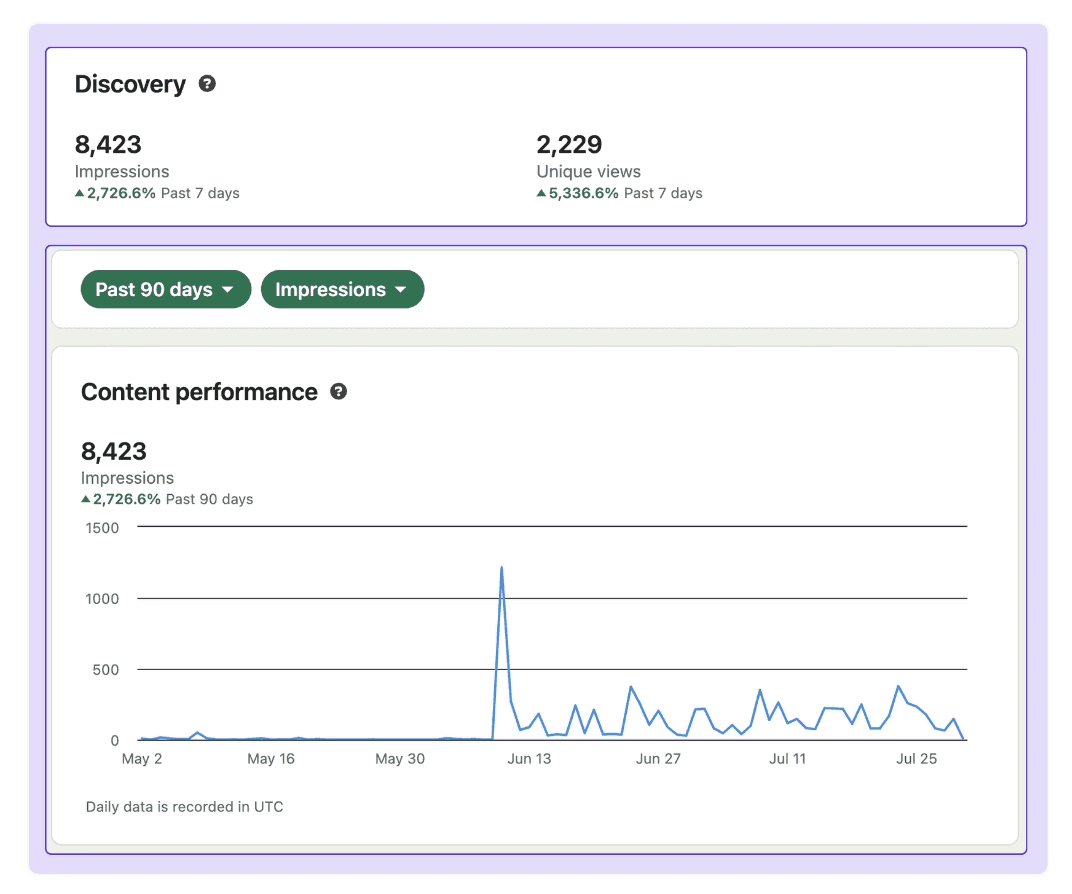
The picture above shows what healthy impression counts look like inside LinkedIn Analytics. The importance lies in the number and the curve’s consistency.
How LinkedIn Decides Who Sees Your Post
Before tactics, it helps to understand the mechanics. LinkedIn doesn’t show your post to everyone at once; it runs a staged distribution process. Here’s what that process looks like:
Stage 1—Initial classification (0 to 60 minutes): LinkedIn evaluates quality, checks for spam signals, and sets an initial test audience size.
Stage 2—Engagement testing (1 to 2 hours): The algorithm measures how quickly the test audience engages. Comments count twice as much as likes. Dwell time and saves are weighted heavily.
Stage 3—Extended distribution (2+ hours): If the post passes the engagement test, LinkedIn expands reach based on relevance to the poster’s network and topic history.
What changed significantly in 2025 is that posts now have a long tail. Strong content can continue circulating for two to three weeks rather than dying after 24 hours.
This is good news for quality. It means a great post earns more over time, but it also means the first hour after publishing matters enormously for getting into extended distribution.
📊 Data Snippet: According to Richard van der Blom's analysis, your LinkedIn feed consists of top creator content (31%), promoted company content (28%), other creator content (28%), LinkedIn Ads (11%), and organic company content (2%). Personal profiles have the most organic opportunity, whereas company pages get almost no free reach without employee amplification.
How to Increase LinkedIn Impressions: 7 Tactics That Actually Work
Impressions don't improve by accident. Each of the tactics below targets a specific part of how LinkedIn evaluates and distributes content. Work through them in order and the effects compound.
1. Choose the Right Format
Format is the single highest-impact decision you make before writing a word. The performance gap between formats in 2026 is extreme: carousels achieve engagement rates nearly 3.7x higher than text-only posts.
Here's the full picture, combining engagement rate data from Meet Lea's 2026 compilation and reach multiplier data from a dataset of over 621,000 LinkedIn posts:
Format | Avg Engagement Rate | vs Text | Reach Multiplier |
|---|---|---|---|
Carousels / Documents | 24.42% | 3.7x | 1.45x |
Multi-image posts | 6.60% | 1.6x | 1.18x |
Video | 6.47% | 1.6x | 1.10x |
Image | 6.05% | 1.5x | 1.18x |
Polls | 4.40% | 1.1x | 1.64x |
Text only | 4.10% | — | 0.88x |
Why Are Carousels Are Best for Engagement?
Carousel slides require swiping, and each swipe counts as an engagement signal in LinkedIn's algorithm. This extended interaction tells the platform the content is worth distributing further.
Users spend 15 to 20 seconds on carousels versus 8 to 10 seconds on single images or text posts, and dwell time is one of the algorithm's key ranking signals.
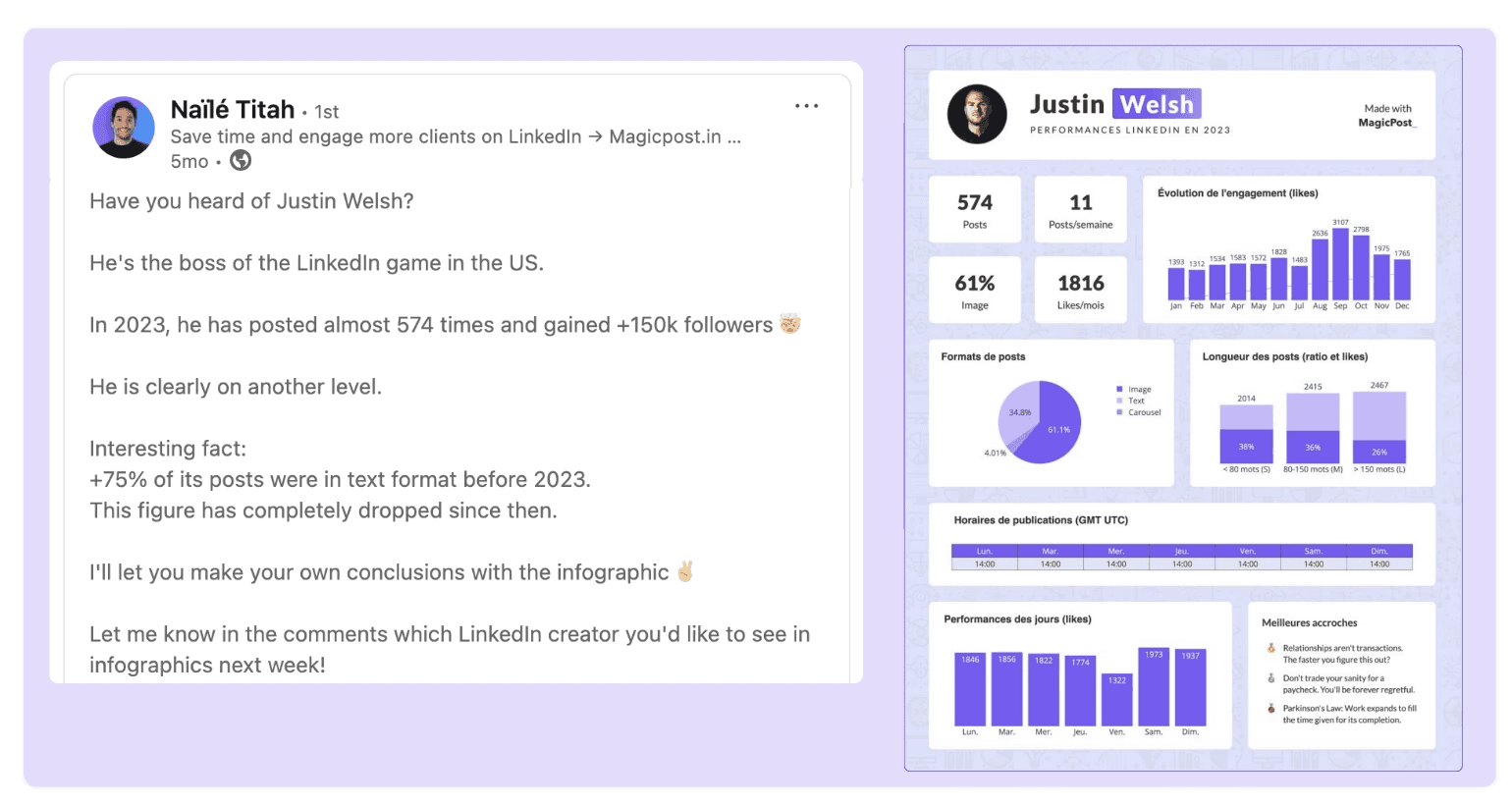
The optimal carousel structure follows a cover slide with a numbered list framework. Carousels with numbered frameworks (e.g., "5 ways to...") achieve 20 to 30% more dwell time than loosely structured slides. Aim for 5 to 10 slides with bold text, clear narrative flow, and strategic white space.
Why Use Polls More Often?
Polls achieve a 1.64x reach multiplier for personal profiles (the highest of any format) and their engagement rate has doubled since 2023.
Despite this, they remain heavily underused. A well-crafted poll with a timely question, 2 to 4 options, and an "Other" option to prompt comments can generate hundreds of responses and sometimes surfaces as platform-recommended content.
One caveat is that overusing polls looks spammy. Use them selectively, not as a default filler format.
Why Format Rotation Matters?
Accounts that rotate between formats (carousels, text, video, and polls) achieve 37% more follower growth and 28% more consistent visibility compared to accounts that repeat the same format.
Audience fatigue with repetitive format is real. Mixing it up isn’t just variety for its own sake; it’s a measurable reach strategy.
💡 Pro Tip: Post 3 to 5 times per week and never more than once in 24 hours. Frequent posting can reduce reach; LinkedIn's algorithm prefers giving each post room to breathe and run its distribution cycle.
2. Write for Saves, Not Just Likes
Saves are the most undervalued signal on LinkedIn. Unlike likes, which are passive and cheap, a save signals that your content is worth returning to.
LinkedIn has only recently started showing save counts publicly, which hints at how much weight the platform gives them internally.
📊 Data Snippet: According to AuthoredUp’s research, 1 save equals 5x more reach than 1 like; 1 save boosts reach twice as much as a meaningful comment; a saved post leads to a 130% higher chance someone follows you; and creators whose posts get saved consistently grow their audience 3x faster on average.
What drives post saves? Posts that teach, clarify, or break something complex into a usable framework. Think checklists, step-by-step guides, data summaries, and templates. In other words, content that’s worth bookmarking, not just skimming once.
Before you publish, ask yourself: would I save this? If the honest answer is no, the post probably needs more substance.
3. Hook Readers in the First Two Lines
LinkedIn truncates your post after two or three lines with a “See more” prompt. Everything before that cutoff is your hook, and it determines whether anyone reads the rest.
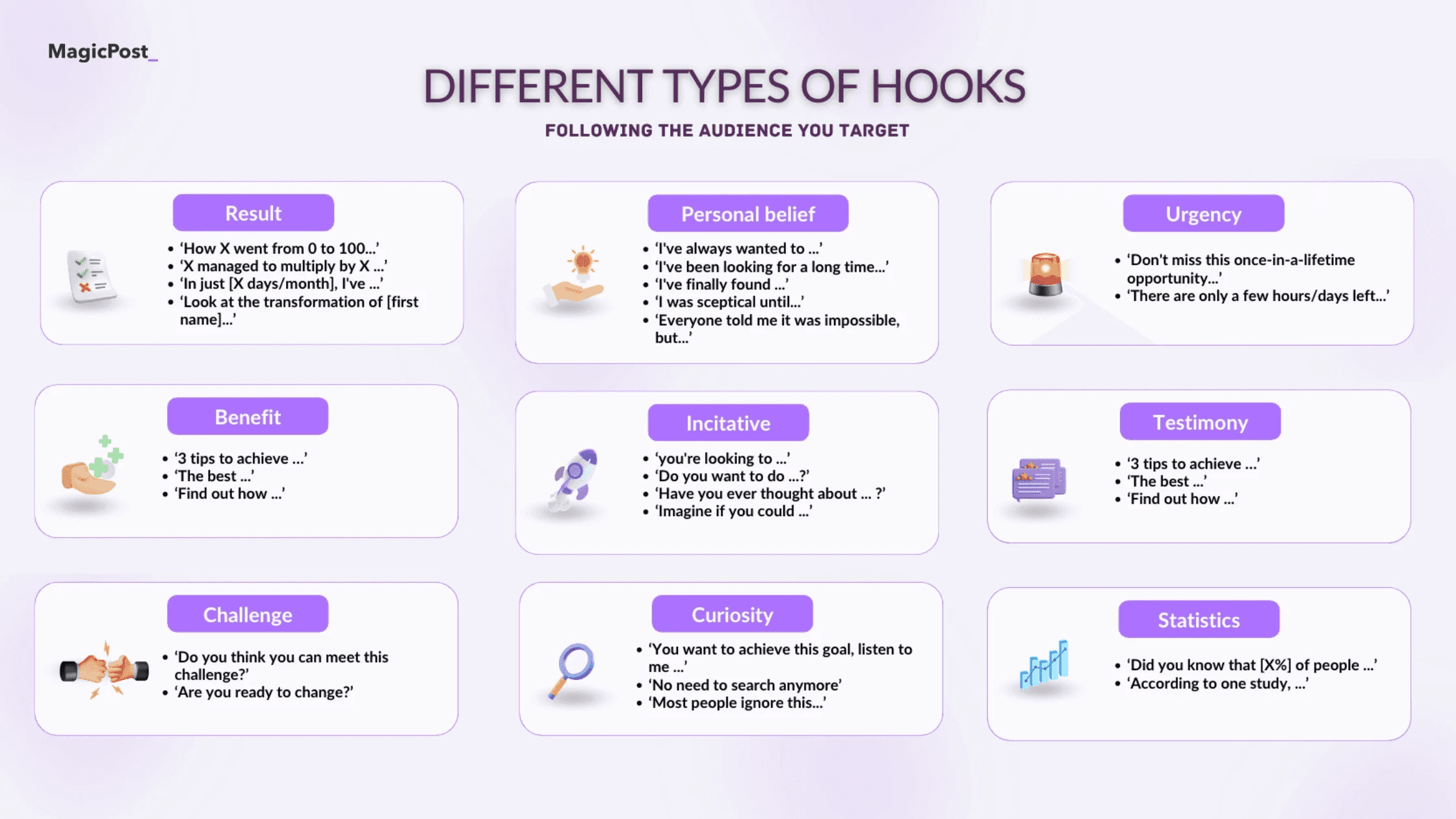
A post with 10,000 impressions and a weak hook generates almost no engagement. A post with 1,000 impressions and a strong hook can outperform it.
A few things that reliably work:
Lead with the payoff. State your conclusion or insight in line one; don’t build up to it.
Use specific numbers. “5 things” outperforms “some things” every time.
Make a counterintuitive claim. Something that contradicts common wisdom earns that click because the reader needs to know how you back it up.
Ask a question your audience is already asking themselves. Not a rhetorical or a generic question; focus asking questions specific to their actual situation.
For a deeper breakdown of hook mechanics, our guide on LinkedIn hooks covers the structures that consistently earn the “See more” click.
4. Write for Readability
The algorithm favors posts that are easy to read, and so does your audience. Research shows that posts above a 10th-grade reading level experience over 35% less reach. Aim for short sentences, plain language, and a 4th-grade reading level as your target.
Structure matters too. The best-performing posts tend to have:
Short paragraphs (maximum 4 lines, ideally 2 to 3).
White space between paragraphs, as it makes the post feel scannable rather than dense.
16 to 20 sentences for longer posts that aim to rank in extended distribution.
Formatting tools matter here. Our free LinkedIn text formatter lets you add emphasis using Unicode characters. It’s a small effort that measurably improves scannability.
5. Engage Strategically in the First Hour
The first 30 to 60 minutes after publishing are critical. Posts that generate likes, comments, and saves during this window are far more likely to pass LinkedIn's engagement test and enter extended distribution.
If you're posting when you can't respond to comments, you're wasting the golden hour.
Why Are Indirect Comments Advantageous?
Not all LinkedIn comments are equal; there are two types to pay attention to:
Direct comments (replies to your post)
Indirect comments (replies to other comments on your post)
Posts with active indirect comment threads (where a discussion is happening in the replies) can see up to a 2.4x increase in reach compared to posts with only direct comments.
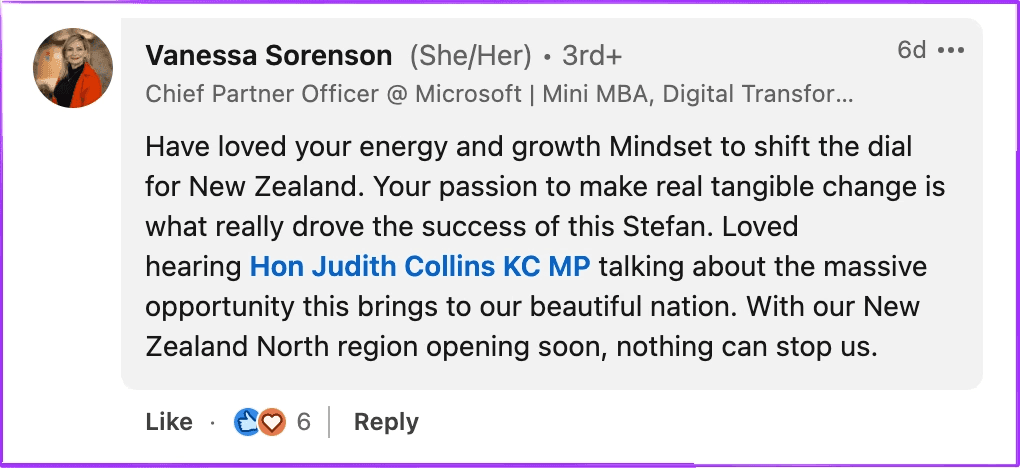
This means responding to every comment and asking follow-up questions isn’t just good manners; it’s a reach strategy. The more discussion threads you generate, the stronger the algorithm signal.
Engage With Others Before and After Posting
After publishing, engage with at least five other posts in your niche. This signals to LinkedIn that you're an active participant in your topic area, not just a broadcaster, and it increases the likelihood your content gets suggested to the same audience you just engaged with.
Avoid leaving too high a percentage of your own comments on your post. Replying to others is fine, but a post where most comments are from the author looks like low external interest and can trigger a reach penalty.
6. Build a Relevant Network, Not Just a Large One
LinkedIn's algorithm prioritizes showing your content to people who are likely to engage with it. A network of 2,000 highly relevant connections in your industry will generate more impressions than 10,000 loosely connected followers who never interact with your content.
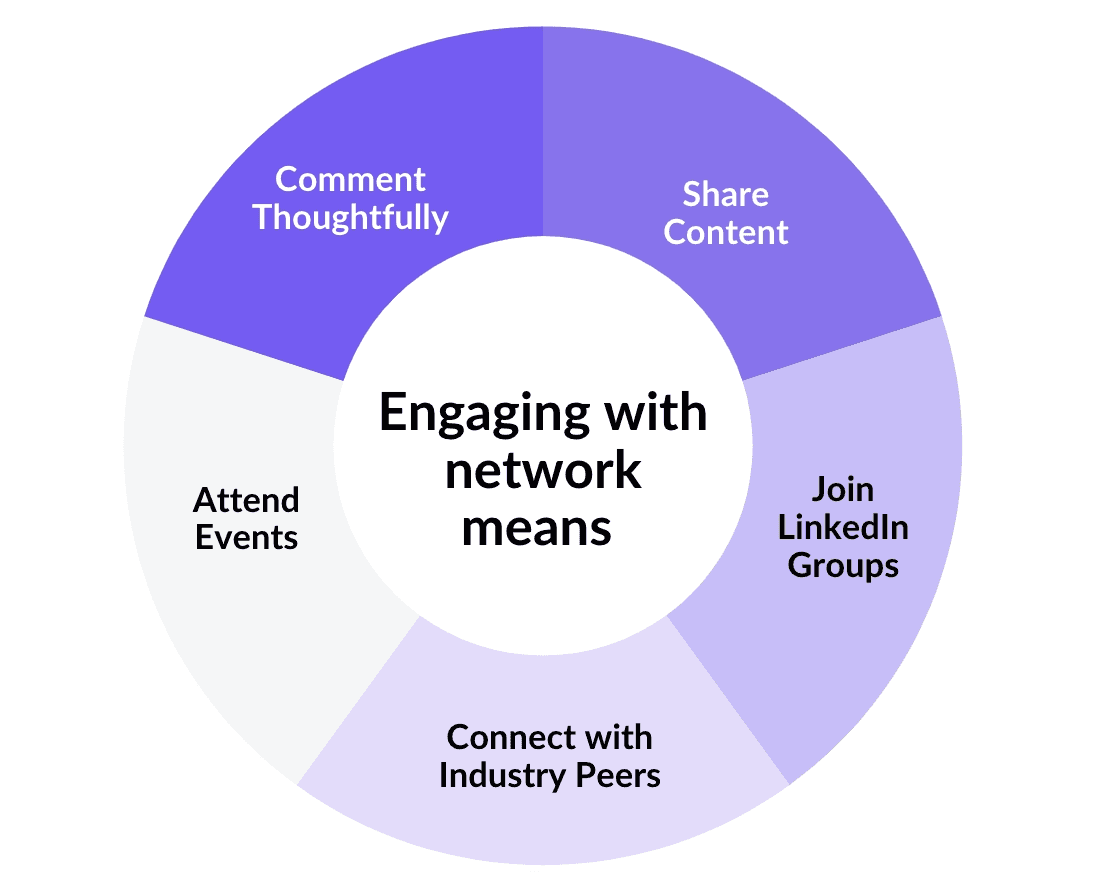
Aim for a follower-to-connection ratio of at least 1.5. If you have 1,000 connections, 1,500 followers is a healthy signal of organic interest in your content. Focus on connecting with people in your niche and regularly engaging with their content to build a reciprocal relationship.
7. Track What Actually Matters
More impressions is the goal, but raw impression counts without context don’t tell you much.
Here are the LinkedIn metrics worth tracking:
Engagement rate: Impressions divided by interactions. This tells you whether your reach is converting to real attention.
Saves: The strongest trust signal. If your saves are growing, your content is earning long-term value.
Profile views: A post that drives profile visits is doing its job; it's converting impressions into interest.
Comment quality: Thoughtful, substantive comments signal that your content is reaching the right people.
Follower growth: A lagging indicator of whether your content is consistently attracting new audience members.
Compare your metrics over time rather than post by post. A single post’s performance is noisy, but a trend across 30 to 90 days is the signal.
Common Mistakes to Avoid Trying to Raise Impressions on LinkedIn
Knowing what drives impressions is only half the picture. These are the three habits that cancel out everything else you're doing.
1. Sharing Single Links
The conventional advice is "links kill your reach,” but the reality is more nuanced.
Posts with a single link do perform worst, but posts with 4 or more links actually flip, triggering more saves and discussion, with 3 to 5x higher median reach than single-link posts.
Essentially, one link looks like a promotion, but multiple links signal a resource worth saving. Here's how to handle links depending on your situation:
Link Option | Distribution Impact | Best For | How to Do It |
|---|---|---|---|
Add link after comments start | 🟢 Lowest penalty | Guides, case studies | Publish without link, edit it in later. Ask a question first. |
Link in first comment | 🟡 Low penalty | Updates, quick tips | Post link in first comment. Mention 'link in comments' in the copy. |
Link in post, preview removed | 🟠 Medium penalty | Must-have links | Paste link, remove the preview card. Keep text short. |
Link in post, preview on | 🔴 Highest penalty | Avoid if possible | Only when the preview is essential to the post. |
2. Using Hashtags
LinkedIn disabled hashtag pages in October 2024 and hashtags are no longer clickable on desktop. Research shows they have had no impact on reach over the past year.
Including 3 to 5 hashtags slightly reduces visibility; more than 6 can actively hurt reach. If you use them, use a maximum of 3 and only for search discoverability, not as a reach strategy.
3. Looking for a Universal Best Posting Time
Post on Tuesdays at 9 a.m. is the kind of advice that sounds authoritative and helpful, but it’s not always useful.
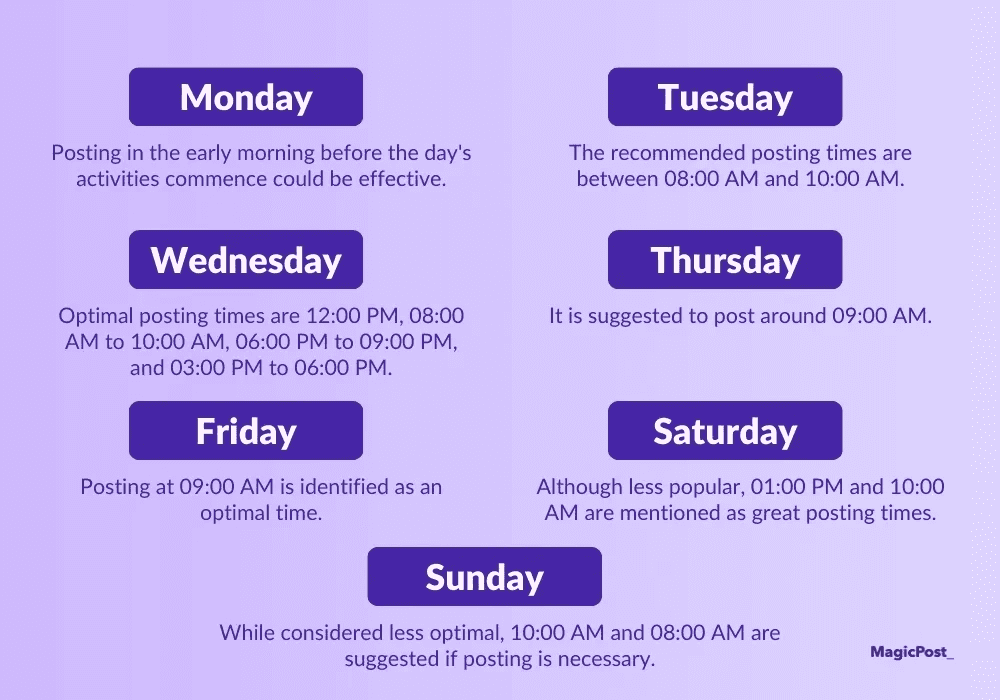
It’s true that LinkedIn users are most active during morning commutes, lunch breaks, and at the end of workdays, but the reality is that LinkedIn's algorithm prioritizes relevance over recency.
A strong post from three days ago can outperform a weak post published five minutes ago. The only posting time that matters is when your specific audience is active and when you can be present to respond to early comments.
4. Posting and Disappearing
The first 30 to 60 minutes after publishing are when LinkedIn decides whether your post enters extended distribution or gets buried.
If you publish and close the tab, you're forfeiting that window entirely. Respond to every early comment, ask follow-up questions to spark discussion threads, and engage with at least five other posts in your niche right after publishing.
The algorithm reads your activity as a signal of relevance; showing up after you post is as important as the post itself.
Increasing impressions on LinkedIn isn't one tactic; it's the compound result of better formats, stronger hooks, smarter engagement, and consistent publishing. Each improvement multiplies the others.
The hardest part is staying consistent when you're also running a business or a career. That's where the workflow matters as much as the strategy.
Write posts with AI that matches your voice, preview them before publishing, and schedule in advance, all in one place, then watch impressions move in MagicPost's LinkedIn analytics tool. Try MagicPost for free. No credit card is required.
FAQ
Why are my LinkedIn impressions so low?
Reach is down for 98% of LinkedIn users compared to 2024, so lower numbers are the norm rather than the exception.
The most common causes are posting text-only content in a feed that rewards carousels and documents, weak hooks that don't earn the "See more" click, and posting without engaging with others in the critical first hour after publishing.
How many LinkedIn impressions is good?
It depends on your network size and industry. For most personal profiles, consistent impressions in the hundreds per post with a growing trend is a healthy baseline. What matters more than the raw number is your engagement rate; impressions that generate comments and saves are more valuable than impressions that get scrolled past.
This guide on what good LinkedIn impressions look like breaks down the benchmarks by profile size, and the monthly LinkedIn benchmark keeps those numbers current.
Does posting more often increase LinkedIn impressions?
Up to a point. The research-backed sweet spot is 3 to 5 posts per week. Posting more than once in 24 hours can actually reduce reach, as LinkedIn limits how often it promotes content from the same source in a short window. Consistency over weeks and months matters more than daily volume.
Do hashtags help with LinkedIn impressions?
No longer. LinkedIn disabled hashtag pages in October 2024 and they are no longer clickable on desktop. Research shows hashtags now have no meaningful impact on reach. Use a maximum of 3 if you want search discoverability, but don't rely on them as a distribution strategy.
What type of content gets the most impressions on LinkedIn?
How does the LinkedIn algorithm affect impressions?
LinkedIn runs a three-stage distribution process. Your post is first shown to a small test audience. If that audience engages quickly (especially with comments and saves), LinkedIn expands distribution to a wider, relevant audience.
Posts that don't generate early engagement get limited distribution regardless of quality. The first 30 to 60 minutes after publishing are the most important window.