"Never put a link in your post, the algorithm hates it." You have read this a hundred times, always stated as gospel, never with a number behind it. So we ran the numbers on 566,957 LinkedIn posts with synced analytics, split by whether they carried an external link and where exactly that link sat. The aggregate answer is brutal, and then it splits into a nuance that almost nobody states correctly.
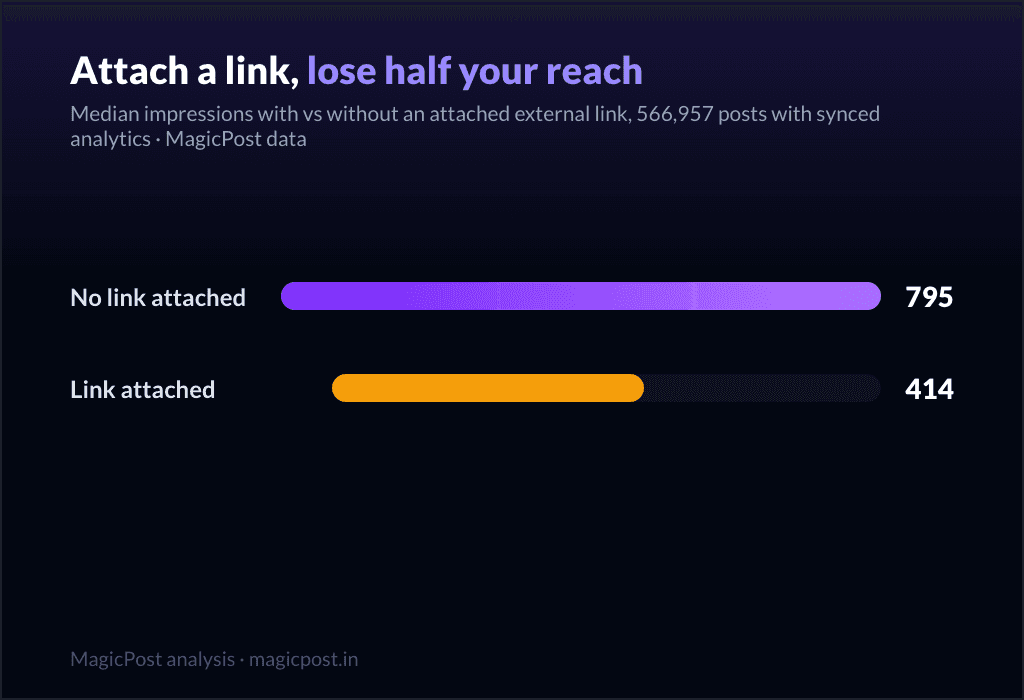
The short version: a post with an attached link preview earns 414 median impressions against 795 for a post without one, and 6 median likes against 19. Reach roughly halved, engagement cut to a third. That is the headline everyone half-remembers.
The longer version is the part you actually need: it is not "links" that get throttled, it is the attached preview card. A URL typed inside your post body does no damage at all. Start with the board.
Link cards vs in-body URLs: the reach numbers
Every number in this article is an impressions measurement, so the pool is fixed: 566,957 posts with synced analytics, aggregated and anonymized, compared on medians so no viral outlier can distort a row.
Post | Posts measured | Median impressions | Median likes |
No attached link | 534,030 | 795 | 19 |
Attached external link | 32,927 | 414 | 6 |
Posts that carry an attached link preview reach 414 median impressions versus 795 without one. That is reach roughly halved, and the engagement gap is even wider: 6 median likes versus 19.
If you stopped reading here you would conclude that linking out is a mistake. You would be half right, and the missing half is the whole point of this page.
The nuance nobody measures: it is the card, not the URL
LinkedIn does not see "a link." It sees two very different things. An attached link is one you paste so that LinkedIn renders a preview card (the image-plus-title box under your text, what we count as the "article" format). An in-body link is a URL sitting inside the words of your post, no card. We split the same 566,957 posts three ways.
Where the link is | Posts measured | Median impressions | Median likes |
Attached preview card | 32,927 | 414 | 6 |
In the post body | 69,166 | 858 | 20 |
No link at all | 464,864 | 786 | 19 |
Read that twice. A URL in your post body earns 858 median impressions, slightly more than the 786 of posts with no link at all, and 20 median likes versus 19. In-body links are not penalized. The throttle lands entirely on the attached preview card: 414 impressions, less than half of either alternative.
This is the actionable takeaway the "never link out" advice gets wrong. The problem was never the link. It is the preview card that hands a reader a one-click exit out of the feed, and the algorithm prices that exit accordingly.
You can cite a source or point to your own site, as long as you do it in plain text rather than letting LinkedIn build the escape hatch for you.
Want to see what links do to YOUR reach? MagicPost's LinkedIn analytics break your own posts down the same way: which ones carried a link card, what they reached, where you stand against these medians. Guessing is optional once you can read it.
What this does not prove: attached links are almost all "articles"
Here is the confounder, stated up front rather than buried. Posts with an attached preview card are, by construction, the article format on LinkedIn. So when we compare "attached link" to "no link," we are partly comparing the article format to image, text and video posts, and the article format is the weakest performer on LinkedIn anyway. Some of the 414-versus-795 gap is the format, not the link itself.
So we put the formats side by side, on the same synced-analytics pool.
Post type | Posts measured | Median impressions | Median likes |
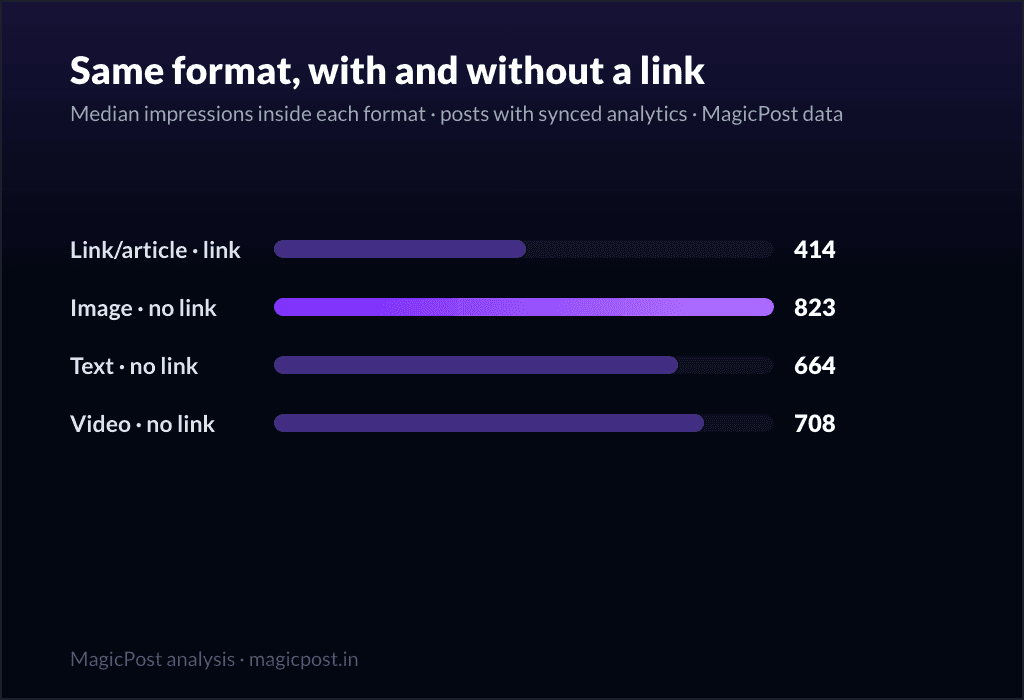
Article (attached link) | 32,897 | 414 | 6 |
Image, no link | 347,689 | 823 | 23 |
Video, no link | 43,078 | 708 | 17 |
Text only, no link | 98,249 | 664 | 11 |
The attached-link/article post (414 impressions) trails even the humblest link-free format, text-only at 664. So part of the penalty is real format weakness. But the three-way kind table already settled the rest: when a post carries a URL in its body instead of an attached card, reach does not drop at all (858 versus 786).
The format confound explains why article posts look bad; it does not rescue the attached card. Both readings point to the same instruction: do not attach the preview.
Does it hold for small accounts?
Yes, in every follower band we measured. We re-ran the attached-versus-no-link split inside three audience sizes, on the same synced-analytics pool.
Follower band | No attached link | Attached link |
Under 5k | 455 | 266 |
5k to 50k | 1,401 | 726 |
50k+ | 9,140 | 3,705 |
The attached-link reach cut is roughly a halving at every size: 455 to 266 for small accounts, 1,401 to 726 in the mid band, 9,140 to 3,705 for the largest. (The absolute numbers climb steeply with audience, which is its own story in what counts as good LinkedIn reach for your size.)
Big or small, attaching a preview card costs you about half your reach. The penalty scales with you rather than sparing the small accounts or punishing the large ones.
Four years of creators learning this the hard way
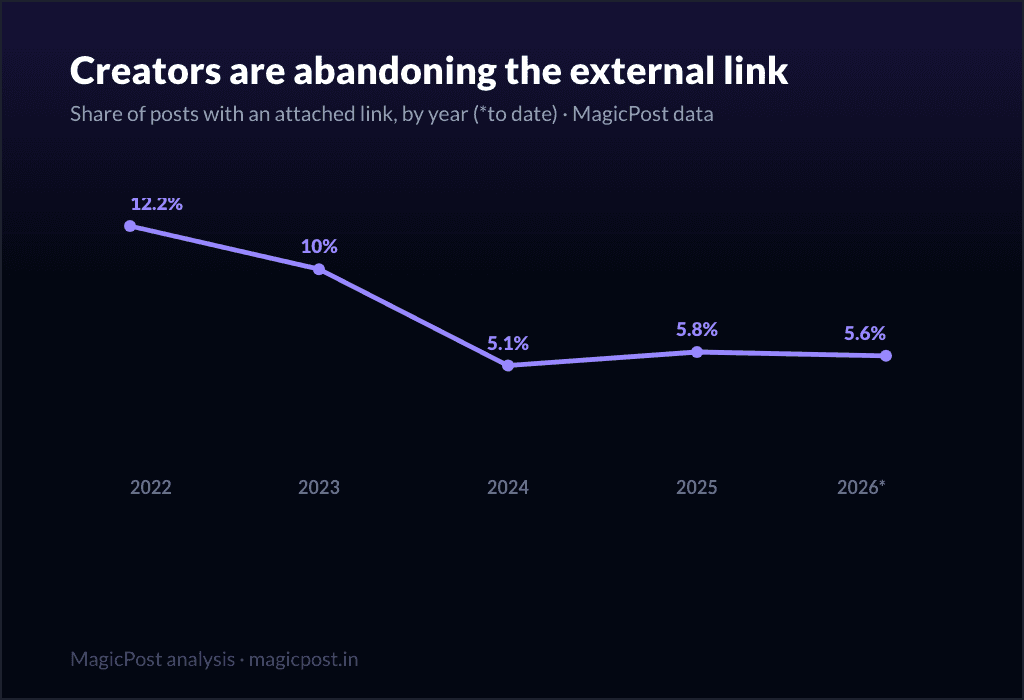
If attached links cost reach, you would expect creators to abandon them over time. They did. We tracked the share of posts carrying an attached link by year.
Year | Posts measured | Share with attached link |
2022 | 65,739 | 12.2% |
2023 | 170,452 | 10.0% |
2024 | 606,050 | 5.1% |
2025 | 1,342,058 | 5.8% |
2026 | 468,845 | 5.6% |
Attached links fell from 12.2% of posts in 2022 to 5.6% in 2026, less than half their former share, with the sharp drop landing in 2024. This is the platform learning the penalty the slow way.
The advice "do not link out" became folklore precisely because, for attached cards, it was right; what got lost in transmission is that an in-body URL was never the problem. (History note: our corpus grows over time, so read year-to-year shares as directional; the halving survives that caveat comfortably. More on these dynamics in how the LinkedIn algorithm works in 2026.)
So where do you put the link?
Three options, ranked by what our data actually supports.
In the post body, as plain text. This is the one our numbers endorse outright: in-body links earn 858 median impressions, on par with or slightly above link-free posts (786), and 20 median likes versus 19. Paste the URL into your sentence, do not let LinkedIn build a preview card from it.
In the first comment. This is the most popular advice on LinkedIn, with one catch: we did not measure it. Our data separates attached cards from in-body URLs and from no link; it does not isolate "link posted in the first comment." It is a reasonable habit and it avoids the preview card entirely, but we are not going to hand you a number we do not have. Treat first-comment links as a plausible workaround, not a measured one.
As an attached preview card. The format we just spent an article showing gets throttled. Use it only when the reach cost is worth it, for example a post whose entire job is to drive a click and where impressions are secondary.
The instinct most creators absorbed ("links kill reach, so never link") is a blunt version of a sharper truth. Links are fine. Preview cards are the tax.
See the cost before you pay it. MagicPost puts drafting, scheduling and analytics for your LinkedIn posts in a single place, so you can watch in your own numbers what an attached link does to a post before you ever spend the reach on it.
Where this data comes from (link reach methodology)
These figures are MagicPost's own first-party research. The reach figures come from 566,957 LinkedIn posts with synced analytics (the sum of 534,030 posts without an attached link and 32,927 with one), published over the last 12 months, reshares and deleted posts excluded, aggregated and anonymized. "Attached link" means a post that renders a LinkedIn preview card (the article format); "in-body link" means a URL inside the post text with no card; "no link" means neither. The three-way split covers 32,927 attached, 69,166 in-body and 464,864 link-free posts. Follower-band and by-format cuts use the same pool. History tracks the share of posts carrying an attached link from 2022 to mid-2026, medians and shares computed within each year and directional by construction since the corpus grows. We use medians throughout, so one viral post cannot move a row. The data is the June 2026 cut and gets refreshed as new posts come in.
FAQ
Do external links kill your LinkedIn reach?
Partly, and only one kind of link. A post with an attached preview card earns 414 median impressions versus 795 without one, on 566,957 posts with synced analytics, so reach is roughly halved. But a URL typed into the post body earns 858 median impressions, on par with the 786 of posts with no link at all. The penalty is on the preview card, not on linking itself. Put the URL in your text and the reach cost disappears in our data.
Does LinkedIn penalize links in posts?
Only attached preview cards. In our 566,957-post sample, attached-card posts reached 414 median impressions while in-body URLs reached 858 and link-free posts 786. So "LinkedIn penalizes links" is too broad: it penalizes the one-click exit a preview card creates, not the act of citing a URL.
Should I put my link in the first comment?
It is the most common advice on LinkedIn, and it plausibly avoids the preview-card penalty since the link is not attached to the post. But we did not measure first-comment links specifically: our data separates attached cards, in-body URLs and no link, and an in-body URL already performs on par with no link (858 versus 786 median impressions). So we recommend the body as the measured option and treat first comment as a reasonable but unmeasured workaround.
Are link posts really worse, or is it just the article format?
Both effects are real and they point the same way. Attached-link posts are almost all the article format, the weakest format on LinkedIn (414 median impressions, below text-only at 664), so part of the gap is format. But when you hold the post type fixed and move the URL into the body, reach does not drop at all (858 versus 786). The format explains why article posts look bad; the in-body comparison shows the link itself is not the problem.
How much reach does an attached link cost on LinkedIn?
Roughly half, in every audience size we measured. Median impressions fall from 455 to 266 for accounts under 5k followers, from 1,401 to 726 for 5k to 50k, and from 9,140 to 3,705 for 50k+. The proportional cut is consistent regardless of follower count.