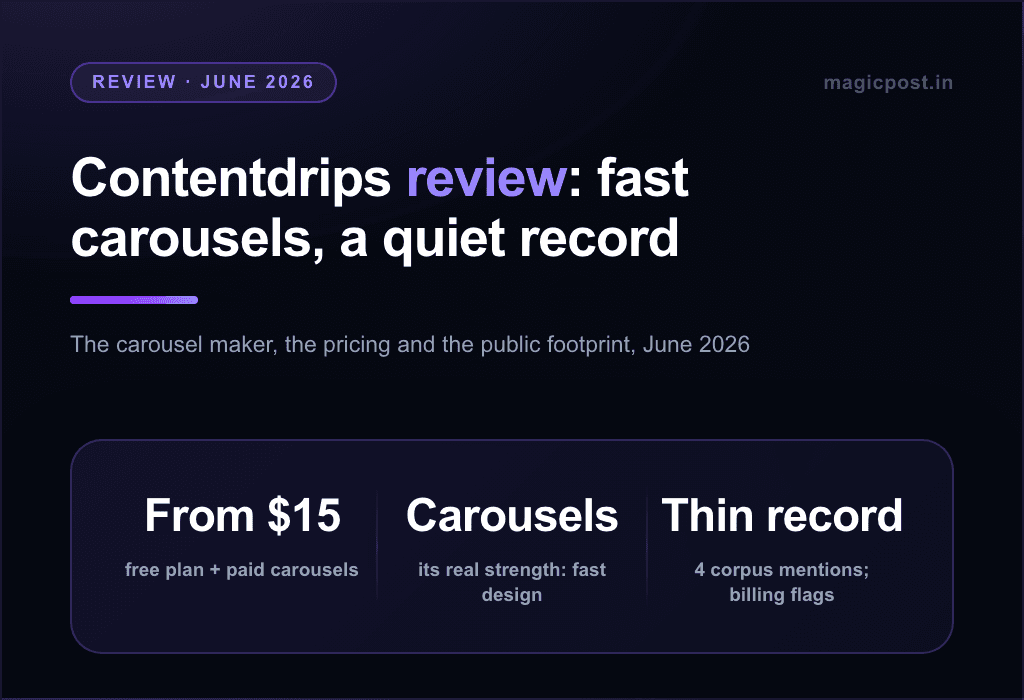
Contentdrips has a clear idea: writing and design in one place, so you stop bouncing between a chatbot and a design tool. The carousels look good, the free plan is real (no card, and CSV-to-Carousel is a genuinely original touch), and $15/mo is a gentle entry.
People look for alternatives at three friction points: the meter (AI credits counted on every tier, 500 a month on the $15 plan), the loop that ends at publishing (no analytics depth, no engagement, mechanism unspecified), and a public record thin enough to be its own signal.
This page does the other job: what to use instead. Seven carousel-capable alternatives at equal depth, with best-for, the receipts, key features, pros and cons, and monthly pricing. Our full verdict is in our Contentdrips review. Dedicated carousel makers such as PostNitro, Canva and Gamma are compared in our ranking of the best LinkedIn carousel generators.
The alternatives at a glance
Tool | Best for | Price/mo | Carousels | Start |
Carousels in a complete workflow | $49 (AI $69) | ✅ Carousels/PDF | No-card trial | |
SocialSonic | Design plus budget breadth | $20 to $200 | ✅ + AI branding | 7-day no-card |
Supergrow | Writing depth with carousels | $39 to $199 | ✅ Pro tier | 7-day trial |
Kleo V3 | Graphics plus coaching | $99 | ✅ 20 graphics/mo | No trial |
Taplio | Maximalist breadth | $39 to $199 | ✅ Generator | 7-day full Pro |
TypeGrow | A budget carousel maker | $29 | ✅ Maker | No-card trial |
Swello | A real image editor (generalist) | From €24 | ⚠️ Editor (Swello Pixel) | Free plan; 7-day no-card |
A reading note on the record, because it is unusually thin. Contentdrips has no Trustpilot profile; its ProductHunt page holds two reviews, one of which reviews a different product entirely, leaving exactly one substantive public review at the time of writing. Our 1.2M-post research corpus logged just four mentions of it over the last year, from four people.
That one review describes UI bugs and a billing experience, reporting that cancelling ends access immediately rather than at the end of the paid period, with support messages ignored for two weeks.
Contentdrips' own pricing page states the opposite policy: a 15-day refund for every user and cancel-anytime with no fees.
We cannot reconcile the two for you; both exist, and the trial is where you find out.
1. MagicPost: Best for carousels in a complete workflow
MagicPost is the LinkedIn-only premium solution, and the design job Contentdrips sells is covered: carousels and PDF posts with fold-accurate previews.
The writing around it goes deeper. The AI learns your voice from your account (the same promise as "Match My Style", trained on more than your past posts), defended by a humanizer built on published research. Generic content reaches roughly 10-14% fewer people, and in 2026 templated phrasing started costing reach too, which the humanizer rewrites while keeping the human habits that help.
Then the loop continues where Contentdrips stops: scheduling and publishing through LinkedIn's official API as a verified application (no unspecified mechanism), working @mentions, analytics with market benchmarks and audience analysis, engagement workflows, and lead detection with CRM. A carousel that publishes is the start; what worked, who saw it and who engaged is the part that compounds.
Key features
Carousels and PDF posts with fold-accurate previews.
Unmetered AI writing in your voice, with a research-backed humanizer.
Publishing via LinkedIn's official API (verified app), with working @mentions.
Analytics with market benchmarks and audience analysis.
Engagement workflows and lead detection with CRM.
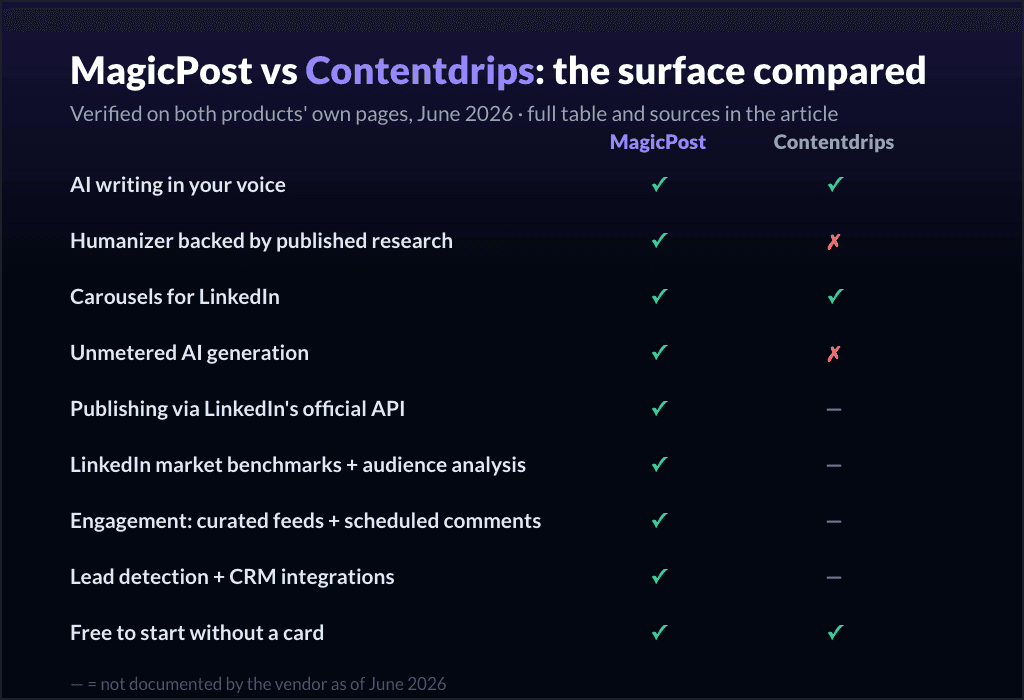
MagicPost | Contentdrips | |
AI writing in your voice | ✅ Style import | ✅ "Match My Style" |
Posts that don't read as AI | ✅ Humanizer, research-backed | ❌ |
Carousels for LinkedIn | ✅ Carousels/PDF, fold previews | ✅ AI Design Agent, 100+ templates |
AI generation limits | ✅ None | ❌ Metered every tier (500/mo at $15) |
Publishing | ✅ Official API, verified app | ⚠️ "Direct publishing", unspecified |
Metrics + engagement + leads | ✅ | ❌ |
Public record | ✅ Trustpilot 4.7/5 (91) | ⚠️ No Trustpilot; 2 ProductHunt reviews |
Contentdrips' design instinct is real, the brand-kit automation saves genuine time, CSV-to-Carousel is clever, and a no-card free plan is always worth credit. What you are buying is a design-and-draft tool with a meter; what this page's readers usually need next is the rest of the LinkedIn loop.
Pros | Cons |
✅ Carousels inside the whole LinkedIn loop, not a design silo | ❌ LinkedIn-only (Contentdrips also does Instagram) |
✅ Unmetered AI in your voice, with a humanizer | ❌ Premium positioning, not the cheapest |
✅ Official-API publishing with working @mentions | |
✅ Benchmarks, engagement and lead detection |
Plan | Price/mo | Includes |
Growth | $49 | Scheduling, analytics, market benchmarks, engagement, leads |
Creator (AI) | $69 | Unmetered AI in your voice, humanizer, carousels |
2. SocialSonic: Best for design plus budget breadth
SocialSonic, from the team behind Writesonic, is the closest like-for-like upgrade: a carousel maker with AI branding images and polls, plus the feature wall Contentdrips lacks.
AI writing trained on viral LinkedIn posts, smart scheduling, analytics with lead attribution and gamification sit around the design tools, at Pro $20/mo (a locked early-adopter rate; listed future price $39), with team and agency tiers at $75 and $200. Five dollars more than Contentdrips Starter buys analytics and a lead angle alongside the carousels.
The diligence: the publishing mechanism is not documented (the same quiet habit), engagement runs through a four-network Chrome extension, and several features were "coming soon" at check time.
Key features
Carousel maker with AI branding images and polls.
AI writing trained on viral LinkedIn posts.
Smart scheduling and analytics with lead attribution.
Team ($75) and agency ($200) tiers.
Pros | Cons |
✅ Carousels plus analytics at budget price | ❌ Publishing mechanism not documented |
✅ Real team and agency tiers | ❌ Four-network engagement extension |
✅ No-card trial | ❌ Several features marked coming soon |
Plan | Price/mo | Includes |
Pro | $20 | Solo writing + design + scheduling |
Team Accelerator | $75 | 3 users |
Agency | $200 | 10 users, branding |
The full picture: SocialSonic alternatives.
3. Supergrow: Best for writing depth with carousels
Supergrow leads with the writing and adds a carousel and infographic maker on its Pro tier.
"Content DNA" voice training, "Postcast" AI interviews, voice-to-post and repurposing from YouTube, blogs and PDFs are the core, with carousels living on the $39 Pro tier. The voice work is deeper than Contentdrips' past-post matching (interviews and account-level DNA), and the repurposing pipeline is the field's widest.
Two cautions travel with every Supergrow mention on this site: analytics are its own public reviewers' most repeated critique, and its pages never document the publishing mechanism.
Key features
"Content DNA" voice training and "Postcast" interviews.
Carousel and infographic maker (Pro tier).
Repurposing from YouTube, blogs and PDFs.
Calendar/queue/Kanban scheduling.
Pros | Cons |
✅ Deepest voice training and repurposing | ❌ Carousels gated to the $39 Pro tier |
✅ Real scheduling with auto first-comment | ❌ Analytics flagged by its own reviewers |
✅ AI included at entry | ❌ Publishing mechanism not documented |
Plan | Price/mo | Includes |
Pro | $39 | Carousels, infographics, full writing |
Full breakdown: Supergrow alternatives.
4. Kleo V3: Best for graphics plus coaching
Kleo V3 bundles one-click graphics, its strongest single feature, with a conversational writing app and the thing nothing else here has.
The graphics (20 a month included) and deep template libraries sit around weekly live group coaching and a private creator community. The graphics stay one-click and the price multiplies by six versus Contentdrips, because what you are buying is the coaching: live calls with founders who are two of LinkedIn's best-known creators.
No analytics documented, no engagement tooling, and a young product (early users report bugs and slow support). Attend the calls or skip the tier.
Key features
One-click graphics (20/month).
Conversational writing app with deep template libraries.
Weekly live group coaching and a private community.
Schedules to LinkedIn (mechanism not documented).
Pros | Cons |
✅ One-click graphics plus live coaching | ❌ $99/mo, no trial |
✅ Founder credibility with creators | ❌ No analytics or engagement |
✅ Deep template libraries | ❌ Young product |
Plan | Price/mo | Includes |
Kleo | $99 | Writing app, graphics, community |
The full comparison: Kleo alternatives.
5. Taplio: Best for maximalist breadth
Taplio includes a dedicated carousel generator inside the widest LinkedIn surface of the older generation.
AI writing on a large viral library, Kanban scheduling, analytics, engagement tools and outreach automation surround the carousels, with a full-Pro trial. Breadth arrives with the file this site has documented at length, though: the advertised $39 Starter ships zero AI credits (the AI starts at $69 Growth), so the credit anxiety you are leaving has a bigger cousin here.
Two more receipts travel with it: its own support acknowledges its extension is treated by LinkedIn as an automation tool against the ToS, and its Trustpilot at 2.4/5 is led by billing complaints.
Key features
A dedicated carousel generator.
AI writing on a large viral library.
Kanban scheduling, analytics, advocacy sharing.
Engagement tools and outreach automation.
Pros | Cons |
✅ A carousel generator inside real breadth | ❌ AI locked out of the $39 entry plan |
✅ Full-Pro 7-day trial | ❌ Extension flagged by its own support |
✅ Built-in lead database | ❌ 2.4/5 Trustpilot, billing complaints |
Plan | Price/mo | Includes |
Starter | $39 | Suite without AI credits |
Growth | $69 | 250 AI credits |
Pro | $199 | Auto-DMs and auto-connections |
The full picture: Taplio alternatives.
6. TypeGrow: Best for a budget carousel maker
TypeGrow is $29/mo after a no-card free trial, and the carousel maker is included in the plan.
A carousel maker, an AI writing assistant, a scheduler, a hook generator, post previews and a 1M+ viral-post library come at that price, running entirely in the cloud with no extension and a stated use of the official LinkedIn API.
Against Contentdrips' free plan, TypeGrow wins on claims (no extension, official API stated) and loses on design depth (no brand kit, no AI Design Agent, no CSV-to-Carousel).
Analytics are undocumented and the public footprint is thin. As the no-card second opinion next to Contentdrips' free plan, it costs nothing to compare them on your own posts during the trial.
Key features
A carousel maker and AI writing assistant.
One-click scheduler and post previews.
A 1M+ viral-post library.
Claims official-API publishing, no extension.
Pros | Cons |
✅ Carousels included, no-card trial | ❌ Lighter design tooling than Contentdrips |
✅ Claims official API, no extension | ❌ No documented analytics |
✅ Real scheduling | ❌ Official-API claim not independently verified |
Plan | Price/mo | Includes |
Starter | $29/mo | Carousels, writing, scheduling |
7. Swello: Best for a real image editor (generalist)
Swello, made in France, pairs scheduling across seven networks with a built-in image editor (Swello Pixel).
AI caption and hashtag helpers, analytics, an inbox and team workflows round it out, from €24/mo (€19/mo billed annually) on top of a permanent free plan, with a no-card trial, and the best record we have audited anywhere: 4.9/5 across 154 uninvited Trustpilot reviews, none negative. The design tool is an editor rather than a generator, though, you compose, it does not draft carousels for you, and the network list grows past Instagram.
On LinkedIn it remains generalist-grade: caption-level AI, cross-network analytics, no documented person-mentions. The record speaks for the company.
Key features
A built-in image editor (Swello Pixel).
Scheduling across seven networks.
AI caption and hashtag helpers, analytics, inbox.
Flat team tiers.
Pros | Cons |
✅ An image editor in a beloved generalist | ❌ No carousel generation (editor only) |
✅ Exceptional record (4.9/154, zero negatives) | ❌ Generalist LinkedIn module |
✅ EU option, flat team tiers | ❌ No documented person-mentions |
Plan | Price/mo | Includes |
Medium | €24 | Core scheduling + editor |
Large | €72 | 5 users, 15 profiles |
Business | €120 | Full team workflows |
The LinkedIn-lens breakdown: Swello alternatives.
How to choose the best Contentdrips alternative for LinkedIn
Count the credits you actually burn. Contentdrips meters every tier (500/mo at $15); Taplio's entry plan ships zero AI credits; Supergrow gates carousels to Pro. Unmetered options exist at every price, including free; price your real monthly volume before picking a meter.
Does the loop close? Designing and publishing is half the job. Ask each tool what happens after: analytics with benchmarks, engagement, leads. A beautiful carousel nobody measures is a hobby.
What is the publishing mechanism, in writing? "Direct publishing" without a named mechanism is this category's habit. One tool here is a verified application on the official API; one more claims it plainly; make the others answer.
Check the pulse before subscribing. A vendor with one substantive public review, a four-mention corpus footprint and a billing story that contradicts its stated policy is not necessarily bad; it is unverified. No-card starts make verification free; use them.
Building a solo brand on LinkedIn? MagicPost was built for exactly that workflow: see how solopreneurs use it, from first idea to published carousel and the analytics that tell you what worked, all on the official API.
Came from Contentdrips for the Carousels? There's a Fit
Contentdrips' design instinct is genuine, the brand-kit automation saves time, and CSV-to-Carousel is a clever, original touch. What you are buying is a design-and-draft tool with a meter, and a loop that ends at publish.
MagicPost puts the same carousels inside the whole LinkedIn workflow: unmetered AI in your voice with a research-backed humanizer, official-API publishing with working @mentions, and benchmarked analytics waiting on the other side, no credits to count and a no-card trial.
FAQ
What is the best Contentdrips alternative?
For carousels inside a complete LinkedIn workflow: MagicPost, unmetered AI in your voice with a research-backed humanizer, carousels and PDF posts, working @mentions, benchmarks and audience analysis, engagement and lead detection, on the official LinkedIn API. Budget design surface: SocialSonic. Budget maker: TypeGrow ($29/mo after a free trial).
Why look for a Contentdrips alternative?
Three patterns: the meter (AI credits counted on every tier, 500/month on the $15 plan), the open loop (no analytics depth, engagement or leads documented, and an unspecified publishing mechanism), and a public record thin enough to be a signal in itself, no Trustpilot profile, effectively one substantive ProductHunt review, and four corpus mentions over the last year.
Is Contentdrips good for LinkedIn carousels?
The design layer is its best argument: an AI Design Agent, 100+ templates, automatic brand kits, and original inputs like CSV-to-Carousel and Blog-to-Carousel. As a carousel generator it is credible; the open question is everything after the design: metered generation, unspecified publishing, no measurement layer.
How much does Contentdrips cost?
Free forever (no card, 50 AI credits, 1 brand), Starter $15/mo (500 AI credits/month, LinkedIn publishing, 3 brands), Teams $26/mo (1,200 credits, unlimited brands); annual saves up to 20%. Its site states a 15-day refund and cancel-anytime terms; the one substantive public review describes a different cancellation experience, so verify the boundary yourself during the free plan.
What is the cheapest Contentdrips alternative?
Contentdrips' own free plan is the cheapest way to stay in the category. Among alternatives, TypeGrow is $29/mo after a no-card trial with a carousel maker included; comparing the two on the same content during the trial costs nothing and answers the design-depth question for your specific posts.
Does Contentdrips publish directly to LinkedIn?
Its site says "direct publishing to LinkedIn & Instagram" without naming the mechanism. Tools that document or claim the official path: MagicPost (verified application) and TypeGrow (its own pages). In this category, an unnamed mechanism is the norm and still worth asking about before you build a workflow on it.
Contentdrips vs MagicPost: what is the real difference?
Scope and the meter. Contentdrips is a design-and-draft tool: carousels, brand kits, style-matched posts, with AI credits counted on every tier and the loop ending at publish. MagicPost is the complete LinkedIn workflow: unmetered voice AI with a humanizer, carousels, working @mentions, benchmarks and audience analysis, engagement and lead detection, on the official API with a no-card trial.