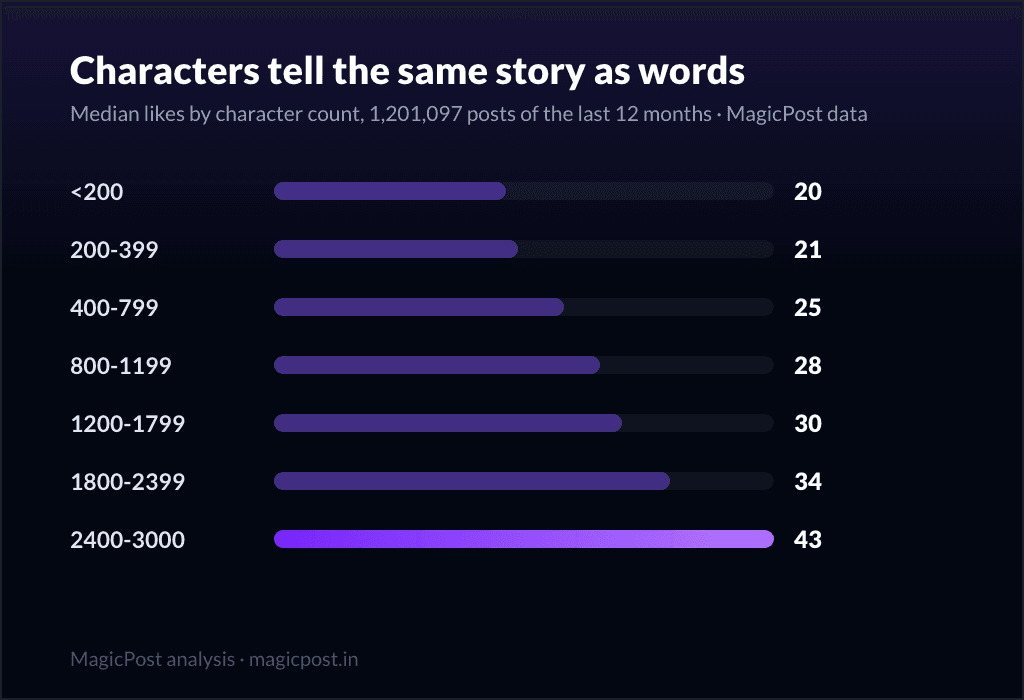
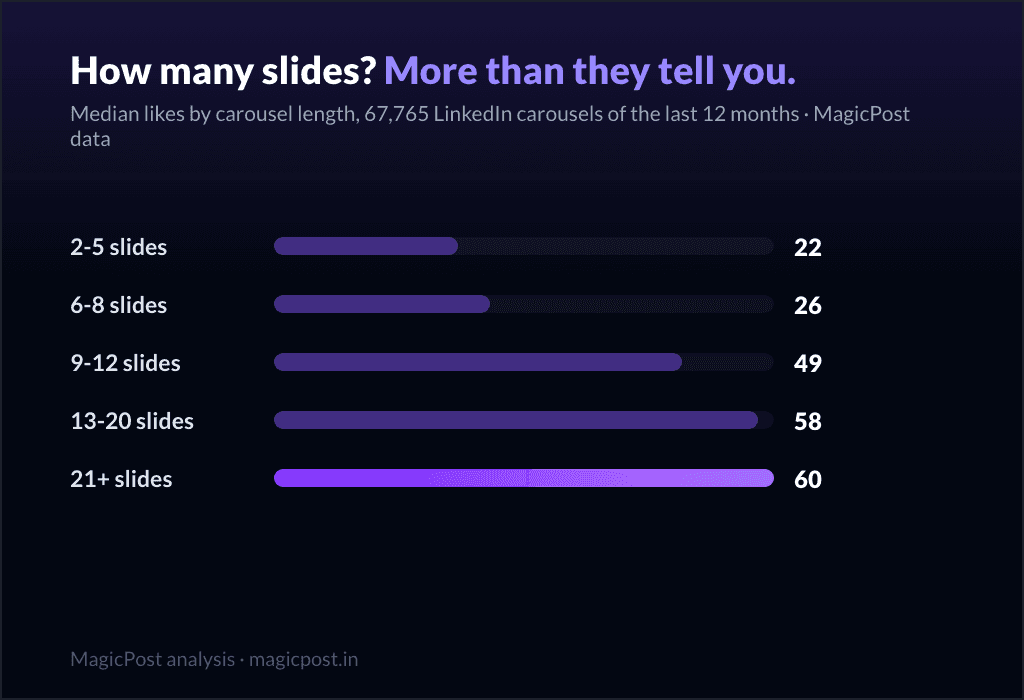
« Ne mettez jamais de lien dans un post, l'algorithme déteste ça. » Vous avez lu cette phrase cent fois, toujours énoncée comme un dogme, jamais avec un chiffre derrière. Nous avons donc passé au crible 566 957 posts LinkedIn aux analytics synchronisés, séparés selon qu'ils portaient un lien externe et selon l'endroit exact où ce lien se trouvait. La réponse globale est brutale, puis elle se scinde en une nuance que presque personne n'énonce correctement.
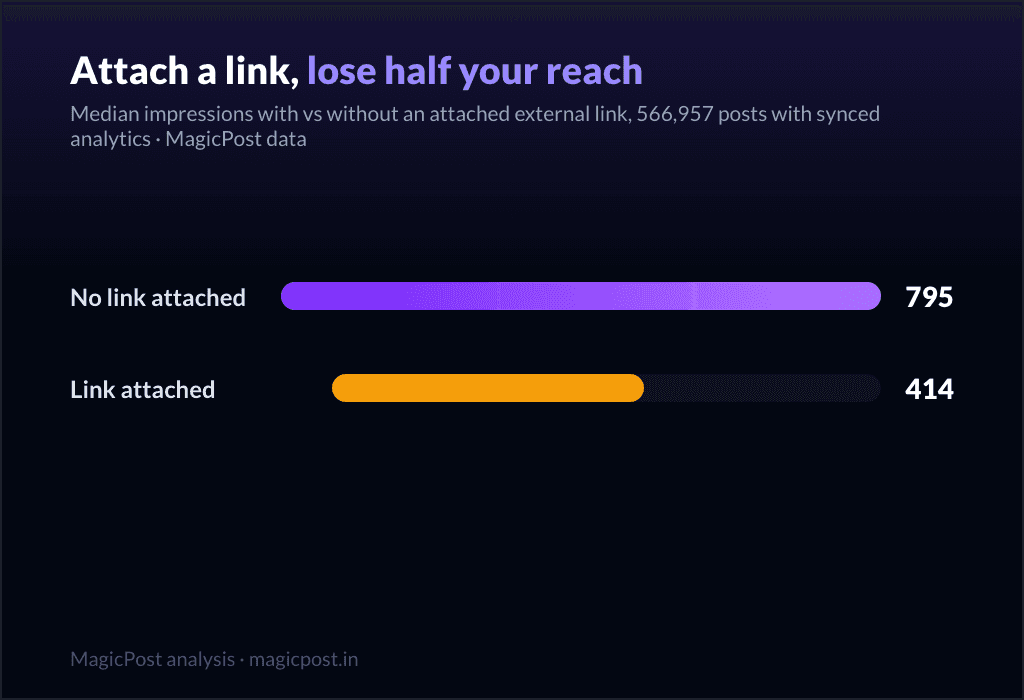
En résumé : un post avec un aperçu de lien joint obtient 414 impressions médianes contre 795 pour un post sans, et 6 likes médians contre 19. Portée à peu près divisée par deux, engagement divisé par trois. C'est le titre que tout le monde retient à moitié.
La version longue est celle dont vous avez vraiment besoin : le bridage ne vise pas « les liens », il vise la carte d'aperçu jointe. Une URL tapée dans le corps de votre post ne fait aucun dégât. Commençons par le tableau.
Cartes de lien contre URL dans le texte : les chiffres de portée
Chaque chiffre de cet article est une mesure d'impressions, le vivier est donc fixe : 566 957 posts aux analytics synchronisés, agrégés et anonymisés, comparés en médianes pour qu'aucun cas viral ne puisse déformer une ligne.
Post | Posts mesurés | Impressions médianes | Likes médians |
Sans lien joint | 534 030 | 795 | 19 |
Lien externe joint | 32 927 | 414 | 6 |
Les posts qui portent un aperçu de lien joint atteignent 414 impressions médianes contre 795 sans. C'est une portée à peu près divisée par deux, et l'écart d'engagement est encore plus large : 6 likes médians contre 19.
Si vous vous arrêtiez là, vous concluriez que renvoyer vers l'extérieur est une erreur. Vous auriez à moitié raison, et la moitié qui manque est tout l'objet de cette page.
La nuance que personne ne mesure : c'est la carte, pas l'URL
LinkedIn ne voit pas « un lien ». Il voit deux choses très différentes. Un lien joint est un lien que vous collez de telle façon que LinkedIn en affiche une carte d'aperçu (l'encadré image plus titre sous votre texte, ce que nous comptons comme le format « article »). Un lien dans le corps est une URL posée à l'intérieur des mots de votre post, sans carte. Nous avons découpé les mêmes 566 957 posts en trois.
Où se trouve le lien | Posts mesurés | Impressions médianes | Likes médians |
Carte d'aperçu jointe | 32 927 | 414 | 6 |
Dans le corps du post | 69 166 | 858 | 20 |
Aucun lien | 464 864 | 786 | 19 |
Relisez ces lignes deux fois. Une URL dans le corps de votre post obtient 858 impressions médianes, un peu plus que les 786 des posts sans aucun lien, et 20 likes médians contre 19. Les liens dans le corps ne sont pas pénalisés. Le bridage frappe entièrement la carte d'aperçu jointe : 414 impressions, moins de la moitié de l'une comme de l'autre des deux alternatives.
C'est le point actionnable que le conseil « ne renvoyez jamais vers l'extérieur » rate. Le problème n'a jamais été le lien. C'est la carte d'aperçu, qui tend au lecteur une sortie du fil en un clic, et l'algorithme facture cette sortie en conséquence.
Vous pouvez citer une source ou pointer vers votre propre site, à condition de le faire en texte brut plutôt que de laisser LinkedIn construire la porte de sortie à votre place.
Envie de voir ce que les liens font à VOTRE portée ? Les analytics LinkedIn de MagicPost décomposent vos propres posts de la même façon : lesquels portaient une carte de lien, ce qu'ils ont atteint, où vous vous situez face à ces médianes. Deviner devient optionnel dès qu'on peut lire.
Ce que cela ne prouve pas : les liens joints sont presque tous des « articles »
Le facteur de confusion, énoncé d'emblée plutôt qu'enterré. Les posts qui portent une carte d'aperçu jointe sont, par construction, le format article de LinkedIn. Donc quand nous comparons « lien joint » à « aucun lien », nous comparons en partie le format article aux posts image, texte et vidéo, or le format article est de toute façon le moins performant sur LinkedIn. Une partie de l'écart entre 414 et 795 vient du format, pas du lien lui-même.
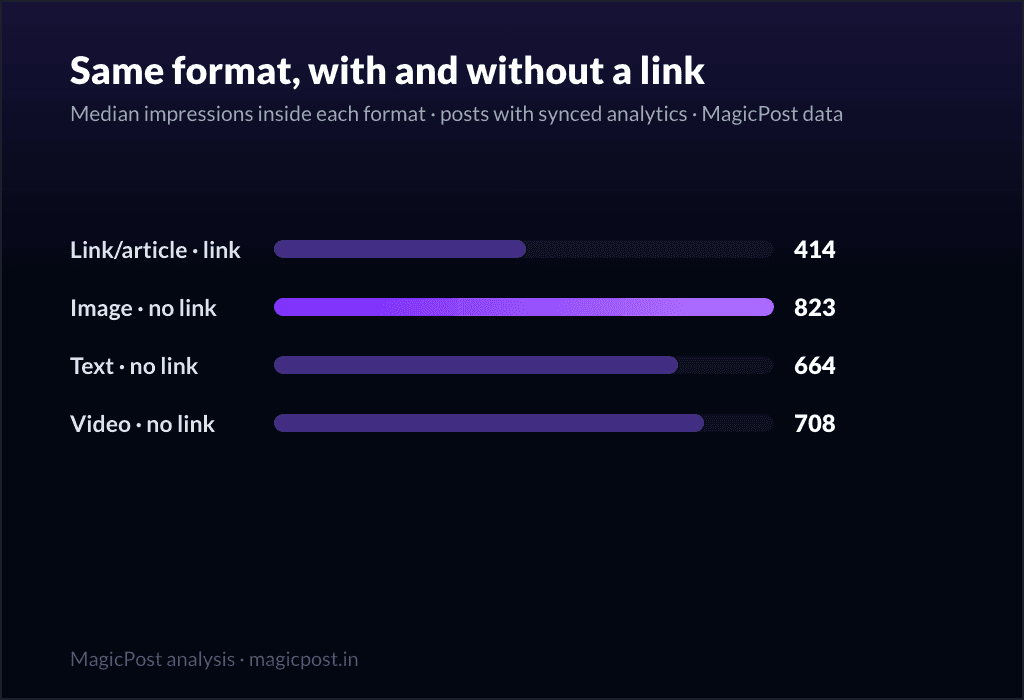
Nous avons donc mis les formats côte à côte, sur le même vivier d'analytics synchronisés.
Type de post | Posts mesurés | Impressions médianes | Likes médians |
Article (lien joint) | 32 897 | 414 | 6 |
Image, sans lien | 347 689 | 823 | 23 |
Vidéo, sans lien | 43 078 | 708 | 17 |
Texte seul, sans lien | 98 249 | 664 | 11 |
Le post article avec lien joint (414 impressions) est derrière même le format sans lien le plus modeste, le texte seul à 664. Une partie de la pénalité est donc une vraie faiblesse de format. Mais le tableau en trois catégories a déjà réglé le reste : quand un post porte une URL dans son corps au lieu d'une carte jointe, la portée ne baisse pas du tout (858 contre 786).
Le biais de format explique pourquoi les posts article ont mauvaise mine ; il ne sauve pas la carte jointe. Les deux lectures mènent à la même consigne : ne joignez pas l'aperçu.
Est-ce vrai aussi pour les petits comptes ?
Oui, dans chaque tranche d'abonnés que nous avons mesurée. Nous avons rejoué la comparaison lien joint contre sans lien à l'intérieur de trois tailles d'audience, sur le même vivier d'analytics synchronisés.
Tranche d'abonnés | Sans lien joint | Lien joint |
Moins de 5 k | 455 | 266 |
5 k à 50 k | 1 401 | 726 |
Plus de 50 k | 9 140 | 3 705 |
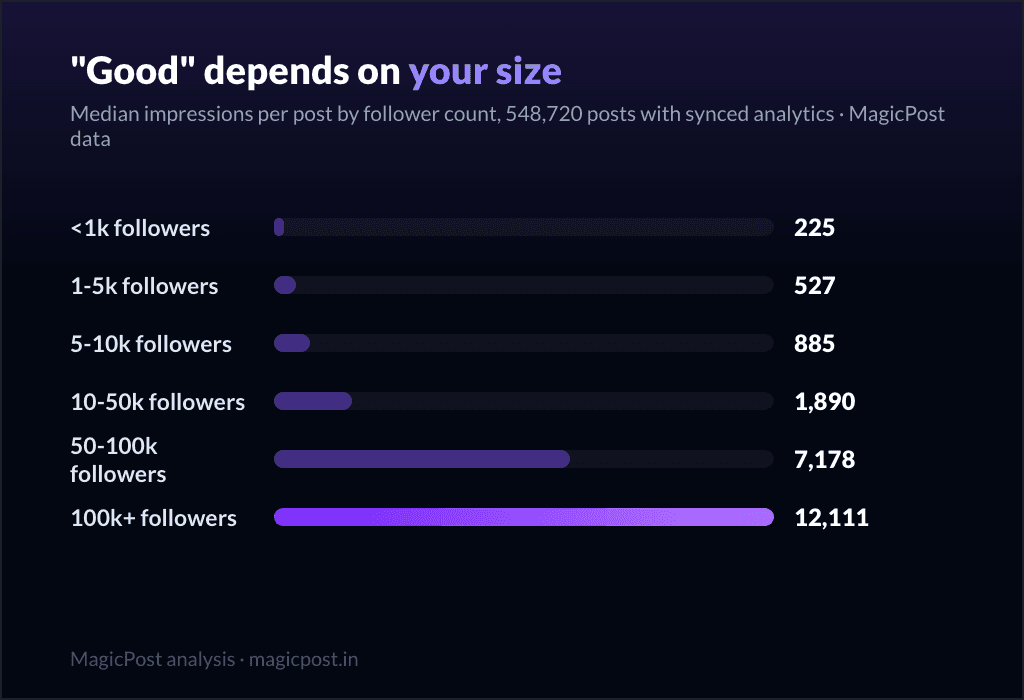
La coupe de portée liée au lien joint est à peu près une division par deux à toutes les tailles : de 455 à 266 pour les petits comptes, de 1 401 à 726 dans la tranche intermédiaire, de 9 140 à 3 705 pour les plus gros. (Les valeurs absolues grimpent fortement avec l'audience, ce qui est une autre histoire, racontée dans ce qui compte comme une bonne portée LinkedIn selon votre taille.)
Gros ou petit, joindre une carte d'aperçu vous coûte environ la moitié de votre portée. La pénalité s'échelonne avec vous plutôt que d'épargner les petits comptes ou de punir les gros.
Quatre ans de créateurs qui l'apprennent à la dure
Si les liens joints coûtent de la portée, on s'attend à ce que les créateurs les abandonnent avec le temps. C'est ce qu'ils ont fait. Nous avons suivi la part des posts portant un lien joint par année.
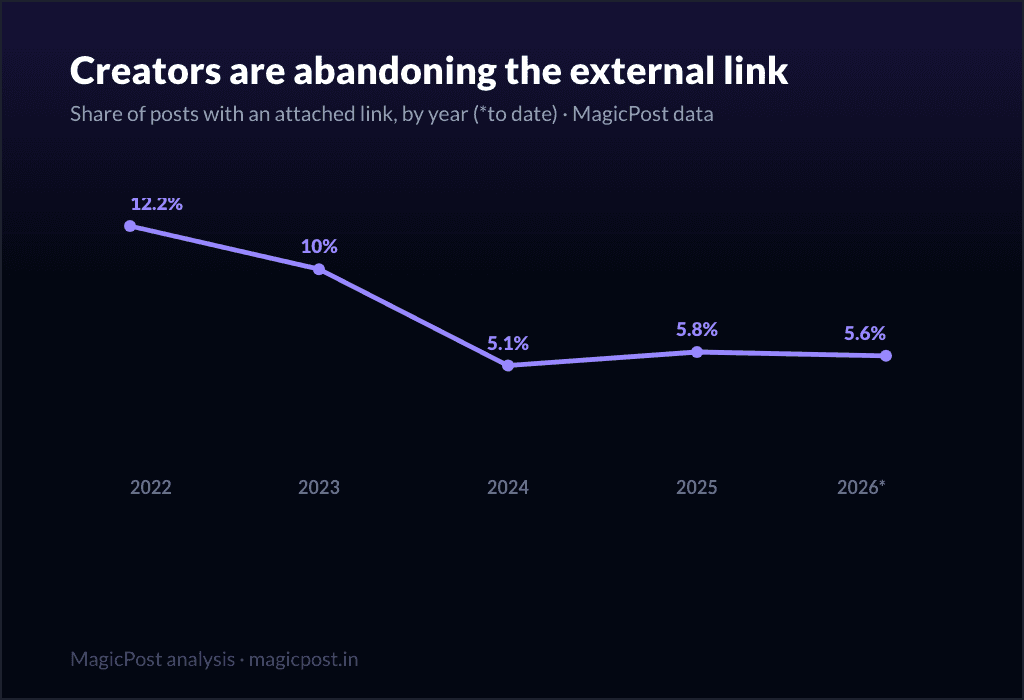
Année | Posts mesurés | Part avec un lien joint |
2022 | 65 739 | 12,2 % |
2023 | 170 452 | 10,0 % |
2024 | 606 050 | 5,1 % |
2025 | 1 342 058 | 5,8 % |
2026 | 468 845 | 5,6 % |
Les liens joints sont passés de 12,2 % des posts en 2022 à 5,6 % en 2026, moins de la moitié de leur part d'alors, avec la chute nette en 2024. C'est la plateforme qui apprend la pénalité par la voie lente.
Le conseil « ne renvoyez pas vers l'extérieur » est devenu folklore justement parce que, pour les cartes jointes, il était juste ; ce qui s'est perdu en route, c'est qu'une URL dans le corps n'a jamais été le problème. (Note historique : notre corpus grandit avec le temps, donc lisez les parts d'une année à l'autre comme directionnelles ; la division par deux survit largement à cette réserve. Plus de détails sur ces dynamiques dans le fonctionnement de l'algorithme LinkedIn en 2026.)
Alors, où mettre le lien ?
Trois options, classées selon ce que nos données soutiennent réellement.
Dans le corps du post, en texte brut. C'est la seule que nos chiffres valident sans réserve : les liens dans le corps obtiennent 858 impressions médianes, à égalité ou légèrement au-dessus des posts sans lien (786), et 20 likes médians contre 19. Collez l'URL dans votre phrase, et ne laissez pas LinkedIn en fabriquer une carte d'aperçu.
En premier commentaire. C'est le conseil le plus répandu sur LinkedIn, avec une réserve : nous ne l'avons pas mesuré. Nos données séparent les cartes jointes, les URL dans le corps et l'absence de lien ; elles n'isolent pas le « lien posté en premier commentaire ». C'est une habitude raisonnable et elle évite complètement la carte d'aperçu, mais nous n'allons pas vous donner un chiffre que nous n'avons pas. Traitez le lien en premier commentaire comme un contournement plausible, pas comme un contournement mesuré.
En carte d'aperçu jointe. Le format auquel nous venons de consacrer un article se fait brider. Ne l'utilisez que quand le coût en portée en vaut la peine, par exemple un post dont tout le travail est de générer un clic et où les impressions sont secondaires.
L'instinct que la plupart des créateurs ont absorbé (« les liens tuent la portée, donc jamais de lien ») est la version grossière d'une vérité plus fine. Les liens ne posent pas de problème. C'est la carte d'aperçu qui est taxée.
Voyez le coût avant de le payer. MagicPost réunit la rédaction, la planification et les analytics de vos posts LinkedIn au même endroit, pour que vous puissiez observer dans vos propres chiffres ce qu'un lien joint fait à un post avant même d'y dépenser votre portée.
D'où viennent ces données (méthodologie portée et liens)
Ces chiffres viennent de la recherche propriétaire de MagicPost. Les données de portée proviennent de 566 957 posts LinkedIn aux analytics synchronisés (la somme de 534 030 posts sans lien joint et de 32 927 avec), publiés sur les 12 derniers mois, repartages et posts supprimés exclus, agrégés et anonymisés. « Lien joint » désigne un post qui affiche une carte d'aperçu LinkedIn (le format article) ; « lien dans le corps » désigne une URL dans le texte du post sans carte ; « aucun lien » désigne ni l'un ni l'autre. Le découpage en trois couvre 32 927 posts avec un lien joint, 69 166 avec un lien dans le corps et 464 864 sans lien. Les découpages par tranche d'abonnés et par format utilisent le même vivier. L'historique suit la part des posts portant un lien joint de 2022 à mi-2026, médianes et parts calculées à l'intérieur de chaque année et directionnelles par construction puisque le corpus grandit. Nous utilisons des médianes partout, pour qu'un seul post viral ne puisse pas déplacer une ligne. Les données correspondent à l'extraction de juin 2026 et sont rafraîchies à mesure que de nouveaux posts arrivent.
FAQ
Les liens externes tuent-ils votre portée LinkedIn ?
En partie, et seulement un type de lien. Un post avec une carte d'aperçu jointe obtient 414 impressions médianes contre 795 sans, sur 566 957 posts aux analytics synchronisés : la portée est donc à peu près divisée par deux. Mais une URL tapée dans le corps du post obtient 858 impressions médianes, au niveau des 786 des posts sans aucun lien. La pénalité porte sur la carte d'aperçu, pas sur le fait de mettre un lien. Placez l'URL dans votre texte et le coût en portée disparaît dans nos données.
LinkedIn pénalise-t-il les liens dans les posts ?
Uniquement les cartes d'aperçu jointes. Dans notre échantillon de 566 957 posts, les posts avec carte jointe ont atteint 414 impressions médianes, contre 858 pour les URL dans le corps et 786 pour les posts sans lien. Dire que « LinkedIn pénalise les liens » est donc trop large : la plateforme pénalise la sortie en un clic que crée une carte d'aperçu, pas le fait de citer une URL.
Faut-il mettre son lien en premier commentaire ?
C'est le conseil le plus courant sur LinkedIn, et il évite plausiblement la pénalité de la carte d'aperçu puisque le lien n'est pas joint au post. Mais nous n'avons pas mesuré spécifiquement les liens en premier commentaire : nos données séparent les cartes jointes, les URL dans le corps et l'absence de lien, et une URL dans le corps fait déjà jeu égal avec l'absence de lien (858 contre 786 impressions médianes). Nous recommandons donc le corps du post comme option mesurée, et traitons le premier commentaire comme un contournement raisonnable mais non mesuré.
Les posts avec lien sont-ils vraiment moins bons, ou est-ce juste le format article ?
Les deux effets sont réels et vont dans le même sens. Les posts avec un lien joint sont presque tous au format article, le format le plus faible sur LinkedIn (414 impressions médianes, en dessous du texte seul à 664) : une partie de l'écart vient donc du format. Mais quand on fige le type de post et qu'on déplace l'URL dans le corps, la portée ne baisse pas du tout (858 contre 786). Le format explique pourquoi les posts article ont mauvaise mine ; la comparaison sur le corps du post montre que le lien lui-même n'est pas le problème.
Combien de portée coûte un lien joint sur LinkedIn ?
Environ la moitié, dans toutes les tailles d'audience mesurées. Les impressions médianes tombent de 455 à 266 pour les comptes de moins de 5 k abonnés, de 1 401 à 726 pour la tranche 5 k à 50 k, et de 9 140 à 3 705 au-delà de 50 k. La coupe proportionnelle reste la même quel que soit le nombre d'abonnés.