" height="26.80529977783203px" id="tymKb8bqC" width="128.00300311279295px"/><path d="M 0 2.417 L 0 0 L 12.909 0 L 12.909 2.417 Z" fill="rgb(126, 78, 253)" height="2.417099999999998px" id="aYr4em6zK" transform="translate(128.341 22.325)" width="12.908999999999992px"/></svg>)

"/><stop offset="1" stop-color="rgb(118, 37, 250)"/></linearGradient></defs><g d="M 19.242 21.22 L 19.362 6.204 L 19.272 6.204 L 13.757 21.22 L 10.161 21.22 L 4.796 6.204 L 4.706 6.204 L 4.825 21.22 L 0 21.22 L 0 0 L 7.283 0 L 12.109 13.607 L 12.229 13.607 L 16.844 0 L 24.247 0 L 24.247 21.22 Z M 26.421 26.113 L 26.421 23.445 L 41.407 23.445 L 41.407 26.113 Z" fill="transparent" height="26.112508199679183px" id="DvfaAIHYn" width="41.40731898311435px"><path d="M 19.242 21.22 L 19.362 6.204 L 19.272 6.204 L 13.757 21.22 L 10.161 21.22 L 4.796 6.204 L 4.706 6.204 L 4.825 21.22 L 0 21.22 L 0 0 L 7.283 0 L 12.109 13.607 L 12.229 13.607 L 16.844 0 L 24.247 0 L 24.247 21.22 Z" fill="rgb(46, 46, 46)" height="21.220180016149442px" id="pLsxRCobd" width="24.247352589074694px"/><path d="M 0 2.668 L 0 0 L 14.986 0 L 14.986 2.668 Z" fill="url(%23yD9d4I5GR-3279285344-linear-gradient)" height="2.6675085048549647px" id="yD9d4I5GR" transform="translate(26.421 23.445)" width="14.986002836263765px"/></g></svg>)
Tool Beoordelingen

Saad Mouaouine
LinkedIn’s organic reach is now down 60% to 80% from its peak levels. The feed is noisier than ever, the algorithm is pickier, and posting manually every morning isn’t a strategy.
A good LinkedIn management tool handles ideation, drafting, scheduling, and analytics in one place. A bad one either gets your account flagged or produces posts that sound like every other AI output in the feed, and there are a lot of those.
This guide compares the six best LinkedIn management tools in 2026, what genuinely separates them, and which one fits your situation.
What Makes a LinkedIn Management Tool Worth Using?
Not all tools in this category are built the same. Before looking at individual platforms, it helps to know the three things that actually determine whether a LinkedIn management tool is worth your money.
1. AI That Writes in Your Voice
Most AI writing tools generate plausible-sounding LinkedIn posts. The problem is they all sound the same.
LinkedIn's algorithm applies a measurable penalty to posts it identifies as unedited AI output (roughly a 30% drop in reach and a 55% drop in engagement).
The tools worth using are the ones that train on your past writing, learn your tone, and produce content that actually sounds like you.
2. Official LinkedIn API Compliance
This is the safety question most roundups skip. LinkedIn actively scans browser sessions for over 6,000 known extension IDs associated with automation.
Browser extension tools that inject JavaScript into LinkedIn's interface are detectable and can result in permanent account restrictions.
Tools built on LinkedIn's official OAuth API route through infrastructure LinkedIn explicitly approves; that’s the only safe way to schedule and publish.
3. Actionable Analytics
Impressions and likes are vanity numbers. What you actually need to know is which content formats perform best for your specific audience, which posting times drive the most engagement, and whether your follower growth is trending in the right direction.
If a tool only surfaces top-line metrics, it’s not helping you improve.
The 6 Best LinkedIn Management Tools in 2026
We evaluated each tool on AI quality, account safety, pricing, and how well it fits different use cases. Here’s the overview, followed by a detailed breakdown of each.
Tool | Best For | Starting Price | Free Trial | API Safe? |
|---|---|---|---|---|
MagicPost | LinkedIn creators, teams, agencies | $49/mo. | ✅ | ✅ |
Taplio | Engagement-focused creators | $39/mo.* | ✅ | ✅ |
Supergrow | Executive teams, employee advocacy | $19/mo. | ✅ | ✅ |
AuthoredUp | Analytics-first creators | $19.95/mo. | ✅ | — |
RedactAI | Budget-conscious solo creators | $19.90/mo. | ✅ | ✅ |
Buffer | Multi-platform social teams | Free / $6/mo. | ✅ | ✅ |
Note: Taplio’s Starter plan includes 0 AI credits. You need the Growth plan ($69/mo) to access AI features.
1. MagicPost — Best Overall LinkedIn Management Tool
MagicPost is the most complete LinkedIn-specific platform in 2026. It handles every part of the content workflow, from idea generation and voice-matched drafting to scheduling, analytics, and team management, without forcing you to juggle separate tools.
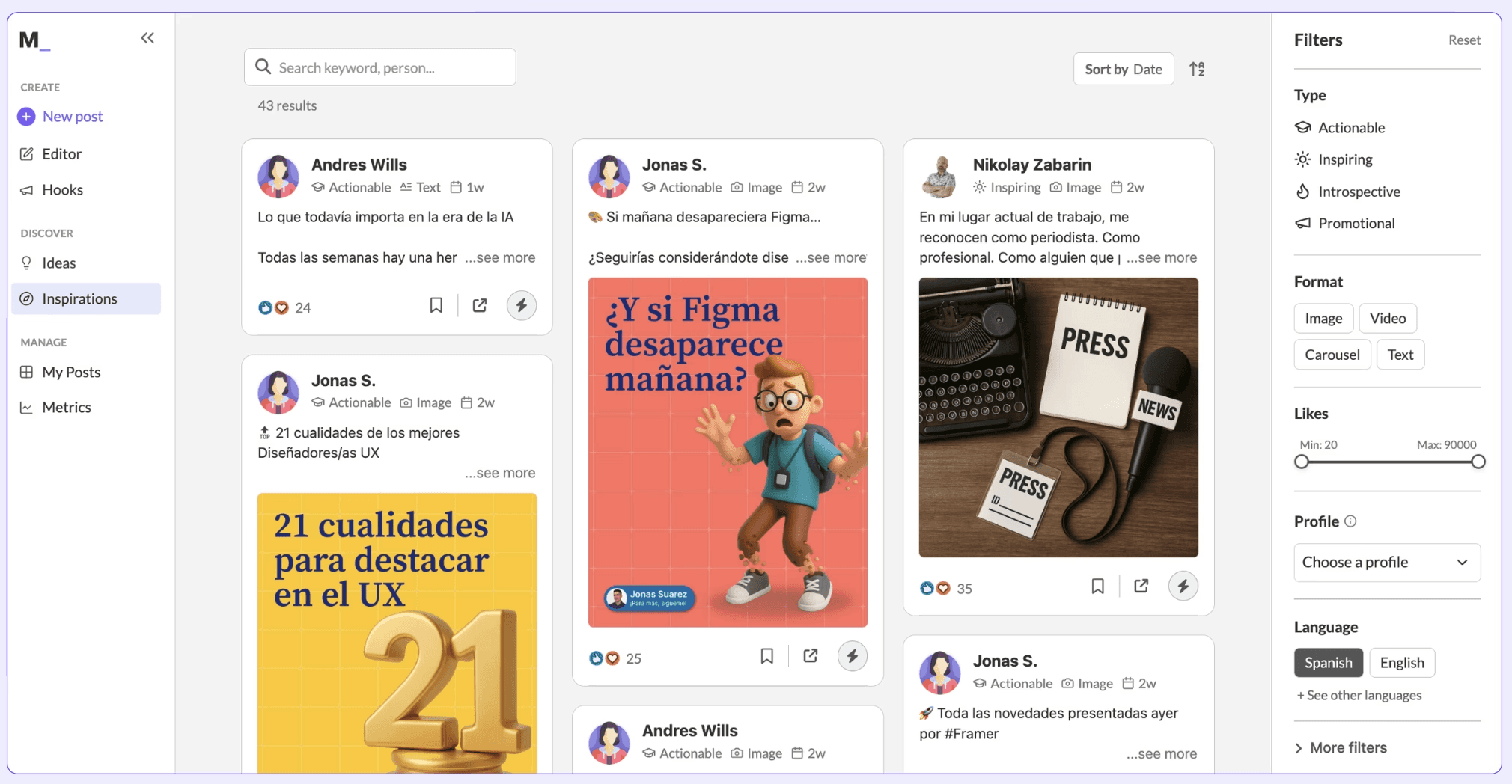
The AI connects to your LinkedIn profile to learn your writing style, format, and tone from your past posts. You can also import any other creator's style to use as a reference.
From there, you choose a post type, a post category within that type, and either enter a subject or paste a URL. MagicPost pulls content from YouTube videos, blog posts, and websites and repurposes it into a formatted LinkedIn post in your voice.
All publishing runs through LinkedIn's official developer program via authenticated API connections, which LinkedIn explicitly approves. If account safety is a concern, that distinction matters. You can also use the built-in LinkedIn post previewer to check exactly how your post will render before it goes live.
Pros and Cons
Pros | Cons |
|---|---|
✅ Voice-matched AI trained on your actual LinkedIn posts | ❌ LinkedIn-only (no multi-platform publishing) |
✅ Official LinkedIn API — zero account risk | ❌ Starter plan capped at 20 posts/month |
✅ Pull metrics on any creator's profile, not just your own | |
✅ Viral post inspiration library (500K+ posts) | |
✅ Converts YouTube videos and URLs into posts | |
✅ Team/Agency plan with multi-account management |
Pricing
Starter | $49/mo. | 20 posts/month, ideas + hooks, scheduling |
|---|---|---|
Creator | $69/mo. | Unlimited posts, metrics, inspiration library, scheduled comments |
Team/Agency | Custom | Multi-account, activity dashboard, custom reports, dedicated support |
📌 MagicPost is the most complete LinkedIn tool in this list. It’s best for founders, marketers, and agencies who want voice-matched AI, safe scheduling, and analytics in one place without playing for features they’ll never use.
2. Taplio — Best for Engagement and Relationship Building
Taplio’s standout feature is its engagement module: you can build lists of people you want to get noticed by, comment on their latest posts from within Taplio, and manage replies to your own content at scale, making it great for users looking to grow through strategic relationships.
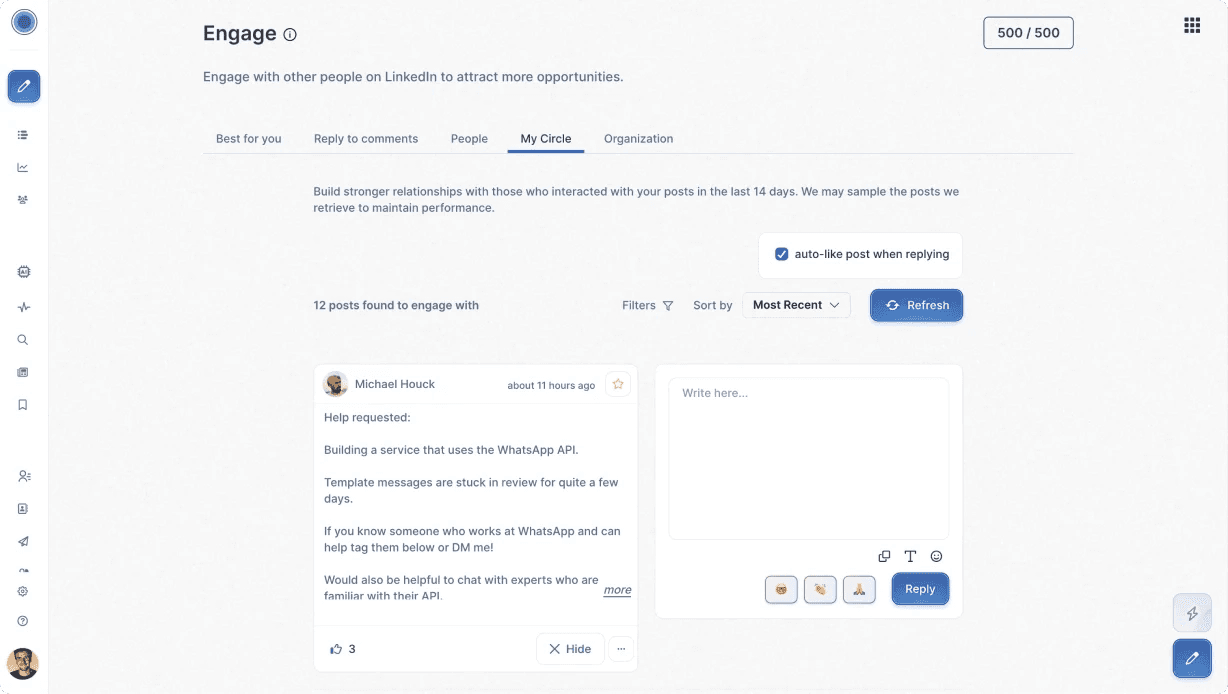
The AI post generator and carousel builder are solid, with ChatAssist providing a conversational interface for refining content. Taplio also gives you access to LinkedIn benchmark data from 200,000+ posts, which helps you calibrate your content strategy against what is actually working across the platform.
One thing to flag before you sign up: the Starter plan at $39/mo. includes zero AI credits. You can’t use the hook generator, post generator, or AI repurposing features without upgrading to Growth at $69/mo.
For most people evaluating this tool, the effective entry price is $69/mo. The Pro plan at $199/mo. adds mass DMs and auto-connection requests. These features edge toward the gray area of LinkedIn's terms of service and are worth approaching carefully. See our full Taplio review for a deeper look.
Pros and Cons
Pros | Cons |
|---|---|
✅ Best-in-class engagement and relationship tools | ❌ Starter plan has zero AI credits |
✅ AI carousel builder with YouTube-to-carousel conversion | ❌ Pro plan outreach features carry compliance risk |
✅ Benchmark data from 200K+ LinkedIn posts | ❌ Pricier than most alternatives for full AI feature set |
✅ Cross-organization analytics for teams |
Pricing
Starter | $39/mo. | Scheduling and analytics only |
|---|---|---|
Growth | $69/mo. | 250 AI credits, 500 comment credits, AI Copilot |
Pro | $199/mo. | Unlimited AI, lead database, mass DMs, auto-connect |
📌 Taplio is a strong choice for creators whose LinkedIn growth strategy centers on building relationships through strategic engagement. It’s less compelling as a pure content creation tool unless you’re on Growth or higher.
3. SuperGrow — Best for Teams and Employee Advocacy Programs
Supergrow’s differentiator is Postcast: an AI-guided interview where you talk for 15 minutes about your area of expertise and the tool produces 5 to 7 publish-ready posts from that conversation.
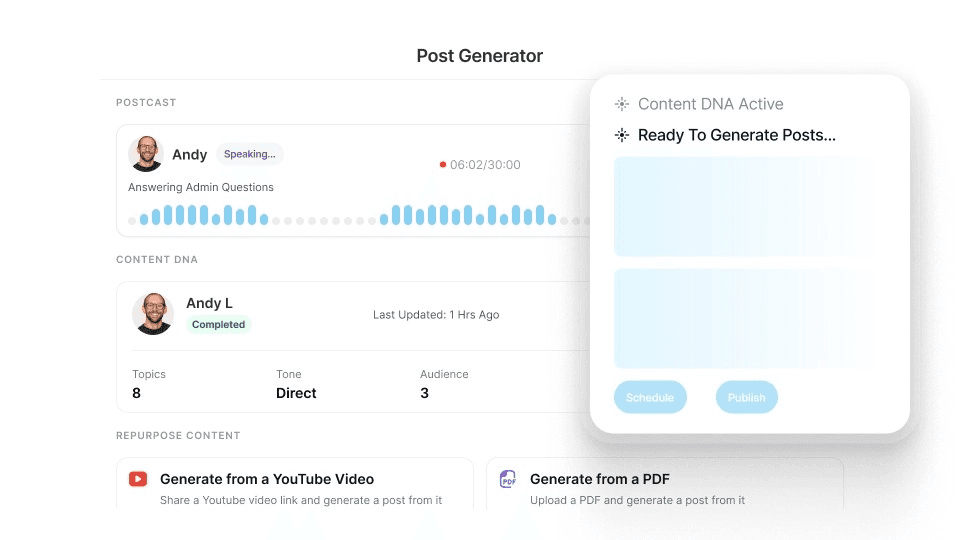
The Content DNA system builds a voice profile from your existing LinkedIn posts and writing to match your style, and Postcast works particularly well for executives or subject matter experts who have plenty to say but no time to write.
On the team side, Supergrow offers approval workflows, org-level dashboards, challenges and leaderboards, weekly per-member performance reports, and member Postcast interviews. It uses official LinkedIn APIs and is explicit about account safety across team accounts.
The MCP (Model Context Protocol) integration is worth noting for technically advanced teams: you can connect Supergrow to Claude, ChatGPT, or any MCP-compatible client and manage your content pipeline through natural language prompts. It’s still in early access but ahead of the curve.
Pros and Cons
Pros | Cons |
|---|---|
✅ Postcast turns a 15-minute conversation into a week of posts | ❌ Team features only unlock at $139/mo. (4 accounts) |
✅ Content DNA voice profiling is among the best available | ❌ Infographic generator and carousel only on Pro+ |
✅ Team features purpose-built for employee advocacy programs | ❌ MCP integration still in early access |
✅ Leaderboards and challenges drive team adoption | |
✅ Official LinkedIn API across all accounts | |
✅ Most affordable entry price of any tool here ($19/mo.) |
Pricing
Starter | $19/mo. | Content DNA, Postcast (2 sessions), scheduling, Kanban dashboard |
|---|---|---|
Pro | $39/mo. | Unlimited Postcast, carousel maker, profile analytics |
Teams | $139/mo. | 4 accounts, approval workflows, organization dashboard, leaderboard |
Enterprise | Custom | 10+ executives, SLA, dedicated onboarding, API access |
📌 Supergrow is the best option for marketing teams running employee advocacy programs and for executives who want to produce content through conversation rather than writing. Individual creators who just want a clean post generator may find the feature depth unnecessary.
4. AuthoredUp — Best for Analytics-Obsessed Creators
AuthoredUp’s focus is analytics and editorial control, not AI content generation. If you want to understand your performance at a granular level and run your content creation inside LinkedIn’s native interface with better tooling on top, AuthoredUp is your pick.
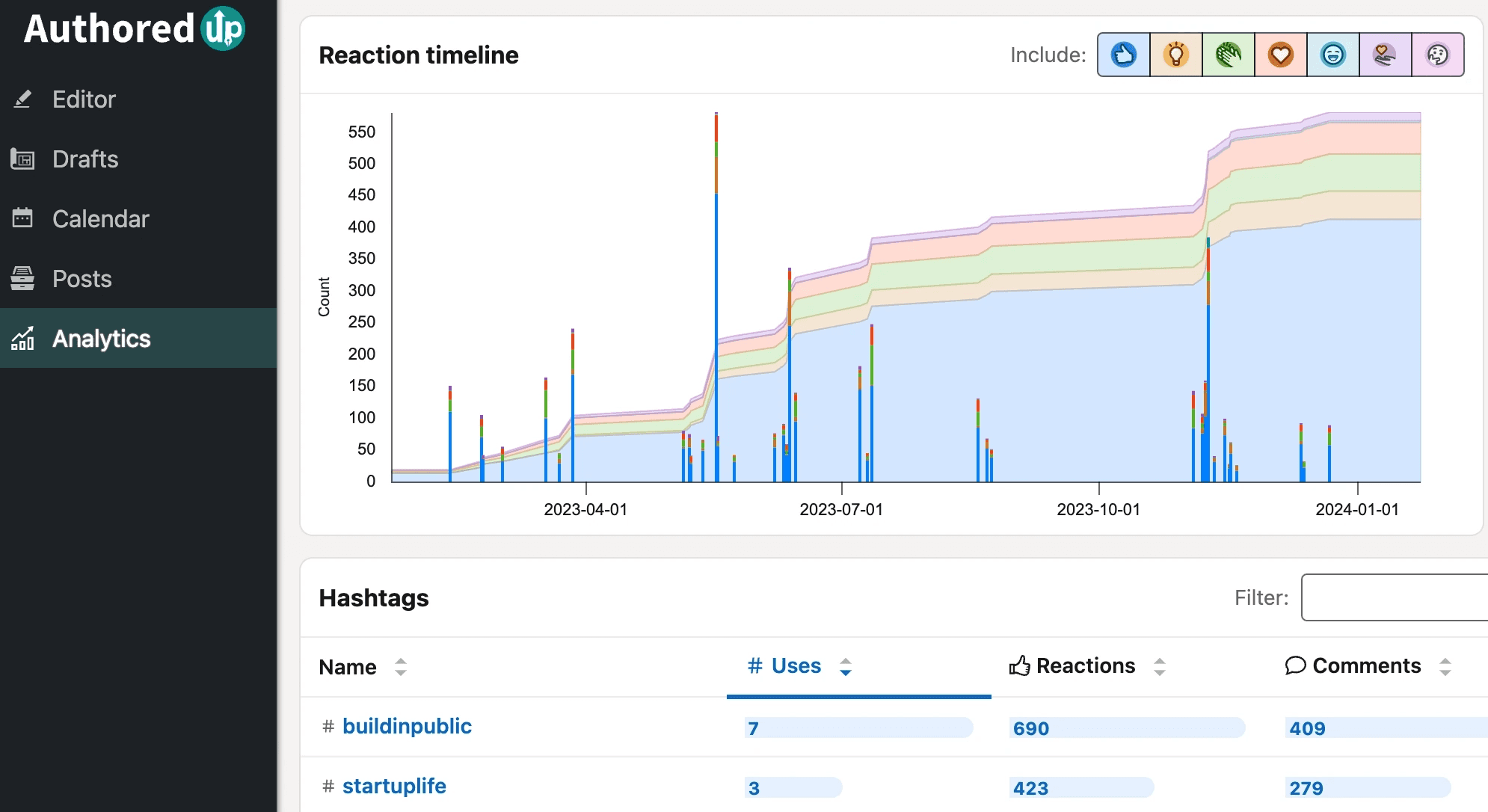
AuthoredUp tracks saves, sends, and reports signals that most platforms ignore but that provide much better insight into whether your content is valued. The heatmap for best posting times, the draft organization system, the 300+ hooks and post endings library, and the readability score make it a strong editor companion.
The team analytics layer lets you see performance across your company page and individual team members in one view.
The main limitation is that AuthoredUp isn’t primarily an AI post generator. If you want to produce content with AI and publish everything from one platform, you’ll likely use AuthoredUp alongside another creation tool.
It also runs as a browser extension, which means it operates within LinkedIn's interface rather than as a standalone platform. Read our full AuthoredUp review for more detail.
Pros and Cons
Pros | Cons |
|---|---|
✅ Tracks saves and sends — not just likes and comments | ❌ Not a primary AI post generator |
✅ Heatmaps identify your best posting windows | ❌ Browser extension model (not standalone) |
✅ 300+ hooks and post endings library | ❌ Business plan requires minimum 3 profiles |
✅ Readability score for every post | ❌ Best used in combination with a creation tool |
✅ Team analytics across all members |
Pricing
Individual | $19.95/mo. | 1 profile, full analytics, 300+ hooks, and unlimited drafts |
|---|---|---|
Business | $14.95/profile/mo. | Minimum 3 profiles, team analytics, and draft collaboration |
Custom Growth | Custom | Minimum 10 profiles, dedicated onboarding, and invoicing |
📌 AuthoredUp is the best tool here for creators who want deep insight into what’s actually working. If you care more about understanding your performance than generating more content, AuthoredUp fills a gap the other tools leave open.
5. RedactAI — Best Budget Option for Individual Creators
RedactAI is the most affordable voice-matched AI tool in this comparison. It trains on your LinkedIn profile information and your last 100 posts to build a personalized AI, then generates content that matches your writing style.
You can also adopt another creator's style as an inspiration source, which is useful for experimenting with different formats and tones.
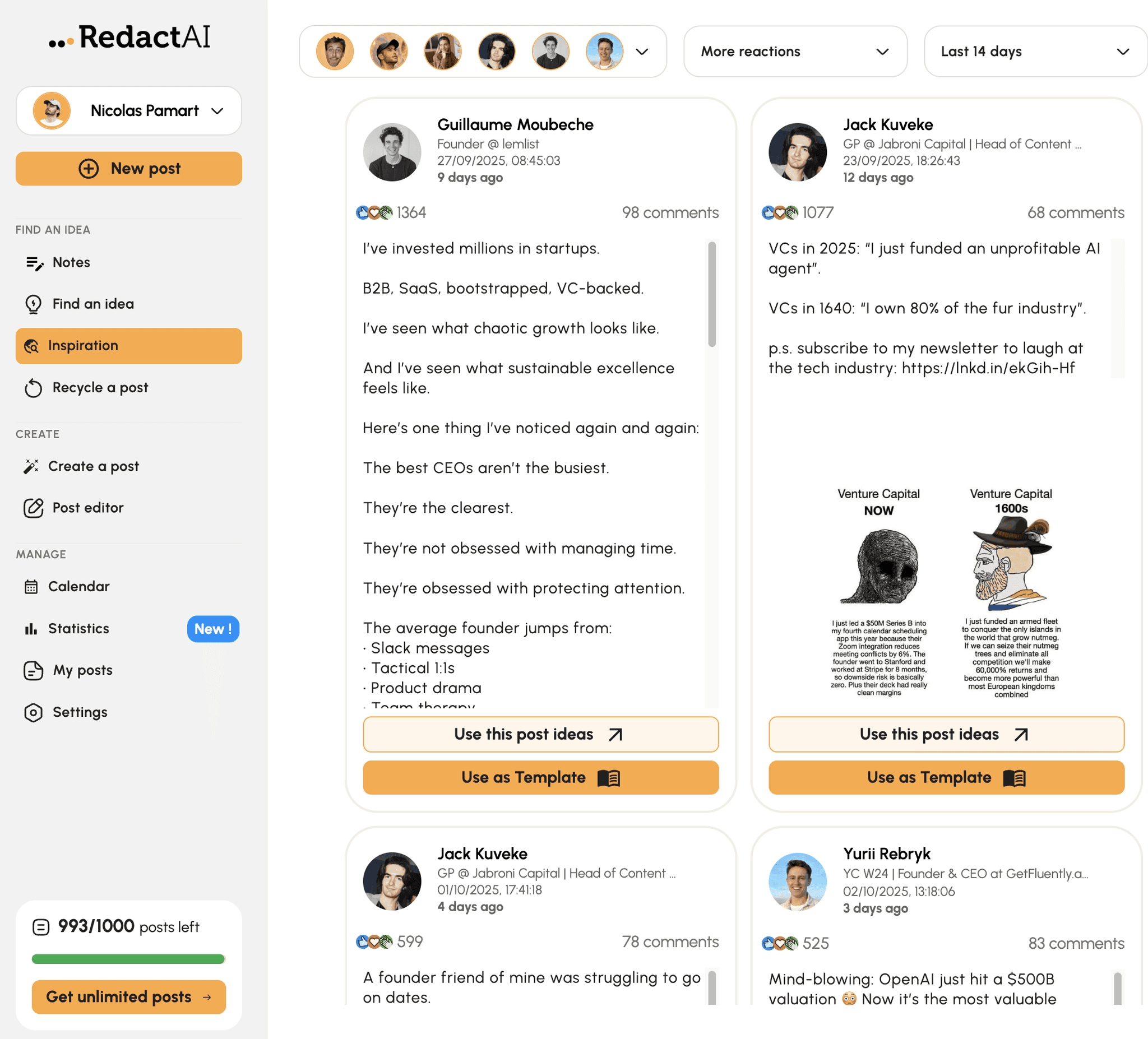
The feature set is tighter than MagicPost or Supergrow, but it covers the essentials: content idea generation, live viral post inspiration, post scheduling, recycling of top-performing posts, and real-time statistics.
For a solo creator who wants voice-matched AI at a low entry price and doesn’t need team features, the Creator plan at $39.90/mo. is competitive.
The main gap shows up when you need to manage multiple profiles. The Copywriter plan at $109.90/mo. is positioned for that use case, but the jump from single-profile to multi-profile pricing is steep. Our RedactAI review covers the specifics.
Pros and Cons
Pros | Cons |
|---|---|
✅ Lowest entry price for voice-matched AI ($19.90/mo.) | ❌ Essential plan limited to 15 posts/month |
✅ Trains on your LinkedIn profile and last 100 posts | ❌No team features below $109.90/mo. Copywriter tier |
✅ Live viral post inspiration feed | ❌ Steep jump between individual and multi-profile pricing |
✅ Post recycling and repurposing built in | ❌ Narrower feature set than MagicPost or Supergrow |
Pricing
Essential | $19.90/mo. | 15 posts/month, 1 profile, scheduling, ideas |
|---|---|---|
Creator | $39.90/mo. | Unlimited posts, unlimited inspiration, ChatWithReactAI |
Copywriter | $109.90/mo. | Multiple profiles, priority support |
📌 RedactAI is a solid entry point for solo creators who want AI that sounds like them without committing to a higher price point, but it outgrows its feature set quickly for anyone managing more than one account.
6. Buffer — Best for Multi-Platform Social Media Teams
Buffer isn’t a LinkedIn-specific tool, and that’s both its greatest strength and its main limitation in this context.
If your team manages LinkedIn alongside Instagram, TikTok, X, Facebook, Threads, and Bluesky, Buffer gives you a single scheduling and analytics dashboard that covers all of them. The per-channel pricing makes it one of the most cost-effective options for multi-platform teams.
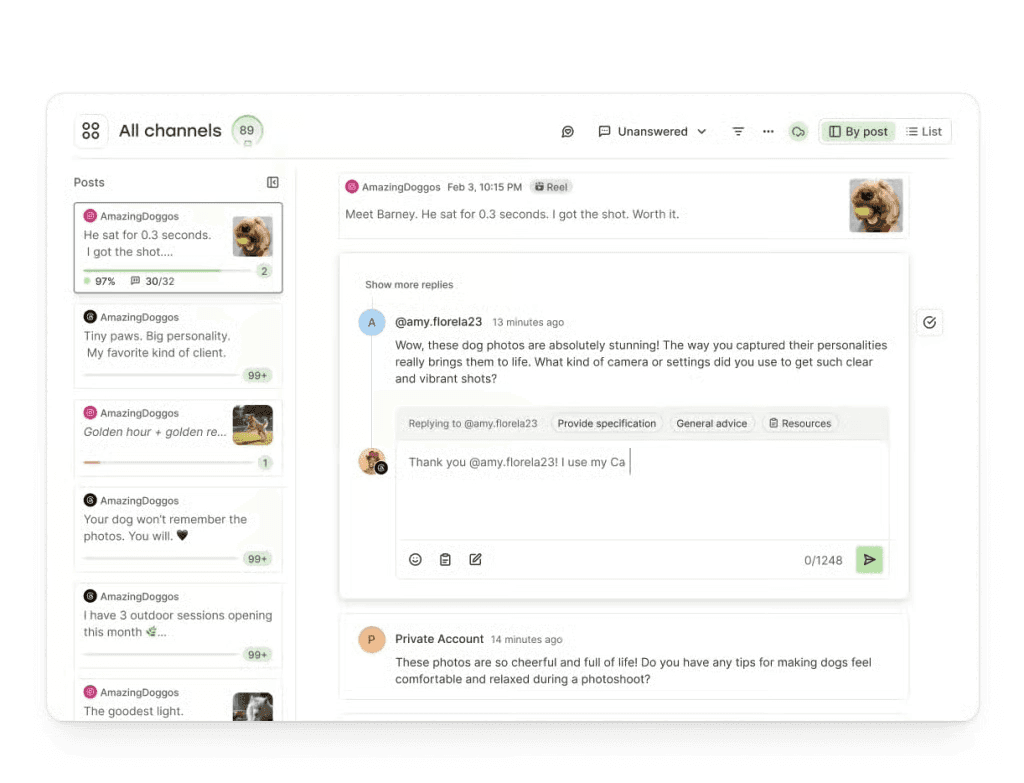
The AI Assistant handles general content generation and repurposing across platforms, content approval workflows make it practical for teams, and the community inbox keeps comments and replies manageable across channels. The custom reports builder is better than most tools at this price point.
What Buffer doesn’t have is anything LinkedIn-specific. There’s no hook generator calibrated to LinkedIn's algorithm, no viral post inspiration library, no voice training on your LinkedIn posting history, and no LinkedIn-native analytics beyond standard metrics.
If LinkedIn is your primary or sole channel, Buffer is too broad a tool for what you need. If LinkedIn is one channel among many, it earns its place.
Pros and Cons
Pros | Cons |
|---|---|
✅ Covers LinkedIn, Instagram, TikTok, X, Threads, Bluesky, Facebook in one dashboard | ❌ Not LinkedIn-specific — no voice training or LinkedIn-native AI |
✅ Very affordable — $6/mo. per channel | ❌ No hook generator, inspiration library, or viral post database |
✅ Content approval workflows for teams | ❌ Per-channel pricing adds up with multiple accounts |
✅ Free plan available (3 channels) | ❌ AI Assistant is generic, not LinkedIn-optimised |
✅ Excellent custom reports builder | |
✅ 14-day free trial |
Pricing
Free | $0/mo. | 3 channels, 10 posts/channel, and basic analytics |
|---|---|---|
Essentials | $6/channel/mo. | Unlimited posts, advanced analytics, and first comment scheduling |
Team | $12/channel/mo. | Unlimited members, approval workflows, and access levels |
📌 Buffer is the right call only if LinkedIn is one of several platforms you actively manage. For LinkedIn-first creators or teams, the lack of platform-specific features makes the other tools in this list a better fit.
Which LinkedIn Management Tool Is Right for You?
The best tool depends entirely on how you use LinkedIn and what you need from it. Here’s a quick guide based on the situation.
If you are... | Best pick | Why |
|---|---|---|
A founder or solopreneur building a personal brand | MagicPost | Voice AI, simple workflow, analytics, and a free trial that doesn’t require a credit card |
A creator on a tight budget | RedactAI or Supergrow (Starter) | Both offer voice-matched AI under $20/mo. to get started |
A sales leader using LinkedIn for pipeline | MagicPost or Taplio (Growth) | API safety plus engagement tools; Taplio if relationship-building is your primary lever |
An agency managing multiple client accounts | MagicPost Team/Agency | Multi-account management, activity dashboard, and a dedicated account manager |
A marketing team running employee advocacy | Supergrow Teams | Postcast, approval workflows, org dashboard, and leaderboards built specifically for this |
An analytics-focused creator | AuthoredUp | The deepest post-level data of any tool here, including saves and sends |
A multi-platform social media manager | Buffer | The only sensible choice when LinkedIn is one of five or more channels to manage |
Is It Safe to Use Third-Party LinkedIn Management Tools?
Yes, as long as the tool uses LinkedIn’s official API. LinkedIn actively scans for over 6,153 browser extension IDs tied to automation. If you get caught, the result is a permanent account restriction, not a warning.
Tools built on LinkedIn’s OAuth API are fully compliant. MagicPost, Supergrow, and Taplio all publish through the official API.
Taplio’s Chrome extension (Taplio X) is for reading analytics only, not posting automation. Check whether any tool you consider is an official LinkedIn Marketing Partner before connecting your account. For more detail, see our guide to LinkedIn account restrictions.
Does the LinkedIn Algorithm Affect Which Tool You Use?
Yes, in two ways.
First, format matters: polls get a 1.64x reach multiplier, carousels 1.45x, and plain text 0.88x. A tool that doesn’t support multiple formats is capping your reach before you write a word.
Second, LinkedIn’s native scheduler has documented reach suppression issues. Third-party tools that publish through the official API bypass this entirely. For more on writing posts that actually perform, see our guide on how to write a LinkedIn post.
Final Thoughts: Which LinkedIn Management Tool Should You Choose?
Every tool here earns its place for the right user: AuthoredUp for analytics depth, Supergrow for teams, RedactAI for solo creators on a budget, Buffer if LinkedIn is one of several channels, and Taplio if relationships are your primary growth lever.
If you want one platform that covers content creation in your voice, safe API scheduling, meaningful analytics, and scales to agency use without stitching tools together, MagicPost is the strongest fit.
Are you ready to manage your LinkedIn presence the right way? Try MagicPost for free today. No credit card is required.
Veelgestelde vragen
What is a LinkedIn management tool?
A LinkedIn management tool is a platform that helps you plan, create, schedule, publish, and analyze your LinkedIn content in one place.
The best ones also include AI to help with ideation and drafting, voice-matching to keep your content sounding authentic, and analytics to show you what is working.
What is the difference between a LinkedIn management tool and a LinkedIn scheduling tool?
A scheduling tool handles one part of the workflow: when your posts go live. A LinkedIn management tool covers the full cycle: content ideation, AI drafting, editing, scheduling, analytics, and in some cases team collaboration and multi-account management.
Scheduling is a feature of management tools, not a category of its own. For a comparison of the best scheduling options specifically, see our best LinkedIn scheduling tools guide.
Is it safe to use third-party LinkedIn tools?
It depends on how the tool connects to LinkedIn. Tools built on LinkedIn's official OAuth API are fully safe and compliant. Browser extension tools that automate actions within LinkedIn's interface are detectable and carry a real risk of permanent account restriction.
Check whether any tool you consider is an official LinkedIn Marketing Partner or uses the LinkedIn API before you connect your account.
Which LinkedIn tool is best for agencies?
MagicPost's Team/Agency plan is the strongest option for agencies managing multiple client LinkedIn accounts. It includes multi-account management, an activity dashboard, custom reports, and a dedicated account manager.
Taplio also offers team plans with shared analytics and client roles if the engagement-focused features are a better fit for your agency's workflow.
Can I try these tools before committing?
All six tools in this guide offer a free trial. Buffer has a free plan that covers three channels with no time limit.

LinkedIn Employee Branding: How to Attract Top Talent (2026)
LinkedIn employee branding is a recruiting strategy. Here's how to turn your team's LinkedIn presence into a measurable talent attraction engine in 2026.

Social Selling on LinkedIn: Win B2B Sales with Content (2026)
Social selling on LinkedIn isn’t about sending more InMails. You need to build the presence that makes prospects reply before you ever reach out. Here’s how.

The 6 Best Employee Advocacy Software in 2026 (Full Review)
Looking for the best employee advocacy software in 2026? We compared MagicPost, Supergrow, DSMN8, and others so you can find the right fit for your team.

LinkedIn Content Agency: Do You Actually Need One in 2026?
Wondering whether a LinkedIn content agency is worth the cost? Here’s what they do, what they charge, and when a dedicated platform is the better choice.

LinkedIn Ghostwriting: How to Build and Scale in 2026
LinkedIn ghostwriting is one of the fastest-growing services in B2B for 2026. Here’s how to capture client voices, manage approvals, and scale your operation.

AI LinkedIn Posts: Hoe AI te gebruiken zonder als AI te klinken
Moe van generieke, robotachtige content? Leer hoe je AI LinkedIn posts schrijft die echt klinken zoals jij met behulp van een beproefd stapsgewijs humanisatie-framework.
Hoe je LinkedIn Posts kunt automatiseren zonder je stem te verliezen
Kun je LinkedIn posts automatiseren zonder als een bot te klinken? Ja. Hier is hoe je het veilig, consequent en in je eigen stem kunt doen met MagicPost.