" height="26.80529977783203px" id="tymKb8bqC" width="128.00300311279295px"/><path d="M 0 2.417 L 0 0 L 12.909 0 L 12.909 2.417 Z" fill="rgb(126, 78, 253)" height="2.417099999999998px" id="aYr4em6zK" transform="translate(128.341 22.325)" width="12.908999999999992px"/></svg>)

"/><stop offset="1" stop-color="rgb(118, 37, 250)"/></linearGradient></defs><g d="M 19.242 21.22 L 19.362 6.204 L 19.272 6.204 L 13.757 21.22 L 10.161 21.22 L 4.796 6.204 L 4.706 6.204 L 4.825 21.22 L 0 21.22 L 0 0 L 7.283 0 L 12.109 13.607 L 12.229 13.607 L 16.844 0 L 24.247 0 L 24.247 21.22 Z M 26.421 26.113 L 26.421 23.445 L 41.407 23.445 L 41.407 26.113 Z" fill="transparent" height="26.112508199679183px" id="DvfaAIHYn" width="41.40731898311435px"><path d="M 19.242 21.22 L 19.362 6.204 L 19.272 6.204 L 13.757 21.22 L 10.161 21.22 L 4.796 6.204 L 4.706 6.204 L 4.825 21.22 L 0 21.22 L 0 0 L 7.283 0 L 12.109 13.607 L 12.229 13.607 L 16.844 0 L 24.247 0 L 24.247 21.22 Z" fill="rgb(46, 46, 46)" height="21.220180016149442px" id="pLsxRCobd" width="24.247352589074694px"/><path d="M 0 2.668 L 0 0 L 14.986 0 L 14.986 2.668 Z" fill="url(%23yD9d4I5GR-3279285344-linear-gradient)" height="2.6675085048549647px" id="yD9d4I5GR" transform="translate(26.421 23.445)" width="14.986002836263765px"/></g></svg>)

Yasmina Akni Ebourki
On LinkedIn, it's essential to capture your audience’s attention with compelling text, but visuals play an equally important role.
In today’s feed, an image is not just a supporting element—it acts as a powerful activator, similar to a captivating headline.
Knowing the ideal size for your LinkedIn images is key to optimizing your content.
By ensuring your visuals fit perfectly, you can make the most of the screen space and create the desired impact.
TL;DR: To make your LinkedIn profile and posts stand out, it’s important to use the right image sizes. Here’s the ideal sizing for the best results:
Profile Photo: 400 x 400 px
Profile Banner: 1584 x 396 px
Single Image Post: 1200 x 627 px
Square Post: 1080 x 1080 px
Carousel Post: 1920 x 1080 px
Link Thumbnail: 1200 x 628 px
Article Featured Image: 1200 x 644 px
Article Banner Image: 600 x 322 px
Vertical Video Size: 1080 x 1920 px
Why LinkedIn Image Sizes Matter
Getting the right image size on LinkedIn is crucial, regardless of the type of content you are posting.
The size of your image directly influences how much screen space it occupies.
Larger images tend to attract more attention, as they dominate the user's feed.
This impacts both UI (User Interface) and UX (User Experience): a properly sized image fits seamlessly into LinkedIn's layout, creating a visually appealing experience for the audience.
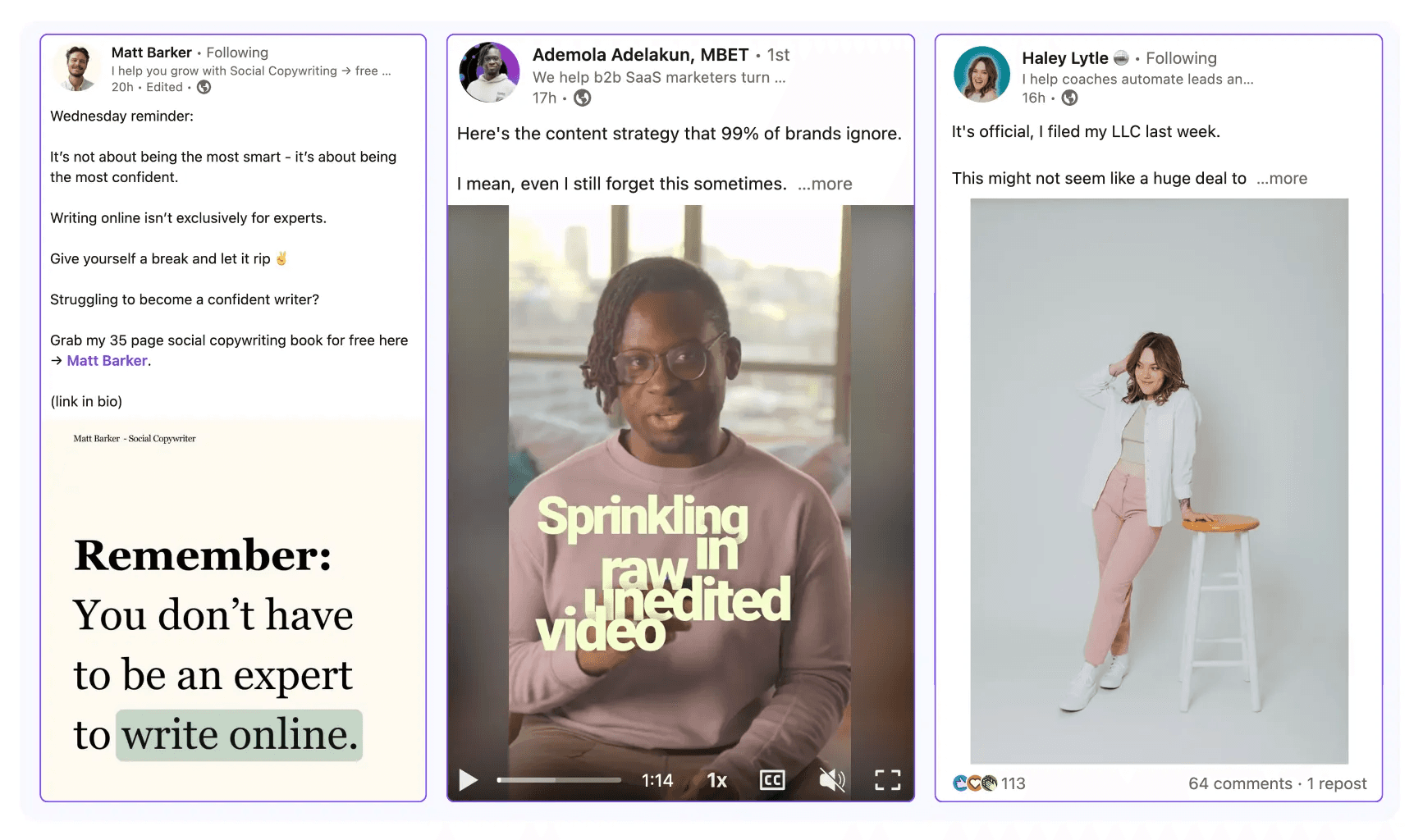
Conversely, an image that is too small or poorly optimized can get lost in the feed, causing your post to be easily overlooked.
Let’s explore why visuals are so important and what can happen if your images aren't properly sized for LinkedIn.
The Role of Visuals on LinkedIn
Every time we open LinkedIn, we’re welcomed with a mix of formats—videos, carousels, personal photos, and even visuals within articles.
These formats are prevalent because they are effective: visuals create an instant hook, catching attention faster than text ever could.
People naturally connect more quickly with something they can scan in less than a second, rather than committing to reading a post.
That’s why, while your text should always be engaging, it’s equally important to pair it with a powerful, well-sized image that enhances your message and represents your brand in the best possible light.
In essence, a striking visual isn’t just an add-on; it’s a tool to ensure your post stands out and drives engagement.
Consequences of Incorrect Image Sizes
Unfortunately, even today, many LinkedIn users overlook the importance of properly sizing their images.
This results in posts that contain visuals that aren’t optimized for their format.
When images are the wrong size, text can become too small, the visuals may fail to catch attention, and the overall post appears unappealing.
This lack of polish leads to reduced visibility, as people are less likely to engage with something that doesn’t look visually compelling.
Even worse, poorly sized images can damage your brand’s credibility.
An unkempt or unprofessional visual can make it harder for your audience to take your message seriously, ultimately impacting your reach and influence on the platform.



Ideal LinkedIn Post Photo Sizes
Now let’s get to the important part—what are the ideal image sizes for posting on LinkedIn?
The answer depends on what type of content you’re sharing.
General Guidelines for LinkedIn Images
The size of your images will vary depending on the format of your post.
To make things easier, it’s a good idea to either keep a cheat sheet of LinkedIn’s image dimensions handy or label your design files with the specific post type they’re meant for.
If you’re not familiar with LinkedIn’s image size requirements, here’s a general guideline to follow:
A single image post may need different dimensions than a carousel, video thumbnail, or banner.
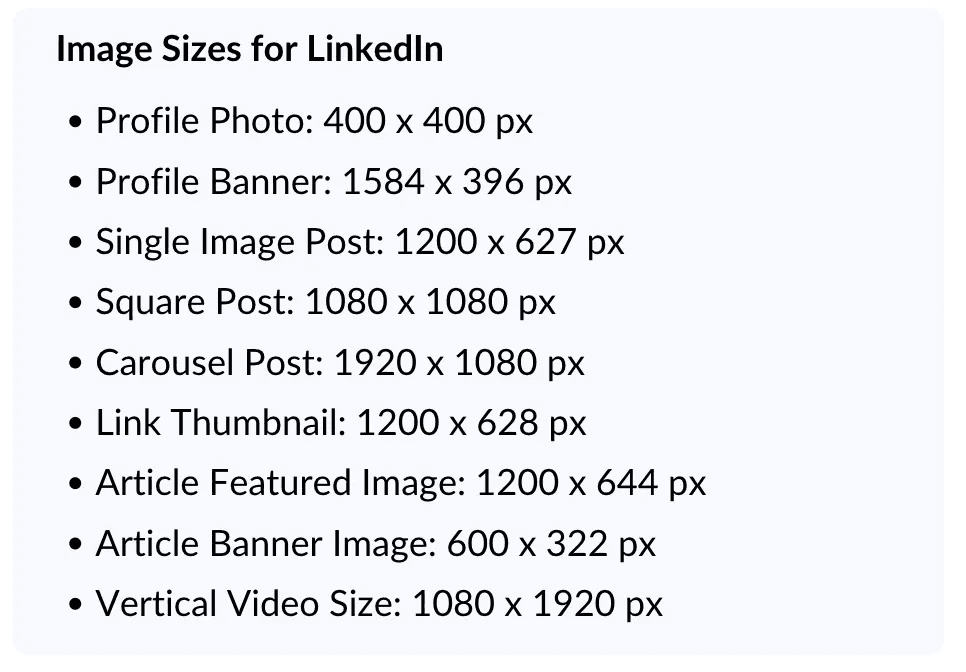
Image Sizes for LinkedIn Posts
Now, let’s get to the nitty-gritty of what you really need to know: the proper image sizes for LinkedIn posts.
It’s important to note that the right size depends on the type of content you’re posting.
For a regular single image post, the ideal size is 1200 x 627 px. This size works great for horizontal images, ensuring they look sharp and fit properly in the feed.
If you prefer to share a square image, the best size is 1080 x 1080 px. This is perfect for a balanced look and works across devices.
For carousel posts, the recommended size is 1920 x 1080 pixels. This size is optimized to occupy a good amount of space on both mobile and desktop, making it easy for users to scan and engage with each slide.
Finally, for portrait images, the ideal size is 1200 x 1200 px. This vertical format works well for posts where you want to highlight specific details or create a more dynamic visual effect.
But there are also many other formats to consider for different types of content:
4Article Featured Image: 1200 x 644 pixels
Article Banner Image: 600 x 322 pixels
Blog Post Link Images: 1200 x 627 pixels
Carousel Posts: 1080 x 1080 pixels or 1920 x 1080 pixels
Preferred Format for Carousel: PDF
Video Vertical Size: 1080 x 1920
Video File Size: 75KB to 200MB
Maximum Video Length: 10 minutes
By following these recommended sizes, your images will look crisp, professional, and visually engaging, whether viewed on mobile or desktop.
Sizes for LinkedIn Link Thumbnails
When sharing links on LinkedIn, the image preview plays a significant role in grabbing attention.
The ideal size for link thumbnails is 1200 x 628 pixels.
This size ensures that your image displays correctly and looks sharp across different devices and screen sizes.
Additionally, the image should be relevant to the content you're sharing.
Choose an image that aligns with the link’s content to make it more engaging.
LinkedIn Profile Photo and Banner Sizes
Another crucial element that is often overlooked is the profile photo and banner next to your profile.
These images need to be optimized because they create the first impression—not only based on your content, but also on who you are, what you offer, and the overall impact you make.
A well-done profile photo and banner with a clear call to action can boost your engagement and help attract more clients if that’s your goal.
On the other hand, if they are not optimized, you’re missing out on a key opportunity to stand out.
Profile Photo
First and foremost, your profile photo is essential.
This is one of the first images people will see, so it’s important to make a good impression.
You should be smiling in the photo, and it must look professional.
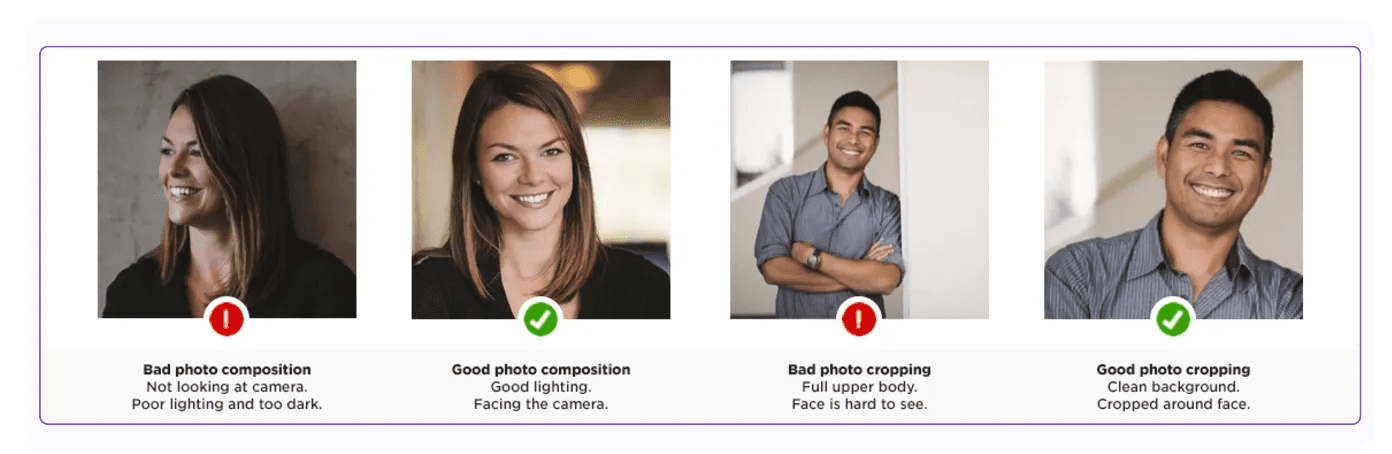
However, avoid pictures where you're on vacation or with friends—it's important to find the balance between being approachable and professional.
The ideal photo size is 400 × 400 px, and the preferred formats are JPEG or PNG.
If your photo is too large, there are techniques to compress it without losing quality.
Keep in mind that LinkedIn has size limitations for images, so it's important to make sure your photo doesn’t end up being too heavy to upload.
LinkedIn Banner
When it comes to your LinkedIn banner, it’s crucial to make sure it’s both visually appealing and professional.
The ideal dimensions for your banner image are 1584 x 396 pixels. This size ensures it displays properly on all devices without distortion.
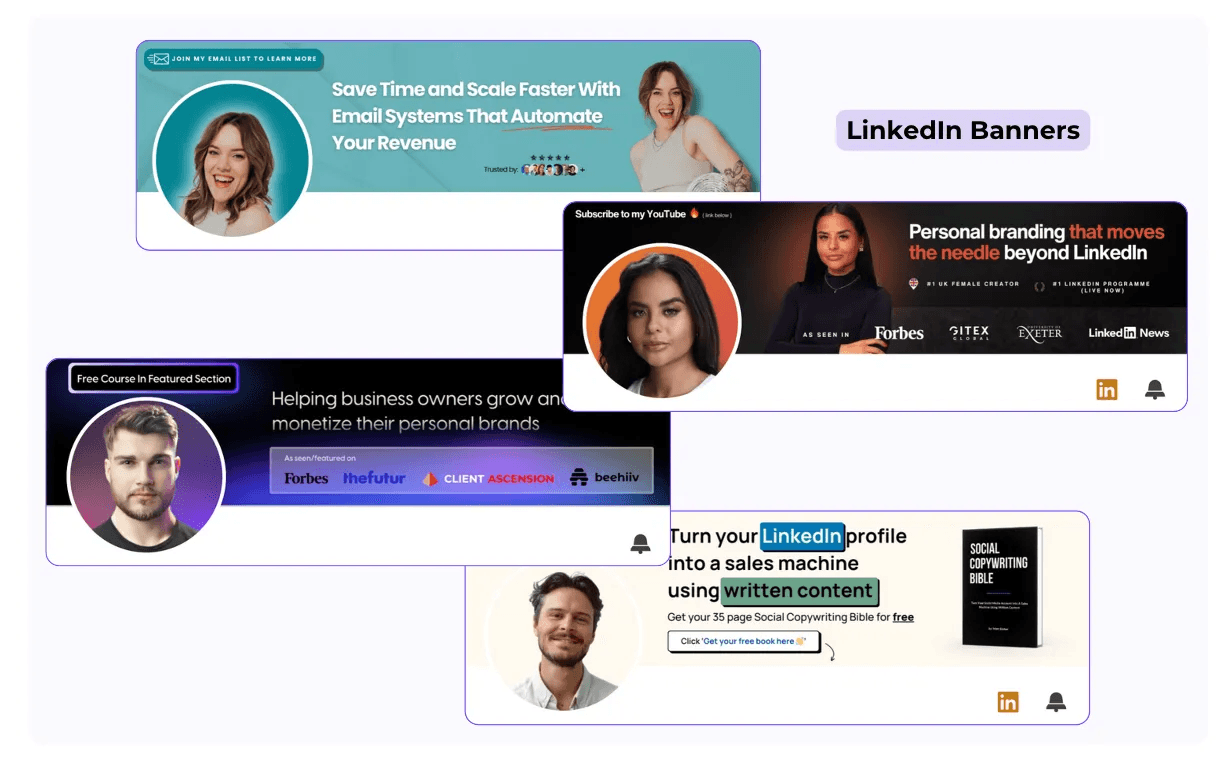
Here are some tips for creating a professional-looking banner:
Keep it simple: A clean, minimalistic design works best. Avoid cluttered images or too much text.
Branding: If you have a personal brand or company logo, include it in your banner to make your profile stand out.
Consistency: Ensure your banner complements your profile photo and reflects your professional identity.
Quality: Use high-quality images, but make sure the file size is optimized for LinkedIn’s upload limits.
Why Image Dimensions Are Key on LinkedIn
What can we take from all of this? Having a well-optimized profile and posts is essential nowadays if you want your content to catch people’s attention and be seen.
Without optimization, you'll miss out on visibility, and others, possibly even your competitors, will stand out more than you.
It might take a little time to figure out the perfect size, but once you find it, it becomes easier to apply it to all your future posts.
As you provide higher quality content, it will get easier, and you’ll gain more confidence. People will start seeing you as a professional.
So, my advice is to write down these guidelines, keep them in mind before posting, and always preview your post, article, or video to see how it will appear before publishing.
8 Best Employee Advocacy Examples to Follow in 2026
Employee advocacy examples to follow in 2026. See how top companies turn employees into growth channels and drive reach, trust, and pipeline.
LinkedIn Content Strategy Agency: What Do They Actually Do?
Looking for a LinkedIn content strategy agency? Before you hire one, understand what a strategy involves, what agencies do, and when to skip them.
LinkedIn Employee Branding: How to Attract Top Talent (2026)
LinkedIn employee branding is a recruitment strategy. Here's how to turn your team's LinkedIn presence into a measurable talent attraction engine in 2026.
5 Best Shield Analytics Alternatives for LinkedIn (2026)
Shield Analytics is shutting down. Here are the 5 best Shield Analytics alternatives for LinkedIn in 2026, with honest pros, cons, and pricing for each.
Does LinkedIn Show Who Viewed Your Profile? (2026)
Does LinkedIn show who viewed your profile? Learn what others see, how to browse anonymously, and the differences between free and premium accounts.
How to Export LinkedIn Contacts and Connections (2026)
Your connections are an asset. Here’s how to export LinkedIn contacts to CSV in a few clicks, the data you’ll get, and what to do when email addresses are missing.
Taplio Review: Powerful, But Are You Overpaying? (2026 Update)
Taplio provides AI posts, scheduling, and lead generation all in one place, but is it worth it in 2026? This Taplio review will assist you in determining if it fits your workflow.