Você está cansado de criar conteúdo genérico para o LinkedIn que não consegue chamar a atenção do seu público? Gostaria de descobrir a receita mágica que fará seu público pausar durante a rolagem e prestar atenção na sua postagem?
Pronto para se libertar de postagens planas e sem graça e começar a criar conteúdo que impulsione o engajamento e a visibilidade? Então você deve ler este artigo. Pesquisamos e compilamos cinco modelos que você pode usar para criar uma voz única na plataforma.
Por que você precisa usar um modelo de post do LinkedIn?
Usar um modelo de post do LinkedIn pode ajudá-lo de muitas maneiras, dependendo das suas necessidades:
Garanta que sua mensagem seja clara, profissional e comunique efetivamente sua mensagem pretendida para sua rede profissional.
Sirva como um guia, fornecendo uma estrutura eficiente que você pode personalizar para atender ao seu conteúdo específico, mantendo uma apresentação polida.
Eles também podem economizar um tempo precioso, oferecendo uma estrutura que você pode rapidamente adaptar para vários tipos de posts, seja compartilhando atualizações, artigos ou anúncios.
De forma geral, templates podem agilizar o processo de criação de conteúdo envolvente e impactante no LinkedIn, especialmente quando você está sem tempo. Útil, não é?
5 Modelos de Postagens do LinkedIn para Usar
Agora, o momento que você estava esperando.
Vamos revisar os 5 melhores modelos que funcionam TODA VEZ.
Abordagem Narrativa
Histórias têm essa habilidade mágica de nos prender e nunca nos soltar! Elas tocam nossas emoções, tornando as mensagens não apenas informativas, mas absolutamente cativantes. É por isso que entrelaçar histórias em suas postagens no LinkedIn é como adicionar combustível de foguete aos seus níveis de engajamento.
Desde compartilhar suas próprias histórias hilárias até celebrar grandes conquistas e até apresentar avaliações positivas de clientes, as possibilidades de contar histórias são infinitas.
E adivinha? Algumas das postagens mais populares do LinkedIn? Sim, você acertou— elas são todas sobre aquelas histórias suculentas que não conseguimos largar.
O passo a passo do modelo de abordagem narrativa:
A isca: Comece com uma anedota pessoal para captar a atenção do seu leitor.
Conectar: Compartilhe suas emoções para se conectar profundamente.
O ponto de virada: Destaque o ponto de virada que mudou tudo.
O resultado: Descreva o resultado para mostrar o impacto.
Reflexão: Reflita sobre as lições aprendidas para adicionar profundidade.
Encorajamento: Ofereça conselhos ou encorajamento práticos.
Engajamento: Conclua com uma pergunta interessante para iniciar a conversa.
Modelo de Lista
O modelo de lista é um dos melhores tipos de conteúdo que você pode criar no LinkedIn: curto, direto e repleto de sabedoria!
A melhor parte? Os usuários do LinkedIn adoram! Eles estão famintos por dicas rápidas, truques e estratégias que mudam o jogo. Ofereça suas percepções em um pacote organizado de estilo lista e veja seu engajamento disparar!
Então, seja uma contagem regressiva dos dez melhores truques, um guia passo a passo ou um tesouro de recursos, escolha seu estilo de lista e prepare-se para deslumbrar sua audiência!
O passo a passo do modelo de lista:
Chame a atenção com um título atraente.
Comece com uma introdução cativante para prender seus leitores.
Entre na sua lista com pontos de bala impactantes.
Conclua com uma forte conclusão e destaque os principais aprendizados.
Não se esqueça de um chamado à ação para engajar sua audiência e estimular a discussão.
Enquanto o texto simples funciona bem, considere sofisticar suas listas com carrosséis para ainda mais visibilidade e desempenho—afinal, carrosséis recebem 5x mais cliques!
Com o poder das listas, você se tornará a fonte confiável de insights sobre a indústria, construindo uma comunidade leal de leitores dedicados ao longo do caminho.
Reflexão Pessoal
Você sabia que sua página do LinkedIn pode refletir sua reflexão pessoal como um hub de mini-blog?
Esqueça artigos longos; blogs compactos com menos de 500 palavras podem ser sua voz sobre qualquer tópico. Preocupado com limites de palavras? Divida em postagens menores ou crie uma série para gerar expectativa!
A receita da sua reflexão pessoal:
Apresente sua perspectiva.
Aborde pontos de vista opostos.
Tempere com histórias.
Ofereça de 3 a 5 dicas.
Termine com um chamado à ação.
Já abordou o tópico anteriormente? Redirecione-os para sua postagem e inicie uma conversa! Direcione o tráfego e construa confiança com sua audiência.
O Modelo de Desabafo
Pronto para agitar as coisas e fazer as pessoas falarem? Adote o modelo de desabafo!
Ele inverte normas, desafia perspectivas e inspira reflexão, ampliando os limites ao longo do caminho. Mas tenha cuidado! Aborde com sensibilidade e respeite opiniões diversas para fomentar um diálogo construtivo.
Pronto para criar conteúdo envolvente e controverso no LinkedIn que desperte discussões animadas? Vamos mergulhar e fazer ondas!
O passo a passo do modelo de desabafo:
Comece com a ideia predominante: Vamos explorar o que todos têm dito.
Agite as coisas com sua nova abordagem: Pronto para balançar o barco com sua perspectiva ousada?
Fundamente com razões: Vamos analisar o 'porquê' por trás de sua posição com evidências sólidas.
Ofereça uma alternativa: Que tal inverter o script e explorar um caminho diferente?
Inclua todos na ação: Vamos ouvir o que vocês têm a dizer! Suas opiniões são importantes.
Hora de entrar na conversa: Compartilhe seus insights e vamos provocar uma discussão animada!
Modelo de Análise
Procurando cativar os entusiastas de números?
Use um modelo baseado em análises para impulsionar um engajamento de alta qualidade no LinkedIn. Números não são apenas atraentes; eles também despertam discussões instigantes.
No entanto, a precisão é fundamental para evitar repercussões por dados mal representados. Se este parece ser um modelo que você gostaria, sugerimos contrastar grandes números com menores para um efeito surpreendente.
Aqui está como um modelo de Análise pode ser estruturado passo a passo com um exemplo:
Abra com uma breve introdução que prepare a mente da audiência.
"Você sabia que o mercado global de e-commerce deve atingir $6,5 trilhões até 2023?"
Insira o seu grande número, possivelmente um que destaque uma tendência chave.
"De acordo com a Statista, o mercado de e-commerce testemunhou um crescimento de 27,6% apenas em 2020, impulsionado pela mudança para compras online em meio à pandemia."
Contrastando o grande número com um ponto de dado menor e específico.
"No entanto, apenas 22% das pequenas empresas têm uma estratégia de e-commerce totalmente integrada, conforme relatado pela Digital Commerce 360."
Apresente sua análise e percepções com base nos dados apresentados. Explique o que eles revelam e suas implicações.
"Esses números destacam o imenso potencial do e-commerce, mas também ressaltam os desafios enfrentados pelas pequenas empresas em capitalizar essa oportunidade.
As empresas devem se adaptar e investir em estratégias robustas de e-commerce para prosperar no mercado digital."
Conclua com um chamado à ação que encoraje os leitores a responder aos dados compartilhando suas opiniões.
"Quais são seus pensamentos sobre o futuro do e-commerce e seu impacto nas pequenas empresas?
Compartilhe suas opiniões nos comentários abaixo, e vamos discutir estratégias para o sucesso na era digital."
Como Criar Seus Próprios Modelos de Postagens no LinkedIn?
Para criar um modelo que se adeque ao seu estilo, siga estes três passos:
1. Encontre Seu Estilo
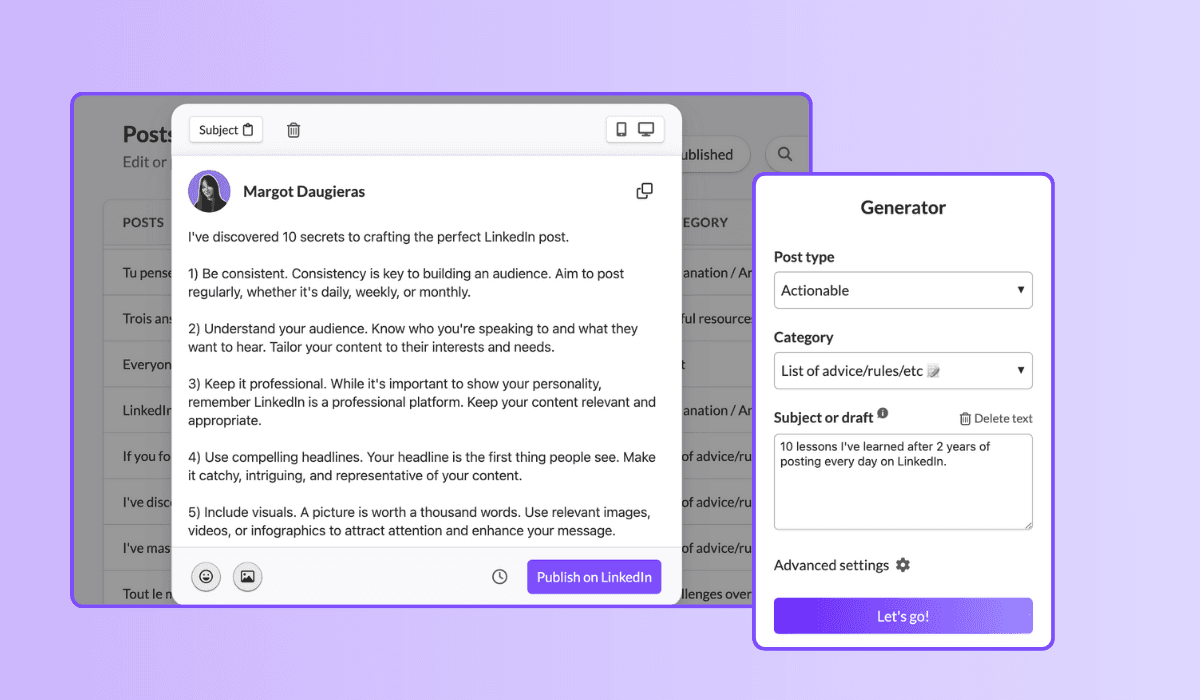
Comece criando postagens no LinkedIn de uma forma que pareça natural para você. Experimente o máximo possível. Utilize ferramentas como MagicPost para gerar várias postagens e identificar quais estilos ressoam com você. Reutilize os estilos que você achou eficazes e agradáveis.
2. Revise Seus Resultados
Preste atenção ao desempenho de suas postagens. Analise quais postagens geram mais engajamento e tente identificar padrões no que funciona melhor para seu público. Isso ajudará você a desenvolver sua própria "fórmula mágica" para postagens bem-sucedidas.
3. Itere e Melhore Constantemente
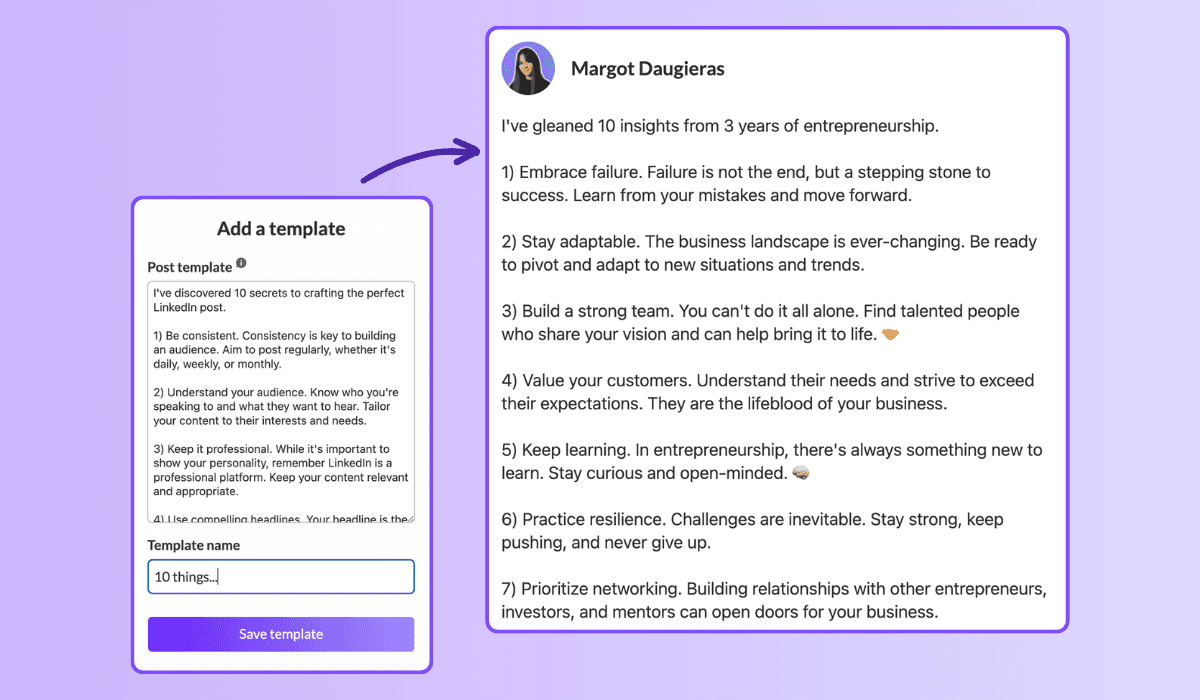
Sempre que uma postagem tiver um bom desempenho, salve-a na funcionalidade “Modelo” do MagicPost. Isso permite que você replique facilmente postagens bem-sucedidas com o mesmo estilo e fórmula vencedora. Refinar continuamente sua abordagem com base no feedback e nos dados de desempenho ajudará a melhorar seus modelos.
Ao seguir estes passos, você poderá criar modelos de postagens no LinkedIn que não apenas refletem seu estilo único, mas também geram um engajamento significativo. Utilizar várias ferramentas e métodos para simplificar sua estratégia pode economizar tempo enquanto maximiza o impacto de suas postagens.
Então mergulhe e comece a criar postagens que cativem seu público!
Aperfeiçoe seu Jogo no LinkedIn com Novos Modelos!
Não fique preso à mesma rotina de sempre—esses modelos podem transformar sua estratégia de conteúdo. Eles não apenas oferecem uma variedade de opções, mas também garantem que você nunca fique sem ideias!
Então, por que esperar? Mergulhe nesses modelos e combine-os usando o MagicPost para liberar todo o potencial da sua presença no LinkedIn.
Eleve sua jornada profissional e alcance novas alturas!
2. The challenge overcome
Family: Challenges overcome. 1.03% median ER, 51 median likes, on 16,823 posts. The second-best family, and the engine of most great LinkedIn stories.
[Open inside the problem, present tense: "[Number] months ago, [the thing that was broken]."]
[Raise the stakes: what it would have cost to fail.]
[The turn: the decision, insight, or person that changed it.]
[What you did, concretely. The steps, not the vibes.]
[Where it landed, with one number.]
[The transferable lesson, one line, for the reader facing the same wall.]
When to use it: whenever a result came from struggle and the struggle is the interesting part. This is the backbone of the personal story post, the format that does the most for you on the platform.
3. The hard moment
Family: Hard moment. 0.80% median ER, 47 median likes, on 3,234 posts. Less used than the others (only 3,234 posts), which is part of why it still earns. Honesty is uncrowded.
[Name the hard thing, without a bow on it: "[What happened]. It still stings."]
[Resist resolving it too fast. Stay in the moment one beat longer than is comfortable.]
[What you are learning from it, tentatively, not as a TED talk.]
[An open question to the room, inviting people who have been there.]
When to use it: a layoff, a failed launch, a loss, a setback you are still inside. Use it honestly or not at all; the family rewards real vulnerability, not performed vulnerability. For the job-loss version specifically, the open-to-work explainer covers how to frame it.
4. The lessons learned
Family: Lessons learned. 0.70% median ER, 32 median likes, on 24,803 posts. A heavily-used family (24,803 posts) that still clears the median: proof the format travels.
[The setup: "[Time period] doing [thing] taught me [number] things."]
[Lesson 1: the counterintuitive one first. Bold the takeaway, then one line of why.]
[Lesson 2.]
[Lesson 3. Keep each to two lines max; the list is the value.]
[Close on the one lesson you wish you had learned soonest.]
When to use it: end of a project, a year, a role, a chapter. Anything you can look back on. Full skeleton bank in the lessons learned post guide.
Fill these in your own voice, automatically. This is the exact job MagicPost's AI LinkedIn post generator was built for: you pick a template, drop in your raw situation, and it writes the post the way you would, with the right length and structure for the family, no blank-page stare. A skeleton gets you the shape; the generator handles the words.
5. The situation recap
Family: Situation recap. 0.68% median ER, 45 median likes, on 11,729 posts. A "here is where things stand" post: state of the project, the market, the journey.
[Frame the moment: "[Number] weeks into [thing], here is the honest status."]
[What is working, briefly. One or two wins.]
[What is not working, more honestly. This is the part people read for.]
[What you are changing because of it.]
[Where you expect to be by [date]. Invite people to check back.]
When to use it: building in public, a recurring update cadence, a midpoint reflection. The transparency is the engagement driver: people follow trajectories, not snapshots.
Tier 2: the teaching templates (your reliable middle)
These five sit around the median: dependable, useful, the everyday workhorses. They teach rather than confess, which caps their ceiling but makes them repeatable. Mix them into the giving tier so you are not always confessing.
6. The explainer
Family: Explainer / analysis. 0.40% median ER, 21 median likes, on 83,180 posts. The second-most-used family on LinkedIn and, not coincidentally, one of the lowest likes counts (21). Useful, crowded, hard to stand out in.
[The question, as your reader would phrase it: "Why does [thing] actually [happen]?"]
[The short answer, in one sentence, up top. Do not bury it.]
[The mechanism: walk through how it works in 3 to 4 steps.]
[The "so what": what the reader should do differently knowing this.]
When to use it: breaking down a concept, a trend, a how-it-works in your domain. Strong for authority, weak for raw engagement, so reserve it for when teaching is the point.
7. The tips list
Family: Tips / rules list. 0.49% median ER, 57 median likes, on 9,520 posts. Note the split: a middling ER but 57 median likes and the highest median comments of any family (23). This template trades efficiency for conversation. People argue with lists.
[The promise: "[Number] rules for [outcome], learned the hard way."]
[Rule 1, as an imperative. "Do X." Then one line of cost-of-ignoring-it.]
[Rules 2 through N, same shape, tight.]
[The bonus rule, slightly contrarian, to bait the comments.]
[Ask: "What would you add?" The list format earns its comments by inviting them.]
When to use it: when you have hard-won rules and want a discussion, not just applause. The comment count is the real prize here.
8. The quick tip
Family: Quick tip. 0.46% median ER, 29 median likes, on 3,684 posts. The smallest unit of value: one actionable thing, fast.
[The tip in the first line, no windup: "[Do this specific thing] to [get this result]."]
[Why it works, one sentence.]
[How to do it, two or three lines. Concrete enough to act on today.]
[Optional: the mistake it replaces.]
When to use it: between bigger posts, to stay present without a big lift. Cheap to produce, modest but reliable return.
9. The contrarian take
Family: Contrarian take. 0.49% median ER, 40 median likes, on 8,357 posts. Above-median engagement and the second-highest median comments outside the tips list (14): disagreement drives replies.
[The unpopular claim, stated flatly: "[Common belief] is wrong."]
[Acknowledge why people believe it. Be fair to the other side first.]
[Your evidence: the experience or data that changed your mind.]
[The reframe: what to believe instead, and what it changes.]
[Invite the pushback explicitly. The disagreement is the engine.]
When to use it: when you have a real, defensible counter-position, not a hot take for its own sake. Full playbook in the contrarian post guide. Use sparingly; an account that is contrarian about everything is just tiring.
10. The personal reflection
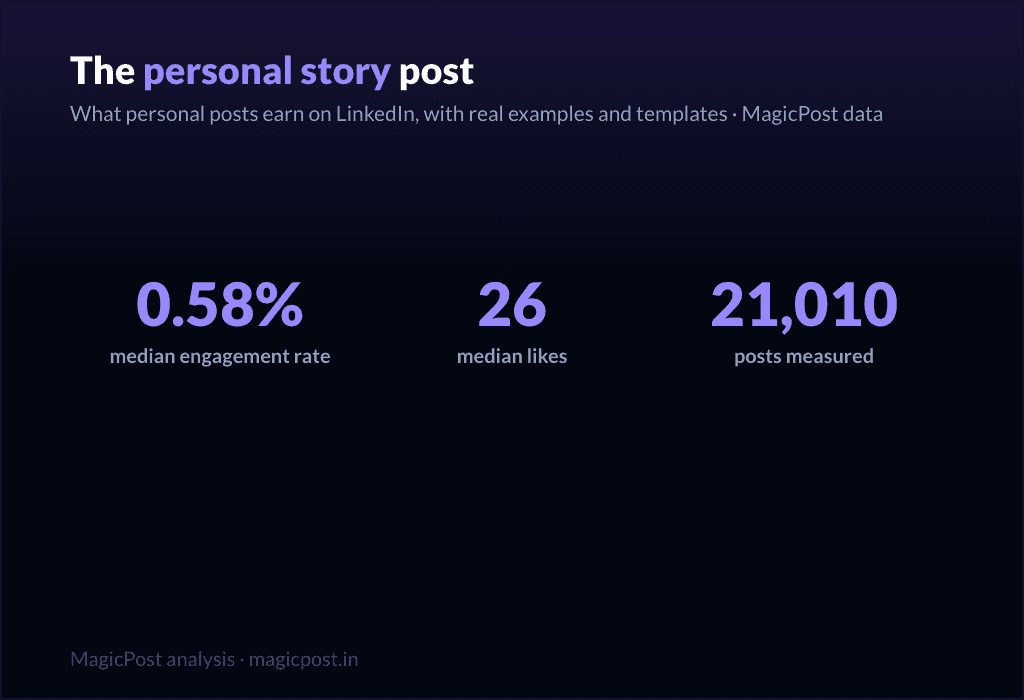
Family: Personal reflection. 0.58% median ER, 26 median likes, on 21,010 posts. Above the median on ER, lower on raw likes (26): it earns a high share of a smaller audience. Quiet, but it builds the relationship.
[A small, specific observation from your week: "[Tiny moment that made you think]."]
[Zoom out: what it made you realize about [work / people / yourself].]
[Hold the thought lightly. This is reflection, not a thesis.]
[An open-ended line that lets people sit with it too.]
When to use it: the in-between days, to stay human and not just useful, including the lighter seasonal beats covered in the holiday post guide. Pairs well with the giving tier as connective tissue.
Tier 3: the asking templates (use sparingly)
Here is the part most template pages hide. Every promotional family sits below the 0.39% median. These templates ask the reader for something (a click, a signup, a sale) and the feed charges you for it. They are necessary (you have to sell sometime) but they are a tax, not a treat. Earn the right with the tiers above, then spend it here, rarely.
11. The launch announcement
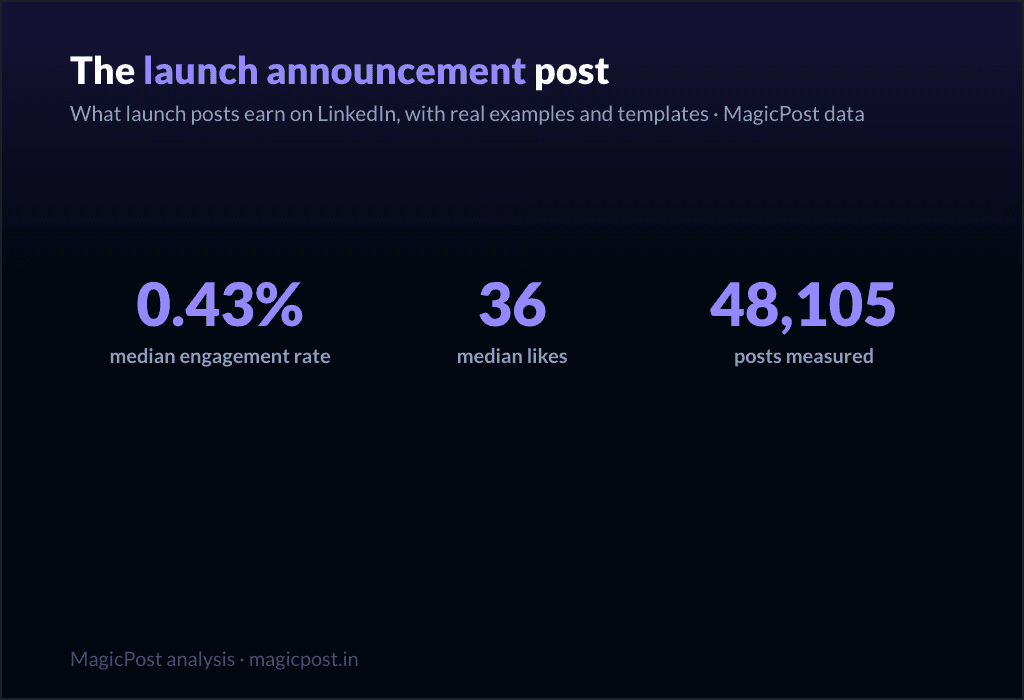
Family: Launch announcement. 0.43% median ER, 36 median likes, on 48,105 posts. The least-bad of the asking templates, slightly above median on ER but thin on comments (5). Still, do not lead your whole feed with launches.
[The news, but framed as a reader benefit, not a press release: "If you [reader problem], this is for you."]
[The problem it solves, in the reader's words.]
[What it is, in one clear line. Then one proof point.]
[The single next step. One CTA, not five.]
When to use it: an actual launch, used once or twice per launch, not as a daily drumbeat. Deep version in the product launch post guide.
12. The value-first sale
Family: Value-first selling. 0.33% median ER, 34 median likes, on 57,659 posts. Below the median (0.33%), which is the honest cost of selling, even when you wrap it in value.
[Lead with a free, genuinely useful insight. Give before you ask.]
[Make the insight complete on its own. It must stand without the pitch.]
[The soft bridge: "This is also exactly what [your offer] does for you."]
[A low-pressure invitation, not a hard close.]
When to use it: when you need to sell but want to protect the relationship. It is the gentlest asking template, and still below median, which tells you something. More patterns in the sales post examples and the wider promotion post examples.
13. The comment-gated lead magnet
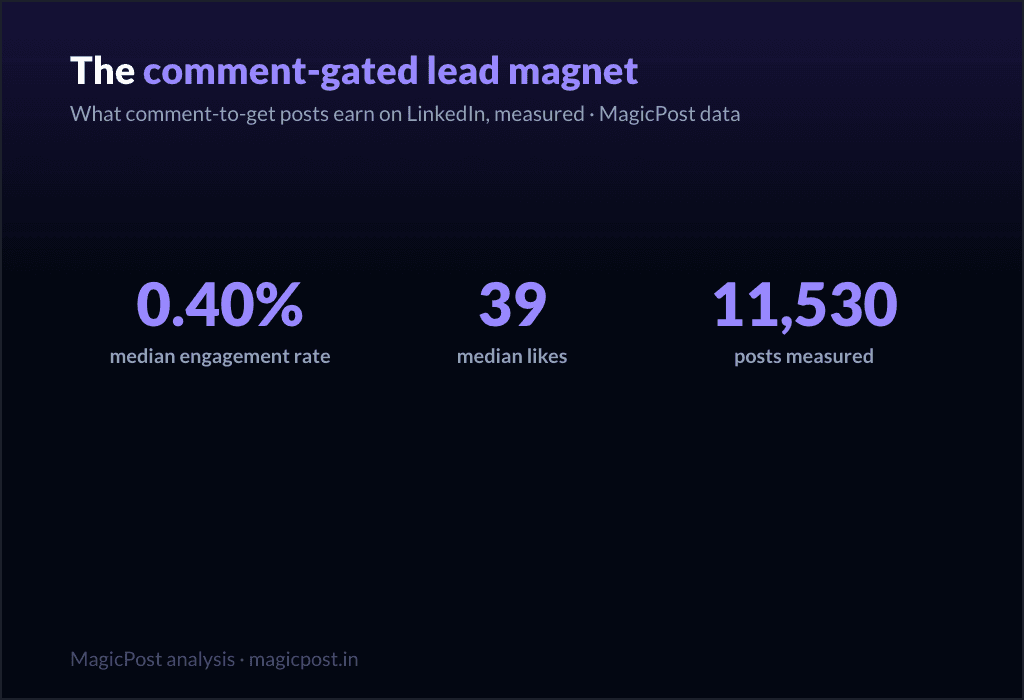
Family: Comment-gated lead magnet. 0.40% median ER, 39 median likes, on 11,530 posts. Right at the median on ER, but look at the comments: 17 median comments, second only to the tips list. The "comment X and I will send it" mechanic manufactures comments by design.
[The valuable thing you are giving away: "[Resource] that [specific outcome]."]
[Proof it is worth wanting: one line on what is inside.]
[The gate: "Comment '[word]' and I will send it to you." Keep the word short.]
[A reason to act now, lightly.]
When to use it: when you have a real asset and want both distribution and a comment spike. Be aware the comments are partly mechanical, not pure enthusiasm. Full mechanics in the lead magnet post guide.
14. The webinar invite
Family: Webinar signup push. 0.31% median ER, 32 median likes, on 51,864 posts. One of the two lowest families in the whole table (0.31%). Event posts ask for a calendar commitment, and the feed knows it.
[The outcome of attending, first: "Leave knowing how to [specific result]."]
[Who it is for, in one line. Disqualify the wrong people on purpose.]
[The logistics, compressed: date, time, format. One line.]
[The single registration link. Make the action trivial.]
When to use it: a real event, posted no more than two or three times in the run-up, spaced out. Lead with the giving tier in between. Full template set in the webinar post guide.
15. The podcast / video share
Family: Podcast / video share. 0.29% median ER, 36 median likes, on 32,031 posts. The lowest-performing family in the entire dataset (0.29%). Sharing content you made elsewhere asks people to leave the feed, and they mostly do not.
[The single best idea from the episode, stated as its own standalone insight.]
[One more: a surprising quote or moment, paraphrased.]
[Make the post valuable even if nobody clicks. That is the whole trick.]
[Then, almost as an afterthought: "Full conversation in the comments / link."]
When to use it: when you genuinely want to drive listens or views, knowing it is the weakest template on this list. The fix is the same every time: make the post worth reading on its own, and treat the click as a bonus.
The pattern, in one line: give four times for every time you ask. The data is unambiguous, and so is the playbook. MagicPost handles the drafting, the calendar, and the post-performance numbers together, so you build your week from the giving tier and spend the asking tier only when you have earned it.
Where this data comes from
Everything on this page is MagicPost's own research. We classified 1,141,932 LinkedIn posts into the template family each one belongs to, then ranked the families by median engagement rate: likes plus comments divided by the author's follower count, expressed as a percentage. The overall median across the whole corpus is a 0.39% engagement rate, the line we use to separate "above median" from "below median" throughout. Each family also reports its median likes and its sample size (n), shown in the table and beside every template. We use medians, never averages, so viral outliers cannot move a row. Engagement-rate figures are aggregated and anonymized.
Perguntas frequentes
Qual é o melhor modelo de post para o LinkedIn?
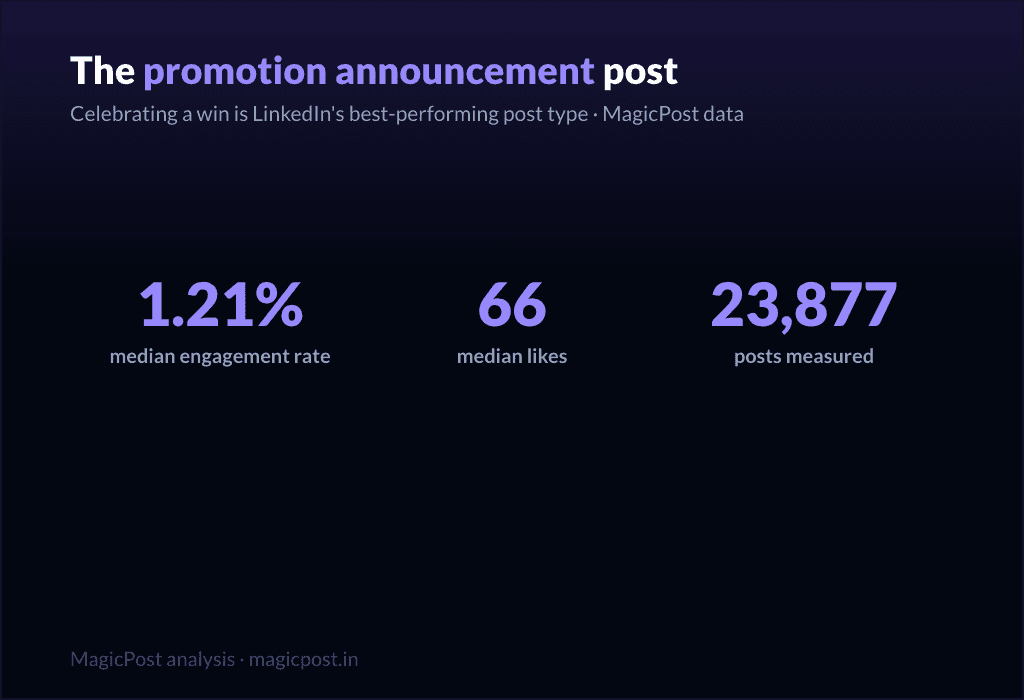
By measured engagement on 1,141,932 posts, the best template family is the win announcement (celebrating a win): a 1.21% median engagement rate and 66 median likes, the highest of any family. More broadly, the top tier is what we call the "giving templates," the ones that hand the reader something before asking for anything: celebrating a win (1.21%), challenges overcome (1.03%, 51 median likes), the hard moment (0.80%, 47 median likes), lessons learned (0.70%, 32 median likes) and the situation recap (0.68%, 45 median likes). All five clear the 0.39% overall median comfortably. The worst templates are the promotional ones, all of which sit below that median.
Quantos modelos de post do LinkedIn existem?
There are as many wordings as there are tools, but they collapse into a smaller number of real families. We measured 22 of them, from celebrating a win (1.21% median ER) down to podcast / video share (0.29%). The 15 fill-in skeletons on this page cover the families worth using, sorted into three performance tiers.
Os modelos de post promocional funcionam no LinkedIn?
They work, but they cost you. Every promotional family sits below the 0.39% overall median: launch announcement (0.43% ER, the least-bad), value-first selling (0.33%, 34 median likes), comment-gated lead magnet (0.40%), webinar signup push (0.31%) and podcast / video share (0.29%, the lowest of all 22 families). Use them when you must, sparingly, and earn the right with the giving templates first.
Qual modelo de LinkedIn gera mais comentários?
The tips / rules list, with 23 median comments, the highest of any family, despite a middling 0.49% engagement rate and 57 median likes. The comment-gated lead magnet is next at 17 median comments, though those are partly manufactured by the "comment to receive" mechanic. If conversation is your goal rather than likes, a rules list is the template to reach for.
Os modelos de storytelling são mesmo melhores que os de passo a passo?
Yes, clearly. Challenges overcome (1.03% ER), hard moment (0.80%) and lessons learned (0.70%) all beat the teaching families like explainer / analysis (0.40%, 21 median likes) and punchy advice (0.44%, 28 median likes), even though those teaching families are far more heavily used (explainer / analysis alone covers 83,180 posts). The crowd writes how-to; the data rewards story.
Onde posso ver exemplos reais desses modelos?
Beyond the skeletons here, LinkedIn post examples collects real posts for each family, and the family-specific guides linked throughout (the personal story post, lessons learned post, contrarian post and others) go deeper on each one with multiple worked examples.