If you came here for the number, here it is: a LinkedIn post can hold up to 3,000 characters. That is the cap, and most of this page's visitors only need that one line.
But the limit is almost never your real problem. We measured 1,201,112 posts from the last 12 months, and the typical one runs 1,011 characters, barely a third of the way to the ceiling. Only 2.5% of posts come within 300 characters of the cap.
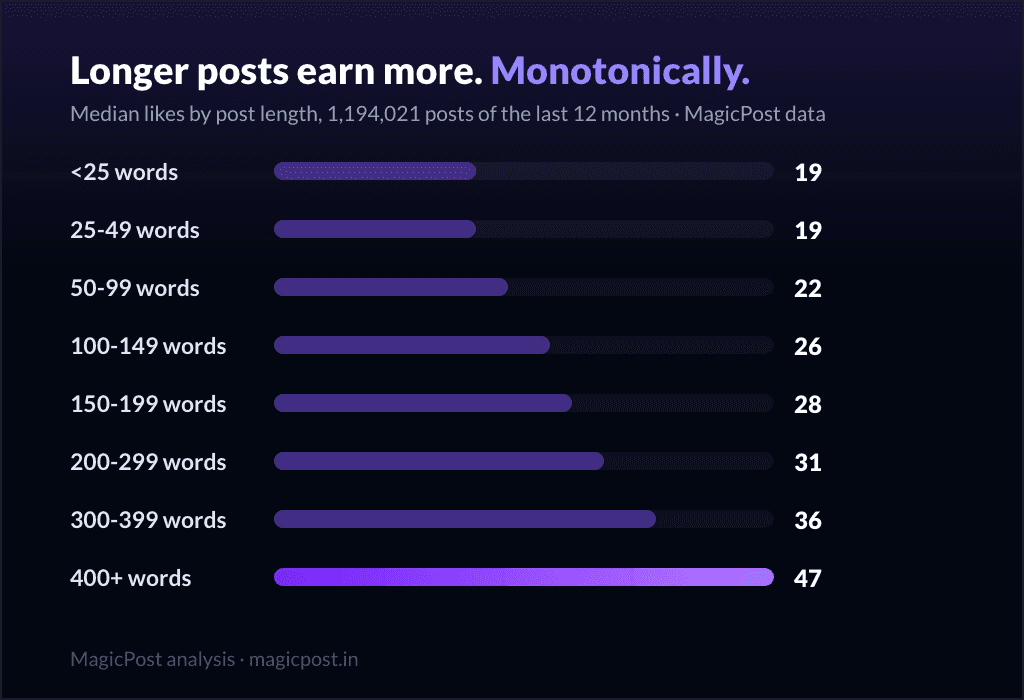
So the interesting question is not "how many characters can I use" but "how many should I", and on that, the data is blunt: longer posts perform better, all the way up to the limit.
Reference first, then the measured layer.
The LinkedIn character limits (reference)
These are platform limits, the hard numbers LinkedIn enforces. They are not our measurements; they are the rules of the field.
Where | Character limit |
Standard post (the feed update) | 3,000 |
Article (LinkedIn's long-form editor) | Higher than a post (long-form, effectively no practical cap) |
The one number to remember is 3,000 characters for a standard feed post. Articles, written in LinkedIn's separate long-form editor, are not bound by the same cap, so they are a different format with a different intent, not a longer post.
One more limit that is not a character count but matters just as much: the "see more" fold. LinkedIn truncates your post after the first few lines and hides the rest behind a "see more" link, and readers decide in seconds whether to expand.
So your first two lines do the work of the whole post, no matter how many of the 3,000 characters sit below them.
The limit is almost never the constraint
Here is the gap between the rule and reality. The cap is 3,000. The actual distribution:
Median post: 1,011 characters. Half of all posts are shorter than that.
90th percentile: 2,000 characters. Nine posts in ten come in under two-thirds of the cap.
Only 2.5% of posts land within 300 characters of the 3,000 limit.
So the limit is real, but you will almost never hit it. The question that actually moves your numbers is how long to make the post inside that range, and that is a performance question, not a platform one.
Longer performs better, all the way to the cap
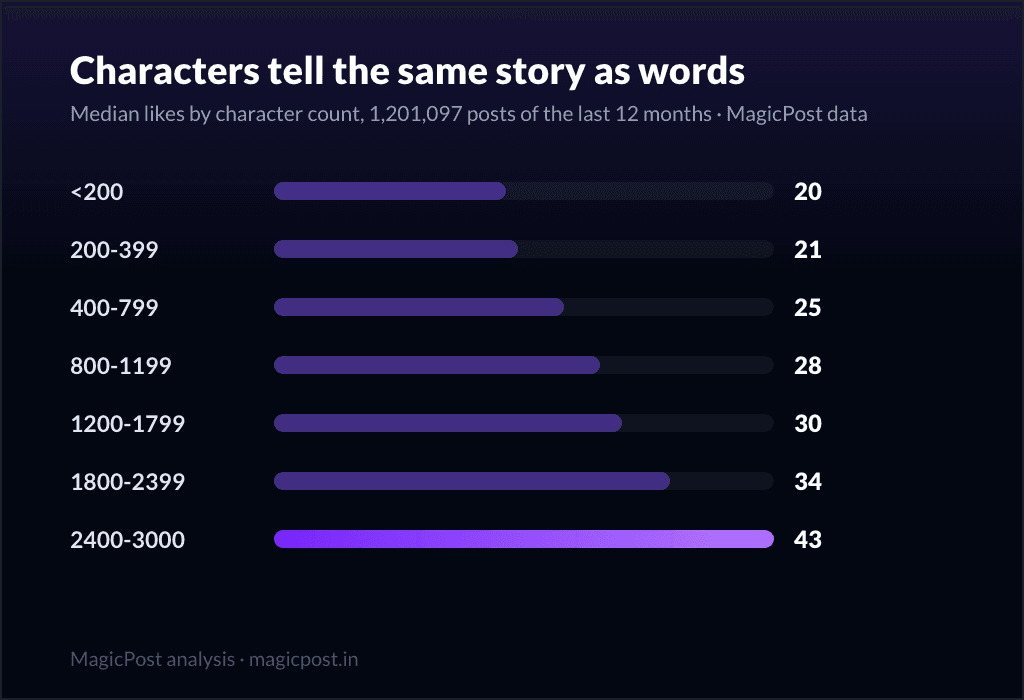
We bucketed every post by its character count and took the median likes in each band. The curve only goes one direction:
Post length (characters) | Posts measured | Median likes |
Under 200 | 101,967 | 20 |
200 to 399 | 96,308 | 21 |
400 to 799 | 245,605 | 25 |
800 to 1,199 | 292,768 | 28 |
1,200 to 1,799 | 293,314 | 30 |
1,800 to 2,399 | 113,256 | 34 |
2,400 to 3,000 | 57,879 | 43 |
Read the two ends: posts under 200 characters earn a median of 20 likes; posts pushing the 2,400-to-3,000 band earn 43, more than double. There is no peak-then-drop, no sweet spot where it stops paying. The medians climb monotonically right into the cap. The short, punchy one-liner that "respects people's time" is, on the median, the worst-performing length on the platform.
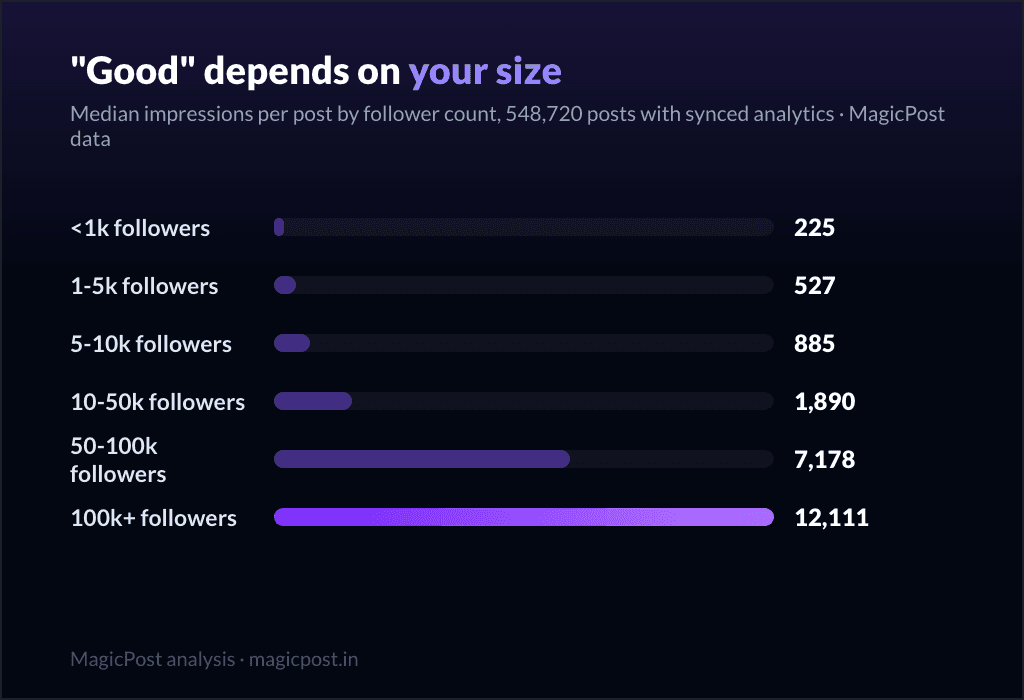
(One caveat, the same one that applies to the length study: this is correlation, not proof of causation. Longer posts tend to come from more invested writers, and that effort is part of the number. We control for it by follower band in the deep-dive below, and the pattern holds in every band.)
We measured this same effect by length in words in the canonical study, with the by-follower-band controls and the full method: how long should a LinkedIn post be. If you want the definitive answer on length, read that one; this page is the character-limit reference, that one is the length deep-dive.
Write to the right length without counting. The MagicPost AI post generator drafts posts that already land in the range the data rewards, with a hook before the fold, so you never have to watch a character counter to get it right.
Characters vs words: a rough rule of thumb
People plan in words and LinkedIn counts in characters, so the translation matters. With an English word averaging roughly five to six characters plus a space, the median post of 1,011 characters works out to somewhere around 150 to 180 words. The best-performing band (2,400 to 3,000 characters) lands near 400 to 500 words.
Treat that as a conversion, not a target. The point is not to pad text to hit a character count; it is to realize that the lengths the data rewards are still well short of the 3,000-character ceiling, and that "long" on LinkedIn means a few hundred words, not a wall of text.
Use the fold, not the limit
Since you will rarely touch 3,000 characters, the constraint that actually governs your post is the "see more" fold, not the cap.
Put your strongest line first. The opening lines are all most people read before deciding to expand. A long post with a weak first line performs like a short one, because the rest is never seen.
Earn the expansion, then go long. Once a reader clicks "see more," the length curve above is on your side. The hook buys the click; the depth earns the engagement.
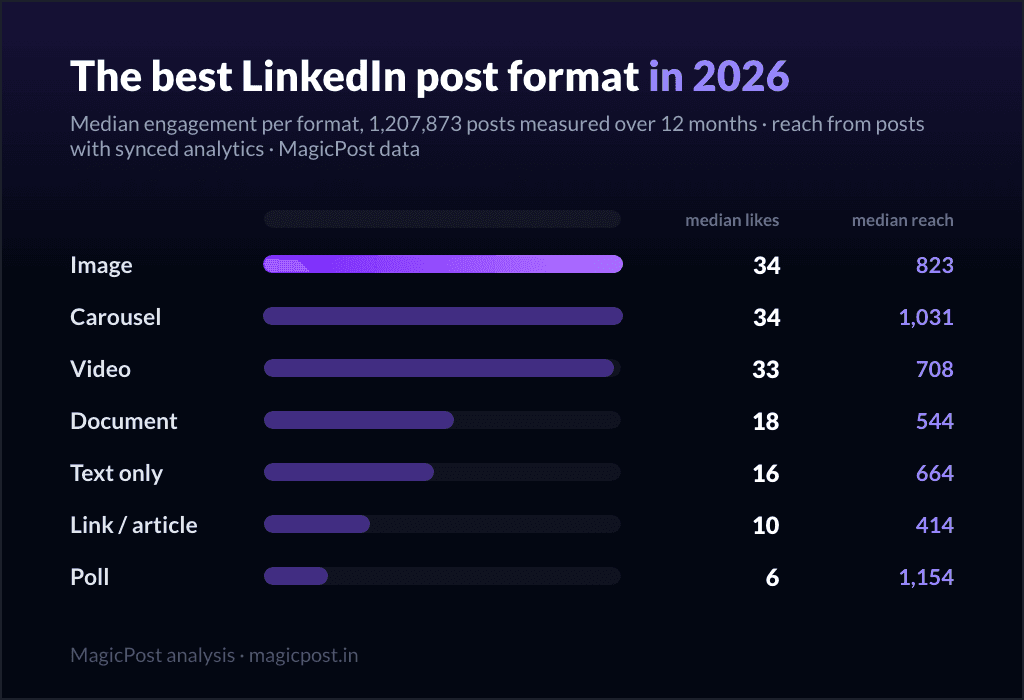
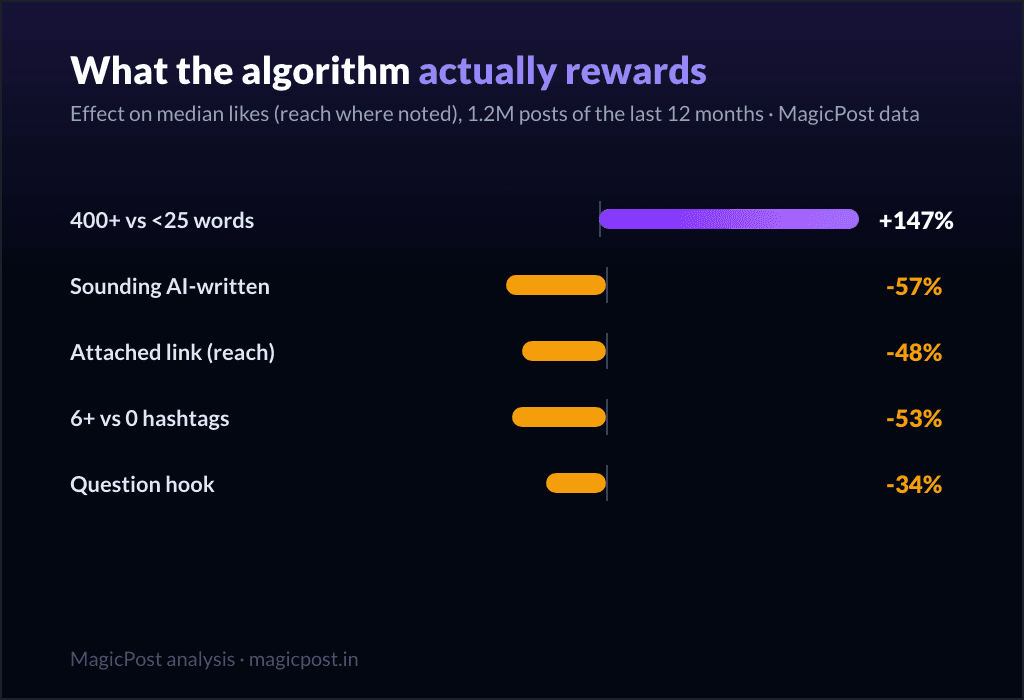
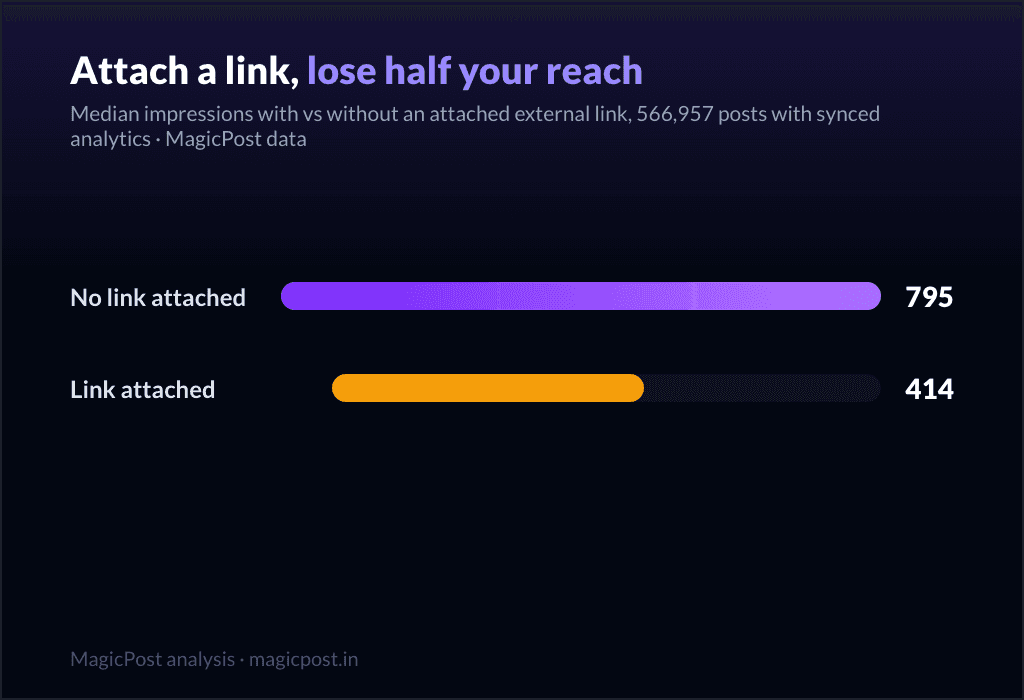
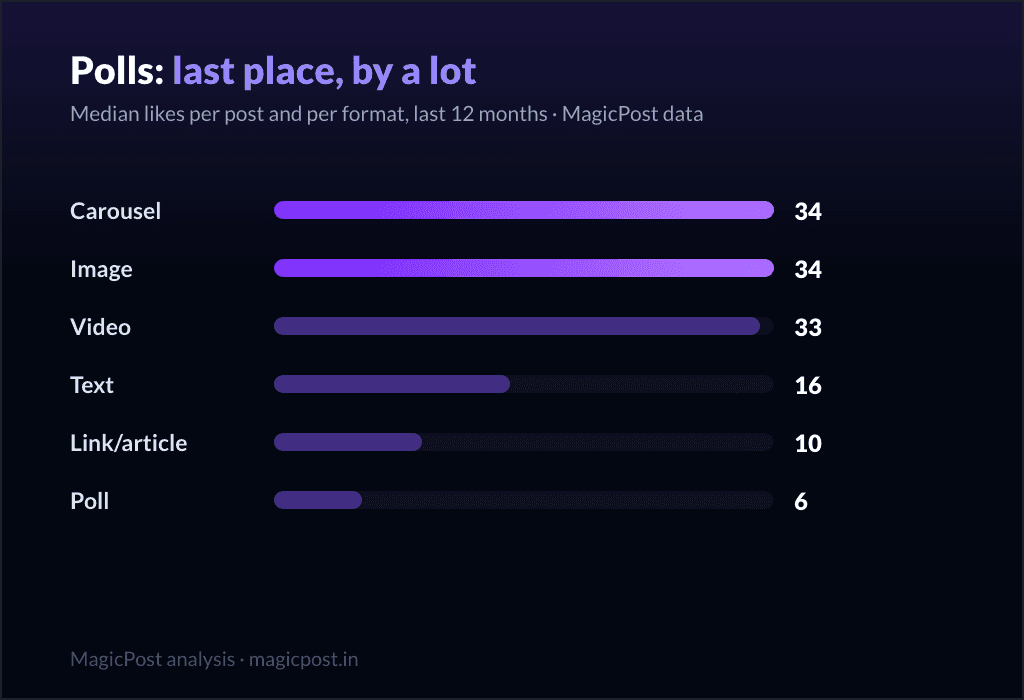
For the openings that get people past the fold, see our LinkedIn hooks guide. For where length sits among every other lever (format, hashtags, links, timing), the pillar is the best LinkedIn post format, and the synthesis of how all of it feeds the feed is how the LinkedIn algorithm works in 2026.
The bottom line
The limit is 3,000 characters. That is the only hard number you need, and you will almost never reach it (only 2.5% of posts get close).
The median post is 1,011 characters, the 90th percentile 2,000. Real posts live far below the cap.
Longer performs better, monotonically: 20 median likes under 200 characters, 43 in the 2,400-to-3,000 band.
The fold, not the cap, is your real constraint. Win the first two lines, then use the room the data rewards.
Put it to work. MagicPost drafts, queues and tracks your LinkedIn posts in a single workspace, with the length, format and hook patterns from this research already baked into what it suggests.
Where this data comes from
The limits in the reference table are LinkedIn's own platform rules (the 3,000-character post cap and the long-form article editor), not our measurements. Everything labelled "measured" is MagicPost's own research: 1,201,112 LinkedIn posts published over the last 12 months (reshares and excluded posts filtered out), grouped by character count and compared on median likes. We use the median, not the average, precisely so a few runaway posts cannot bend the character curve upward. The median post length is 1,011 characters, the 90th percentile 2,000, and 2.5% of posts fall within 300 characters of the cap. Numbers current as of June 2026.
FAQ
How many characters can a LinkedIn post have?
A standard LinkedIn post can hold up to 3,000 characters. LinkedIn truncates the post after the first few lines in the feed and hides the rest behind a "see more" link, so even within the 3,000-character limit your opening lines decide whether the rest gets read. (LinkedIn articles, written in the separate long-form editor, are not bound by the 3,000-character cap.)
What is the ideal length for a LinkedIn post?
By the data, longer is better up to the cap: posts under 200 characters earn a median of 20 likes, while posts in the 2,400-to-3,000 character band earn 43, more than double. There is no sweet spot where it stops paying. The full word-by-word analysis, with controls, is in how long should a LinkedIn post be.
How long is the average LinkedIn post?
The median post runs 1,011 characters, and 90% of posts come in under 2,000 characters. The typical post sits roughly a third of the way to the 3,000-character limit, and only 2.5% of posts get within 300 characters of the cap.
How many words is 3,000 characters?
Roughly 450 to 600 words, depending on word length and spacing. In practice you will rarely write that much: the median post of about 1,011 characters is closer to 150 to 180 words. The lengths the data rewards are still well below the character ceiling.
Should I use all 3,000 characters?
You do not need to, and almost nobody does (only 2.5% of posts come close). But within reason, length pays: the median likes climb steadily from 20 (under 200 characters) to 43 (2,400 to 3,000 characters). Lead with a strong hook to clear the "see more" fold, then go as long as you have something worth saying.