Yes, you can schedule posts on LinkedIn without any third-party tool. The clock icon in the post composer queues a post for the date and time you pick, on a personal profile or a company page, and it has been there since November 2022, when LinkedIn rolled out native scheduling on desktop and Android.
The question people actually type is a capability question: what does the native scheduler handle, and where does it stop? This page answers it row by row, with LinkedIn's help center as the source for the native side and MagicPost as the named example on the tool side.
For the click-by-click steps, read how to schedule a post on LinkedIn.
Can you schedule posts on LinkedIn natively?
LinkedIn's native scheduler is the clock icon in the post composer: lower-right corner on desktop, next to the Post button, upper-right corner in the mobile app. You write the post, click the clock, pick a date and a time, then click Next and Schedule.
Three facts from LinkedIn's help center page on scheduling posts frame everything that follows:
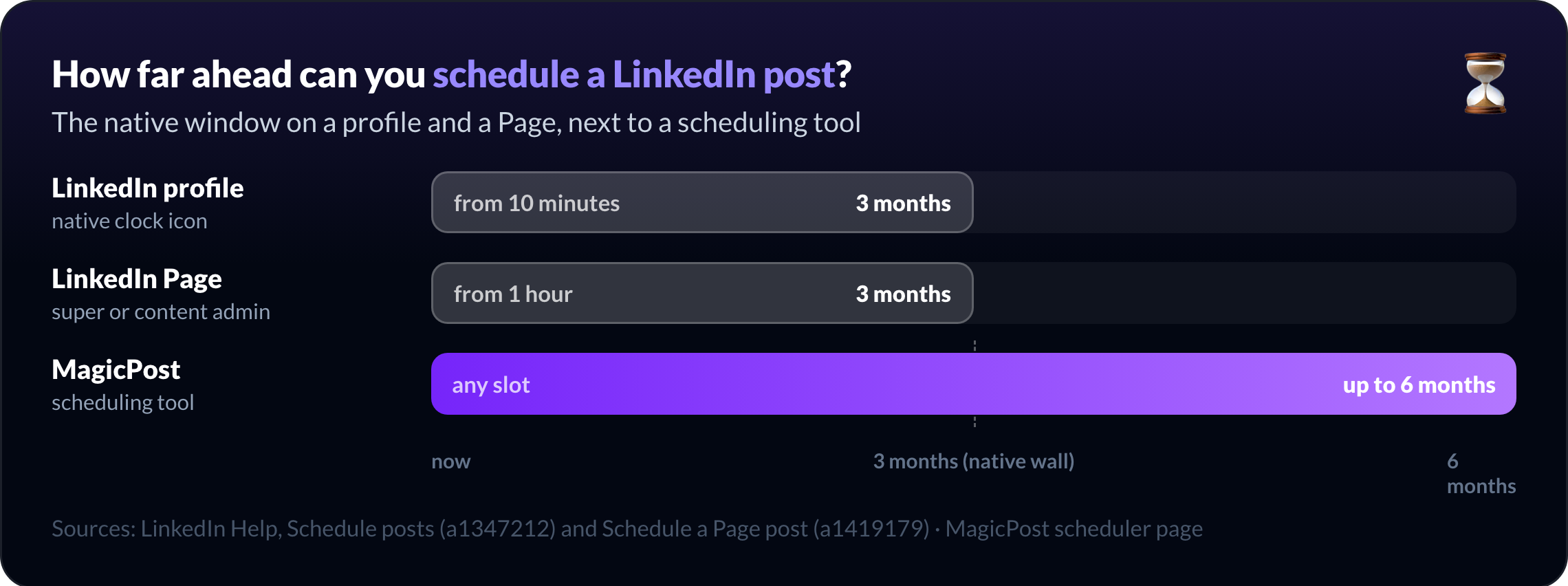
Window: 10 minutes to 3 months ahead on a personal profile.
Company Pages: one hour to three months, super or content admin.
Not schedulable on a profile: events, jobs, service posts.
Scheduled posts live in a list, not a calendar. You reach it from the same clock icon (View all scheduled posts), and from there you can modify the schedule, edit the post or delete it.
A word on LinkedIn ads, since the question comes up: LinkedIn ads are not scheduled from the post composer. A campaign's dates are set in Campaign Manager. A scheduled Page post cannot even be promoted through Browse existing content until it has been published.
What LinkedIn's native scheduler can do
LinkedIn's native scheduler handles a single post, sent later, with the media the composer accepts. Each line below carries its source.
Capability | Native LinkedIn | Source |
Text post | Yes | LinkedIn Help, Schedule posts |
Image or video post | Yes (personal profile) | LinkedIn Help, Schedule posts; our how-to guide |
Document (PDF carousel) and poll | Not excluded by the help center on a personal profile (only events, jobs and services are listed) | LinkedIn Help, Schedule posts |
Company Page post | Yes, super admin or content admin | LinkedIn Help, Schedule a LinkedIn Page post |
Newsletter article on a Page | Yes | LinkedIn Help, Scheduled posts for LinkedIn Pages |
Exact time entry | Yes, instead of the 30-minute dropdown steps | LinkedIn Help, Reschedule a Page post |
Reschedule | Yes, Modify schedule from the scheduled posts list | LinkedIn Help, Schedule posts |
Edit a scheduled post | Yes, Edit post from the scheduled posts list (profile and Page) | LinkedIn Help, Schedule posts; Edit a scheduled Page post |
Delete or post now | Yes; Post now is documented for Pages | LinkedIn Help, Scheduled posts for LinkedIn Pages |
Other admins see the queue | Yes on Pages: view, edit, reschedule, delete | LinkedIn Help, Scheduled posts for LinkedIn Pages |
Two details are easy to miss. LinkedIn schedules against your device's time zone settings, so a laptop set to another zone moves the slot. And when a Page admin is removed, their scheduled posts pass to the admin who removed them.
What the native LinkedIn scheduler cannot do
LinkedIn's native scheduler stops at "one post, one time." The limits below are either stated in LinkedIn's help center or absent from it; the wording tells you which.
What LinkedIn's native scheduler cannot do (documented)
No polls or multi-image posts on a company Page. Also excluded there: events, reshares, jobs, service posts.
No events, jobs or service posts on a personal profile either.
Three months, then a wall, on a profile or a Page.
No ad promotion before publication. Campaign Manager only sees the post once it is live.
What the native LinkedIn scheduler does not document
A scheduled first comment. The help center covers the post, not a comment that fires after it; scheduling a LinkedIn first comment needs a tool.
Recurring posts or a queue. Every scheduled post is a one-off you set by hand.
A calendar view. Scheduled posts appear as a list, not a month or week grid.
Slot analytics. Nothing ties the hour you picked to the reach the post got.
Recommended times by country. The composer suggests no slot at all.
Several accounts from one place. A scheduled post belongs to the account you are signed into.
An approval step. Page admins can edit or delete a queued post; nothing holds it for approval.
A media check before the slot. A file LinkedIn refuses fails at publish time.
These limits are the ceiling of a feature built into a composer rather than a planning tool, and they are where scheduling tools start.
Native scheduler vs scheduling tools, format by format
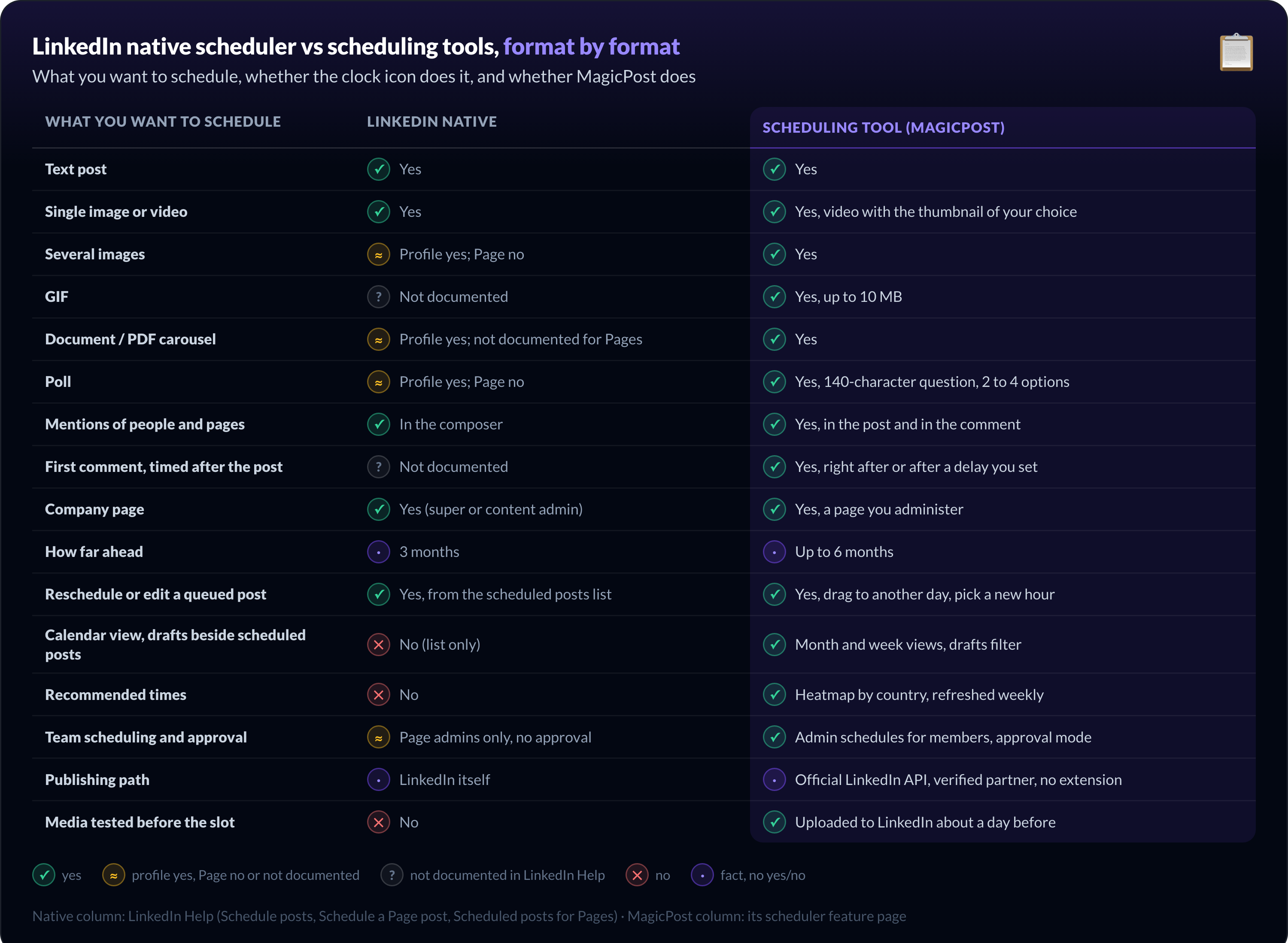
The table below is the short version of this whole page: what you want to schedule on LinkedIn, whether the native clock icon does it, and whether a scheduling tool does it. MagicPost's column comes from its own feature page, the native column from LinkedIn's help center.
What you want to schedule | LinkedIn native | Scheduling tool (MagicPost) |
Text post | Yes | Yes |
Single image or video | Yes | Yes, video with the thumbnail of your choice |
Several images | Profile: not documented; Page no | Yes |
GIF | Not documented | Yes, up to 10 MB |
Document / PDF carousel | Profile: not excluded by the help center; not documented for Pages | Yes |
Poll | Profile: not documented; Page no | Yes, 140-character question, 2 to 4 options |
Mentions of people and pages | In the composer | Yes, in the post and in the comment |
First comment, timed after the post | Not documented | Yes, right after or after a delay you set |
Company page | Yes (super or content admin) | Yes, a page you administer |
How far ahead | 3 months | Up to 6 months |
Reschedule or edit a queued post | Yes, from the scheduled posts list | Yes, drag to another day, pick a new hour |
Calendar view, drafts beside scheduled posts | No (list only) | Month and week views, drafts filter |
Recommended times | No | Heatmap by country, refreshed weekly |
Team scheduling and approval | Page admins only, no approval | Admin schedules for members, approval mode |
Publishing path | LinkedIn itself | Official LinkedIn API, verified application, no extension |
Media tested before the slot | No | Uploaded to LinkedIn about a day before |
Can you schedule a text, image or video post on LinkedIn?
LinkedIn's native scheduler and every scheduling tool handle the plain post the same way. The one delta the table leaves out: MagicPost also lets you keep or remove the link preview before the post goes out.
Can you schedule a carousel, PDF or multi-image post on LinkedIn?
The profile column rests on a silence: LinkedIn's help center excludes only events, jobs and services, so a document post is not ruled out. On a company Page, multiple photos sit on the documented "can't schedule" list and documents are not mentioned either way.
Can you schedule a LinkedIn poll natively?
The Page "no" comes from LinkedIn's own wording; the profile side is an absence in the help center rather than a permission. In MagicPost a poll is one of the composer formats, scheduled like any other post.
Can you schedule the first comment on LinkedIn?
If your link or CTA lives in the first comment, native scheduling means setting an alarm. MagicPost prepares the comment with the post, image and mentions included; the mechanics live on the scheduled comments feature page.
Schedule every format from one calendar. MagicPost's LinkedIn post scheduler puts text, images, video, PDF, carousel, poll and first comment on a month or week calendar, fills the hour from a heatmap of recommended times per country, and publishes through the official LinkedIn API as a verified application. Free trial, no card, no browser extension.
Can you schedule posts on a LinkedIn business page?
LinkedIn Pages schedule posts natively when your role on the Page is super admin or content admin. The window runs from one hour to three months ahead, the time follows your location, and Page posts sit in the same View all scheduled posts list.
What a Page cannot schedule natively is a longer list than a profile's, per LinkedIn's help page on scheduling a Page post: events, multiple photos, reshares, polls, jobs and service posts. Newsletter articles, on the other hand, do schedule.
The Page queue is also LinkedIn's only hint of teamwork: other admins can view, edit, reschedule and delete what a colleague queued, as the help page on scheduled posts for LinkedIn Pages sets out. There is still no approval step.
MagicPost runs the company page from the same calendar as a profile: an account publishes either on your personal profile or on the company page connected to it.
In a team, an admin schedules for one member or several, each post going out from that member's own account and time zone, and approval mode holds every post until it is approved.
How a scheduling tool publishes when LinkedIn is not open
The part that decides whether a tool is safe is the path from your draft to the feed.
LinkedIn's help center page on prohibited software and extensions lists scrapers, bots and browser extensions that automate activity on LinkedIn as violations. A scheduler that types in your browser session on your behalf sits on the wrong side of that line.
MagicPost publishes through the official LinkedIn API, as a LinkedIn verified application, with access you grant on LinkedIn's own authorization screen. Your password never passes through MagicPost, there is no extension to install, and you can revoke that access from your LinkedIn settings at any time.
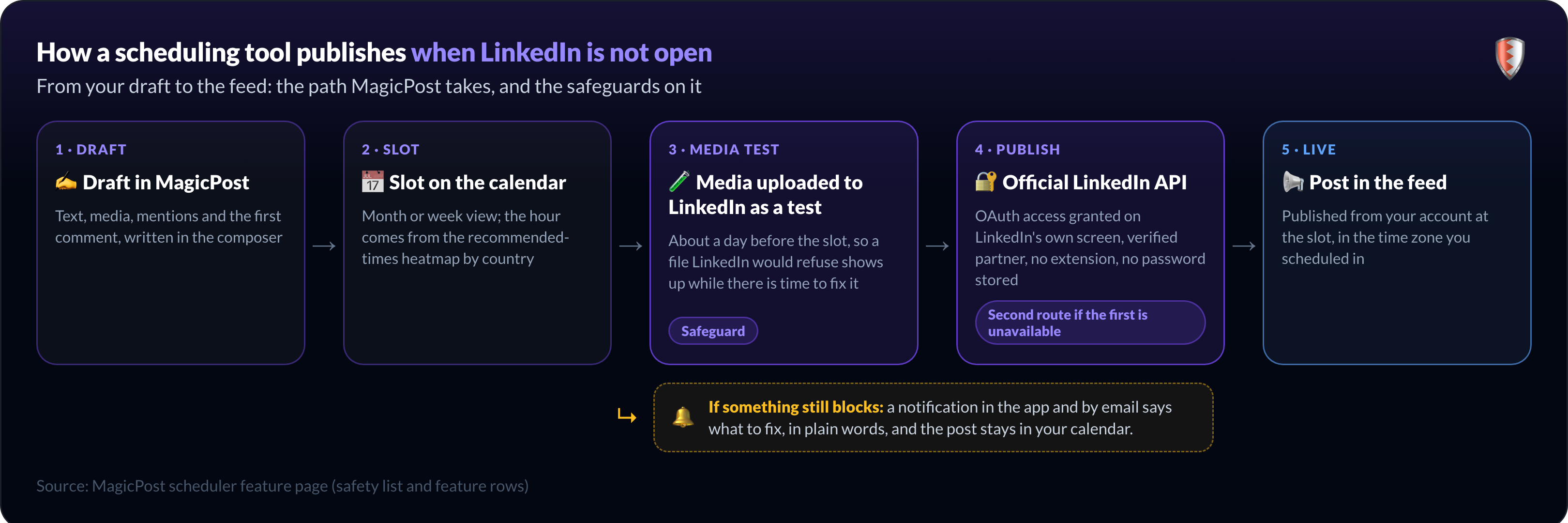
Between the slot and the feed, three safeguards run. About a day before the slot, MagicPost uploads your media to LinkedIn as a test, so a file that would be refused shows up while there is time to fix it.
If the first publishing route is unavailable, a second one takes over.
If the post still fails to go out, a notification in the app and by email says what to fix, in plain words, and the post stays in your calendar.
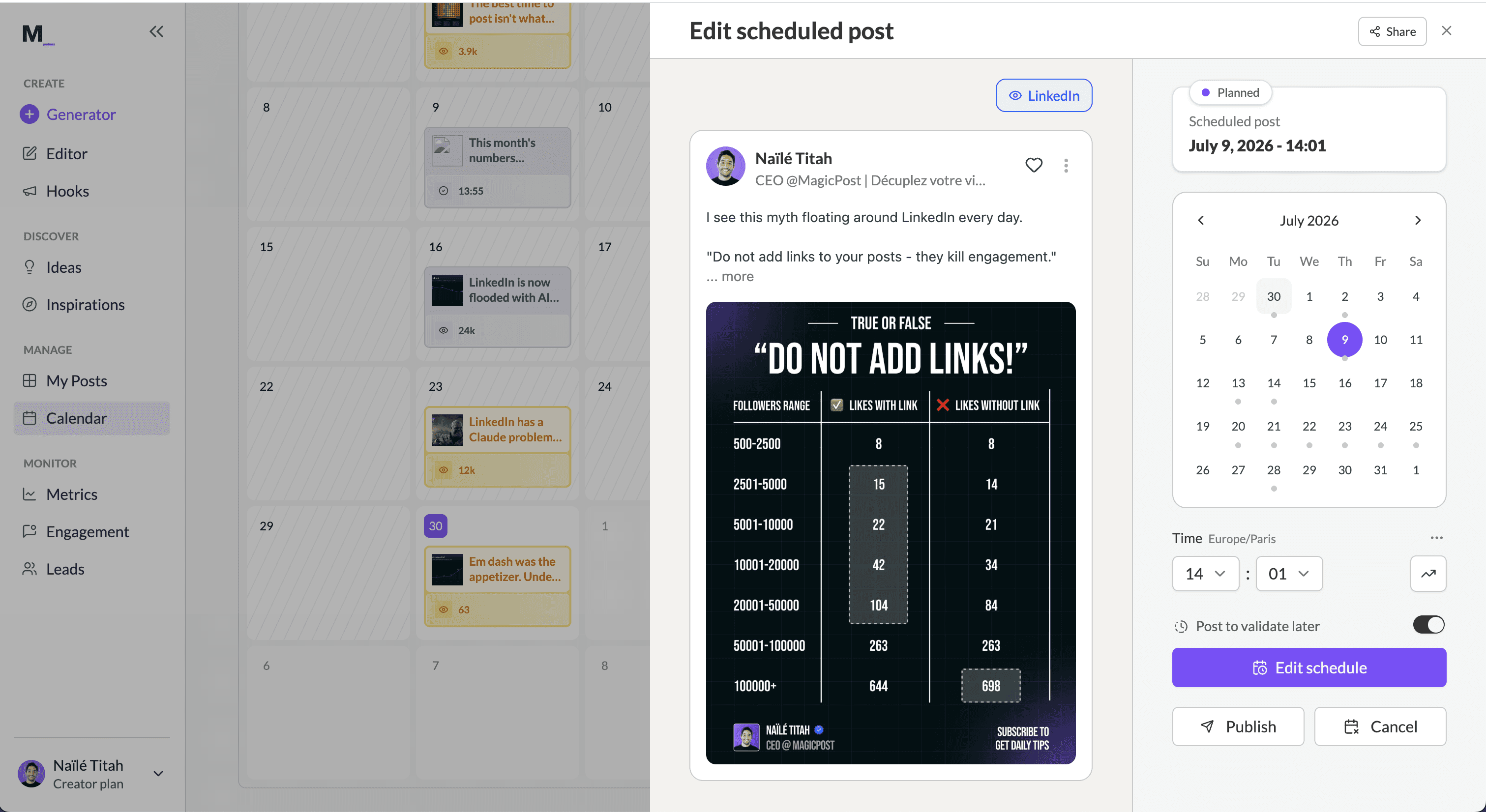
The same calendar accepts a post from an AI assistant. Ask Claude or Cursor for a post to go out on Tuesday at 9am and the MagicPost MCP server books the slot; the guide to schedule LinkedIn posts from Claude walks through it.
Which LinkedIn post scheduler should you use?
LinkedIn's native scheduler is the right choice when you post a few times a week, write each post when it comes, and "next Tuesday at 9am" is as far ahead as you plan. It is free, it lives in the composer, and it lets you reschedule, edit or delete what you queued; what you can actually schedule for free has its own page.
A scheduling tool earns its place the day one of these becomes routine:
You batch. A week or a month in one sitting needs a calendar with drafts beside it.
You post polls or several images from a Page. Native scheduling refuses both there.
Your link lives in the first comment. Nobody wants an alarm for that.
You need more than three months. MagicPost schedules up to six.
You run more than one account, or a team. One calendar, each post from its owner's account, an approval step.
You want to know which slots work. Recommended times by country, then the metrics of what you published.
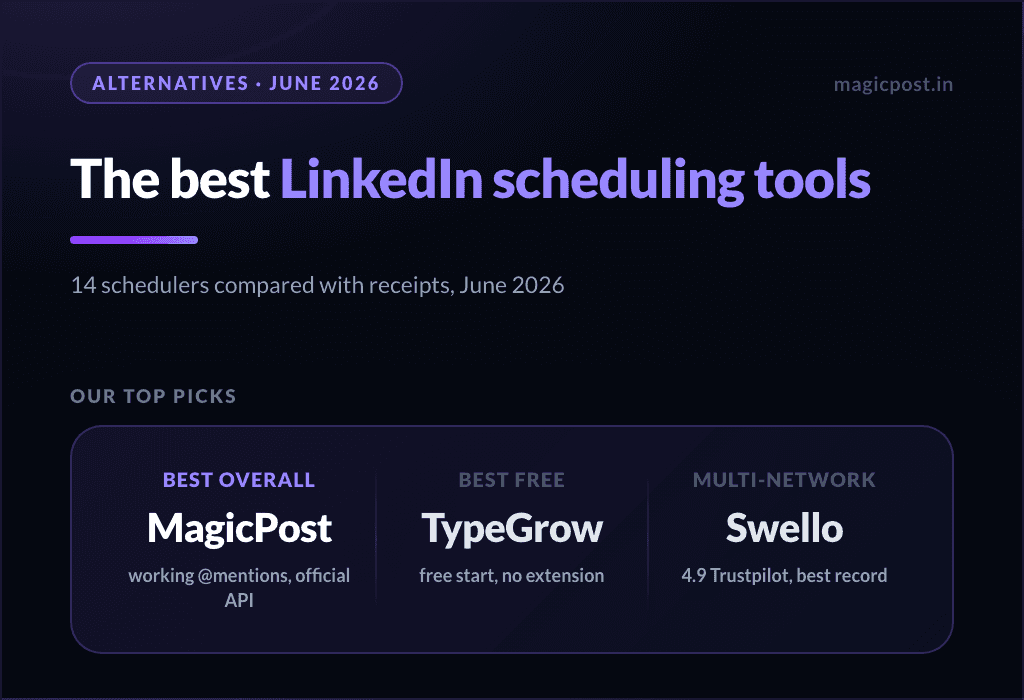
For a comparison of every scheduler on the market, with the mention test and the connection test, read the best LinkedIn scheduling tools. To plan the cadence itself, the LinkedIn editorial calendar guide covers what goes where.
Fill the calendar once, publish all week. MagicPost schedules every feed post format, first comment included, from a month or week calendar, and publishes through the official LinkedIn API as a verified application. Free trial, no credit card, no browser extension.
Preguntas frecuentes
Can you schedule posts on LinkedIn?
Yes, you can schedule posts on LinkedIn natively: the clock icon in the post composer schedules a text, image or video post on a profile or company page, from 10 minutes to 3 months ahead.
LinkedIn's native scheduler cannot schedule a poll or multiple photos on a company page, a first comment or a recurring post, and it does not show which slot performs; scheduling tools such as MagicPost add those.
Can you schedule LinkedIn posts in advance, and how far?
LinkedIn's native scheduler accepts a slot from 10 minutes to 3 months ahead on a personal profile, and from one hour to three months ahead on a company Page, according to LinkedIn's help center. MagicPost schedules up to six months ahead, and the time zone you scheduled in stays attached to the post.
Can you schedule posts on a LinkedIn business page?
Yes, LinkedIn Pages schedule posts natively if you are a super admin or a content admin of the Page. The Page composer has the same clock icon as a profile.
LinkedIn's help center lists what a Page cannot schedule: events, multiple photos, reshares, polls, jobs and service posts. MagicPost schedules on a company page you administer from the same calendar as a profile.
Can you edit a scheduled post on LinkedIn?
LinkedIn's help center documents an Edit post option, on a profile and on a Page (see edit a scheduled Page post): open your scheduled posts from the clock icon, click the More icon on the post, then Edit post or Modify schedule. On a Page, the help center also lists Post now and delete.
Once a post is published, the rules change; see how to edit a LinkedIn post.
Can you schedule a poll or a carousel on LinkedIn?
LinkedIn's native scheduler cannot schedule a poll on a company Page, by LinkedIn's own wording; on a personal profile, the help center excludes only events, jobs and service posts. A PDF carousel schedules on a profile and is not documented for Pages.
MagicPost schedules polls, PDFs and carousels on a profile or a company page.
Can you schedule the first comment on a LinkedIn post?
LinkedIn's help center does not document a way to schedule a comment under a scheduled post. MagicPost prepares the first comment with the post, with an image and mentions, and publishes it right after the post or after a delay you set; scheduled comments are included from the Analytics plan ($35/mo.). The full routine is in how to schedule a LinkedIn first comment.
Can you schedule recurring posts on LinkedIn?
LinkedIn's native scheduler handles one-off posts only: each scheduled post is set by hand, and the help center describes no repeat option. MagicPost does not repeat a post automatically either; it gives you a month or week calendar where you drag posts onto days and fill a month in one sitting.
Can you schedule LinkedIn ads?
LinkedIn ads are not scheduled from the post composer: a campaign's start and end dates are set in Campaign Manager. LinkedIn's help center adds that a scheduled Page post cannot be promoted through Browse existing content until it has been published, so schedule the organic post first and promote it once it is live.