Every LinkedIn coach has a confident opinion about emojis. Some say they kill your reach and make you look junior. Others say you need fifteen of them per post to "break up the wall of text." Nobody shows their numbers.
We pulled 1,201,129 LinkedIn posts published over the last 12 months and let them settle the question: split first by whether they carry any emoji at all, then by exactly how many, judged on what they actually earned.
The short version: emojis help, but modestly, and the effect peaks fast. A post with at least one emoji earns a median of 30 likes against 26 for a post with none, roughly 15% more. But the sweet spot is one or two emojis, not fifteen. Pile on more and the advantage drains away.
And the most interesting number is in the history: emoji use climbed for years, peaked in 2024, and has been falling since.
Start with the curve, because it overturns the most popular emoji advice on the platform:
Do emojis help LinkedIn engagement?
The first cut is the simplest one. Does having any emoji at all beat having none?
Posts | Posts measured | Median likes | Median comments |
No emoji | 545,208 | 26 | 5 |
At least one emoji | 655,921 | 30 | 6 |
That is a genuine gap, on more than half a million posts each side, so it is not noise. A post with an emoji earns about 15% more median likes than one without, and one more median comment. Worth having.
But notice the size of it: 30 versus 26. This is not the 2.5x miracle the old playbooks promised. It is a small, reliable nudge, and like every effect in this study it has a confounder we will name at the end.
The count curve: one or two, then downhill
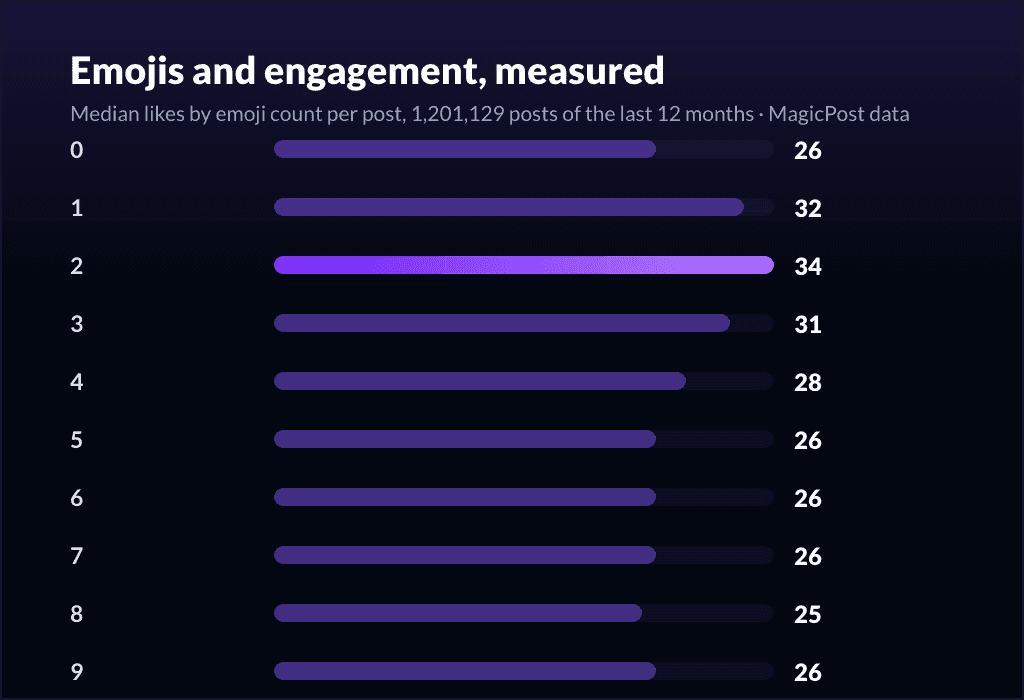
Presence is the headline. The dose is where the advice gets interesting. Here is median likes by the exact number of emojis in the post, from zero up to ten-or-more:
Emojis in post | Posts measured | Median likes |
0 | 545,208 | 26 |
1 | 171,895 | 32 |
2 | 107,390 | 34 |
3 | 82,327 | 31 |
4 | 62,437 | 28 |
5 | 48,854 | 26 |
6 | 38,771 | 26 |
7 | 30,595 | 26 |
8 | 23,510 | 25 |
9 | 18,546 | 26 |
10+ | 71,596 | 28 |
Read it top to bottom and the story is clean. The peak is two emojis, at 34 median likes. One emoji already gets you most of the way (32). By the time you reach five you are back down to 26, exactly where you started with zero, and posts loaded with six to eight sit at or below the no-emoji baseline.
The faint uptick at the 10+ bucket is a mixed bag of heavily structured list posts and carousels; it never recovers the two-emoji peak.
So the famous "use fifteen emojis" advice is, on this data, simply wrong for the median creator. The lift is front-loaded into the first one or two, and everything after is decoration that does nothing at best and, past a handful, quietly costs you. One rule for this page: one or two emojis, placed where they earn their keep.
Want this applied for you? The MagicPost AI LinkedIn post generator writes with these patterns built in: a clean hook, a tight structure, and emojis used as punctuation rather than confetti, so you land near the two-emoji sweet spot without counting.
The history: emojis peaked in 2024, and are receding
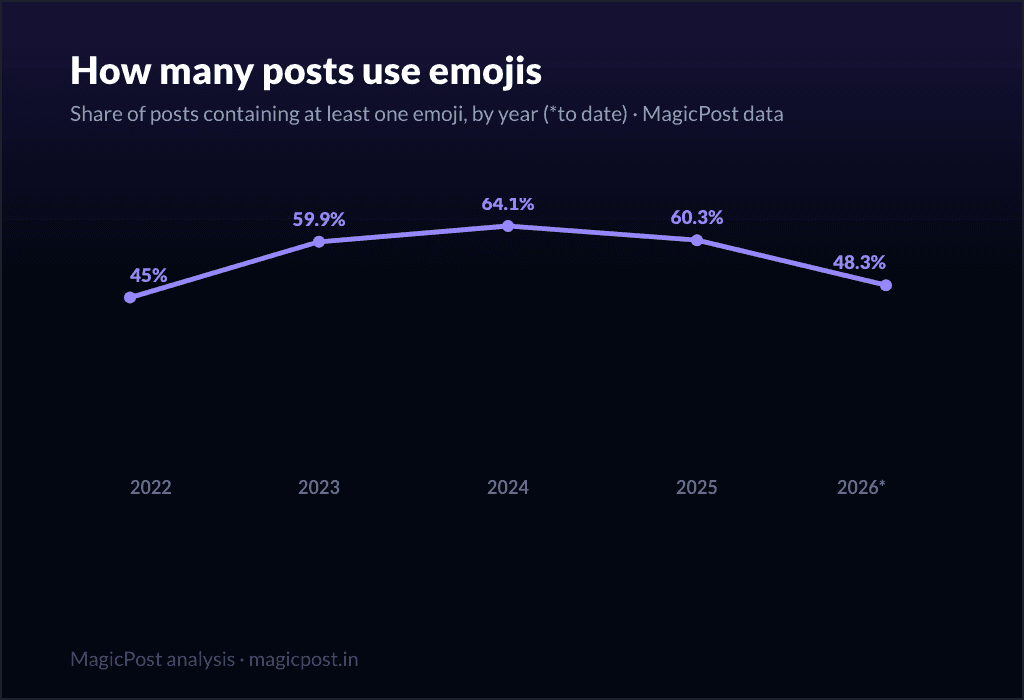
The single-snapshot tables miss the most telling movement. Here is the share of LinkedIn posts that contain at least one emoji, year by year:
Year | Posts measured | Share with at least one emoji |
2022 | 65,296 | 45.0% |
2023 | 169,532 | 59.9% |
2024 | 604,691 | 64.1% |
2025 | 1,335,596 | 60.3% |
2026 (to date) | 466,456 | 48.3% |
For three years emojis only got more popular: 45.0% of posts in 2022, up to a 64.1% peak in 2024. Then the trend reversed. 2025 slipped to 60.3%, and 2026 so far is down to 48.3%, almost back to where the whole climb started.
Why the retreat? We can only offer a hypothesis, not a measured cause. The likeliest reading is that the novelty wore off: when two-thirds of the feed is studded with the same ✅ and 🔥 markers, those markers stop signalling effort and start signalling template.
There is also a plausible AI angle, worth holding loosely rather than treating as a finding: dense, emoji-heavy, perfectly-bulleted formatting is increasingly read as the fingerprint of an AI-generated post (more in our em dash and other AI signs on LinkedIn piece), so creators who want to sound human are dialing it back. Either way the direction is clear, and the two-emoji sweet spot above fits it neatly.
Does the lift hold for small accounts?
Yes. The worry with any platform-wide median is that it is really a story about big accounts. So we re-ran the presence cut inside each follower band:
Follower band | No emoji | At least one emoji |
Under 5k | 11 | 14 |
5k to 50k | 29 | 36 |
50k+ | 161 | 200 |
The emoji edge survives in every band, and in proportional terms it is actually largest for the smallest accounts: under 5k followers, posts with an emoji earn 14 median likes against 11, about a quarter more.
So this is not a big-account trick that happens to show up in a platform-wide median; it works the same whether you have a hundred followers or a hundred thousand. An emoji or two is a small, free improvement at any size, and overloading still wastes it.
The keeper: a curated emoji shortlist by job
Everything above is measurement. This section is craft, not statistics, and it is the part of the original article readers kept coming back for.
The principle that holds it together is the same one the data points to: every emoji should do a job. If you cannot say what an emoji is for, it is the third, fourth or fifth one on the curve, and it is not helping. Here is a tight working set, organized by the job each emoji does.
To open a post (use one, on line one): 🔥 💡 🚨 👀 🎯 🚀 ❗ 👇 The first emoji is the only one most readers see before the "see more" cutoff, so make it an attention opener, not a decoration. Pick one.
To mark list items (pick one and stay consistent): ✅ 📌 👉 ➡️ ⭐ 🔹 Replacing bare bullets with one repeated marker creates structure on a platform that has no real bullets. Use the same marker down the list; rotating four different ones reads as clutter.
To flag a warning or a caveat: ⚠️ 🛑 ❌ 🚫 Useful exactly once in a post, to set off the "don't do this" line from the rest.
To celebrate a result or a milestone: 🎉 🏆 📈 🙌 💪 Reserve these for genuine wins. Sprinkled on every post, they read as filler.
To close with a call to action: 👇 💬 🔗 ♻️ One marker on the final line, pointing at the action you want (comment, link, repost).
Two habits keep you on the right side of the curve. First, do not repeat the exact same emoji string across post after post; that is the pattern readers and the algorithm both learn to skim past. Second, keep the warm, casual emojis (🙏 💯 😍) to at most one, and only where the tone genuinely fits. They are the easiest way to tip from "structured" into "trying too hard."
That is the shortlist that covers most posts. If you want the full, browse-by-category copy-paste library, including section dividers, tech and AI markers, and people-and-leadership sets, our companion how-to has it: LinkedIn emojis to copy and paste. This page is the data and the verdict; that page is the reference sheet.
What this means for your posts
Use one or two emojis, not none and not fifteen. The median peaks at two (34 likes); the lift over zero is real but small (30 vs 26).
Spend your first emoji on the hook. It is the one that clears the "see more" line. Make it an opener, not a flourish. (More on openers in our LinkedIn hooks guide.)
Stop at a handful. Past five emojis you are back at the no-emoji baseline; eight is below it. Overload is the most common emoji mistake, not under-use.
Read the trend. Emoji-heavy formatting peaked in 2024 and is receding. Cleaner posts are coming back into fashion, and the data already favors restraint.
Format is the bigger lever. Emojis are punctuation. The post format and the algorithm mechanics behind it move far more weight than any emoji choice.
Put the findings to work. MagicPost keeps your drafting, scheduling and analytics in a single workflow, so posts come out structured and human, near the two-emoji sweet spot, instead of buried under markers that the data says cost you reach.
Where this data comes from
The data here is ours, gathered in-house rather than borrowed from a survey. Core figures: 1,201,129 LinkedIn posts published over the last 12 months (reshares and deleted posts excluded), with the emoji count computed per post at build time, then grouped on median engagement. The presence cut compares 545,208 posts with no emoji against 655,921 with at least one. The count curve buckets posts by exact emoji count, 0 through 9, with a final 10-or-more band. History: the same corpus from 2022 to mid-2026, tracking the share of posts using at least one emoji within each year, directional by construction since the corpus grows over time. The follower-band control re-runs the presence cut inside each band, people only. Everything is reported as a median, not a mean, so one runaway post cannot pull a number off its mark. These figures come from our June 2026 pull and shift as the data set keeps growing.
FAQ
Should you use emojis on LinkedIn?
Yes, in moderation. Across 1.2 million posts, a post with at least one emoji earns a median of 30 likes versus 26 for a post with none, roughly 15% more, and the edge holds in every follower band. But the benefit is front-loaded: median engagement peaks at two emojis (34 likes), is gone by five (back to 26), and dips below the no-emoji baseline past that. So use one or two, placed where they do real work (a hook, a list marker, a CTA), and skip the rest.
How many emojis should you use in a LinkedIn post?
One or two. The measured peak is two emojis at 34 median likes, with one emoji close behind at 32. From three onward the line slides down: 28 at four emojis, 26 (the no-emoji baseline) at five, and 25 at eight. The popular advice to use fifteen does not hold up in this data. Treat emojis as punctuation, not volume.
Do too many emojis hurt your LinkedIn reach?
On engagement, yes, in the sense that you lose the benefit. There is no published LinkedIn penalty, but the curve is clear: posts with five or more emojis earn the same or fewer median likes than posts with none. Heavy emoji use no longer signals effort because so many posts do it, and increasingly it reads as template-driven or AI-generated formatting, which is one likely reason emoji use across the platform has fallen from its 64.1% peak in 2024 to 48.3% in 2026.
Which emojis work best on LinkedIn?
The ones with a clear job. For openers, an attention emoji on line one: 🔥 💡 🚨 👀. For list markers, one consistent symbol repeated down the list: ✅ 📌 👉 ➡️. For a closing call to action: 👇 💬 🔗. Structural markers beat decorative or emotional ones for B2B content. The full copy-paste set, organized by use case, is in our companion guide, LinkedIn emojis to copy and paste.
Are emojis going out of style on LinkedIn?
The data suggests a shift toward restraint, not disappearance. The share of posts using at least one emoji climbed from 45.0% in 2022 to a 64.1% peak in 2024, then receded to 60.3% in 2025 and 48.3% in 2026 so far. The likely drivers are novelty fatigue and a growing association between heavy emoji formatting and AI-written posts. A single well-placed emoji still helps; walls of them are on the way out.