Is Taplio safe? Writing posts with Taplio carries little risk, but the Taplio X extension falls in the class of software LinkedIn prohibits: section 8.2 of the LinkedIn User Agreement bars "bots or other unauthorized automated methods", and LinkedIn's help article "Prohibited software and extensions" (a1341387) names browser extensions that automate activity.
Taplio is not banned on LinkedIn, and no public source documents a LinkedIn member banned for scheduling posts or writing them with Taplio.
What is documented is narrower: Taplio reaches LinkedIn through the Taplio X Chrome extension and a cookie session rather than LinkedIn's official API, and Taplio's own support manual says LinkedIn treats that extension as an automation tool that goes against its Terms of Service.
This page collects what LinkedIn, Taplio, Taplio's founder and Taplio's users have put on the record, separates it from what nobody has documented, and ranks Taplio's features by the risk they carry. If you came from our Taplio review, this is the long version of its safety section.
Is Taplio an Official LinkedIn Tool?
No. Taplio is an independent company (taplio.com), not a LinkedIn product and not a LinkedIn-verified application. Searches for "Taplio official LinkedIn tool" usually mean one of two things: the official Taplio website, which exists, or a LinkedIn endorsement, which does not.
The distinction matters because LinkedIn draws a line between two ways a tool can touch your account.
Official API access. The tool is registered as a LinkedIn application, you authorize it on LinkedIn's OAuth screen, and LinkedIn sets the rate limits. This is how MagicPost publishes, as a LinkedIn-verified application.
Browser-side access. The tool runs a Chrome extension or reuses your logged-in session to act on LinkedIn pages. LinkedIn's help center classes browser extensions that automate activity as prohibited software.
Taplio sits in the second category, and everything below follows from that.
How Does Taplio Connect to Your LinkedIn Account?
Taplio uses two connection methods, and the risk differs between them.
Taplio X, the Chrome extension. Taplio offers it as a free add-on that brings Taplio into LinkedIn: smart replies, saving posts and contacts, quick analytics while you browse. Some actions only work with the extension installed: retrieving profile and post views, posting from a company page, and tagging people.
The cookie session. Basic posting and scheduling work without the extension, through a stored login session for your account. That is still outside the official API: your posts go out through a session that imitates you, not through an application LinkedIn has authorized to post on your behalf.
MagicPost connects the other way round: you authorize it once on LinkedIn's OAuth screen, and every post is published by a LinkedIn-verified application, with nothing to install in your browser. See how scheduling through the official LinkedIn API works.
What Does LinkedIn's Policy Say About Tools Like Taplio?
LinkedIn's help page Prohibited software and extensions states that LinkedIn does not permit third-party software, including "crawlers, bots, browser plug-ins, or browser extensions that scrape, modify the appearance of, or automate activity" on LinkedIn.
Two consequences are spelled out on the same page. Accounts found using such tools can be "restricted or shut down". And, verbatim, "any prohibited tools they're using may become non-operational without notice".
The second clause is the one people skip. Your account is not the only thing at stake; the tool itself can stop working overnight.
That happened to Kleo's original Chrome extension (withdrawn in June 2025 after LinkedIn required its removal, 70,000+ users) and to Shield Analytics, whose founder announced in May 2026 that "both google and linkedin made it clear" the setup was no longer viable.
Neither of those tools was Taplio. They matter because they are LinkedIn's policy applied to the same class of tool.
What Does Taplio Say About the Risk?
Taplio's support documentation is specific. The Taplio X user manual (archived copy) states that Taplio X "is considered by default as an automation tool by LinkedIn, which goes against their Terms of Service".
The same manual says users can receive warnings for behavior LinkedIn reads as "spammy" or "unusual", and for running several LinkedIn tools at once.
So Taplio and LinkedIn agree on the classification.
What Has Happened to Taplio on LinkedIn So Far?
Three incidents have been reported, at three different levels: the company, the founder, and a user.
Taplio's company page was reportedly restricted in April 2025
Taplio's own company page was restricted in April 2025, in a period the same source describes as LinkedIn moving against third-party automation tools. The case was reported by Supergrow, a competing tool, in its Taplio review, without a cited source.
Our own observation: in June 2026 we could not find an official Taplio company page on LinkedIn. That is a dated observation from our side, not a LinkedIn statement.
Taplio's founder says LinkedIn permanently suspended his account
Tibo, Taplio's founder, wrote on X in November 2024: "So Linkedin permanently suspended my account because of my Taplio involvement... They automatically suspend every new account that I create."
The suspension concerns the founder's personal profile, not Taplio's customers. It does show that LinkedIn ties enforcement to the tool, not only to what an individual account does.
One Taplio user describes being flagged off LinkedIn
A Trustpilot review of Taplio from November 2024 (1/5) reads: "Lack of activity controls leading to getting flagged and off LinkedIn... I had to beg them to get it back." The reviewer's account was restored.
It is a single testimony, and the only public one we found that reaches the user level. The complaint targets the engagement tools and LinkedIn's daily action limits, not scheduling or AI writing.
What Is and Isn't Documented About Taplio and LinkedIn Bans
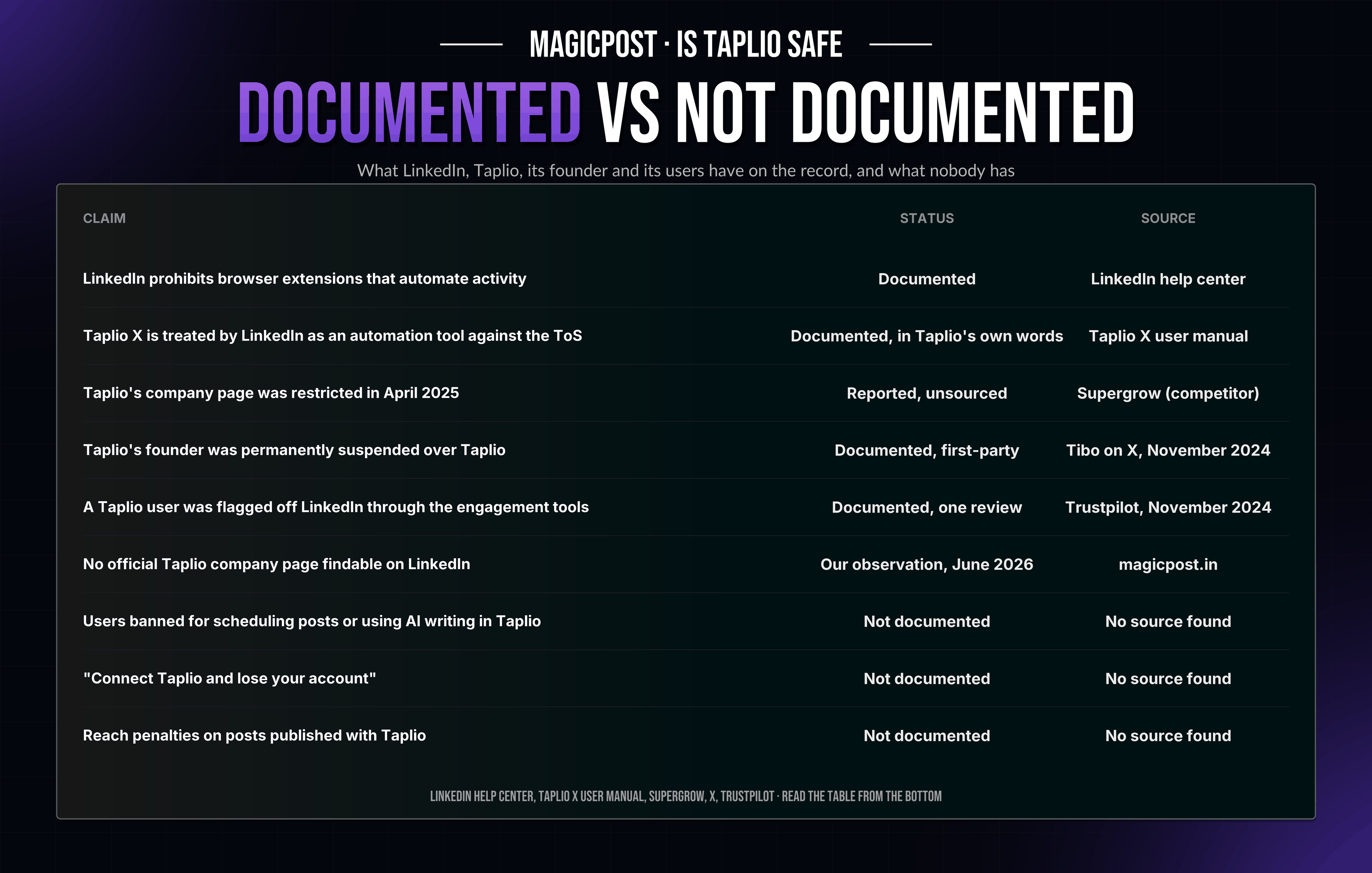
Claim | Status | Source |
LinkedIn prohibits browser extensions that automate activity | Documented | LinkedIn help center |
Taplio X is treated by LinkedIn as an automation tool against the ToS | Documented, in Taplio's own words | Taplio X user manual |
Taplio's company page was restricted in April 2025 | Reported, unsourced | Supergrow (competitor) |
Taplio's founder was permanently suspended over Taplio | Documented, first-party | Tibo on X, November 2024 |
A Taplio user was flagged off LinkedIn through the engagement tools | Documented, one review | Trustpilot, November 2024 |
No official Taplio company page findable on LinkedIn | Our observation, June 2026 | magicpost.in |
Users banned for scheduling posts or using AI writing in Taplio | Not documented | No source found |
"Connect Taplio and lose your account" | Not documented | No source found |
Reach penalties on posts published with Taplio | Not documented | No source found |
Read the table from the bottom. The scare version ("connect Taplio and lose your account") has no source. The reassuring version ("LinkedIn is fine with it") contradicts LinkedIn's policy and Taplio's own manual.
What the sources support is narrower: the risk is structural, it is not automatic, and it grows with the features you turn on.
Which Taplio Features Carry the Most LinkedIn Risk?
LinkedIn publishes no per-feature list. The "risk reading" column below is our interpretation of LinkedIn's policy wording applied to each Taplio feature, cross-checked with the incidents above.
Taplio feature | Plan | How it touches LinkedIn | Risk reading |
AI post and hook writing | Growth, Pro | Inside the Taplio app, no LinkedIn action | Lowest |
Post scheduling and publishing | All plans | Cookie session posts on your behalf | Low, but outside the API |
Analytics in the Taplio app | All plans | Reads your data through the session | Low |
Taplio X extension (smart replies, quick analytics, tagging, company-page posting) | All plans | Extension acting on linkedin.com | The class LinkedIn's policy names |
Comment credits and auto-reply | Growth, Pro | Actions on other people's posts, volume-driven | Higher: the flagged review's case |
Auto-connection requests, auto-DMs, mass DM campaigns | Pro | Classic outreach automation | Highest |
Two practical conclusions follow. If you only write and schedule, you use the two lowest-risk features and can leave the extension uninstalled. If you bought Pro for outreach automation, you are running the category LinkedIn's prohibited-software policy names.
The credit allowances are in our breakdown of Taplio pricing: 500 comment credits per month on Growth is a volume the flagged reviewer's "daily action limits" complaint speaks directly to.
How Do You Use Taplio More Safely If You Keep It?
Leave Taplio X uninstalled unless you need company-page posting, tagging or view metrics. Posting and scheduling work without it.
Run one LinkedIn tool at a time. Taplio's manual lists running several tools as a warning trigger.
Stay far below the credit ceilings on comments and connection requests. The documented user incident came from daily action limits.
Skip auto-DMs and mass DM campaigns. They are the Pro-tier features with the least defensible pattern under LinkedIn's policy.
Treat a warning or a reconnect prompt as a stop signal, not as something to retry.
Keep your drafts somewhere else too. LinkedIn's policy allows a prohibited tool to become "non-operational without notice".
Safer Taplio Alternatives on the Official LinkedIn API
If the structural risk is the reason you searched, the fix is structural too: move publishing to a tool that operates as a registered LinkedIn application.
MagicPost is a LinkedIn-verified application. You authorize it on LinkedIn's OAuth screen, it publishes and schedules through the official API within LinkedIn's approved rate limits, and there is no Chrome extension to install. The head-to-head is on Taplio vs MagicPost.
Its engagement routine runs on curated lists and an in-app engagement feed rather than through an extension acting on linkedin.com.
Supergrow's pricing page states that it connects through LinkedIn's official API. We have not been able to match that statement with a LinkedIn-verified-application receipt, so we list it as a vendor claim, not as a verified mechanism.
The ranked list, with the publishing method of each tool, is in our guide to Taplio alternatives on the official LinkedIn API. For the wider category, extensions included, see our audit of LinkedIn automation tools, and our best LinkedIn scheduling tools ranking for the connection method of 18 schedulers.
Want the scheduling, AI writing and engagement routine without the extension? MagicPost publishes through LinkedIn's official API as a verified application, with a free trial and no card required. Try MagicPost for free →
FAQ
Is Taplio banned on LinkedIn?
No. Taplio is not banned on LinkedIn. Documented: its founder says LinkedIn permanently suspended his personal account over Taplio, and Taplio's manual says LinkedIn treats the Taplio X extension as an automation tool against its Terms of Service. Reported but unsourced: LinkedIn restricted Taplio's company page in April 2025.
No source documents a customer banned for using Taplio's scheduler or AI writer.
Is the Taplio Chrome extension safe?
Taplio X is a browser extension that acts on linkedin.com, the class of software LinkedIn's help center lists as prohibited, and Taplio's own manual says LinkedIn treats it as an automation tool. Posting and scheduling in Taplio work without the extension; only company-page posting, tagging and view metrics require it.
Is Taplio an official LinkedIn partner?
No. Taplio is an independent tool that connects through a Chrome extension and a cookie session, not a LinkedIn partner and not a LinkedIn-verified application. Tools on the official API, such as MagicPost, are authorized on LinkedIn's OAuth screen and publish as registered applications.
Can LinkedIn detect Taplio?
LinkedIn does not publish its detection methods. Taplio's own manual states that Taplio X "is considered by default as an automation tool by LinkedIn", which is Taplio saying that LinkedIn recognizes the extension as a class, before any individual behavior is assessed.
Will Taplio get my LinkedIn account restricted?
No source documents a Taplio user restricted for scheduling posts or using AI writing. One public review describes a user flagged off LinkedIn through Taplio's engagement tools, and Taplio's manual warns about "spammy" behavior and running several tools at once.
The risk rises with comment credits, the extension, and the Pro-tier outreach automation.
Is MagicPost safer than Taplio for LinkedIn?
MagicPost publishes through LinkedIn's official API as a LinkedIn-verified application, with no browser extension and no cookie session, which is the mechanism LinkedIn's policy permits.
Taplio connects through the Taplio X extension and a cookie session, the mechanism LinkedIn's policy names as prohibited. On mechanism, the difference is documented on both sides.