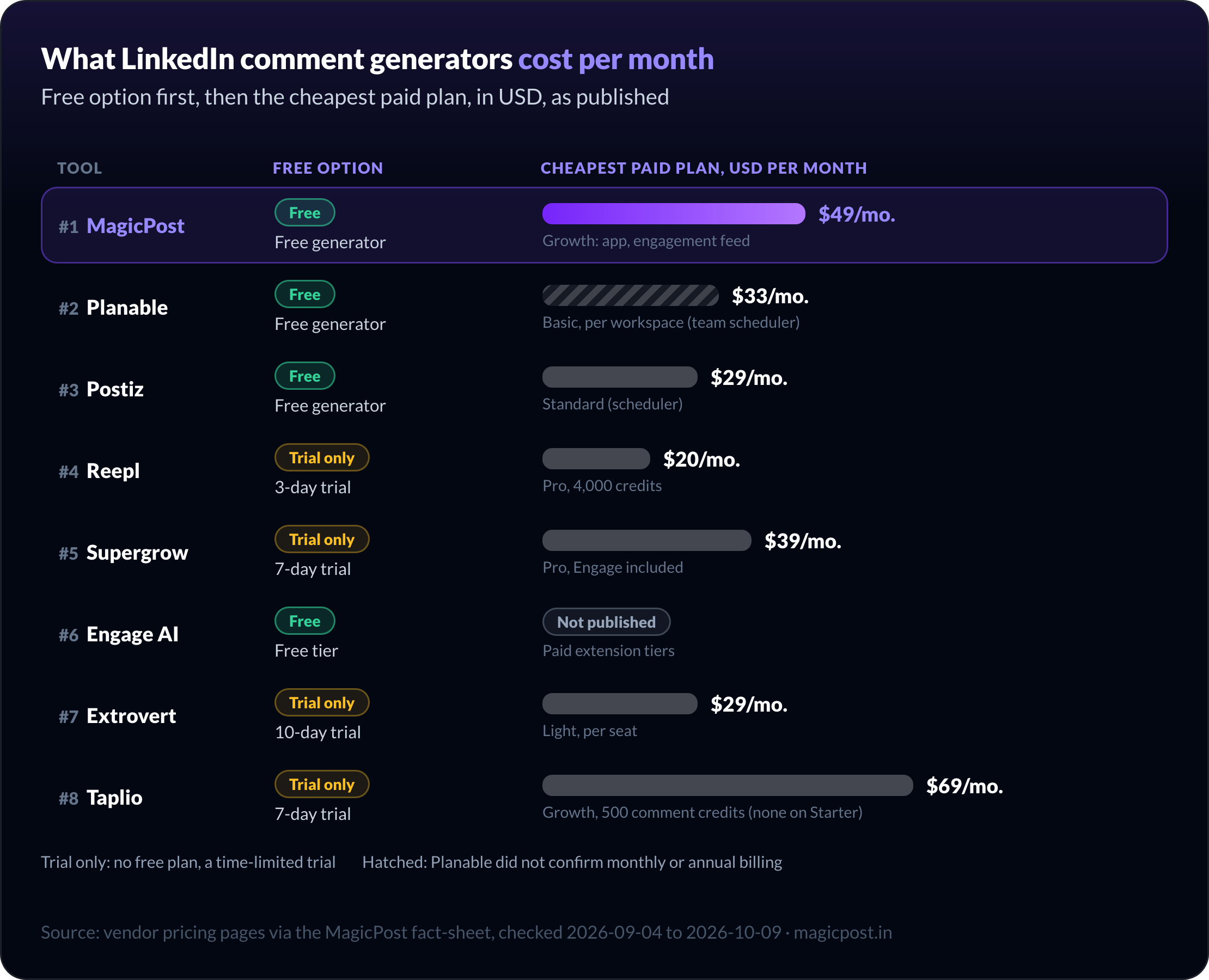
A comment generator writes the text, and you post it. This page ranks 8 LinkedIn comment generators on the draft they produce, where you get it, and what they cost per month.
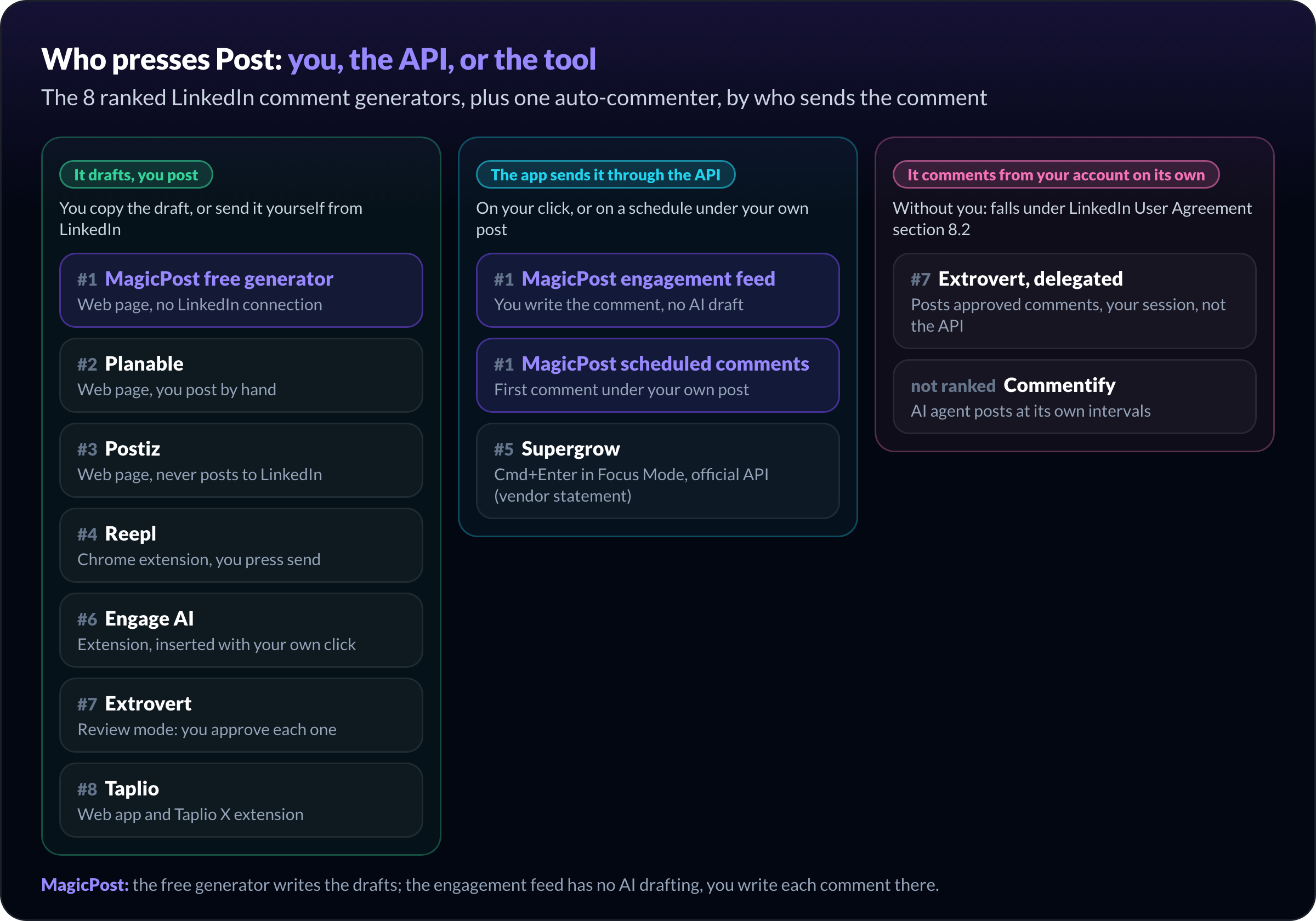
Tools that post comments from your account on their own are not generators. They get their own section below, with the clause of LinkedIn's User Agreement that covers them.
If you are after the whole daily routine (lists of people, a feed of their posts, a reply inbox), our LinkedIn engagement tools comparison covers that category.
The best LinkedIn comment generators at a glance
# | Tool | Best for | Where the draft appears | Who posts the comment | Price/mo. |
1 | MagicPost | Three drafts from three angles, free | Web page, no signup | You | Free; app from $49 |
2 | Planable | Tone and variant control | Web page, no registration | You | Free |
3 | Postiz | The widest choice of tones | Web page | You | Free; scheduler from $29 |
4 | Reepl | Drafts in your voice inside the feed | Chrome extension | You | From $20 |
5 | Supergrow | Commenting down a list with shortcuts | Supergrow web app | You | $39 (Pro) |
6 | Engage AI | Free drafts inside the LinkedIn feed | Chrome or Edge extension | You | Free tier |
7 | Extrovert | Sales teams commenting on prospects | Extrovert web app | You, or Extrovert if you hand it over | From $29 per seat |
8 | Taplio | Comment credits inside a content suite | Web app and Taplio X extension | You | $69 (Growth) |
Free LinkedIn comment generators: paste a post, copy a draft
These three need no install and no LinkedIn connection. You paste the post, you get text, and nothing leaves the page.
1. MagicPost: Best free LinkedIn comment generator, with three angles per post
MagicPost's free LinkedIn comment generator turns the post you just read into three drafts: one adding a perspective, one naming the line that landed, one asking the author a question.
The three angles always come in that order, so you can go straight to the one that matches what you want to say. Each draft points at a specific line of the post you pasted, so the author can tell you read it.
The free generator takes five posts a day, three drafts each, with no account and no card. It answers in the language of the post: paste a German post and you get German drafts.
Nothing is published from the page. There is no LinkedIn connection at all: you copy a draft, edit it, and post it yourself.
When one comment a day becomes twenty a week, the MagicPost app takes over the routine. Its LinkedIn engagement feed puts the latest post of up to 49 profiles per list on one page, and you comment from there with your own click.
Those comments go out through LinkedIn's Community Management API, open only to developers LinkedIn has reviewed, with no extension.
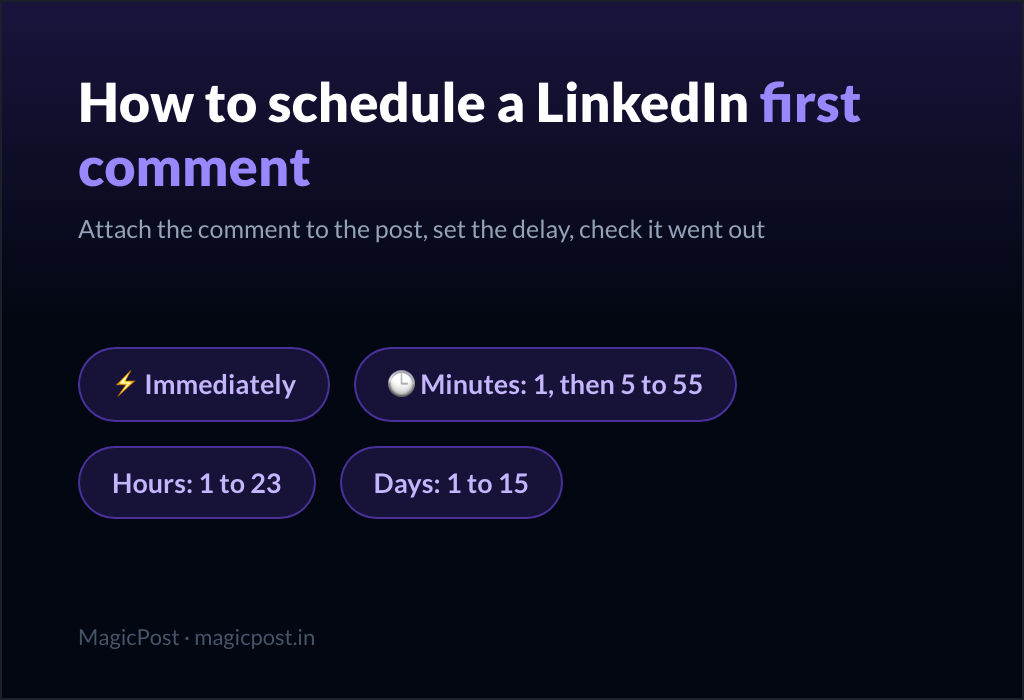
For the comment under your own post, scheduled comments publish it on their own, from right after the post to fifteen days later.
Key features
Three drafts per post, three fixed angles.
Five posts a day, no signup.
Engagement feed for up to 49 profiles per list.
Scheduled first comments, up to fifteen days later.
Reply tab for the comments your posts receive (Creator).
Pros | Cons |
✅ Three distinct angles instead of one generic reply | ❌ No tone picker on the free generator |
✅ No account and no LinkedIn connection to get drafts | ❌ Free-tool drafts stay on the web page; the app feed has no draft generator |
✅ One path from a single draft to a daily routine on the official API | ❌ Scheduled comments and the Reply tab start on Creator |
Plan | Price/mo. | Included |
Free generator | $0 | 5 posts a day, 3 drafts each, no signup |
Growth | $49 | Engagement feed, analytics, 100 leads/mo.; no reply inbox |
Creator | $69 | Everything in Growth, plus the reply inbox, scheduled comments, AI post writing, carousels |
2. Planable: Best for choosing the tone and the number of variants
Planable's free LinkedIn comment generator gives the most control over the draft itself: ten named tones, two lengths, and one, three or five variations per request.
The Planable comment generator is a standalone web page with no registration. You paste the post, add optional context, then pick a tone among humorous, inspirational, informative, casual, formal, witty, enthusiastic, empathetic, convincing and teasing.
Asking for five variations of a short, witty comment is the fastest way on this list to compare phrasings side by side. The tones are preset voices; none is trained on your writing.
Planable returns text only, with no LinkedIn connection and no feed: you copy the draft and post it by hand, one post at a time.
The paid Planable product is something else: a collaboration tool for social media teams, priced per workspace, where a workspace is one client or brand.
Key features
Ten named tones.
Short or long comments.
One, three or five variations.
Optional context field.
No registration.
Pros | Cons |
✅ The most tone options among free web generators | ❌ Tones are generic voices, not trained on yours |
✅ Up to five variations in one request | ❌ You paste every post by hand |
✅ No registration at all | ❌ The paid product is a team scheduler, not a commenting tool |
Plan | Price/mo. | Included |
Comment generator | Free | Ten tones, up to five variations, no registration |
Basic | $33 per workspace | 60 posts, 4 social accounts, unlimited users |
Pro | $49 per workspace | 150 posts, 10 social accounts, public API |
Planable's pricing page does not state whether the $33 and $49 figures are monthly or annual rates. Its first 50 posts are free with no time limit.
3. Postiz: Best for the widest choice of comment tones
Postiz's free LinkedIn comment generator offers twelve tones, the longest list on this page, and returns a comment to copy.
The Postiz comment generator works like Planable's: paste the post, pick a tone, copy the result. The tones run from casual, professional and friendly to sarcastic, storytelling and authoritative.
The page is labeled 100% free. It does not say whether a signup is required, and the generator never posts to LinkedIn.
Postiz itself is a multi-network scheduler with an AI copilot, available hosted or self-hosted as open source. Its "post comments" feature adds a first comment under your own scheduled posts; it does not comment in the feed.
Key features
Twelve tones, sarcastic and storytelling included.
One comment to copy per request.
Free web tool.
Paid scheduler covers LinkedIn and other networks.
Pros | Cons |
✅ Twelve tones, more than any other generator here | ❌ One draft per request, no variants; signup requirement not stated |
✅ Open-source scheduler you can self-host, with first comments on your scheduled posts | ❌ The hosted scheduler has no free plan, only a 7-day trial |
Plan | Price/mo. | Included |
Comment generator | Free | Paste, pick a tone, copy |
Standard | $29 | 5 channels, unlimited posts, solo |
Team | $39 | 10 channels |
Pro | $49 | 30 channels |
Ultimate | $99 | 100 channels |
Source: Postiz pricing.
LinkedIn comment generators inside your feed or app
These write the draft where you read the post, so you skip the copy and paste. An extension sits inside your LinkedIn session; an app connects to your account.
4. Reepl: Best for comment drafts in your own voice inside the LinkedIn feed
Reepl drafts comments and replies in your voice directly in the LinkedIn feed, through a Chrome extension, and leaves the sending to you.
The extension, listed as "Reepl: Free LinkedIn Copilot" on the Chrome Web Store, drafts a comment in one click on the post you are reading. The draft follows your voice profile, so it reads closer to you than a fixed tone does.
Reepl states that it never likes, comments, connects or messages on your behalf: you read the draft, edit it, and press send.
The extension runs inside your logged-in LinkedIn session. LinkedIn's prohibited software page names browser extensions that modify or automate activity on the site, so weigh that before you install one.
The rest of Reepl is a content copilot: post drafts, carousels, a scheduler on the official API (vendor statement) and, from Premium, an engagement feed.
Key features
Comment and reply drafts in the feed.
Voice profiles from your own writing.
Never sends a comment itself.
Engagement feed from Premium.
Credit-based plans, 4,000 to 25,000 a month.
Pros | Cons |
✅ Drafts in your voice, where you read the post | ❌ Chrome extension inside your LinkedIn session |
✅ The lowest paid entry on this list | ❌ Every AI action spends credits |
✅ Clear draft-only rule: nothing goes out without you | ❌ Engagement feed only from Premium |
Plan | Price/mo. | Included |
Pro | $20 | 4,000 credits, 1 voice profile, scheduler, carousels |
Premium | $30 | 10,000 credits, engagement feed, AI agent, MCP |
Max | $80 | 25,000 credits |
Reepl's pricing FAQ describes a 3-day free trial with no card; the Premium button on the same page reads "Start 3-day trial for $1".
5. Supergrow: Best for commenting down a list with keyboard shortcuts
Supergrow Engage suggests AI comments matched to your Content DNA, inside a focus view built for working through a list of profiles fast.
You build a list by pasting a post link (everyone who commented on it), by hand, or from a CSV. Focus Mode then shows the post on the left and the comment box on the right.
Shortcuts move you along: S skips, L likes, Cmd+Enter comments, the arrows change post. The AI suggestion is editable, with a tone setting and a custom prompt.
You can choose which account you comment as, company pages included. Reactions are limited to a like, and there is no inbox for the comments your own posts receive.
Supergrow states it connects through LinkedIn's official API, with no browser extension, and that nothing leaves your account without you. Engage is available from the Pro plan.
Key features
AI comment suggestions from your Content DNA.
Focus Mode with keyboard shortcuts.
Lists from a post's commenters, by hand or CSV.
Comment as yourself or a company page.
Tone and custom prompt per suggestion.
Pros | Cons |
✅ The fastest keyboard workflow for long lists | ❌ Like is the only reaction |
✅ Suggestions tied to the voice the rest of Supergrow uses | ❌ No inbox for comments on your own posts |
✅ Comment as a company page from the same view | ❌ No free option, only a 7-day trial |
Plan | Price/mo. | Included |
Pro | $39 | 1 account, Engage included |
Teams | $199 | 5 accounts, Content DNA per member, approvals, team analytics |
Enterprise | Custom | More than 5 executives |
Source: Supergrow pricing. Full verdict in our Supergrow review.
6. Engage AI: Best for free comment drafts inside the LinkedIn feed
Engage AI is a Chrome and Edge extension that drafts comments in the LinkedIn feed: open a post, pick a tone, and a draft lands in the comment box.
It runs inside your logged-in session, and you insert each comment with your own click. A prospect monitor watches a list of profiles and alerts you when they post.
It is the only in-feed tool on this page with a documented free tier. The paid extension tiers are not published on the pricing page, so we do not print them. On the Chrome Web Store the extension shows 4.5 out of 5 from 329 ratings and 30,000 users.
The pricing page sells a separate product: a LinkedIn Engagement Community where members comment on each other's assigned posts. That is an engagement pod, and our engagement tools comparison explains how LinkedIn treats pods.
Key features
AI comment drafts in several tones.
Works inside the LinkedIn feed.
Prospect monitoring with post alerts.
Free tier for the extension.
Pros | Cons |
✅ The only free in-feed drafter on this list | ❌ Browser extension in your session, the class LinkedIn's policy names |
✅ Prospect alerts tell you when to comment | ❌ Paid extension tiers not published |
✅ Widely used: 30,000 users on the Chrome Web Store | ❌ The same vendor sells a pod, which LinkedIn's terms rule out |
Plan | Price/mo. | Included |
Extension, free tier | $0 | AI comment drafts, prospect monitoring |
Extension, paid tiers | Not published | Listed as Elite on the pricing page |
Engagement Community | $50 | Up to 9 reciprocal engagement sessions a week |
Source: Engage AI pricing.
Two more drafters work the same way and sit just outside this ranking.
CommentLikeMe is a Chrome extension, free to install with no card, that offers up to three drafts in your voice on LinkedIn, X and Reddit.
ContentIn includes AI comment generation, three replies per post from a button in its feed, in its Growth plan at $39/mo.
LinkedIn comment generators for sales teams and content suites
These two come inside a larger paid product, a prospecting workflow for Extrovert and a content suite for Taplio, so the comment drafts are one feature among several.
To compare the other jobs these suites bundle, see the best LinkedIn tools by job and, for slides, our LinkedIn carousel generator ranking.
7. Extrovert: Best for sales teams commenting on their prospects' posts
Extrovert watches the LinkedIn posts of the prospects you import and suggests a comment, and later a DM, for each one, following a playbook you set.
Prospects come from your CRM, Clay or a CSV. AI comment drafts are unlimited on every tier, written in a writing style you configure per seat.
Every campaign starts in review mode: you approve, edit or skip each suggestion. You can also hand the commenting over to Extrovert, which then posts approved comments during your working hours with random delays.
The connection is your session: Extrovert's safety docs describe a Chrome extension using your existing session, or an email and password from which it creates a session in your chosen country.
Key features
Tracks 250 to 1,000 prospects per seat.
Unlimited AI comment drafts on every tier.
Review mode, or delegated posting.
DM suggestions from Business.
Webhooks to your sequencer or CRM.
Pros | Cons |
✅ Comments tied to a named prospect list, not a feed | ❌ Session-based connection, not the official API |
✅ Unlimited comment drafts on every tier | ❌ Delegated posting turns it into an auto-commenter |
✅ CRM, Clay and webhook integrations | ❌ Priced per seat, so the bill grows with the team |
Plan | Price/mo. | Included |
Light | $29 per seat | 250 prospects, 2 campaigns, 1 writing style |
Business | $49 per seat | 500 prospects, DM suggestions, 2 writing styles |
Pro | $75 per seat | 1,000 prospects, unlimited DM suggestions, delayed comment posting |
Source: Extrovert pricing.
8. Taplio: Best for comment credits inside an all-round content suite
Taplio bundles AI comment help with post writing, scheduling and analytics, and counts it in comment credits: 500 a month on Growth, unlimited on Pro.
Comment help is not on Starter, which has no AI at all. From Growth, Taplio suggests comments on posts from influential voices in your niche, and the Taplio X Chrome extension brings smart replies into LinkedIn itself.
Taplio's own support documentation states that LinkedIn considers Taplio X an automation tool by default, against its Terms of Service, and that some users receive warnings. Our Is Taplio safe? page has the details.
If you already pay for Taplio's writing and scheduling, its comment credits come with the plan. Bought for comments alone, it is the most expensive option on this page.
Key features
Comment credits, 500 a month on Growth.
Smart replies through the Taplio X extension.
AI post writing and scheduling.
Analytics beyond LinkedIn's native dashboard.
Auto lead outreach on Pro.
Pros | Cons |
✅ Comments, posts and analytics in one subscription | ❌ No comment help on Starter |
✅ Unlimited comment credits on Pro | ❌ Its own support says LinkedIn treats Taplio X as automation |
✅ Comment suggestions on posts from influential voices in your niche | ❌ $69/mo. to reach comment credits |
✅ Smart replies inside LinkedIn through Taplio X | ❌ The most expensive option here if bought for comments alone |
Plan | Price/mo. | Included |
Starter | $39 | No AI credits, no comment credits |
Growth | $69 | 250 AI credits, 500 comment credits |
Pro | $199 | Unlimited AI and comment credits, auto lead outreach |
Source: Taplio pricing. Full verdict in the Taplio review.
LinkedIn comment generators that post for you: why they are not on the list
Some tools sold as comment generators do more than write: they find posts, write the comment, and publish it from your account on their own schedule. LinkedIn's User Agreement is explicit about that use. Section 8.2 lists, among the things members agree not to do:
"Use bots or other unauthorized automated methods to access the Services, add or download contacts, send or redirect messages, create, comment on, like, share, or re-share posts, or otherwise drive inauthentic engagement"
The User Agreement also rules out software, scripts and browser plugins that scrape the site. A generator that hands you text stops before any of this: you are the one who comments.
Commentify is the clearest example of the other kind. Its AI agent finds posts by topic, hashtag or profile, writes comments in your voice, and posts them at what it calls natural intervals, after you connect your account through an extension.
Its comparison page against Taplio presents the workflow as fully autonomous, with no daily clicking required. Nobody reads the post before the comment goes out, which is the use section 8.2 describes.
On the Commentify homepage, plans run from $39/mo. for up to 900 comments a month to $99/mo. with a posting agent added.
Two related cases are covered elsewhere. Engagement pods, where other members comment on your posts by assignment, are in our LinkedIn engagement tools comparison. Tools that automate connection requests and messages are in our LinkedIn automation tools guide.
Commenter.ai, still ranked as a comment generator in older lists, now sells a sales-conversation app from $99/mo. that tracks LinkedIn, Gmail and calendar threads.
How to choose the best LinkedIn comment generator
Three checks, in this order:
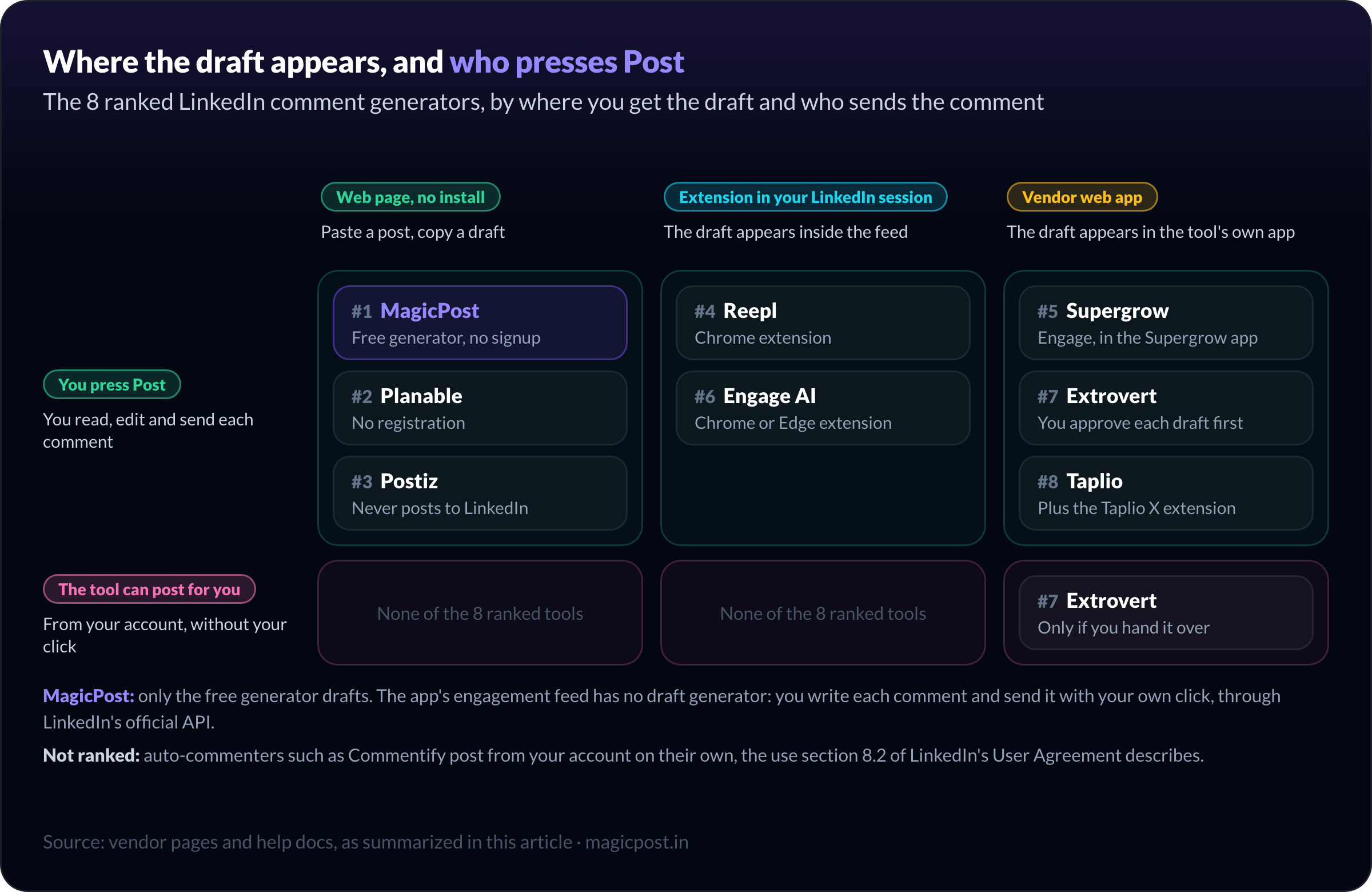
Make sure you press Post. Every generator ranked above leaves the final click to you, except Extrovert when you delegate. Anything that comments without you falls under section 8.2.
Pick where you want the draft. A web page needs no install and no connection (MagicPost, Planable, Postiz). An extension drafts in the feed but runs in your session (Reepl, Engage AI). An app connects to your account (Supergrow, Extrovert, Taplio).
Count the comments you plan to write. One or two a day fit a free generator. Twenty a week need a feed of the people you follow.
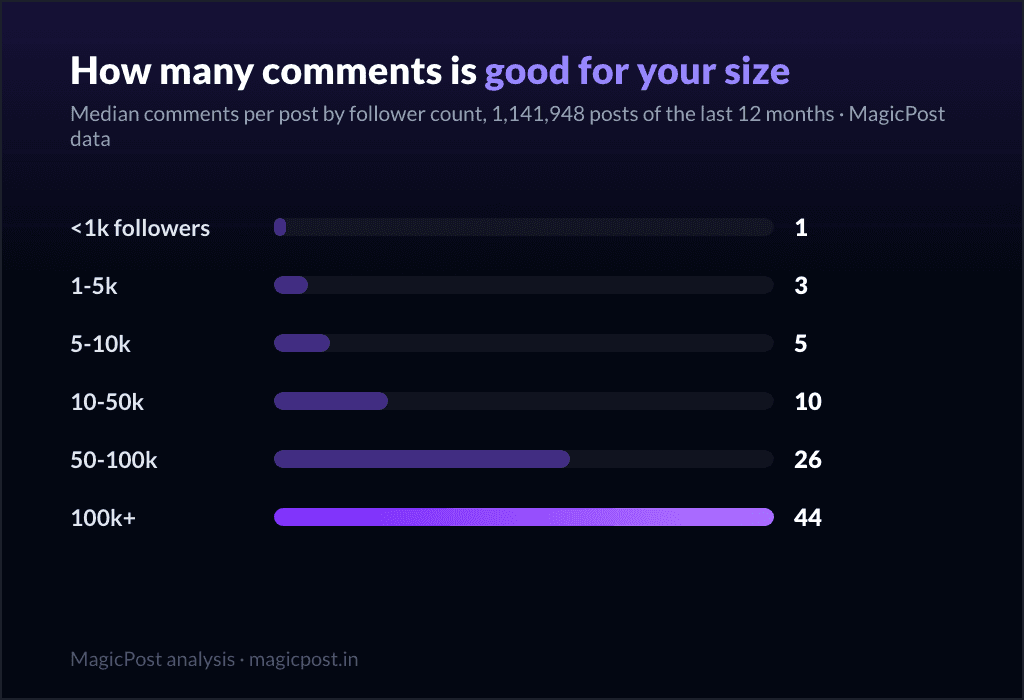
Then read the draft against the post before you send it. The median LinkedIn post gets 6 comments and a quarter get at most 1, across 1,141,948 posts in MagicPost's study of LinkedIn comment counts, so each comment you leave stands out.
A good draft points at one specific line of the post. If you cannot tell which post it was written for, rewrite it; our guide to commenting effectively on LinkedIn shows what earns a reply.
Try the best LinkedIn comment generator for free
Three comment drafts for any LinkedIn post, free. Paste a post into MagicPost's free LinkedIn comment generator for three drafts, no signup. When commenting becomes daily, the MagicPost engagement feed gathers the posts worth answering and sends your comments through the official LinkedIn API. Try MagicPost for free →
FAQ
What is the best LinkedIn comment generator?
MagicPost's free LinkedIn comment generator is the best for most people: it turns a pasted post into three drafts (a perspective, what landed, a question), five posts a day, with no signup and nothing posted for you.
Planable is the best pick for tone control, and Reepl for in-feed drafts in your own voice.
What is the best free LinkedIn comment generator?
The best free LinkedIn comment generators are MagicPost (three angles per post, five posts a day, no signup), Planable (ten tones, up to five variations, no registration) and Postiz (twelve tones).
Engage AI has a free tier for its in-feed extension. Reepl, Supergrow, Extrovert and Taplio offer trials, not free plans.
Is there a LinkedIn comment generator that works without a Chrome extension?
Yes. MagicPost, Planable and Postiz run on a plain web page: you paste the post and copy the draft, with no extension and no LinkedIn connection. Supergrow drafts inside its web app and states it connects through LinkedIn's official API, without an extension.
Are AI comment generators against LinkedIn's rules?
A generator that writes a draft you post yourself is writing help: you still read the post and press the button.
LinkedIn's User Agreement, section 8.2, rules out "bots or other unauthorized automated methods" that comment on, like or share posts, which describes tools that post comments from your account without you.
Can ChatGPT write LinkedIn comments?
Yes, a general chatbot can write a LinkedIn comment if you paste the post into it. A dedicated comment generator saves the prompt and adds structure: MagicPost's generator always returns three angles, and Planable's lets you set the tone and the number of variants.
Can I reply to comments on my own posts with a generator?
Yes. Nuelink offers a free reply generator: paste the comment someone left, pick a tone and length, and copy the reply.
In MagicPost, the Reply tab of the Engagement page fetches the comments on one of your posts when you click Sync, sorts them into To handle, Replied and Dismissed, and posts your reply under the comment on LinkedIn.
The Reply tab is included on the Creator plan and in the free trial; on Growth it is visible but locked.
Can I schedule a LinkedIn comment?
Yes, for the comment under your own post. MagicPost's scheduled comments publish it through the official LinkedIn API, from right after the post to fifteen days later, on the Creator plan. Our guide to scheduling a LinkedIn first comment walks through it.