The best LinkedIn engagement tools do one job: get you commenting on the right people's posts every day without scrolling for them. How they do it matters more than the feature list.
Some bring the posts to you and leave the click to you; others write the comment; the last group presses the button for you, from your account, overnight.
We sorted 10 LinkedIn engagement tools into four methods, priced each one per month, and wrote down who acts on your account and how. If you want the basics first, start with what LinkedIn engagement is.
The best LinkedIn engagement tools at a glance
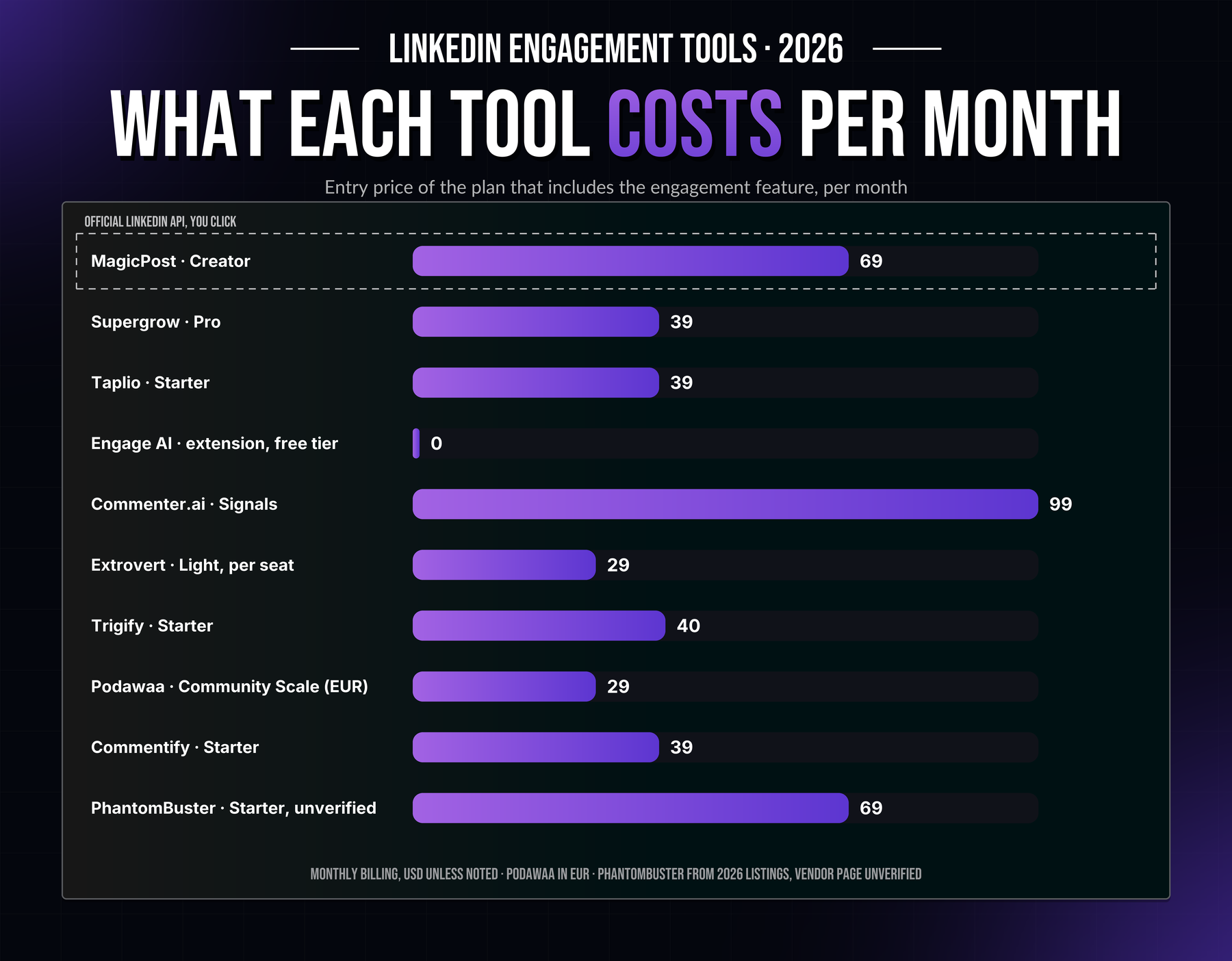
Tool | Method | Who presses the button | Price/mo. | Start |
Curated feed, official LinkedIn API | You, one click per reaction or comment | $49 (Growth) | Free trial, no card | |
Supergrow Engage | Curated feed, OAuth (vendor statement) | You, with keyboard shortcuts | $39 (Pro) | 7-day trial |
Taplio | Web app + Taplio X Chrome extension | You; the extension acts in your session | From $39 | 7-day full Pro |
Engage AI | Chrome extension in the LinkedIn feed | You, after the AI drafts | Free tier; community $50 | Free tier |
Commenter.ai | Web app, connection method not documented | You, from AI drafts | From $99 | 7-day trial, no card |
Extrovert | Chrome session or server-side session | You in review mode, or Extrovert if you hand it over | From $29 per seat | 10-day trial, no card |
Trigify | Data capture, method not documented | Nobody: it lists who engaged | From $40 | Shuts down 22 October 2026 |
Podawaa | Pod: extension or cloud engine | Other pod members | From €29 | 7 days free |
Commentify | AI agent posting from your account | The agent | From $39 | 5-day trial, no card |
PhantomBuster | Session cookie, cloud | A Phantom, on a schedule | From $69 (unverified) | 14-day trial |
Podawaa publishes euro prices only; its figures are not converted.
How we sorted the LinkedIn engagement tools: four methods
Four ways to get engagement on LinkedIn, and four different answers to one question: who acts on your account?
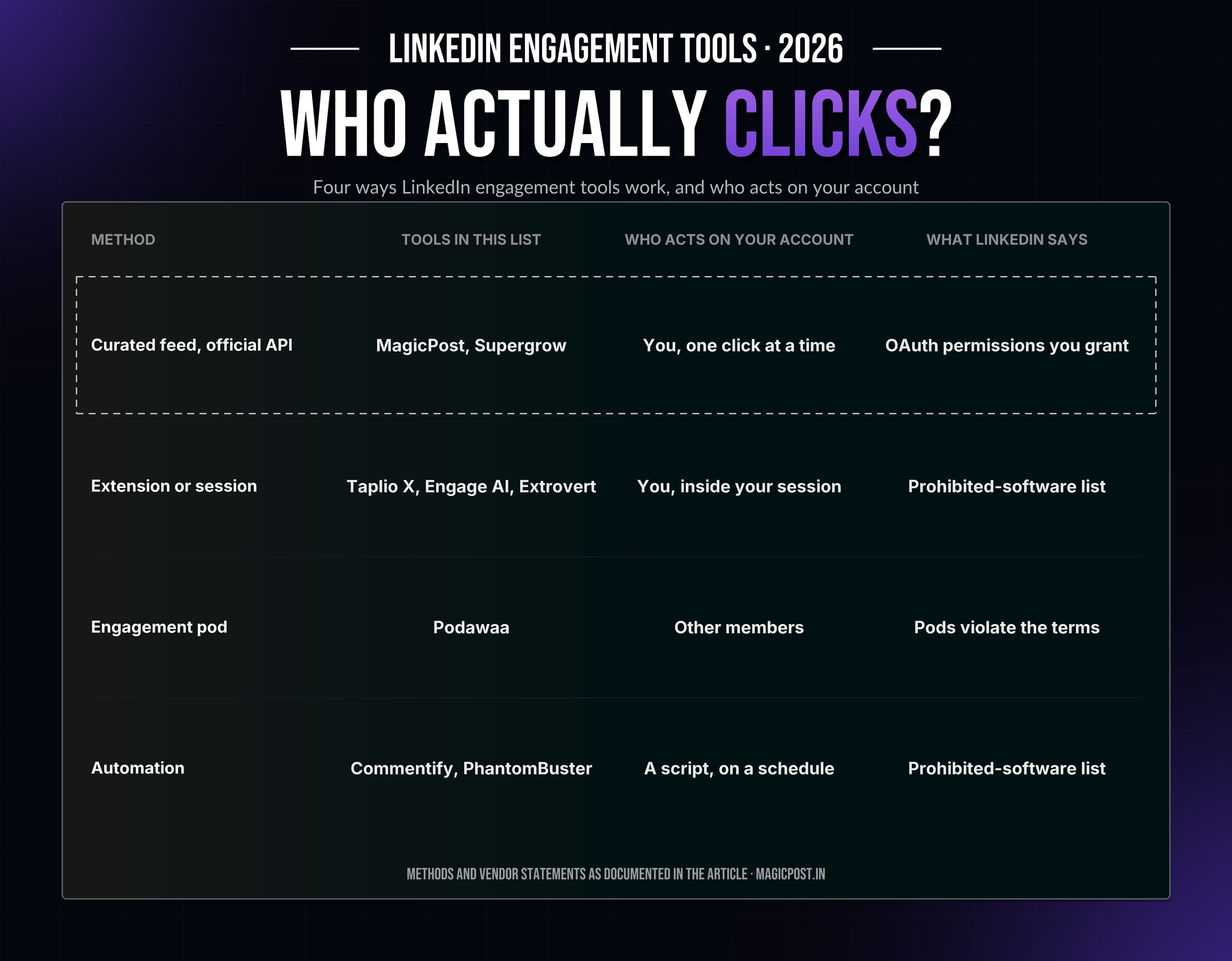
Method | Tools in this list | Who acts on your account | What LinkedIn says |
Curated feed on the official API | MagicPost, Supergrow | You, from a page that gathers the posts | Partner apps act with the permissions you grant through OAuth |
Browser extension or session | Taplio X, Engage AI, Extrovert | You, inside your logged-in session; sometimes the tool | Extensions that modify or automate LinkedIn are on the prohibited-software list |
Engagement pod | Podawaa (and Engage AI's community) | Other members, on posts they did not choose to read | Pods violate the terms; LinkedIn announced measures to make them ineffective |
Automation | Commentify, PhantomBuster | A script, from your account, on a schedule | Same prohibited-software list; accounts can be restricted |
LinkedIn's prohibited software and extensions page lists browser extensions and bots that "scrape, modify the appearance of, or automate activity" on the site. It also warns that such tools "may become non-operational without notice".
That sentence has a track record. Kleo's in-LinkedIn extension was withdrawn in June 2025, at 70,000 users, after LinkedIn required its removal. Lempod's pod extension was removed from the Chrome Web Store in 2025.
Taplio's founder has stated publicly that LinkedIn permanently suspended his personal account because of his Taplio involvement (sourced in Is Taplio safe?).
The method decides who carries the risk, whether or not a given account is ever restricted, and that is the first column to read in any list of LinkedIn engagement tools.
Curated-feed LinkedIn engagement tools: you comment, the tool gathers the posts
1. MagicPost: Best for a daily commenting routine on the official API
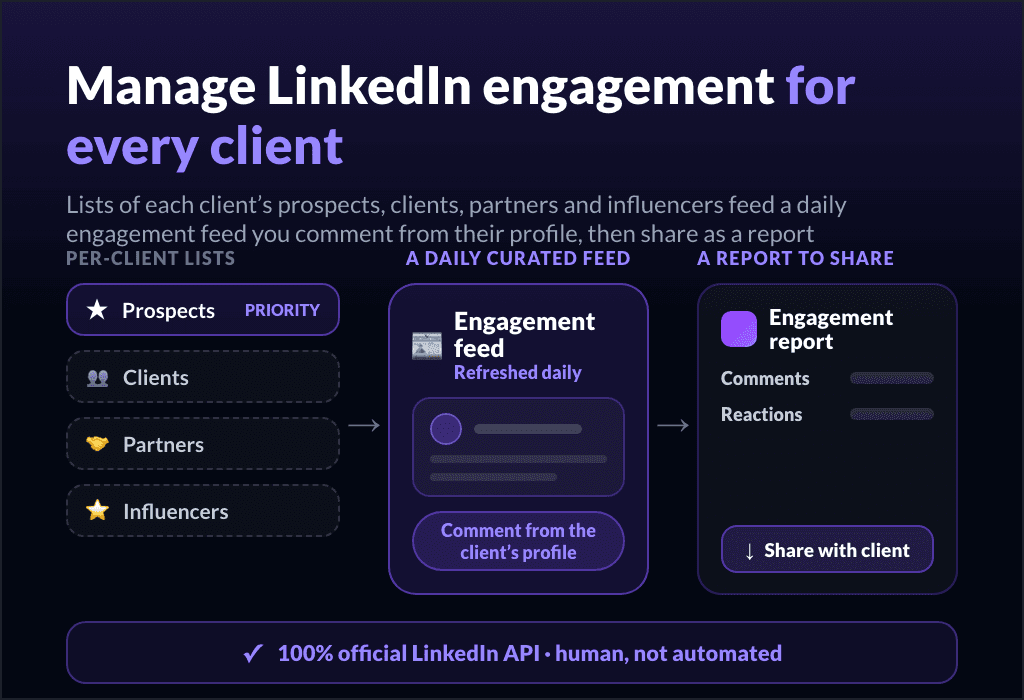
MagicPost turns commenting into a daily round: lists of the people who matter, one page with their latest posts, and every reaction sent through the official LinkedIn API with your own click.
You build lists of up to 49 profiles, people or company pages, and open one feed that shows the latest post of each. The comment box is the real one: six reactions, mentions, GIFs, images and saved comments.
What the other curated feeds lack is the receiving end. A Reply tab lists the comments your own posts receive, with each commenter's headline, country and audience, so you answer from the same place.
One click sends a commenter to an engagement list or to lead scoring, where an ICP fit badge lands on the card and the lead goes to your CRM. Our guide shows how to turn the people who engage with your posts into scored leads.
What it does not do: there is no auto-like and no comment sent while you are away. Every action starts with your click.
MagicPost sets no cap of its own; when LinkedIn throttles your commenting for the day, MagicPost says so and you pick the round back up the next day.
Key features
Lists of up to 49 profiles, people and company pages.
One curated feed with each profile's latest post.
Six reactions, mentions, GIF, image, saved comments.
Daily and weekly goals, exportable engagement report.
Reply inbox for the comments you receive.
Commenters scored against your ICP, pushed to your CRM.
Official LinkedIn API through OAuth: nothing to install.
Pros | Cons |
✅ Official LinkedIn API as a verified partner, no extension, no password | ❌ No auto-commenting, by design: you write and you click |
✅ Reply inbox and six reactions, which the other curated feeds lack | ❌ LinkedIn-only |
✅ Engagers to ICP badge to CRM in one click | ❌ Scheduled comments need the Creator plan |
✅ Exportable engagement report for a client or a manager |
Plan | Price/mo. | Includes |
Growth | $49 | Scheduling, analytics, benchmarks, engagement tool, leads |
Creator | $69 | AI writing, inspirations, scheduled comments, plus everything in Growth |
Agency | $59 per seat | From 2 seats, one client account per seat |
Team | $59 per seat | Employee advocacy, from 2 seats |
Want the routine without the scrolling? MagicPost's LinkedIn engagement tool runs on lists, one feed and daily goals, and the comments you receive come back to the same place. The trial takes no card.
2. Supergrow Engage: Best for keyboard-first commenting (Focus Mode)
Supergrow's Engage is the closest thing to MagicPost's feed, built for speed: the post on the left, your comment box on the right, and a key for everything.
Lists come from three places. Paste a post link and get everyone who commented on it, add people by hand, or upload a CSV. Focus Mode then walks you through the list: S skips, L likes, Cmd+Enter comments.
AI suggestions are matched to your Content DNA and editable before they go out, and you choose which account comments, company pages included.
The limits sit in the comment box. Reactions stop at like, there are no saved comments, and the comments you receive on your own posts have no inbox.
Supergrow states that it connects through OAuth with no extension to install; that is the vendor's statement, not a LinkedIn-verified-application receipt. G2 reviewers list "the engagement aspect of commenting" among their dislikes, next to analytics.
Key features
Lists from a post's commenters, by hand or CSV.
Focus Mode with keyboard shortcuts.
AI comments matched to Content DNA, tone control.
Comment as a person or as a company page.
First-comment scheduling under your own posts.
Pros | Cons |
✅ The fastest commenting loop of the curated feeds | ❌ Like only, no other reaction, no saved comments |
✅ Lists built from who already comments on a post | ❌ No inbox for the comments you receive |
✅ Pro at $39 includes the whole content suite | ❌ No free plan, only a 7-day trial |
Plan | Price/mo. | Includes |
Pro | $39 | Engage, Focus Mode, AI comments |
Teams | $199 | 5 accounts, approvals, org dashboard |
Full breakdown: Supergrow alternatives.
3. Taplio: Best for pairing engagement with a lead database and outreach
Taplio bundles an engagement builder with the rest of a growth suite: writing, scheduling, a searchable lead database and, on the top tier, automated DMs.
Engage lives in the web app: pick the people whose posts you want to show up on, and Taplio surfaces them. Comment credits meter the AI side, 500 a month on Growth and unlimited on Pro.
The Taplio X Chrome extension adds smart replies, saved posts and quick analytics inside LinkedIn itself. That extension is the method question: Taplio's own support documentation states that Taplio X is treated by LinkedIn as an automation tool that goes against LinkedIn's terms, and that some users receive warnings.
Trustpilot shows 2.4/5 across 13 reviews, most about billing and cancellation; one describes being "flagged and off LinkedIn" after exceeding daily action limits.
Key features
Engagement builder: show up on chosen people's posts.
AI comment credits: 500 on Growth, unlimited on Pro.
Taplio X extension: smart replies inside LinkedIn.
Lead database with saved-search alerts.
Auto-DMs and auto-connections on Pro.
Pros | Cons |
✅ Engagement, content and outreach in one suite | ❌ Extension classed as automation by Taplio's own support |
✅ A lead database no curated feed offers | ❌ Starter ships no AI or comment credits |
❌ 2.4/5 Trustpilot, billing complaints |
Plan | Price/mo. | Includes |
Starter | $39 | Suite, no AI or comment credits |
Growth | $69 | 250 AI credits, 500 comment credits |
Pro | $199 | Unlimited credits, auto-DMs |
Full breakdown: Taplio alternatives.
AI comment assistants among LinkedIn engagement tools: the tool drafts, you post
These two do not gather posts for you. They help with the sentence, and they leave the click to you. Other drafters are ranked in our LinkedIn comment generator comparison. If you only need a draft now and then, the free LinkedIn comment generator does that without an install or an account.
4. Engage AI: Best for a free comment drafter inside the LinkedIn feed
Engage AI is the extension most people mean by "AI comments on LinkedIn": open a post, pick a tone, get a draft in the comment box.
It runs as a Chrome or Edge extension in your logged-in session. Beyond drafts, a prospect monitor watches a list of profiles and tells you when they post.
The free tier is real, which is rare in this list. The paid extension tiers are not published on the pricing page, so we do not print them.
The pricing page sells something else instead: a LinkedIn Engagement Community at $50/mo., where members join up to nine sessions a week and comment on each other's assigned posts. That is a pod under another name, from the same company (FILT Pod).
Keep the extension and the community apart when you weigh this one.
Key features
AI comment drafts in several tones, in the feed.
Prospect monitoring with alerts when they post.
Free tier for the extension.
Separate paid engagement community, $50/mo. or $250/mo.
Pros | Cons |
✅ Free tier for in-feed drafts | ❌ Browser extension in your session, the class LinkedIn's policy names |
✅ Prospect alerts | ❌ Paid extension tiers not published on the pricing page |
✅ Works on the post you are already reading | ❌ The same vendor sells reciprocal engagement sessions |
Plan | Price/mo. | Includes |
Extension, free tier | Free | AI drafts, prospect monitoring (limits not published) |
Community, Individual | $50 | Up to 9 engagement sessions a week |
Community, Group | $250 | Unlimited client sub-accounts |
5. Commenter.ai: Best for ranking which conversations deserve a comment
Commenter.ai started as a comment generator and now sits a step above the comment box: it connects LinkedIn, Gmail and Google Calendar, ranks your active conversations by timing, sentiment and next steps, and drafts the comment or DM for the one at the top.
Tracking is the product: 100 people and 25 keywords on Signals, 1,000 and 200 on Workflow, with thread insights and a history of 60 days to 24 months.
Nothing is posted for you; the site rules out scripts and automation replacing your conversations. How it connects to LinkedIn is not documented, and at $99/mo. entry it is priced as a sales tool, not a commenting aid.
Key features
Ranks active LinkedIn and email conversations.
AI drafts for comments and DMs.
People and keyword tracking, thread insights.
CSV export and 12-month history from Workflow.
Teams plan: 5 seats, 3 connected accounts.
Pros | Cons |
✅ Prioritizes conversations across LinkedIn and email | ❌ $99/mo. entry for a solo user |
✅ No automation: you send every reply | ❌ LinkedIn connection method not documented |
❌ No curated feed of chosen profiles |
Plan | Price/mo. | Includes |
Signals | $99 | 100 people, 25 keywords, 600 drafts/mo. |
Workflow | $149 | 1,000 people, 200 keywords, 3,000 drafts/mo. |
Teams | $350 | 5 seats, 3 accounts, pooled drafts |
LinkedIn engagement tools that turn comments into pipeline: for sales teams
For a sales team the comment is the first touch and the CRM is where it has to land. Two tools build that bridge in opposite directions: Extrovert starts from your prospects, Trigify starts from whoever is already engaging.
MagicPost covers the receiving end from its Reply tab, where commenters are scored against your ICP and pushed to the CRM.
6. Extrovert: Best for SDR teams commenting on their prospects' posts
Extrovert watches the LinkedIn posts of the prospects you import and hands you a comment and a DM for each, following a playbook you set.
Prospects come from your CRM, Clay or a CSV. Every campaign starts in review mode, so you approve, edit or skip each suggestion. AI comment drafts are unlimited on every tier, DM suggestions start on Business, and webhooks push warm leads to your sequencer, Make, Zapier or n8n.
Method, from Extrovert's own help center: the Chrome extension "connects using your existing account session in Chrome", or you give an email and password and Extrovert creates a session from your chosen country.
You can hand the commenting over to Extrovert, which then posts approved comments during your working hours with random delays. Session-based, with optional auto-posting; not the official API.
Key features
Tracks the posts of 250 to 1,000 prospects a seat.
Unlimited AI comment drafts, playbook-driven.
DM suggestions from Business, unlimited on Pro.
Review mode by default, optional hand-over.
CRM and Clay sync, webhooks, Make, Zapier, n8n.
Pros | Cons |
✅ Built around prospects, not a creator's feed | ❌ Acts through your Chrome session, or a server-side session with your password |
✅ Review mode keeps you on every comment by default | ❌ Optional auto-posting from your account |
❌ Per-seat pricing grows with the team |
Plan | Price/mo. | Includes |
Light | $29 per seat | 250 prospects, 2 campaigns, 1 writing style |
Business | $49 per seat | 500 prospects, DM suggestions, API integrations |
Pro | $75 per seat | 1,000 prospects, unlimited DMs and styles |
7. Trigify: Best for turning other people's engagement into lead lists
Trigify shuts down at 11:59pm BST on 22 October 2026, as its team joins HubSpot; our Trigify alternatives page compares the tools its customers can move to. Trigify does not comment. It captures who liked or commented on the posts of the accounts you track, competitors and influencers included, enriches them and pushes them to HubSpot or your outreach tool.
Credits pay for signals, enrichments and "Jarvis" AI runs: 4,000 a month on Starter, 40,000 on Max. Boolean listening searches scale from 25 to 1,000 by tier.
The homepage talks about "business networks" rather than naming LinkedIn and does not say how the data is collected; one third-party review reads it as scraping. Treat the method as undocumented.
Key features
Engagement capture: who liked or commented on tracked posts.
Boolean social listening across 11+ networks.
Enrichment credits and a HubSpot connector.
Workflows to outreach tools.
2 seats on Starter, 5 on Max.
Pros | Cons |
✅ The only tool here that starts from existing engagement | ❌ No commenting and no feed: a data layer |
✅ Enriches each engager and pushes them to HubSpot | ❌ Data collection method not documented |
❌ Homepage does not name LinkedIn |
Plan | Price/mo. | Includes |
Starter | $40 | 4,000 credits, 2 seats |
Max | $199 | 40,000 credits, 5 seats |
Enterprise | Custom | 200,000+ credits, unlimited seats |
Pods and automation: the LinkedIn engagement tools that act without you
Three tools where the reaction or the comment goes out without your click. They are here because every other list includes them, and because the mechanism deserves a read before the price.
For connection requests and message sequences, see the LinkedIn automation tools list instead.
8. Podawaa: Best for understanding what an engagement pod costs
Podawaa is a pod with a price list: members' accounts react to and comment on your posts, and yours does the same for them.
Two modes. Community mode installs a Chrome extension and uses your account to engage back, from €29/mo. with 50 reactions and 5 comments per post.
Private mode runs on Podawaa's cloud engine so your account is never used on others' posts, from €59/mo. plus a fee per extra account. The Dominate tiers add auto-boost on every new post and a dedicated manager.
The comments come from people who did not choose to read the post. That is what LinkedIn's 2026 position on pods targets, as reported by ConnectSafely: pods violate the terms, and LinkedIn announced measures to make them ineffective.
Lempod, the pod extension most people knew, was removed from the Chrome Web Store in 2025.
Key features
50 to 250 reactions per post, 5 to 50 comments.
Community mode (extension) or private mode (cloud).
AI comment generation from Accelerate.
Auto-boost and repost boost on Dominate.
Post scheduling.
Pros | Cons |
✅ Transparent caps and prices for a pod | ❌ Engagement from members who did not read the post |
✅ Private mode keeps your account out of the reciprocity | ❌ Community mode runs an extension in your session |
❌ LinkedIn states that pods violate its terms |
Plan | Price/mo. | Includes |
Community Scale | €29 | 50 reactions, 5 comments per post |
Community Accelerate | €45 | 100 reactions, 10 comments, comment generation |
Private Scale | €59 | Cloud engine, +€19 per extra account |
Private Dominate | €159 | 250 reactions, 50 comments, dedicated manager |
9. Commentify: Best for seeing what AI auto-commenting looks like
Commentify's agent, Jeni, finds posts by topic, hashtag or profile, writes a comment in your voice and posts it at intervals, without you.
That is the whole pitch: 900 comments a month on Starter, 2,400 on Pro, on LinkedIn and X, with a posting agent for weekly carousels in the bundle.
The vendor lists natural timing, unique comments and a sensitive-content filter as safety measures. The method, an agent acting from your account, is what LinkedIn's prohibited-software page describes.
A comment written to be seen rather than read is what a reader spots first, and 900 of them a month are hard to miss.
Key features
Auto-comments by topic, hashtag or profile.
900 or 2,400 comments per month.
LinkedIn and X.
Weekly carousel posting agent (bundle).
Pros | Cons |
✅ The cheapest way to put volume on a comment count | ❌ Nobody reads the post before the comment goes out |
✅ Topic and profile targeting | ❌ The agent acts from your account: the prohibited-software class |
✅ Covers X as well | ❌ No per-comment approval described |
Plan | Price/mo. | Includes |
Starter | $39 | Up to 900 comments/mo. |
Pro | $59 | Up to 2,400 comments/mo. |
Power Bundle | $99 | Commenting and posting agents |
10. PhantomBuster: Best for running comments from a spreadsheet, at a known cost
PhantomBuster's LinkedIn Auto Commenter takes a sheet of post URLs and comments, posts them from your account on a schedule, and logs each one with a timestamp.
It is one Phantom among many: an Auto Liker, an AI Post Responder, and scrapers that export who commented on or liked a post. Limits from the Phantom's own page: personal profiles only, top-level comments only, no emojis.
The method is a LinkedIn session cookie run from PhantomBuster's cloud, so the actions come from your account while you are elsewhere. Reviews on G2, Capterra and Reddit report account restrictions; that is the reported pattern, not a certainty. LinkedIn's prohibited-software page covers this class by name.
Key features
Auto Commenter from a Google Sheet or CSV, on repeat.
Auto Liker and AI Post Responder.
Commenter and liker exports for lead lists.
Execution hours: 20, 80 or 300 per month.
Pros | Cons |
✅ Any list of posts, any comment text, logged | ❌ Session cookie on cloud infrastructure |
✅ Scrapers double as lead-list builders | ❌ Metered in hours, not in comments |
❌ Personal profile only, no replies, no emojis |
Plan | Price/mo. | Includes |
Starter | $69 | 20 hours, 5 slots |
Pro | $159 | 80 hours, 15 slots |
Team | $439 | 300 hours, 50 slots |
The $69/mo. Starter price is a figure we could not verify on PhantomBuster's own pricing page.
How to choose the best LinkedIn engagement tool
The four categories above answer four questions; ask them in this order.
Ask who presses the button. You, from a curated feed or after a draft; you or the tool (Extrovert); other pod members; a script. Everything else in the comparison follows from this answer.
Check the access method before the price. Official API through OAuth (MagicPost; Supergrow states the same), extension or session (Taplio X, Engage AI, Extrovert), cloud session cookie (PhantomBuster). LinkedIn's prohibited-software page is the yardstick.
Count what comes back. A curated feed gives a habit and a report; MagicPost adds the comments you receive and a CRM path; Trigify, a list of engagers; a pod, numbers from outside your audience.
Compare invoices at the size you will be in six months. Per seat (Extrovert), per account (Podawaa private mode, Supergrow Teams), per credit (Trigify) and per execution hour (PhantomBuster) price differently once a team joins.
Ready for a daily round on the official API? Lists, one feed, six reactions, a reply inbox and lead scoring, with no extension and no password to share. Try MagicPost for free →
FAQ
What is the best LinkedIn engagement tool?
MagicPost, for a daily commenting routine: lists of up to 49 profiles, one feed with each profile's latest post, six reactions, saved comments, daily goals, a reply inbox and one-click lead scoring, all on the official LinkedIn API. Supergrow Engage is the pick for keyboard-first commenting, Extrovert for SDR teams.
Are LinkedIn engagement tools safe for your account?
LinkedIn engagement tools are safe or not depending on the method, not the brand. A tool on the official API with your OAuth permission does only what you click.
Extensions, session tools, pods and cloud automation fall under LinkedIn's prohibited-software policy: accounts can be restricted, and the tools can stop working without notice, as Kleo's extension and Lempod did.
Do LinkedIn engagement pods still work?
LinkedIn engagement pods deliver numbers, and LinkedIn works against them: as reported by ConnectSafely in 2026, LinkedIn calls pods a violation of the terms and announced measures to make them ineffective.
The reactions also come from members outside your audience who did not choose to read the post, so pod comments rarely bring anything you can act on.
What is the difference between a LinkedIn engagement tool and an automation tool?
An engagement tool brings the posts of chosen people to one place so you can react and comment yourself. An automation tool sends actions from your account without you: connection requests, messages, likes or comments on a schedule.
The first shortens the path to a person; the second removes the person. See our LinkedIn automation tools list for the second.
Is there a free LinkedIn engagement tool?
Engage AI has a free tier for AI comment drafts in the feed, as a browser extension. MagicPost's engagement tool comes with a no-card free trial, and its free LinkedIn comment generator drafts a comment without an account. The other tools offer trials only.
Can LinkedIn engagement tools schedule comments?
Scheduling a first comment under your own post and scheduling comments under other people's posts are two different things. Under your own post, it is a publishing feature that MagicPost and Supergrow both offer (scheduled comments).
Under other people's posts, it is automation: what Commentify and PhantomBuster sell, and what LinkedIn's policy covers.
Which LinkedIn engagement tool works for agencies?
MagicPost is the LinkedIn engagement tool for agencies that runs per client and reports per client: engagement lists, goals and the exportable report live in each client's workspace on the official API.
Extrovert prices per seat. Engage AI's community and Podawaa's private mode sell client sub-accounts for reciprocal engagement: the pod model applied to clients.