The best LinkedIn carousel generator writes the slides for you, keeps them editable, and gets the PDF onto LinkedIn without a detour through three other apps. Four of the 7 tools here write and publish; the other three leave the upload to you.
This guide compares 7 LinkedIn carousel generators on four points: whether AI writes the deck or you design it by hand, how many slides each plan allows, whether the tool publishes to LinkedIn, and what the free option really includes.
For the rest of your stack, the best LinkedIn tools guide ranks one pick per job, and our LinkedIn comment generator ranking covers the drafts you leave under other people's posts.
LinkedIn carousel generators at a glance
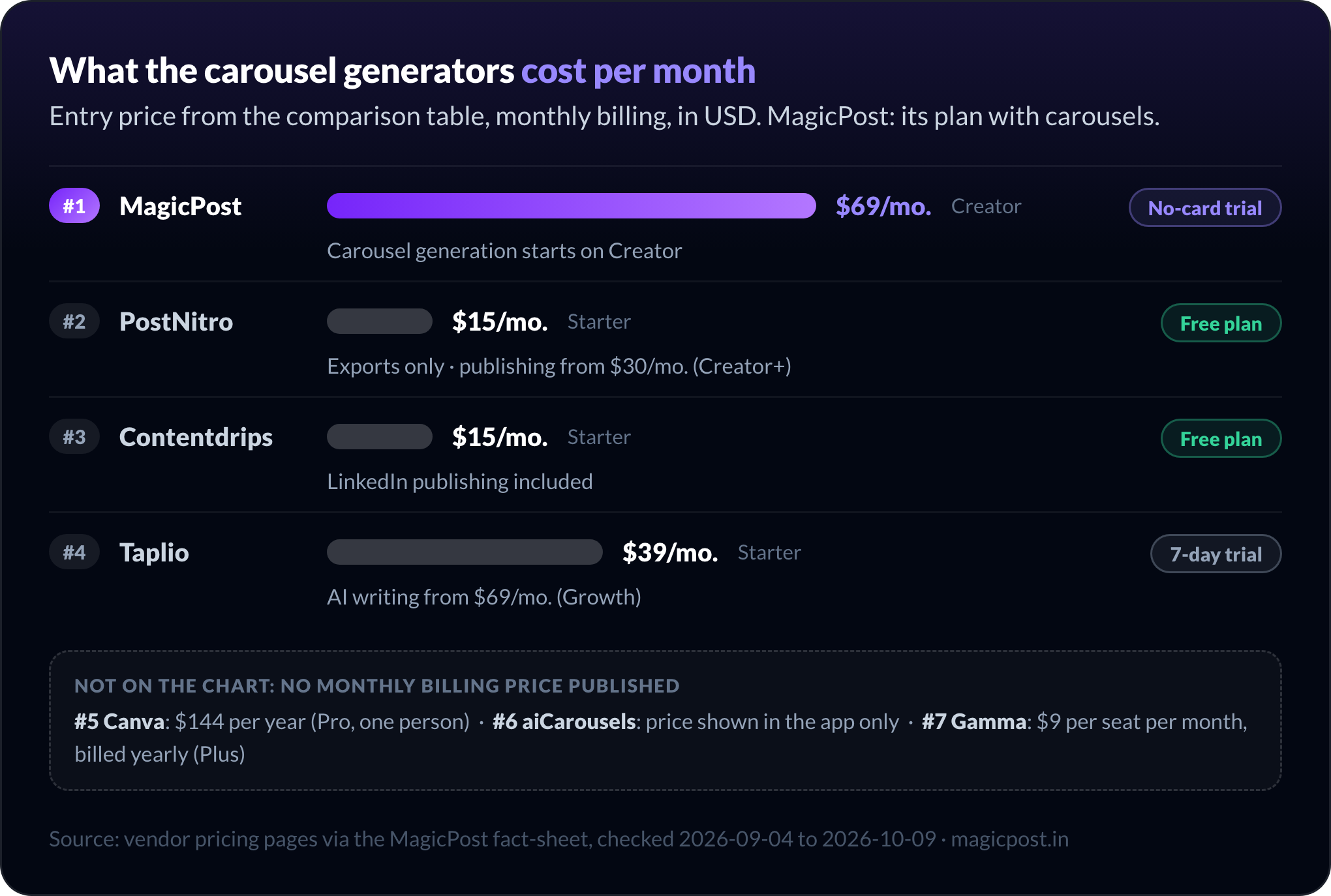
Tool | Best for | AI writes the slides | Slide cap | Publishes to LinkedIn | From (USD) | Free option |
MagicPost | Editable AI carousels published to LinkedIn | Yes, from a topic, link, file or post | 20 | Yes, official API (Creator) | $69/mo. | No-card trial |
PostNitro | Carousel-first design engine | Yes, on a brand kit | 5 (Free) to 20 (Team+) AI slides | Yes, from Creator+ | $15/mo. | Free plan, watermarked |
Contentdrips | Bulk carousels from a spreadsheet | Yes, credit-metered | Not documented | Yes, from Starter | $15/mo. | Free plan, 50 one-time credits |
Taplio | Carousels inside a LinkedIn growth suite | Yes, from an idea, post or URL | Not documented | Yes, through the Taplio queue | $39/mo. (AI writing from $69/mo.) | 7-day trial; separate free web tool |
Canva | Designing slides by hand from templates | No, templates plus AI design credits | Not documented | Scheduling on Pro | Yearly only: $144 per year | Free plan |
aiCarousels | Free AI carousels without signing up | Yes, from 5 source types | Not documented | No, download only | Shown in the app only | Free to start, no sign-up |
Gamma | Turning a deck or document into a carousel | Yes, from a prompt or a file | 10 per prompt (Free) | No, export only | Yearly only: $9 per seat/mo. | Free plan, 400 one-time credits |
Prices are each vendor's monthly billing figure. Canva and Gamma display yearly billing only on their pricing pages.
Best AI LinkedIn carousel generators that also publish
These four tools write the slides and send the carousel to LinkedIn themselves, so the PDF never leaves the app. They differ on how editable the result is, what each plan caps, and how the tool connects to your LinkedIn account.
1. MagicPost: Best LinkedIn carousel generator for editable AI slides published to LinkedIn
MagicPost turns a topic, a link, a file or one of your own posts into a full LinkedIn carousel, keeps every line editable, and publishes it through LinkedIn's official API.
The generator reads four kinds of source: a one-line topic, the URL of an article, a PDF, Word, text or Markdown file, or one of your posts (draft, scheduled, favorite or published).
You pick a style from your brand kit and a slide count, and the deck comes back with a cover, the argument and a closing card.
Once generated, every title, number and caption is a text field you click and retype, without going back through the AI.
The finished carousel exports as a PDF at 1080 by 1350 pixels, the size LinkedIn turns into a swipeable document post. Or you attach it to a post inside MagicPost and publish or schedule both together, with no browser extension.
The step-by-step setup is in the help center guide to generating a LinkedIn carousel with AI.
Key features
5, 8, 10, 12 slides or Auto.
Slide strip: reorder, duplicate or hide, up to 20.
Brand kit: fonts, logo, up to 3 styles.
Identity band with headshot, name and subtitle.
Copilot edits one slide or the whole deck.
Community Management API, granted after a review of the app and its use case.
Pros | Cons |
✅ AI-written deck where every line stays a text field | ❌ Carousel generation starts on Creator; Growth excludes it |
✅ Starts from your own posts, drafts included | ❌ One fixed vertical format, no square or landscape carousel |
✅ Publishes and schedules the carousel with the post, official API | ❌ LinkedIn only: no Instagram or TikTok publishing |
✅ No cap on carousel generations on Creator |
Plan | Price/mo. | Includes |
Growth | $49 | Scheduling, analytics, engagement; no carousel generation |
Creator | $69 | AI carousel generation with no cap, AI writing, scheduled comments |
Agency | $59 per seat | Client workspaces, from 2 seats |
Team | $59 per seat | Team workspace, from 2 seats |
The free trial needs no credit card and includes a small one-time allowance of carousel generations. Full verdict in the MagicPost review.
2. PostNitro: Best for a carousel-first design engine with a free plan
PostNitro is a LinkedIn carousel generator built around design: the AI writes and lays out carousels, single images and short animated videos on your brand kit, then schedules them to six networks on its higher plans.
Carousels come in 4:5, 1:1 or 16:9, with custom templates, fonts, watermarks and a QR code on the call-to-action slide. The freeform editor lets you move any element. Exports cover a PNG per slide, a single PDF for LinkedIn document carousels, and MP4.
The plan decides how deep the AI goes. A generated carousel holds 5 AI slides on Free, 8 on Starter, 15 on Creator+ and 20 on Team+. Publishing starts on Creator+: Free and Starter design and export, but do not post to LinkedIn.
PostNitro also runs outside its editor, through an MCP server, a CLI, a REST API and Claude or ChatGPT connectors, billed in API credits. How it connects to LinkedIn to publish (official API or otherwise) is not stated on its pages.
Key features
AI carousels in 4:5, 1:1 or 16:9.
Brand kit, custom templates, fonts, QR code.
Exports: PNG per slide, PDF, MP4.
Scheduling to 10 or 30 social accounts.
MCP server, CLI, REST API, AI connectors.
Pros | Cons |
✅ Permanent free plan, no card | ❌ Free plan: 5 AI slides, 5 downloads a month, watermark |
✅ Three carousel ratios and video export | ❌ Starter ($15/mo.) exports only; publishing needs $30/mo. |
✅ Agent access through MCP, CLI and API | ❌ LinkedIn connection method not stated |
✅ Freeform editor: move any element | ❌ MCP, CLI and API use billed in API credits |
Plan | Price/mo. | Includes |
Free | $0 | 5 AI slides, 5 downloads a month, watermark, no scheduling |
Starter | $15 | No watermark, 8 AI slides, 30 downloads, no scheduling |
Creator+ | $30 | 15 AI slides, unlimited downloads, 10 social accounts |
Team+ | $60 | 20 AI slides, 5 members, 30 social accounts |
Source: PostNitro pricing.
For Black Friday 2026, PostNitro takes 40% off yearly plans from November 1 to November 30; the codes are in our list of LinkedIn Black Friday deals for 2026.
3. Contentdrips: Best LinkedIn carousel generator for bulk decks from a spreadsheet
Contentdrips is the LinkedIn carousel generator that turns a CSV file into a batch of carousels, and the cheapest tool on this list that publishes to LinkedIn, at $15/mo.
Its AI Design Agent writes from a topic, a blog post, a YouTube or TikTok video, or an image, then applies your brand kit to carousels, quote cards and reels templates. Text-to-Carousel and CSV-to-Carousel are both on the free plan; no other tool here documents a spreadsheet import.
Paid plans add publishing to LinkedIn and Instagram without copy-paste, plus date and time scheduling and a two-week Bulk Post Planner. The connection method behind that publishing is not specified.
Every AI action draws on credits: 50 one-time credits on Free, then a monthly allowance on each paid plan. The public record is thin, with a single substantive review on Product Hunt, which reports bugs and an immediate loss of access on cancellation; the Contentdrips review lays out both sides.
Key features
AI Design Agent with brand kit.
CSV-to-Carousel and Text-to-Carousel.
Sources: topic, blog, YouTube, TikTok, image.
LinkedIn and Instagram publishing (paid).
Bulk Post Planner over two weeks.
Pros | Cons |
✅ CSV-to-Carousel for batches of decks | ❌ AI credits metered on every plan |
✅ Publishing to LinkedIn from $15/mo. | ❌ Publishing mechanism not specified |
✅ Writes from YouTube and TikTok videos | ❌ Almost no public reviews to judge support |
Plan | Price/mo. | Includes |
Free | $0 | 50 one-time AI credits, basic templates, 1 brand, no scheduling |
Starter | $15 | 500 AI credits a month, LinkedIn publishing, 3 brands |
Pro | $26 | 1,200 AI credits a month, unlimited brands and teams |
Source: Contentdrips pricing. More options in Contentdrips alternatives.
4. Taplio: Best for carousels inside an all-in-one LinkedIn growth suite
Taplio's carousel generator sits inside a paid LinkedIn suite of AI writing, scheduling, analytics and outreach, with a separate free web tool at taplio.com/carousel that needs no account.
In the app, the generator takes an idea, a pasted post, an article URL or a YouTube URL and returns written, designed slides: a cover hook, the body, a call to action.
Your brand kit is applied, and the deck exports as a PDF or goes straight to the Taplio scheduling queue.
Taplio's carousel page says carousels are free during its 7-day trial, with no credit card. Which paid plan keeps the generator after the trial is not stated there; AI writing starts on Growth at $69/mo.
For advanced actions, Taplio relies on its Taplio X Chrome extension, which LinkedIn treats as an automation tool against its Terms of Service, according to Taplio's support documentation. See is Taplio safe for the detail.
Key features
AI carousels from idea, post, article or YouTube.
Brand kit on every slide.
PDF export or Taplio scheduling queue.
Free web carousel tool, no account.
AI writing, analytics, lead outreach in the suite.
Pros | Cons |
✅ Carousels next to a full LinkedIn growth suite | ❌ Extension classed as automation by LinkedIn, per Taplio |
✅ Free web tool usable without an account | ❌ No permanent free plan for the in-app generator |
✅ Article and YouTube links as sources | ❌ Trustpilot 3.5/5 on 19 reviews |
Plan | Price/mo. | Includes |
Starter | $39 | Suite without AI credits |
Growth | $69 | 250 AI credits, 500 comment credits |
Pro | $199 | Unlimited credits, auto-DMs and connections |
Source: Taplio pricing. Full verdict in the Taplio review and Taplio alternatives.
Best free LinkedIn carousel makers you export from
These three tools make the slides but leave the posting to you: you download the PDF, then upload it to LinkedIn as a document. They are also where the most generous free options sit.
5. Canva: Best for designing LinkedIn carousels by hand from templates
Canva is a general design platform used for LinkedIn carousels through its templates: you design the slides yourself, export a PDF, and post it to LinkedIn as a document.
Canva has no LinkedIn-specific AI writer: the words come from you, and the drag-and-drop editor handles the layout. AI design tools draw on an allowance of up to 20 uses on the free plan.
The free plan opens 1.6M+ templates, one brand kit with three colors, and PDF, JPG and PNG export. Pro brings 3.6M+ templates including premium ones, five brand kits and social scheduling.
Whether a scheduled LinkedIn post from Canva can be a PDF document carousel is not stated on its pricing page. On the free plan, the path is export and manual upload.
Key features
1.6M+ templates free, 3.6M+ on Pro.
Drag-and-drop editor, full layout control.
PDF, JPG and PNG export on every plan.
Brand kits: 1 free, 5 on Pro.
Social scheduling on Pro.
Pros | Cons |
✅ Largest template library, free plan included | ❌ You write every slide; no LinkedIn writer |
✅ Full design control, slide by slide | ❌ Not built for LinkedIn: no hooks, voice or post analytics |
✅ Permanent free plan enough to export a carousel PDF | ❌ Monthly billing price not displayed |
Plan | Price | Includes |
Free | $0 | 1.6M+ templates, 1 brand kit, up to 20 AI uses, no scheduling |
Pro | $144 per year, one person | 3.6M+ templates, 5 brand kits, social scheduling |
Business | $250 per year per person | Team admin, 100 brand kits, approvals |
Enterprise | Custom |
Canva shows yearly prices only on its pricing page; Pro and Business can be tried for free.
6. aiCarousels: Best for starting an AI LinkedIn carousel without signing up
aiCarousels is a single-purpose carousel generator for LinkedIn, Instagram and TikTok that you can start using without creating an account.
The AI writes the slides from five kinds of source: a topic, pasted text, a website URL, a YouTube video or a PDF. A template editor then handles palettes, Google Fonts and Smart Auto-Resize, and converters turn a carousel into a PowerPoint, a LinkedIn post or a video.
There is no LinkedIn connection. You download the PDF and upload it through LinkedIn's document icon, which is what aiCarousels' own FAQ tells you to do. There is no scheduling either.
aiCarousels publishes no price: the free limits (watermark, slide cap) are not listed, and the PRO plan is priced and sold inside the app only. PRO adds bonus tools: a LinkedIn post generator, quote cards, infographics and a headshot generator.
Key features
Sources: topic, text, URL, YouTube, PDF.
No sign-up needed to start.
Smart Auto-Resize, palettes, Google Fonts.
Converters to PowerPoint, post and video.
Large set of free LinkedIn utilities.
Pros | Cons |
✅ AI carousel without creating an account | ❌ No publishing or scheduling to LinkedIn |
✅ Widest choice of sources, plus converters to PowerPoint and video | ❌ No public price, and free limits not documented |
Plan | Price/mo. | Includes |
Free | $0 | AI carousels, limits not published |
PRO | Shown in the app only | Bonus tools, monthly or yearly billing |
7. Gamma: Best for turning a deck or document into a LinkedIn carousel
Gamma is an AI presentation tool whose social media product lays out a prompt or an existing document as a LinkedIn-sized carousel, with captions and your brand applied.
You start from a prompt or from content you already have: a blog post, notes, a PDF or a PowerPoint. Gamma sizes the cards for a LinkedIn carousel, writes the captions, and lets you edit or regenerate any card.
Gamma's output is a PDF or an image pack that you upload to LinkedIn by hand or through a scheduler; nothing else in it is built around LinkedIn.
Gamma's free plan gives 400 credits once at signup, up to 10 slides per prompt, and leaves Gamma branding on the export. Plus removes the branding and adds 1,000 credits a month.
Key features
Prompt, blog post, PDF or PPTX as source.
LinkedIn carousel sizing and captions.
Edit or regenerate card by card.
Export to PDF, PPTX, PNG, Google Slides.
Pros | Cons |
✅ Reuses an existing deck or document | ❌ No LinkedIn publishing |
✅ Exports to PowerPoint and Google Slides too | ❌ Free credits are one-time, not monthly |
✅ Writes the captions along with the carousel | ❌ Free plan keeps Gamma branding, 10 slides per prompt |
Plan | Price | Includes |
Free | $0 | 400 one-time credits, 10 slides per prompt, Gamma branding |
Plus | $9 per seat per month, billed yearly ($108 per year) | 1,000 credits a month, no branding |
Pro | $18 per seat per month, billed yearly | 4,000 credits, custom branding, API |
Ultra | $90 per seat per month, billed yearly | 20,000 credits |
Gamma displays per-seat prices under annual billing only.
How many slides should a LinkedIn carousel generator make?
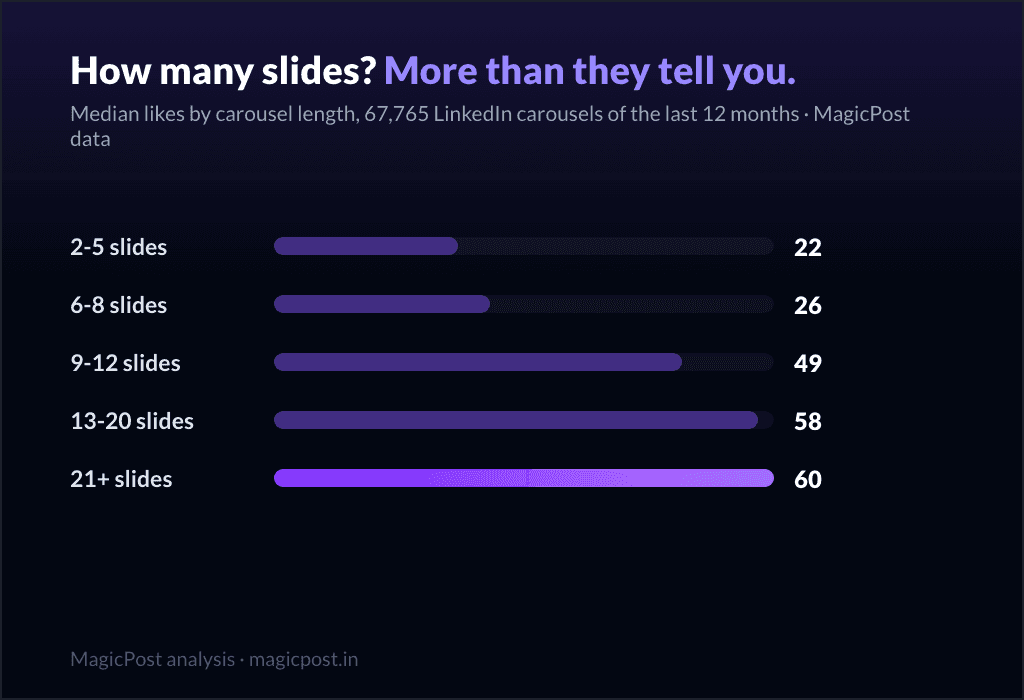
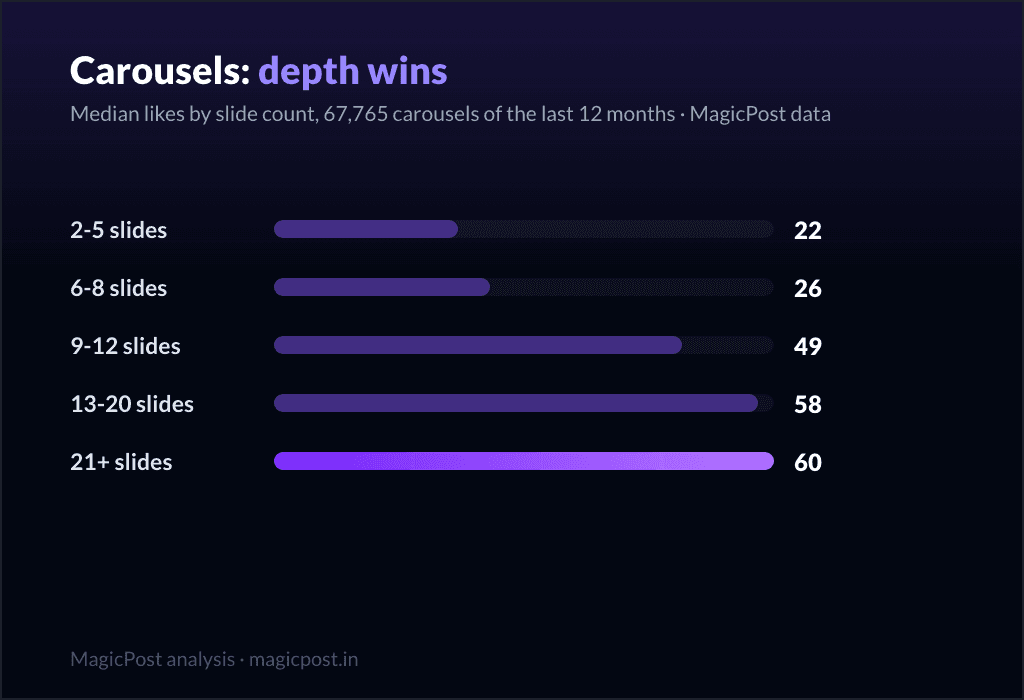
A LinkedIn carousel generator should let you go past 12 slides, because that is where engagement keeps climbing. MagicPost measured 67,765 LinkedIn carousels (PDF document posts) over 12 months and compared median likes by slide count.
Slides | Carousels measured | Median likes |
2 to 5 | 11,865 | 22 |
6 to 8 | 22,356 | 26 |
9 to 12 | 21,966 | 49 |
13 to 20 | 8,265 | 58 |
21 or more | 3,313 | 60 |
The median carousel stops at 8 slides, one band below the jump. Above 50,000 followers the peak shifts to 9 to 12 slides; below that, median likes keep rising with slide count.
Deeper carousels also tend to come from more invested authors, so author effort explains part of the curve. The full method is in how many slides a LinkedIn carousel should have.
Set against those bands, the slide cap on each plan decides how deep a generated deck can go. Canva, aiCarousels, Contentdrips and Taplio document no cap.
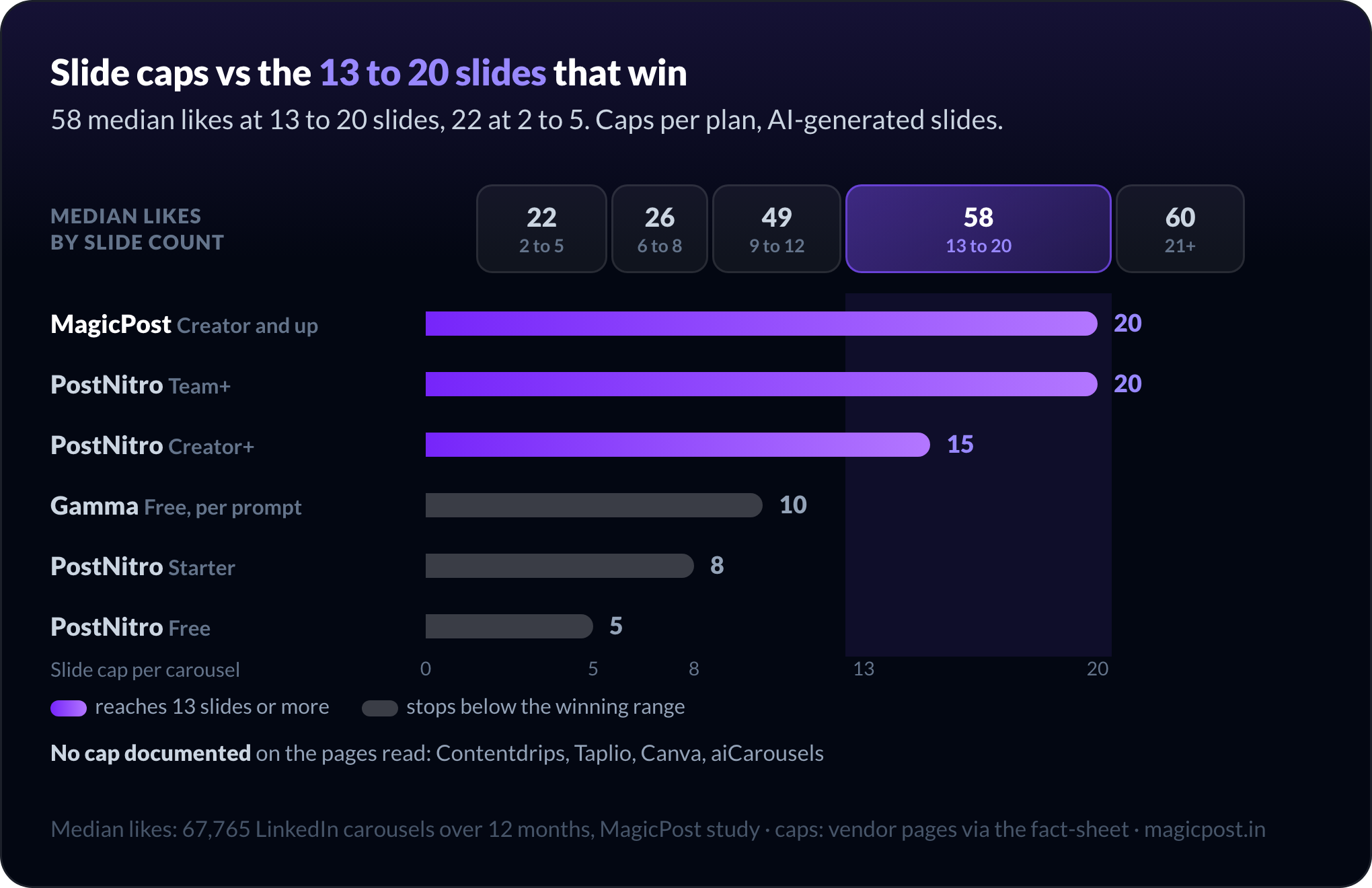
A free plan capped at 5 AI slides produces exactly the band with the lowest median likes. If you start from a cap, plan to add slides by hand.
Want a 13-slide deck without designing 13 slides? The MagicPost LinkedIn carousel generator writes up to 20 slides from a topic, a link, a file or one of your posts, keeps every line editable, and publishes the carousel through LinkedIn's official API.
Free LinkedIn carousel generators: what you get without paying
Four of the seven tools have a permanent free plan, and aiCarousels is free to start. PostNitro, Contentdrips and Gamma ask for no card. Their free tiers give you different things:
Canva: design and export a PDF; no scheduling.
PostNitro: 5 AI slides, 5 downloads a month, watermark.
aiCarousels: no sign-up; limits not published.
Contentdrips: 50 one-time AI credits, CSV-to-Carousel included.
Gamma: 400 one-time credits, Gamma branding.
Taplio's free web tool works without an account, while its in-app generator is free only during the 7-day trial.
MagicPost has no free carousel tool you can use without an account. You sign up for the free trial, which needs no credit card and includes a small one-time allowance of carousel generations; after that, carousel generation is on Creator at $69/mo.
If you only need one carousel today, Canva, PostNitro or aiCarousels will get you a PDF without paying.
None of the free options publishes to LinkedIn. Free plans export the PDF; you upload it yourself through LinkedIn's document feature, step by step in how to create LinkedIn carousel posts.
How to choose the best LinkedIn carousel generator
Run these four checks in order. Each one removes tools before you compare prices.
Decide who writes the slides. For written copy, pick an AI generator; if you only need layout, Canva gives the most control.
Check the slide cap on the plan you will pay for. The data favors 13 to 20 slides; a 5 or 8-slide cap leaves the rest to you.
Decide whether the tool should publish. Exporting and uploading is a manual step per carousel; MagicPost, PostNitro Creator+, Contentdrips and Taplio skip it.
Check how the tool connects to LinkedIn. MagicPost uses the official API; LinkedIn treats Taplio's extension as automation, per Taplio. PostNitro and Contentdrips do not say, and export-only tools never touch your account.
Repurposing old content changes the shortlist. To turn existing posts into carousels, MagicPost and Taplio take a post as source; for a PDF or a deck, aiCarousels, MagicPost and Gamma read the file. A Twitter thread to LinkedIn carousel conversion works with any tool that accepts pasted text.
Try the MagicPost LinkedIn carousel generator
Write the carousel, edit every line, publish it with the post. MagicPost generates LinkedIn carousels from your own posts, links and files, in your brand kit, and publishes them through LinkedIn's official API. Try MagicPost for free →
FAQ
What is the best LinkedIn carousel generator?
MagicPost is the best LinkedIn carousel generator if you want AI-written slides that stay editable and publish to LinkedIn from the same app, through the official API, on the Creator plan at $69/mo.
For a free option, PostNitro has a permanent free plan with 5 AI slides, Canva the largest free template library, and aiCarousels an AI generator you can use without signing up.
Is there a free LinkedIn carousel generator without signing up?
aiCarousels lets you start an AI carousel without creating an account, and Taplio runs a separate free carousel web tool at taplio.com/carousel with no account needed.
Canva, PostNitro, Contentdrips and Gamma have permanent free plans. MagicPost offers a free trial with no credit card.
Can AI turn a PDF or a blog post into a LinkedIn carousel?
MagicPost, aiCarousels and Gamma turn a PDF into a LinkedIn carousel, and MagicPost also reads Word, text and Markdown files. For a blog post, MagicPost, Taplio and aiCarousels take the article URL, and Contentdrips writes from a blog post.
How do you post a carousel on LinkedIn?
A LinkedIn carousel is a PDF uploaded as a document post: start a post, click the document icon, upload the PDF and give it a title. MagicPost can attach the carousel to a post and publish it for you through LinkedIn's official API.
What size and format should a LinkedIn carousel be?
A LinkedIn carousel is a PDF document, one page per slide. MagicPost exports each slide at 1080 by 1350 pixels, the vertical 4:5 format the LinkedIn feed turns into a swipeable document. PostNitro also offers 1:1 and 16:9 carousels.
How many slides should a LinkedIn carousel have?
A LinkedIn carousel with 13 to 20 slides earns 58 median likes, against 22 for 2 to 5 slides, across 67,765 carousels measured by MagicPost. Above 50,000 followers, 9 to 12 slides perform best. The median carousel stops at 8 slides.
Do free LinkedIn carousel generators add a watermark?
PostNitro's free plan adds a watermark to exports, and Gamma's free plan keeps Gamma branding. Canva's free plan exports PDF, JPG and PNG. aiCarousels does not publish its free limits, so check the export before you post.
Which LinkedIn carousel generator can schedule carousels?
MagicPost schedules a carousel with its post through LinkedIn's official API on Creator. PostNitro schedules from Creator+ ($30/mo.), Contentdrips from Starter ($15/mo.), and Taplio sends carousels to its scheduling queue. Canva Pro schedules social posts; carousel support is not stated.