The best LinkedIn Wrapped tools build a recap of your year on LinkedIn: your top posts, your impressions, your followers gained, in an image you can share. MagicPost's LinkedIn Wrapped is the best free option for 2026, and it's open now.
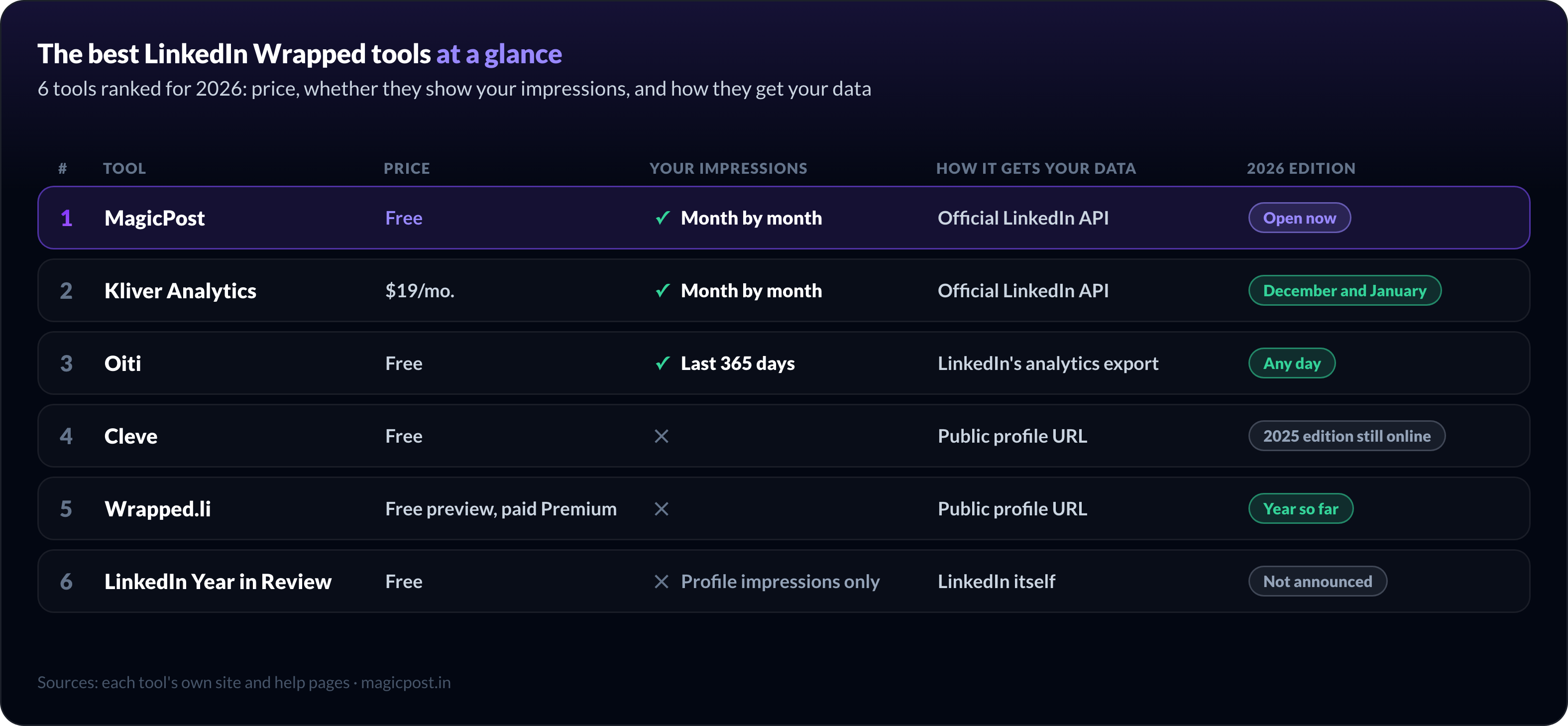
The six tools below differ most on where they get your numbers, and that decides what your recap can show. Tools that read only your public posts never see your impressions. Tools connected to LinkedIn's official API, or fed LinkedIn's own analytics file, do.
The best LinkedIn Wrapped tools at a glance
# | Tool | Best for | Price | Your impressions | How it gets your data | 2026 edition |
1 | A free Wrapped with your real numbers | Free | ✅ Month by month | Official LinkedIn API | ✅ Open now | |
2 | Kliver Analytics | A full-year LinkedIn analytics report | $19/mo. | ✅ Month by month | Official LinkedIn API | ✅ December and January |
3 | Oiti | No account, from LinkedIn's own file | Free | ✅ Last 365 days | LinkedIn's analytics export | ✅ Any day |
4 | Cleve | An AI chat about your year | Free | ❌ | Public profile URL | ⏳ 2025 edition still online |
5 | Wrapped.li | A carousel or GIF that thanks your supporters | Free preview, paid Premium | ❌ | Public profile URL | ✅ Year so far |
6 | LinkedIn Year in Review | Your activity, inside the LinkedIn app | Free | ❌ Profile impressions only | LinkedIn itself | ⏳ Not announced |
1. MagicPost: the best free LinkedIn Wrapped tool
MagicPost's LinkedIn Wrapped gives you the most complete free recap: your top 3 posts ranked by impressions, your impressions month by month and your followers gained, built from your own LinkedIn data.
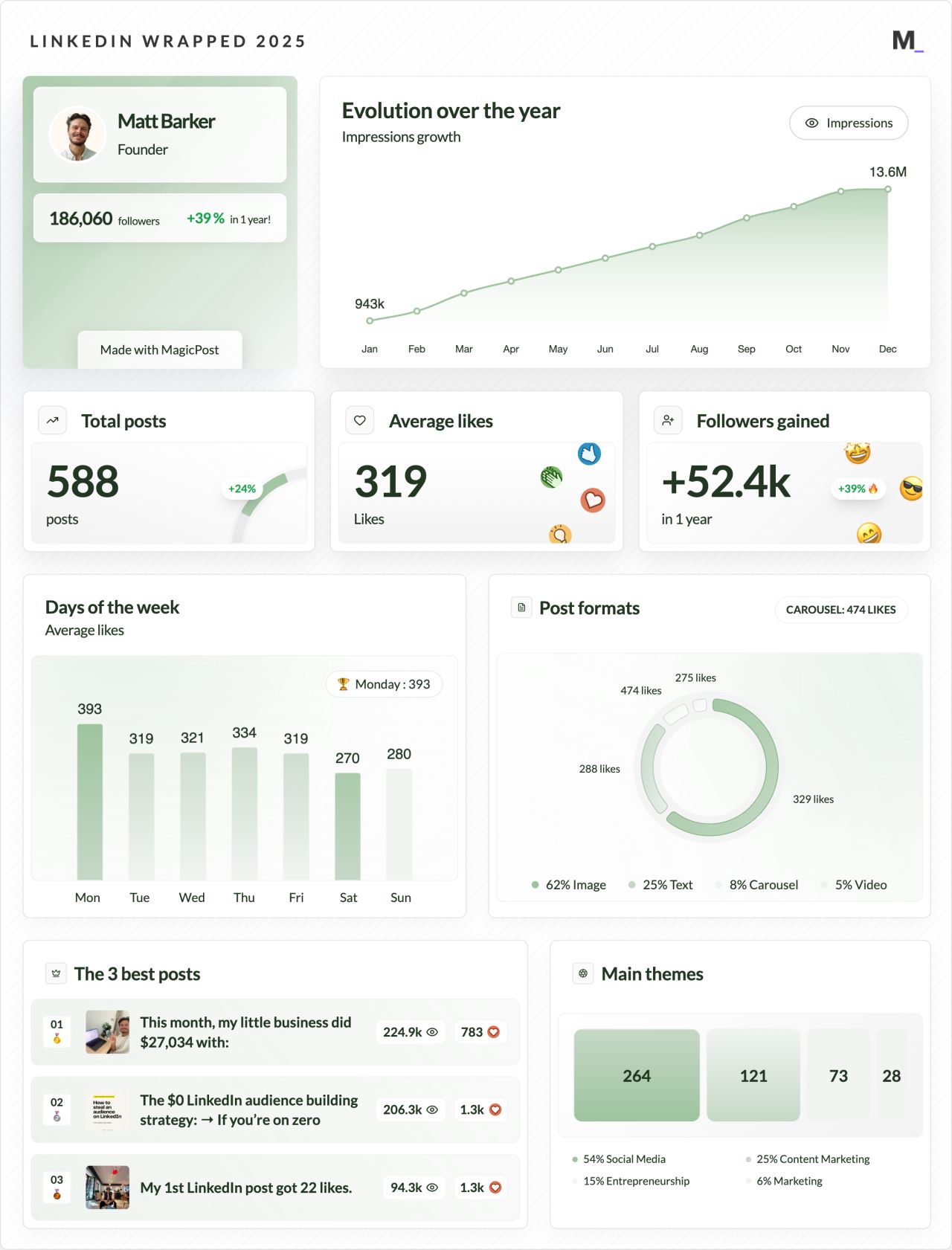
You connect LinkedIn through its official API, because MagicPost is a LinkedIn-verified partner: no password to share, no browser extension. Through that connection, the recap can show your impressions, a number LinkedIn shows only to you.
The 2026 Wrapped covers your year up to the day you generate it, and you can refresh its numbers once a day. Nearly 5,000 people made theirs in 2025.
Key features
Top 3 posts, ranked by impressions
Impressions, followers, likes and comments, month by month
Followers gained, total posts, average likes
Best posting day and best format
Your main themes of the year
Your photo, colors and a vertical format
PNG, JPEG or PDF download
A post written for your Wrapped, ready to publish
✅ Pros | ❌ Cons |
Real impressions and top posts, free | Download from a computer only (Chrome, Firefox or Edge) |
Official LinkedIn API, no password or extension | Needs a free MagicPost account |
Calendar-year recap, refreshable daily | |
Writes the LinkedIn post that goes with it |
Plan | Price | Includes |
LinkedIn Wrapped | Free | The full recap, the download and the post, no credit card |
Growth | $49/mo. | LinkedIn analytics all year, scheduling, engagement and leads |
The help center guide shows how to generate, customize and download it.
2. Kliver Analytics: best for a full-year LinkedIn analytics report
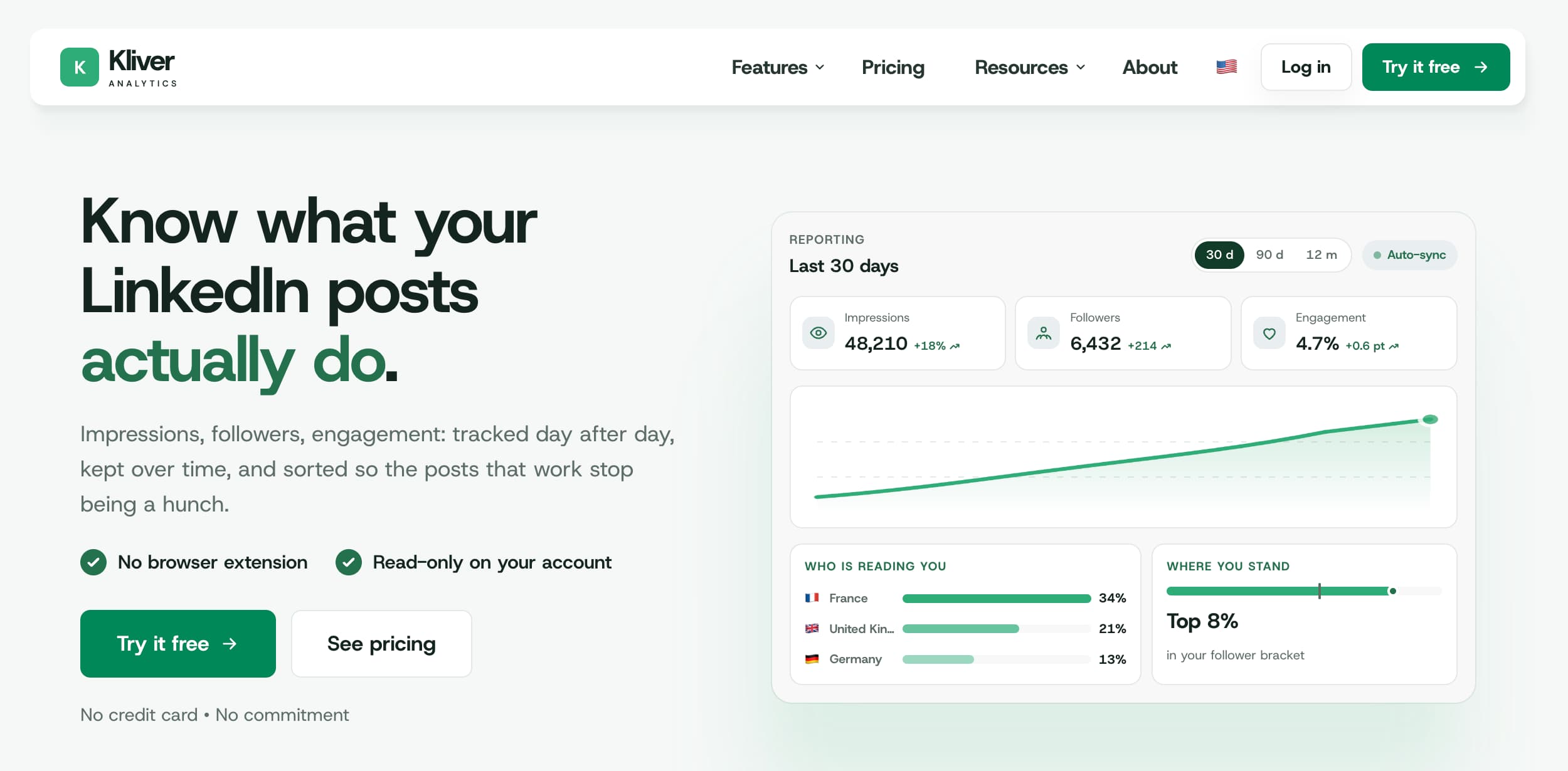
Kliver Analytics is the pick if you want your year as a real analytics report rather than a one-off image: a January to December Wrapped poster, plus every number behind it, kept and exportable.
Kliver is a LinkedIn analytics tool from the MagicPost team, sold as a separate product. It reads your account through LinkedIn's official API and never posts or comments for you. Our Kliver Analytics review covers the rest of the tool.
In December and January, a Wrapped entry appears in its sidebar. The poster covers a full calendar year and compares each headline figure (posts, average likes, average comments, new followers) with the year before.
Unlike a free Wrapped, Kliver keeps every day of data it has seen, even after LinkedIn's own window drops it.
You can export a CSV of every post in a period, or a PDF report with your logo for a client or a manager.
Key features
Full-year poster, January to December
Each headline figure compared with last year
Monthly curve of followers, impressions or likes
Your three best posts, with reactions and views
CSV export of every post in a period
PDF, PNG or JPEG report with your logo
History kept beyond LinkedIn's window
Official LinkedIn API, read-only, no extension
✅ Pros | ❌ Cons |
Year-over-year comparison on the poster | Paid: no free plan |
Your numbers kept beyond LinkedIn's window | The Wrapped entry shows in December and January |
CSV and branded report exports for the whole year | PNG download only for the poster |
Plan | Price | Includes |
Kliver Analytics | $19/mo. per seat | Wrapped poster, dashboard, benchmarks, CSV and report exports |
From November 20 to December 6, 2026, Kliver's Black Friday deal brings it to $13/mo. on monthly billing, kept at every renewal: see the LinkedIn Black Friday deals. Kliver's help center details the Wrapped, and its report export page shows the branded report.
3. Oiti: best for a LinkedIn recap without an account
Oiti's free LinkedIn Wrapped turns the analytics file LinkedIn already lets you download into a recap, without an account and without connecting LinkedIn.
You export your creator analytics from LinkedIn on a computer (an .xlsx file covering the past 365 days), then drop it on Oiti's LinkedIn Wrapped page. The file is read in your browser and nothing is uploaded.
Because the numbers come from LinkedIn's own export, the recap has real impressions, members reached and followers. The limits are the file's: a rolling 365-day window rather than January to December, and top posts capped at 50 per ranking.
Key features
Impressions, reach, engagements and followers
Top posts, best month, best weekday
Audience: who reads you
A share card and five story slides
A caption for your post
✅ Pros | ❌ Cons |
No account, no LinkedIn connection | You export the file yourself, on desktop |
Real impressions from LinkedIn's file | Past 365 days, not the calendar year |
Works any day of the year | English exports only for now |
Plan | Price | Includes |
LinkedIn Wrapped | Free | The recap and the share formats, no sign-up |
Oiti itself is an AI writing tool for LinkedIn with a 7-day free trial; the Wrapped page is free on its own.
4. Cleve: best for an AI chat about your LinkedIn year
Cleve's LinkedIn Wrapped is the best known of the free recaps: its 2024 edition reached 110,000 users in four weeks, and its 2025 edition comes with a chat about your own stats.
You paste your public LinkedIn profile link and sign in to Cleve, and its AI builds a 12-page summary with your top posts, trends and a LinkedIn persona in under two minutes. You need more than three posts in the year. The same tool also runs as "LinkedIn Unwrapped".
The chat is Cleve's edge: you can ask about your content performance, get suggestions for next year or have posts drafted in your style.
Cleve reads your public posts only. Impressions and followers gained are visible only to you in LinkedIn's analytics, so they are not part of the recap.
Key features
12-page recap of your year
Top posts, trends and a LinkedIn persona
A chat with your own stats
Content suggestions for next year
✅ Pros | ❌ Cons |
12-page recap with a LinkedIn persona | Public posts only: no impressions |
Chat about your stats after the recap | The 2025 edition is still the one online |
Needs a Cleve sign-in and more than 3 posts |
Plan | Price | Includes |
LinkedIn Wrapped | Free | The recap and the chat, with a Cleve sign-in |
Cleve's main product is now an AI workspace for ideas and drafts, from $8/mo. Its LinkedIn Wrapped page has not announced a 2026 edition yet.
5. Wrapped.li: best for a LinkedIn Wrapped carousel or GIF
Wrapped.li is the LinkedIn Wrapped tool to pick for a carousel or a GIF: a PDF carousel, a single image or an animated GIF, plus a post that thanks the people who engaged with you.
You enter your LinkedIn profile link or username, with no sign-up and no password, and get a free preview of your 2026 so far. Wrapped.li is an independent service, not affiliated with LinkedIn.
The recap is built from public posts and engagement: your strongest posts, your engagement highlights and your top supporters. Premium unlocks the full story, the downloads and a posting kit with three captions and the people to tag.
Key features
Strongest posts and engagement highlights
Your top supporters
PDF carousel, image or GIF
Three ready captions and people to tag
✅ Pros | ❌ Cons |
Three formats, GIF included | Public data only: no impressions |
A thank-you post that tags your supporters | Full story and downloads need Premium |
2026 edition already live | Premium price shown only at checkout |
Plan | Price | Includes |
Preview | Free | Your profile preview, no sign-up |
Premium | Price shown at checkout | Full story, downloads, posting kit |
6. LinkedIn Year in Review: best for your activity inside the app
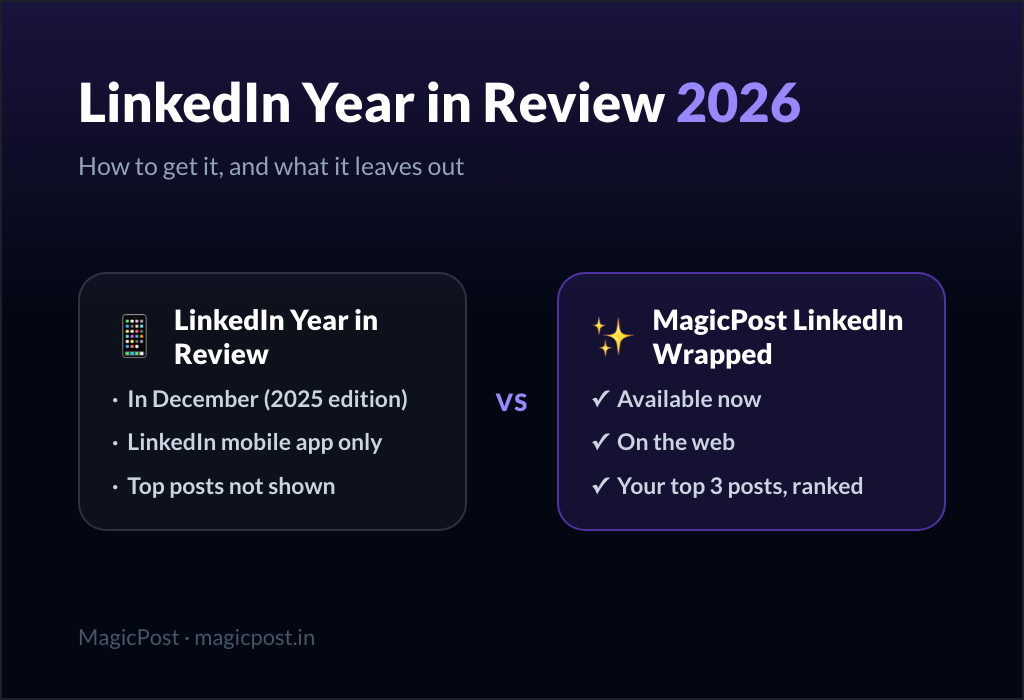
LinkedIn Year in Review is LinkedIn's own recap, the one many people call LinkedIn Wrapped. It's free and needs no other tool, but it opens only in the LinkedIn mobile app.
The 2025 edition reached eligible members from December 17 and stayed viewable until January 31. It recapped your activity: new connections, skills, posts, comments and reactions, profile impressions and a usage persona.
What it leaves out is your performance as a creator: no top posts and no impressions per post. It was also limited to English, Spanish and Portuguese, and members below LinkedIn's minimum engagement got none.
Key features
Days on LinkedIn and your most active time
New connections, followers and skills
Posts, comments, reactions and profile impressions
Your join date and a usage persona
✅ Pros | ❌ Cons |
Built into LinkedIn, nothing to connect | Mobile app only, no desktop |
Covers activity no other tool sees | No top posts, no per-post impressions |
Open only from mid-December to January 31 |
Plan | Price | Includes |
Year in Review | Free | For eligible members, in the LinkedIn app |
Our guide shows how to see your LinkedIn Year in Review and why it may not show up. LinkedIn has not announced the 2026 edition yet.
Are LinkedIn Wrapped tools safe? How each one gets your data
A LinkedIn Wrapped tool gets your numbers in one of four ways, and the method decides both what it can show and what it asks of you.
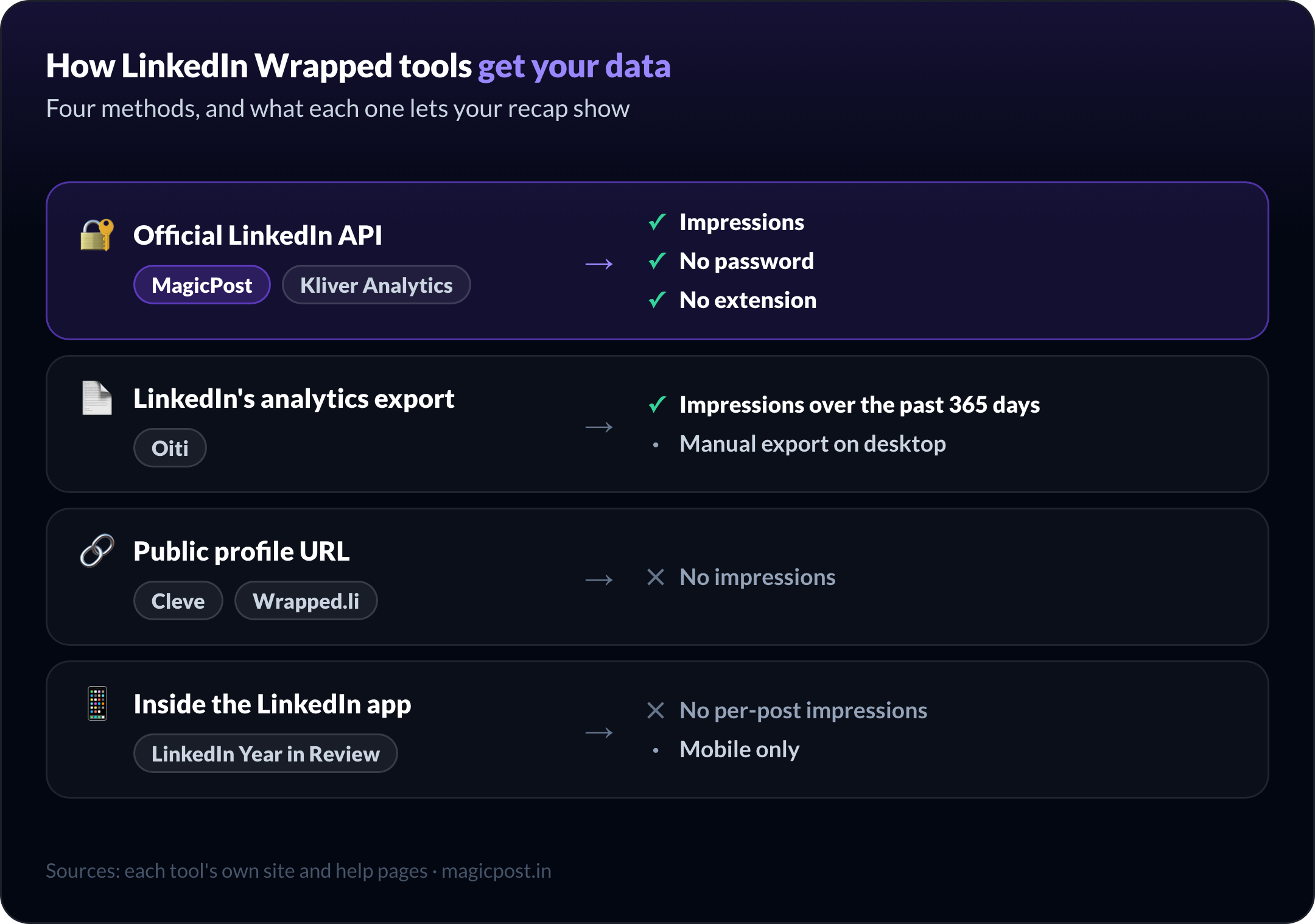
The official LinkedIn API (MagicPost, Kliver Analytics): you approve access on LinkedIn's own sign-in page, without giving your password, and the access stays revocable. It is the only method that reads impressions automatically.
LinkedIn's analytics export (Oiti): you download your own file and the tool reads it in your browser. Real numbers, nothing connected, but a manual step on desktop.
Your public profile (Cleve, Wrapped.li): you paste a link and the tool reads what anyone can see. Nothing to approve, and no impressions.
Inside LinkedIn (Year in Review): no third party involved, and limited to what LinkedIn chose to show.
None of these tools asks for your LinkedIn password, and none needs a browser extension. A Wrapped tool that asks for either is one to skip. For the API route, MagicPost explains how its LinkedIn connection works.
When each LinkedIn Wrapped tool is available
Timing matters if you want your recap before the December rush, or after LinkedIn's own closes.
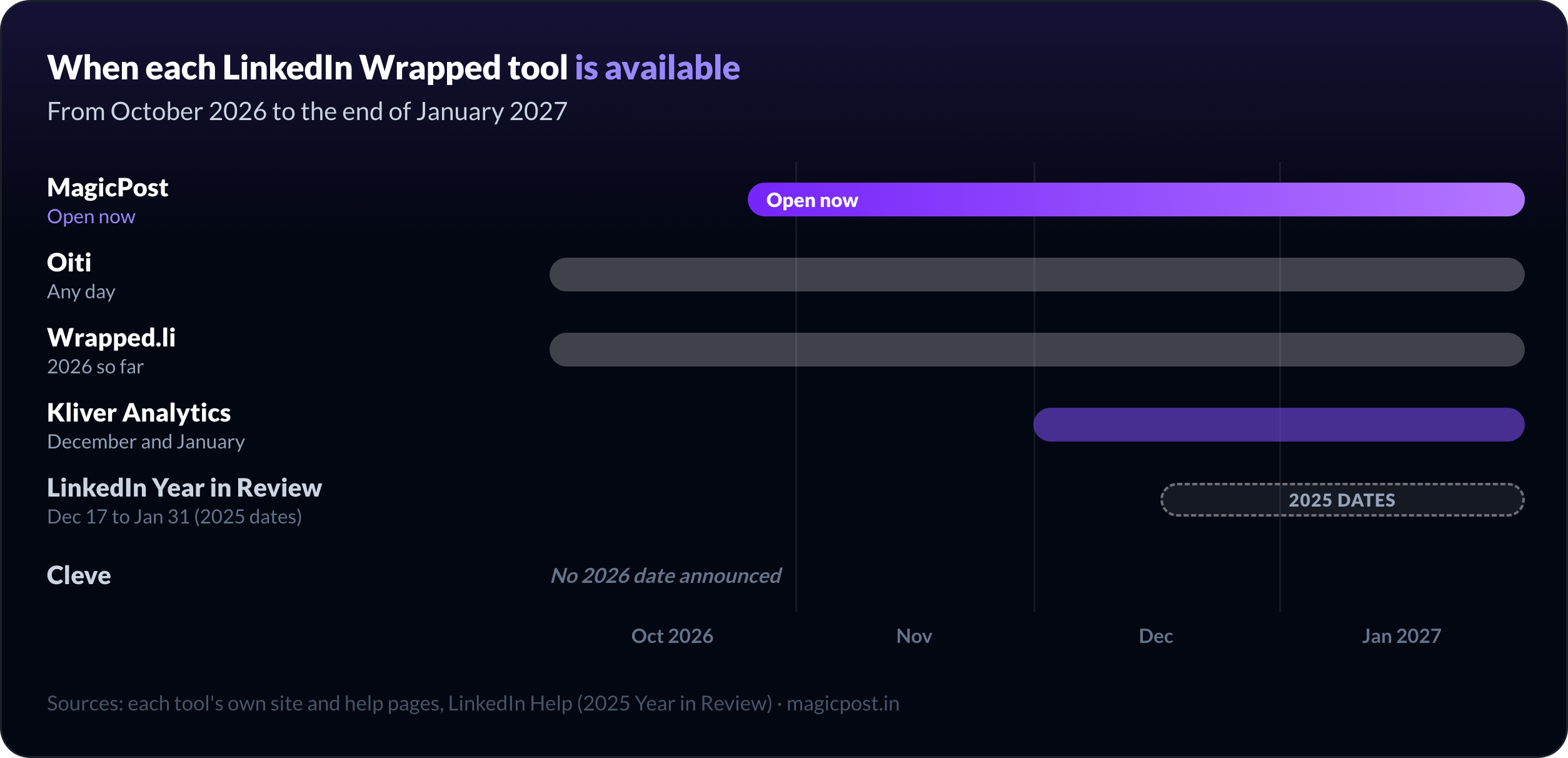
Now: MagicPost, Oiti, Wrapped.li
December and January: Kliver Analytics, for the full calendar year
Mid-December to January 31: LinkedIn Year in Review
Not announced: Cleve's 2026 edition
Made now, a MagicPost LinkedIn Wrapped covers your year to date: refresh it after December 31 for the full year. The Year in Review line uses LinkedIn's 2025 dates, assuming LinkedIn keeps them.
How to choose the best LinkedIn Wrapped tool
Do you want your impressions? Only MagicPost, Kliver Analytics and Oiti show them, because only they read your LinkedIn analytics.
Do you want it free? MagicPost, Oiti, Cleve and LinkedIn's Year in Review are free. Wrapped.li charges for downloads, and Kliver is a paid analytics tool.
One image, or a report? For a post to share, MagicPost's Wrapped is enough. For a year-over-year report you can export and hand to a client, Kliver Analytics.
Phone or computer? LinkedIn's Year in Review is app-only. MagicPost and Kliver download from a computer.
Make your 2026 recap with MagicPost's free LinkedIn Wrapped tool
If you post on LinkedIn, the recap worth sharing is the one with your real numbers: your top 3 posts by impressions, your year month by month, your followers gained. MagicPost builds it free, through LinkedIn's official API, and it's ready today.
Get your free LinkedIn Wrapped 2026, or open it directly in MagicPost: connect LinkedIn and your recap is ready in a few minutes.
FAQ
What is the best LinkedIn Wrapped tool in 2026?
MagicPost's LinkedIn Wrapped is the best LinkedIn Wrapped tool for 2026: it's free, open now, and shows your top 3 posts ranked by impressions and your impressions month by month, through LinkedIn's official API. For a full-year analytics report you can export, Kliver Analytics is the pick.
Is there a free LinkedIn Wrapped tool?
Yes: MagicPost's LinkedIn Wrapped is free with no credit card, and so are Oiti's, Cleve's and LinkedIn's own Year in Review. Wrapped.li offers a free preview and charges for the full story and downloads.
Is it safe to use a LinkedIn Wrapped tool?
A LinkedIn Wrapped tool is safe when it never asks for your LinkedIn password and needs no browser extension. MagicPost and Kliver Analytics connect through LinkedIn's official API, approved on LinkedIn's own sign-in page; Cleve and Wrapped.li only read your public profile, and Oiti reads a file you export yourself.
What is the best alternative to Cleve's LinkedIn Wrapped?
MagicPost's LinkedIn Wrapped is the best alternative to Cleve's LinkedIn Wrapped (also called LinkedIn Unwrapped). Cleve reads your public posts only, so it can't show impressions, while MagicPost's recap ranks your top posts by impressions, for free, and its 2026 edition is already open.
Can a LinkedIn Wrapped tool show my impressions?
Only a LinkedIn Wrapped tool that reads your LinkedIn analytics can show your impressions: MagicPost and Kliver Analytics through LinkedIn's official API, or Oiti from the analytics file you export. Tools that work from your public profile URL, like Cleve and Wrapped.li, can't see them.
Does LinkedIn have its own Wrapped?
Yes: LinkedIn Year in Review is LinkedIn's own Wrapped. Its first edition reached members from December 17, 2025, in the mobile app only and in English, Spanish and Portuguese. It recaps your activity, not your post impressions.
Is ConnectSafely a LinkedIn Wrapped tool?
No: ConnectSafely's "LinkedIn Wrapped 2026" page is a guide to LinkedIn's official Year in Review, without a recap generator. ConnectSafely itself sells inbound LinkedIn growth tools, starting at $10/mo.
Can I get my LinkedIn Wrapped before December?
Yes: MagicPost's LinkedIn Wrapped 2026 is open now and covers your year to date. Refresh it after December 31 for the full year, since the 2026 Wrapped still covers 2026 in January 2027. Oiti and Wrapped.li also work before December, while LinkedIn's Year in Review arrives in mid-December.