Shield Analytics has shut down. If you used it to track your LinkedIn performance, there is nothing left to export: its site has been offline since October 2026, and what you need now is a replacement.

This guide covers what Shield was, why it shut down, and the six best Shield analytics alternatives to move to depending on what you actually need.
What Is Shield Analytics?
Shield launched in 2018 and became the go-to LinkedIn analytics tool for serious creators, agencies, and teams. It did one thing and did it well: complete analytics on your LinkedIn profile performance.
It tracked the following:
Post-level impressions, engagement rates, reactions, comments, and reposts.
Follower growth over time with demographic breakdowns by job title, industry, and location.
Your full post history from the day you connected, not just recent posts.
Earned media value, which is the estimated cost of achieving your organic reach through paid ads.
Shield Agent, an AI assistant that answered plain-language questions about your data.
Its last published price was $25/profile/month, with a 7-day free trial.
However, it had a limitation: Shield was read-only. It told you what happened, but publishing, scheduling, and content creation depended on you.
Why Did Shield Analytics Shut Down?
Shield’s co-founder Andreas Jonsson announced the shutdown on LinkedIn on 18 May 2026: “over the past weeks, both google and linkedin made it clear to us that we couldn't continue operating Shield the way we built it. and we've decided not to fight it.”
The wind-down notice he signed with co-founder Alex on shieldapp.ai said the same, and neither text says what Google or LinkedIn objected to.
What Shield’s own help center does document is how the tool connected: through the Shield Chrome extension, with your LinkedIn session left open.
Since October 2026 its site no longer answers: every URL tested on 26 October 2026 returned an HTTP 402 error, so logging in or exporting data is no longer possible.
⚠️ Shield’s data can no longer be exported. Post history, follower trends, and engagement benchmarks have to be rebuilt elsewhere; the free LinkedIn benchmark by follower count covers the last one. LinkedIn’s native analytics won’t restore what Shield held.
The 6 Best Shield Alternatives at a Glance
Here’s how the six alternatives we recommend compare at a glance.
Tool | Starting Price | Analytics | Content Creation | Scheduling | LinkedIn API |
|---|---|---|---|---|---|
$19/mo. ($9.50/mo. billed yearly) | ✅ | ❌ | ❌ | ✅ Official API (read-only, no extension) | |
$49/mo. ($29/mo. billed yearly) | ✅ | ✅ | ✅ | ✅ LinkedIn-verified app (official API) | |
AuthoredUp | $19.95/mo. | ✅ | ❌ | ⚠️ Non-native | ❌ (Extension/DOMinjection risk) |
PerfectPost | $19/mo. | ✅ | ❌ | ⚠️ Non-native | ❌ (Hybrid extension/Non-partner) |
Blabigo | €19/mo. | ✅ | ✅ | ✅ | ❌ (Hybrid extension/Non-partner) |
SocialBee | $24/mo. | ✅ | ✅ | ✅ | ⚠️ Verified partner (Not LinkedIn-first) |
1. Kliver Analytics: Best Analytics-Only Replacement on the Official API
Kliver Analytics is the closest thing on this list to Shield rebuilt the way LinkedIn asks for: measurement only, read-only, and no browser extension anywhere in the chain.
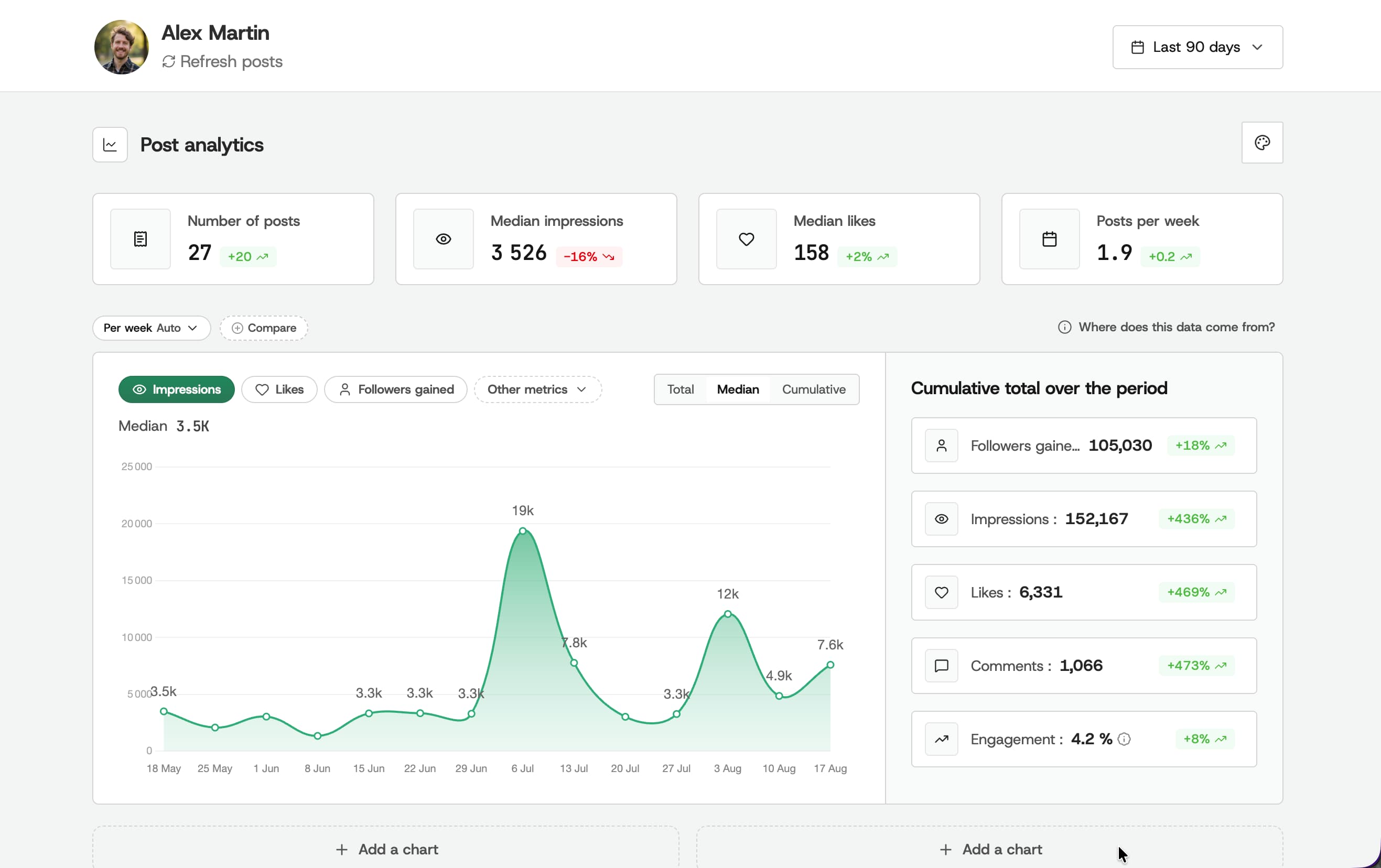
Kliver and MagicPost come from the same company, which also publishes this page, and they hold the first two places here. Kliver is first because what a Shield subscriber lost was a measurement tool, not a platform.
Shield connected through its own Chrome extension. Kliver reads your account through LinkedIn’s official API and never writes to it, with no extension to install. It tracks impressions, followers and engagement day after day, keeps your history past LinkedIn’s own 12-month window, and scores each post against your own median rather than against a raw impression count.
It does nothing else. No post generator, no scheduling, no engagement tooling. If you only ever opened Shield to read numbers, that is the point; if you also wrote and scheduled from it, Kliver is the wrong replacement and MagicPost is next.
Notable Features
Impressions, followers and engagement tracked day after day.
History kept past LinkedIn’s own 12-month window.
Every post scored against your own median and sorted into bangers, good and flops.
Audience broken down by country and city, plus vertical, field and archetype.
Percentile ranking inside your follower bracket, with median impressions per format next to yours.
Any period exported as a PDF report, which covers client reporting.
Pros and Cons
Pros | Cons |
|---|---|
✅ Official LinkedIn API, no extension and no DOM injection | ❌ No content creation and no scheduling |
✅ Read-only, so nothing is ever published from your account | ❌ LinkedIn only, no other network |
✅ $9.50/mo. billed yearly undercuts Shield’s $25/profile/mo. | ❌ A younger product than the rest of this list |
✅ Free trial, no card required | ❌ Built by MagicPost, so not an independent pick |
Pricing
Plan | Price | Key Inclusions |
|---|---|---|
Monthly | $19/profile/mo. | One profile, full analytics, benchmark, PDF export, trial without a card |
Yearly | $9.50/profile/mo. | Same product billed $114/year, 50% off the monthly price |
From November 20 to December 6, 2026, Kliver Analytics runs the same Black Friday deal as MagicPost, with the terms in our LinkedIn Black Friday deals tracker.
2. MagicPost: Best for Analytics and Full Content Workflow
MagicPost is the only tool here that replaces Shield’s analytics and gives you everything Shield never had: LinkedIn-first AI content creation, scheduling, and account safety through the platform’s official API.
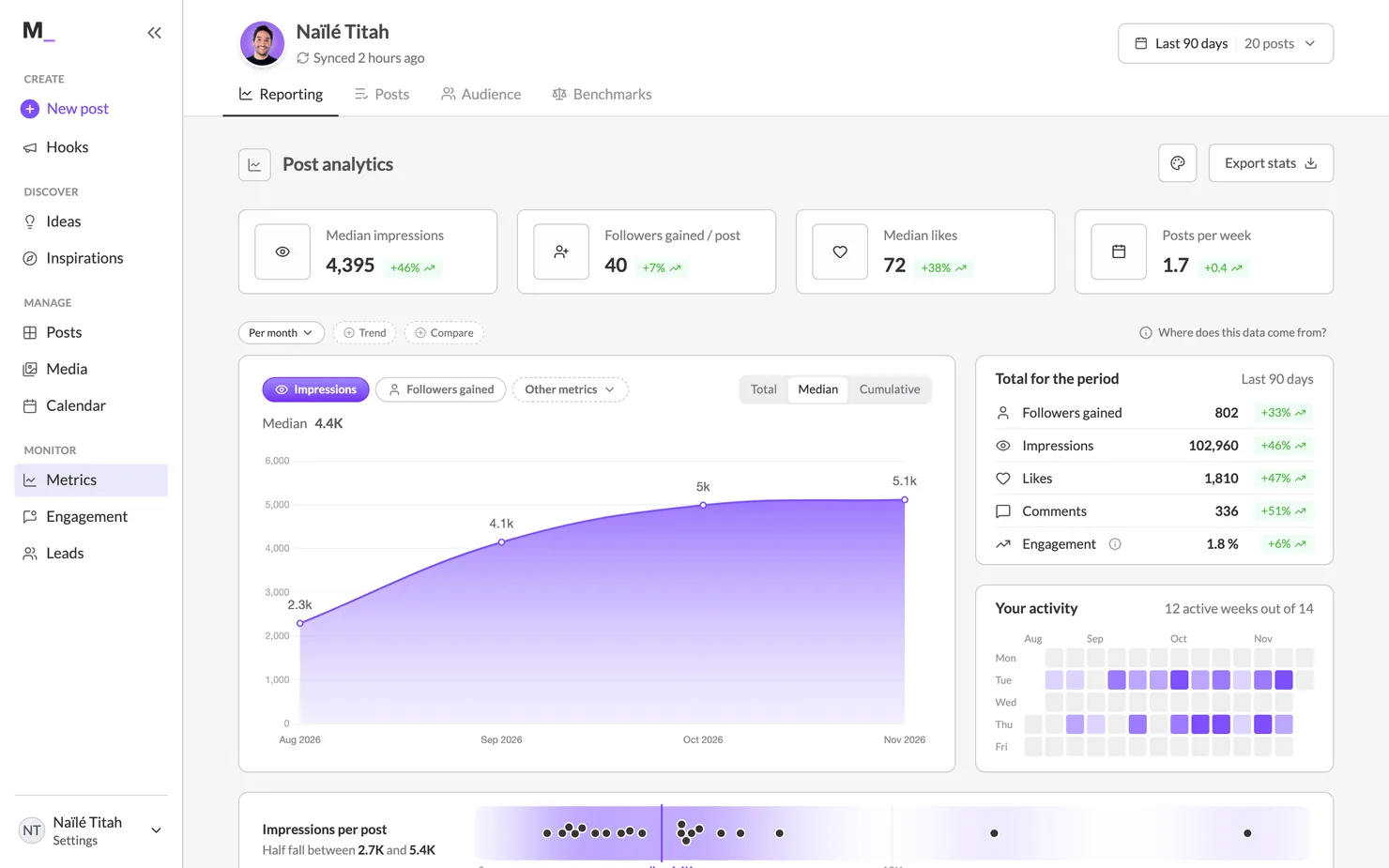
Shield users who were also creating content manually will feel this the most. MagicPost connects your LinkedIn account through the official developer program, imports your writing style from past posts, and generates drafts in your voice.
The analytics dashboard tracks impressions, engagement, follower growth, and competitor profiles. That’s everything Shield offered, packaged alongside the content tools Shield never included.
What makes it the right Shield replacement is that unlike most of the tools on this list, MagicPost uses LinkedIn’s official OAuth API. As a LinkedIn-verified app, it needs no browser extension and no LinkedIn password: posts go out through LinkedIn’s own API.
Notable Features
LinkedIn analytics: impressions, engagement, follower growth, competitor tracking, themes that work, and more.
AI post generation trained on your own writing style.
Hook generator, idea generator, and a 500,000+ viral post inspiration library.
Scheduling through LinkedIn’s official API.
Employee advocacy tools for team-wide posting.
Multi-account management for agencies.
Pros and Cons
Pros | Cons |
|---|---|
✅ Official LinkedIn API, no extension or password | ❌ Analytics-only users pay for features they may not use |
✅ Analytics + content + scheduling in one place | |
✅ Voice learning from your own posts | |
✅ Free trial, no credit card is required |
Pricing
Plan | Price | Key Inclusions |
|---|---|---|
Growth | $49/mo. ($29/mo. billed yearly) | Advanced analytics, scheduling, mentions, safe API connection |
Creator | $69/mo. ($39/mo. billed yearly) | Unlimited posts, full analytics, inspiration library, engagement tools |
Team/Agency | Agency and Team $59/mo. per seat, from 2 seats | Multi-account, team seats, custom reports, dedicated support |
3. AuthoredUp: Best Analytics Plus Post Formatting
AuthoredUp is a close replacement for Shield’s analytics at a lower price. It offers historical data from before you installed the tool.
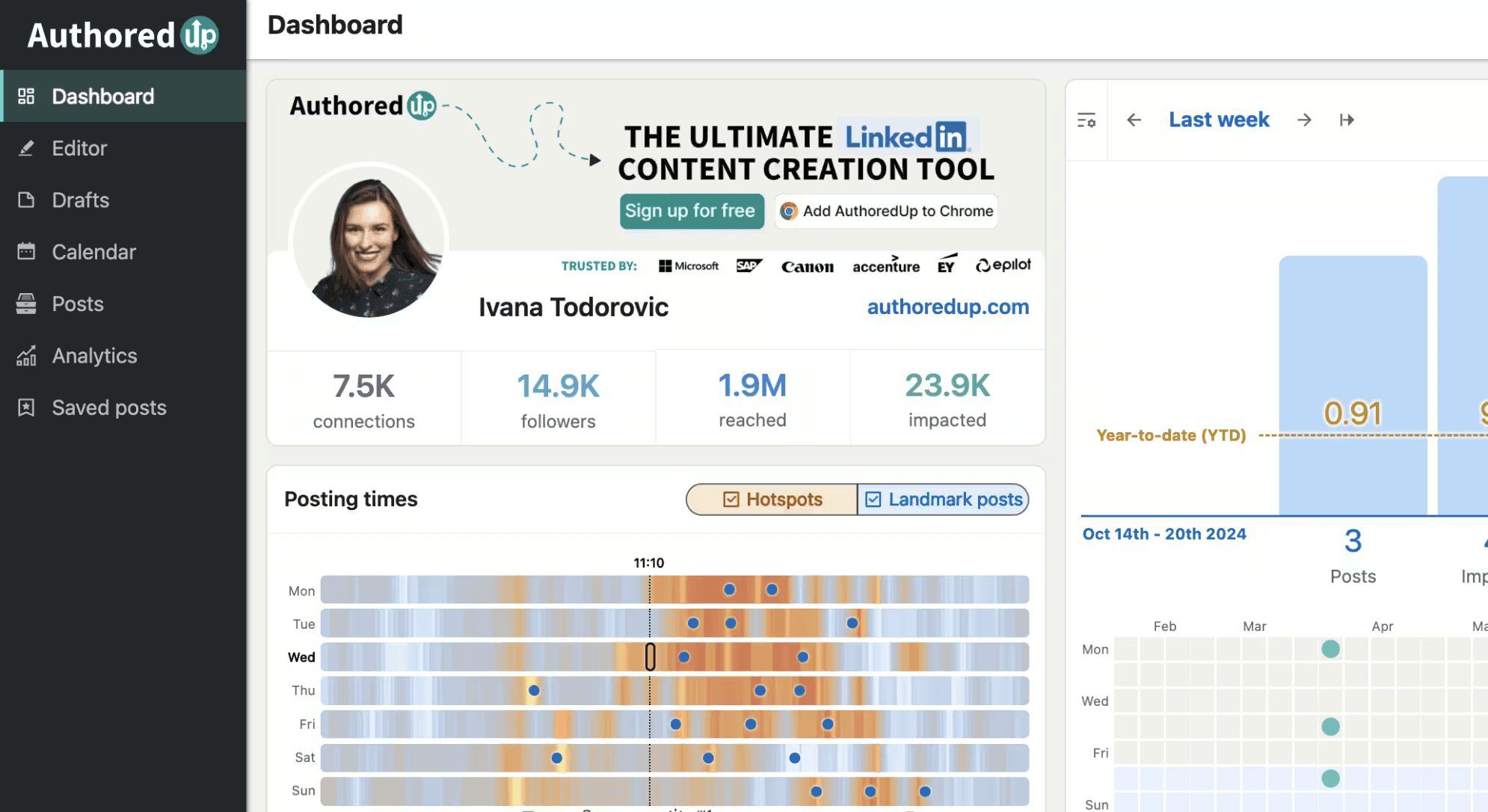
AuthoredUp is a Chrome extension and web platform built for LinkedIn analytics and post formatting.
It pulls your full post history regardless of when you connect, not just from the installation date forward, which was one of Shield’s actual limitations. At $19.95/mo., it undercuts Shield’s $25/profile/mo. plan while going deeper on per-post analytics.
It doesn’t generate content. You write everything. But if you were a Shield user who just needed the data and handled writing yourself, AuthoredUp is a viable option.
Notable Features
Full post history analytics from before the installation date.
Multi-device preview (desktop, tablet, and mobile) before publishing.
Engagement, reach, saves, and comments tracked per post.
300+ hook and post ending templates.
Readability score and word count optimization.
CSV export, scheduling up to 3 months ahead.
Pros and Cons
Pros | Cons |
|---|---|
✅ Historical data that’s deeper than Shield on post analytics | ❌ No AI content generation |
✅ $19.95/mo. undercuts Shield’s pricing | ❌ Chrome extension dependency |
✅ No automated actions on your account | ❌ No mobile app |
✅ GDPR-compliant, data hosted in Germany |
Pricing
Plan | Price | Key Inclusions |
|---|---|---|
Individual | $19.95/mo. | 1 profile, full analytics, editor, scheduling, 300+ hooks, 14-day trial |
Business | $14.95/profile/mo. | 3+ profiles minimum, team analytics, draft collaboration |
4. PerfectPost: Best Free Plan
PerfectPost has a generous free tier with one month of analytics history that goes deeper than LinkedIn’s native dashboard.

PerfectPost is a Chrome extension and SaaS platform for LinkedIn analytics, scheduling, and post editing. Its free plan includes real analytics, scheduling, and post preview. The Premium plan unlocks engagement curves, visibility trends, and decision-making rates that LinkedIn doesn’t surface natively.
It’s not a content creation tool, so Shield users who also wrote their own content will still need something else for drafting. But for pure analytics access at zero cost (with caveats), it’s a good place to start.
Notable Features
Engagement curves, visibility trends, and decision-making rates (Premium).
Top commenter insights and unreplied comment tracker.
First comment scheduling.
Post editor with preview and formatting.
Customizable LinkedIn feed filters.
Analytics data export.
Pros and Cons
Pros | Cons |
|---|---|
✅ Free plan with 1 month analytics history | ❌ Chrome extension, carries account risk |
✅ Analytics depth above average for the price | ❌ No content generation |
✅ First comment scheduling is rare at this price | ❌ No Trustpilot presence for independent validation |
Pricing
Plan | Price | Key Inclusions |
|---|---|---|
Free | $0 | 5 scheduled posts, 1 month analytics history, post preview, unlimited drafts |
Premium | $19/mo. | Unlimited scheduling, full analytics, AI writing assistant, data export |
5. Blabigo: Best for Analytics + Basic AI Writing
Blabigo is a clean platform with stronger-than-average analytics and basic AI content generation; it’s a middle ground between Shield’s pure data focus and MagicPost’s full content features.

Blabigo is a LinkedIn personal branding platform with an editorial calendar, AI post generation, scheduling, and analytics.
The analytics dashboard goes above average for the price, covering post performance, follower tracking, and company page analytics on the Business plan.
It won’t match the depth of Shield or AuthoredUp at the post-history level, but it covers the metrics most creators track day-to-day.
For Shield users who want to stop paying for a separate analytics tool and a separate content tool, Blabigo consolidates both at a competitive price. Carousel generation is listed as coming soon on the Business plan.
Notable Features
Basic AI post generation and a rich text editor.
Editorial calendar with scheduling.
LinkedIn post and profile analytics.
Hook and ending templates.
1-click repurposing of high-performing posts.
Company page management and analytics (Business plan).
Pros and Cons
Pros | Cons |
|---|---|
✅ Analytics + basic AI writing in one tool | ❌ Carousel is coming soon, not available yet |
✅ Company page analytics on Business plan | ❌ Analytics not as deep as AuthoredUp or Shield |
✅ Clean, focused interface | ❌ Not LinkedIn API-verified |
✅ Competitive pricing | ❌ Smaller user base, less community validation |
Pricing
Plan | Price | Key Inclusions |
|---|---|---|
Growth | €19/mo. (~$21) | Personal account, AI drafts, scheduling, editorial calendar, analytics, hooks |
Business | €28/mo. (~$30) | Everything in Growth + company page, page analytics, and first comment automation |
6. SocialBee: Best for Multi-Channel Users
If you were using Shield for LinkedIn but also managing other social platforms, SocialBee consolidates your stack. It offers analytics, scheduling, and AI content creation across LinkedIn, Instagram, Facebook, X, TikTok, YouTube, and more.

SocialBee is a multi-platform social media management tool built for teams and solopreneurs who need scheduling, AI content creation, and analytics across multiple channels.
On the Accelerate plan ($40/mo.) and above, it offers up to 2 years of analytics history, actually a longer window than Shield’s default 90-day view. The analytics are functional but not LinkedIn-specific: you won’t get Shield-style earned media value calculations or demographic breakdowns.
But if LinkedIn is one of several platforms you manage, SocialBee removes the need for a separate analytics tool, a separate scheduler, and a separate content creation layer. It also connects through LinkedIn’s official API (OAuth 2.0), with no browser extension involved.
Notable Features
Analytics up to 2 years of data (Accelerate and Pro plans).
Scheduling and publishing across 9 platforms, including LinkedIn.
AI assistant for content planning and caption generation.
Post approval workflows and team collaboration.
Bulk post editor and CSV uploads.
Engagement management: mentions, comments, DMs.
14-day free trial, no credit card required.
Pros and Cons
Pros | Cons |
|---|---|
✅ Up to 2 years of analytics history | ❌ Analytics are multi-platform, not LinkedIn-specialist |
✅ Covers 9 platforms from one dashboard | ❌ No LinkedIn-specific earned media value or demographic depth |
✅ Post approval workflows and team collaboration | ❌ Bootstrap plan only gives 3 months analytics history |
✅ 14-day free trial, no credit card |
Pricing
Plan | Price | Key Inclusions |
|---|---|---|
Bootstrap | $24/mo. | 5 social profiles, 1 user, AI content, scheduling, 3 months analytics |
Accelerate | $40/mo. | 10 profiles, advanced analytics up to 2 years, bulk post editor, CSV uploads, post approval |
Pro | $82/mo. | 25 profiles, 3 users, 5 workspaces, analytics export, unlimited content categories |
Which Shield Analytics Alternative Should You Choose?
Not sure which is the best replacement for Shield? Here’s a quick breakdown.
If you need... | Best pick |
|---|---|
Analytics + content creation + account safety | MagicPost |
Analytics only, official API, no extension | |
Analytics only, deep data, low price | AuthoredUp |
Analytics for free (Limited) | PerfectPost (free plan) |
Analytics + basic AI writing in one tool | Blabigo |
Are LinkedIn Tools Safe to Use?
Shield’s wind-down is a reminder of something most LinkedIn tool comparisons gloss over: how a tool connects to LinkedIn matters as much as what it does.
Tools that access LinkedIn data through browser extensions or session cookies sit outside LinkedIn’s official developer program. LinkedIn actively scans for these and has enforcement mechanics ranging from temporary restrictions to permanent account bans.
❌ Shield connected through its own Chrome extension. Its founders shut it down after Google and LinkedIn told them it could not keep running as built, and its users’ history went with it: none of it can be exported today.
✅ MagicPost connects through LinkedIn’s official OAuth API as a LinkedIn-verified app: no browser extension, no session cookies, no LinkedIn password.
Kliver connects the same way, through the official API, and stays read-only on your account. AuthoredUp and PerfectPost both use Chrome extensions, which carry account risk by definition. That’s not a reason to avoid them, but it’s worth knowing. You can learn more about this in our guide to LinkedIn account restrictions.
Moving on from Shield? MagicPost Is the Upgrade
Analytics you already know, plus AI content creation, scheduling, and a connection through LinkedIn’s official API, as a LinkedIn-verified app. No Chrome extension to install, no LinkedIn password to share.
FAQ
Has Shield Analytics shut down?
Yes. Shield Analytics has shut down: its co-founders announced the wind-down in mid-May 2026, and since October 2026 the site no longer answers, so logging in or exporting data is no longer possible.
Their statement read: “Both Google and LinkedIn made it clear that we could not continue operating Shield as it was built. We decided not to fight it.”
What is the best Shield Analytics alternative?
It depends on what you need. For analytics alone on LinkedIn’s official API, Kliver Analytics (built by MagicPost, publisher of this blog) is the closest match to what Shield did; AuthoredUp goes deeper on post formatting but runs as a Chrome extension. For analytics plus content creation and account safety, MagicPost covers the full workflow on that same official API.
Can I export my Shield data?
No. Shield’s site has been offline since October 2026, so logging in and exporting are no longer possible. Whatever was not exported before the shutdown is gone; LinkedIn’s native analytics won’t restore it.
Why did Shield Analytics wind down?
Shield Analytics wound down because Google and LinkedIn told its founders it could not keep running as built. Co-founder Andreas Jonsson wrote on LinkedIn on 18 May 2026: “both google and linkedin made it clear to us that we couldn't continue operating Shield the way we built it.”
Shield never said what either company objected to. Its help center documents how profiles connected: through the Shield Chrome extension, with the LinkedIn session left open.
Are LinkedIn analytics tools safe to use?
It depends on how they connect to LinkedIn. Tools using Chrome extensions or session cookies operate outside LinkedIn’s official program and carry account risk. Tools using LinkedIn’s official OAuth API connect the way LinkedIn provides for third-party apps, with no extension or password. On this list, MagicPost, Kliver and SocialBee are the ones connecting through the official API. For a full breakdown, see our guide to LinkedIn automation tools.