You publish on LinkedIn. Posts go out, likes come in, a few people leave a comment. Then the notification clears and nothing else happens.
Every one of those people saw your name and your point of view, then chose to react. That is the warmest signal you get on the platform, and most of it scrolls away unread.
MagicPost Leads turns LinkedIn engagement into leads on your own posts, through LinkedIn's official API: it captures everyone who likes or comments, scores them against your Ideal Customer Profile (ICP) and routes the good fits to your CRM, so you can reach out yourself.
Below is how to run each move with the MagicPost Leads module, and where to keep a human in charge.
Why LinkedIn post engagers make better leads than a cold list
A cold prospect has never heard of you. A post engager has read your thinking and reacted to it. That difference is what makes the lead warm, and it's the core of engagement-based social selling.
Three reasons engagement beats a bought list:
They already know you. Your first message follows up on something they chose to read.
The cost is close to zero. No data vendor, no ad spend: you paid in content you'd post anyway.
The engagement carries context. A thoughtful comment on your hiring post tells you what that person cares about this week.
Plenty of people who like your posts will never buy from you, though. Peers in your industry, former colleagues, students and job seekers all engage too.
A lead playbook has to find the buyers in that crowd quickly, without treating every like as a lead.
What do LinkedIn likes, comments and repeat engagement tell you about a lead?
Not all LinkedIn engagement carries the same weight. Before you qualify anyone, read the signal:
Engagement | What it usually means | Buying signal |
👍 Like / reaction | "This resonated." Low effort, high volume. | Weak alone, useful in aggregate |
💬 Comment | They spent time and put their name to an opinion. | Strong, especially when specific |
👀 Repeat engagement | Same person, several of your posts. | Strongest: they're warming up |
A two-word "Great post" comment is barely above a like. A comment that adds a real experience, asks a specific question, or disagrees with substance comes from someone worth a closer look. What a person wrote tells you more about a lead than how many people reacted.
One shortcut to skip: the "Comment GUIDE and I'll send it" post. It manufactures comments that say little about intent, and it now costs you reach.
Since the week of July 27, 2026, "Comment KEYWORD" posts get 52% fewer impressions than their author's average post, according to a MagicPost study of 684,000 LinkedIn posts.
Why does qualifying LinkedIn engagers by hand break down?
You can do this manually. The routine looks like this:
Open the post on LinkedIn (the post itself, not the feed preview).
Click the reaction count to see who engaged.
Open each profile in a new tab.
Read the headline, company and recent activity to judge fit.
Copy the keepers into a spreadsheet.
Repeat for every post, every week.
Now do the math. If you post three times a week and each post pulls 40 engagers, that's 120 profiles to open and judge every week, just to find the handful that matter.
Meanwhile, the warm leads sit in the notification tab and quietly expire. Opening and judging profiles one by one is repetitive work, the kind software handles well.
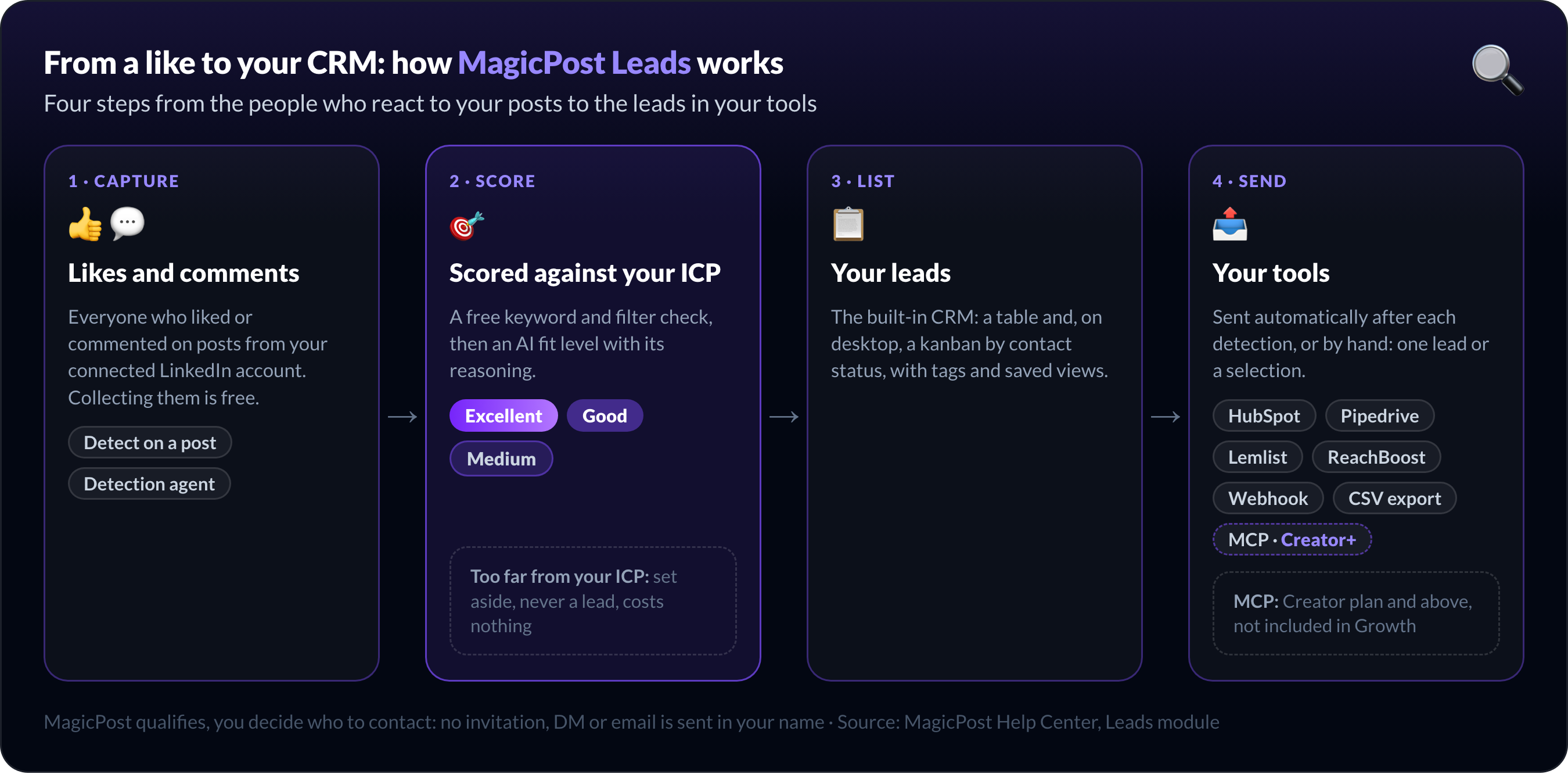
Stop opening 120 profiles a week. MagicPost Leads captures and scores your post engagers, then sends the good fits to your CRM.
Step 1: Capture everyone who engages with your LinkedIn posts
The first move is to stop reading reactions one profile at a time and collect them in one place.
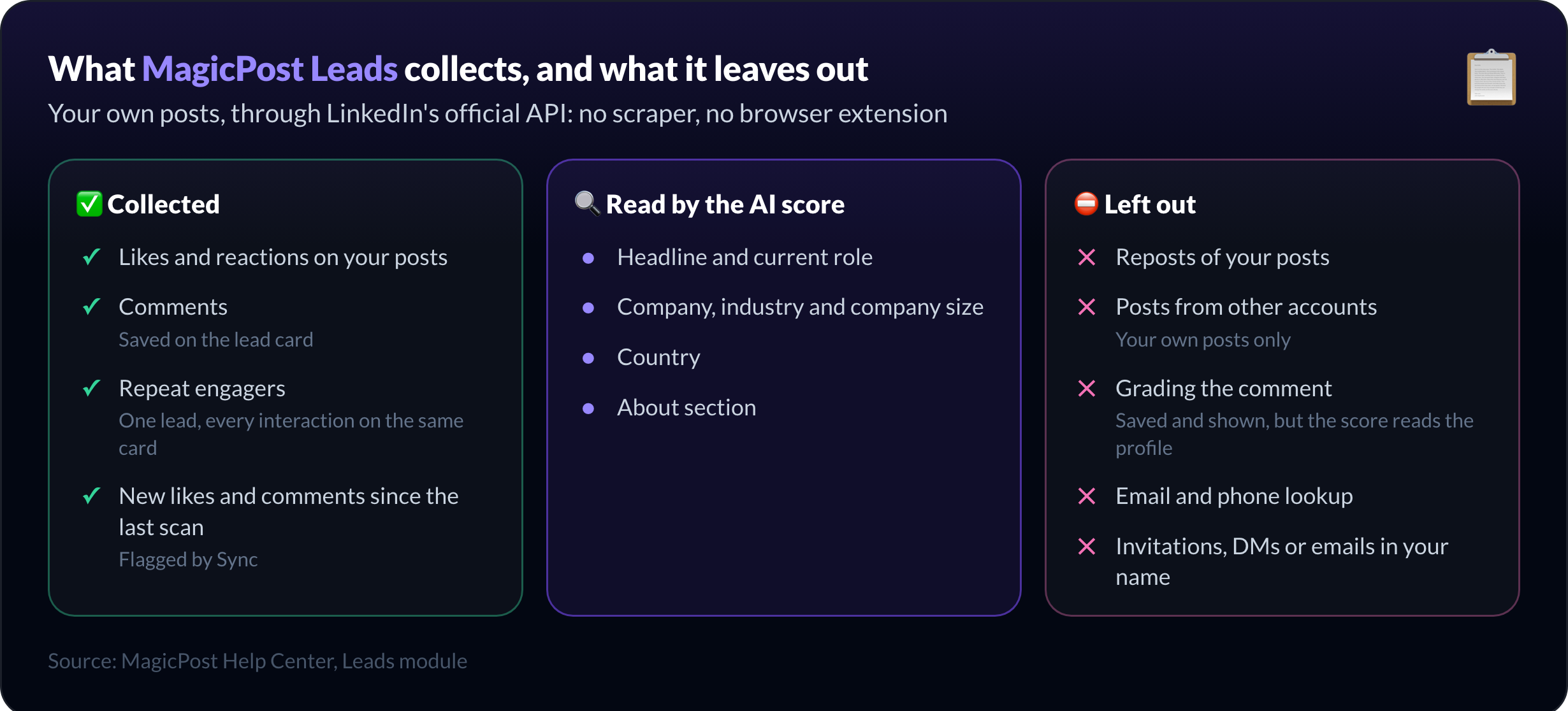
The MagicPost Leads module collects everyone who liked or commented on the posts published by your connected LinkedIn account. MagicPost keeps each comment on the person's lead card, and someone who engages with several of your posts stays one lead, with every interaction on the same card.
Collecting engagers is free.
On demand, you open the Posts tab and click Detect on a published post. Its status then moves from In progress to View leads or No match, and Sync flags new likes and comments since the last scan.
Automatically, the lead detection agent scans each new post at check times you pick, from a couple of hours to a few days after publication. Reactions keep arriving for days, so several scans catch the long tail, and the agent can email you when it finds leads.
Unlike scraper tools that pull a cold list from a search, this works on your audience: the people already engaging with your posts. There is nothing to install either: no browser extension, no session cookies, everything runs server-side.
MagicPost reads your engagement through LinkedIn's official API. It holds access to the Community Management API, which LinkedIn grants to developers who apply and get approved.
Step 2: Score your LinkedIn engagers against your ICP
Capturing is the easy part. The work is deciding who actually fits, and that is the part the MagicPost Leads module automates.
First, you describe your Ideal Customer Profile once. A guided setup asks for a plain-language description of who you want to reach, for example "Head of Sales or VP Sales at a B2B SaaS company, mid-market, based in Europe or North America". Then you sharpen it:
Filters: country, industry and company size, plus city, follower count and profile type in the advanced filters.
Example profiles: paste a few real customer profiles so the AI learns what a great match looks like.
The first-ICP walkthrough covers the wizard step by step. If you sell to two very different buyers, create two ICPs: each profile is scored against each one separately.
Then every engager goes through two checks. A free pre-qualification compares the profile with your ICP keywords and filters, and rules out obvious misses. The profiles that pass get an AI score with a fit level, Excellent, Good or Medium, plus the reasoning and the profile quote behind it.
A profile the AI judges too far from your ICP is set aside: it never shows up in your leads.
One credit is spent per lead scored Medium or better, per ICP, so a quiet post with no relevant engagers costs you nothing. The details are in how AI scoring works.
The MagicPost AI score reads the person's profile: headline, role, company, industry, company size, country and About section. It does not grade the comment. That part is your job, and it's a quick one: an Excellent fit who left a specific comment is the conversation to start today.
Step 3: Send qualified LinkedIn leads to your CRM
A scored list is only useful if it lands where you actually work.
MagicPost includes a built-in CRM for the pipeline: a table view and, on desktop, a kanban by contact status, with tags, saved views and message templates. You can triage without leaving the tool.
When you want leads somewhere else, you have five routes:
Route | Use it for |
Webhook | Post each lead to Zapier, Make, n8n or your own endpoint |
HubSpot or Pipedrive | Create the contact, with a note, in your CRM |
Lemlist or ReachBoost | Add the lead to a campaign or list you run yourself |
MCP | Ask Claude, ChatGPT, Gemini or Perplexity about your leads in plain language (Creator plan and above) |
CSV export | Hand a filtered list to a teammate (paid plans) |
Connected tools receive leads automatically after each detection run, and you can also send one lead or a selection by hand. The Excellent fits from this morning's post can sit in Pipedrive before lunch, with the note attached.
How do you reach out to a warm LinkedIn lead without being spammy?
This is where MagicPost deliberately stops. MagicPost qualifies leads; it does not message anyone for you. No LinkedIn invitations, no DMs, no emails in your name. You decide who to contact and what to say.
Engagement-based leads convert because the outreach feels human and relevant, which is what social selling on LinkedIn rests on. You already have the opening line: the post they engaged with.
❌ "Hi {{firstName}}, I'd love to connect and tell you about our solution."
✅ "Saw your comment on my post about onboarding, you mentioned the handoff problem. Curious how you're handling it now."
The first is a template anyone could send. The second only works because you know what they engaged with, and the comment is saved on the lead card. If they're warm but not ready to talk, a lead magnet offered in that conversation is a softer next step.
If they don't reply, move the lead to the follow-up status in the MagicPost pipeline; the first-contact date stamped when you marked it contacted stays on the card.
Then wait for a reason to come back. When the same person likes or comments on another of your posts, the new interaction lands on that same lead card, and their new comment becomes the opening of your second message.
Why is MagicPost Leads safer than LinkedIn scrapers and auto-DM tools?
Tools like PhantomBuster, part of the broader social selling toolkit, can also pull engagers off a post. The difference is how they get the list and what happens next.
Scraper and auto-outreach tools | MagicPost Leads | |
Source | Any post, through your LinkedIn session cookie | Likes and comments on your own posts, via the official API |
Scoring | Basic rules, or none | AI fit level against your ICP, with reasoning |
Outreach | Automated DMs and sequences | None: you write every message |
Terms of use | Scraping and bot activity are banned in section 8.2 of LinkedIn's User Agreement | No scraping, no automated engagement |
Sending hundreds of automated connection requests calls for a different tool and carries a different risk. This playbook is for finding the real buyers in your engagement and reaching them like a person. For tools that also watch competitors' posts, our comparison of seven Trigify alternatives sorts them by how each one reaches LinkedIn.
Example: one LinkedIn post turned into qualified leads
Say you run sales at a B2B SaaS company and you post a breakdown of how your team cut onboarding time. It pulls 60 reactions and 12 comments.
Opening 72 profiles by hand is an afternoon gone. With the playbook:
Capture: the detection agent collects the 72 engagers a few hours after publication.
Qualify: your "VP Sales, mid-market SaaS" ICP scores, say, 5 Excellent, 9 Good and 6 Medium; 52 are set aside.
Route: MagicPost pushes the new leads to Pipedrive, each with its note.
Reach out: you message the 5 Excellent fits first, opening with their comment.
One post gives you fourteen relevant conversations to start, instead of a cleared notification tab.
Turn your LinkedIn engagement into leads with MagicPost
You're already doing the hard part: posting content good enough that people engage. The waste is letting that engagement clear without asking who, among those people, could buy from you.
This playbook starts after the engagement, so it pairs with how to generate business leads on LinkedIn, which covers attracting them in the first place.
The MagicPost Leads module runs that loop: it scores your engagers against your ICP and drops the good fits into the tools you already use. It's included from the Growth plan at $49/mo. with 100 leads a month, and the Creator plan at $69/mo. raises that to 200.
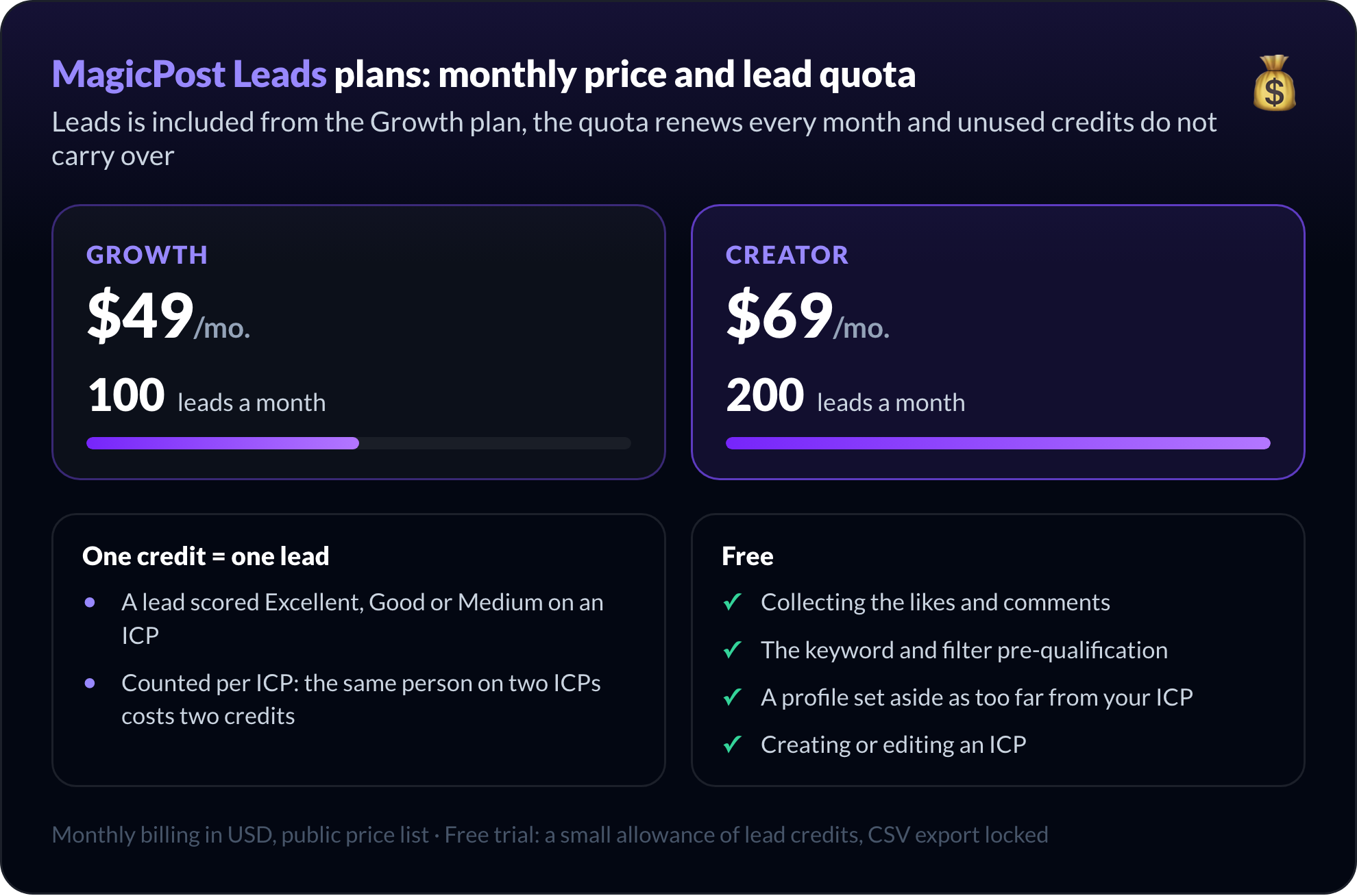
Start with your next post. Compare the MagicPost plans that include Leads, or start free on MagicPost: the trial includes a small allowance of lead credits.
FAQ
How do I turn people who engage with my LinkedIn posts into qualified leads?
MagicPost turns LinkedIn post engagers into qualified leads in three steps: it collects everyone who liked or commented on your posts, scores each profile against your Ideal Customer Profile, and sends the good fits to your CRM.
You then reach out yourself, opening with the post or comment that brought them in.
How can I get the list of people who liked and commented on my LinkedIn post without scraping?
MagicPost collects the people who liked or commented on your own LinkedIn posts through LinkedIn's official API, so there is no scraper and no browser extension. LinkedIn also lists reactions and comments under each post, but it leaves the sorting to you, one profile at a time.
How do I qualify LinkedIn engagers against my ICP?
Qualifying LinkedIn engagers means comparing each profile with your Ideal Customer Profile: role, company type, size, industry and location.
In MagicPost, a free keyword and filter check rules out obvious misses, then an AI scores the rest Excellent, Good or Medium, with its reasoning. Profiles too far from the ICP are set aside.
Can I send LinkedIn engagers to HubSpot or Pipedrive automatically?
Yes. MagicPost pushes qualified leads to HubSpot or Pipedrive as contacts with a note, automatically after each detection run. It also connects to Lemlist, ReachBoost and any webhook, which covers Zapier, Make and n8n.
What should I say when reaching out to a LinkedIn post engager?
A good first message to a LinkedIn post engager refers to the exact post and, if they commented, to what they said. Ask a question about their situation rather than pitching. A generic "I'd love to connect" message throws away the context that makes the lead warm.
How soon should I reach out after someone engages with my LinkedIn post?
Reach out while the post is still recent, because the like or comment is what makes your message relevant.
The MagicPost detection agent scans each new post at the check times you choose (2 hours, 4 hours, 12 hours or 3 days after publication) and can email you when it finds leads. With the early check times on, the best fits reach you within hours of publication.
Does MagicPost find the email addresses of LinkedIn engagers?
No. MagicPost Leads does not look up email addresses or phone numbers: a lead arrives with its LinkedIn profile, its ICP fit level and the comment it left.
For destinations that need an email, the CRM push has an "email required" filter, so only the leads whose address you already have go through.
Does MagicPost send the messages for me?
No. MagicPost does not send LinkedIn invitations, direct messages or emails for you. It qualifies the people who engaged and hands them to your CRM or outreach tool, and you stay in control of every message.
Is it against LinkedIn's terms to turn post engagement into leads?
Qualifying the people who engage with your posts is not against LinkedIn's terms; scraping and automated engagement are. Section 8.2 of the LinkedIn User Agreement bans software that scrapes profiles and bots that send messages, comments or likes.
MagicPost reads your engagement through the official API and sends nothing on your behalf.
How much does the MagicPost Leads module cost?
The MagicPost Leads module is included from the Growth plan at $49/mo., with 100 leads a month, and the Creator plan at $69/mo. includes 200 leads a month.
A lead costs one credit when it scores Medium or better on an ICP; collecting engagers and setting aside poor fits are free. The free trial includes a small allowance of lead credits.
Can a sales team use MagicPost Leads together?
MagicPost Leads works per member on the Team plan: each member detects leads on their own LinkedIn posts, with their own credits. Admins get a team Leads page that lists every member's leads in one place and lets them create ICPs shared with the team.