MagicPost is an AI-powered LinkedIn content platform used by 100,000+ creators and teams.
It covers the full workflow in one place, from generating posts in your voice and scheduling through LinkedIn’s official API to tracking performance and keeping you engaged with the right people daily.
If LinkedIn is your main channel and you want to stop spending hours on content that underperforms, this MagicPost review covers everything you need to know.
What Is MagicPost?
MagicPost is a LinkedIn-verified AI content and analytics platform trusted by more than 100,000 creators.
It connects to your LinkedIn account through the official OAuth API and builds a writing profile from your existing content, analyzing your tone, sentence structure, vocabulary, and formatting patterns.
Everything it generates uses that profile as the baseline, which is why the output reads like you rather than like a generic AI draft.
Beyond individual creators, MagicPost has dedicated solutions for agencies (managing multiple clients from one workspace) and teams running employee advocacy programs.
🌟 Account Safety: MagicPost is a LinkedIn-verified partner. It uses the official OAuth API. There’s no Chrome extension and no session cookies. Your account activity is fully transparent to LinkedIn and completely within their guidelines, so there’s no risk of account suspensions.
MagicPost Features
Most LinkedIn tools do one or two things well and leave you to stitch together the rest. MagicPost actually covers all of it.
AI Post Generator
The post generator connects to your LinkedIn and learns your writing style from past posts. You can also try it out via our LinkedIn post generator.
You choose a post type (Actionable, Inspiring, Introspective, or Promotional), select a category, and give it a subject, URL, or YouTube link. MagicPost generates a draft that mimics how you actually write, including your tone, sentence rhythm, use of emojis, and formatting preferences.
You can also import any creator’s writing style to model your output after someone whose format works for your audience.
URL and YouTube content repurposing extracts ideas from external content and turns them into LinkedIn posts without starting from scratch.
💡 Pro Tip: Paste a YouTube video link from your own channel or a podcast you appeared on. MagicPost extracts the key points and writes a post in your voice. Spend five minutes instead of an hour, and the content is already something you actually said.
Idea Generator
The post idea generator helps you overcome your writer’s block.
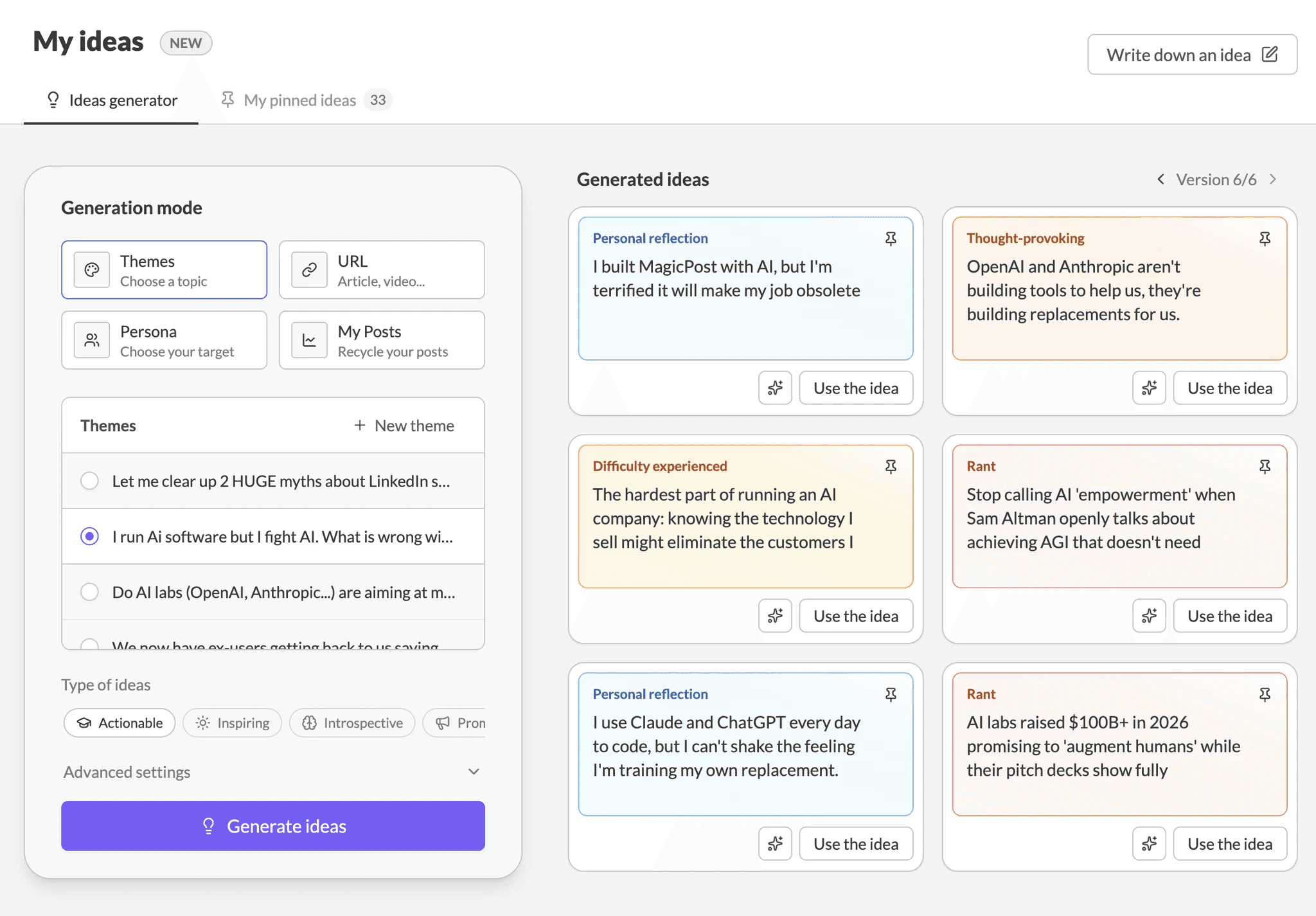
There are four ways to generate ideas:
Theme (a topic you want to cover)
Persona (describe your target audience and get angles tailored to their specific problems)
URL (extract ideas from an article or video), and
My Posts (repurpose your own past content with fresh angles).
Each method returns six structured, categorized LinkedIn post ideas you can pin for later or send straight to the post generator.
Ideas are accessible from anywhere in the platform, including the engagement feed, inspiration library, and post history, not just a dedicated tab.
💡 Pro Tip: The Persona method is underused. Try: “sales directors at B2B SaaS companies with 50 to 200 employees who are frustrated with outbound conversion rates.” The ideas shift from generic industry takes to angles that speak directly to a real person’s actual problem.
Inspiration Library
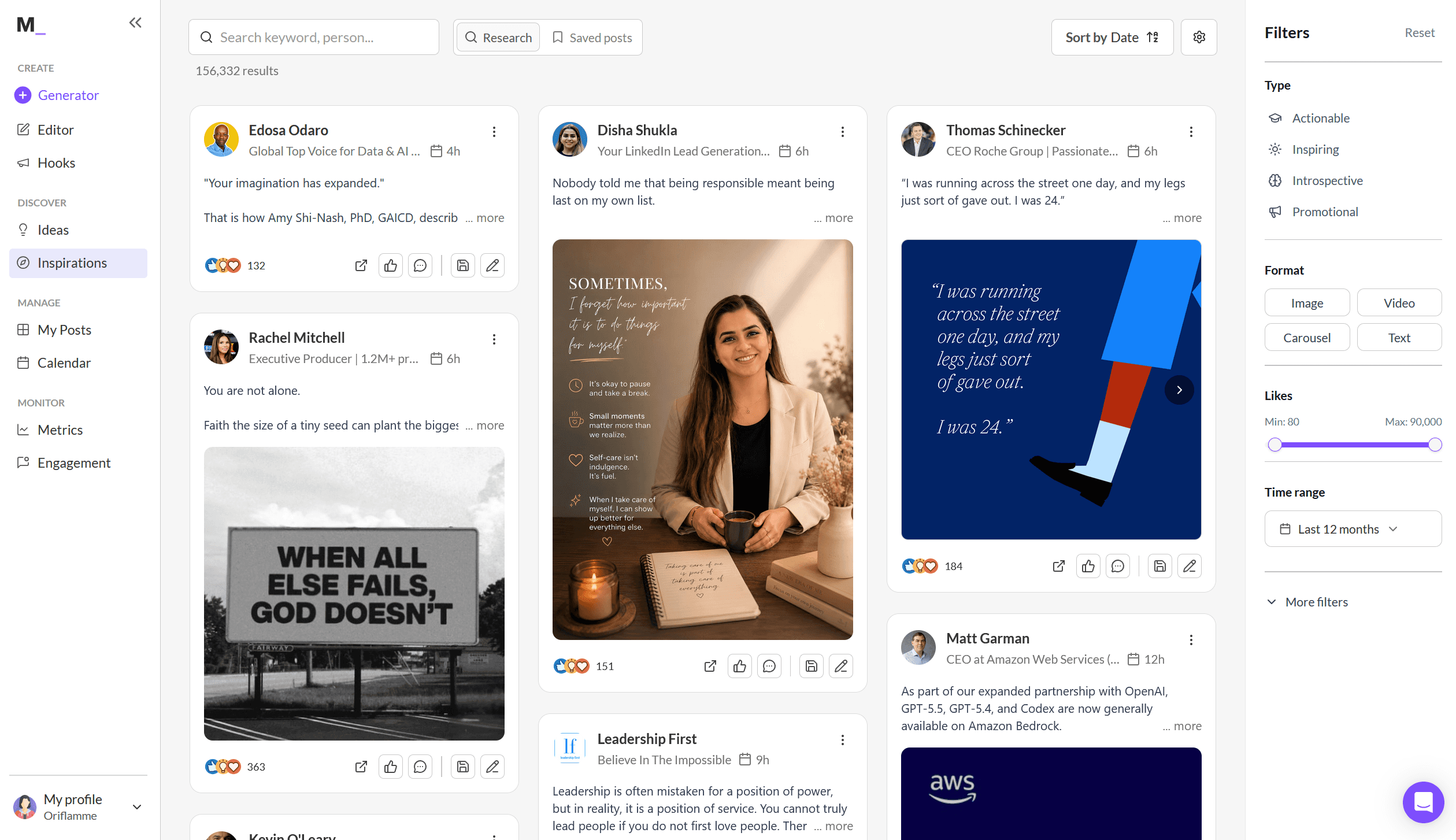
2M+ LinkedIn posts are searchable by keyword or creator name and filterable by post type, format, and engagement level on MagicPost’s inspiration library.
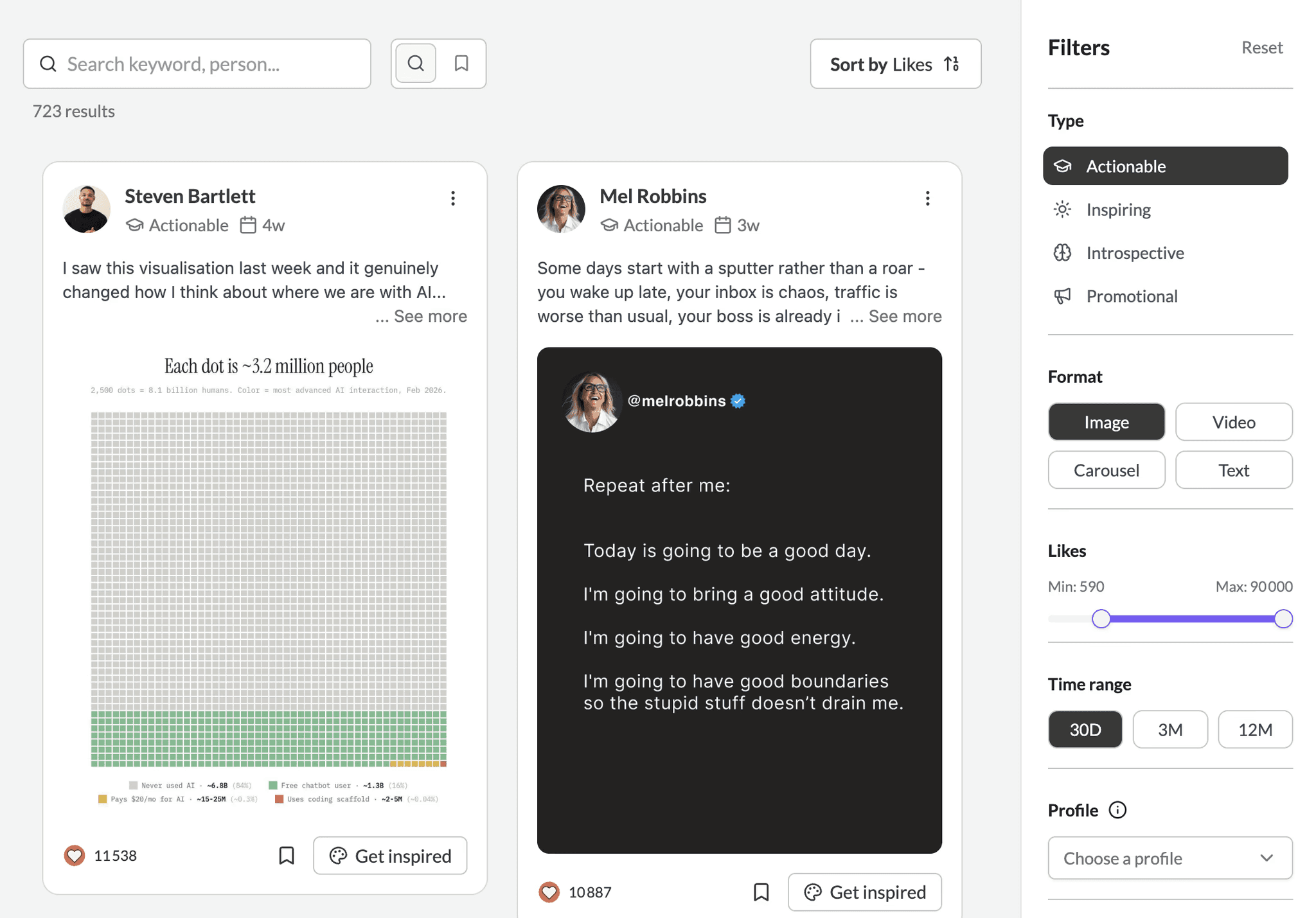
The library updates in real time. When you find a post that works structurally, hit “Get Inspired” and MagicPost uses it as a structural reference for your own draft. It uses your voice, your perspective, and their proven format.
💡 Pro Tip: Search your three biggest competitors or the top creators in your niche. Sort by engagement. In 10 minutes you’ll have a clear picture of which formats and topics your shared audience responds to, and you can act on it immediately.
Hook Generator
The hooks generator is a standalone feature for generating and testing opening lines. Give it your post topic and tone (professional, casual, storytelling, or bold), and it generates multiple hook variations optimized for scroll-stopping on LinkedIn.
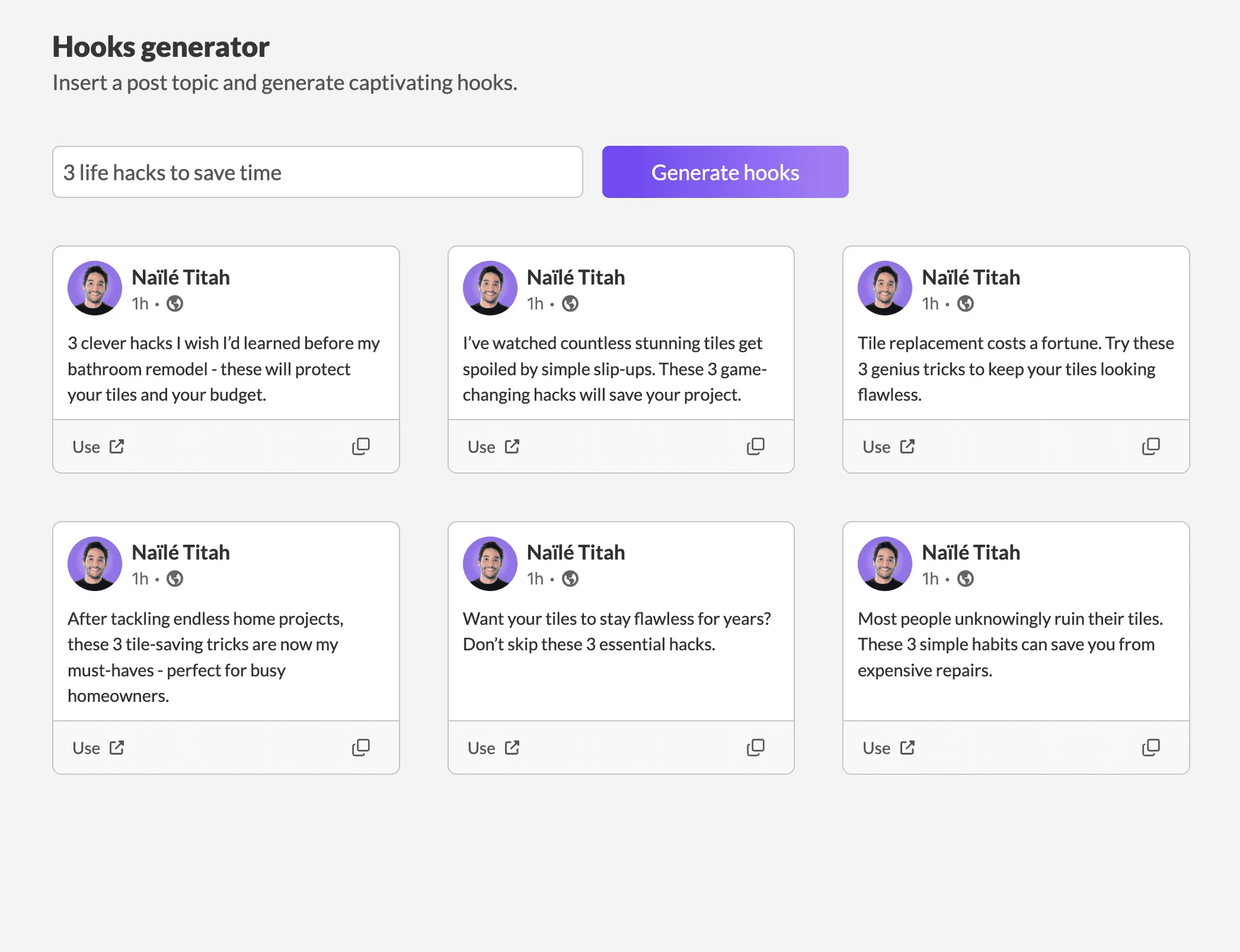
You can save your best-performing hooks into a personal library, track which ones drive the most engagement over time, and send any hook directly to the post generator with one click.
Most creators rewrite their hook once and publish. MagicPost makes it easy to test three or four openers on the same topic and track what your specific audience responds to over time.
💡 Pro Tip: Build a hook library of your 10-15 best performers. Review it before generating a new post. You’ll start to spot patterns in what your audience actually stops for, which is more valuable than any general advice about hook formulas.
Post Editor
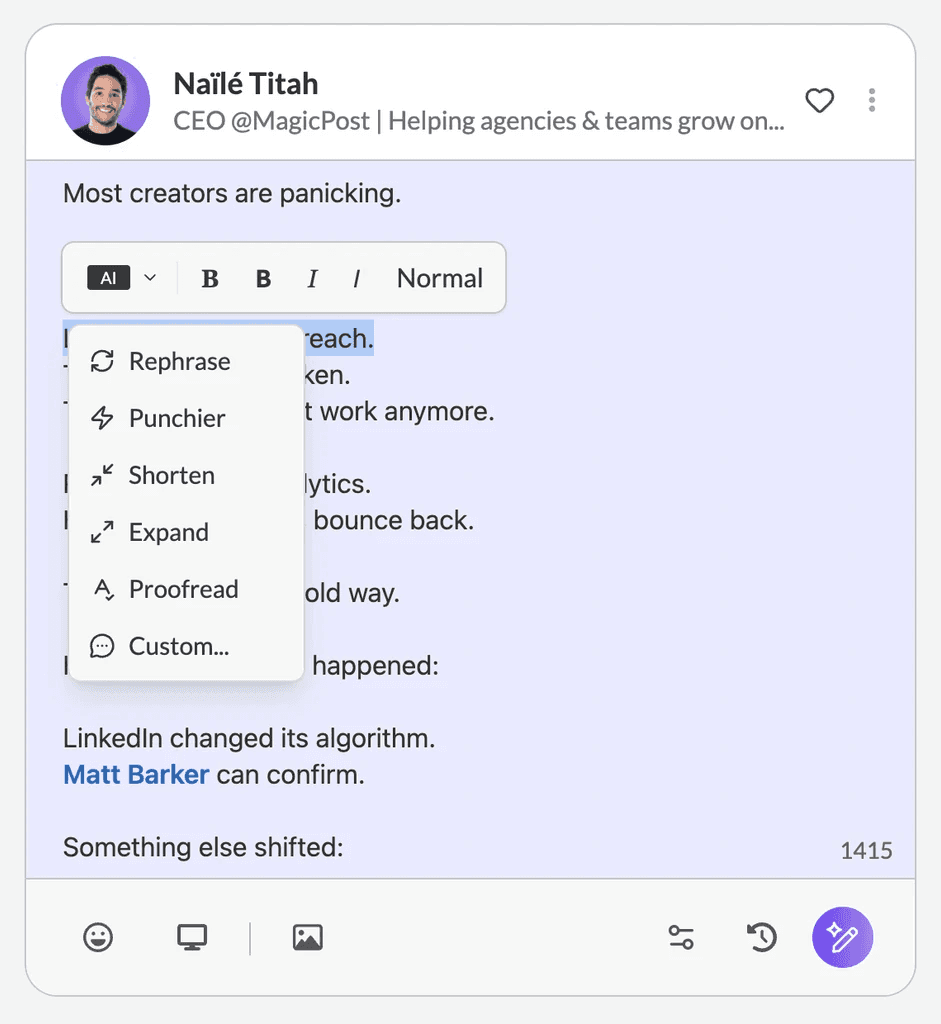
After generation, the editor lets you rewrite sections, change the hook, reduce length, or regenerate the whole thing using inline AI tools.
Tag people with @, add symbols and emojis, attach media, and preview on desktop and mobile before publishing.
The mobile preview shows exactly where the “see more” cut-off lands, which matters more than most creators realize for hook performance.
💡 Pro Tip: Always check the mobile preview before publishing. Over 60% of LinkedIn browsing is mobile. If your hook gets cut mid-sentence on a phone screen, you’ve already lost the read.
Scheduling and Content Calendar
Schedule posts to your LinkedIn profile or company page weeks or months ahead. The calendar has drag-and-drop for rearranging content, and you can create posts, schedule drafts, or drop ideas for later all from the same view.
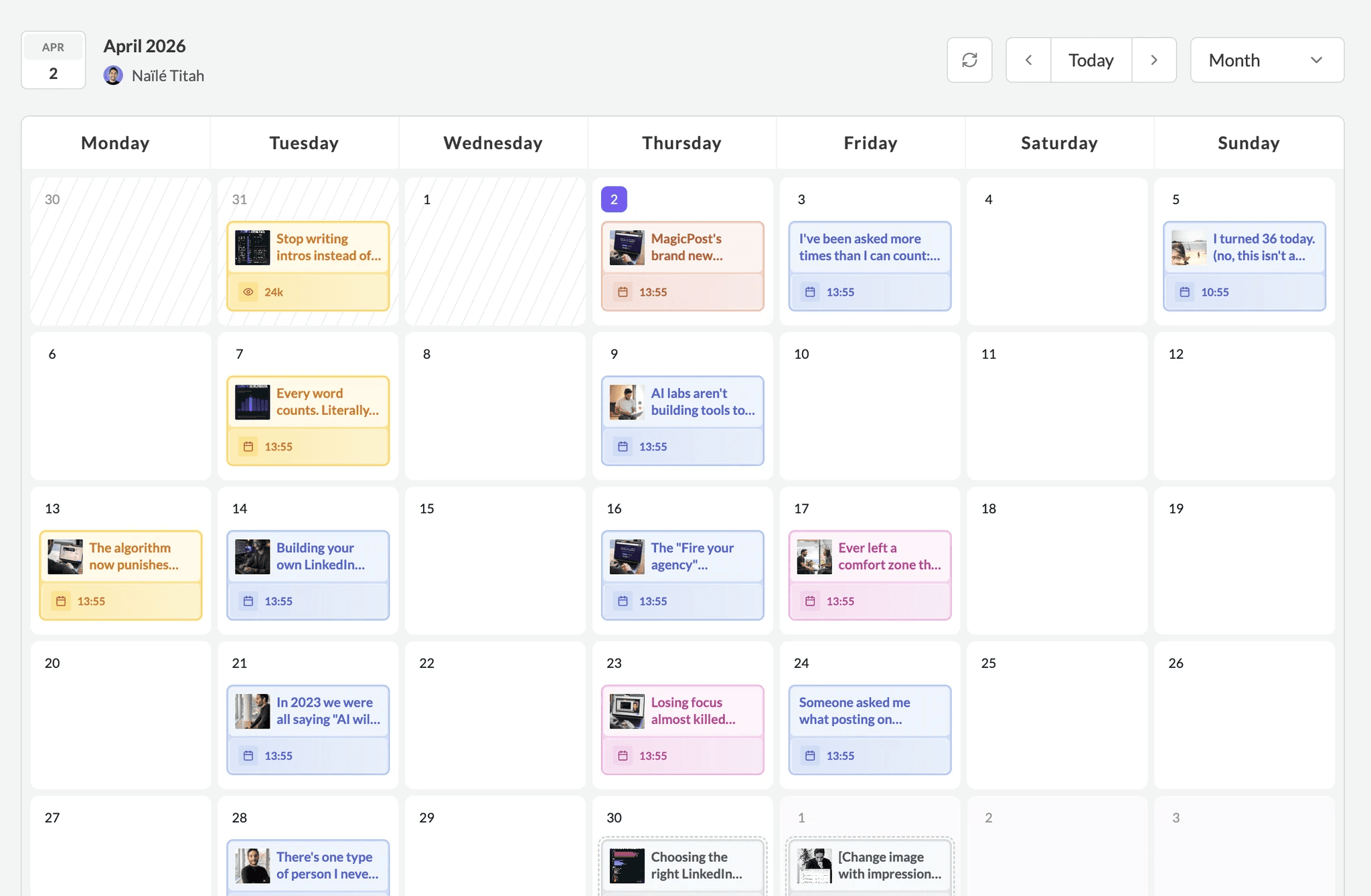
MagicPost publishes on a schedule automatically at the set time through the official LinkedIn API.
First comment scheduling is included; schedule a comment to post automatically when your content goes live, with GIF support.
Add a link, a key takeaway, or a question to start the conversation. The algorithm treats early comments as an engagement signal, so posting one automatically at the right moment matters.
💡 Pro Tip: Schedule your first comment with a question directed at a specific type of reader: “If you’re a [job title] reading this, I’d love to know…” It invites a specific person to respond rather than asking a generic audience, and targeted early comments drive disproportionate engagement momentum.
LinkedIn Analytics (New Feature)
When Shield Analytics shut down in May 2026, it left a gap for thousands of creators who depended on LinkedIn analytics beyond the native dashboard.
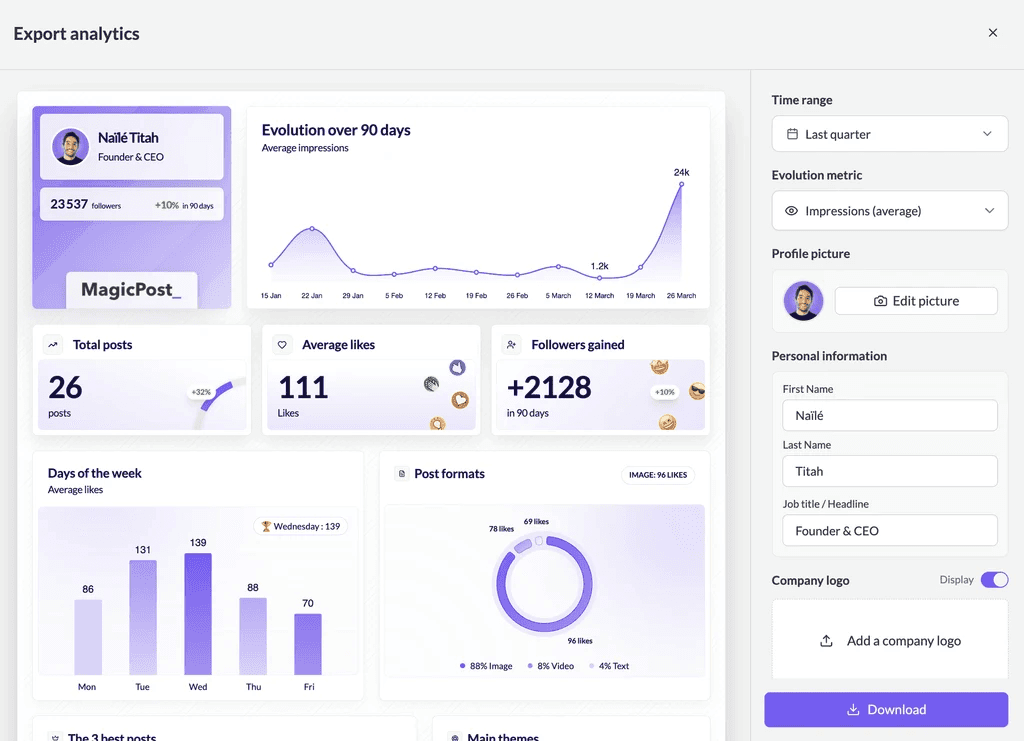
MagicPost’s Growth plan at $49/mo. was built to fill that gap directly. It has the same depth, the same type of data, and the added safety of an official API connection. You can see exactly where you stand on LinkedIn without leaving the platform.
💭 Matt Barker, a 190K+ follower LinkedIn creator and former Shield user, said, “Since using MagicPost Analytics, I finally understand what my audience loves.”
The analytics dashboard covers:
Impressions, likes, comments, engagement rate, and follower growth over custom timeframes.
Audience breakdown, including countries, job fields, verticals, cities, and LinkedIn account types.
Best posting days and times based on your own data.
Most used post formats and top-performing content themes.
All posts in one place; you don’t need to scroll down your feed to find historical performance.
Creator metrics, like pulling analytics for any public LinkedIn profile for competitor benchmarking.
Exportable white-label reports with custom branding, time range, and main metric selection.
LinkedIn benchmark comparisons to see how your performance stacks up against market averages.
💡 Pro Tip: Set up a monthly analytics export for your own profile and 3 to 5 competitors on the first of each month. One hour of review per month gives you better strategic direction than reacting post-by-post to whatever LinkedIn’s native dashboard shows.
Engagement Feed
The engagement feed, the LinkedIn engagement tool in MagicPost, lets you build custom lists of up to 49 profiles, including prospects, clients, influencers, and partners, and see their latest posts in one curated view instead of scrolling your full LinkedIn feed.
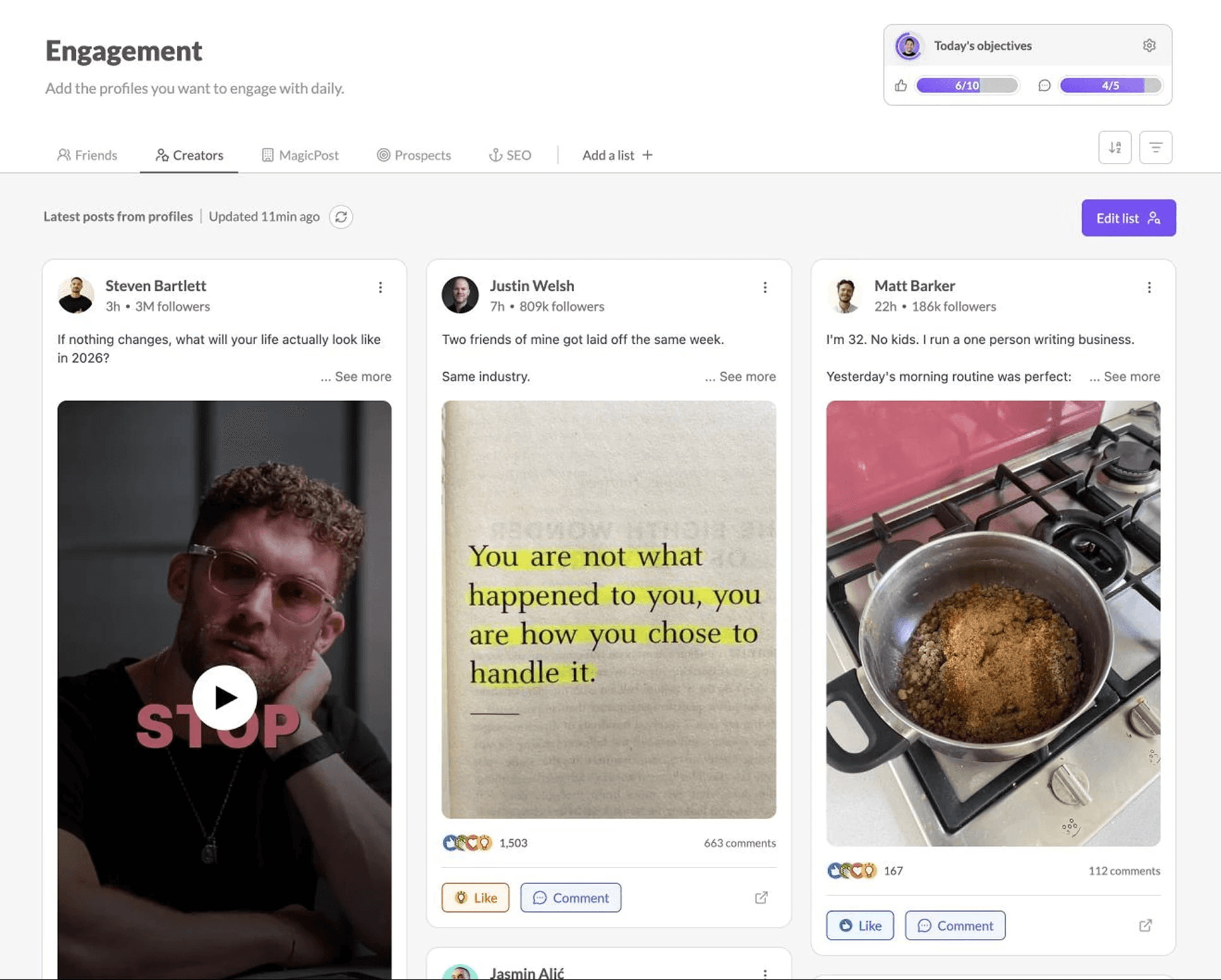
You can like and comment directly from within MagicPost, use GIFs, and save your best comments to reuse with one click.
You can set daily or weekly engagement objectives to build consistency as a habit rather than a chore.
MagicPost explicitly doesn’t automate commenting (besides the comment scheduling feature). You engage manually, but the curated feed makes it intentional rather than scattered.
💡 Pro Tip: Build three lists: 10 dream clients, 10 competitors, and 10 thought leaders in your niche. Spend 10 minutes in the engagement feed every morning before posting.
You’ll be visible to your dream clients before your post goes out, which means familiar faces see your content rather than strangers.
API and MCP Integration
The Creator plan includes API and MCP (Model Context Protocol) integration, letting you connect MagicPost with external tools, AI clients like Claude or ChatGPT, and custom workflows.
Content generation and scheduling can be triggered programmatically for teams with more complex setups.
Agency Features
MagicPost has a dedicated agency workflow that goes beyond just switching between accounts:
Add clients to your workspace by inviting them or creating accounts on their behalf, with one seat per client.
Secure LinkedIn connect link, whereby clients authorize their LinkedIn with one click without ever logging into MagicPost.
Approval mode, whereby no post goes live until the client approves it via a shared link. No login is required on their end.
Clients can review, leave comments on specific posts, and approve content from a mobile browser.
White-label downloadable reports, where you can customize reports with client branding, time range, and key metrics in one click.
Switch between client accounts instantly from the top-left menu.
💡 Pro Tip: Turn on Approval mode for high-profile or risk-sensitive clients. Share the review link with them on the same day you draft the posts. Most clients respond within 24 hours when approval is quick, which means your calendar stays on schedule.
Employee Advocacy
The Team plan is built for companies running employee advocacy programs. A manager sets brand guidelines, approved topics, and tone centrally. Each team member gets their own dedicated space with AI settings, post history, and a personal calendar.
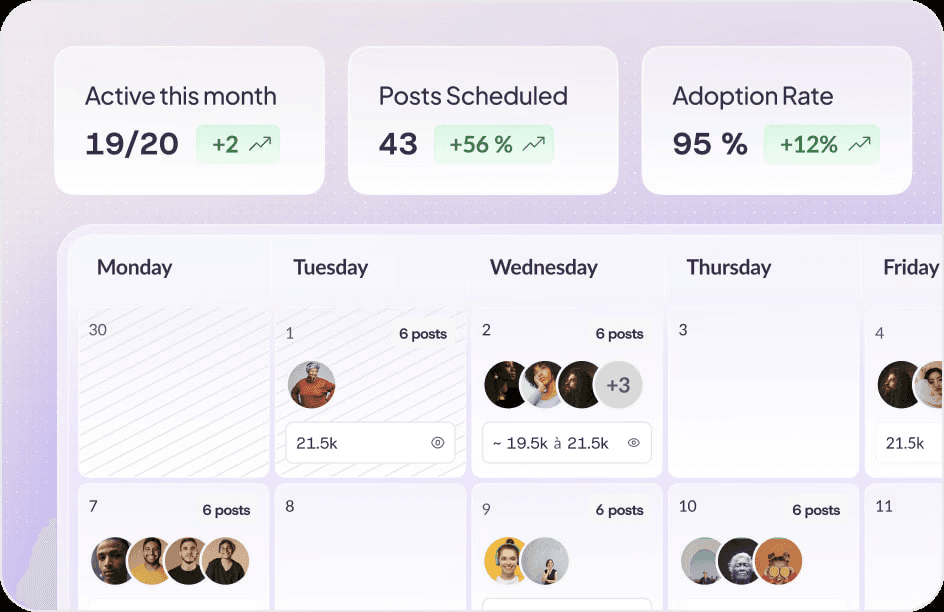
Posts are generated in each member’s individual voice, not a company template.
Invite team members or create accounts on their behalf.
Monitor activity, including published posts, scheduled content, and drafts in progress across the whole team.
Team impact dashboard, displaying total impressions, followers gained, and top performers.
Admins can manage content and scheduling for any member, which is useful for ghostwriting for executives.
Downloadable white-label team reports, ready to present to leadership.
💡 Pro Tip: Start with your 5 most active employees rather than rolling out to the whole company. Early adopters become internal advocates who make onboarding the rest of the team significantly easier. MagicPost reports 100% adoption at Audencia after starting with a focused group.
Multilingual Support
Content generation is available in 7 languages, making MagicPost usable for teams and creators publishing in markets beyond English.
Language selection is available in the post generator settings.
MagicPost Pricing
We changed the pricing structure in 2026 to create a Growth tier aimed squarely at creators looking for a complete LinkedIn analytics platform and a Creator plan for the full content workflow.
Plan | Price | Who It’s For | Key Inclusions |
Growth | $49/mo. ($29/mo billed yearly) | Creators who need metrics + scheduling, not AI writing | Advanced LinkedIn metrics, audience demographics, benchmark reports, manual write & schedule, engagement feed, leads (100/month), and export reports |
Creator | $69/mo. ($39/mo billed yearly) | Creators who want the full workflow | Everything in Growth + AI post generator, idea generator, inspiration library (2M+), hook generator, scheduled comments, creator metrics, and API/MCP integration |
Team / Agency | Agency and Team: $59/mo. per seat (from 2 seats) | Agencies and companies with multiple profiles | Everything in Creator + multi-account management, client approval workflow, white-label reports, activity dashboard, custom reports, 30-min onboarding, and a dedicated account manager |
MagicPost runs a Black Friday sale on these plans each year. The current discount and sale dates are on the MagicPost Black Friday deal page.
✅ MagicPost offers a free trial with no credit card or commitment requirement. It includes AI generation, inspiration library, scheduling, and advanced metrics from day one.
MagicPost Pros and Cons
No tool is perfect. What we do well and where we might not meet your needs:
Pros | Cons |
✅ Official API verification, meaning zero account ban risk | ❌ LinkedIn-only; no Instagram, TikTok, or Twitter |
✅ Genuinely learns your voice from your post history | ❌ No carousel maker |
✅ 2M+ real-time inspiration library | ❌ Full AI features require Creator at $69/mo. |
✅ Hook generator with A/B tracking and personal library | ❌ Competitor benchmarking requires Creator plan |
✅ First comment scheduling with GIF support | |
✅ Deep analytics with audience demographics and benchmark reports | |
✅ White-label reports for agencies | |
✅ Client approval without login, meaning no extra steps for clients | |
✅ Employee advocacy with team activity monitoring | |
✅ 7 languages, API/MCP integration | |
✅ Free trial, no credit card is required |
Is MagicPost Right for You?
If LinkedIn is where you’re building and you want a single tool that handles the whole thing without compromising on any part of the workflow, MagicPost is the one to beat. If you are weighing it against Supergrow, the Supergrow vs MagicPost comparison lays out the differences.
You’ll get the most from it if:
You post on LinkedIn consistently (or want to) and spend more time writing than you should.
You’ve tried other AI tools and the output sounded nothing like you.
You were a Shield Analytics user looking for a replacement that actually adds creation and scheduling on top of the metrics.
You’re an agency tired of juggling separate tools for writing, scheduling, approvals, and reporting.
You want your team posting on LinkedIn but can’t get them to do it consistently on their own.
You’re looking for the cheapest MagicPost plan and don’t need AI writing. In that case, the $49 Growth plan is great.
But it’s probably not the right move if:
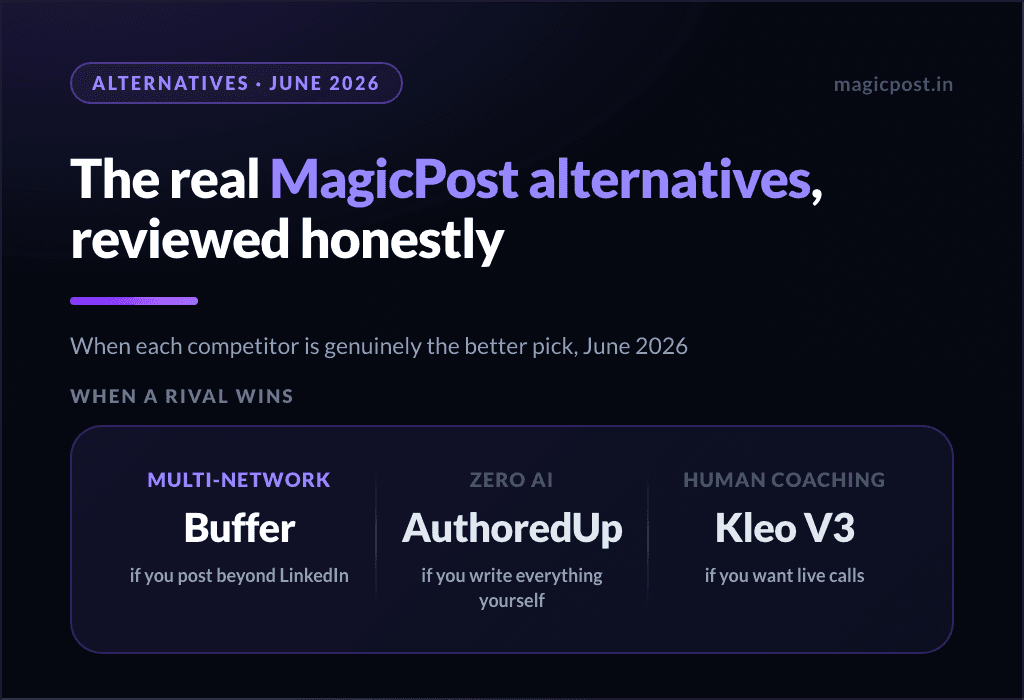
You manage social media across multiple platforms and need everything in one multi-channel dashboard.
Your agency workflow depends on clients approving carousel-format content; the carousel maker isn’t built yet.
Try MagicPost for Yourself
The free trial doesn’t require a credit card. Connect your LinkedIn, generate your first post in under two minutes, and see how closely it matches your voice.
FAQ
Is MagicPost safe for my LinkedIn account?
Yes, and it’s one of the few tools in this category where that answer is unambiguous. MagicPost is a LinkedIn-verified partner publishing through the official OAuth API.
Your account activity is fully transparent to LinkedIn and completely within their guidelines. You have no Chrome extension, no session cookies, and no risks to worry about.
Does MagicPost generate posts that actually sound like me?
Better than most. It builds a writing profile from your post history, covering tone, sentence structure, vocabulary, and formatting, and uses that as the baseline for every draft.
The output isn’t perfect without editing, but it’s close enough to your voice that the editing is refinement rather than rewriting.
Is MagicPost a good replacement for Shield Analytics?
Yes. MagicPost’s Growth plan at $49/mo. is positioned as the Shield replacement. The analytics are deeper than LinkedIn’s native dashboard, audience demographics, benchmark reports, and posting time data, with the added benefit of a safe API connection.
See our full Shield Analytics alternatives guide for a broader comparison.
What is the difference between the Growth and Creator plans?
The Growth plan at $49/mo. covers scheduling, manual writing, the engagement feed, leads, and the full analytics dashboard, including audience demographics, benchmark reports, and white-label exports.
The Creator plan at $69/mo. adds the AI post generator, idea generator, 2M+ inspiration library, hook generator with A/B tracking, comment scheduling, creator metrics, and API/MCP integration.
Does MagicPost support employee advocacy?
Yes. The Team plan lets a manager set brand guidelines and approved topics centrally while each team member posts in their own voice from their own LinkedIn account.
Activity monitoring, team impact dashboards, and white-label reports are included. Saint-Gobain, Audencia, and Roundtable are among the companies using it.
Can agencies use MagicPost for client management?
Yes. The Agency plan includes multi-account management, secure LinkedIn connect links (clients authorize without accessing MagicPost), Approval mode for content approval via shared link with no client login required, and white-label downloadable reports. Starting from 2 clients, at $59/mo. per seat (one seat per client account).
Does MagicPost have a free trial?
Yes. Free account, no credit card, no commitment. It includes AI generation, inspiration library, scheduling, and advanced metrics.