
Everything in the Team plan
 |
|The MagicPost Team plan is for companies whose employees post on LinkedIn under their own names. It gives each member a workspace, a shared team calendar, and metrics for each member and for the whole team. See also MagicPost for employee advocacy.
The Team plan is priced per seat: $59 (€49) per seat per month, or $47 (€39) per seat per month billed yearly. You choose how many seats you need, from 2 seats.
A MagicPost price can vary by country: the Teams tab of the Billing page shows the amount that applies to you.
Every member of a Team organization gets every feature of the Creator plan, with limits of its own: see "Limits of a Team member" below. What are the MagicPost plans and what is in them? compares the four plans.
How Team seats are priced
On the MagicPost Team plan, you pay for a number of seats, and the total is the price of one seat times the number of seats. You choose that number on the Team card, in the Teams tab of the Billing page, with the minus and plus buttons. The card shows the price /month per seat, the number of seats, and the Total.
The Team card has two buttons: Purchase plan to subscribe on your own, and Book a call to set up your team with the MagicPost sales team. magicpost.in/pricing also shows the price of a Team seat.
Add or remove seats on the Team plan
To change the number of seats of a MagicPost Team subscription, click Add or remove seats. The seat management window opens. The owner, who holds the subscription, finds the button on the plan card of the Billing page. Every administrator of the Team organization also finds it on the Members page.
When you add Team seats during a billing period, MagicPost charges only the prorated amount for the days left until your renewal date. When you remove seats, MagicPost charges nothing, the seats leave the organization right away, and the lower number of seats is billed from your next renewal. See how to add, remove and reassign seats.
The seat selector of the MagicPost seat management window has a last step that you cannot buy on your own: at that step, the window shows Need more seats? and offers a call with the MagicPost sales team instead of a payment.
Specialized seats on the Team plan
The standard MagicPost Team seat is the Creator seat, with full access. The Team plan also has two specialized seat types for members who need only part of the product: Analytics (statistics and calendar) and Engagement (engagement only). The Growth seat type is sold on the Agency plan only.
Specialized Team seats are not self-serve by default. The MagicPost team enables them organization by organization, on request. Once enabled, each specialized seat type appears as its own row in the seat management window, with its price.
Limits of a Team member
A Team member has the features of the Creator plan, but not its limits. On Team, AI images are capped at 100 per month, AI edits of visuals and carousels at 100 per month, and leads at 100 per month.
MagicPost shows each allowance on the gauge of the feature. See how many visuals and carousels you can generate.
How a Team organization is set up
No member of a MagicPost Team organization shares a LinkedIn password. Each member connects their own LinkedIn to MagicPost through a secure connection.
Each Team member has their own MagicPost workspace, with their own AI settings, post history and calendar. What a team can pool in MagicPost is its templates (see sharing templates with your team), plus AI guidelines and a team brand kit set in the organization Settings.
An administrator you invite to MagicPost uses no seat by default. You can invite as many administrators as you need, and give one a paid seat with Assign a paid seat when you invite them.
Invite your team
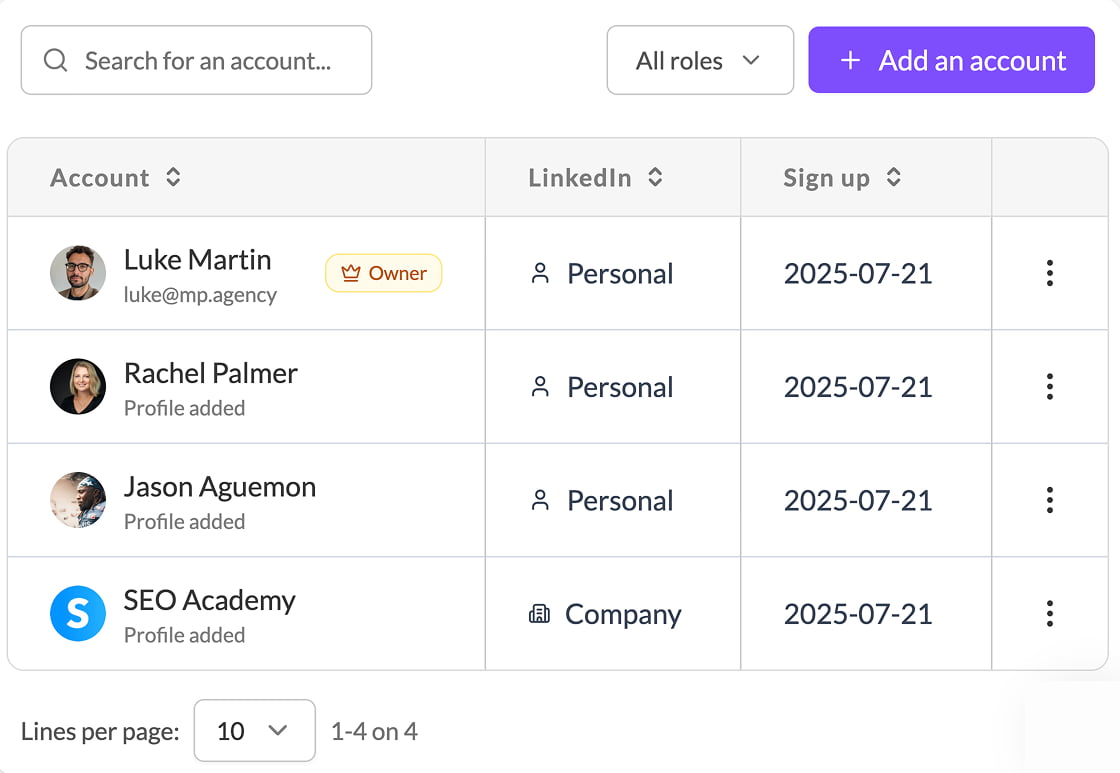
In MagicPost, an administrator invites members by email, or creates their accounts for them. Each member takes one Team seat and gets a dedicated workspace.
Follow your team's activity
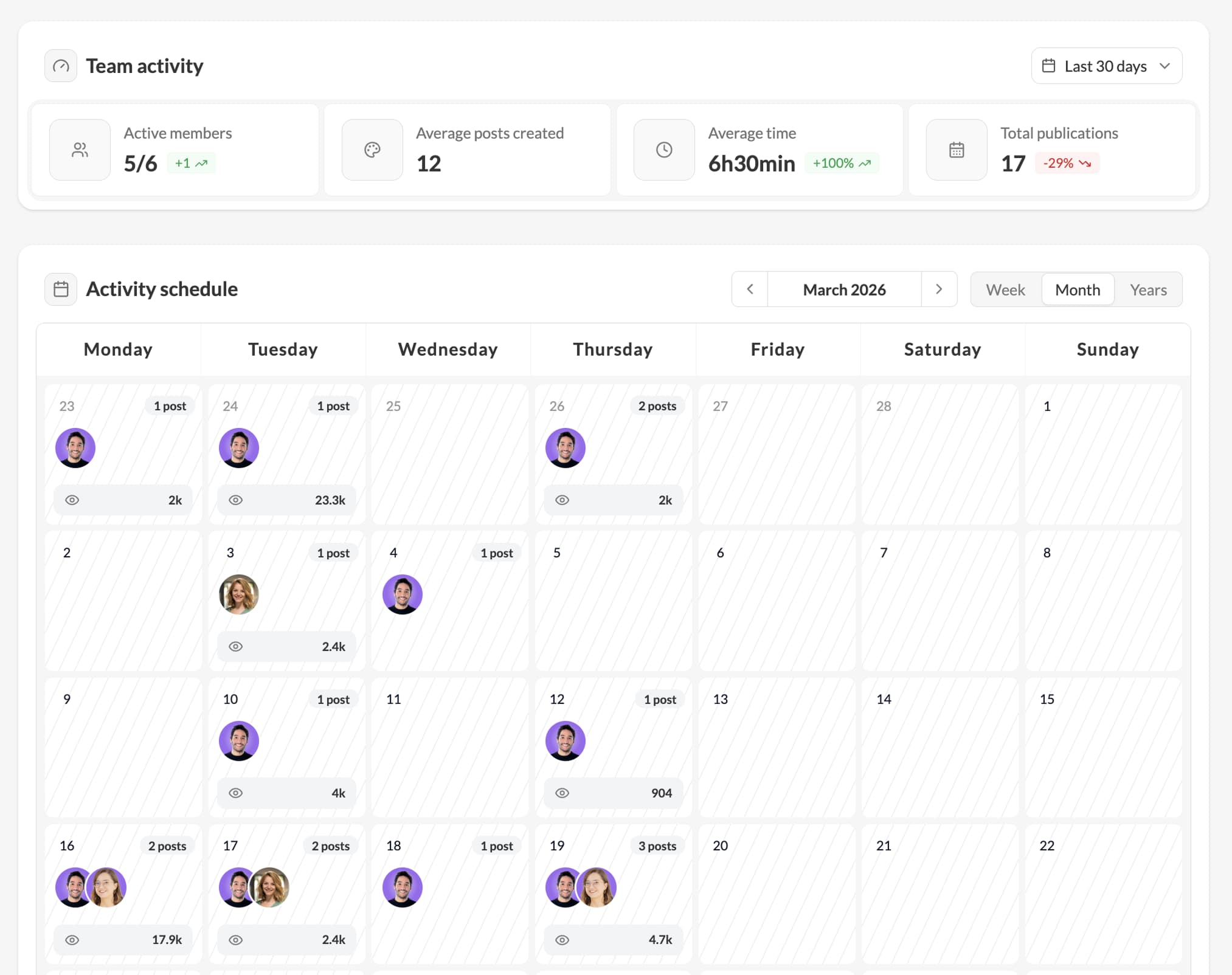
The MagicPost activity dashboard shows a Team administrator who is posting, who has drafts waiting, and who has stopped posting.
Measure your team's impact
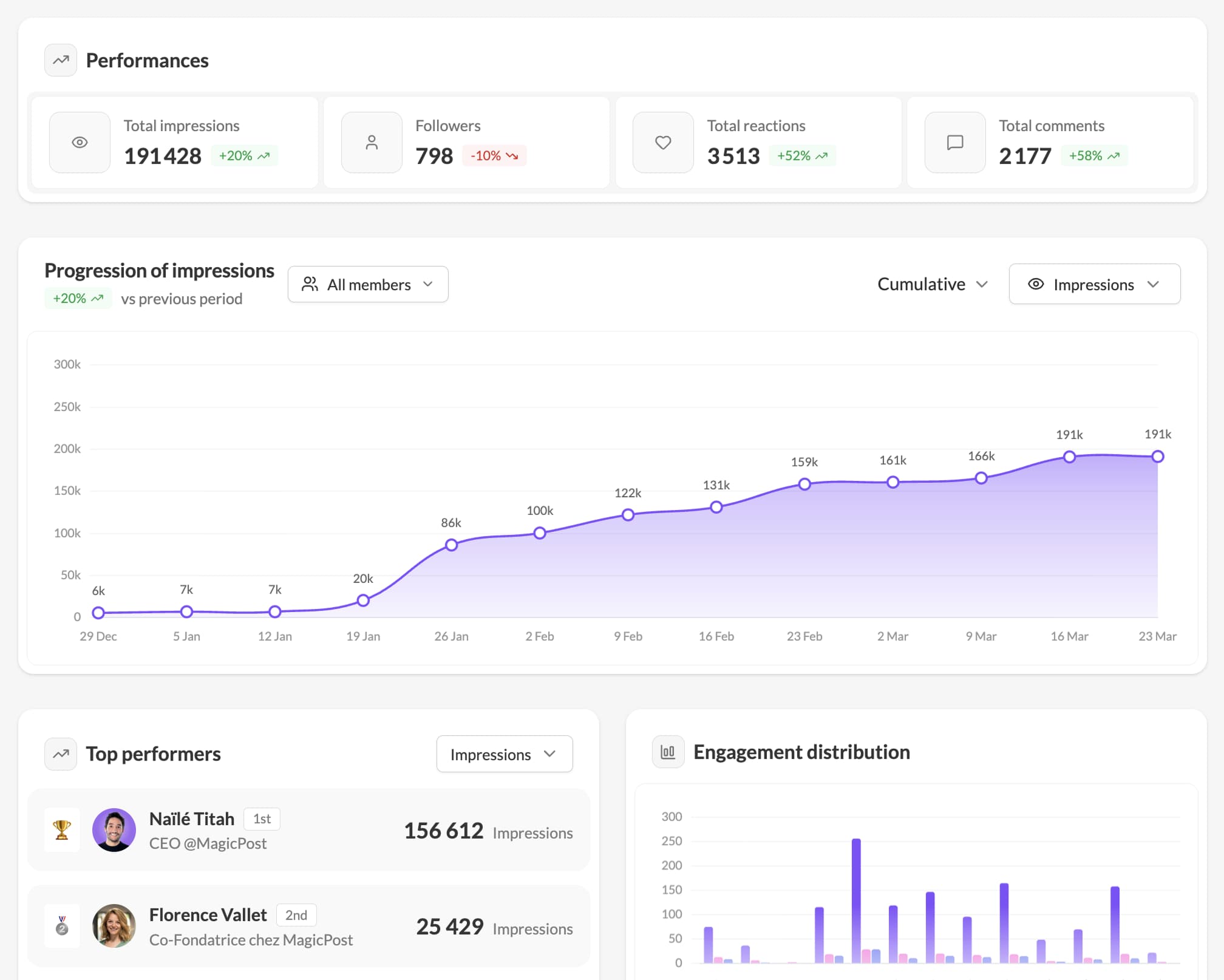
MagicPost team metrics show LinkedIn performance per member and aggregated across the team: impressions, engagement, followers.
Switch between members
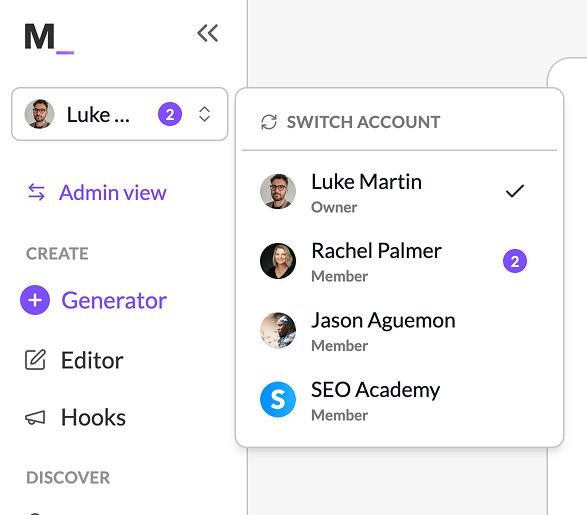
A Team administrator jumps from one member's workspace to the next from the account selector at the top of the MagicPost sidebar, while Show the member switcher is on in the organization settings (on by default in a new team organization). Log in to the account, in the member list, works either way. Administrators can write, schedule and engage on behalf of any member.
The team calendar
The MagicPost team calendar shows every member's posts in one view. An administrator sees what goes out this week, spots the days when several members publish and the days when nobody does, and spreads the posts out.
Drive it from your AI assistant
The Team plan includes API and MCP access. Connect MagicPost to Claude or Perplexity and run your team in plain language: follow each member's activity, publish for them, or build your own leaderboards without leaving the conversation.
See What is MCP, and what can I do with it?
FAQ
Is the MagicPost Team plan priced per seat?
Yes. The Team plan costs $59 (€49) per seat per month, from 2 seats, and you pay for every seat you buy, whether or not a member holds it. Seats are added or removed one by one with Add or remove seats.
What is a seat on the Team plan?
One seat is one LinkedIn identity: a personal profile or a company page. Each seat has its own workspace. An administrator you invite uses no seat unless you assign one.
Can I remove seats from my Team plan?
Yes, down to the minimum number of seats of the Team plan. If the seats you remove are in use, MagicPost asks you to select the members to remove from the organization. MagicPost charges nothing for the change, and the lower number of seats is billed from your next renewal.
What if my team needs more seats than MagicPost sells online?
Book a call with the MagicPost sales team. The seat selector of the Team plan stops at a last step marked Need more seats?, which offers a call instead of a payment.
Does a Team member have the same limits as a Creator subscriber?
No. A Team member has the same features as a Creator subscriber, with caps on AI images, AI edits of visuals and carousels, and leads. The gauge of each feature shows what is left.
What happens to a member's LinkedIn posts if they leave the team?
Nothing changes on LinkedIn. The posts a member published through MagicPost stay on their own LinkedIn profile, under their name.
Can I post on behalf of a member?
Yes, an administrator can. The post still goes out under the member's name, from their LinkedIn.
Does my team need to share their LinkedIn password?
No. Each member authorizes LinkedIn themselves, through a secure connection.
What is the difference between the Team plan and the Agency plan?
The Team plan is for your own people posting under their own names: team calendar and team metrics. The Agency plan is for publishing on behalf of clients: client approval before publishing and white-label reports. Both plans are priced per seat. See Everything in the Agency plan.
Need help?
Book a 30-minute call and we will set your team up: https://cal.com/magicpost/book-a-call