ChatGPT is good enough to write one LinkedIn post. It writes a clean draft in seconds, and its free plan costs nothing. It gets harder when LinkedIn becomes a weekly job: the same voice every time, a publishing calendar, numbers on what worked.
For that weekly job, a dedicated tool like MagicPost can earn its price; for the occasional post, ChatGPT is enough. MagicPost also connects to ChatGPT, so the two can share the work, and our reach data shows what publishing an unedited AI draft costs.
Is ChatGPT Good Enough to Write LinkedIn Posts?
ChatGPT is a strong first-draft writer. Give it a topic, three of your past posts and a clear angle, and it returns something publishable faster than you can type the hook. Our guide to AI LinkedIn posts that do not sound like AI covers the prompts and edits.
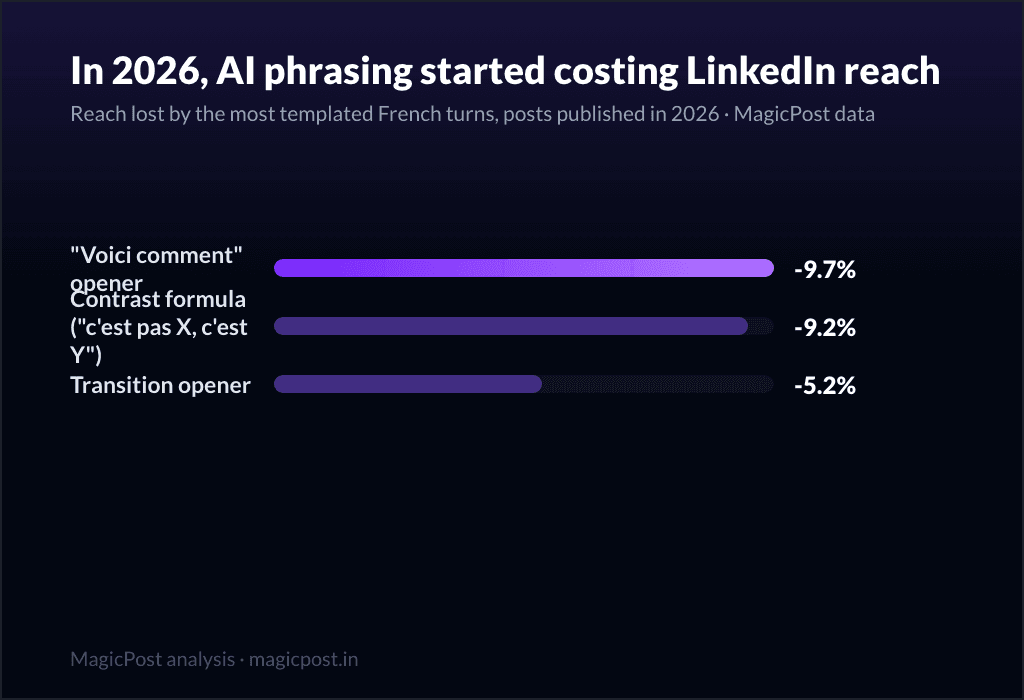
Three limits show up once you post every week. ChatGPT does not see your LinkedIn: custom instructions and memory keep your preferences, but it never sees which posts performed. Its unedited drafts also reach for the same shapes, such as the reveal opener, the contrast formula and the one-word cliffhanger.
And everything after the text stays manual: you copy, paste, pick a time, then check LinkedIn's stats.
ChatGPT handles the writing well. Running LinkedIn as a channel also means publishing, measuring and following up on who engaged.
MagicPost vs ChatGPT at a Glance
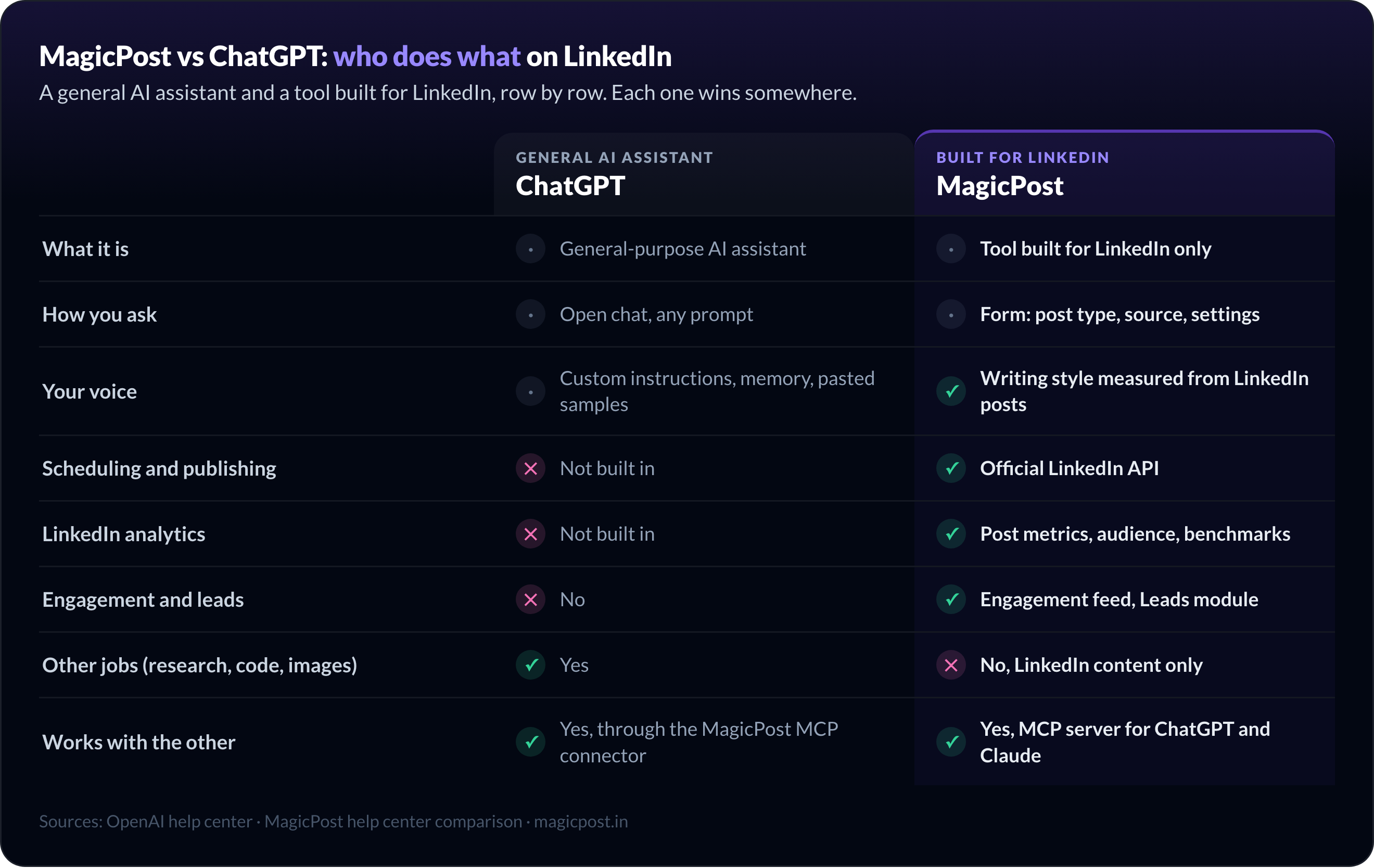
ChatGPT | MagicPost | |
What it is | General-purpose AI assistant | Tool built for LinkedIn only |
Price | Free plan; paid plans such as Plus | Free trial, no card; AI writing on the Creator plan |
How you ask | Open chat, any prompt | Form: post type, source, settings |
Your voice | Custom instructions, memory, pasted samples | Writing style measured from LinkedIn posts |
Scheduling and publishing | Not built in | Official LinkedIn API |
LinkedIn analytics | Not built in | Post metrics, audience, benchmarks |
Engagement and leads | No | Engagement feed, Leads module |
Other jobs (research, code, images) | Yes | No, LinkedIn content only |
Works with the other | Yes, through the MagicPost MCP connector | Yes, MCP server for ChatGPT and Claude |
ChatGPT Plus is described in OpenAI's help center. MagicPost plans are listed on the public pricing page, and a MagicPost price can vary by country.
What Does ChatGPT Do Better Than MagicPost?
ChatGPT is the better pick on four points.
Price. ChatGPT has a permanent free plan. MagicPost's free trial needs no card, but it ends.
Range. ChatGPT researches, writes code and makes images. MagicPost's AI only produces LinkedIn content.
Conversation. ChatGPT lets you argue with a draft line by line. MagicPost's Chat tab is marked "Soon".
Model choice. MagicPost does not let you pick the AI model; you steer it through settings and style.
Someone who posts a few times a month, enjoys prompting and already tracks results somewhere loses little by using ChatGPT alone.
What Does MagicPost Do That ChatGPT Doesn't?
MagicPost covers the steps around the text, in the same workspace. The help center comparison lists each feature with its plan. Four of them change a weekly LinkedIn routine the most.
Writes LinkedIn posts in a voice measured from your posts
MagicPost measures a writing style from a LinkedIn profile's posts, yours or a creator's, and applies it when it generates. Your knowledge base (who you are, what you talk about, your documents) and your saved instructions apply too, so you never retype them.
The AI LinkedIn post generator also has a Humanizer with three levels: True to your style, Balanced and Maximum anti-detection. It reduces AI-sounding phrasing, with no guarantee that a post goes undetected: no tool can promise that.
Schedules and publishes through the official LinkedIn API
Once your LinkedIn account is connected, MagicPost schedules and publishes posts through the official LinkedIn API, with no browser extension. ChatGPT stops at the text.
Shows what each LinkedIn post did
MagicPost analytics track impressions and engagement post by post, including posts you published directly on LinkedIn once imported. They also break down your audience and compare you with LinkedIn benchmarks.
That closes the loop ChatGPT leaves open: you see which topics and formats worked before you write the next one.
Turns engagement into leads
The engagement feed gathers posts from the profiles you choose, with daily objectives; you write the comments yourself. The Leads module spots people matching your ICP among those who engaged with your posts, scores them and sends them to your CRM.
Does a ChatGPT Draft Cost You Reach on LinkedIn?
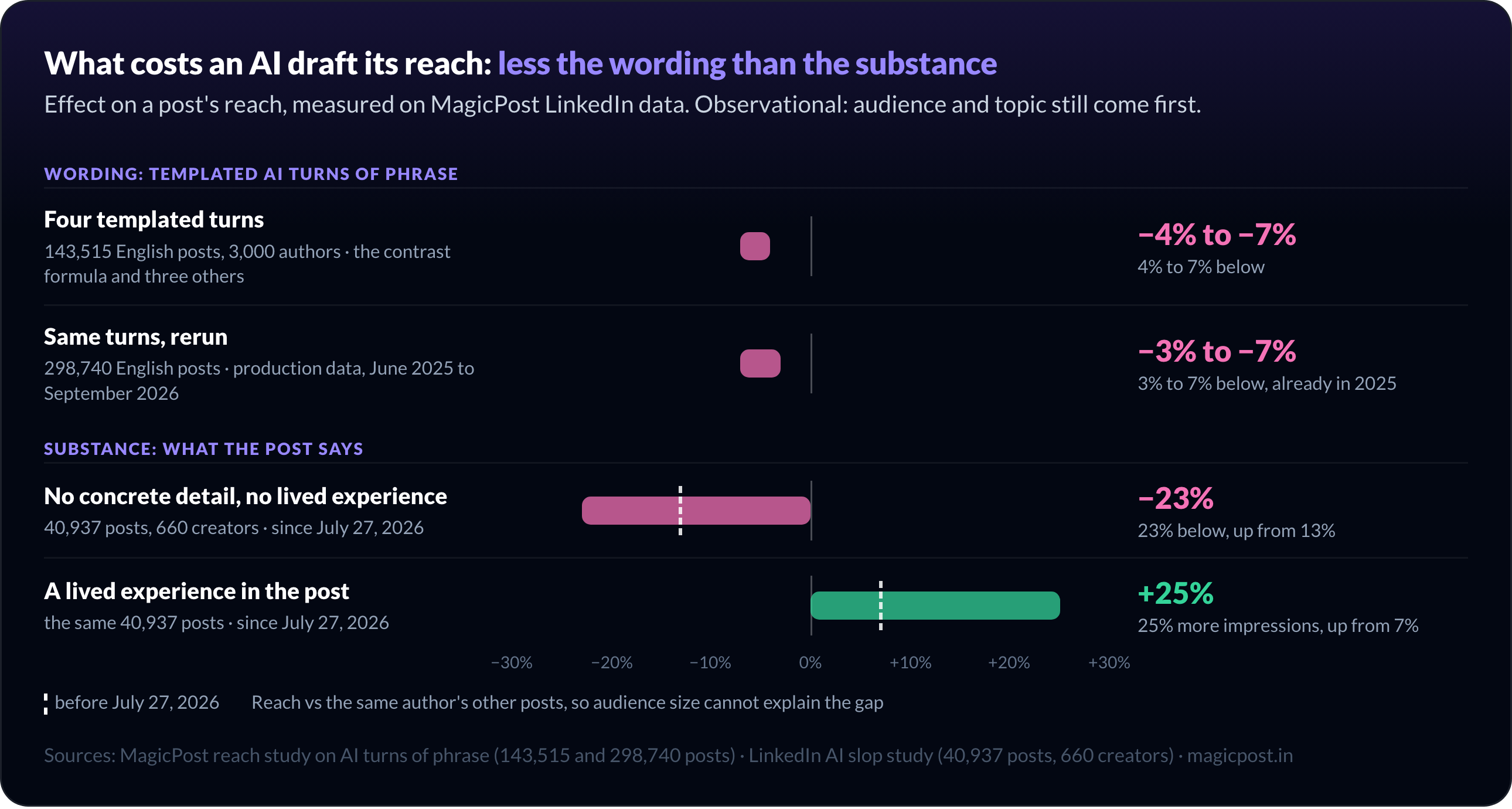
A little, and mostly through what the draft leaves out. We measured both effects on our own LinkedIn data, comparing each post with the same author's other posts so audience size cannot explain the gap.
What we measured | Sample | Effect on reach |
Four templated turns, such as the contrast formula | 143,515 English posts, 3,000 authors | About 4% to 7% below the author's normal |
The same turns, rerun on production data | 298,740 English posts, June 2025 to September 2026 | Already 3% to 7% in 2025 |
No concrete detail, no lived experience | 40,937 posts, 660 creators | 23% below the author's average since July 27, 2026, up from 13% |
A lived experience in the post | Same 40,937 posts | 25% more impressions, up from 7% |
Full methods are in our reach study on AI turns of phrase and the LinkedIn AI slop study. Both are observational: reach depends first on your audience and topic.
For this comparison, what goes into the post matters more than the tool. On LinkedIn, the generic post is what loses reach, whether a person or an AI wrote it.
A ChatGPT draft and a MagicPost draft both need the detail only you have, a number, a client situation, a mistake. MagicPost helps by keeping your knowledge base in every generation and cleaning the templated turns with the Humanizer. The experience itself has to come from you.
Can You Use ChatGPT and MagicPost Together?
Yes, in two ways.
Write in ChatGPT, publish with MagicPost. Paste the ChatGPT draft into the Editor tab of the MagicPost New post page, then schedule or publish it. Scheduling is on every plan, including Growth.
Drive MagicPost from inside ChatGPT. MagicPost has an MCP server that ChatGPT adds as a custom connector at `https://mcp.magicpost.in/mcp`. You sign in to MagicPost and click Authorize, no API key to create. The setup guide walks through each step.
Then you ask in plain language, and ChatGPT picks the MagicPost tools on its own:
"How did my LinkedIn posts perform over the last 30 days?"
"Find high-performing posts about this topic and draft one in my style."
"Schedule my latest draft for Tuesday at 9 am."
Through MCP, ChatGPT can generate posts in your writing style, schedule or publish them, read your metrics, search the inspiration library and work on your leads. It cannot generate carousels or visuals, delete a post or answer comments: those stay in the MagicPost app (full list).
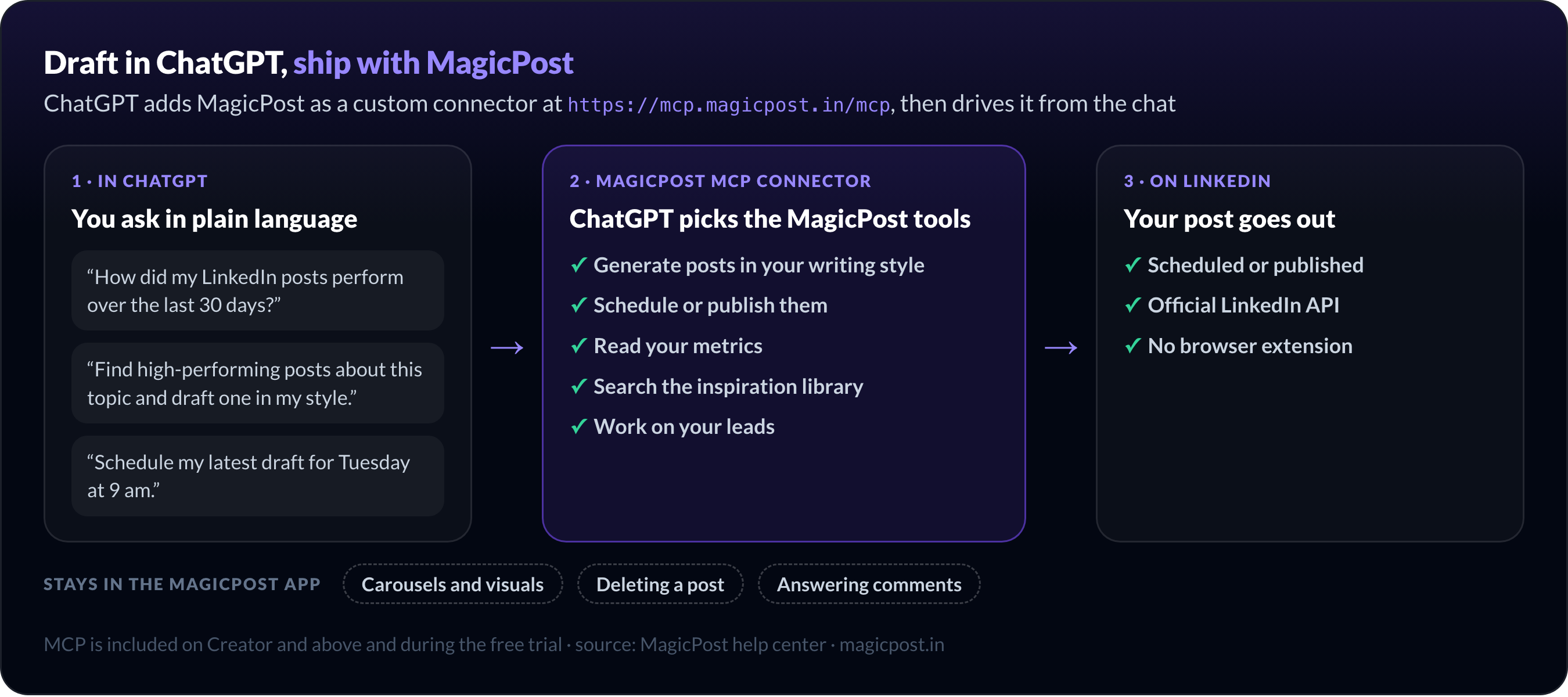
The MagicPost MCP server is included on Creator and above and during the free trial. On the ChatGPT side, adding a custom connector may require a paid ChatGPT plan; OpenAI sets that rule.
The same server works with Claude: see the LinkedIn MCP page, and why raw Claude drafts sound like AI on LinkedIn.
Which MagicPost Plan Do You Need Next to ChatGPT?
Pick the plan by who writes the text.
Your setup | MagicPost plan |
ChatGPT writes, MagicPost schedules and measures | Growth, no AI generation |
MagicPost writes in your voice, plus MCP for ChatGPT | Creator, with AI generation |
An agency or ghostwriter running several profiles | Agency, priced per seat |
A company team posting together | Team, priced per seat |
Growth covers scheduling, analytics, the engagement feed and leads, without AI generation, which fits people who keep writing in ChatGPT. AI post generation, writing styles, the Humanizer and MCP access start on Creator.
Every new account starts with a free trial that opens all features and asks for no card. The trial length depends on your country.
Once a year, the Black Friday deal on MagicPost plans discounts all four, on yearly and monthly billing.
MagicPost vs ChatGPT: Which Should You Choose for LinkedIn?
Use ChatGPT alone when:
You post a few times a month at most.
You want a free tool and like prompting.
LinkedIn is a side channel, and you already track results elsewhere.
Use MagicPost when:
You post every week and want one voice across every post.
You want posts scheduled through the official LinkedIn API.
You need to see what each post did, then turn engagement into leads.
Use both when you like drafting in ChatGPT: connect MagicPost through MCP on Creator, or paste your drafts into Growth to schedule and measure them.
FAQ
Is ChatGPT enough for LinkedIn, or do I need a dedicated tool?
ChatGPT is good enough to draft a single LinkedIn post, and its free plan costs nothing. It does not schedule posts or measure them on LinkedIn, so a dedicated tool such as MagicPost pays off once you post every week.
What is the difference between MagicPost and ChatGPT?
ChatGPT is a general-purpose AI assistant; MagicPost is a tool built only for LinkedIn. MagicPost writes in a style measured from your LinkedIn posts, schedules through the official LinkedIn API and tracks metrics, engagement and leads. ChatGPT is free to start.
Can LinkedIn detect posts written with ChatGPT?
LinkedIn does not look for ChatGPT as such: it detects generic content, whoever drafted it. In "Keeping conversations real on LinkedIn" (May 2026), LinkedIn reported "correctly identifying generic content 94% of the time" in early testing.
In our data, posts with no concrete detail and no lived experience sit 23% below their author's average since July 27, 2026.
Can I connect MagicPost to ChatGPT?
Yes. MagicPost connects to ChatGPT through its MCP server, added as a custom connector at https://mcp.magicpost.in/mcp. ChatGPT can then draft posts in your style, schedule them and read your metrics. MCP is included on Creator and above and during the free trial.
Is MagicPost free like ChatGPT?
MagicPost is a paid product with a free trial that opens all features and asks for no card. After the trial, plans start at Growth, without AI writing; AI post generation is included on Creator.
Can I write a post in ChatGPT and schedule it with MagicPost?
Yes. Paste the ChatGPT text into the Editor tab of the MagicPost New post page, then schedule or publish it on LinkedIn. Scheduling is included on every MagicPost plan, Growth included.